
Python爬蟲的4種姿勢
作者 |?jclian
來源 |?Python爬蟲與算法
問題的由來
??前幾天,有個人問了筆者一個問題,如何利用爬蟲來實現(xiàn)如下的需求,需要爬取的網(wǎng)頁如下(網(wǎng)址為:https://www.wikidata.org/w/index.php?title=Special:WhatLinksHere/Q5&limit=500&from=0):
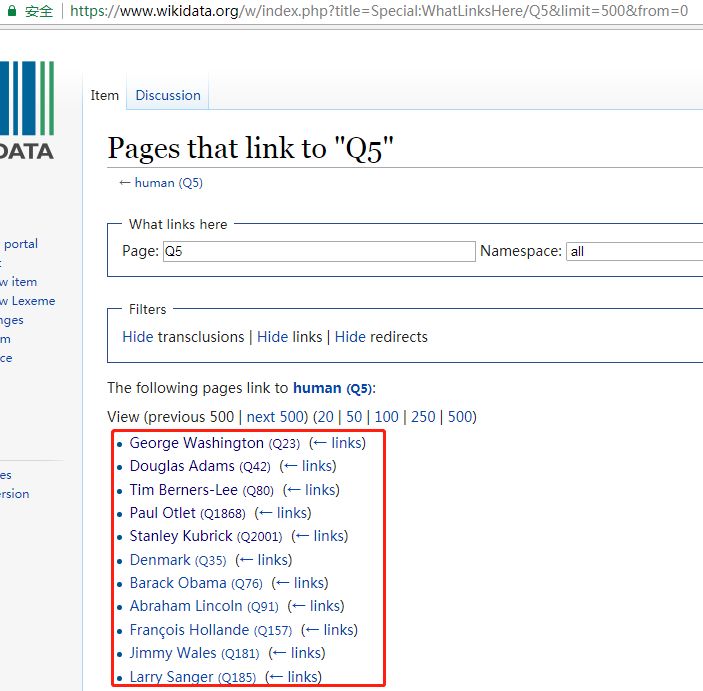
??我們的需求為爬取紅色框框內(nèi)的名人(有500條記錄,圖片只展示了一部分)的 名字以及其介紹,關于其介紹,點擊該名人的名字即可,如下圖:
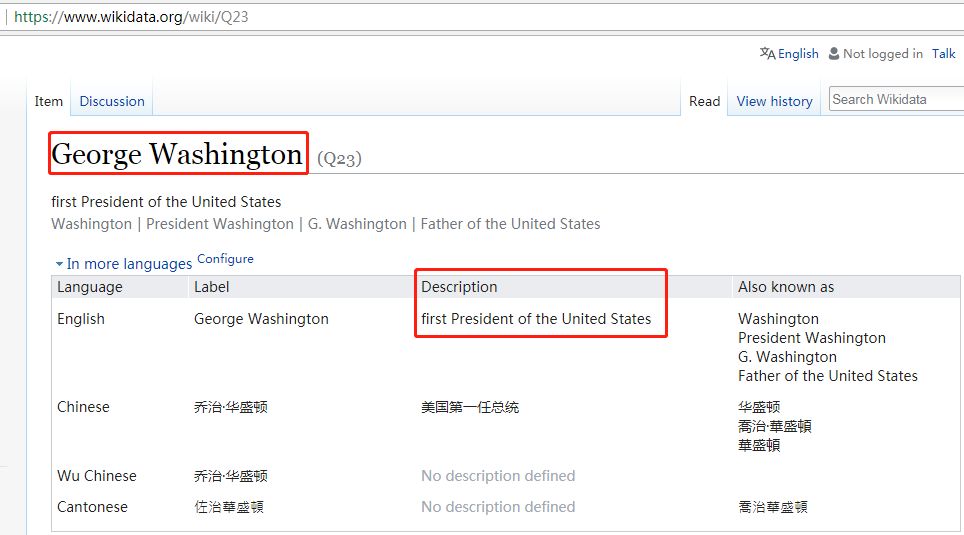 name和description
這就意味著我們需要爬取500個這樣的頁面,即500個HTTP請求(暫且這么認為吧),然后需要提取這些網(wǎng)頁中的名字和描述,當然有些不是名人,也沒有描述,我們可以跳過。最后,這些網(wǎng)頁的網(wǎng)址在第一頁中的名人后面可以找到,如George Washington的網(wǎng)頁后綴為Q23.
??爬蟲的需求大概就是這樣。
爬蟲的4種姿勢
??首先,分析來爬蟲的思路:先在第一個網(wǎng)頁(https://www.wikidata.org/w/index.php?title=Special:WhatLinksHere/Q5&limit=500&from=0)中得到500個名人所在的網(wǎng)址,接下來就爬取這500個網(wǎng)頁中的名人的名字及描述,如無描述,則跳過。
??接下來,我們將介紹實現(xiàn)這個爬蟲的4種方法,并分析它們各自的優(yōu)缺點,希望能讓讀者對爬蟲有更多的體會。實現(xiàn)爬蟲的方法為:
一般方法(同步,requests+BeautifulSoup)
并發(fā)(使用concurrent.futures模塊以及requests+BeautifulSoup)
異步(使用aiohttp+asyncio+requests+BeautifulSoup)
使用框架Scrapy
一般方法
??一般方法即為同步方法,主要使用requests+BeautifulSoup,按順序執(zhí)行。完整的Python代碼如下:
import?requests
from?bs4?import?BeautifulSoup
import?time

#?開始時間
t1?=?time.time()
print('#'?*?50)

url?=?"http://www.wikidata.org/w/index.php?title=Special:WhatLinksHere/Q5&limit=500&from=0"
#?請求頭部
headers?=?{'User-Agent':?'Mozilla/5.0?(Windows?NT?10.0;?WOW64)?AppleWebKit/537.36?(KHTML,?like?Gecko)?Chrome/67.0.3396.87?Safari/537.36'}
#?發(fā)送HTTP請求
req?=?requests.get(url,?headers=headers)
#?解析網(wǎng)頁
soup?=?BeautifulSoup(req.text,?"lxml")
#?找到name和Description所在的記錄
human_list?=?soup.find(id='mw-whatlinkshere-list')('li')

urls?=?[]
#?獲取網(wǎng)址
for?human?in?human_list:
????url?=?human.find('a')['href']
????urls.append('https://www.wikidata.org'+url)

#?獲取每個網(wǎng)頁的name和description
def?parser(url):
????req?=?requests.get(url)
????#?利用BeautifulSoup將獲取到的文本解析成HTML
????soup?=?BeautifulSoup(req.text,?"lxml")
????#?獲取name和description
????name?=?soup.find('span',?class_="wikibase-title-label")
????desc?=?soup.find('span',?class_="wikibase-descriptionview-text")
????if?name?is?not?None?and?desc?is?not?None:
????????print('%-40s,\t%s'%(name.text,?desc.text))

for?url?in?urls:
????parser(url)

t2?=?time.time()?#?結(jié)束時間
print('一般方法,總共耗時:%s'?%?(t2?-?t1))
print('#'?*?50)
輸出的結(jié)果如下(省略中間的輸出,以……代替):
##################################################
George?Washington???????????????????????,????first?President?of?the?United?States
Douglas?Adams???????????????????????????,????British?author?and?humorist?(1952–2001)
......
Willoughby?Newton???????????????????????,????Politician?from?Virginia,?USA
Mack?Wilberg????????????????????????????,????American?conductor
一般方法,總共耗時:724.9654655456543
##################################################
使用同步方法,總耗時約725秒,即12分鐘多。
??一般方法雖然思路簡單,容易實現(xiàn),但效率不高,耗時長。那么,使用并發(fā)試試看。
并發(fā)方法
??并發(fā)方法使用多線程來加速一般方法,我們使用的并發(fā)模塊為concurrent.futures模塊,設置多線程的個數(shù)為20個(實際不一定能達到,視計算機而定)。完整的Python代碼如下:
import?requests
from?bs4?import?BeautifulSoup
import?time
from?concurrent.futures?import?ThreadPoolExecutor,?wait,?ALL_COMPLETED
#?開始時間
t1?=?time.time()
print('#'?*?50)
url?=?"http://www.wikidata.org/w/index.php?title=Special:WhatLinksHere/Q5&limit=500&from=0"
#?請求頭部
headers?=?{'User-Agent':?'Mozilla/5.0?(Windows?NT?10.0;?WOW64)?AppleWebKit/537.36?(KHTML,?like?Gecko)?Chrome/67.0.3396.87?Safari/537.36'}
#?發(fā)送HTTP請求
req?=?requests.get(url,?headers=headers)
#?解析網(wǎng)頁
soup?=?BeautifulSoup(req.text,?"lxml")
#?找到name和Description所在的記錄
human_list?=?soup.find(id='mw-whatlinkshere-list')('li')
urls?=?[]
#?獲取網(wǎng)址
for?human?in?human_list:
????url?=?human.find('a')['href']
????urls.append('https://www.wikidata.org'+url)
#?獲取每個網(wǎng)頁的name和description
def?parser(url):
????req?=?requests.get(url)
????#?利用BeautifulSoup將獲取到的文本解析成HTML
????soup?=?BeautifulSoup(req.text,?"lxml")
????#?獲取name和description
????name?=?soup.find('span',?class_="wikibase-title-label")
????desc?=?soup.find('span',?class_="wikibase-descriptionview-text")
????if?name?is?not?None?and?desc?is?not?None:
????????print('%-40s,\t%s'%(name.text,?desc.text))
#?利用并發(fā)加速爬取
executor?=?ThreadPoolExecutor(max_workers=20)
# submit()的參數(shù):?第一個為函數(shù),?之后為該函數(shù)的傳入?yún)?shù),允許有多個
future_tasks?=?[executor.submit(parser,?url)?for?url?in?urls]
#?等待所有的線程完成,才進入后續(xù)的執(zhí)行
wait(future_tasks,?return_when=ALL_COMPLETED)
t2?=?time.time()?#?結(jié)束時間
print('并發(fā)方法,總共耗時:%s'?%?(t2?-?t1))
print('#'?*?50)
輸出的結(jié)果如下(省略中間的輸出,以……代替):
##################################################
Larry?Sanger????????????????????????????,????American?former?professor,?co-founder?of?Wikipedia,?founder?of?Citizendium?and?other?projects
Ken?Jennings????????????????????????????,????American?game?show?contestant?and?writer
......
Antoine?de?Saint-Exupery????????????????,????French?writer?and?aviator
Michael?Jackson?????????????????????????,????American?singer,?songwriter?and?dancer
并發(fā)方法,總共耗時:226.7499692440033
##################################################
使用多線程并發(fā)后的爬蟲執(zhí)行時間約為227秒,大概是一般方法的三分之一的時間,速度有了明顯的提升啊!多線程在速度上有明顯提升,但執(zhí)行的網(wǎng)頁順序是無序的,在線程的切換上開銷也比較大,線程越多,開銷越大。
??關于多線程與一般方法在速度上的比較,可以參考文章:Python爬蟲之多線程下載豆瓣Top250電影圖片。
異步方法
??異步方法在爬蟲中是有效的速度提升手段,使用aiohttp可以異步地處理HTTP請求,使用asyncio可以實現(xiàn)異步IO,需要注意的是,aiohttp只支持3.5.3以后的Python版本。使用異步方法實現(xiàn)該爬蟲的完整Python代碼如下:
import?requests
from?bs4?import?BeautifulSoup
import?time
import?aiohttp
import?asyncio

#?開始時間
t1?=?time.time()
print('#'?*?50)

url?=?"http://www.wikidata.org/w/index.php?title=Special:WhatLinksHere/Q5&limit=500&from=0"
#?請求頭部
headers?=?{'User-Agent':?'Mozilla/5.0?(Windows?NT?10.0;?WOW64)?AppleWebKit/537.36?(KHTML,?like?Gecko)?Chrome/67.0.3396.87?Safari/537.36'}
#?發(fā)送HTTP請求
req?=?requests.get(url,?headers=headers)
#?解析網(wǎng)頁
soup?=?BeautifulSoup(req.text,?"lxml")
#?找到name和Description所在的記錄
human_list?=?soup.find(id='mw-whatlinkshere-list')('li')

urls?=?[]
#?獲取網(wǎng)址
for?human?in?human_list:
????url?=?human.find('a')['href']
????urls.append('https://www.wikidata.org'+url)

#?異步HTTP請求
async?def?fetch(session,?url):
????async?with?session.get(url)?as?response:
????????return?await?response.text()

#?解析網(wǎng)頁
async?def?parser(html):
????#?利用BeautifulSoup將獲取到的文本解析成HTML
????soup?=?BeautifulSoup(html,?"lxml")
????#?獲取name和description
????name?=?soup.find('span',?class_="wikibase-title-label")
????desc?=?soup.find('span',?class_="wikibase-descriptionview-text")
????if?name?is?not?None?and?desc?is?not?None:
????????print('%-40s,\t%s'%(name.text,?desc.text))

#?處理網(wǎng)頁,獲取name和description
async?def?download(url):
????async?with?aiohttp.ClientSession()?as?session:
????????try:
????????????html?=?await?fetch(session,?url)
????????????await?parser(html)
????????except?Exception?as?err:
????????????print(err)

#?利用asyncio模塊進行異步IO處理
loop?=?asyncio.get_event_loop()
tasks?=?[asyncio.ensure_future(download(url))?for?url?in?urls]
tasks?=?asyncio.gather(*tasks)
loop.run_until_complete(tasks)

t2?=?time.time()?#?結(jié)束時間
print('使用異步,總共耗時:%s'?%?(t2?-?t1))
print('#'?*?50)
輸出結(jié)果如下(省略中間的輸出,以……代替):
##################################################
Frédéric?Tadde??????????????????????????,????French?journalist?and?TV?host
Gabriel?Gonzáles?Videla?????????????????,????Chilean?politician
......
Denmark?????????????????????????????????,????sovereign?state?and?Scandinavian?country?in?northern?Europe
Usain?Bolt??????????????????????????????,????Jamaican?sprinter?and?soccer?player
使用異步,總共耗時:126.9002583026886
##################################################
顯然,異步方法使用了異步和并發(fā)兩種提速方法,自然在速度有明顯提升,大約為一般方法的六分之一。異步方法雖然效率高,但需要掌握異步編程,這需要學習一段時間。
??關于異步方法與一般方法在速度上的比較,可以參考文章:利用aiohttp實現(xiàn)異步爬蟲。
??如果有人覺得127秒的爬蟲速度還是慢,可以嘗試一下異步代碼(與之前的異步代碼的區(qū)別在于:僅僅使用了正則表達式代替BeautifulSoup來解析網(wǎng)頁,以提取網(wǎng)頁中的內(nèi)容):
import?requests
from?bs4?import?BeautifulSoup
import?time
import?aiohttp
import?asyncio
import?re
#?開始時間
t1?=?time.time()
print('#'?*?50)
url?=?"http://www.wikidata.org/w/index.php?title=Special:WhatLinksHere/Q5&limit=500&from=0"
#?請求頭部
headers?=?{
????'User-Agent':?'Mozilla/5.0?(Windows?NT?10.0;?WOW64)?AppleWebKit/537.36?(KHTML,?like?Gecko)?Chrome/67.0.3396.87?Safari/537.36'}
#?發(fā)送HTTP請求
req?=?requests.get(url,?headers=headers)
#?解析網(wǎng)頁
soup?=?BeautifulSoup(req.text,?"lxml")
#?找到name和Description所在的記錄
human_list?=?soup.find(id='mw-whatlinkshere-list')('li')
urls?=?[]
#?獲取網(wǎng)址
for?human?in?human_list:
????url?=?human.find('a')['href']
????urls.append('https://www.wikidata.org'?+?url)
#?異步HTTP請求
async?def?fetch(session,?url):
????async?with?session.get(url)?as?response:
????????return?await?response.text()
#?解析網(wǎng)頁
async?def?parser(html):
????#?利用正則表達式解析網(wǎng)頁
????try:
????????name?=?re.findall(r'(.+?) ',?html)[0]
????????desc?=?re.findall(r'(.+?) ',?html)[0]
????????print('%-40s,\t%s'?%?(name,?desc))
????except?Exception?as?err:
????????pass
#?處理網(wǎng)頁,獲取name和description
async?def?download(url):
????async?with?aiohttp.ClientSession()?as?session:
????????try:
????????????html?=?await?fetch(session,?url)
????????????await?parser(html)
????????except?Exception?as?err:
????????????print(err)
#?利用asyncio模塊進行異步IO處理
loop?=?asyncio.get_event_loop()
tasks?=?[asyncio.ensure_future(download(url))?for?url?in?urls]
tasks?=?asyncio.gather(*tasks)
loop.run_until_complete(tasks)
t2?=?time.time()??#?結(jié)束時間
print('使用異步(正則表達式),總共耗時:%s'?%?(t2?-?t1))
print('#'?*?50)
輸出的結(jié)果如下(省略中間的輸出,以……代替):
##################################################
Dejen?Gebremeskel???????????????????????,????Ethiopian?long-distance?runner
Erik?Kynard?????????????????????????????,????American?high?jumper
......
Buzz?Aldrin?????????????????????????????,????American?astronaut
Egon?Krenz??????????????????????????????,????former?General?Secretary?of?the?Socialist?Unity?Party?of?East?Germany
使用異步(正則表達式),總共耗時:16.521944999694824
##################################################
16.5秒,僅僅為一般方法的43分之一,速度如此之快,令人咋舌(感謝某人提供的嘗試)。筆者雖然自己實現(xiàn)了異步方法,但用的是BeautifulSoup來解析網(wǎng)頁,耗時127秒,沒想到使用正則表達式就取得了如此驚人的效果。可見,BeautifulSoup解析網(wǎng)頁雖然快,但在異步方法中,還是限制了速度。但這種方法的缺點為,當你需要爬取的內(nèi)容比較復雜時,一般的正則表達式就難以勝任了,需要另想辦法。
爬蟲框架Scrapy
??最后,我們使用著名的Python爬蟲框架Scrapy來解決這個爬蟲。我們創(chuàng)建的爬蟲項目為wikiDataScrapy,項目結(jié)構如下:
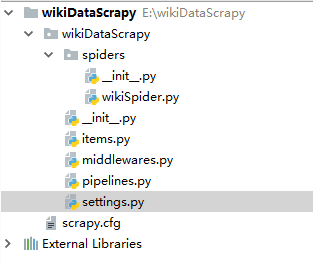 wikiDataScrapy項目
在settings.py中設置“ROBOTSTXT_OBEY = False”. 修改items.py,代碼如下:
#?-*-?coding:?utf-8?-*-

import?scrapy

class?WikidatascrapyItem(scrapy.Item):
????#?define?the?fields?for?your?item?here?like:
????name?=?scrapy.Field()
????desc?=?scrapy.Field()
然后,在spiders文件夾下新建wikiSpider.py,代碼如下:
import?scrapy.cmdline
from?wikiDataScrapy.items?import?WikidatascrapyItem
import?requests
from?bs4?import?BeautifulSoup

#?獲取請求的500個網(wǎng)址,用requests+BeautifulSoup搞定
def?get_urls():
????url?=?"http://www.wikidata.org/w/index.php?title=Special:WhatLinksHere/Q5&limit=500&from=0"
????#?請求頭部
????headers?=?{
????????'User-Agent':?'Mozilla/5.0?(Windows?NT?10.0;?WOW64)?AppleWebKit/537.36?(KHTML,?like?Gecko)?Chrome/67.0.3396.87?Safari/537.36'}
????#?發(fā)送HTTP請求
????req?=?requests.get(url,?headers=headers)
????#?解析網(wǎng)頁
????soup?=?BeautifulSoup(req.text,?"lxml")
????#?找到name和Description所在的記錄
????human_list?=?soup.find(id='mw-whatlinkshere-list')('li')

????urls?=?[]
????#?獲取網(wǎng)址
????for?human?in?human_list:
????????url?=?human.find('a')['href']
????????urls.append('https://www.wikidata.org'?+?url)

????#?print(urls)
????return?urls

#?使用scrapy框架爬取
class?bookSpider(scrapy.Spider):
????name?=?'wikiScrapy'??#?爬蟲名稱
????start_urls?=?get_urls()??#?需要爬取的500個網(wǎng)址

????def?parse(self,?response):
????????item?=?WikidatascrapyItem()
????????#?name?and?description
????????item['name']?=?response.css('span.wikibase-title-label').xpath('text()').extract_first()
????????item['desc']?=?response.css('span.wikibase-descriptionview-text').xpath('text()').extract_first()

????????yield?item

#?執(zhí)行該爬蟲,并轉(zhuǎn)化為csv文件
scrapy.cmdline.execute(['scrapy',?'crawl',?'wikiScrapy',?'-o',?'wiki.csv',?'-t',?'csv'])
輸出結(jié)果如下(只包含最后的Scrapy信息總結(jié)部分):
{'downloader/request_bytes':?166187,
?'downloader/request_count':?500,
?'downloader/request_method_count/GET':?500,
?'downloader/response_bytes':?18988798,
?'downloader/response_count':?500,
?'downloader/response_status_count/200':?500,
?'finish_reason':?'finished',
?'finish_time':?datetime.datetime(2018,?10,?16,?9,?49,?15,?761487),
?'item_scraped_count':?500,
?'log_count/DEBUG':?1001,
?'log_count/INFO':?8,
?'response_received_count':?500,
?'scheduler/dequeued':?500,
?'scheduler/dequeued/memory':?500,
?'scheduler/enqueued':?500,
?'scheduler/enqueued/memory':?500,
?'start_time':?datetime.datetime(2018,?10,?16,?9,?48,?44,?58673)}
可以看到,已成功爬取500個網(wǎng)頁,耗時31秒,速度也相當OK。再來看一下生成的wiki.csv文件,它包含了所有的輸出的name和description,如下圖:
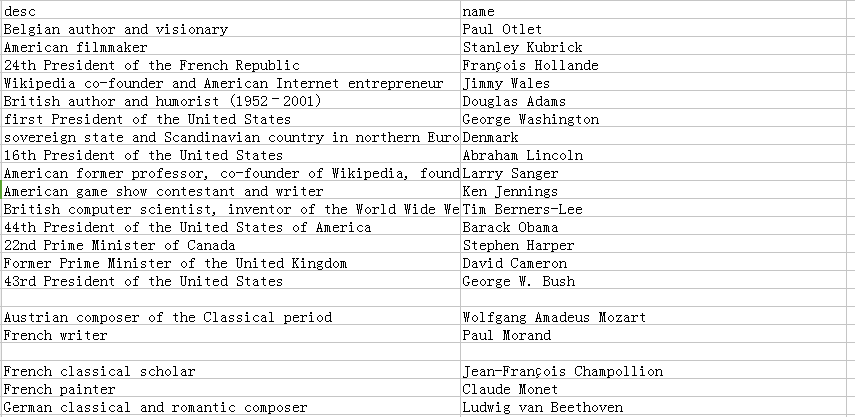 輸出的CSV文件(部分)
可以看到,輸出的CSV文件的列并不是有序的。至于如何解決Scrapy輸出的CSV文件有換行的問題,請參考stackoverflow上的回答:https://stackoverflow.com/questions/39477662/scrapy-csv-file-has-uniform-empty-rows/43394566#43394566 。
??Scrapy來制作爬蟲的優(yōu)勢在于它是一個成熟的爬蟲框架,支持異步,并發(fā),容錯性較好(比如本代碼中就沒有處理找不到name和description的情形),但如果需要頻繁地修改中間件,則還是自己寫個爬蟲比較好,而且它在速度上沒有超過我們自己寫的異步爬蟲,至于能自動導出CSV文件這個功能,還是相當實在的。
總結(jié)
??本文內(nèi)容較多,比較了4種爬蟲方法,每種方法都有自己的利弊,已在之前的陳述中給出,當然,在實際的問題中,并不是用的工具或方法越高級就越好,具體問題具體分析嘛~