
Spring Boot + websocket 自定義協議開發(fā)
作者:myworld
來源:SegmentFault 思否社區(qū)
大家都知道使用socket通信都是二進制,通信框架多是使用二進制通信,高效且快速,但在前端如何編輯發(fā)送二進制,二進制數據在日常的JavaScript中很少遇到,但是當你使用WebSocket與后端進行數據交互時,就有可能會用到二進制的數據格式。
這里我們自定義一個簡單協議 寫一個前后端websocket交互的示例
定義協議
前2個字節(jié) 定義消息類型(如心跳包/權限檢查包等)
剩余字節(jié) 定義消息體
服務端代碼
我們在上篇 websocket入門筆記 的基礎上再次開發(fā)
修改 MyWebsocketHandler 繼承 BinaryWebSocketHandler
package com.ben.websocketdemo;

import com.fasterxml.jackson.databind.util.ByteBufferBackedInputStream;
import org.springframework.stereotype.Component;
import org.springframework.web.socket.BinaryMessage;
import org.springframework.web.socket.CloseStatus;
import org.springframework.web.socket.TextMessage;
import org.springframework.web.socket.WebSocketSession;
import org.springframework.web.socket.handler.AbstractWebSocketHandler;
import org.springframework.web.socket.handler.BinaryWebSocketHandler;

import java.nio.ByteBuffer;
import java.nio.CharBuffer;
import java.nio.charset.Charset;
import java.nio.charset.StandardCharsets;
import java.util.Calendar;

@Component
public class MyWebsocketHandler extends BinaryWebSocketHandler {

    @Override
    public void afterConnectionEstablished(WebSocketSession session) throws Exception {
        System.out.println("afterConnectionEstablished");
    }

//    // 發(fā)送
//    @Override
//    protected void handleTextMessage(WebSocketSession session, TextMessage message) throws Exception {
//         String msg = message.getPayload();
//
//        // 向客戶端發(fā)送數據
//        session.sendMessage(new TextMessage("你好哦: " + msg));
//    }

    // 發(fā)送二進制消息
    @Override
    protected void handleBinaryMessage(WebSocketSession session, BinaryMessage message) throws Exception {
        ByteBuffer byteBuffer = message.getPayload();
        short mytype = byteBuffer.getShort();

        byte[] bytePrefix = ByteBuffer.allocate(2).putShort(mytype).array();

        Calendar calendar= Calendar.getInstance();
        int m = calendar.get(Calendar.MINUTE);
        int s = calendar.get(Calendar.SECOND);
        String time = String.format("%02d", m) + ":" + String.format("%02d", s);
        switch (mytype){
            case 1: // 心跳包
                byte[] content = time.getBytes(StandardCharsets.UTF_8);
                byte[] bytes = byteMergerAll(bytePrefix,content);
                session.sendMessage(new BinaryMessage(bytes));
            break;
            default:
                byte[] contentRecevid = new byte[byteBuffer.remaining()];
                byteBuffer.get(contentRecevid);
                String recevidMsg = new String(contentRecevid, StandardCharsets.UTF_8);
                System.out.println("收到客戶端消息: " + recevidMsg);
                String respStr = time + " 服務端已處理: " + recevidMsg;
                byte[] respcontent1 = respStr.getBytes(StandardCharsets.UTF_8);
                byte[] bytes1 =byteMergerAll(bytePrefix,respcontent1);
                session.sendMessage(new BinaryMessage(bytes1));
            break;
        }
    }

    private static byte[] byteMergerAll(byte[]... values) {
        int length_byte = 0;
        for (int i = 0; i < values.length; i++) {
            length_byte += values[i].length;
        }
        byte[] all_byte = new byte[length_byte];
        int countLength = 0;
        for (int i = 0; i < values.length; i++) {
            byte[] b = values[i];
            System.arraycopy(b, 0, all_byte, countLength, b.length);
            countLength += b.length;
        }
        return all_byte;
    }

    @Override
    public void afterConnectionClosed(WebSocketSession session, CloseStatus closeStatus) throws Exception {
        System.out.println("afterConnectionClosed");
    }
}
上面 handleBinaryMessage 方法注意幾點
根據我們自定義協議, byte[] 前2個字節(jié) 用于定義消息類型 我們通過 byteBuffer.getShort() 獲取 , 之后byteBuffer的position增加2 表明前2個字節(jié)已經讀取過了 default分支中通過 byteBuffer.get() 獲取的是byteBuffer[position,limit]的內容 關于 ByteBuffer 的相關介紹 可以自行搜索下 java ByteBuffer
js端
<!DOCTYPE html>
<html lang="en">

<head>
    <meta charset="UTF-8">
    <meta http-equiv="X-UA-Compatible" content="IE=edge">
    <meta name="viewport" content="width=device-width, initial-scale=1.0">
    <title>Document</title>
</head>

<body>
    <form name="publish">
        <input type="text" name="message">
        <input type="submit" value="send">
    </form>

    <div id="messages"></div>
</body>
<script>
    let websocket = new WebSocket("ws://127.0.0.1:8080/bensocket");
    websocket.binaryType = "arraybuffer";
    const protoLen = 2; //定義協議前部固定長度

    document.forms.publish.onsubmit = function () {
        let msg = this.message.value;

        let content = stringToBytes(msg);
        var buffer = new ArrayBuffer(content.length + protoLen);

        // let buffer = new ArrayBuffer(protoLen + content.byteLength);
        let dataView = new DataView(buffer);

        dataView.setInt16(0, 88); // 從第0個Byte位置開始,放置一個數字為1的Short類型數據(占2 Byte) 數字代表消息類型 1是心跳包 其他根據業(yè)務自定義
        for (var i = 0; i < content.length; i++) {
            dataView.setUint8(protoLen + i, content[i]);
        }

        websocket.send(buffer);
        return false;
    }

    setInterval(() => {
        let buffer = new ArrayBuffer(protoLen);
        let dataView = new DataView(buffer);

        dataView.setInt16(0, 1); // 1表示心跳包
        websocket.send(buffer);
    }, 1000);

    websocket.onopen = function (evt) {
        let el = document.createElement('div');
        el.textContent = "onopend";
        document.getElementById("messages").prepend(el);
    };
    websocket.onclose = function (evt) {
        let el = document.createElement('div');
        el.textContent = "onclose";
        document.getElementById("messages").prepend(el);
    };
    websocket.onmessage = function (evt) {
        let { data } = evt;
        let len = data.byteLength;
        let buffer = new ArrayBuffer(len);
        let dataView = new DataView(data);
        let type = dataView.getInt16(0)

        var arr = [];
        for (var i = protoLen; i < len; i++) {
            arr.push(dataView.getInt8(i));
        }
        let content = utf8ByteToUnicodeStr(arr);

        let el = document.createElement('div');
        el.textContent = (type == 1 ? "heart: " : "normal: ") + content;
        document.getElementById("messages").prepend(el);

    };
    websocket.onerror = function (evt) {
        document.getElementById("messages").prepend("onerror");
    };

    /**
     *@description:將string轉為UTF-8格式signed char字節(jié)數組
    *
    */
    function stringToBytes(str) {
        var bytes = new Array();
        for (var i = 0; i < str.length; i++) {
            var c = str.charCodeAt(i);
            var s = parseInt(c).toString(2);
            if (c >= parseInt('000080', 16) && c <= parseInt('0007FF', 16)) {
                var af = '';
                for (var j = 0; j < (11 - s.length); j++) {
                    af += '0';
                }
                af += s;
                var n1 = parseInt('110' + af.substring(0, 5), 2);
                var n2 = parseInt('110' + af.substring(5), 2);
                if (n1 > 127) n1 -= 256;
                if (n2 > 127) n2 -= 256;
                bytes.push(n1);
                bytes.push(n2);
            } else if (c >= parseInt('000800', 16) && c <= parseInt('00FFFF', 16)) {
                var af = '';
                for (var j = 0; j < (16 - s.length); j++) {
                    af += '0';
                }
                af += s;
                var n1 = parseInt('1110' + af.substring(0, 4), 2);
                var n2 = parseInt('10' + af.substring(4, 10), 2);
                var n3 = parseInt('10' + af.substring(10), 2);
                if (n1 > 127) n1 -= 256;
                if (n2 > 127) n2 -= 256;
                if (n3 > 127) n3 -= 256;
                bytes.push(n1);
                bytes.push(n2);
                bytes.push(n3);
            } else if (c >= parseInt('010000', 16) && c <= parseInt('10FFFF', 16)) {
                var af = '';
                for (var j = 0; j < (21 - s.length); j++) {
                    af += '0';
                }
                af += s;
                var n1 = parseInt('11110' + af.substring(0, 3), 2);
                var n2 = parseInt('10' + af.substring(3, 9), 2);
                var n3 = parseInt('10' + af.substring(9, 15), 2);
                var n4 = parseInt('10' + af.substring(15), 2);
                if (n1 > 127) n1 -= 256;
                if (n2 > 127) n2 -= 256;
                if (n3 > 127) n3 -= 256;
                if (n4 > 127) n4 -= 256;
                bytes.push(n1);
                bytes.push(n2);
                bytes.push(n3);
                bytes.push(n4);
            } else {
                bytes.push(c & 0xff);
            }
        }
        return bytes;
    }

    function byteToString(array) {
        var result = "";
        for (var i = 0; i < array.length; i++) {
            result += String.fromCharCode(parseInt(array[i], 2));
        }
        return result;
    }

    function utf8ByteToUnicodeStr(utf8Bytes){
    var unicodeStr ="";
    for (var pos = 0; pos < utf8Bytes.length;){
        var flag= utf8Bytes[pos];
        var unicode = 0 ;
        if ((flag >>>7) === 0 ) {
            unicodeStr+= String.fromCharCode(utf8Bytes[pos]);
            pos += 1;

        } else if ((flag &0xFC) === 0xFC ){
            unicode = (utf8Bytes[pos] & 0x3) << 30;
            unicode |= (utf8Bytes[pos+1] & 0x3F) << 24;
            unicode |= (utf8Bytes[pos+2] & 0x3F) << 18;
            unicode |= (utf8Bytes[pos+3] & 0x3F) << 12;
            unicode |= (utf8Bytes[pos+4] & 0x3F) << 6;
            unicode |= (utf8Bytes[pos+5] & 0x3F);
            unicodeStr+= String.fromCharCode(unicode) ;
            pos += 6;

        }else if ((flag &0xF8) === 0xF8 ){
            unicode = (utf8Bytes[pos] & 0x7) << 24;
            unicode |= (utf8Bytes[pos+1] & 0x3F) << 18;
            unicode |= (utf8Bytes[pos+2] & 0x3F) << 12;
            unicode |= (utf8Bytes[pos+3] & 0x3F) << 6;
            unicode |= (utf8Bytes[pos+4] & 0x3F);
            unicodeStr+= String.fromCharCode(unicode) ;
            pos += 5;

        } else if ((flag &0xF0) === 0xF0 ){
            unicode = (utf8Bytes[pos] & 0xF) << 18;
            unicode |= (utf8Bytes[pos+1] & 0x3F) << 12;
            unicode |= (utf8Bytes[pos+2] & 0x3F) << 6;
            unicode |= (utf8Bytes[pos+3] & 0x3F);
            unicodeStr+= String.fromCharCode(unicode) ;
            pos += 4;

        } else if ((flag &0xE0) === 0xE0 ){
            unicode = (utf8Bytes[pos] & 0x1F) << 12;;
            unicode |= (utf8Bytes[pos+1] & 0x3F) << 6;
            unicode |= (utf8Bytes[pos+2] & 0x3F);
            unicodeStr+= String.fromCharCode(unicode) ;
            pos += 3;

        } else if ((flag &0xC0) === 0xC0 ){ //110
            unicode = (utf8Bytes[pos] & 0x3F) << 6;
            unicode |= (utf8Bytes[pos+1] & 0x3F);
            unicodeStr+= String.fromCharCode(unicode) ;
            pos += 2;

        } else{
            unicodeStr+= String.fromCharCode(utf8Bytes[pos]);
            pos += 1;
        }
    }
    return unicodeStr;
}
</script>

</html>
js代碼中使用到 ArrayBuffer 和 DataView 來操作字節(jié) 具體介紹和用法 參考文章 https://www.jianshu.com/p/468...
java服務器 發(fā)送給客戶端的是 byte[] , java中byte數據類型是8位、有符號的,以二進制補碼表示的整數 java的基本數據類型
The Go Programming Language Specification
Numeric types
uint8 the set of all unsigned 8-bit integers (0 to 255)
byte alias for uint8
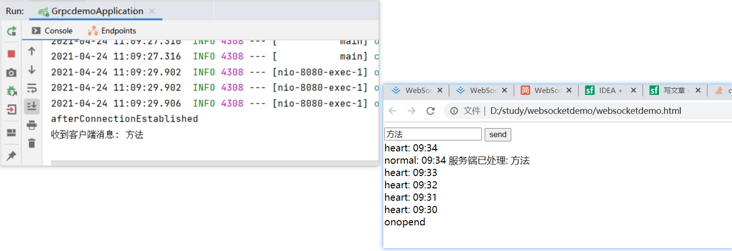
測試

評論
圖片
表情