<kbd id="afajh"><form id="afajh"></form></kbd>
<strong id="afajh"><dl id="afajh"></dl></strong>
    <del id="afajh"><form id="afajh"></form></del>
        1. <th id="afajh"><progress id="afajh"></progress></th>
          <b id="afajh"><abbr id="afajh"></abbr></b>
          <th id="afajh"><progress id="afajh"></progress></th>

          Redux 在 React Hook 中的使用及其原理

          共 10724字,需瀏覽 22分鐘

           ·

          2021-02-03 07:56

          作者:黃刀小五
          來源:SegmentFault 思否社區(qū)


          淺談Redux


          下面將從what, why, how to 三個方面來說說Redux

          第一問 what ? 什么是Redux


          將一個web應(yīng)用拆分成視圖層與數(shù)據(jù)層, Redux就是保存其數(shù)據(jù)的一個容器, 其本質(zhì)就是維護(hù)一個存儲數(shù)據(jù)的對象.

          • State : 一個存放數(shù)據(jù)的容器 (一個對象)

          const initState = {
            count: 0,
          }

          • Action : 一個 want to do 的過程 (計劃要做一個什么樣的操作)

            • ActionType是對Action的描述, 也是連接Action和Reducer的橋梁
            • 本質(zhì)上是一個由ActionType和payload(數(shù)據(jù))組成的對象

          export const increaseConstant = 'INCREASE' // ActionType

          {
             type: increaseConstant,
             payload,
          }  // Action

          • Reducer : 一個 to do 的過程 (執(zhí)行Action計劃的操作)

          case increaseConstant: // 當(dāng) ActionType 為 'INCREASE' 時, 執(zhí)行count++
            return {
              ...state,
              count: payload + 1
            }

          第二問 why ? 為什么要使用Redux


          當(dāng)你不知道是否需要使用Redux的時候, 那就是不需要使用.

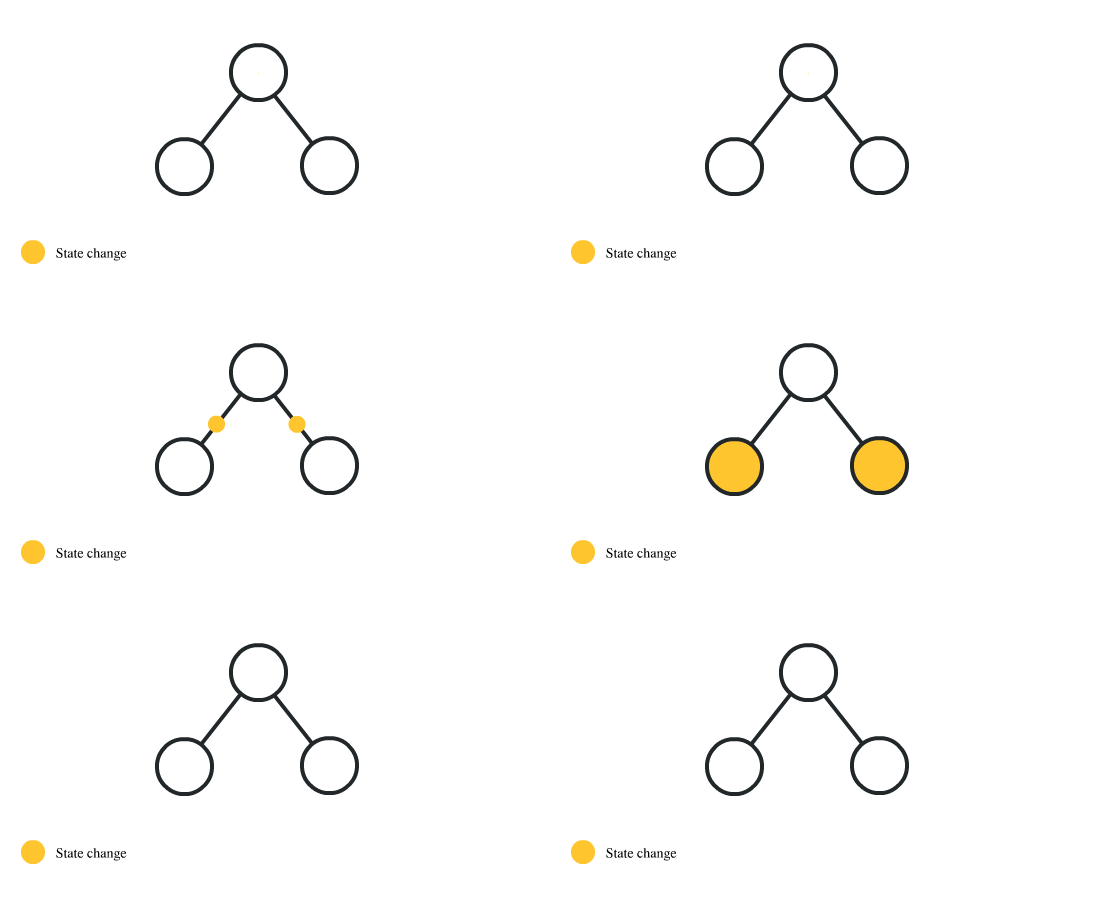
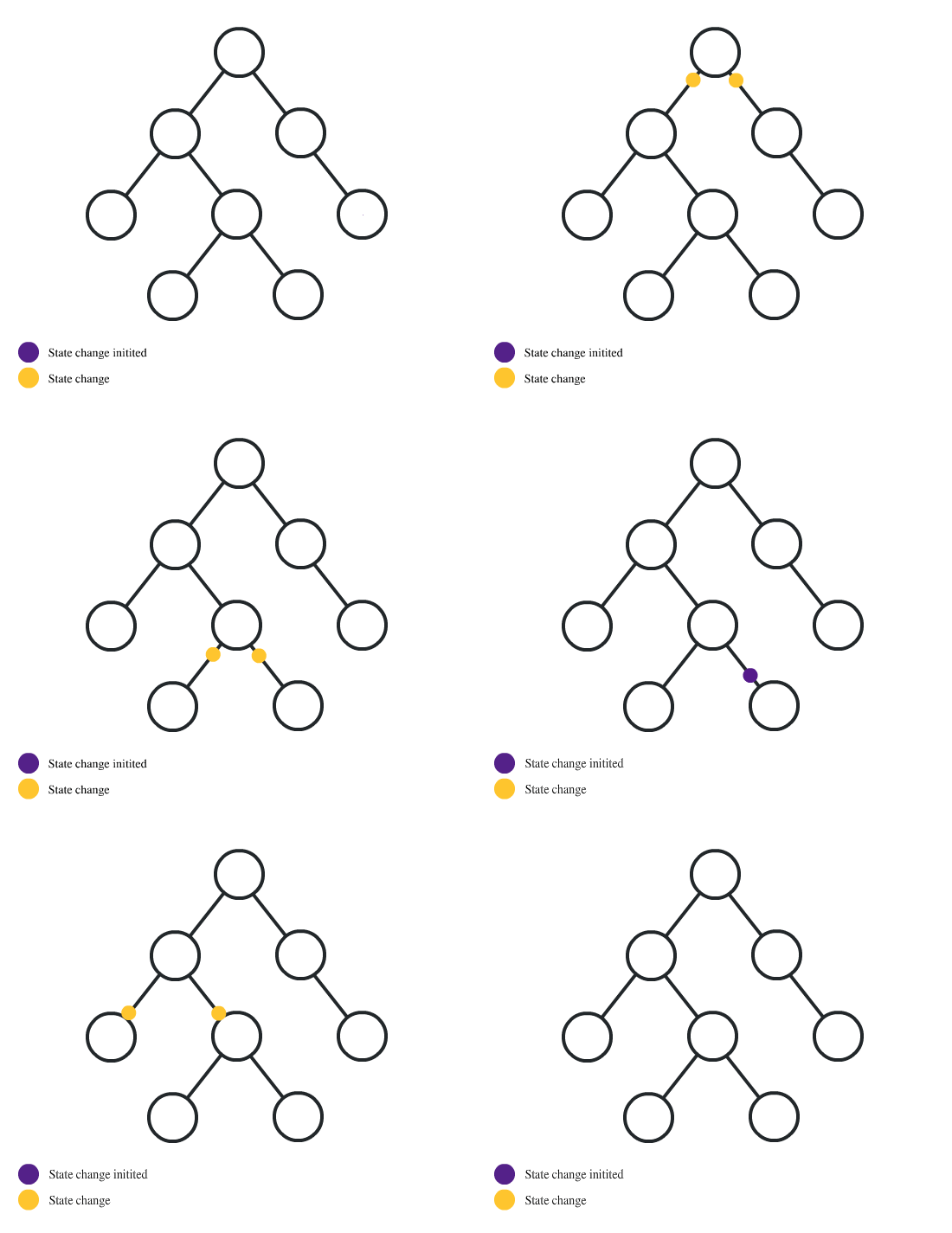
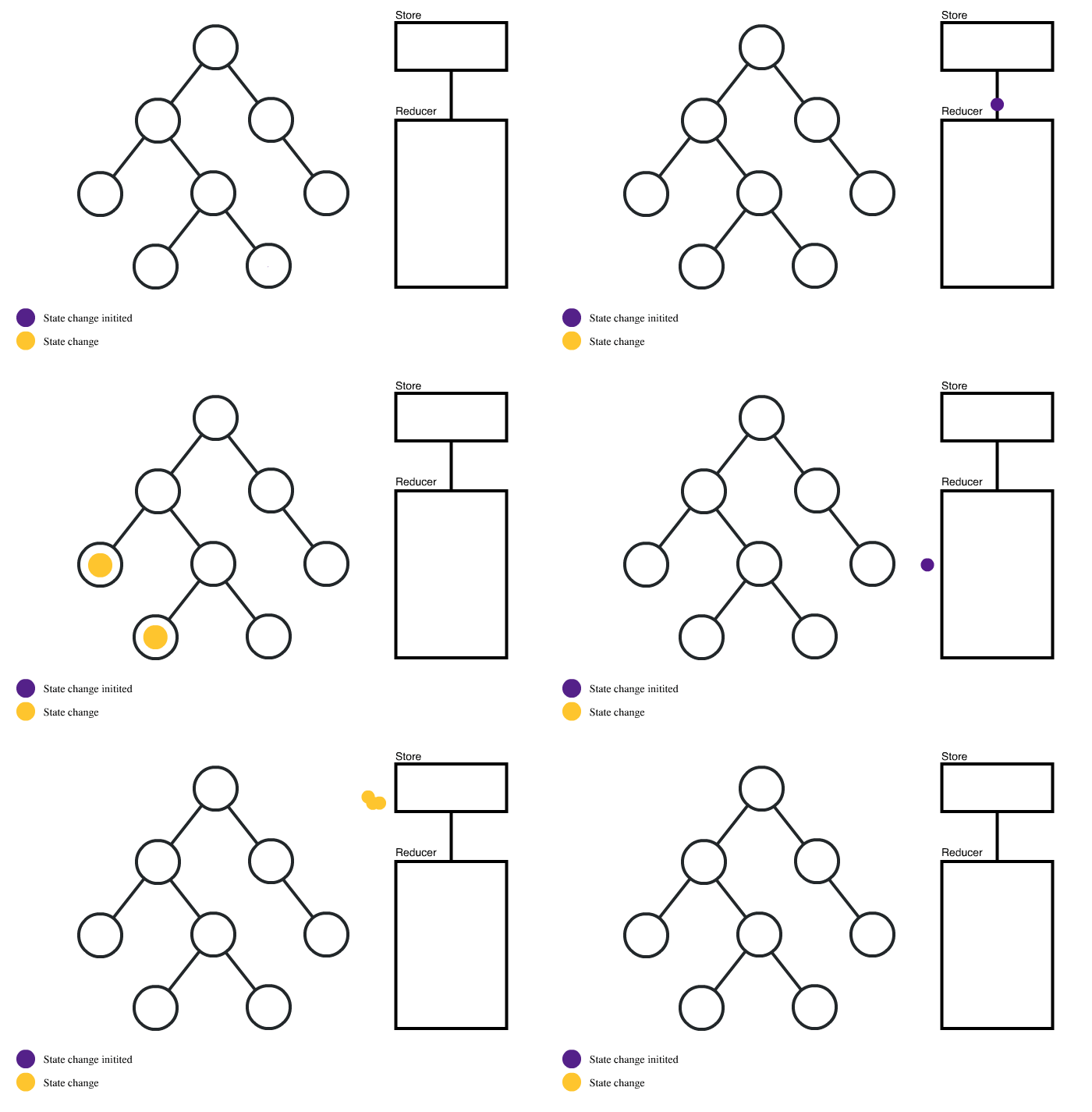
          下面一組動圖很好的描述了一個應(yīng)用程序的開發(fā)過程, 及何時需要Redux.

          • 游戲初期階段, 數(shù)據(jù)單向傳遞, 父傳子

          • 游戲進(jìn)入中期, 開始有少量非父子組件間需要通訊一些數(shù)據(jù)
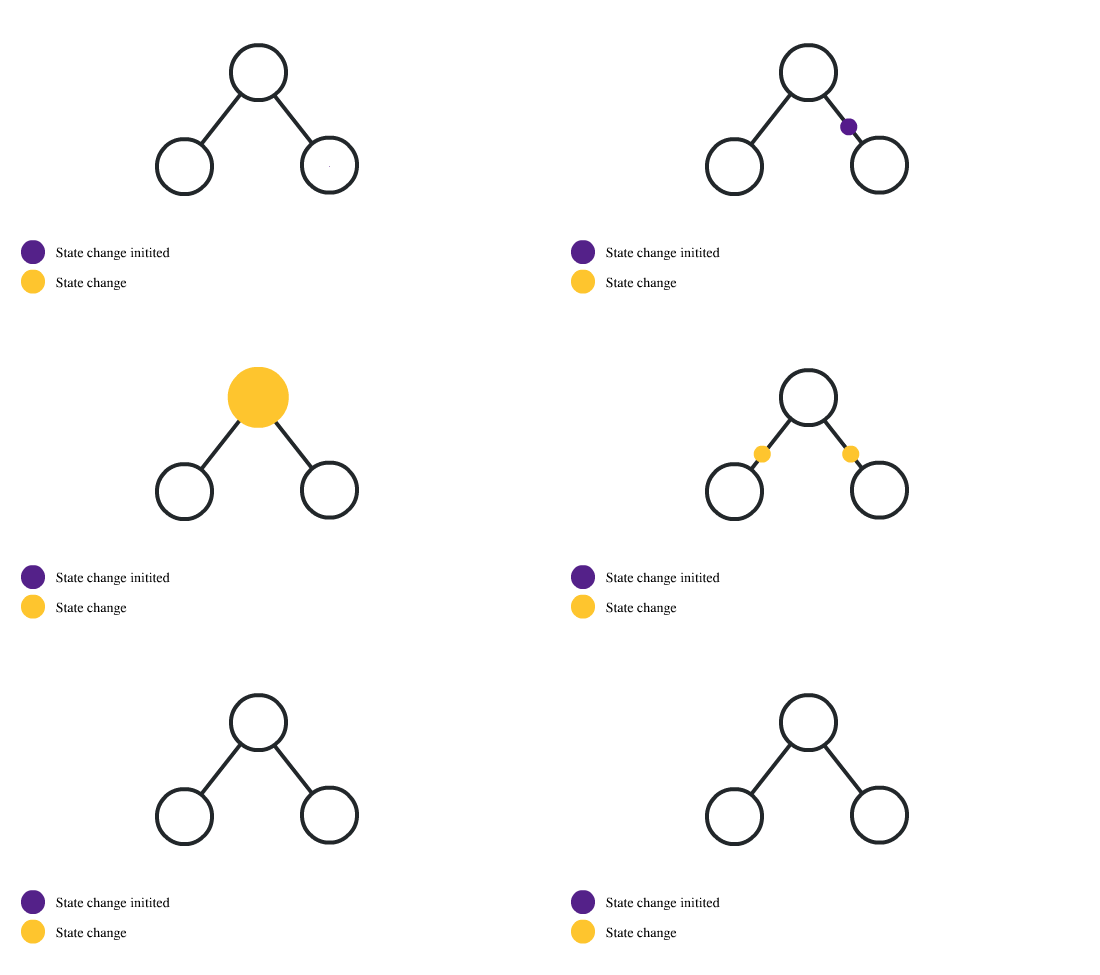

          • 游戲進(jìn)入后期, 開始需要大量的數(shù)據(jù)通訊


          • 此時, 就是Redux的用武之地了, 使用Redux后流程如下


          第三問 how to ? 怎么使用Redux


          在說使用方法之前, 我們先來從頭到尾模擬一個Redux的過程, 只要理解原理, 使用起來那不是小菜一碟.

          Let's go, come on baby!


          下面我們就用一個簡單的計數(shù)器的例子來模擬實現(xiàn)一個Redux的過程:

          創(chuàng)建一個count組件


          import React, { useState } from 'react'

          const CountItem = (props) => {
            const {
              count,
              increase,
            } = props

            return (
              <>
                {count}
                <button onClick={increase}>Count++</button>
              </>
            )
          }

          const Count = () => {
            const [count, setCount] = useState(0)

            const increase = () => {
              setCount(count + 1)
            }

            return (
              <CountItem
                count={count}
                increase={increase}
              />
            )
          }

          export default Count

          這樣一個簡單的count組件就創(chuàng)建好了, 現(xiàn)在, 我們想把對數(shù)據(jù)的操作單獨(dú)封裝成一個方法名為dispatch, 傳遞的參數(shù)為一個Action 格式: { type: xxx, payload: xxx }

          封裝一個Dispatch函數(shù)


          const dispatch = (action) => {
            switch(action.type) {
              case 'INCREASE':
                return action.payload + 1
              default:
                break
            }
          }

          改寫increase方法


          const increase = () => {
          -  setCount(count + 1)
          +  setCount(dispatch({type'INCREASE', payload: count}))
          }

          這時, 我們將action對象也抽離出來, 方便復(fù)用, 新建action.js.

          action.js => 返回action對象


          const increaseCount = (payload) => {
            return {
              type'INCREASE',
              payload
            }
          }

          改寫increase方法


          const increase = () => {
          -  setCount(dispatch({type'INCREASE', payload: count}))
          +  setCount(dispatch(increaseCount(count)))
          }

          接下來我們把dispatch中的事件操作抽離到reducer中, 新建reducer.js.

          reducer.js => 進(jìn)行數(shù)據(jù)操作


          const reducer = (state, action) => {
            const { type, payload } = action
            switch(type) {
              case 'INCREASE':
                return {
                  ...state,
                  count: payload + 1
                }
              default:
                return state
            }
          }

          改寫dispatch函數(shù)


          const dispatch = (action) => {
            const state = {
              count,
            }
            
            const newState = reducer(state, action)

            return newState
          }

          改寫increase方法


          const increase = () => {
          -  setCount(dispatch(increaseCount(count)))
          +  setCount(dispatch(increaseCount(count)).count)
          }

          接下來, 我們把set方法也拿到dispatch中, 讓所有操作都在dispatch中完成.

          繼續(xù)改造dispatch函數(shù), 增加setter做映射


          const dispatch = (action) => {
            const state = {
              count,
            }
            
          +  const setter = {
          +    count: setCount
          +  }
            
            const newState = reducer(state, action)
            
          +  for (let key in newState) {
          +    setter[key](newState[key])
          +  }

          -  return newState
          }

          改寫increase方法


          const increase = () => {
          -  setCount(dispatch(increaseCount(count)).count)
          +  dispatch(increaseCount(count))
          }

          這里我們可以看到, action.type是連接action和reducer的橋梁, 我們可以將actionType定義為常量單獨(dú)保存.

          在action中增加actionType


          export const increaseConstant = 'INCREASE'

          // 替換 action 和 reducer 中的 'INCREASE' 為 increaseConstant

          基于現(xiàn)有場景, 如果我們有另一個功能, 而目前的reducer并不能幫助我們很好的把不同的功能劃分開來, 我們改造一下reducer, 改造成一個對象, 用對象的key去區(qū)分功能.

          改寫reducer


          const reducer = {
            count(state, action) {
              const { type, payload } = action
              switch(type) {
                case increaseConstant:
                  return payload + 1
                default:
                  break
              }
            },
          }

          這時我們要遍歷reducer, 找到正確的key, 才能讓程序正確執(zhí)行, 我們新建combineReducers.js來完成這步操作.

          combineReducers


          const combineReducers = (reducer) => {
            return (state, action) => {
              let ret = {}

              for (let key in reducer) {
                ret[key] = reducer[key](state[key], action)
              }
              
              return {
                ...state,
                ...ret,
              }
            }
          }

          繼續(xù)改下dispatch函數(shù), 使其支持當(dāng)前格式reducer.

          改寫dispatch


          -  const newState = reducer(state, action)
          +  const newState = combineReducers(reducer)(state, action)

          至此, 一個redux的實現(xiàn)過程就完成了, 接下來, 我們實際用一用redux. 其實, 當(dāng)完成上述操作的時候, 怎么用就已經(jīng)說的差不多了.


          Redux + React 使用


          action, reducer, Count組件同上, Count組件需要簡單改寫下.

          新建store.js

          import { createStore, combineReducers } from 'redux'
          import reducer from './recuder'

          const initState = {
            count: 0,
          }

          const store = createStore(
            combineReducers(reducer),
            initState,
          )

          export default store

          新建app.jsx, 引入store

          import { Provider } from 'react-redux'
          import store from './store'

          const App = () => {
            return (
              <Provider store={store}>
                <Count />
              </Provider>
            )
          }

          export default App

          改寫Count組件

          import React from 'react'
          import { connect } from 'react-redux'
          import { increaseCount } from './action'

          const CountItem = (props) => {
            const {
              count,
              increase,
            } = props

            return (
              <>
                {count}
                <button onClick={increase}>Count++</button>
              </>
            )
          }

          const Count = (props) => {
            const {
              count,
              dispatch,
            } = props

            const increase = () => {
              dispatch(increaseCount(count))
            }

            return <CountItem count={count} increase={increase} />
          }

          export default connect(
            (state) => {
              return state
            },
            (dispatch) => {
              return { dispatch }
            }
          )(Count)

          接下來, 我們改寫成hook的寫法

          改寫Count組件

          import React from 'react'
          - import { connect } from 'react-redux'
          + import { useSelector, useDispatch } from 'react-redux'
          import { increaseCount } from './action'

          const CountItem = (props) => {
            const {
              count,
              increase,
            } = props

            return (
              <>
                {count}
                <button onClick={increase}>Count++</button>
              </>
            )
          }

          const Count = () => {
          -  const {
          -    count,
          -    dispatch,
          -  } = props
            
          +  const count = useSelector(state => state.count)
          +  const dispatch = useDispatch()

            const increase = () => {
              dispatch(increaseCount(count))
            }

            return <CountItem count={count} increase={increase} />
          }

          export default connect(
          -  (state) => {
          -      return state
          -  },
          -  (dispatch) => {
          -    return { dispatch }
          -  }
          - )(Count)

          export default Count

          至此, 本篇文章就到此結(jié)束了, 大家可以寫個復(fù)雜一點(diǎn)的組件練習(xí)下, 比如todoList, 手動滑稽. 逃了逃了。


          點(diǎn)擊左下角閱讀原文,到 SegmentFault 思否社區(qū) 和文章作者展開更多互動和交流,或掃描下方二維碼添加“ SF 思否小姐姐 ”,回復(fù)“ 入群 ”即可加入我們的技術(shù)交流群,收獲更多的技術(shù)文章~

          - END -

          瀏覽 47
          點(diǎn)贊
          評論
          收藏
          分享

          手機(jī)掃一掃分享

          分享
          舉報
          評論
          圖片
          表情
          推薦
          點(diǎn)贊
          評論
          收藏
          分享

          手機(jī)掃一掃分享

          分享
          舉報
          <kbd id="afajh"><form id="afajh"></form></kbd>
          <strong id="afajh"><dl id="afajh"></dl></strong>
            <del id="afajh"><form id="afajh"></form></del>
                1. <th id="afajh"><progress id="afajh"></progress></th>
                  <b id="afajh"><abbr id="afajh"></abbr></b>
                  <th id="afajh"><progress id="afajh"></progress></th>
                  午夜国产亚洲 | 国产青青青 | 中文字幕日韩精品人妻无码 | 最新的成人豆花AV | 蜜桃视频在线观看91 |