
ASP.NET Core WebAPI 版本控制

前言
在日常項目開發(fā)中,隨著項目需求不斷的累加、不斷的迭代;項目服務(wù)接口需要向下兼容歷史版本;前些時候就因為Api接口為做版本管理導(dǎo)致接口對低版本兼容處理不友好。
最近就像了解下如何實現(xiàn)WebApi版本控制,那么版本控制有什么好處呢?
WebApi版本控制的好處
有助于及時推出功能, 而不會破壞現(xiàn)有系統(tǒng),兼容性處理更友好。 它還可以幫助為選定的客戶提供額外的功能。
接下來就來實現(xiàn)版本控制以及在Swagger UI中接入WebApi版本
一、WebApi版本控制實現(xiàn)
通過Microsoft.AspNetCore.Mvc.Versioning 實現(xiàn)webapi 版本控制
創(chuàng)建WebApi項目,添加Nuget包:Microsoft.AspNetCore.Mvc.Versioning
Install-Package Microsoft.AspNetCore.Mvc.Versioning
修改項目Startup文件,使用Microsoft.AspNetCore.Mvc.Versioning
public class Startup
{
    public Startup(IConfiguration configuration)
    {
        Configuration = configuration;
    }
    public IConfiguration Configuration { get; }

    // This method gets called by the runtime. Use this method to add services to the container.
    public void ConfigureServices(IServiceCollection services)
    {
        //根據(jù)需要設(shè)置,以下內(nèi)容
        services.AddApiVersioning(apiOtions =>
        {
            //返回響應(yīng)標(biāo)頭中支持的版本信息
            apiOtions.ReportApiVersions = true;
            //此選項將用于不提供版本的請求。默認(rèn)情況下, 假定的 API 版本為1.0
            apiOtions.AssumeDefaultVersionWhenUnspecified = true;
            //缺省api版本號,支持時間或數(shù)字版本號
            apiOtions.DefaultApiVersion = new ApiVersion(1, 0);
            //支持MediaType、Header、QueryString 設(shè)置版本號;缺省為QueryString、UrlSegment設(shè)置版本號;后面會詳細說明對于作用
            apiOtions.ApiVersionReader = ApiVersionReader.Combine(
                new MediaTypeApiVersionReader("api-version"),
                new HeaderApiVersionReader("api-version"),
                new QueryStringApiVersionReader("api-version"),
                new UrlSegmentApiVersionReader());
        });
        services.AddControllers();
    }

    // This method gets called by the runtime. Use this method to configure the HTTP request pipeline.
    public void Configure(IApplicationBuilder app, IWebHostEnvironment env)
    {
        if (env.IsDevelopment())
        {
            app.UseDeveloperExceptionPage();
        }
        app.UseHttpsRedirection();

        //使用ApiVersioning
        app.UseApiVersioning();
        app.UseRouting();
        app.UseAuthorization();
        app.UseEndpoints(endpoints =>
        {
            endpoints.MapControllers();
        });
    }
}
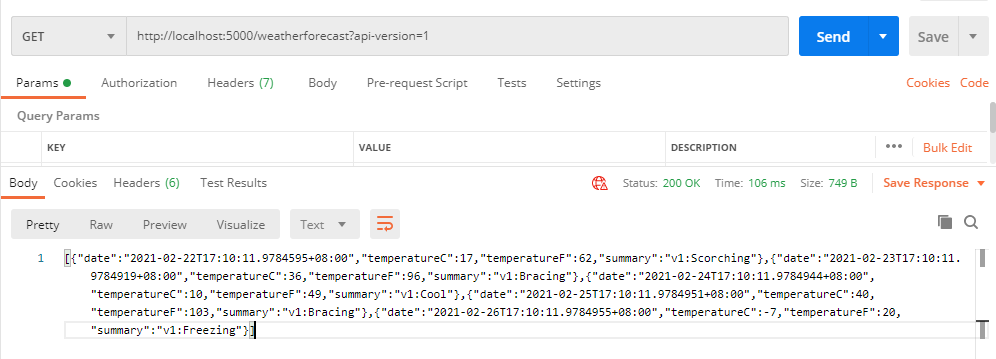
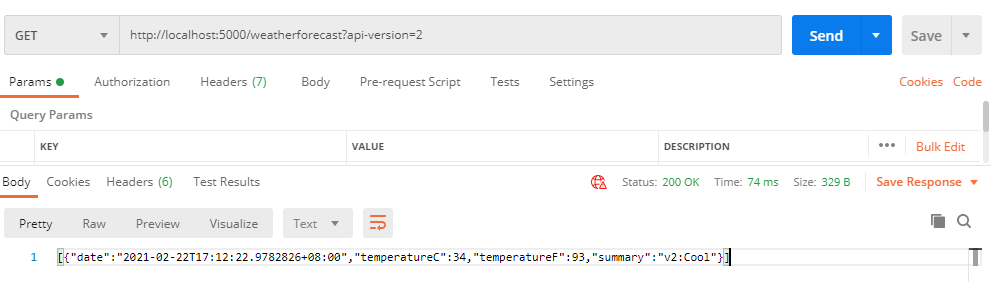
a)通過ApiVersion標(biāo)記指定指定控制器或方法的版本號;Url參數(shù)控制版本(QueryStringApiVersionReader),如下:
namespace WebAPIVersionDemo.Controllers
{
    [ApiController]
    [Route("[controller]")]
    //Deprecated=true:表示v1即將棄用,響應(yīng)頭中返回
    [ApiVersion("1.0", Deprecated = true)]
    [ApiVersion("2.0")]public class WeatherForecastController : ControllerBase
    {
        private static readonly string[] Summaries = new[]{"Freezing", "Bracing", "Chilly", "Cool", "Mild", "Warm", "Balmy", "Hot", "Sweltering", "Scorching"};

        [HttpGet]
        public IEnumerable<WeatherForecast> Get()
        {
            var rng = new Random();
            return Enumerable.Range(1, 5).Select(index => new WeatherForecast
            {
                Date = DateTime.Now.AddDays(index),
                TemperatureC = rng.Next(-20, 55),
                Summary = $"v1:{Summaries[rng.Next(Summaries.Length)]}"
            })
            .ToArray();
        }
    }
}
通過參數(shù)api-version參數(shù)指定版本號;調(diào)用結(jié)果:
b)通過Url Path Segment控制版本號(UrlSegmentApiVersionReader):為控制器添加路由方式如下,apiVersion為固定格式
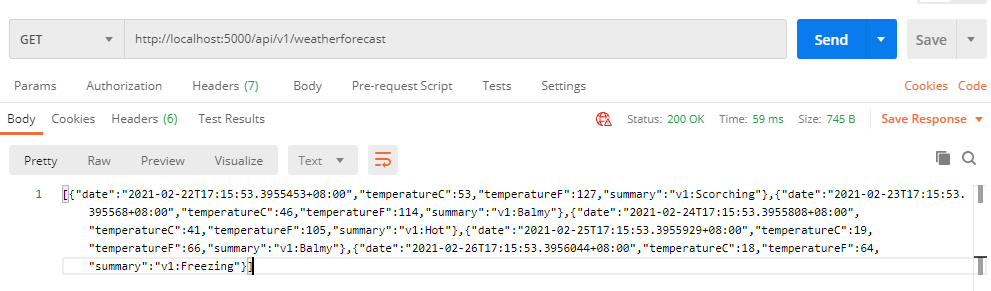
[Route("/api/v{version:apiVersion}/[controller]")]
調(diào)用方式:通過調(diào)用路徑傳入版本號,如:http://localhost:5000/api/v1/weatherforecast
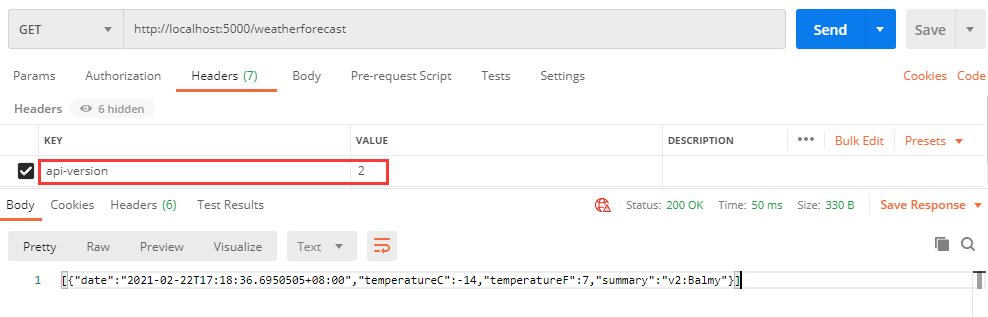
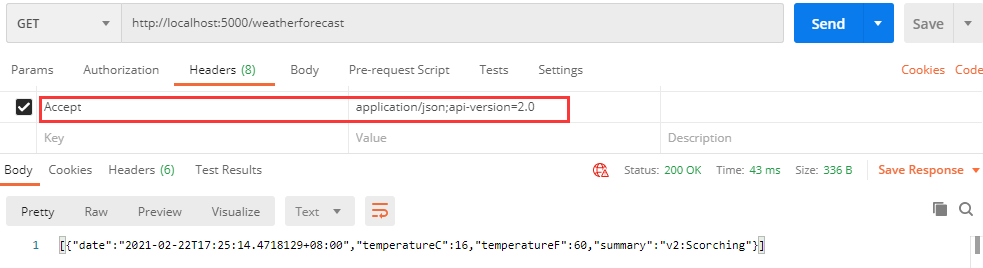
c)通過Header頭控制版本號:在Startup中設(shè)置(HeaderApiVersionReader、MediaTypeApiVersionReader)
apiOtions.ApiVersionReader = ApiVersionReader.Combine(
                new MediaTypeApiVersionReader("api-version"),
                new HeaderApiVersionReader("api-version"));
調(diào)用方式,在請求頭或中MediaType中傳遞api版本,如下:
其他說明:
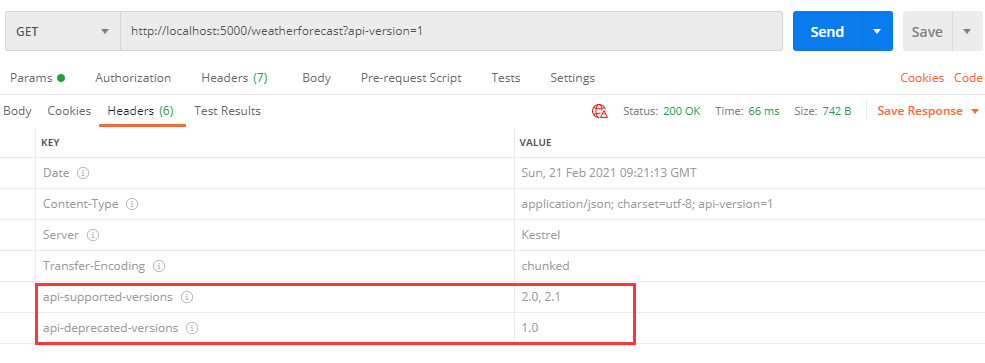
a)ReportApiVersions設(shè)置為true時, 返回當(dāng)前支持版本號(api-supported-versions);Deprecated 參數(shù)設(shè)置為true表示已棄用,在響應(yīng)頭中也有顯示(api-deprecated-versions):
b)MapToApiVersion標(biāo)記:允許將單個 API 操作映射到任何版本(可以在v1的控制器中添加v3的方法);在上面控制器中添加以下代碼,訪問v3版本方法
[HttpGet]
[MapToApiVersion("3.0")]
public IEnumerable<WeatherForecast> GetV3()
{
    //獲取版本
    string v = HttpContext.GetRequestedApiVersion().ToString();
    var rng = new Random();
    return Enumerable.Range(1, 1).Select(index => new WeatherForecast
    {
        Date = DateTime.Now.AddDays(index),
        TemperatureC = rng.Next(-20, 55),
        Summary = $"v{v}:{Summaries[rng.Next(Summaries.Length)]}"
    })
    .ToArray();
}

c)注意事項:
1、路徑中參數(shù)版本高于,其他方式設(shè)置版本
2、多種方式傳遞版本,只能采用一種方式傳遞版本號
3、SwaggerUI中MapToApiVersion設(shè)置版本不會單獨顯示
二、Swagger UI中版本接入
1、添加包:Swashbuckle.AspNetCore、Microsoft.AspNetCore.Mvc.Versioning.ApiExplorer
//swaggerui 包
Install-Package Swashbuckle.AspNetCore
//api版本
Install-Package Microsoft.AspNetCore.Mvc.Versioning.ApiExplorer
2、修改Startup代碼:
public class Startup
{
    /// <summary>
    /// Api版本提者信息
    /// </summary>
    private IApiVersionDescriptionProvider provider;

    // This method gets called by the runtime. Use this method to add services to the container.
    public void ConfigureServices(IServiceCollection services)
    {
        services.AddControllers();

        //根據(jù)需要設(shè)置,以下內(nèi)容
        services.AddApiVersioning(apiOtions =>
        {
            //返回響應(yīng)標(biāo)頭中支持的版本信息
            apiOtions.ReportApiVersions = true;
            //此選項將用于不提供版本的請求。默認(rèn)情況下, 假定的 API 版本為1.0
            apiOtions.AssumeDefaultVersionWhenUnspecified = true;
            //缺省api版本號,支持時間或數(shù)字版本號
            apiOtions.DefaultApiVersion = new ApiVersion(1, 0);
            //支持MediaType、Header、QueryString 設(shè)置版本號;缺省為QueryString設(shè)置版本號
            apiOtions.ApiVersionReader = ApiVersionReader.Combine(
                    new MediaTypeApiVersionReader("api-version"),
                    new HeaderApiVersionReader("api-version"),
                    new QueryStringApiVersionReader("api-version"),
                    new UrlSegmentApiVersionReader());
        });


        services.AddVersionedApiExplorer(option =>
        {
            option.GroupNameFormat = "接口:'v'VVV";
            option.AssumeDefaultVersionWhenUnspecified = true;
        });

        this.provider = services.BuildServiceProvider().GetRequiredService<IApiVersionDescriptionProvider>();
        services.AddSwaggerGen(options =>
        {
            foreach (var description in provider.ApiVersionDescriptions)
            {
                options.SwaggerDoc(description.GroupName,
                        new Microsoft.OpenApi.Models.OpenApiInfo()
                        {
                            Title = $"接口 v{description.ApiVersion}",
                            Version = description.ApiVersion.ToString(),
                            Description = "切換版本請點右上角版本切換"
                        }
                );
            }
            options.IncludeXmlComments(this.GetType().Assembly.Location.Replace(".dll", ".xml"), true);
        });

    }

    // This method gets called by the runtime. Use this method to configure the HTTP request pipeline.
    public void Configure(IApplicationBuilder app, IWebHostEnvironment env)
    {
        //……

        //使用ApiVersioning
        app.UseApiVersioning();

        //啟用swaggerui,綁定api版本信息
        app.UseSwagger();
        app.UseSwaggerUI(c =>
        {
            foreach (var description in provider.ApiVersionDescriptions)
            {
                c.SwaggerEndpoint($"/swagger/{description.GroupName}/swagger.json", description.GroupName.ToUpperInvariant());
            }
        });

        //……
    }
}
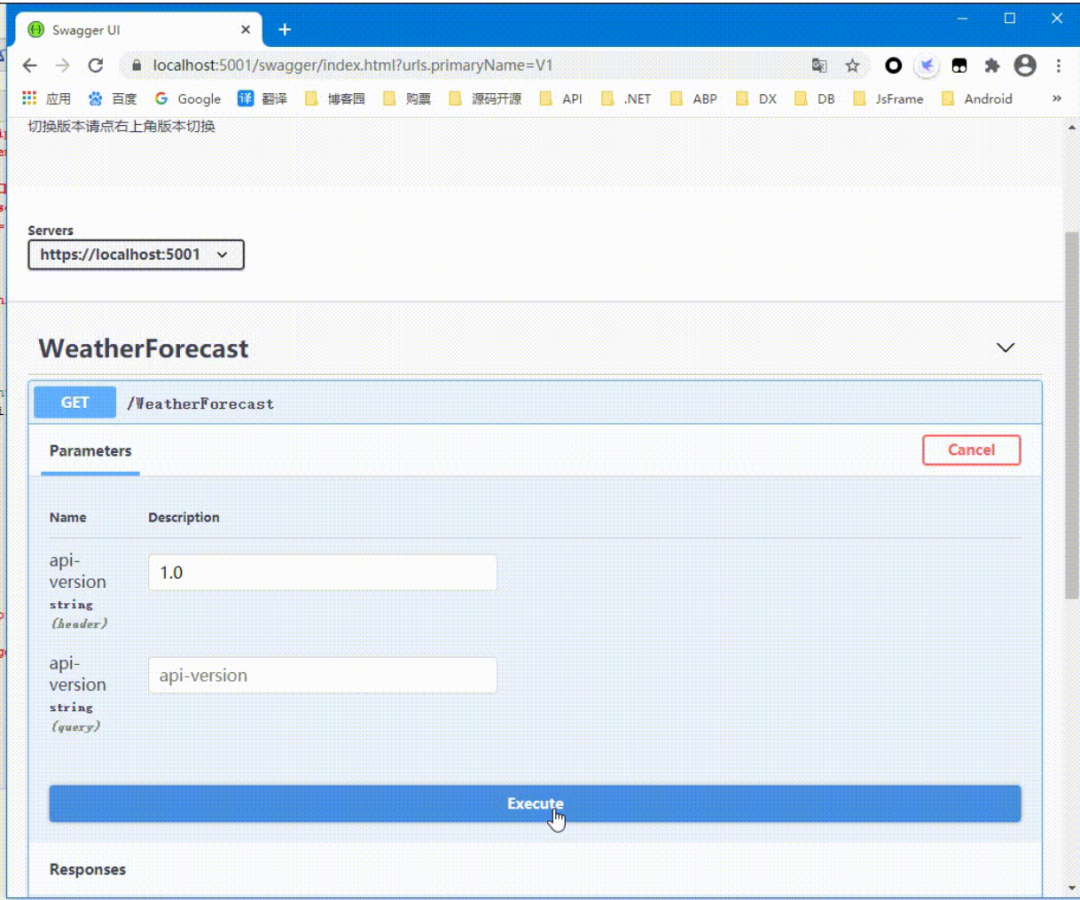
3、運行效果:
其他
示例地址:https://github.com/cwsheng/WebAPIVersionDemo
【推薦】.NET Core開發(fā)實戰(zhàn)視頻課程 ★★★
.NET Core實戰(zhàn)項目之CMS 第一章 入門篇-開篇及總體規(guī)劃
【.NET Core微服務(wù)實戰(zhàn)-統(tǒng)一身份認(rèn)證】開篇及目錄索引
Redis基本使用及百億數(shù)據(jù)量中的使用技巧分享(附視頻地址及觀看指南)
.NET Core中的一個接口多種實現(xiàn)的依賴注入與動態(tài)選擇看這篇就夠了
用abp vNext快速開發(fā)Quartz.NET定時任務(wù)管理界面
在ASP.NET Core中創(chuàng)建基于Quartz.NET托管服務(wù)輕松實現(xiàn)作業(yè)調(diào)度
現(xiàn)身說法:實際業(yè)務(wù)出發(fā)分析百億數(shù)據(jù)量下的多表查詢優(yōu)化