
Asp.NET Core 限流控制-AspNetCoreRateLimit

起因:
近期項(xiàng)目中,提供了一些調(diào)用頻率較高的api接口,需要保障服務(wù)器的穩(wěn)定運(yùn)行;需要對(duì)提供的接口進(jìn)行限流控制。避免因客戶端頻繁的請(qǐng)求導(dǎo)致服務(wù)器的壓力。
一、AspNetCoreRateLimit 介紹
AspNetCoreRateLimit是一個(gè)ASP.NET Core速率限制的解決方案,旨在控制客戶端根據(jù)IP地址或客戶端ID向Web API或MVC應(yīng)用發(fā)出的請(qǐng)求的速率。AspNetCoreRateLimit包含一個(gè)IpRateLimitMiddleware和ClientRateLimitMiddleware,每個(gè)中間件可以根據(jù)不同的場(chǎng)景配置限制允許IP或客戶端,自定義這些限制策略,也可以將限制策略應(yīng)用在每個(gè)API URL或具體的HTTP Method上。
二、AspNetCoreRateLimit使用
由上面介紹可知AspNetCoreRateLimit支持了兩種方式:基于客戶端IP(IpRateLimitMiddleware)和客戶端ID(ClientRateLimitMiddleware)速率限制 接下來就分別說明使用方式
添加Nuget包引用:
Install-Package AspNetCoreRateLimit
基于客戶端IP速率限制
1、修改Startup.cs中方法:

public class Startup
{
    public Startup(IConfiguration configuration)
    {
        Configuration = configuration;
    }

    public IConfiguration Configuration { get; }// This method gets called by the runtime. Use this method to add services to the container.
    public void ConfigureServices(IServiceCollection services)
    {
        //需要從加載配置文件appsettings.json
        services.AddOptions();
        //需要存儲(chǔ)速率限制計(jì)算器和ip規(guī)則
        services.AddMemoryCache();

        //從appsettings.json中加載常規(guī)配置,IpRateLimiting與配置文件中節(jié)點(diǎn)對(duì)應(yīng)
        services.Configure<IpRateLimitOptions>(Configuration.GetSection("IpRateLimiting"));

        //從appsettings.json中加載Ip規(guī)則
        services.Configure<IpRateLimitPolicies>(Configuration.GetSection("IpRateLimitPolicies"));

        //注入計(jì)數(shù)器和規(guī)則存儲(chǔ)
        services.AddSingleton<IIpPolicyStore, MemoryCacheIpPolicyStore>();
        services.AddSingleton<IRateLimitCounterStore, MemoryCacheRateLimitCounterStore>();

        services.AddControllers();

        services.AddSingleton<IHttpContextAccessor, HttpContextAccessor>();
        //配置(解析器、計(jì)數(shù)器密鑰生成器)
        services.AddSingleton<IRateLimitConfiguration, RateLimitConfiguration>();

        //Other Code
    }

    // This method gets called by the runtime. Use this method to configure the HTTP request pipeline.
    public void Configure(IApplicationBuilder app, IWebHostEnvironment env)
    {
        //Other Code

        app.UseRouting();

        app.UseAuthorization();
     //啟用客戶端IP限制速率
        app.UseIpRateLimiting();

        app.UseEndpoints(endpoints =>
        {
            endpoints.MapControllers();
        });
    }
}
2、在appsettings.json中添加通用配置項(xiàng)節(jié)點(diǎn):(IpRateLimiting節(jié)點(diǎn)與Startup中取的節(jié)點(diǎn)對(duì)應(yīng))
"IpRateLimiting": {
  //false,則全局將應(yīng)用限制,并且僅應(yīng)用具有作為端點(diǎn)的規(guī)則*。例如,如果您設(shè)置每秒5次調(diào)用的限制,則對(duì)任何端點(diǎn)的任何HTTP調(diào)用都將計(jì)入該限制
  //true, 則限制將應(yīng)用于每個(gè)端點(diǎn),如{HTTP_Verb}{PATH}。例如,如果您為*:/api/values客戶端設(shè)置每秒5個(gè)呼叫的限制,
  "EnableEndpointRateLimiting": false,
  //false,拒絕的API調(diào)用不會(huì)添加到調(diào)用次數(shù)計(jì)數(shù)器上;如 客戶端每秒發(fā)出3個(gè)請(qǐng)求并且您設(shè)置了每秒一個(gè)調(diào)用的限制,則每分鐘或每天計(jì)數(shù)器等其他限制將僅記錄第一個(gè)調(diào)用,即成功的API調(diào)用。如果您希望被拒絕的API調(diào)用計(jì)入其他時(shí)間的顯示(分鐘,小時(shí)等)
  //,則必須設(shè)置StackBlockedRequests為true。
  "StackBlockedRequests": false,
  //Kestrel 服務(wù)器背后是一個(gè)反向代理,如果你的代理服務(wù)器使用不同的頁眉然后提取客戶端IP X-Real-IP使用此選項(xiàng)來設(shè)置
  "RealIpHeader": "X-Real-IP",
  //取白名單的客戶端ID。如果此標(biāo)頭中存在客戶端ID并且與ClientWhitelist中指定的值匹配,則不應(yīng)用速率限制。
  "ClientIdHeader": "X-ClientId",
  //限制狀態(tài)碼
  "HttpStatusCode": 429,
  ////IP白名單:支持Ip v4和v6
  //"IpWhitelist": [ "127.0.0.1", "::1/10", "192.168.0.0/24" ],
  ////端點(diǎn)白名單
  //"EndpointWhitelist": [ "get:/api/license", "*:/api/status" ],
  ////客戶端白名單
  //"ClientWhitelist": [ "dev-id-1", "dev-id-2" ],
  //通用規(guī)則
  "GeneralRules": [
    {
      //端點(diǎn)路徑
      "Endpoint": "*",
      //時(shí)間段,格式:{數(shù)字}{單位};可使用單位:s, m, h, d
      "Period": "1s",
      //限制
      "Limit": 2
    },
   //15分鐘只能調(diào)用100次
    {"Endpoint": "*","Period": "15m","Limit": 100},
   //12H只能調(diào)用1000
    {"Endpoint": "*","Period": "12h","Limit": 1000},
   //7天只能調(diào)用10000次
    {"Endpoint": "*","Period": "7d","Limit": 10000}
  ]
}
配置節(jié)點(diǎn)已添加相應(yīng)注釋信息。
規(guī)則設(shè)置格式:
端點(diǎn)格式:{HTTP_Verb}:{PATH},您可以使用asterix符號(hào)來定位任何HTTP謂詞。
期間格式:{INT}{PERIOD_TYPE},您可以使用以下期間類型之一:s, m, h, d。
限制格式:{LONG}
3、特點(diǎn)Ip限制規(guī)則設(shè)置,在appsettings.json中添加 IP規(guī)則配置節(jié)點(diǎn)
"IpRateLimitPolicies": {
  //ip規(guī)則
  "IpRules": [
    {
      //IP
      "Ip": "84.247.85.224",
      //規(guī)則內(nèi)容
      "Rules": [
        //1s請(qǐng)求10次
        {"Endpoint": "*","Period": "1s","Limit": 10},
        //15分鐘請(qǐng)求200次
        {"Endpoint": "*","Period": "15m","Limit": 200}
      ]
    },
    {
      //ip支持設(shè)置多個(gè)
      "Ip": "192.168.3.22/25",
      "Rules": [
        //1秒請(qǐng)求5次
        {"Endpoint": "*","Period": "1s","Limit": 5},
        //15分鐘請(qǐng)求150次
        {"Endpoint": "*","Period": "15m","Limit": 150},
        //12小時(shí)請(qǐng)求500次
        {"Endpoint": "*","Period": "12h","Limit": 500}
      ]
    }
  ]
}
基于客戶端ID速率限制
1、修改Startup文件:
public void ConfigureServices(IServiceCollection services)
{
    //需要從加載配置文件appsettings.json
    services.AddOptions();

    //需要存儲(chǔ)速率限制計(jì)算器和ip規(guī)則
    services.AddMemoryCache();

    //從appsettings.json中加載常規(guī)配置
    services.Configure<ClientRateLimitOptions>(Configuration.GetSection("IPRateLimiting"));

    //從appsettings.json中加載客戶端規(guī)則
    services.Configure<ClientRateLimitPolicies>(Configuration.GetSection("ClientRateLimitPolicies"));

    //注入計(jì)數(shù)器和規(guī)則存儲(chǔ)
    services.AddSingleton<IClientPolicyStore, MemoryCacheClientPolicyStore>();
    services.AddSingleton<IRateLimitCounterStore, MemoryCacheRateLimitCounterStore>();


    services.AddControllers();

        // https://github.com/aspnet/Hosting/issues/793
        // the IHttpContextAccessor service is not registered by default.
        //注入計(jì)數(shù)器和規(guī)則存儲(chǔ)
        services.AddSingleton<IHttpContextAccessor, HttpContextAccessor>();

        //配置(解析器、計(jì)數(shù)器密鑰生成器)
        services.AddSingleton<IRateLimitConfiguration, RateLimitConfiguration>();
}

public void Configure(IApplicationBuilder app, IHostingEnvironment env)
{
        //啟用客戶端限制
    app.UseClientRateLimiting();

    app.UseMvc();
}
2、通用配置采用IP限制相同配置,添加客戶端限制配置:
//客戶端限制設(shè)置
"ClientRateLimitPolicies": {
  "ClientRules": [
    {
      //客戶端id
      "ClientId": "client-id-1",
      "Rules": [
        {"Endpoint": "*","Period": "1s","Limit": 10},
        {"Endpoint": "*","Period": "15m","Limit": 200}
      ]
    },
    {
      "ClientId": "client-id-2",
      "Rules": [
        {"Endpoint": "*","Period": "1s","Limit": 5},
        {"Endpoint": "*","Period": "15m","Limit": 150},
        {"Endpoint": "*","Period": "12h","Limit": 500}
      ]
    }
  ]
}
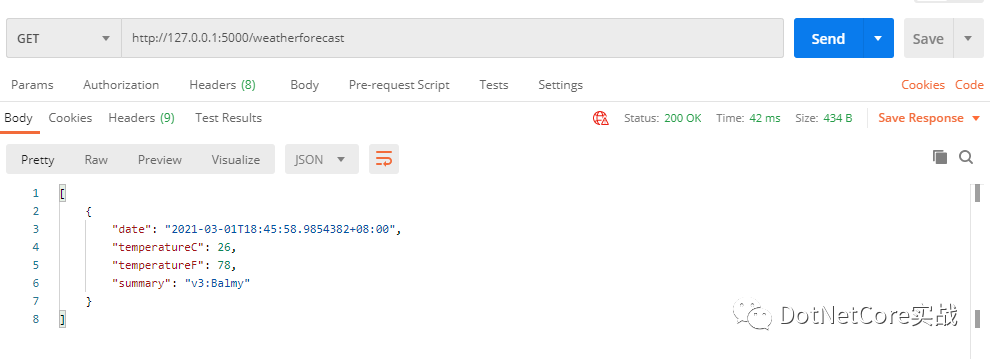
3、調(diào)用結(jié)果:
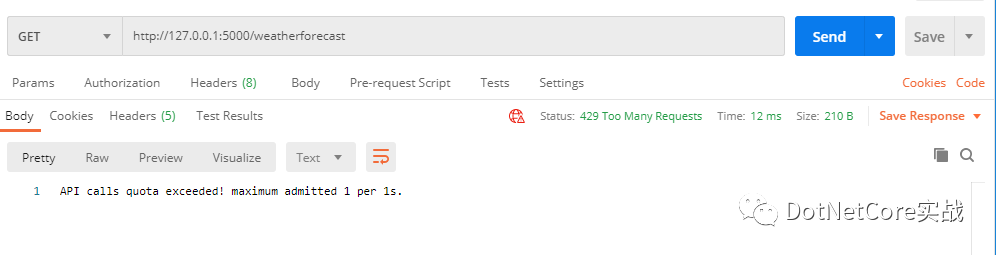
設(shè)置規(guī)則:1s只能調(diào)用一次:首次調(diào)用
調(diào)用第二次:自定義返回內(nèi)容
三、其他
運(yùn)行時(shí)更新速率限制
添加IpRateLimitController控制器:
/// <summary>
/// IP限制控制器
/// </summary>
[Route("api/[controller]")]
[ApiController]
public class IpRateLimitController : ControllerBase
{

    private readonly IpRateLimitOptions _options;
    private readonly IIpPolicyStore _ipPolicyStore;

    /// <summary>
    ///
    /// </summary>
    /// <param name="optionsAccessor"></param>
    /// <param name="ipPolicyStore"></param>
    public IpRateLimitController(IOptions<IpRateLimitOptions> optionsAccessor, IIpPolicyStore ipPolicyStore)
    {
        _options = optionsAccessor.Value;
        _ipPolicyStore = ipPolicyStore;
    }

    /// <summary>
    /// 獲取限制規(guī)則
    /// </summary>
    /// <returns></returns>
    [HttpGet]
    public async Task<IpRateLimitPolicies> Get()
    {
        return await _ipPolicyStore.GetAsync(_options.IpPolicyPrefix);
    }

    /// <summary>
    ///
    /// </summary>
    [HttpPost]
    public async Task Post(IpRateLimitPolicy ipRate)
    {
        var pol = await _ipPolicyStore.GetAsync(_options.IpPolicyPrefix);
        if (ipRate != null)
        {
            pol.IpRules.Add(ipRate);
            await _ipPolicyStore.SetAsync(_options.IpPolicyPrefix, pol);
        }
    }
}
分布式部署時(shí),需要將速率限制計(jì)算器和ip規(guī)則存儲(chǔ)到分布式緩存中如Redis
修改注入對(duì)象
// inject counter and rules distributed cache stores
services.AddSingleton<IClientPolicyStore, DistributedCacheClientPolicyStore>();
services.AddSingleton<IRateLimitCounterStore,DistributedCacheRateLimitCounterStore>();
添加Nuget包 Microsoft.Extensions.Caching.StackExchangeRedis
在Startup中設(shè)置Redis連接
services.AddStackExchangeRedisCache(options =>
{
    options.ConfigurationOptions = new ConfigurationOptions
    {
        //silently retry in the background if the Redis connection is temporarily down
        AbortOnConnectFail = false
    };
    options.Configuration = "localhost:6379";
    options.InstanceName = "AspNetRateLimit";
});
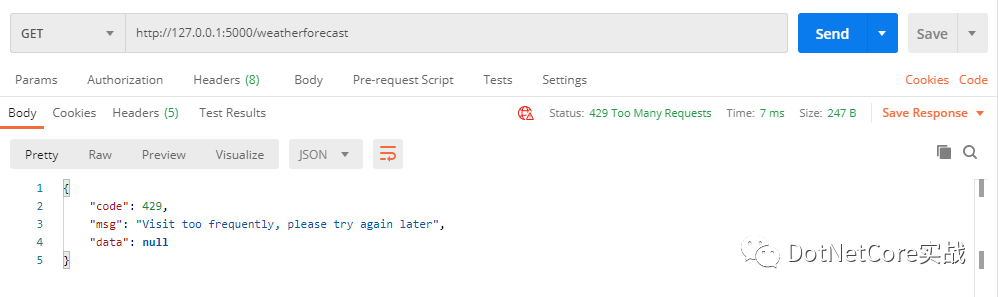
限制時(shí)自定義相應(yīng)結(jié)果:
//請(qǐng)求返回
    "QuotaExceededResponse": {
      "Content": "{{\"code\":429,\"msg\":\"Visit too frequently, please try again later\",\"data\":null}}",
      "ContentType": "application/json;utf-8",
      "StatusCode": 429
    },
調(diào)用時(shí)返回結(jié)果:
其他:
示例代碼:https://github.com/cwsheng/WebAPIVersionDemo
【推薦】.NET Core開發(fā)實(shí)戰(zhàn)視頻課程 ★★★
.NET Core實(shí)戰(zhàn)項(xiàng)目之CMS 第一章 入門篇-開篇及總體規(guī)劃
【.NET Core微服務(wù)實(shí)戰(zhàn)-統(tǒng)一身份認(rèn)證】開篇及目錄索引
Redis基本使用及百億數(shù)據(jù)量中的使用技巧分享(附視頻地址及觀看指南)
.NET Core中的一個(gè)接口多種實(shí)現(xiàn)的依賴注入與動(dòng)態(tài)選擇看這篇就夠了
10個(gè)小技巧助您寫出高性能的ASP.NET Core代碼
用abp vNext快速開發(fā)Quartz.NET定時(shí)任務(wù)管理界面
在ASP.NET Core中創(chuàng)建基于Quartz.NET托管服務(wù)輕松實(shí)現(xiàn)作業(yè)調(diào)度
現(xiàn)身說法:實(shí)際業(yè)務(wù)出發(fā)分析百億數(shù)據(jù)量下的多表查詢優(yōu)化