
視頻直播:實時數(shù)據(jù)可視化分析

導(dǎo)語 | 本文描述了如何在騰訊云上使用云化后大數(shù)據(jù)組件來完成實時分析系統(tǒng)的設(shè)計和實現(xiàn),閱讀過程中通過對比云Ckafka、Flink和MySQL等組件的使用差異來體現(xiàn)云化方案的優(yōu)勢。文中以視頻直播禮物打賞的場景為例,展示全/半托管服務(wù)下開發(fā)的便利,便于讀者對視頻直播系統(tǒng)的設(shè)計有一個初步了解。
一、解決方案描述
(一)概述
本方案結(jié)合騰訊云CKafka、流計算Oceanus、私有網(wǎng)絡(luò)VPC、商業(yè)智能分析BI等,對視頻直播行業(yè)數(shù)字化運(yùn)營進(jìn)行實時可視化分析。分析指標(biāo)包含觀看直播人員的地區(qū)分布、各級別會員統(tǒng)計、各模塊打賞禮物情況、在線人數(shù)等。
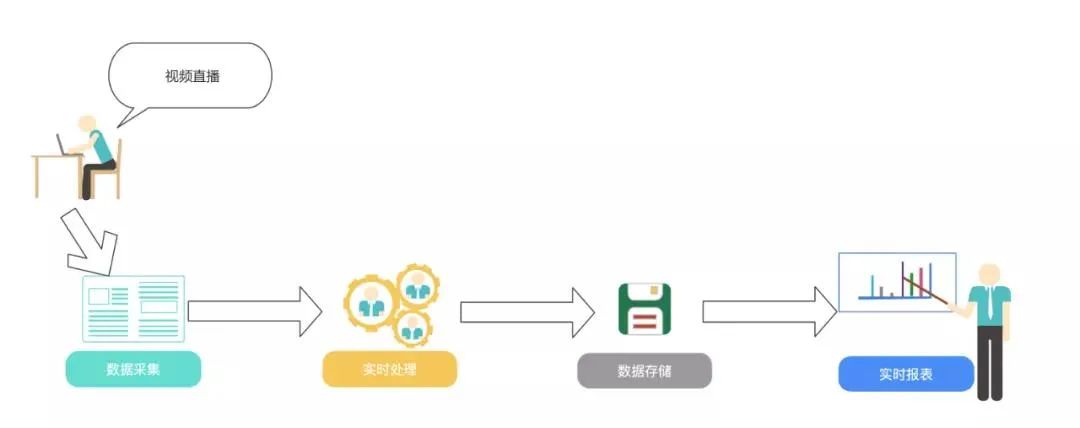
視頻直播場景
(二)方案架構(gòu)及優(yōu)勢
根據(jù)以上視頻直播場景,設(shè)計了如下架構(gòu)圖:
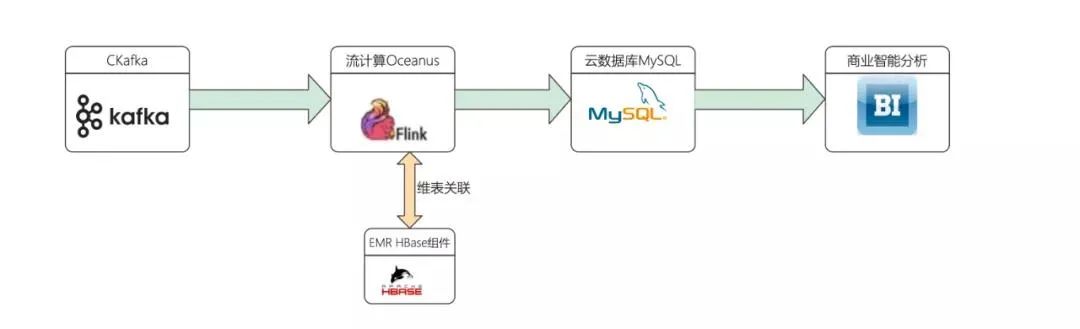
架構(gòu)圖
涉及產(chǎn)品列表:
流計算Oceanus
私有網(wǎng)絡(luò)VPC
消息隊列CKafka
云數(shù)據(jù)庫MySQL
EMR集群HBase組件
商業(yè)智能分析服務(wù)
二、前置準(zhǔn)備
購買并創(chuàng)建相應(yīng)的大數(shù)據(jù)組件。
(一)創(chuàng)建VPC私有網(wǎng)絡(luò)
私有網(wǎng)絡(luò)是一塊您在騰訊云上自定義的邏輯隔離網(wǎng)絡(luò)空間,在構(gòu)建MySQL、EMR,ClickHouse集群等服務(wù)時選擇的網(wǎng)絡(luò)必須保持一致,網(wǎng)絡(luò)才能互通。否則需要使用對等連接、VPN等方式打通網(wǎng)絡(luò)。
(頁面地址:https://console.cloud.tencent.com/vpc/vpc?rid=8)
(二)創(chuàng)建Oceanus集群
流計算Oceanus服務(wù)兼容原生的Flink任務(wù)。在 Oceanus 控制臺的【集群管理->【新建集群】頁面創(chuàng)建集群,選擇地域、可用區(qū)、VPC、日志、存儲,設(shè)置初始密碼等。VPC及子網(wǎng)使用剛剛創(chuàng)建好的網(wǎng)絡(luò)。創(chuàng)建完后Flink的集群如下:
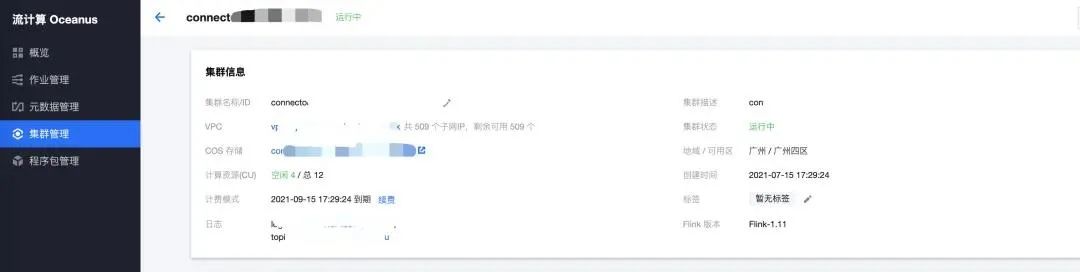
Oceanus集群
(三)創(chuàng)建消息隊列Ckafka
消息隊列CKafka(Cloud Kafka)是基于開源Apache Kafka消息隊列引擎,提供高吞吐性能、高可擴(kuò)展性的消息隊列服務(wù)。消息隊列CKafka完美兼容Apache kafka0.9、0.10、1.1、2.4、2.8版本接口,在性能、擴(kuò)展性、業(yè)務(wù)安全保障、運(yùn)維等方面具有超強(qiáng)優(yōu)勢,讓您在享受低成本、超強(qiáng)功能的同時,免除繁瑣運(yùn)維工作。
(頁面地址:https://cloud.tencent.com/product/ckafka)
創(chuàng)建Ckafka集群
注意私有網(wǎng)絡(luò)和子網(wǎng)選擇之前創(chuàng)建的網(wǎng)絡(luò)和子網(wǎng):
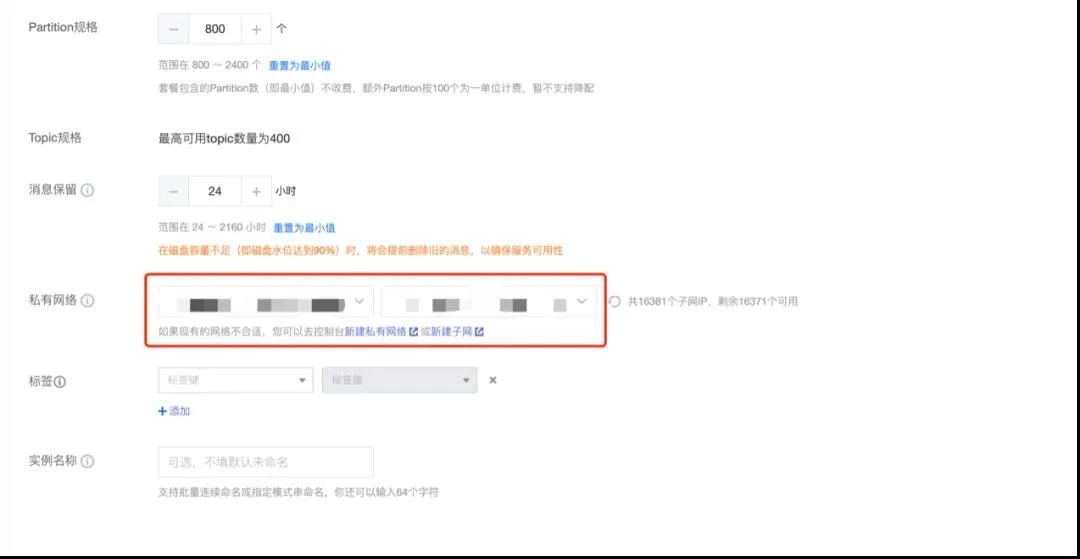
Kafka集群
創(chuàng)建topic

創(chuàng)建topic
模擬發(fā)送數(shù)據(jù)到 topic
kafka客戶端
進(jìn)入同子網(wǎng)的CVM下,啟動kafka客戶端,模擬發(fā)送數(shù)據(jù),具體操作參考文檔:
(https://cloud.tencent.com/document/product/597/56840)
使用腳本發(fā)送
腳本一:Java參考以下官方網(wǎng)址:
(https://cloud.tencent.com/document/product/597/54834)
腳本二:Python腳本生成模擬數(shù)據(jù):
#!/usr/bin/python3# 首次使用該腳本,需 "pip3 install kafka" 安裝kafka模塊import jsonimport randomimport timefrom kafka import KafkaProducerTIME_FORMAT = "%Y-%m-%d %H:%M:%S"PROVINCES = ["北京", "廣東", "山東", "江蘇", "河南", "上海", "河北", "浙江", "香港","陜西", "湖南", "重慶", "福建", "天津", "云南", "四川", "廣西", "安徽","海南", "江西", "湖北", "山西", "遼寧", "臺灣", "黑龍江", "內(nèi)蒙古","澳門", "貴州", "甘肅", "青海", "新疆", "西藏", "吉林", "寧夏"]broker_lists = ['172.28.28.13:9092']topic_live_gift_total = 'live_gift_total'topic_live_streaming_log = 'live_streaming_log'producer = KafkaProducer(bootstrap_servers=broker_lists,value_serializer=lambda m: json.dumps(m).encode('ascii'))# 模擬幾天前,幾小時前的數(shù)據(jù)pre_day_count = 0pre_hour_count = 0hour_unit = 3600day_unit = 3600 * 24def generate_data_live_gift_total():# construct timeupdate_time = time.time() - day_unit * pre_day_countupdate_time_str = time.strftime(TIME_FORMAT, time.localtime(update_time))create_time = update_time - hour_unit * pre_hour_countcreate_time_str = time.strftime(TIME_FORMAT, time.localtime(create_time))results = []for _ in range(0, 10):user_id = random.randint(2000, 4000)random_gift_type = random.randint(1, 10)random_gift_total = random.randint(1, 100)msg_kv = {"user_id": user_id, "gift_type": random_gift_type,"gift_total_amount": random_gift_total,"create_time": create_time_str, "update_time": update_time_str}results.append(msg_kv)return resultsdef generate_live_streaming_log():# construct timeupdate_time = time.time() - day_unit * pre_day_countleave_time_str = time.strftime(TIME_FORMAT, time.localtime(update_time))create_time = update_time - hour_unit * pre_hour_countcreate_time_str = time.strftime(TIME_FORMAT, time.localtime(create_time))results = []for _ in range(0, 10):user_id = random.randint(2000, 4000)random_province = random.randint(0, len(PROVINCES) - 1)province_name = PROVINCES[random_province]grade = random.randint(1, 5)msg_kv = {"user_id": user_id, "ip": "123.0.0." + str(user_id % 255),"room_id": 20210813, "arrive_time": create_time_str,"create_time": create_time_str, "leave_time": leave_time_str,"region": 1122, "grade": (user_id % 5 + 1), "province": province_name}results.append(msg_kv)return resultsdef send_data(topic, msgs):count = 0# produce asynchronouslyfor msg in msgs:import timetime.sleep(1)count += 1producer.send(topic, msg)print(" send %d data...\n %s" % (count, msg))producer.flush()if __name__ == '__main__':count = 1while True:time.sleep(60)#for _ in range(count):msg_live_stream_logs = generate_live_streaming_log()send_data(topic_live_streaming_log, msg_live_stream_logs)msg_topic_live_gift_totals = generate_data_live_gift_total()send_data(topic_live_gift_total, msg_topic_live_gift_totals)
(四)創(chuàng)建EMR集群
EMR是云端托管的彈性開源泛Hadoop服務(wù),支持Spark、HBase、Presto、Flink、Druid等大數(shù)據(jù)框架,本次示例主要需要使用Flume、Hive、YARN、HUE、Oozie組件。
(頁面地址https://console.cloud.tencent.com/emr)
在EMR集群中安裝HBase組件。
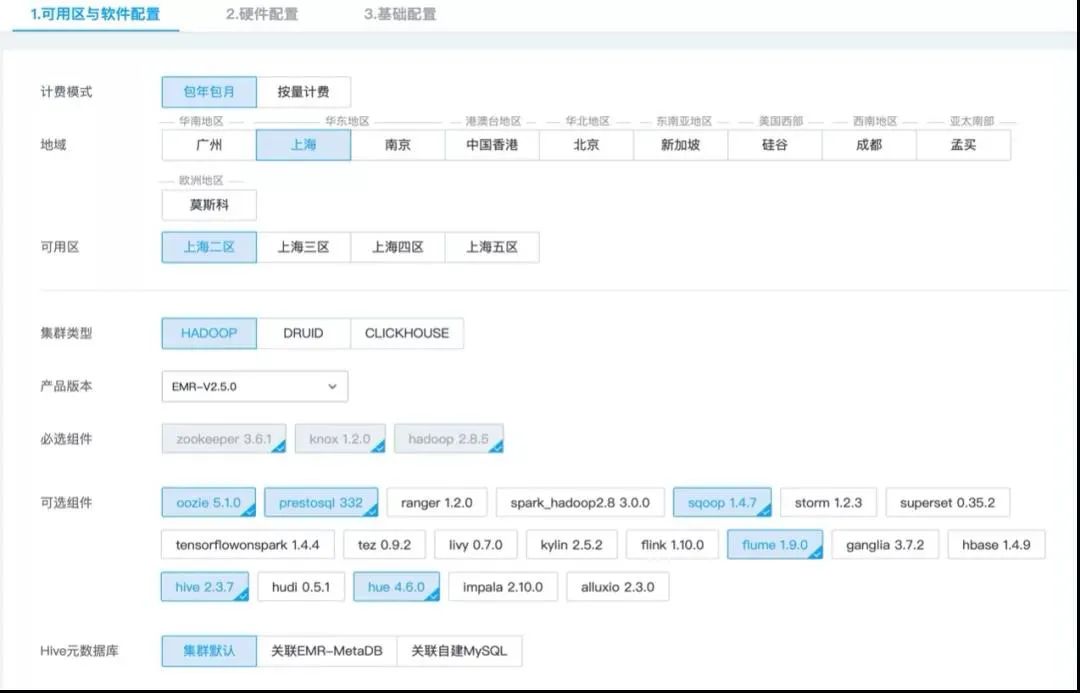
HBase組件
如果生產(chǎn)環(huán)境,服務(wù)器配置可根據(jù)實際情況選擇,示例中選擇了低配服務(wù)器,網(wǎng)絡(luò)需要選擇之前創(chuàng)建好的VPC網(wǎng)絡(luò),始終保持服務(wù)組件在同一VPC下。
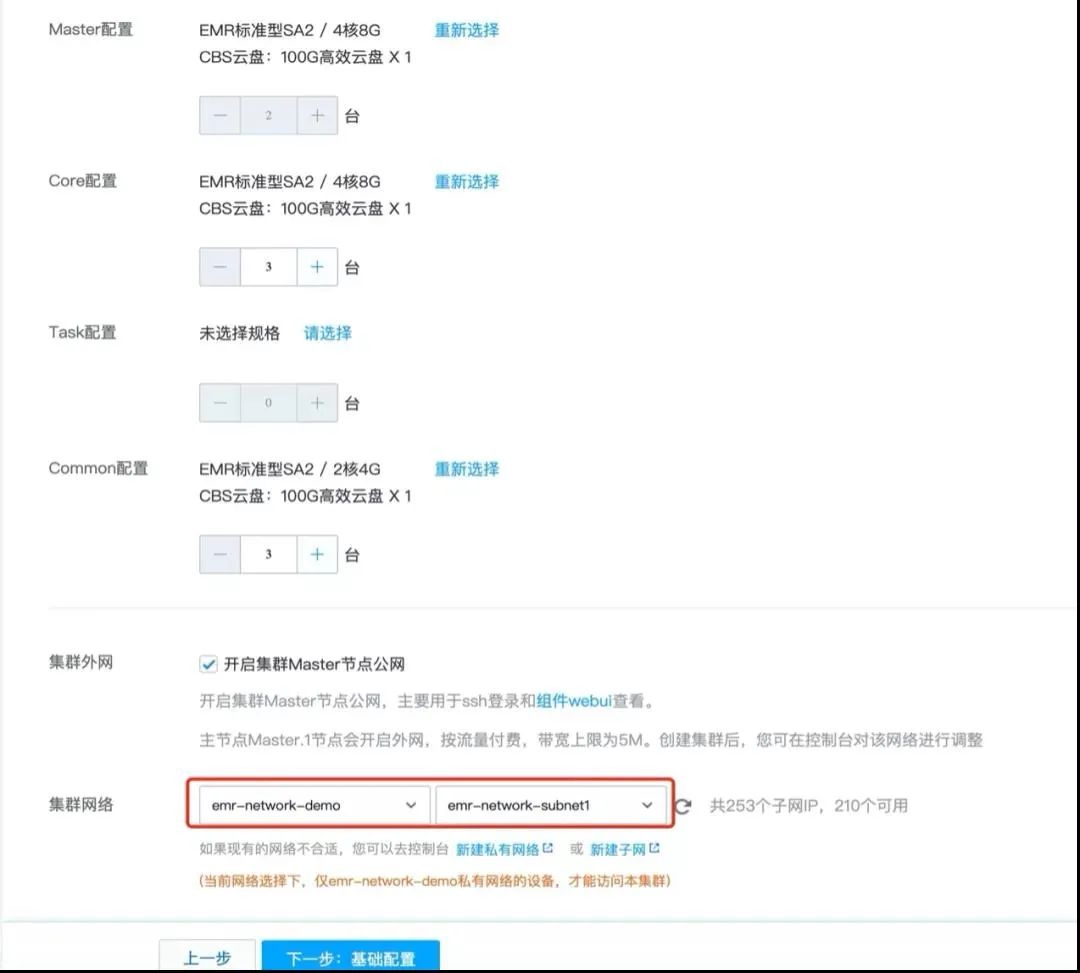 網(wǎng)絡(luò)選擇
進(jìn)入HBase Master節(jié)點
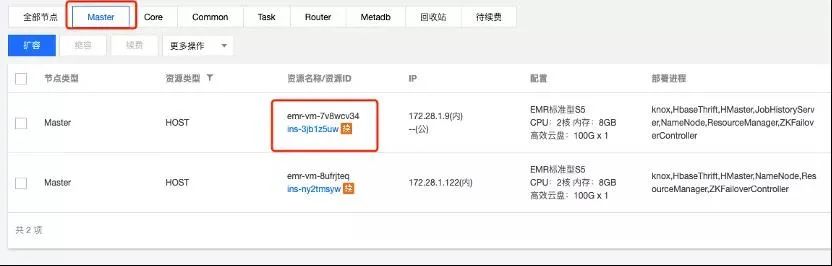 HBaseMaster節(jié)點
點擊登錄進(jìn)入服務(wù)器
創(chuàng)建Hbase表
[]create ‘dim_hbase’, ‘cf’
(五)創(chuàng)建云數(shù)據(jù)庫MySQL
云數(shù)據(jù)庫MySQL(TencentDB for MySQL)是騰訊云基于開源數(shù)據(jù)庫MySQL專業(yè)打造的高性能分布式數(shù)據(jù)存儲服務(wù),讓用戶能夠在云中更輕松地設(shè)置、操作和擴(kuò)展關(guān)系數(shù)據(jù)庫。
(頁面地址:https://console.cloud.tencent.com/cdb)
新建MySQL服務(wù)的頁面需要注意選擇的網(wǎng)絡(luò)是之前創(chuàng)建好的:
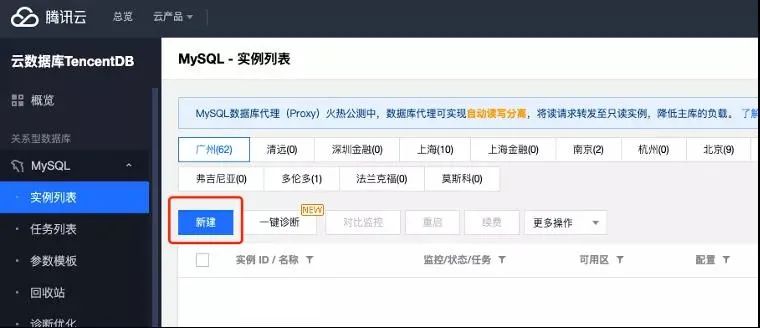 MySQL創(chuàng)建
創(chuàng)建完MySQL服務(wù)后,需要修改binlog參數(shù),如圖修改為FULL(默認(rèn)值為MINIMAL)
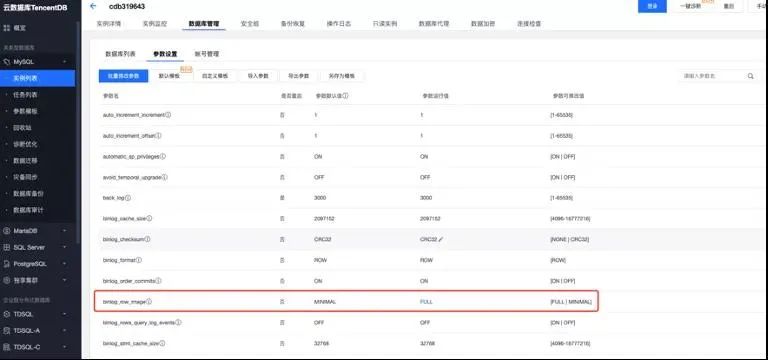 修改參數(shù)
修改完參數(shù)后,登陸MySQL創(chuàng)建示例所需要的數(shù)據(jù)庫和數(shù)據(jù)庫表。
登陸MySQL云數(shù)據(jù)庫
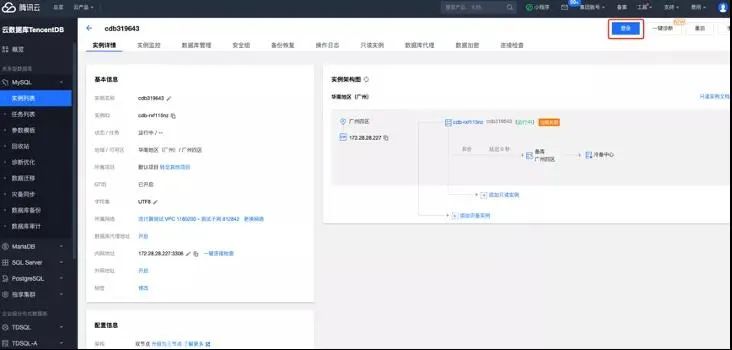 登錄
登錄
新建數(shù)據(jù)庫
打開SQL窗口或可視化頁面創(chuàng)建數(shù)據(jù)庫和表:
CREATE DATABASE livedb; --創(chuàng)建數(shù)據(jù)庫列表(六)創(chuàng)建商業(yè)智能分析
商業(yè)智能分析(Business Intelligence,BI)支持自服務(wù)數(shù)據(jù)準(zhǔn)備、探索式分析和企業(yè)級管控,是新一代的敏捷自助型BI服務(wù)平臺。只需幾分鐘,您就可以在云端輕松自如地完成數(shù)據(jù)分析、業(yè)務(wù)數(shù)據(jù)探查、報表制作等一系列數(shù)據(jù)可視化操作。便捷的拖拉拽式交互操作方式,讓您無需依賴IT人員,無需擔(dān)心試錯成本,快速洞察數(shù)據(jù)背后的關(guān)聯(lián)、趨勢和邏輯。
(頁面地址:https://cloud.tencent.com/product/bi)
購買商業(yè)智能分析
需要主賬號購買資源,購買時需根據(jù)創(chuàng)建的子賬號數(shù)來進(jìn)行購買。
 BI購買
BI購買
子用戶提出申請:
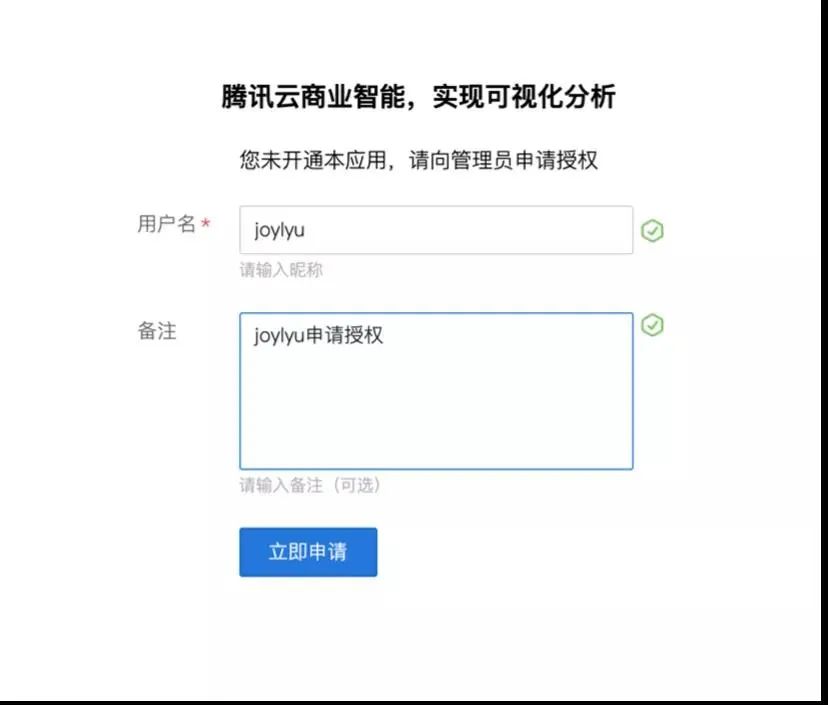 子用戶申請
子用戶申請
主賬號審核通過。并給子用戶授予添加數(shù)據(jù)源,創(chuàng)建數(shù)據(jù)集,查看報告的權(quán)限。
添加MySQL數(shù)據(jù)源
這里選用開啟外網(wǎng)方式連接,更多連接方式見:
(https://cloud.tencent.com/document/product/590/19294)
打開購買的MySQL實例,開啟外網(wǎng):
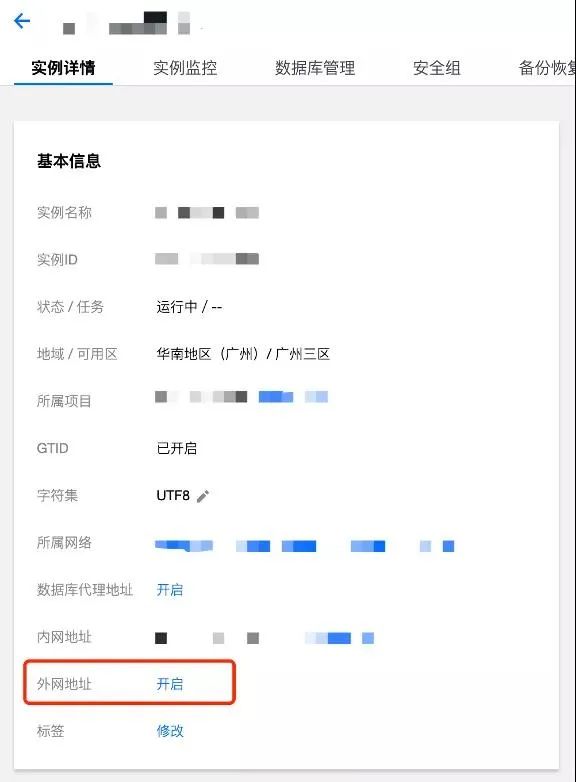 MySQL開啟外網(wǎng)
將SaaS BI(119.29.66.144:3306)添加到MySQL數(shù)據(jù)庫安全組
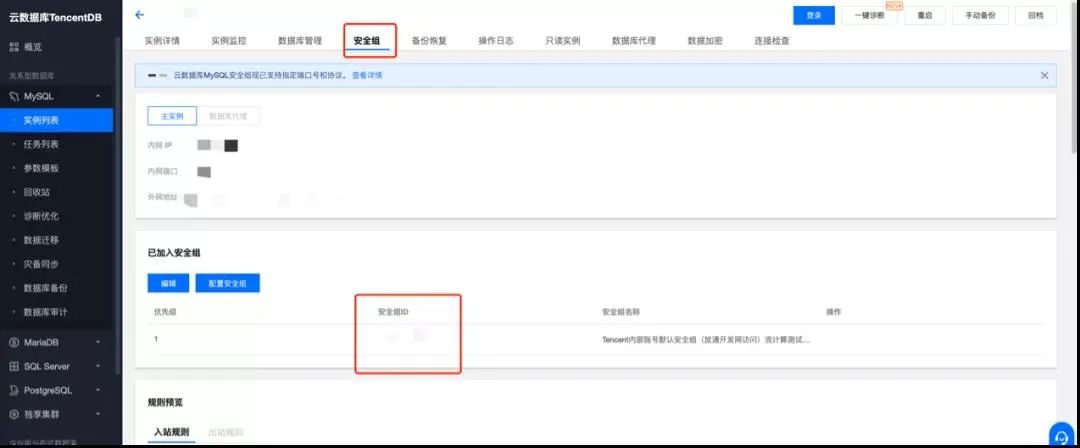
添加安全組1
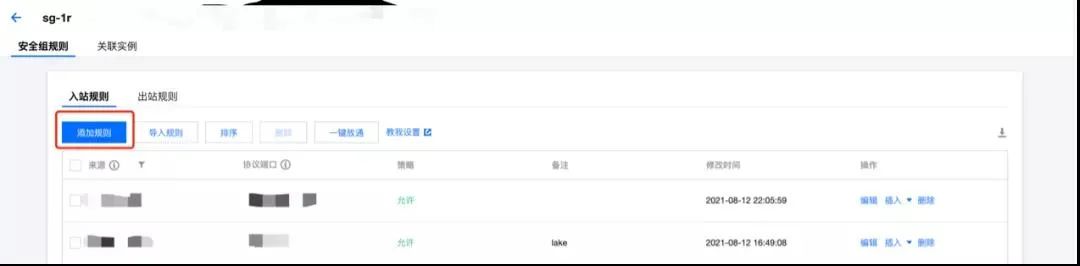
添加安全組2
注意添加的是MySQL3306端口,不是外網(wǎng)映射的端口。
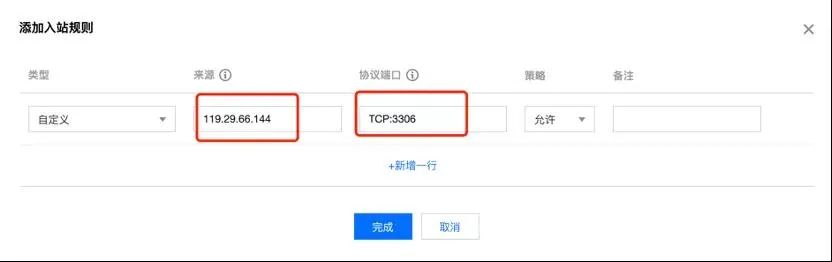
創(chuàng)建MySQL賬戶并配置權(quán)限
創(chuàng)建賬戶,并設(shè)置賬號密碼,注意主機(jī)IP設(shè)置為%:

創(chuàng)建賬戶1
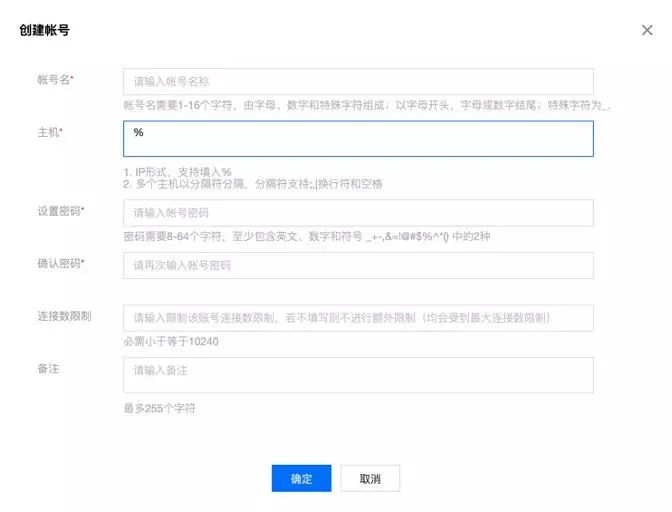 創(chuàng)建賬戶2
設(shè)置賬號權(quán)限:
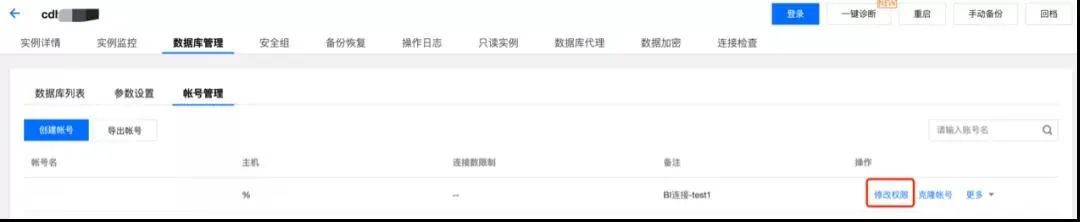 設(shè)置權(quán)限1
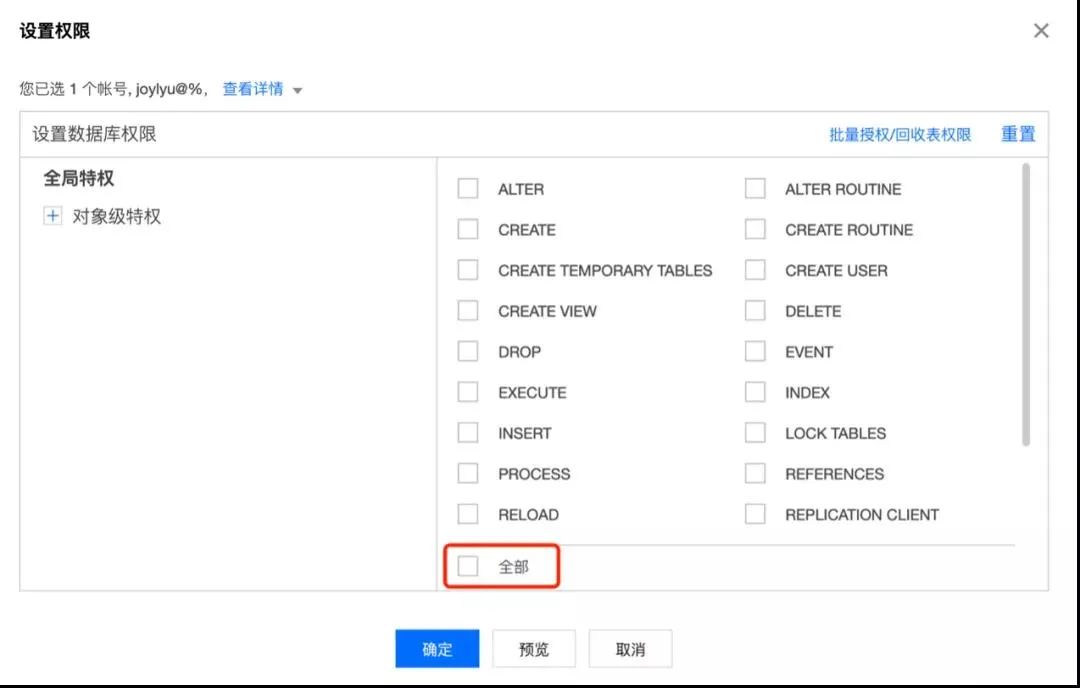 設(shè)置權(quán)限2
進(jìn)入智能商業(yè)分析,連接MySQL數(shù)據(jù)庫。添加數(shù)據(jù)源->MySQL,填寫完成后點擊測試連接。
三、方案實現(xiàn)
接下來通過案例為您介紹如何利用流計算服務(wù)Oceanus實現(xiàn)視頻直播數(shù)字化運(yùn)營的實時可視化數(shù)據(jù)處理與分析。
(一)解決方案
業(yè)務(wù)目標(biāo)
這里只列取以下3種統(tǒng)計指標(biāo):
全站觀看直播用戶分布;
禮物總和統(tǒng)計各模塊;
禮物統(tǒng)計源數(shù)據(jù)格式。
事件log:live_streaming_log(topic):
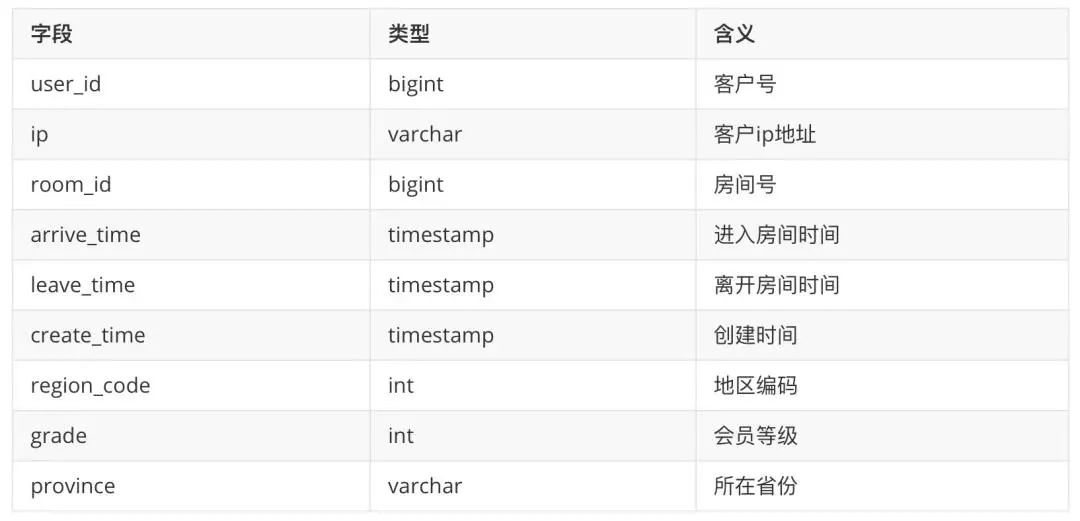
Ckafka內(nèi)部采用json格式存儲,展現(xiàn)出來的數(shù)據(jù)如下所示:
{'user_id': 3165, 'ip': '123.0.0.105', 'room_id': 20210813, 'arrive_time': '2021-08-16 09:48:01', 'create_time': '2021-08-16 09:48:01', 'leave_time': '2021-08-16 09:48:01', 'region': 1122, 'grade': 1, 'province': '浙江'}
禮物記錄:live_gift_log(topic名):
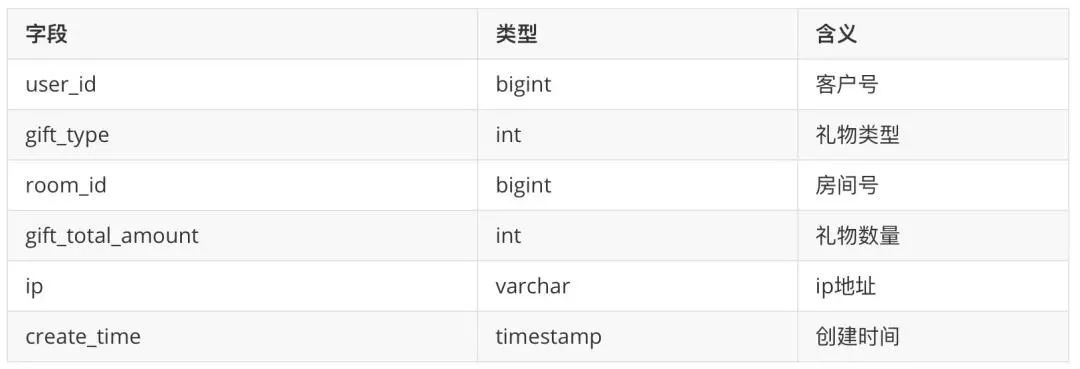
{'user_id': 3994, 'gift_type': 3, 'gift_total_amount': 28, 'room_id': 20210813, 'ip': '123.0.0.105', 'create_time': '2021-08-16 09:46:51', 'update_time': '2021-08-16 09:46:51'}
模塊記錄表:live_module_roomid(Hbase維表):

Oceanus SQL作業(yè)編寫
全網(wǎng)觀看直播用戶分布。(需提前在MySQL建表)
定義source:
CREATE TABLE `live_streaming_log_source ` (`user_id` BIGINT,`ip` VARCHAR,`room_id` BIGINT,`arrive_time` TIMESTAMP,`leave_time` TIMESTAMP,`create_time` TIMESTAMP,`region_code` INT,`grade` INT,`province` VARCHAR) WITH ('connector' = 'kafka','topic' = 'live_streaming_log','scan.startup.mode' = 'earliest-offset','properties.bootstrap.servers' = '172.28.28.13:9092','properties.group.id' = 'joylyu-consumer-2','format' = 'json','json.ignore-parse-errors' = 'false','json.fail-on-missing-field' = 'false');
定義sink:
CREATE TABLE `live_streaming_log_sink` (`user_id` BIGINT,`ip` VARCHAR,`room_id` BIGINT,`arrive_time` TIMESTAMP,`leave_time` TIMESTAMP,`create_time` TIMESTAMP,`region_code` INT,`grade` INT,`province` VARCHAR,primary key(`user_id`, `ip`,`room_id`,`arrive_time`) not enforced) WITH ('connector' = 'jdbc','url' ='jdbc:mysql://172.28.28.227:3306/livedb?rewriteBatchedStatements=true&serverTimezon=Asia/Shanghai','table-name' = 'live_streaming_log','username' = 'root','password' = 'xxxxx','sink.buffer-flush.max-rows' = '5000','sink.buffer-flush.interval' = '2s','sink.max-retries' = '3');
業(yè)務(wù)邏輯:
INSERT INTO `live_streaming_log_sink`SELECT `*` FROM `live_streaming_log_source`;
禮物總和統(tǒng)計(需提前在MySQL建表)
定義source:
CREATE TABLE ` live_gift_total_source` (`user_id` VARCHAR,`gift_type` VARCHAR,`gift_total_amount` BIGINT,`ip` VARCHAR,`create_time` VARCHAR) WITH ('connector' = 'kafka','topic' = 'live_gift_total','scan.startup.mode' = 'earliest-offset','properties.bootstrap.servers' = '172.28.28.13:9092','properties.group.id' = 'joylyu-consumer-1','format' = 'json','json.ignore-parse-errors' = 'false','json.fail-on-missing-field' = 'false');
定義sink:
CREATE TABLE `live_gift_total_sink` (`gift_type` VARCHAR,`gift_total_amount` BIGINT,primary key(`user_id`, `gift_type`) not enforced) WITH ('connector' = 'jdbc','url' = 'jdbc:mysql://172.28.28.227:3306/livedb?rewriteBatchedStatements=true&serverTimezone=Asia/Shanghai','table-name' = 'live_gift_total','username' = 'root','password' = 'xxxxx','sink.buffer-flush.max-rows' = '5000','sink.buffer-flush.interval' = '2s','sink.max-retries' = '3');
業(yè)務(wù)邏輯:
INSERT INTO `live_gift_total_sink`SELECT `gift_type`,SUM(`gift_total_amount`) as `gift_total_amount_all`FROM `live_gift_total_source`GROUP BY `gift_type`;
各模塊禮物統(tǒng)計(需提前在MySQL建表)
定義source:
CREATE TABLE `live_gift_total_source` (`user_id` VARCHAR,`gift_type` VARCHAR,`gift_total_amount` BIGINT,`ip` VARCHAR,`create_time` VARCHAR,proc_time AS PROCTIME()) WITH ('connector' = 'kafka','topic' = 'live_gift_total','scan.startup.mode' = 'earliest-offset','properties.bootstrap.servers' = '172.28.28.13:9092','properties.group.id' = 'joylyu-consumer-1','format' = 'json','json.ignore-parse-errors' = 'false','json.fail-on-missing-field' = 'false');
定義Hbase維表:
CREATE TABLE `dim_hbase` (`rowkey` STRING,`cf` ROW <`module_id` STRING>,PRIMARY KEY (`rowkey`) NOT ENFORCED) WITH ('connector' = 'hbase-1.4','table-name' = 'dim_hbase','zookeeper.quorum' = '用戶自己的hbase服務(wù)器zookeeper地址');
定義sink:
CREATE TABLE `module_gift_total_sink` (`module_id` BIGINT,`module_gift_total_amount` BIGINT,primary key(`module_id`) not enforced) WITH ('connector' = 'jdbc','url' = 'jdbc:mysql://172.28.28.227:3306/livedb?rewriteBatchedStatements=true&serverTimezone=Asia/Shanghai','table-name' = 'live_gift_total','username' = 'root','password' = 'xxxxx','sink.buffer-flush.max-rows' = '5000','sink.buffer-flush.interval' = '2s','sink.max-retries' = '3');
業(yè)務(wù)邏輯:
INSERT INTO `module_gift_total_sink`SELECT`b`.`cf`.`module_id`,SUM(`a`.`gift_total_amount`) AS `module_gift_total_amount`FROM `live_gift_total_source` AS `a`LEFT JOIN `dim_hbase` AS `b` for SYSTEM_TIME as of `a`.`proc_time`ON `a`.`room_id` = `b`.`rowkey`GROUP BY `b`.`cf`.`module_id`;
(二)實時大屏可視化展示
添加數(shù)據(jù)源
進(jìn)入商業(yè)智能分析界面,點擊添加數(shù)據(jù)源->MySQL,按上面方法連接到指定MySQL數(shù)據(jù)庫,點擊保存。
創(chuàng)建數(shù)據(jù)集
點擊創(chuàng)建數(shù)據(jù)集->SQL數(shù)據(jù)集(可根據(jù)實際業(yè)務(wù)場景選擇其他數(shù)據(jù)集),從剛才的數(shù)據(jù)源中添加數(shù)據(jù)集,點擊保存。
制作報告
新建報告。點擊制作報告->新建報告(可選擇任意模版),拖拽組件到中間空白處完成報告的制作。
設(shè)置實時刷新。點擊左上角報告設(shè)置->高級,勾選獲取實時數(shù)據(jù),刷新間隔設(shè)置為3s(根據(jù)實際業(yè)務(wù)情況自行選擇),這樣可以根據(jù)MysQL數(shù)據(jù)源間隔3s一次自動刷新報告。完成之后點擊保存。具體步驟見:
(https://cloud.tencent.com/document/product/590/19753)
查看報告
點擊查看報告,選擇剛才保存的報告,可以動態(tài)展示報告。注:此報告只做演示使用,可以參考:
(https://cloud.tencent.com/document/product/590/19784)
如下圖所示,大屏中總共6個圖表。
圖表1:用戶地區(qū)分布。表示觀看直播客戶在全國范圍內(nèi)的地區(qū)分布;
圖表2:各級別會員人數(shù)。表示各個會員等級的總?cè)藬?shù);
圖表3:禮物類型總和。表示收到各禮物類型的總和;
圖表4:最近6h禮物總數(shù)統(tǒng)計。表示最近6小時收到的禮物總計和;
圖表5:刷禮物排行前10。表示刷禮物最多的10個客戶;
圖表6:在線人數(shù)。當(dāng)天每個時間段進(jìn)入直播間的人數(shù)。
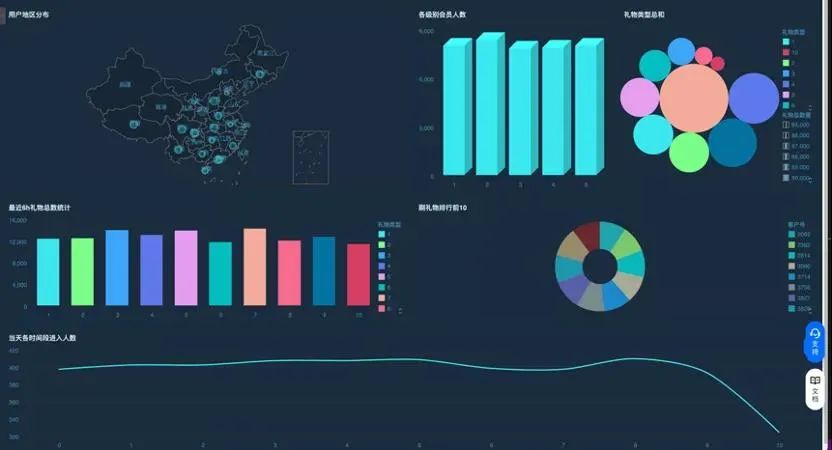
實時大屏
四、總結(jié)
通過騰訊云CKafka組件采集數(shù)據(jù),在兼容Flink開源版本的流計算Oceanus中實時進(jìn)行維表關(guān)聯(lián)等加工處理,將加工后的數(shù)據(jù)存儲在MySQL等數(shù)據(jù)庫中,最終通過商業(yè)智能分析BI組件實時刷新MySQL的數(shù)據(jù)繪制出了實時大屏,得到了實時刷新的效果。這個方案在數(shù)據(jù)庫表設(shè)計時為了簡便易懂做了簡化處理,重點打通騰訊云產(chǎn)品展現(xiàn)整個方案。限于個人水平,如有理解有誤之處歡迎批評指正。
(作者:spiderwu,騰訊CSIG高級工程師)

 點擊「閱讀原文」,了解騰訊云流計算Oceanus更多信息~