
目標檢測 YOLOv5訓練操作
1. 數(shù)據(jù)配置
1.1. 工具安裝
Labelimg 是一款開源的數(shù)據(jù)標注工具,可以標注三種格式:
1.VOC標簽格式,保存為xml文件
2.yolo標簽格式,保存為txt文件
3.createML標簽格式,保存為json格式
安裝也比較簡單:
$ pip3 install labelimg -i https://pypi.tuna.tsinghua.edu.cn/simple1.2. 數(shù)據(jù)準備
1.2.1. 建立文件夾和基礎(chǔ)文件
先在主目錄建立一個 resources 文件夾,專門用來存放總的訓練數(shù)據(jù)
然后在該目錄下建立一個 VOC_DIY 文件夾,用于這次訓練的數(shù)據(jù)文件夾
在這里面建立一個 JPEGImages 文件夾存放需要打標簽的圖片文件
再建立一個 Annotations 文件夾存放標注的標簽文件
最后創(chuàng)建一個名為 predefined_classes.txt 的 txt 文件來存放所要標注的類別名稱
最終結(jié)構(gòu)如下:

1.2.2. 編輯類別種類
假設(shè)任務(wù)是需要一個檢測人和手表的任務(wù),那么目標只有兩個
先編輯 predefined_classes.txt 文件,定義的類別種類:
personwatche
1.2.3. 放置標注圖片
然后把待標注的圖片放在 JPEGImages 文件夾中,這里演示只用10張:
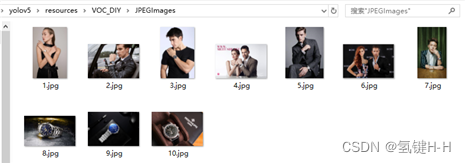
實際應(yīng)用時需要更多更好的數(shù)據(jù),數(shù)量和質(zhì)量都很重要
1.3. 數(shù)據(jù)標注
路徑切換到y(tǒng)olov5\resources\VOC_DIY數(shù)據(jù)集文件夾中來
在該地址啟動 labelimg
$ labelimg JPEGImages predefined_classes.txt基礎(chǔ)的配置和使用參考網(wǎng)上隨便搜一下就好了,如《labelImg使用教程》(https://blog.csdn.net/weixin_42899627/article/details/109000509)
主要設(shè)置:
?Auto Save mode:切換到下一張圖的時候,會自動保存標簽。
?Display Labels:顯示標注框和標簽
?Advanced Mode:標注的十字架懸浮在窗口上
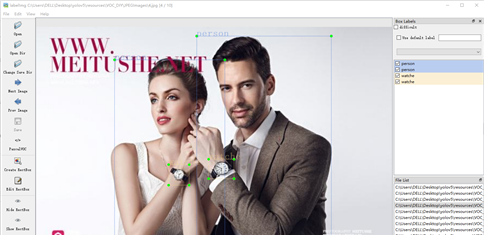
標注好了之后,可以在 Annotations 文件夾中查看:
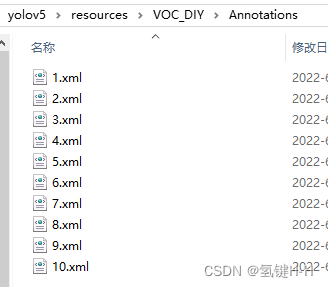
1.4. 數(shù)據(jù)轉(zhuǎn)換
目標檢測的數(shù)據(jù)集資源標簽的格式一般都是VOC(xml格式)
剛剛labelimg默認配置的也是,不過也可以自己設(shè)置為 yolo(txt格式)
現(xiàn)在就需要對xml格式的標簽文件轉(zhuǎn)換為txt文件
同時將數(shù)據(jù)集需要劃分為訓練集和驗證集
路徑切回工程主目錄,建立一個 voc2yolo.py 文件實現(xiàn)以上所述功能
import xml.etree.ElementTree as ETimport osimport randomfrom shutil import rmtree, copyfileclasses = ["person", "watche"]TRAIN_RATIO = 0.8VOC_PATH = 'resources/VOC_DIY/'CLEAR_HISTORICAL_DATA = Truedef convert(size, box):dw = 1. / size[0]dh = 1. / size[1]x = (box[0] + box[1]) / 2.0y = (box[2] + box[3]) / 2.0w = box[1] - box[0]h = box[3] - box[2]x = x * dww = w * dwy = y * dhh = h * dhreturn (x, y, w, h)def convert_annotation(image_id):in_file = open(VOC_PATH + 'Annotations/%s.xml' % image_id)out_file = open(VOC_PATH + 'YOLOLabels/%s.txt' % image_id, 'w')tree = ET.parse(in_file)root = tree.getroot()size = root.find('size')w = int(size.find('width').text)h = int(size.find('height').text)for obj in root.iter('object'):difficult = obj.find('difficult').textcls = obj.find('name').textif cls not in classes or int(difficult) == 1:continuecls_id = classes.index(cls)xmlbox = obj.find('bndbox')b = (float(xmlbox.find('xmin').text), float(xmlbox.find('xmax').text), float(xmlbox.find('ymin').text), float(xmlbox.find('ymax').text))bb = convert((w, h), b)out_file.write(str(cls_id) + " " + " ".join([str(a) for a in bb]) + '\n')in_file.close()out_file.close()work_sapce_dir = os.path.join(os.getcwd(), VOC_PATH).replace('/','\\')annotation_dir = os.path.join(work_sapce_dir, "Annotations/").replace('/','\\')image_dir = os.path.join(work_sapce_dir, "JPEGImages/").replace('/','\\')yolo_labels_dir = os.path.join(work_sapce_dir, "YOLOLabels/").replace('/','\\')yolov5_images_dir = os.path.join(work_sapce_dir, "images/").replace('/','\\')yolov5_labels_dir = os.path.join(work_sapce_dir, "labels/").replace('/','\\')yolov5_images_train_dir = os.path.join(yolov5_images_dir, "train/").replace('/','\\')yolov5_images_test_dir = os.path.join(yolov5_images_dir, "val/").replace('/','\\')yolov5_labels_train_dir = os.path.join(yolov5_labels_dir, "train/").replace('/','\\')yolov5_labels_test_dir = os.path.join(yolov5_labels_dir, "val/").replace('/','\\')dir_list = [yolo_labels_dir, yolov5_images_dir, yolov5_labels_dir,yolov5_images_train_dir, yolov5_images_test_dir,yolov5_labels_train_dir, yolov5_labels_test_dir]for dir in dir_list:if not os.path.isdir(dir):os.mkdir(dir)elif CLEAR_HISTORICAL_DATA is True:rmtree(dir)os.mkdir(dir)print("Clean {}".format(dir))train_file = open(os.path.join(work_sapce_dir, "yolov5_train.txt"), 'w')test_file = open(os.path.join(work_sapce_dir, "yolov5_val.txt"), 'w')train_file.close()test_file.close()train_file = open(os.path.join(work_sapce_dir, "yolov5_train.txt"), 'a')test_file = open(os.path.join(work_sapce_dir, "yolov5_val.txt"), 'a')list_imgs = os.listdir(image_dir)list_imgs.sort()random.shuffle(list_imgs)imgs_len = len(list_imgs)for i in range(0, imgs_len):path = os.path.join(image_dir, list_imgs[i])if os.path.isfile(path):image_path = image_dir + list_imgs[i]voc_path = list_imgs[i](nameWithoutExtention, extention) = os.path.splitext(os.path.basename(image_path))(voc_nameWithoutExtention, voc_extention) = os.path.splitext(os.path.basename(voc_path))annotation_name = nameWithoutExtention + '.xml'annotation_path = os.path.join(annotation_dir, annotation_name)label_name = nameWithoutExtention + '.txt'label_path = os.path.join(yolo_labels_dir, label_name)if i <= TRAIN_RATIO * imgs_len:if os.path.exists(annotation_path):train_file.write(image_path + '\n')convert_annotation(nameWithoutExtention)copyfile(image_path, yolov5_images_train_dir + voc_path)copyfile(label_path, yolov5_labels_train_dir + label_name)else:if os.path.exists(annotation_path):test_file.write(image_path + '\n')convert_annotation(nameWithoutExtention)copyfile(image_path, yolov5_images_test_dir + voc_path)copyfile(label_path, yolov5_labels_test_dir + label_name)print("\r進度:{:3d} %".format(int((i + 1) / imgs_len * 100)), end='', flush=True)train_file.close()test_file.close()input("\n輸入任意鍵退出")
運行該文件就可以得到所需的訓練集和驗證集了
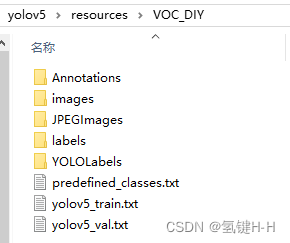
1.5. 修改配置
1.5.1. 修改數(shù)據(jù)配置文件
編輯data目錄下的相應(yīng)的yaml文件
找到目錄下的voc.yaml文件,將該文件復制一份,將復制的文件重命名為watche.yaml
根據(jù)項目實況保留有用信息:
path: ./resources/VOC_DIYtrain: # train images (relative to 'path') 8 images- images/trainval: # val images (relative to 'path') 2 images- images/val# Classesnc: 2 # number of classesnames: ['person', 'watche'] # class names
1.5.2. 修改模型配置文件
由于該項目使用的是yolov5s.pt這個預訓練權(quán)重,所以要使用models目錄下的yolov5s.yaml文件中的相應(yīng)參數(shù)
將yolov5s.yaml文件復制一份,然后將其重命名為yolov5_watche.yaml
根據(jù)項目實況改個;類型數(shù)量就好了:
# nc: 80 # number of classesnc: 2 # number of classes
2. 訓練配置
訓練是利用 train.py 文件
2.1. 參數(shù)設(shè)置
同《YOLOv5 使用入門》一樣,主要還是看參數(shù)設(shè)置:
def parse_opt(known=False):parser = argparse.ArgumentParser()parser.add_argument('--weights', type=str, default=ROOT / 'yolov5s.pt', help='initial weights path')parser.add_argument('--cfg', type=str, default='', help='model.yaml path')parser.add_argument('--data', type=str, default=ROOT / 'data/coco128.yaml', help='dataset.yaml path')parser.add_argument('--hyp', type=str, default=ROOT / 'data/hyps/hyp.scratch-low.yaml', help='hyperparameters path')parser.add_argument('--epochs', type=int, default=300)parser.add_argument('--batch-size', type=int, default=16, help='total batch size for all GPUs, -1 for autobatch')parser.add_argument('--imgsz', '--img', '--img-size', type=int, default=640, help='train, val image size (pixels)')parser.add_argument('--rect', action='store_true', help='rectangular training')parser.add_argument('--resume', nargs='?', const=True, default=False, help='resume most recent training')parser.add_argument('--nosave', action='store_true', help='only save final checkpoint')parser.add_argument('--noval', action='store_true', help='only validate final epoch')parser.add_argument('--noautoanchor', action='store_true', help='disable AutoAnchor')parser.add_argument('--noplots', action='store_true', help='save no plot files')parser.add_argument('--evolve', type=int, nargs='?', const=300, help='evolve hyperparameters for x generations')parser.add_argument('--bucket', type=str, default='', help='gsutil bucket')parser.add_argument('--cache', type=str, nargs='?', const='ram', help='--cache images in "ram" (default) or "disk"')parser.add_argument('--image-weights', action='store_true', help='use weighted image selection for training')parser.add_argument('--device', default='', help='cuda device, i.e. 0 or 0,1,2,3 or cpu')parser.add_argument('--multi-scale', action='store_true', help='vary img-size +/- 50%%')parser.add_argument('--single-cls', action='store_true', help='train multi-class data as single-class')parser.add_argument('--optimizer', type=str, choices=['SGD', 'Adam', 'AdamW'], default='SGD', help='optimizer')parser.add_argument('--sync-bn', action='store_true', help='use SyncBatchNorm, only available in DDP mode')parser.add_argument('--workers', type=int, default=8, help='max dataloader workers (per RANK in DDP mode)')parser.add_argument('--project', default=ROOT / 'runs/train', help='save to project/name')parser.add_argument('--name', default='exp', help='save to project/name')parser.add_argument('--exist-ok', action='store_true', help='existing project/name ok, do not increment')parser.add_argument('--quad', action='store_true', help='quad dataloader')parser.add_argument('--cos-lr', action='store_true', help='cosine LR scheduler')parser.add_argument('--label-smoothing', type=float, default=0.0, help='Label smoothing epsilon')parser.add_argument('--patience', type=int, default=100, help='EarlyStopping patience (epochs without improvement)')parser.add_argument('--freeze', nargs='+', type=int, default=[0], help='Freeze layers: backbone=10, first3=0 1 2')parser.add_argument('--save-period', type=int, default=-1, help='Save checkpoint every x epochs (disabled if < 1)')parser.add_argument('--local_rank', type=int, default=-1, help='DDP parameter, do not modify')# Weights & Biases argumentsparser.add_argument('--entity', default=None, help='W&B: Entity')parser.add_argument('--upload_dataset', nargs='?', const=True, default=False, help='W&B: Upload data, "val" option')parser.add_argument('--bbox_interval', type=int, default=-1, help='W&B: Set bounding-box image logging interval')parser.add_argument('--artifact_alias', type=str, default='latest', help='W&B: Version of dataset artifact to use')opt = parser.parse_known_args()[0] if known else parser.parse_args()return opt

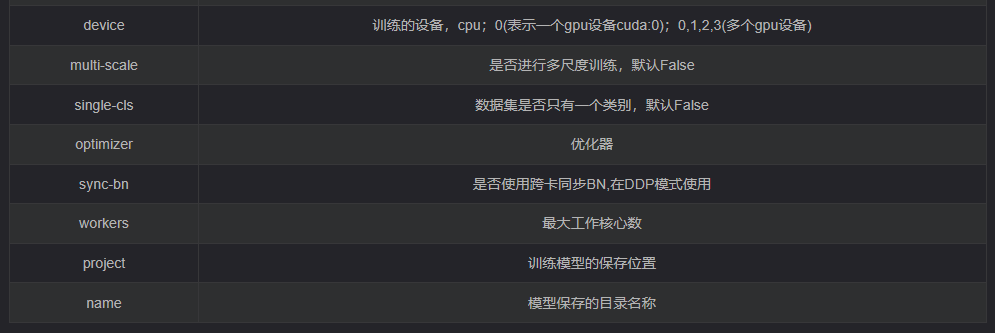
將權(quán)重路徑、權(quán)重配置和數(shù)據(jù)集配置文件路徑修改
parser.add_argument('--weights', type=str, default=ROOT / 'weights/yolov5s.pt', help='initial weights path')parser.add_argument('--cfg', type=str, default=ROOT / 'models/yolov5s_watche.yaml', help='model.yaml path')parser.add_argument('--data', type=str, default=ROOT / 'data/watche.yaml', help='dataset.yaml path')
還有需要改動的一般就是訓練次數(shù)、批次大小和工作核心數(shù)了
parser.add_argument('--epochs', type=int, default=300)parser.add_argument('--batch-size', type=int, default=16, help='total batch size for all GPUs, -1 for autobatch')parser.add_argument('--workers', type=int, default=8, help='max dataloader workers (per RANK in DDP mode)')
2.2. 執(zhí)行訓練
配置好后,直接執(zhí)行
$ python train.py期間可以用 tensorboard 查看參數(shù)
$ tensorboard --logdir=runs/train復制顯示的網(wǎng)址地址,在瀏覽器打開查看訓練過程
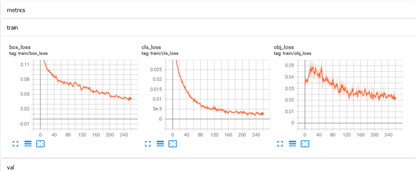
3. 檢測效果
訓練過程數(shù)據(jù)和模型存放在 runs\train\exp 文件夾中
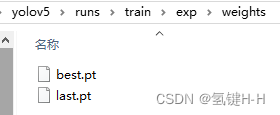
一個為最優(yōu)的權(quán)重文件 best.pt,一個為最后一輪訓練的權(quán)重文件 last.pt
在訓練過程中大小在50M左右,不過訓完成后處理為14M左右
參考 《YOLOv5 使用入門》(https://joveh-h.blog.csdn.net/article/details/125206372),利用驗證集的圖片數(shù)據(jù)、剛訓練好的模型和數(shù)據(jù)集配置進行檢測:
$ python detect.py --source=resources/VOC_DIY/images/val/7.jpg --weights=runs/train/exp/weights/best.pt --data=data/watche.yaml效果還是可以的

cls:1, xywh:[0.7656546235084534, 0.6132478713989258, 0.14231498539447784, 0.06410256773233414], conf:0.77cls:0, xywh:[0.4962049424648285, 0.5197649598121643, 0.7267552018165588, 0.6314102411270142], conf:0.78
版權(quán)聲明:本文為CSDN博主「氫鍵H-H」的原創(chuàng)文章,遵循CC 4.0 BY-SA版權(quán)協(xié)議,轉(zhuǎn)載請附上原文出處鏈接及本聲明。
原文鏈接:
https://blog.csdn.net/qq_32618327/article/details/125225366
編輯:古月居
聲明:部分內(nèi)容來源于網(wǎng)絡(luò),僅供讀者學習、交流之目的文章版權(quán)歸原作者所有。如有不妥,請聯(lián)系刪除。