
短信驗(yàn)證碼登錄 流程詳解
點(diǎn)擊上方 Java學(xué)習(xí)之道,選擇 設(shè)為星標(biāo)
來(lái)源: blog.csdn.net/classabcd/article/details/82464582
作者: classabcd
Part1業(yè)務(wù)流程
構(gòu)造手機(jī)驗(yàn)證碼:使用random對(duì)象生成要求的隨機(jī)數(shù)作為驗(yàn)證碼,例如4位驗(yàn)證碼:1000~9999之間隨機(jī)數(shù); 使用接口向短信平臺(tái)發(fā)送手機(jī)號(hào)和驗(yàn)證碼數(shù)據(jù),然后短信平臺(tái)再把驗(yàn)證碼發(fā)送到制定手機(jī)號(hào)上,接口參數(shù)一般包括:目標(biāo)手機(jī)號(hào),隨機(jī)驗(yàn)證碼(或包含失效時(shí)間),平臺(tái)接口地址,平臺(tái)口令; 保存接口返回的信息(一般為json文本數(shù)據(jù),然后需轉(zhuǎn)換為json對(duì)象格式); 將手機(jī)號(hào)--驗(yàn)證碼、操作時(shí)間存入Session中,作為后面驗(yàn)證使用; 接收用戶(hù)填寫(xiě)的驗(yàn)證碼及其他數(shù)據(jù); 對(duì)比提交的驗(yàn)證碼與Session中的驗(yàn)證碼是否一致,同時(shí)判斷提交動(dòng)作是否在有效期內(nèi); 驗(yàn)證碼正確且在有效期內(nèi),請(qǐng)求通過(guò),處理相應(yīng)的業(yè)務(wù)。
Part2依賴(lài)
首先添加一個(gè)jar包, 工具類(lèi)會(huì)用到
<dependency>
??<groupId>commons-codecgroupId>
??<artifactId>commons-codecartifactId>
??<version>1.11version>
dependency>
Part3config文檔
我這里只是編寫(xiě)一個(gè)簡(jiǎn)單的短信驗(yàn)證功能,要是用其他的語(yǔ)音驗(yàn)證。。。。等等需要去秒滴云官方下載文檔,下面是編寫(xiě)的一個(gè)config文檔,專(zhuān)門(mén)存放一些參數(shù)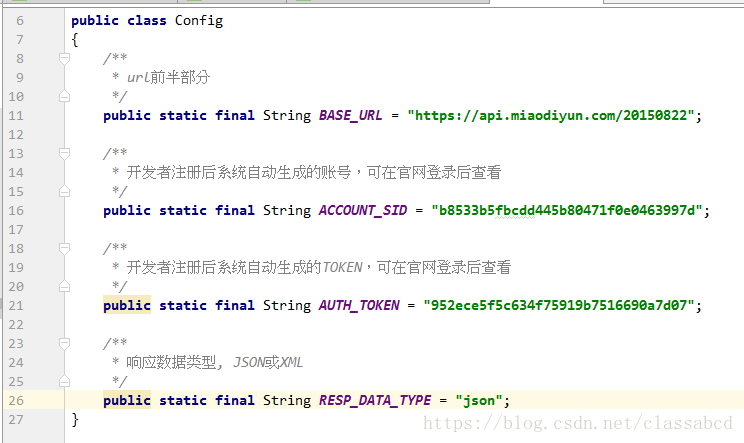
Part4http請(qǐng)求工具類(lèi)
public?class?HttpUtil
{
???/**
????*?構(gòu)造通用參數(shù)timestamp、sig和respDataType
????*?
????*?@return
????*/
???public?static?String?createCommonParam()
???{
??????//?時(shí)間戳
??????SimpleDateFormat?sdf?=?new?SimpleDateFormat("yyyyMMddHHmmss");
??????String?timestamp?=?sdf.format(new?Date());

??????//?簽名
??????String?sig?=?DigestUtils.md5Hex(Config.ACCOUNT_SID?+?Config.AUTH_TOKEN?+?timestamp);

??????return?"×tamp="?+?timestamp?+?"&sig="?+?sig?+?"&respDataType="?+?Config.RESP_DATA_TYPE;
???}

???/**
????*?post請(qǐng)求
????*?
????*?@param?url
????*????????????功能和操作
????*?@param?body
????*????????????要post的數(shù)據(jù)
????*?@return
????*?@throws?IOException
????*/
???public?static?String?post(String?url,?String?body)
???{
??????System.out.println("url:"?+?System.lineSeparator()?+?url);
??????System.out.println("body:"?+?System.lineSeparator()?+?body);

??????String?result?=?"";
??????try
??????{
?????????OutputStreamWriter?out?=?null;
?????????BufferedReader?in?=?null;
?????????URL?realUrl?=?new?URL(url);
?????????URLConnection?conn?=?realUrl.openConnection();

?????????//?設(shè)置連接參數(shù)
?????????conn.setDoOutput(true);
?????????conn.setDoInput(true);
?????????conn.setConnectTimeout(5000);
?????????conn.setReadTimeout(20000);
?????????conn.setRequestProperty("Content-Type",?"application/x-www-form-urlencoded");
?????????//?提交數(shù)據(jù)
?????????out?=?new?OutputStreamWriter(conn.getOutputStream(),?"UTF-8");
?????????out.write(body);
?????????out.flush();

?????????//?讀取返回?cái)?shù)據(jù)
?????????in?=?new?BufferedReader(new?InputStreamReader(conn.getInputStream(),?"UTF-8"));
?????????String?line?=?"";
?????????boolean?firstLine?=?true;?//?讀第一行不加換行符
?????????while?((line?=?in.readLine())?!=?null)
?????????{
????????????if?(firstLine)
????????????{
???????????????firstLine?=?false;
????????????}?else
????????????{
???????????????result?+=?System.lineSeparator();
????????????}
????????????result?+=?line;
?????????}
??????}?catch?(Exception?e)
??????{
?????????e.printStackTrace();
??????}
??????return?result;
???}

???/**
????*?回調(diào)測(cè)試工具方法
????*?
????*?@param?url
????*?@param?reqStr
????*?@return
????*/
???public?static?String?postHuiDiao(String?url,?String?body)
???{
??????String?result?=?"";
??????try
??????{
?????????OutputStreamWriter?out?=?null;
?????????BufferedReader?in?=?null;
?????????URL?realUrl?=?new?URL(url);
?????????URLConnection?conn?=?realUrl.openConnection();

?????????//?設(shè)置連接參數(shù)
?????????conn.setDoOutput(true);
?????????conn.setDoInput(true);
?????????conn.setConnectTimeout(5000);
?????????conn.setReadTimeout(20000);

?????????//?提交數(shù)據(jù)
?????????out?=?new?OutputStreamWriter(conn.getOutputStream(),?"UTF-8");
?????????out.write(body);
?????????out.flush();

?????????//?讀取返回?cái)?shù)據(jù)
?????????in?=?new?BufferedReader(new?InputStreamReader(conn.getInputStream(),?"UTF-8"));
?????????String?line?=?"";
?????????boolean?firstLine?=?true;?//?讀第一行不加換行符
?????????while?((line?=?in.readLine())?!=?null)
?????????{
????????????if?(firstLine)
????????????{
???????????????firstLine?=?false;
????????????}?else
????????????{
???????????????result?+=?System.lineSeparator();
????????????}
????????????result?+=?line;
?????????}
??????}?catch?(Exception?e)
??????{
?????????e.printStackTrace();
??????}
??????return?result;
???}
}
Part5生成四位數(shù)的方法
public?static?String?runNumber()?{
???String?str="ABCDEFGHIJKLMNOPQRSTUVWXYZ0123456789";
???StringBuilder?sb=new?StringBuilder(4);
???for(int?i=0;i<4;i++)
???{
??????char?ch=str.charAt(new?Random().nextInt(str.length()));
??????sb.append(ch);
???}
???System.out.println(sb.toString());
???String?code?=?sb.toString();
???return?code;
}
Part6發(fā)送
執(zhí)行方法execute(),便會(huì)發(fā)送成功
public?class?IndustrySMS
{
???private?static?String?operation?=?"/industrySMS/sendSMS";

???private?static?String?accountSid?=?Config.ACCOUNT_SID;
???private?static?String?to?=?"15342349382";
???private?static?String?smsContent?=?"【小陶科技】登錄驗(yàn)證碼:{"+runNumber().toString()+"},如非本人操作,請(qǐng)忽略此短信。";

???/**
????*?驗(yàn)證碼通知短信
????*/
???public?static?void?execute()
???{
??????String?tmpSmsContent?=?null;
???????try{
?????????tmpSmsContent?=?URLEncoder.encode(smsContent,?"UTF-8");
???????}catch(Exception?e){
?????????
???????}
???????String?url?=?Config.BASE_URL?+?operation;
???????String?body?=?"accountSid="?+?accountSid?+?"&to="?+?to?+?"&smsContent="?+?tmpSmsContent
???????????+?HttpUtil.createCommonParam();

???????//?提交請(qǐng)求
???????String?result?=?HttpUtil.post(url,?body);
???????System.out.println("result:"?+?System.lineSeparator()?+?result);
?}
-? ?| 更多精彩文章 -
▽加我微信,交個(gè)朋友 長(zhǎng)按/掃碼添加↑↑↑



評(píng)論
圖片
表情