
NCNN+INT8+YOLOV4量化模型和實時推理
【GiantPandaCV導語】本文記錄了作者使用NCNN量化YOLOV4模型并進行推理的全過程,過程比較詳細,希望對想使用NCNN這一功能的讀者有幫助。本文同步發(fā)布于我的知乎,https://zhuanlan.zhihu.com/p/372278785,歡迎關注。
一、前言
2021年5月7日,騰訊優(yōu)圖實驗室正式推出了ncnn新版本,這一版本的貢獻毫無疑問,又是對arm系列的端側(cè)推理一大推動,先剖出nihui大佬博客上關于新版ncnn的優(yōu)化點:
繼續(xù)保持優(yōu)秀的接口穩(wěn)定性和兼容性
API接口完全不變 量化校準table完全不變 int8模型量化流程完全不變(重點是這個!!!之前對tensorflow框架一直不感冒,很大一部分源于tensorflow每更新一次版本,就殺死一片上一版本的接口,可能上了2.0以后這種情況好了很多,不過依舊訓練是torch用的更多)
ncnn int8量化工具(ncnn2table)新特性
支持 kl aciq easyquant 三種量化策略 支持多輸入的模型量化 支持RGB/RGBA/BGR/BGRA/GRAY輸入的模型量化 大幅改善多線程效率 離線進行(反量化-激活-量化)->(requantize)融合,實現(xiàn)端到端量化推理
更多詳情大家可以去看下nihui大佬的博客:https://zhuanlan.zhihu.com/p/370689914
二、新版ncnn的int8量化初探
趁著這股熱風,趕緊試下新版ncnn量化版int8(更重要的原因是月底要中期答辯了,畢設還沒搞完,趕緊跑跑大佬的庫,順帶嫖一波)
2.1 安裝編譯ncnn
話不多說,在跑庫前先安裝編譯好需要的環(huán)境,安裝和編譯過程可以看我的另一條博客:
https://zhuanlan.zhihu.com/p/368653551
2.2 yolov4-tiny量化int8
在量化前,先不要著急,我們先看看ncnn的wiki,看下量化前需要做什么工作:
https//github.com/Tencent/ncnn/wiki/quantized-int8-inference
wiki中:為了支持int8模型在移動設備上的部署,我們提供了通用的訓練后量化工具,可以將float32模型轉(zhuǎn)換為int8模型。
也就是說,在進行量化前,我們需要yolov4-tiny.bin和yolov4-tiny.param這兩個權(quán)重文件,因為想快速測試int8版本的性能,這里就不把yolov4-tiny.weights轉(zhuǎn)yolov4-tiny.bin和yolov4-tiny.param的步驟寫出來了,大家上model.zoo去嫖下這兩個opt文件,地址:https://github.com/nihui/ncnn-assets/tree/master/models
接著,按照步驟使用編譯好的ncnn對兩個模型進行優(yōu)化:
./ncnnoptimize yolov4-tiny.param yolov4-tiny.bin yolov4-tiny-opt.param yolov4-tiny.bin 0
如果是直接上model.zoo下的兩個opt文件,可以跳過這一步。
下載校準表圖像
先下載官方給出的1000張ImageNet圖像,很多同學沒有梯子,下載慢,可以用下這個鏈接:
https://download.csdn.net/download/weixin_45829462/18704213
這里給大家設置的是免費下載,如果后續(xù)被官方修改了下載積分,那就么得辦法啦(好人的微笑.jpg)

制作校準表文件
linux下,切換到和images同個文件夾的根目錄下,直接
find images/ -type f > imagelist.txt
windows下,打開Git Bash(沒有的同學自行百度安裝,這個工具是真的好用),切換到切換到和images同個文件夾的根目錄下,也是直接上面的命令行:
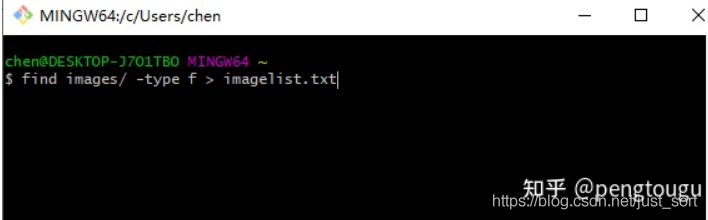
生成所需的list.txt列表,格式如下:
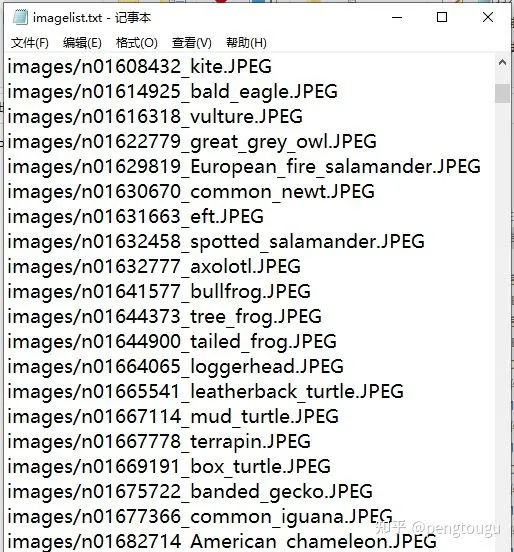
接著繼續(xù)輸入命令:
./ncnn2table yolov4-tiny-opt.param yolov4-tiny-opt.bin imagelist.txt yolov4-tiny.table mean=[104,117,123] norm=[0.017,0.017,0.017] shape=[224,224,3] pixel=BGR thread=8 method=kl
其中,上述所包含變量含義如下:
mean平均值和norm范數(shù)是你傳遞給Mat::substract_mean_normalize()的值,shape形狀是模型的輸入圖片形狀 pixel是模型的像素格式,圖像像素將在Extractor::input()之前轉(zhuǎn)換為這種類型 thread線程是可用于并行推理的CPU線程數(shù)(這個要根據(jù)自己電腦或者板子的性能自己定義) 量化方法是訓練后量化算法,目前支持kl和aciq
量化模型
./ncnn2int8 yolov4-tiny-opt.param yolov4-tiny-opt.bin yolov4-tiny-int8.param yolov4-tiny-int8.bin yolov4-tiny.table
直接一步走,所有量化的工具在ncnn\build-vs2019\tools\quantize文件夾下
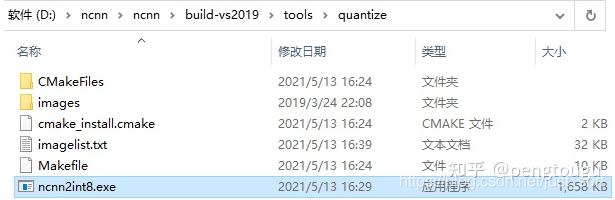
找不到的讀者請看下自己編譯過程是不是有誤,正常編譯下是會有這些量化文件的
運行成功后會生成兩個int8的文件,分別是:

對比一下原來的兩個opt模型,小了整整一倍!
三、新版ncnn的int8量化再探
量化出了int8模型僅僅是成功了一半,有模型但是內(nèi)部參數(shù)全都錯亂的情況也不是沒見過。。。

調(diào)用int8模型進行推理
打開vs2019,建立新的工程,配置的步驟我在上一篇博客已經(jīng)詳細說過了,再狗頭翻出來祭給大家:
https://zhuanlan.zhihu.com/p/368653551
大家直接去ncnn\examples文件夾下copy一下yolov4.cpp的代碼(一個字!嫖!)
但是我在這里卻遇到了點問題,因為一直搞不懂大佬主函數(shù)寫的傳參是什么,在昨晚復習完教資后搞到了好晚。。。
int main(int argc, char** argv)
{
    cv::Mat frame;
    std::vector<Object> objects;
    cv::VideoCapture cap;
    ncnn::Net yolov4;
    const char* devicepath;
    int target_size = 0;
    int is_streaming = 0;

    if (argc < 2)
    {
        fprintf(stderr, "Usage: %s [v4l input device or image]\n", argv[0]);
        return -1;
    }

    devicepath = argv[1];

#ifdef NCNN_PROFILING
    double t_load_start = ncnn::get_current_time();
#endif
    int ret = init_yolov4(&yolov4, &target_size); //We load model and param first!
    if (ret != 0)
    {
        fprintf(stderr, "Failed to load model or param, error %d", ret);
        return -1;
    }

#ifdef NCNN_PROFILING
    double t_load_end = ncnn::get_current_time();
    fprintf(stdout, "NCNN Init time %.02lfms\n", t_load_end - t_load_start);

#endif
    if (strstr(devicepath, "/dev/video") == NULL)
    {
        frame = cv::imread(argv[1], 1);
        if (frame.empty())
        {
            fprintf(stderr, "Failed to read image %s.\n", argv[1]);
            return -1;
        }
    }
    else
    {
        cap.open(devicepath);

        if (!cap.isOpened())
        {
            fprintf(stderr, "Failed to open %s", devicepath);
            return -1;
        }
        cap >> frame;
        if (frame.empty())
        {
            fprintf(stderr, "Failed to read from device %s.\n", devicepath);
            return -1;
        }
        is_streaming = 1;
    }
    while (1)
    {
        if (is_streaming)
        {
#ifdef NCNN_PROFILING
            double t_capture_start = ncnn::get_current_time();
#endif
            cap >> frame;

#ifdef NCNN_PROFILING
            double t_capture_end = ncnn::get_current_time();
            fprintf(stdout, "NCNN OpenCV capture time %.02lfms\n", t_capture_end - t_capture_start);
#endif
            if (frame.empty())
            {
                fprintf(stderr, "OpenCV Failed to Capture from device %s\n", devicepath);
                return -1;
            }
        }

#ifdef NCNN_PROFILING
        double t_detect_start = ncnn::get_current_time();
#endif
        detect_yolov4(frame, objects, target_size, &yolov4); //Create an extractor and run detection

#ifdef NCNN_PROFILING
        double t_detect_end = ncnn::get_current_time();
        fprintf(stdout, "NCNN detection time %.02lfms\n", t_detect_end - t_detect_start);
#endif
#ifdef NCNN_PROFILING
        double t_draw_start = ncnn::get_current_time();
#endif
        draw_objects(frame, objects, is_streaming); //Draw detection results on opencv image

#ifdef NCNN_PROFILING
        double t_draw_end = ncnn::get_current_time();
        fprintf(stdout, "NCNN OpenCV draw result time %.02lfms\n", t_draw_end - t_draw_start);
#endif
        if (!is_streaming)
        {   //If it is a still image, exit!
            return 0;
        }
    }
    return 0;
}
果然大佬就是大佬,寫的代碼高深莫測,我只是一個小白,好難

靠,第二天直接不看了,重新寫了一個main函數(shù),調(diào)用大佬寫的那幾個function:
int main(int argc, char** argv)
{
    cv::Mat frame;
    std::vector<Object> objects;
    cv::VideoCapture cap;
    ncnn::Net yolov4;
    const char* devicepath;
    int target_size = 160;
    int is_streaming = 0;
    /*
    const char* imagepath = "E:/ncnn/yolov5/person.jpg";

    cv::Mat m = cv::imread(imagepath, 1);
    if (m.empty())
    {
        fprintf(stderr, "cv::imread %s failed\n", imagepath);
        return -1;
    }

    double start = GetTickCount();
    std::vector<Object> objects;
    detect_yolov5(m, objects);
    double end = GetTickCount();
    fprintf(stderr, "cost time:  %.5f\n ms", (end - start)/1000);

    draw_objects(m, objects);

    */
    int ret = init_yolov4(&yolov4, &target_size); //We load model and param first!
    if (ret != 0)
    {
        fprintf(stderr, "Failed to load model or param, error %d", ret);
        return -1;
    }

    cv::VideoCapture capture;
    capture.open(0);  //修改這個參數(shù)可以選擇打開想要用的攝像頭

    //cv::Mat frame;
    while (true)
    {
        capture >> frame;
        cv::Mat m = frame;
        double start = GetTickCount();
        std::vector<Object> objects;
        detect_yolov4(frame, objects, 160, &yolov4);
        double end = GetTickCount();
        fprintf(stderr, "cost time:  %.5f ms \n", (end - start));
        // imshow("外接攝像頭", m); //remember, imshow() needs a window name for its first parameter
        draw_objects(m, objects, 8);

        if (cv::waitKey(30) >= 0)
            break;
    }

    return 0;
}
還有幾點注意,大家在進行推理的時候
把fp16禁掉,不用了 換成int8推理 把線程改成你之前制作int8模型的那個線程 模型也替換掉
具體如下:
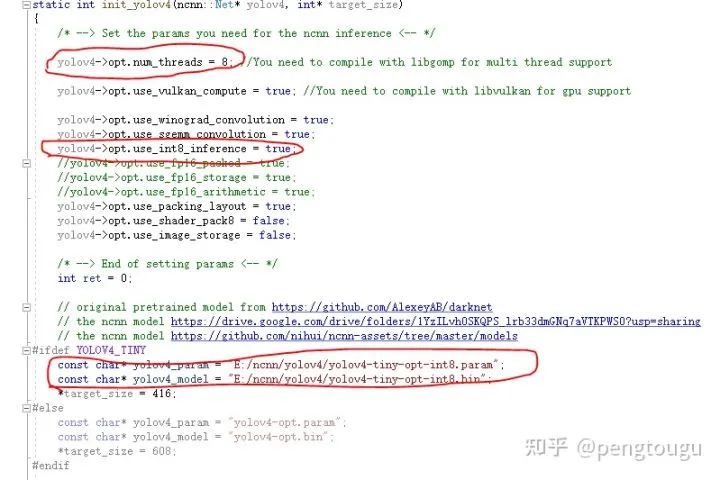
走到這里,就可以愉快的推理了
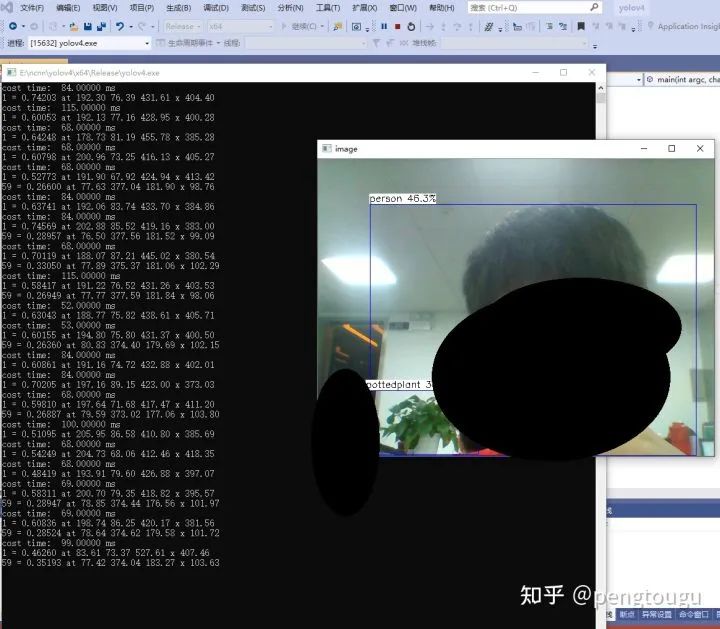
四、總結(jié)
說一下我的電腦配置,神舟筆記本K650D-i5,處理器InterCorei5-4210M,都是相對過時的老機器了,畢竟買了6年,性能也在下降。
跑庫過程全程用cpu,為什么不用gpu?(問的好,2g顯存老古董跑起來怕電腦炸了)
對比之前的fp16模型,明顯在input_size相同的情況下快了40%-70%,且精度幾乎沒有什么損耗
總結(jié)來說,新版ncnn的int8量化推理確實是硬貨,后續(xù)會嘗試更多模型的int8推理,做對比實驗給各位網(wǎng)友看
所有的文件和修改后的代碼放在這個倉庫里,歡迎大家白嫖:
https://github.com/pengtougu/ncnn-yolov4-int8
感興趣的朋友可以git clone下載跑跑,即下即用(前提要安裝好ncnn)~
歡迎關注GiantPandaCV, 在這里你將看到獨家的深度學習分享,堅持原創(chuàng),每天分享我們學習到的新鮮知識。( ? ?ω?? )?
有對文章相關的問題,或者想要加入交流群,歡迎添加BBuf微信: