
5個(gè)有趣的Python腳本

Python可以玩的方向有很多,比如爬蟲(chóng)、預(yù)測(cè)分析、GUI、自動(dòng)化、圖像處理、可視化等等,可能只需要十幾行代碼就能實(shí)現(xiàn)酷炫的功能。
因?yàn)镻ython是動(dòng)態(tài)腳本語(yǔ)言,所以代碼邏輯比Java要簡(jiǎn)要很多,實(shí)現(xiàn)同樣的功能少寫(xiě)很多代碼。而且Python生態(tài)有眾多的第三方工具庫(kù),把功能都封裝在包里,只需要你調(diào)用接口,就能使用復(fù)雜的功能。
下面舉幾個(gè)簡(jiǎn)單好玩的腳本例子,初學(xué)者可以照著代碼寫(xiě)寫(xiě),能快速掌握python語(yǔ)法。
1、使用PIL、Matplotlib、Numpy對(duì)模糊老照片進(jìn)行修復(fù)
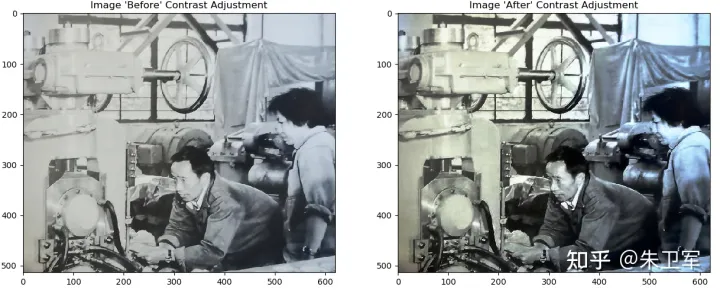
# encoding=utf-8
import numpy as np
import matplotlib.pyplot as plt
from PIL import Image
import os.path
# 讀取圖片
img_path = "E:\\test.jpg"
img = Image.open(img_path)

# 圖像轉(zhuǎn)化為numpy數(shù)組
img = np.asarray(img)
flat = img.flatten()

# 創(chuàng)建函數(shù)
def get_histogram(image, bins):
    # array with size of bins, set to zeros
    histogram = np.zeros(bins)
    # loop through pixels and sum up counts of pixels
    for pixel in image:
        histogram[pixel] += 1
    # return our final result
    return histogram

# execute our histogram function
hist = get_histogram(flat, 256)

# execute the fn
cs = np.cumsum(hist)

# numerator & denomenator
nj = (cs - cs.min()) * 255
N = cs.max() - cs.min()

# re-normalize the cumsum
cs = nj / N

# cast it back to uint8 since we can't use floating point values in images
cs = cs.astype('uint8')

# get the value from cumulative sum for every index in flat, and set that as img_new
img_new = cs[flat]

# put array back into original shape since we flattened it
img_new = np.reshape(img_new, img.shape)

# set up side-by-side image display
fig = plt.figure()
fig.set_figheight(15)
fig.set_figwidth(15)

# display the real image
fig.add_subplot(1, 2, 1)
plt.imshow(img, cmap='gray')
plt.title("Image 'Before' Contrast Adjustment")

# display the new image
fig.add_subplot(1, 2, 2)
plt.imshow(img_new, cmap='gray')
plt.title("Image 'After' Contrast Adjustment")
filename = os.path.basename(img_path)

# plt.savefig("E:\\" + filename)
plt.show()
2、將文件批量壓縮,使用zipfile庫(kù)
import os
import zipfile
from random import randrange


def zip_dir(path, zip_handler):
    for root, dirs, files in os.walk(path):
        for file in files:
            zip_handler.write(os.path.join(root, file))


if __name__ == '__main__':
    to_zip = input("""
Enter the name of the folder you want to zip
(N.B.: The folder name should not contain blank spaces)
>
""")
    to_zip = to_zip.strip() + "/"
    zip_file_name = f'zip{randrange(0,10000)}.zip'
    zip_file = zipfile.ZipFile(zip_file_name, 'w', zipfile.ZIP_DEFLATED)
    zip_dir(to_zip, zip_file)
    zip_file.close()
    print(f'File Saved as {zip_file_name}')
3、使用tkinter制作計(jì)算器GUI
tkinter是python自帶的GUI庫(kù),適合初學(xué)者練手創(chuàng)建小軟件
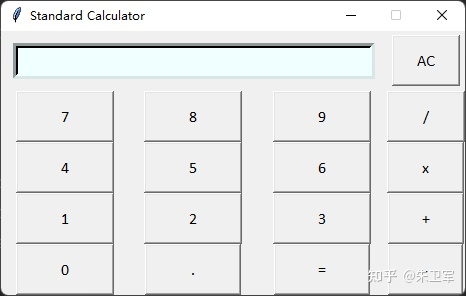
import tkinter as tk

root = tk.Tk()  # Main box window
root.title("Standard Calculator")  # Title shown at the title bar
root.resizable(0, 0)  # disabling the resizeing of the window

# Creating an entry field:
e = tk.Entry(root,
             width=35,
             bg='#f0ffff',
             fg='black',
             borderwidth=5,
             justify='right',
             font='Calibri 15')
e.grid(row=0, column=0, columnspan=3, padx=12, pady=12)


def buttonClick(num):  # function for clicking
    temp = e.get(
    )  # temporary varibale to store the current input in the screen
    e.delete(0, tk.END)  # clearing the screen from index 0 to END
    e.insert(0, temp + num)  # inserting the incoming number input


def buttonClear():  # function for clearing
    e.delete(0, tk.END)

# 代碼過(guò)長(zhǎng),部分略
4、PDF轉(zhuǎn)換為Word文件
使用pdf2docx庫(kù),可以將PDF文件轉(zhuǎn)為Word格式
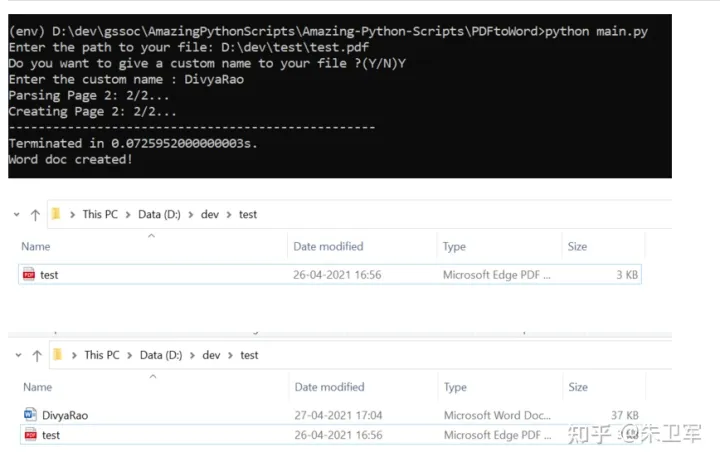
from pdf2docx import Converter
import os
import sys

# Take PDF's path as input
pdf = input("Enter the path to your file: ")
assert os.path.exists(pdf), "File not found at, "+str(pdf)
f = open(pdf,'r+')

#Ask for custom name for the word doc
doc_name_choice = input("Do you want to give a custom name to your file ?(Y/N)")

if(doc_name_choice == 'Y' or doc_name_choice == 'y'):
    # User input
    doc_name = input("Enter the custom name : ")+".docx"

else:
    # Use the same name as pdf
    # Get the file name from the path provided by the user
    pdf_name = os.path.basename(pdf)
    # Get the name without the extension .pdf
    doc_name =  os.path.splitext(pdf_name)[0] + ".docx"


# Convert PDF to Word
cv = Converter(pdf)

#Path to the directory
path = os.path.dirname(pdf)

cv.convert(os.path.join(path, "", doc_name) , start=0, end=None)
print("Word doc created!")
cv.close()
5、Python自動(dòng)發(fā)送郵件
使用smtplib和email庫(kù)可以實(shí)現(xiàn)腳本發(fā)送郵件
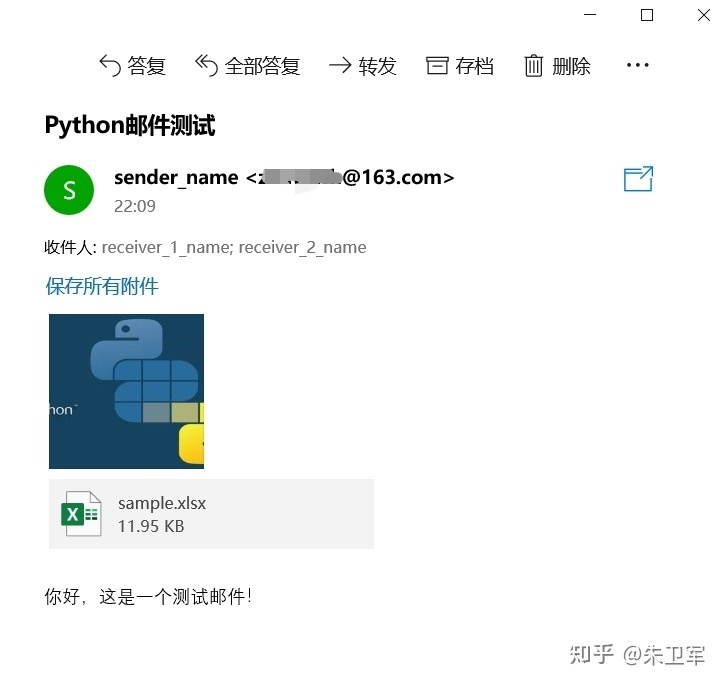
import smtplib
import email
# 負(fù)責(zé)構(gòu)造文本
from email.mime.text import MIMEText
# 負(fù)責(zé)構(gòu)造圖片
from email.mime.image import MIMEImage
# 負(fù)責(zé)將多個(gè)對(duì)象集合起來(lái)
from email.mime.multipart import MIMEMultipart
from email.header import Header

# SMTP服務(wù)器,這里使用163郵箱
mail_host = "smtp.163.com"
# 發(fā)件人郵箱
mail_sender = "******@163.com"
# 郵箱授權(quán)碼,注意這里不是郵箱密碼,如何獲取郵箱授權(quán)碼,請(qǐng)看本文最后教程
mail_license = "********"
# 收件人郵箱,可以為多個(gè)收件人
mail_receivers = ["******@qq.com","******@outlook.com"]

mm = MIMEMultipart('related')

# 郵件主題
subject_content = """Python郵件測(cè)試"""
# 設(shè)置發(fā)送者,注意嚴(yán)格遵守格式,里面郵箱為發(fā)件人郵箱
mm["From"] = "sender_name<******@163.com>"
# 設(shè)置接受者,注意嚴(yán)格遵守格式,里面郵箱為接受者郵箱
mm["To"] = "receiver_1_name<******@qq.com>,receiver_2_name<******@outlook.com>"
# 設(shè)置郵件主題
mm["Subject"] = Header(subject_content,'utf-8')

# 郵件正文內(nèi)容
body_content = """你好,這是一個(gè)測(cè)試郵件!"""
# 構(gòu)造文本,參數(shù)1:正文內(nèi)容,參數(shù)2:文本格式,參數(shù)3:編碼方式
message_text = MIMEText(body_content,"plain","utf-8")
# 向MIMEMultipart對(duì)象中添加文本對(duì)象
mm.attach(message_text)

# 二進(jìn)制讀取圖片
image_data = open('a.jpg','rb')
# 設(shè)置讀取獲取的二進(jìn)制數(shù)據(jù)
message_image = MIMEImage(image_data.read())
# 關(guān)閉剛才打開(kāi)的文件
image_data.close()
# 添加圖片文件到郵件信息當(dāng)中去
mm.attach(message_image)

# 構(gòu)造附件
atta = MIMEText(open('sample.xlsx', 'rb').read(), 'base64', 'utf-8')
# 設(shè)置附件信息
atta["Content-Disposition"] = 'attachment; filename="sample.xlsx"'
# 添加附件到郵件信息當(dāng)中去
mm.attach(atta)

# 創(chuàng)建SMTP對(duì)象
stp = smtplib.SMTP()
# 設(shè)置發(fā)件人郵箱的域名和端口,端口地址為25
stp.connect(mail_host, 25)
# set_debuglevel(1)可以打印出和SMTP服務(wù)器交互的所有信息
stp.set_debuglevel(1)
# 登錄郵箱,傳遞參數(shù)1:郵箱地址,參數(shù)2:郵箱授權(quán)碼
stp.login(mail_sender,mail_license)
# 發(fā)送郵件,傳遞參數(shù)1:發(fā)件人郵箱地址,參數(shù)2:收件人郵箱地址,參數(shù)3:把郵件內(nèi)容格式改為str
stp.sendmail(mail_sender, mail_receivers, mm.as_string())
print("郵件發(fā)送成功")
# 關(guān)閉SMTP對(duì)象
stp.quit()
小結(jié)
Python還有很多好玩的小腳本,你可以根據(jù)自己的場(chǎng)景來(lái)編寫(xiě),也可以使用現(xiàn)成的第三方庫(kù)。
Wang 往 Qi 期 Tui 推 Jian 薦
2、40 行 Python 代碼,寫(xiě)一個(gè) CPU!
3、支付寶能向微信好友轉(zhuǎn)賬了?有用但不多....
點(diǎn)擊關(guān)注公眾號(hào),閱讀更多精彩內(nèi)容

評(píng)論
圖片
表情