
5個(gè)方便好用的Python自動(dòng)化腳本

相比大家都聽過自動(dòng)化生產(chǎn)線、自動(dòng)化辦公等詞匯,在沒有人工干預(yù)的情況下,機(jī)器可以自己完成各項(xiàng)任務(wù),這大大提升了工作效率。
編程世界里有各種各樣的自動(dòng)化腳本,來完成不同的任務(wù)。
尤其Python非常適合編寫自動(dòng)化腳本,因?yàn)樗Z法簡(jiǎn)潔易懂,而且有豐富的第三方工具庫。
這次我們使用Python來實(shí)現(xiàn)幾個(gè)自動(dòng)化場(chǎng)景,或許可以用到你的工作中。
1、自動(dòng)化閱讀網(wǎng)頁新聞
這個(gè)腳本能夠?qū)崿F(xiàn)從網(wǎng)頁中抓取文本,然后自動(dòng)化語音朗讀,當(dāng)你想聽新聞的時(shí)候,這是個(gè)不錯(cuò)的選擇。
代碼分為兩大部分,第一通過爬蟲抓取網(wǎng)頁文本呢,第二通過閱讀工具來朗讀文本。
需要的第三方庫:
Beautiful Soup - 經(jīng)典的HTML/XML文本解析器,用來提取爬下來的網(wǎng)頁信息
requests - 好用到逆天的HTTP工具,用來向網(wǎng)頁發(fā)送請(qǐng)求獲取數(shù)據(jù)
Pyttsx3 - 將文本轉(zhuǎn)換為語音,并控制速率、頻率和語音
import?pyttsx3
import?requests
from?bs4?import?BeautifulSoup
engine?=?pyttsx3.init('sapi5')
voices?=?engine.getProperty('voices')
newVoiceRate?=?130???????????????????????##?Reduce?The?Speech?Rate
engine.setProperty('rate',newVoiceRate)
engine.setProperty('voice',?voices[1].id)
def?speak(audio):
??engine.say(audio)
??engine.runAndWait()
text?=?str(input("Paste?article\n"))
res?=?requests.get(text)
soup?=?BeautifulSoup(res.text,'html.parser')

articles?=?[]
for?i?in?range(len(soup.select('.p'))):
????article?=?soup.select('.p')[i].getText().strip()
????articles.append(article)
text?=?"?".join(articles)
speak(text)
#?engine.save_to_file(text,?'test.mp3')?##?If?you?want?to?save?the?speech?as?a?audio?file
engine.runAndWait()
2、自動(dòng)生成素描草圖
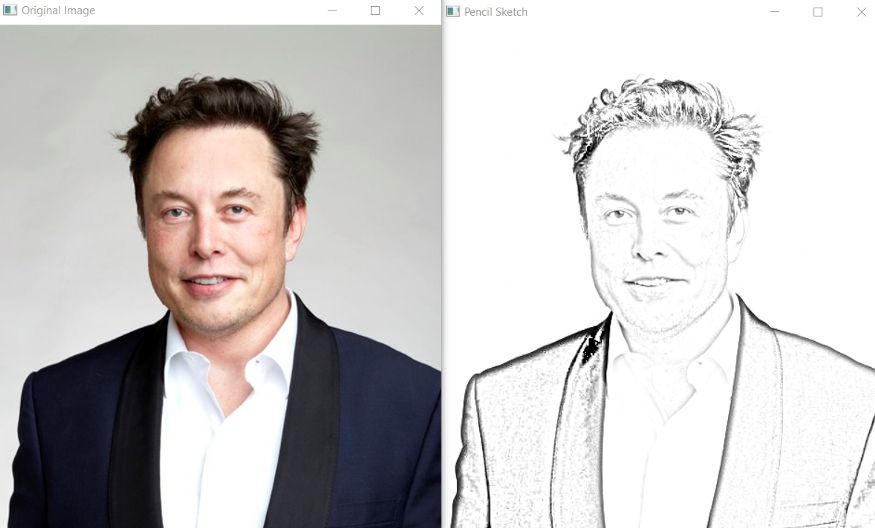
這個(gè)腳本可以把彩色圖片轉(zhuǎn)化為鉛筆素描草圖,對(duì)人像、景色都有很好的效果。
而且只需幾行代碼就可以一鍵生成,適合批量操作,非常的快捷。
需要的第三方庫:
Opencv - 計(jì)算機(jī)視覺工具,可以實(shí)現(xiàn)多元化的圖像視頻處理,有Python接口
??"""?Photo?Sketching?Using?Python?"""
??import?cv2
??img?=?cv2.imread("elon.jpg")

??##?Image?to?Gray?Image
??gray_image?=?cv2.cvtColor(img,cv2.COLOR_BGR2GRAY)

??##?Gray?Image?to?Inverted?Gray?Image
??inverted_gray_image?=?255-gray_image

??##?Blurring?The?Inverted?Gray?Image
??blurred_inverted_gray_image?=?cv2.GaussianBlur(inverted_gray_image,?(19,19),0)

??##?Inverting?the?blurred?image
??inverted_blurred_image?=?255-blurred_inverted_gray_image

??###?Preparing?Photo?sketching
??sketck?=?cv2.divide(gray_image,?inverted_blurred_image,scale=?256.0)

??cv2.imshow("Original?Image",img)
??cv2.imshow("Pencil?Sketch",?sketck)
??cv2.waitKey(0)
3、自動(dòng)發(fā)送多封郵件
這個(gè)腳本可以幫助我們批量定時(shí)發(fā)送郵件,郵件內(nèi)容、附件也可以自定義調(diào)整,非常的實(shí)用。
相比較郵件客戶端,Python腳本的優(yōu)點(diǎn)在于可以智能、批量、高定制化地部署郵件服務(wù)。
需要的第三方庫:
Email - 用于管理電子郵件消息
Smtlib - 向SMTP服務(wù)器發(fā)送電子郵件,它定義了一個(gè) SMTP 客戶端會(huì)話對(duì)象,該對(duì)象可將郵件發(fā)送到互聯(lián)網(wǎng)上任何帶有 SMTP 或 ESMTP 監(jiān)聽程序的計(jì)算機(jī)
Pandas - 用于數(shù)據(jù)分析清洗地工具
import?smtplib?
from?email.message?import?EmailMessage
import?pandas?as?pd

def?send_email(remail,?rsubject,?rcontent):
????email?=?EmailMessage()??????????????????????????##?Creating?a?object?for?EmailMessage
????email['from']?=?'The?Pythoneer?Here'????????????##?Person?who?is?sending
????email['to']?=?remail????????????????????????????##?Whom?we?are?sending
????email['subject']?=?rsubject?????????????????????##?Subject?of?email
????email.set_content(rcontent)?????????????????????##?content?of?email
????with?smtplib.SMTP(host='smtp.gmail.com',port=587)as?smtp:?????
????????smtp.ehlo()?????????????????????????????????##?server?object
????????smtp.starttls()?????????????????????????????##?used?to?send?data?between?server?and?client
????????smtp.login("[email protected]","delta@371")?##?login?id?and?password?of?gmail
????????smtp.send_message(email)????????????????????##?Sending?email
????????print("email?send?to?",remail)??????????????##?Printing?success?message

if?__name__?==?'__main__':
????df?=?pd.read_excel('list.xlsx')
????length?=?len(df)+1

????for?index,?item?in?df.iterrows():
????????email?=?item[0]
????????subject?=?item[1]
????????content?=?item[2]

????????send_email(email,subject,content)
4、自動(dòng)化數(shù)據(jù)探索
數(shù)據(jù)探索是數(shù)據(jù)科學(xué)項(xiàng)目的第一步,你需要了解數(shù)據(jù)的基本信息才能進(jìn)一步分析更深的價(jià)值。
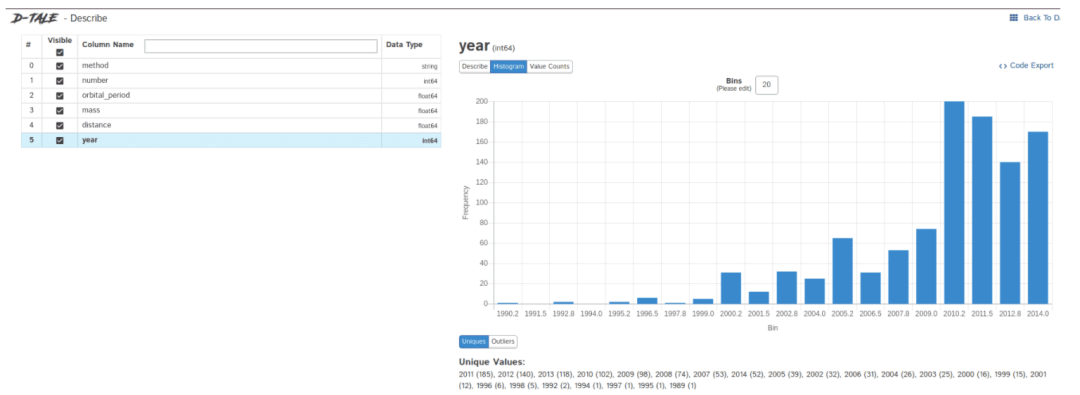
一般我們會(huì)用pandas、matplotlib等工具來探索數(shù)據(jù),但需要自己編寫大量代碼,如果想提高效率,Dtale是個(gè)不錯(cuò)的選擇。
Dtale特點(diǎn)是用一行代碼生成自動(dòng)化分析報(bào)告,它結(jié)合了Flask后端和React前端,為我們提供了一種查看和分析Pandas數(shù)據(jù)結(jié)構(gòu)的簡(jiǎn)便方法。
我們可以在Jupyter上實(shí)用Dtale。
需要的第三方庫:
Dtale - 自動(dòng)生成分析報(bào)告
###?Importing?Seaborn?Library?For?Some?Datasets
import?seaborn?as?sns

###?Printing?Inbuilt?Datasets?of?Seaborn?Library
print(sns.get_dataset_names())


###?Loading?Titanic?Dataset
df=sns.load_dataset('titanic')

###?Importing?The?Library
import?dtale

####?Generating?Quick?Summary
dtale.show(df)
5、自動(dòng)桌面提示
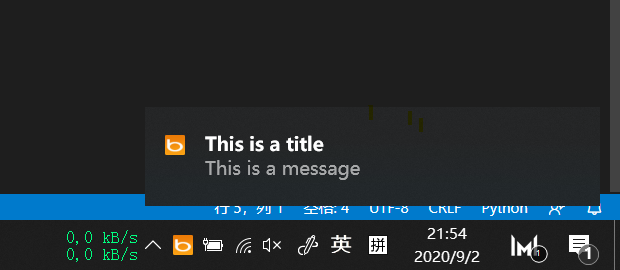
這個(gè)腳本會(huì)自動(dòng)觸發(fā)windows桌面通知,提示重要事項(xiàng),比如說:您已工作兩小時(shí),該休息了
我們可以設(shè)定固定時(shí)間提示,比如隔10分鐘、1小時(shí)等
用到的第三方庫:
win10toast - 用于發(fā)送桌面通知的工具
from?win10toast?import?ToastNotifier
import?time
toaster?=?ToastNotifier()

header?=?input("What?You?Want?Me?To?Remember\n")
text?=?input("Releated?Message\n")
time_min=float(input("In?how?many?minutes?\n"))

time_min?=?time_min?*?60
print("Setting?up?reminder..")
time.sleep(2)
print("all?set!")
time.sleep(time_min)
toaster.show_toast(f"{header}",?f"{text}",?duration=10,?threaded=True)
while?toaster.notification_active():?time.sleep(0.005)?????
小結(jié)
Python能實(shí)現(xiàn)的自動(dòng)化功能非常豐富,如果你可以“偷懶”的需求場(chǎng)景不妨試試。
參考:
https://medium.com/pythoneers/10-handy-automation-scripts-you-should-try-using-python-fc9450116938?

加入知識(shí)星球【我們談?wù)摂?shù)據(jù)科學(xué)】
500+小伙伴一起學(xué)習(xí)!
·?推薦閱讀?·
聊聊我常用的5款動(dòng)態(tài)數(shù)據(jù)可視化工具
如何在Github上學(xué)習(xí)Python?這些熱門倉庫不要錯(cuò)過