
【手把手教程】維護機器學習代碼的正確姿勢
↓↓↓點擊關注,回復資料,10個G的驚喜
setup.cfg — flake8 和 mypy 的配置。
pyproject.toml — black 的配置。
pip?install?black?flake8?mypy
black?.
flake8
class?MyModel(nn.Module):
????....

def?forward(x:?torch.Tensor)?->?torch.Tensor:
????....
????return?self.final(x)mypy?.
pip?install?pre-commit
pre-commit?install
-?name:?Install?dependencies
??????run:?|
????????python?-m?pip?install?--upgrade?pip
????????pip?install?-r?requirements.txt
????????pip?install?black?flake8?mypy
????-?name:?Run?black
??????run:
????????black?--check?.
????-?name:?Run?flake8
??????run:?flake8
????-?name:?Run?Mypy
??????run:?mypy?retinaface
對你自己而言:可能你認為你永遠都不會再用到這些代碼了,但實際上并不一定。下次用的時候你可能也記不得它的具體內(nèi)容了,但 readme 可以幫到你。
對其他人而言:readme 是一個賣點。如果人們看不出該存儲庫的用途以及它所解決的問題,大家就不會使用它,你所做的所有工作都不會對他人產(chǎn)生積極影響。
用一張圖來說明任務是什么以及如何解決,而不需要任何文字。在花了幾周解決問題之后,你可能有 100500 張圖,但你不能把他們放在 readme 里;
數(shù)據(jù)放在哪里;
怎樣開始訓練;
如何進行推理。
model?=?MyFancyModel()
state_dict?=?torch.load()
model.load_state_dict(state_dict)
from?retinaface.pre_trained_models?import?get_model
model?=?get_model("resnet50_2020-07-20",?max_size=2048)
#?https://github.com/ternaus/retinaface/blob/master/retinaface/pre_trained_models.py?
?from?collections?import?namedtuple?
?from?torch.utils?import?model_zoo?
?from?retinaface.predict_single?import?Model?
?model?=?namedtuple("model",?["url",?"model"])?
?models?=?{?
?"resnet50_2020-07-20":?model(?
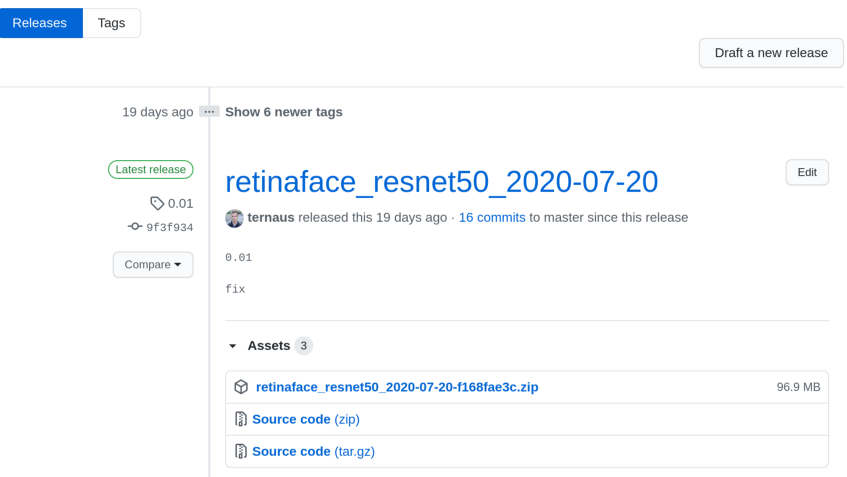
?url="https://github.com/ternaus/retinaface/releases/download/0.01/retinaface_resnet50_2020-07-20-f168fae3c.zip",?#?noqa:?E501?
?model=Model,?
????)?
?}?
?def?get_model(model_name:?str,?max_size:?int,?device:?str?=?"cpu")?->?Model:?
?????model?=?models[model_name].model(max_size=max_size,?device=device)?
?????state_dict?=?model_zoo.load_url(models[model_name].url,?progress=True,?map_location="cpu")?
?????model.load_state_dict(state_dict)?
?????return?model?
pip?freeze?>?requiements.txt
python?setup.py?sdist
python?setup.py?sdist?upload
pip?install?
"""Streamlit?web?app"""
import?numpy?as?np
import?streamlit?as?st
from?PIL?import?Image
from?retinaface.pre_trained_models?import?get_model
from?retinaface.utils?import?vis_annotations
import?torch
st.set_option("deprecation.showfileUploaderEncoding",?False)
@st.cache
def?cached_model():
????m?=?get_model("resnet50_2020-07-20",?max_size=1048,?device="cpu")
????m.eval()
????return?m
model?=?cached_model()
st.title("Detect?faces?and?key?points")
uploaded_file?=?st.file_uploader("Choose?an?image...",?type="jpg")
if?uploaded_file?is?not?None:
????image?=?np.array(Image.open(uploaded_file))
????st.image(image,?caption="Before",?use_column_width=True)
????st.write("")
????st.write("Detecting?faces...")
????with?torch.no_grad():
????????annotations?=?model.predict_jsons(image)
????if?not?annotations[0]["bbox"]:
????????st.write("No?faces?detected")
????else:
????????visualized_image?=?vis_annotations(image,?annotations)
????????st.image(visualized_image,?caption="After",?use_column_width=True)
setup.sh — 該文件可以直接使用,不需要更改。
Procfile — 你需要使用應用程序修改文件的路徑。
heroku?login
heroku?create
git?push?heroku?master
研究問題是什么?
你是如何解決這個問題的?
項目:https://www.kaggle.com/c/sp-society-camera-model-identification
博客:http://ternaus.blog/machine_learning/2018/12/05/Forensic-Deep-Learning-Kaggle-Camera-Model-Identification-Challenge.html
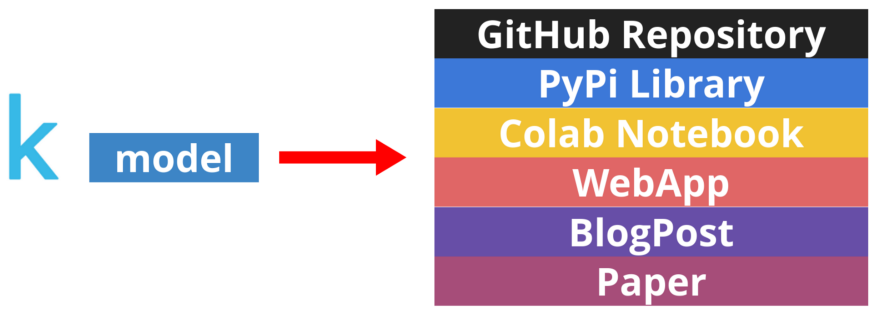
GitHub 存儲庫,里面有整潔的代碼和良好的 readme 文件。
非機器學習人員能夠使用的庫。
允許在瀏覽器中用你的模型進行快速實驗的 Colab notebook。
吸引非技術受眾的 WebApp。
用人類語言講故事的博客文章。
推薦閱讀
決策樹可視化,被驚艷到了! 開發(fā)機器學習APP,太簡單了 周志華教授:關于深度學習的一點思考 200 道經(jīng)典機器學習面試題總結 卷積神經(jīng)網(wǎng)絡(CNN)數(shù)學原理解析 收手吧,華強!我用機器學習幫你挑西瓜
如有收獲,歡迎三連??
評論
圖片
表情