
讓你的 commit 更有價(jià)值
編者按:本文作者陳方旭,奇舞團(tuán)前端開發(fā)工程師。
提交規(guī)范
AngularJS 在開發(fā)者文檔1中關(guān)于 git commit 的指導(dǎo)說明,提到嚴(yán)格的 git commit 格式規(guī)范可以在瀏覽項(xiàng)目歷史的過程中看到更易讀的信息,并且能用 git commit 的信息直接生成 AngularJS 的 change log 。
commit messages 格式規(guī)范
commit messages 由 header 、body 、footer 組成。
header 又包含 type 、scope 、subject 。header 是必需的,不過其中的 scope 是可選的。
body 和 footer 可以省略。
<type>(<scope>): <subject>
// 空行
<BLANK LINE>
<body>
// 空行
<BLANK LINE>
<footer>
Header
Type
類型必須是以下幾種之一:
feat: 新功能
fix: bug 修復(fù)
docs: 僅修改文檔
style: 修改格式(空格,格式化,省略分號(hào)等),對(duì)代碼運(yùn)行沒有影響
refactor: 重構(gòu)(既不是修 bug ,也不是加功能)
build: 構(gòu)建流程、外部依賴變更,比如升級(jí) npm 包、修改 webpack 配置等
perf: 性能優(yōu)化
test: 測(cè)試相關(guān)
chore: 對(duì)構(gòu)建過程或輔助工具和庫(kù)(如文檔生成)的更改
ci: ci 相關(guān)的更改
除此之外,還有一個(gè)特殊的類型 revert ,如果當(dāng)前提交是為了撤銷之前的某次提交,應(yīng)該用 revert 開頭,后面加上被撤銷的提交的 header,在 body 中應(yīng)該注明:This reverts commit <hash>. ,hash 指的就是將要被撤銷的 commit SHA 。
// 例如
revert: feat(user): add user type
This reverts commit ca16a365467e17915f0273392f4a13331b17617d.
Scope
scope 可以指定提交更改的影響范圍,這個(gè)視項(xiàng)目而定,當(dāng)修改影響超過單個(gè)的 scope 時(shí),可以指定為 * 。
Subject
subject 是指更改的簡(jiǎn)潔描述,長(zhǎng)度約定在 50 個(gè)字符以內(nèi),通常遵循以下幾個(gè)規(guī)范:
用動(dòng)詞開頭,第一人稱現(xiàn)在時(shí)表述,例如:change 代替 changed 或 changes
第一個(gè)字母小寫
結(jié)尾不加句號(hào)(.)
Body
body 部分是對(duì)本地 commit 的詳細(xì)描述,可以分成多行。
跟 subject 類似,用動(dòng)詞開頭,第一人稱現(xiàn)在時(shí)表述,例如:change 代替 changed 或 changes。
body 應(yīng)該說明修改的原因和更改前后的行為對(duì)比。
Footer
footer 基本用在這兩種情況:
不兼容的改動(dòng)( Breaking Changes ),通常用 BREAKING CHANGE: 開頭,后面跟一個(gè)空格或兩個(gè)換行符。剩余的部分就是用來說明這個(gè)變動(dòng)的信息和遷移方法等。
關(guān)閉 Issue, github 關(guān)閉 Issue 的例子2
// BREAKING CHANGE: 的例子
BREAKING CHANGE: isolate scope bindings definition has changed and
the inject option for the directive controller injection was removed.
To migrate the code follow the example below:
Before:
scope: {
myAttr: 'attribute',
myBind: 'bind',
myExpression: 'expression',
myEval: 'evaluate',
myAccessor: 'accessor'
}
After:
scope: {
myAttr: '@',
myBind: '@',
myExpression: '&',
// myEval - usually not useful, but in cases where the expression is assignable, you can use '='
myAccessor: '=' // in directive's template change myAccessor() to myAccessor
}
The removed `inject` wasn't generaly useful for directives so there should be no code using it.
// Closes Issue 例子
Closes #2314, #3421
完整的例子
例一: feat
feat($browser): onUrlChange event (popstate/hashchange/polling)
Added new event to $browser:
- forward popstate event if available
- forward hashchange event if popstate not available
- do polling when neither popstate nor hashchange available
Breaks $browser.onHashChange, which was removed (use onUrlChange instead)
例二: fix
fix($compile): couple of unit tests for IE9
Older IEs serialize html uppercased, but IE9 does not...
Would be better to expect case insensitive, unfortunately jasmine does
not allow to user regexps for throw expectations.
Closes #392
Breaks foo.bar api, foo.baz should be used instead
例三: style
style($location): add couple of missing semi colons
查看更多例子3
規(guī)范 commit message 的好處
首行就是簡(jiǎn)潔實(shí)用的關(guān)鍵信息,方便在 git history 中快速瀏覽
具有詳實(shí)的 body 和 footer ,可以清晰的看出某次提交的目的和影響
可以通過 type 過濾出想要查找的信息,也可以通過關(guān)鍵字快速查找相關(guān)提交
可以直接從 commit 生成 change log
// 列舉幾個(gè)常用的 log 參數(shù)
// 輸出 log 的首行
git log --pretty=oneline
// 只輸出首行的 commit 信息。不包含 hash 和 合并信息等
git log --pretty=format:%s
// 查找有關(guān)“更新菜單配置項(xiàng)”的提交
git log --grep="更新菜單配置項(xiàng)"
// 打印出 chenfangxu 的提交
git log --author=chenfangxu
// 紅色的短 hash,黃色的 ref , 綠色的相對(duì)時(shí)間
git log --graph --pretty=format:'%Cred%h%Creset -%C(yellow)%d%Creset %s %Cgreen(%cr)%Creset'
用工具實(shí)現(xiàn)規(guī)范提交
上面介紹了規(guī)范提交的格式,如果讓各位同學(xué)在 git commit 的時(shí)候嚴(yán)格按照上面的規(guī)范來寫,首先心智是有負(fù)擔(dān)的,得記住不同的類型到底是用來定義什么的,subject 怎么寫,body 怎么寫,footer 要不要寫。其次,對(duì)人的規(guī)范大部分都是反人性的,所以很可能在過不了多久,就會(huì)有同學(xué)漸漸的不按照規(guī)范來寫。靠意志力來控制自己嚴(yán)格按照規(guī)范來寫是需要額外耗費(fèi)一些精力的,把精力耗費(fèi)在這種事情上面實(shí)在有些浪費(fèi)。
用工具實(shí)現(xiàn)規(guī)范提交的方案,一種是在提交的時(shí)候就提示必填字段,另一種是在提交后校驗(yàn)字段是否符合規(guī)范。這兩種在實(shí)際項(xiàng)目中都是很有必要的。
Commitizen
Commitizen 是一個(gè)幫助撰寫規(guī)范 commit messages 的工具。他有一個(gè)命令行工具 cz-cli4,接下來會(huì)把使用 Commitizen 分成幾個(gè)階段來介紹。
體驗(yàn) git cz
// 全局安裝 Commitizen
npm install -g commitizen
你的倉(cāng)庫(kù)可能還不是對(duì) Commitizen 友好的,此時(shí)運(yùn)行 git cz 的效果跟 git commit 一樣,也就是沒有效果。不過,可以執(zhí)行 npx git-cz 來體驗(yàn)。
如果想直接運(yùn)行 git cz 實(shí)現(xiàn)語義化的提交,可以根據(jù) streamich/git-cz5 文檔中說的全局安裝 git cz。
// 全局安裝 git cz
npm install -g git-cz
除此之外還有一種更推薦的方式,就是讓你的倉(cāng)庫(kù)對(duì) Commitizen 友好。
Commitizen 友好
全局安裝 Commitizen 后,用 cz-conventional-changelog 適配器來初始化你的項(xiàng)目
// 初始化 cz-conventional-changelog 適配器
commitizen init cz-conventional-changelog --save-dev --save-exact
上面的初始化做了三件事:
安裝 cz-conventional-changelog 依賴
把依賴保存到 package.json 的 dependencies 或 devDependencies 中
在根目錄的 package.json 中 添加如下所示的 config.commitizen
"config": {
"commitizen": {
"path": "./node_modules/cz-conventional-changelog"
}
}
或者,在項(xiàng)目根目錄下新建一個(gè) .czrc 文件,內(nèi)容設(shè)置為
{
"path": "cz-conventional-changelog"
}
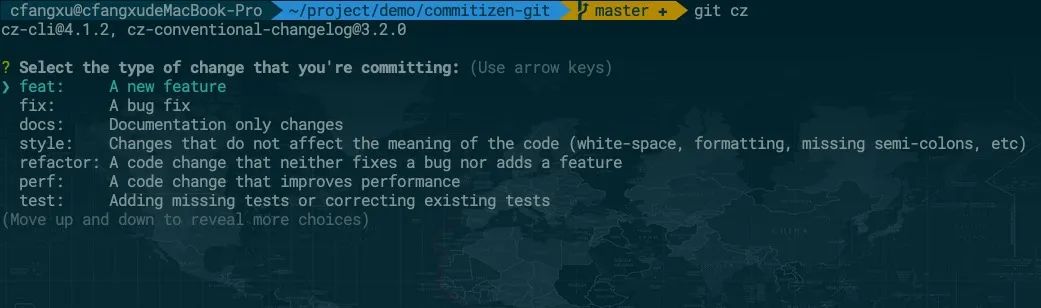
現(xiàn)在運(yùn)行 git cz 效果如下:
cz-customizable 自定義中文配置
通過上面的截圖可以看到,提交的配置選項(xiàng)都是英文的,如果想改成中文的,可以使用 cz-customizable6 適配器。
運(yùn)行下面的命令,注意之前已經(jīng)初始化過一次了,這次再初始化,需要加 --force 覆蓋
npm install cz-customizable --save-dev
commitizen init cz-customizable --save-dev --save-exact --force
現(xiàn)在 package.json 中 config.commitizen 字段為:
"config": {
"commitizen": {
"path": "./node_modules/cz-customizable"
}
}
cz-customizable 文檔中說明了查找配置文件的方式有三種,我們按照第一種,在項(xiàng)目根目錄創(chuàng)建一個(gè) .cz-config.js 的文件。按照給出的示例 cz-config-EXAMPLE.js7 編寫我們的 config。commit-type 可以參考 conventional-commit-types8 。
可以點(diǎn)擊查看我配置好的文件 qiqihaobenben/commitizen-git/.cz-config.js9 ,里面中詳細(xì)的注釋。
commitlint 校驗(yàn)提交
Commitizen 文檔中開始就介紹到,Commitizen 可以在觸發(fā) git commit 鉤子之前就能給出提示,但是也明確表示提交時(shí)對(duì) commit messages 的校驗(yàn)也是很有用的。畢竟即使用了 Commitzen,也是能繞過去,所以提交最后的校驗(yàn)很重要。
commitlint10 可以檢查 commit messages 是否符合常規(guī)提交格式,需要一份校驗(yàn)配置,推薦 @commitlint/config-conventional11 。
npm i --save-dev @commitlint/config-conventional @commitlint/cli
在項(xiàng)目根目錄創(chuàng)建 commitlint.config.js 文件并設(shè)置校驗(yàn)規(guī)則:
module.exports = {
extends: ["@commitlint/config-conventional"],
// rules 里面可以設(shè)置一些自定義的校驗(yàn)規(guī)則
rules: {},
};
在項(xiàng)目中安裝 husky ,并在項(xiàng)目根目錄新建 husky.config.js 文件,加入以下設(shè)置:
// 安裝 husky
npm install --save-dev husky
// husky.config.js 中加入以下代碼
module.exports = {
"hooks": {
"commit-msg": "commitlint -E HUSKY_GIT_PARAMS"
}
}
// 安裝 commitlint-config-cz
npm install commitlint-config-cz --save-dev
// commitlint.config.js 改為
module.exports = {
extends: [
'cz'
]
};
git commit 觸發(fā) git cz
在提交的時(shí)候,我們都習(xí)慣了 git commit ,雖然換成 git cz 不難,但是如果讓開發(fā)者在 git commit 時(shí)無感知的觸發(fā) git cz 肯定是更好的,而且也能避免不熟悉項(xiàng)目的人直接 git commit 提交一些不符合規(guī)范的信息。
我們可以在 husky.config.js 中設(shè)置:
"hooks": {
"prepare-commit-msg": "exec < /dev/tty && git cz --hook || true",
}
生成 CHANGELOG
standard-version15是一個(gè)使用 semver16 和 conventional-commits17 支持生成 CHANGELOG 進(jìn)行版本控制的實(shí)用程序。standard-version 不只是能生成 CHANGELOG , 還能根據(jù) commit 的 type 來進(jìn)行版本控制。
// 安裝 standard-verison
npm i --save-dev standard-version
// 在 package.json 中的 scripts 加入 standard-version
{
"scripts": {
"release": "standard-version"
}
}
示例項(xiàng)目
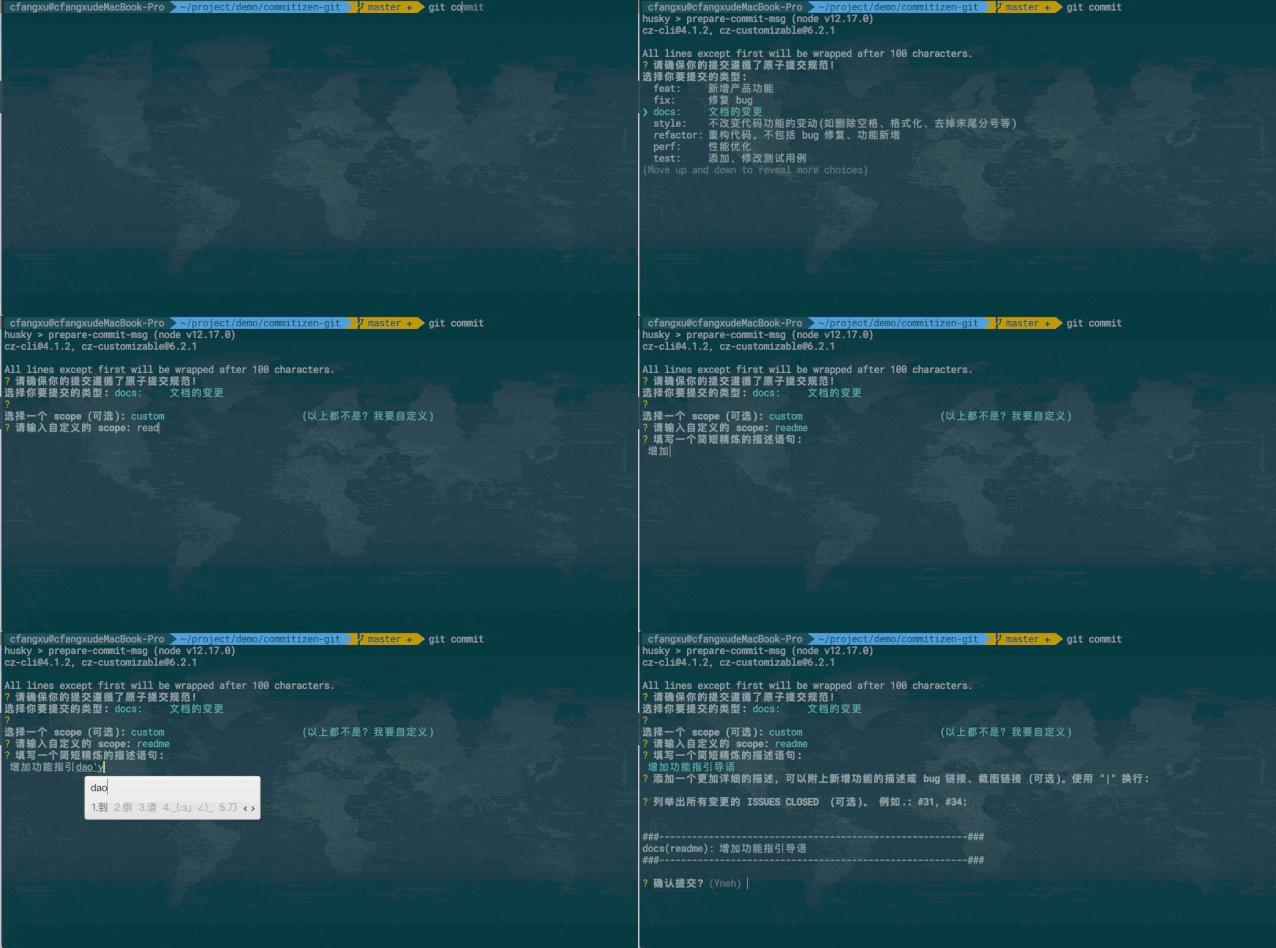
可以查看 commitizen-git18 ,里面歸納了快速配置 Commitizen 友好倉(cāng)庫(kù)的步驟,差不多三五分鐘就能搞定。
可以看一下配置完后,執(zhí)行 git commit 的效果。
擴(kuò)展
更復(fù)雜的自定義提示
cz-customizable19 中自定義配置項(xiàng)通常情況是夠用的,commitlint 中校驗(yàn)的規(guī)則基本上也是夠用的,但是會(huì)有比較硬核的開發(fā)者會(huì)覺得還是不夠,還要更多。比如一些 prompt 更加自定義,提交時(shí)詢問的 question 添加更多的邏輯,比如可以把一些重要的字段校驗(yàn)提前到 Commitizen 中,或者添加更多自定義的校驗(yàn)。
如果真想這么干,那就去 fork 一份 cz-conventional-changelog20 或者 cz-customizable21 來改,或者直接自己寫一個(gè) adapter。
Commitizen 友好徽章
如果把倉(cāng)庫(kù)配置成了對(duì) Commitizen 友好的話,可以在 README.md 中加上這個(gè)小徽章:
[](http://commitizen.github.io/cz-cli/)
參考文檔
AngularJS Git Commit Message Conventions22
conventional commit format23
Commit message 和 Change log 編寫指南24
Writing Git commit messages25
A Note About Git Commit Messages(文中講了 subject 50 個(gè)字符的約定怎么來的)26
個(gè)性化你的 Git Log 的輸出格式27
git pretty formats28
文內(nèi)鏈接
https://github.com/angular/angular.js/blob/master/DEVELOPERS.md#-git-commit-guidelines
https://docs.github.com/en/github/managing-your-work-on-github/linking-a-pull-request-to-an-issue
https://docs.google.com/document/d/1QrDFcIiPjSLDn3EL15IJygNPiHORgU1_OOAqWjiDU5Y/edit#heading=h.8sw072iehlhg
https://github.com/commitizen/cz-cli
https://github.com/streamich/git-cz
https://github.com/leoforfree/cz-customizable
https://github.com/leoforfree/cz-customizable/blob/master/cz-config-EXAMPLE.js
https://github.com/commitizen/conventional-commit-types/blob/master/index.json
https://github.com/qiqihaobenben/commitizen-git/blob/master/.cz-config.js
https://github.com/conventional-changelog/commitlint
https://github.com/conventional-changelog/commitlint/tree/master/%40commitlint/config-conventional !--@commitlint/config-conventional--
https://github.com/conventional-changelog/commitlint/tree/master/%40commitlint/config-conventional !--@commitlint/config-conventional--
https://github.com/leoforfree/cz-customizable/blob/master/cz-config-EXAMPLE.js
https://github.com/whizark/commitlint-config-cz
https://github.com/conventional-changelog/standard-version
https://semver.org/lang/zh-CN/
https://github.com/conventional-commits
https://github.com/qiqihaobenben/commitizen-git
https://github.com/leoforfree/cz-customizable
https://github.com/commitizen/cz-conventional-changelog
https://github.com/leoforfree/cz-customizable
https://docs.google.com/document/d/1QrDFcIiPjSLDn3EL15IJygNPiHORgU1_OOAqWjiDU5Y/edit
https://www.conventionalcommits.org/en/v1.0.0/
http://www.ruanyifeng.com/blog/2016/01/commit_message_change_log.html
https://365git.tumblr.com/post/3308646748/writing-git-commit-messages
https://tbaggery.com/2008/04/19/a-note-about-git-commit-messages.html
https://ruby-china.org/topics/939
https://git-scm.com/docs/pretty-formats