
【Git】675- 讓你的 commit 更有價值
編者按:本文作者陳方旭,奇舞團前端開發(fā)工程師。
提交規(guī)范
AngularJS 在開發(fā)者文檔1中關于 git commit 的指導說明,提到嚴格的 git commit 格式規(guī)范可以在瀏覽項目歷史的過程中看到更易讀的信息,并且能用 git commit 的信息直接生成 AngularJS 的 change log 。
commit messages 格式規(guī)范
commit messages 由 header 、body 、footer 組成。
header 又包含 type 、scope 、subject 。header 是必需的,不過其中的 scope 是可選的。
body 和 footer 可以省略。
<type>(<scope>):?<subject>
// 空行
<BLANK LINE>
<body>
// 空行
<BLANK LINE>
<footer>
Header
Type
類型必須是以下幾種之一:
feat: 新功能
fix: bug 修復
docs: 僅修改文檔
style: 修改格式(空格,格式化,省略分號等),對代碼運行沒有影響
refactor: 重構(既不是修 bug ,也不是加功能)
build: 構建流程、外部依賴變更,比如升級 npm 包、修改 webpack 配置等
perf: 性能優(yōu)化
test: 測試相關
chore: 對構建過程或輔助工具和庫(如文檔生成)的更改
ci: ci 相關的更改
除此之外,還有一個特殊的類型 revert ,如果當前提交是為了撤銷之前的某次提交,應該用 revert 開頭,后面加上被撤銷的提交的 header,在 body 中應該注明:This reverts commit
// 例如
revert:?feat(user):?add user type
This reverts commit ca16a365467e17915f0273392f4a13331b17617d.
Scope
scope 可以指定提交更改的影響范圍,這個視項目而定,當修改影響超過單個的 scope 時,可以指定為 * 。
Sbuject
subject 是指更改的簡潔描述,長度約定在 50 個字符以內,通常遵循以下幾個規(guī)范:
用動詞開頭,第一人稱現(xiàn)在時表述,例如:change 代替 changed 或 changes
第一個字母小寫
結尾不加句號(.)
Body
body 部分是對本地 commit 的詳細描述,可以分成多行。
跟 subject 類似,用動詞開頭,第一人稱現(xiàn)在時表述,例如:change 代替 changed 或 changes。
body 應該說明修改的原因和更改前后的行為對比。
Footer
footer 基本用在這兩種情況:
不兼容的改動( Breaking Changes ),通常用 BREAKING CHANGE: 開頭,后面跟一個空格或兩個換行符。剩余的部分就是用來說明這個變動的信息和遷移方法等。
關閉 Issue, github 關閉 Issue 的例子2
// BREAKING CHANGE: 的例子
BREAKING CHANGE:?isolate scope bindings definition has changed and
????the inject option?for?the directive controller injection was removed.
????To migrate the code follow the example below:
????Before:
????scope:?{
??????myAttr:?'attribute',
??????myBind:?'bind',
??????myExpression:?'expression',
??????myEval:?'evaluate',
??????myAccessor:?'accessor'
????}
????After:
????scope:?{
??????myAttr:?'@',
??????myBind:?'@',
??????myExpression:?'&',
??????// myEval - usually not useful, but in cases where the expression is assignable, you can use '='
??????myAccessor:?'='?// in directive's template change myAccessor() to myAccessor
????}
????The removed?`inject`?wasn't generaly useful?for?directives so there should be no code using it.
// Closes Issue 例子
Closes #2314,?#3421
完整的例子
例一: feat
feat($browser):?onUrlChange event?(popstate/hashchange/polling)
Added?new?event?to $browser:
-?forward popstate event?if?available
-?forward hashchange event?if?popstate not available
-?do?polling when neither popstate nor hashchange available
Breaks $browser.onHashChange,?which was removed?(use onUrlChange instead)
例二: fix
fix($compile):?couple?of?unit tests?for?IE9
Older IEs serialize html uppercased,?but IE9 does not...
Would be better to expect?case?insensitive,?unfortunately jasmine does
not allow to user regexps?for?throw?expectations.
Closes #392
Breaks foo.bar api,?foo.baz should be used instead
例三: style
style($location):?add couple?of?missing semi colons
查看更多例子3
規(guī)范 commit message 的好處
首行就是簡潔實用的關鍵信息,方便在 git history 中快速瀏覽
具有詳實的 body 和 footer ,可以清晰的看出某次提交的目的和影響
可以通過 type 過濾出想要查找的信息,也可以通過關鍵字快速查找相關提交
可以直接從 commit 生成 change log
// 列舉幾個常用的 log 參數(shù)
// 輸出 log 的首行
git log?--pretty=oneline
// 只輸出首行的 commit 信息。不包含 hash 和 合并信息等
git log?--pretty=format:%s
// 查找有關“更新菜單配置項”的提交
git log?--grep="更新菜單配置項"
// 打印出 chenfangxu 的提交
git log?--author=chenfangxu
// 紅色的短 hash,黃色的 ref , 綠色的相對時間
git log?--graph?--pretty=format:'%Cred%h%Creset -%C(yellow)%d%Creset %s %Cgreen(%cr)%Creset'
用工具實現(xiàn)規(guī)范提交
上面介紹了規(guī)范提交的格式,如果讓各位同學在 git commit 的時候嚴格按照上面的規(guī)范來寫,首先心智是有負擔的,得記住不同的類型到底是用來定義什么的,subject 怎么寫,body 怎么寫,footer 要不要寫。其次,對人的規(guī)范大部分都是反人性的,所以很可能在過不了多久,就會有同學漸漸的不按照規(guī)范來寫。靠意志力來控制自己嚴格按照規(guī)范來寫是需要額外耗費一些精力的,把精力耗費在這種事情上面實在有些浪費。
用工具實現(xiàn)規(guī)范提交的方案,一種是在提交的時候就提示必填字段,另一種是在提交后校驗字段是否符合規(guī)范。這兩種在實際項目中都是很有必要的。
Commitizen
Commitizen 是一個幫助撰寫規(guī)范 commit messages 的工具。他有一個命令行工具 cz-cli4,接下來會把使用 Commitizen 分成幾個階段來介紹。
體驗 git cz
// 全局安裝 Commitizen
npm install?-g commitizen
你的倉庫可能還不是對 Commitizen 友好的,此時運行 git cz 的效果跟 git commit 一樣,也就是沒有效果。不過,可以執(zhí)行 npx git-cz 來體驗。
如果想直接運行 git cz 實現(xiàn)語義化的提交,可以根據(jù) streamich/git-cz5 文檔中說的全局安裝 git cz。
// 全局安裝 git cz
npm install?-g git-cz
除此之外還有一種更推薦的方式,就是讓你的倉庫對 Commitizen 友好。
Commitizen 友好
全局安裝 Commitizen 后,用 cz-conventional-changelog 適配器來初始化你的項目
// 初始化 cz-conventional-changelog 適配器
commitizen init cz-conventional-changelog?--save-dev?--save-exact
上面的初始化做了三件事:
安裝 cz-conventional-changelog 依賴
把依賴保存到 package.json 的 dependencies 或 devDependencies 中
在根目錄的 package.json 中 添加如下所示的 config.commitizen
"config":?{
????"commitizen":?{
??????"path":?"./node_modules/cz-conventional-changelog"
????}
??}
或者,在項目根目錄下新建一個 .czrc 文件,內容設置為
{
??"path":?"cz-conventional-changelog"
}
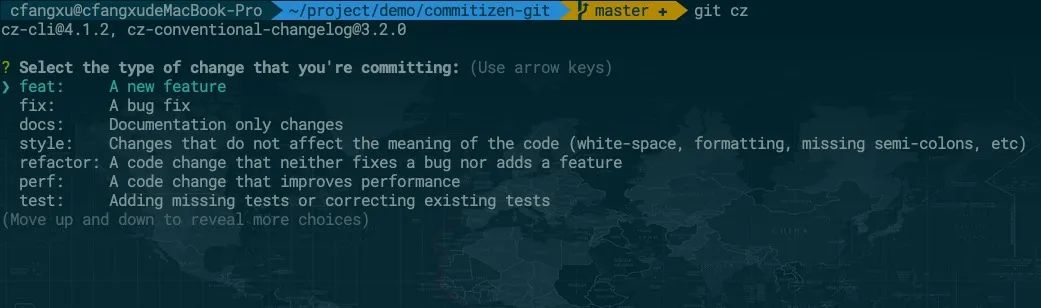
現(xiàn)在運行 git cz 效果如下:
cz-customizable 自定義中文配置
通過上面的截圖可以看到,提交的配置選項都是英文的,如果想改成中文的,可以使用 cz-customizable6 適配器。
運行下面的命令,注意之前已經初始化過一次了,這次再初始化,需要加 --force 覆蓋
npm install cz-customizable?--save-dev
commitizen init cz-customizable?--save-dev?--save-exact?--force
現(xiàn)在 package.json 中 config.commitizen 字段為:
"config":?{
????"commitizen":?{
??????"path":?"./node_modules/cz-customizable"
????}
??}
cz-customizable 文檔中說明了查找配置文件的方式有三種,我們按照第一種,在項目根目錄創(chuàng)建一個 .cz-config.js 的文件。按照給出的示例 cz-config-EXAMPLE.js7 編寫我們的 config。commit-type 可以參考 conventional-commit-types8 。
可以點擊查看我配置好的文件 qiqihaobenben/commitizen-git/.cz-config.js9 ,里面中詳細的注釋。
commitlint 校驗提交
Commitizen 文檔中開始就介紹到,Commitizen 可以在觸發(fā) git commit 鉤子之前就能給出提示,但是也明確表示提交時對 commit messages 的校驗也是很有用的。畢竟即使用了 Commitzen,也是能繞過去,所以提交最后的校驗很重要。
commitlint10 可以檢查 commit messages 是否符合常規(guī)提交格式,需要一份校驗配置,推薦 @commitlint/config-conventional11 。
npm i?--save-dev @commitlint/config-conventional @commitlint/cli
在項目根目錄創(chuàng)建 commitlint.config.js 文件并設置校驗規(guī)則:
module.exports?=?{
??extends:?["@commitlint/config-conventional"],
??// rules 里面可以設置一些自定義的校驗規(guī)則
??rules:?{},
};
在項目中安裝 husky ,并在項目根目錄新建 husky.config.js 文件,加入以下設置:
// 安裝 husky
npm install?--save-dev husky
// husky.config.js 中加入以下代碼
module.exports?=?{
??"hooks":?{
????"commit-msg":?"commitlint -E HUSKY_GIT_PARAMS"
??}
}
// 安裝 commitlint-config-cz
npm install commitlint-config-cz?--save-dev
// commitlint.config.js 改為
module.exports?=?{
??extends:?[
????'cz'
??]
};
git commit 觸發(fā) git cz
在提交的時候,我們都習慣了 git commit ,雖然換成 git cz 不難,但是如果讓開發(fā)者在 git commit 時無感知的觸發(fā) git cz 肯定是更好的,而且也能避免不熟悉項目的人直接 git commit 提交一些不符合規(guī)范的信息。
我們可以在 husky.config.js 中設置:
"hooks":?{
??"prepare-commit-msg":?"exec < /dev/tty && git cz --hook || true",
}
生成 CHANGELOG
standard-version15是一個使用 semver16 和 conventional-commits17 支持生成 CHANGELOG 進行版本控制的實用程序。standard-version 不只是能生成 CHANGELOG , 還能根據(jù) commit 的 type 來進行版本控制。
// 安裝 standard-verison
npm i?--save-dev standard-version
// 在 package.json 中的 scripts 加入 standard-version
{
??"scripts":?{
????"release":?"standard-version"
??}
}
示例項目
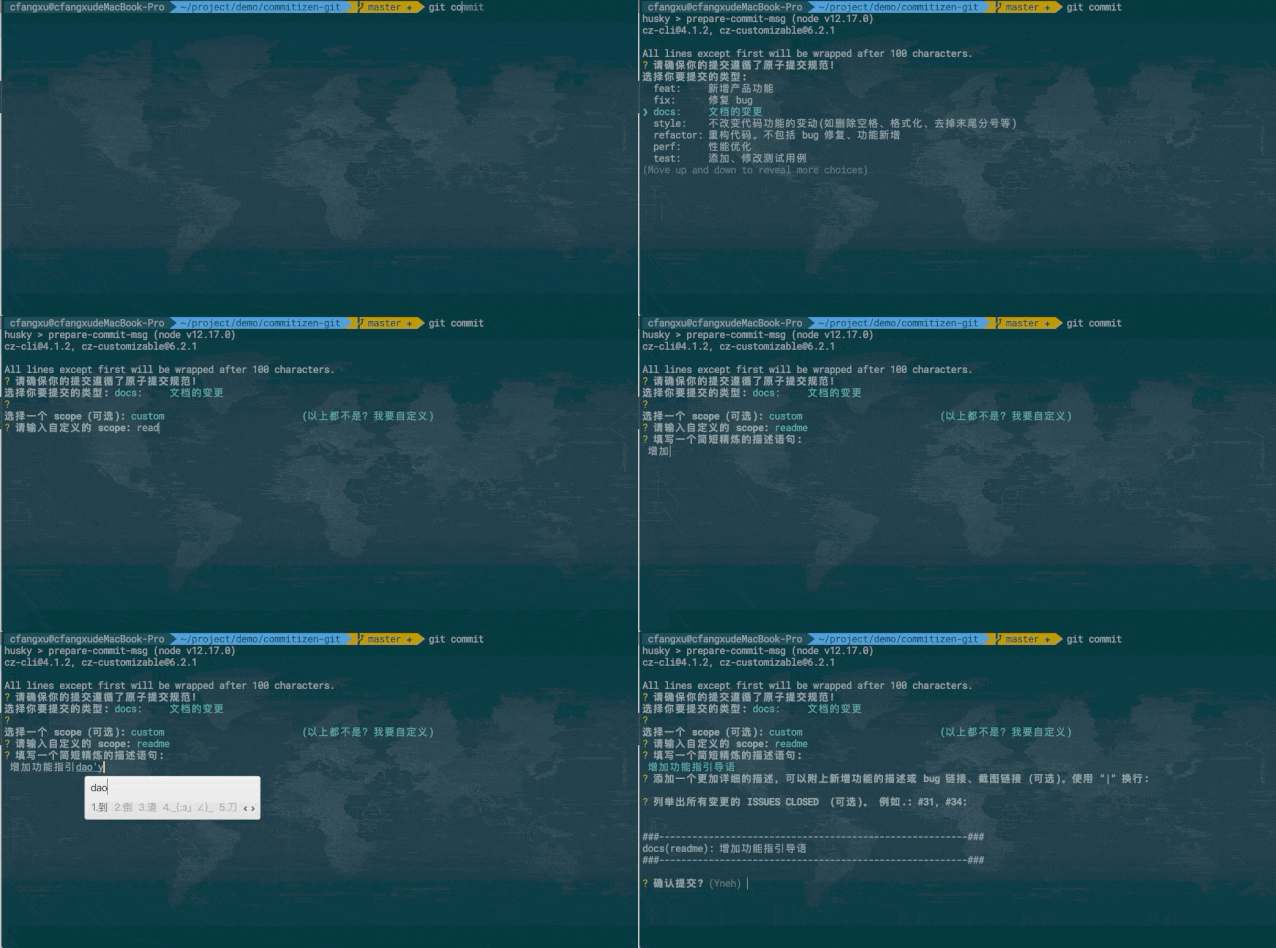
可以查看 commitizen-git18 ,里面歸納了快速配置 Commitizen 友好倉庫的步驟,差不多三五分鐘就能搞定。
可以看一下配置完后,執(zhí)行 git commit 的效果。
擴展
更復雜的自定義提示
cz-customizable19 中自定義配置項通常情況是夠用的,commitlint 中校驗的規(guī)則基本上也是夠用的,但是會有比較硬核的開發(fā)者會覺得還是不夠,還要更多。比如一些 prompt 更加自定義,提交時詢問的 question 添加更多的邏輯,比如可以把一些重要的字段校驗提前到 Commitizen 中,或者添加更多自定義的校驗。
如果真想這么干,那就去 fork 一份 cz-conventional-changelog20 或者 cz-customizable21 來改,或者直接自己寫一個 adapter。
Commitizen 友好徽章
如果把倉庫配置成了對 Commitizen 友好的話,可以在 README.md 中加上這個小徽章:
[](http://commitizen.github.io/cz-cli/)
參考文檔
AngularJS Git Commit Message Conventions22
conventional commit format23
Commit message 和 Change log 編寫指南24
Writing Git commit messages25
A Note About Git Commit Messages(文中講了 subject 50 個字符的約定怎么來的)26
個性化你的 Git Log 的輸出格式27
git pretty formats28
文內鏈接
https://github.com/angular/angular.js/blob/master/DEVELOPERS.md#-git-commit-guidelines
https://docs.github.com/en/github/managing-your-work-on-github/linking-a-pull-request-to-an-issue
https://docs.google.com/document/d/1QrDFcIiPjSLDn3EL15IJygNPiHORgU1_OOAqWjiDU5Y/edit#heading=h.8sw072iehlhg
https://github.com/commitizen/cz-cli
https://github.com/streamich/git-cz
https://github.com/leoforfree/cz-customizable
https://github.com/leoforfree/cz-customizable/blob/master/cz-config-EXAMPLE.js
https://github.com/commitizen/conventional-commit-types/blob/master/index.json
https://github.com/qiqihaobenben/commitizen-git/blob/master/.cz-config.js
https://github.com/conventional-changelog/commitlint
https://github.com/conventional-changelog/commitlint/tree/master/%40commitlint/config-conventional !--@commitlint/config-conventional--
https://github.com/conventional-changelog/commitlint/tree/master/%40commitlint/config-conventional !--@commitlint/config-conventional--
https://github.com/leoforfree/cz-customizable/blob/master/cz-config-EXAMPLE.js
https://github.com/whizark/commitlint-config-cz
https://github.com/conventional-changelog/standard-version
https://semver.org/lang/zh-CN/
https://github.com/conventional-commits
https://github.com/qiqihaobenben/commitizen-git
https://github.com/leoforfree/cz-customizable
https://github.com/commitizen/cz-conventional-changelog
https://github.com/leoforfree/cz-customizable
https://docs.google.com/document/d/1QrDFcIiPjSLDn3EL15IJygNPiHORgU1_OOAqWjiDU5Y/edit
https://www.conventionalcommits.org/en/v1.0.0/
http://www.ruanyifeng.com/blog/2016/01/commit_message_change_log.html
https://365git.tumblr.com/post/3308646748/writing-git-commit-messages
https://tbaggery.com/2008/04/19/a-note-about-git-commit-messages.html
https://ruby-china.org/topics/939
https://git-scm.com/docs/pretty-formats
關于奇舞周刊
《奇舞周刊》是360公司專業(yè)前端團隊「奇舞團」運營的前端技術社區(qū)。關注公眾號后,直接發(fā)送鏈接到后臺即可給我們投稿。