
圖文詳解 23 種設計模式
點擊下方“IT牧場”,選擇“設為星標”

面向接口編程,而不是面向實現(xiàn)。這個很重要,也是優(yōu)雅的、可擴展的代碼的第一步,這就不需要多說了吧。
職責單一原則。每個類都應該只有一個單一的功能,并且該功能應該由這個類完全封裝起來。
對修改關閉,對擴展開放。對修改關閉是說,我們辛辛苦苦加班寫出來的代碼,該實現(xiàn)的功能和該修復的 bug 都完成了,別人可不能說改就改;對擴展開放就比較好理解了,也就是說在我們寫好的代碼基礎上,很容易實現(xiàn)擴展。

public class FoodFactory {

    public static Food makeFood(String name) {
        if (name.equals("noodle")) {
            Food noodle = new LanZhouNoodle();
            noodle.addSpicy("more");
            return noodle;
        } else if (name.equals("chicken")) {
            Food chicken = new HuangMenChicken();
            chicken.addCondiment("potato");
            return chicken;
        } else {
            return null;
        }
    }
}
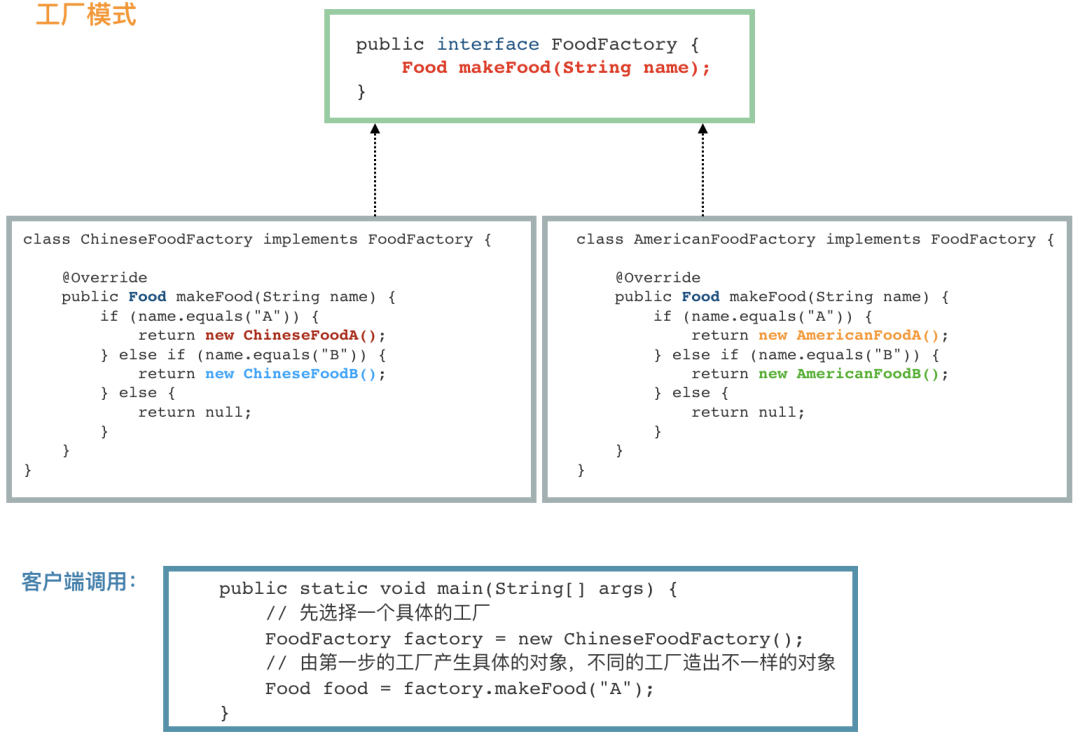
public interface FoodFactory {
    Food makeFood(String name);
}
public class ChineseFoodFactory implements FoodFactory {

    @Override
    public Food makeFood(String name) {
        if (name.equals("A")) {
            return new ChineseFoodA();
        } else if (name.equals("B")) {
            return new ChineseFoodB();
        } else {
            return null;
        }
    }
}
public class AmericanFoodFactory implements FoodFactory {

    @Override
    public Food makeFood(String name) {
        if (name.equals("A")) {
            return new AmericanFoodA();
        } else if (name.equals("B")) {
            return new AmericanFoodB();
        } else {
            return null;
        }
    }
}
public class APP {
    public static void main(String[] args) {
        // 先選擇一個具體的工廠
        FoodFactory factory = new ChineseFoodFactory();
        // 由第一步的工廠產(chǎn)生具體的對象,不同的工廠造出不一樣的對象
        Food food = factory.makeFood("A");
    }
}
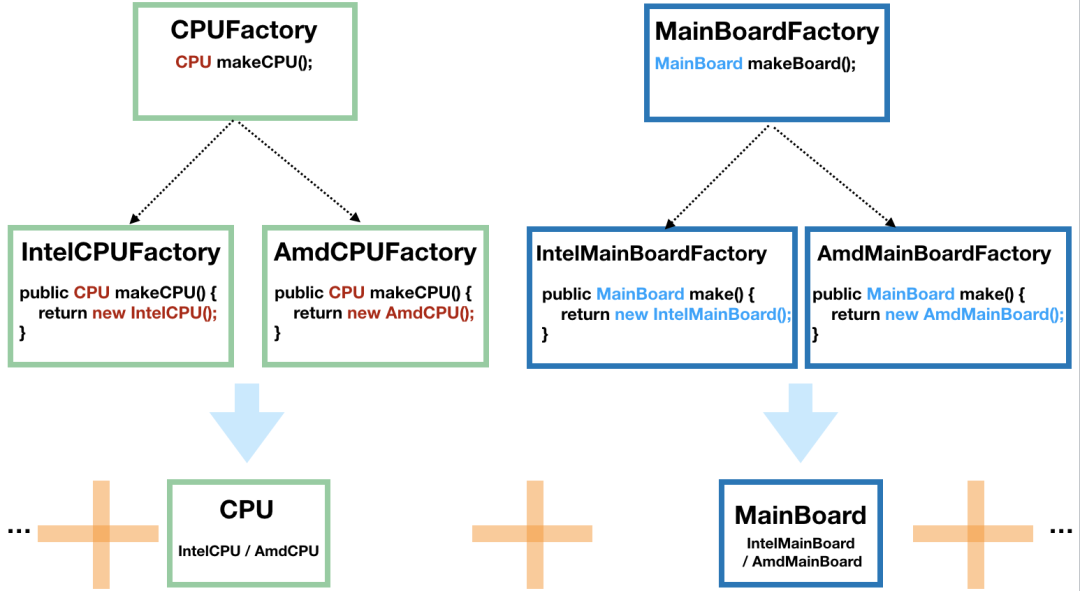
// 得到 Intel 的 CPU
CPUFactory cpuFactory = new IntelCPUFactory();
CPU cpu = intelCPUFactory.makeCPU();

// 得到 AMD 的主板
MainBoardFactory mainBoardFactory = new AmdMainBoardFactory();
MainBoard mainBoard = mainBoardFactory.make();

// 組裝 CPU 和主板
Computer computer = new Computer(cpu, mainBoard);

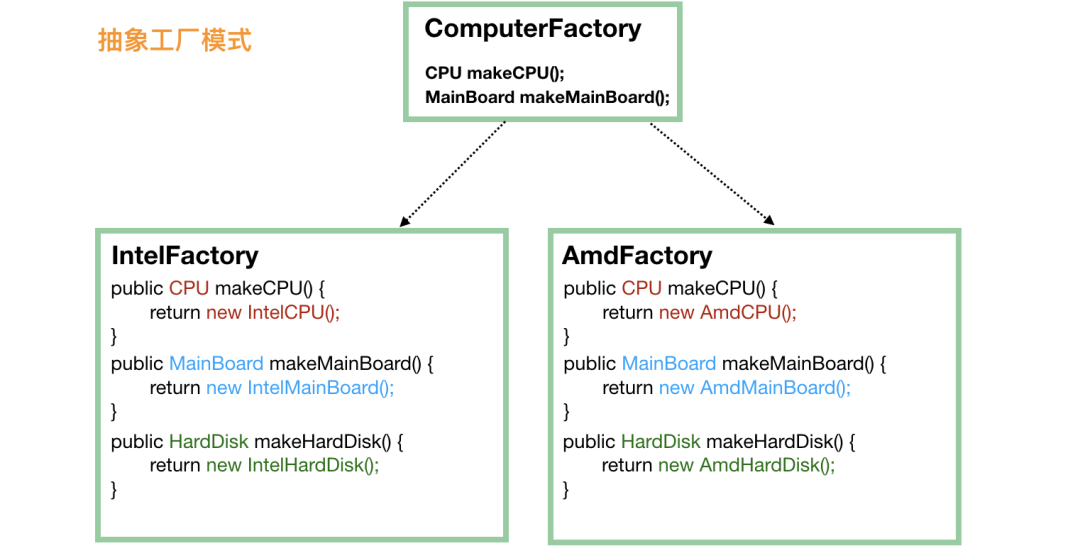
public static void main(String[] args) {
    // 第一步就要選定一個“大廠”
    ComputerFactory cf = new AmdFactory();
    // 從這個大廠造 CPU
    CPU cpu = cf.makeCPU();
    // 從這個大廠造主板
    MainBoard board = cf.makeMainBoard();
      // 從這個大廠造硬盤
      HardDisk hardDisk = cf.makeHardDisk();

    // 將同一個廠子出來的 CPU、主板、硬盤組裝在一起
    Computer result = new Computer(cpu, board, hardDisk);
}
public class Singleton {
    // 首先,將 new Singleton() 堵死
    private Singleton() {};
    // 創(chuàng)建私有靜態(tài)實例,意味著這個類第一次使用的時候就會進行創(chuàng)建
    private static Singleton instance = new Singleton();

    public static Singleton getInstance() {
        return instance;
    }
    // 瞎寫一個靜態(tài)方法。這里想說的是,如果我們只是要調用 Singleton.getDate(...),
    // 本來是不想要生成 Singleton 實例的,不過沒辦法,已經(jīng)生成了
    public static Date getDate(String mode) {return new Date();}
}
public class Singleton {
    // 首先,也是先堵死 new Singleton() 這條路
    private Singleton() {}
    // 和餓漢模式相比,這邊不需要先實例化出來,注意這里的 volatile,它是必須的
    private static volatile Singleton instance = null;

    public static Singleton getInstance() {
        if (instance == null) {
            // 加鎖
            synchronized (Singleton.class) {
                // 這一次判斷也是必須的,不然會有并發(fā)問題
                if (instance == null) {
                    instance = new Singleton();
                }
            }
        }
        return instance;
    }
}
volatile 在這里是需要的,希望能引起讀者的關注。
很多人不知道怎么寫,直接就在 getInstance() 方法簽名上加上 synchronized,這就不多說了,性能太差。
public class Singleton3 {

    private Singleton3() {}
    // 主要是使用了 嵌套類可以訪問外部類的靜態(tài)屬性和靜態(tài)方法 的特性
    private static class Holder {
        private static Singleton3 instance = new Singleton3();
    }
    public static Singleton3 getInstance() {
        return Holder.instance;
    }
}
Food food = new FoodBuilder().a().b().c().build();
Food food = Food.builder().a().b().c().build();
class User {
    // 下面是“一堆”的屬性
    private String name;
    private String password;
    private String nickName;
    private int age;

    // 構造方法私有化,不然客戶端就會直接調用構造方法了
    private User(String name, String password, String nickName, int age) {
        this.name = name;
        this.password = password;
        this.nickName = nickName;
        this.age = age;
    }
    // 靜態(tài)方法,用于生成一個 Builder,這個不一定要有,不過寫這個方法是一個很好的習慣,
    // 有些代碼要求別人寫 new User.UserBuilder().a()...build() 看上去就沒那么好
    public static UserBuilder builder() {
        return new UserBuilder();
    }

    public static class UserBuilder {
        // 下面是和 User 一模一樣的一堆屬性
        private String  name;
        private String password;
        private String nickName;
        private int age;

        private UserBuilder() {
        }

        // 鏈式調用設置各個屬性值,返回 this,即 UserBuilder
        public UserBuilder name(String name) {
            this.name = name;
            return this;
        }

        public UserBuilder password(String password) {
            this.password = password;
            return this;
        }

        public UserBuilder nickName(String nickName) {
            this.nickName = nickName;
            return this;
        }

        public UserBuilder age(int age) {
            this.age = age;
            return this;
        }

        // build() 方法負責將 UserBuilder 中設置好的屬性“復制”到 User 中。
        // 當然,可以在 “復制” 之前做點檢驗
        public User build() {
            if (name == null || password == null) {
                throw new RuntimeException("用戶名和密碼必填");
            }
            if (age <= 0 || age >= 150) {
                throw new RuntimeException("年齡不合法");
            }
            // 還可以做賦予”默認值“的功能
              if (nickName == null) {
                nickName = name;
            }
            return new User(name, password, nickName, age);
        }
    }
}
public class APP {
    public static void main(String[] args) {
        User d = User.builder()
                .name("foo")
                .password("pAss12345")
                .age(25)
                .build();
    }
}
@Builder
class User {
    private String  name;
    private String password;
    private String nickName;
    private int age;
}
User user = new User().setName("").setPassword("").setAge(20);
protected native Object clone() throws CloneNotSupportedException;
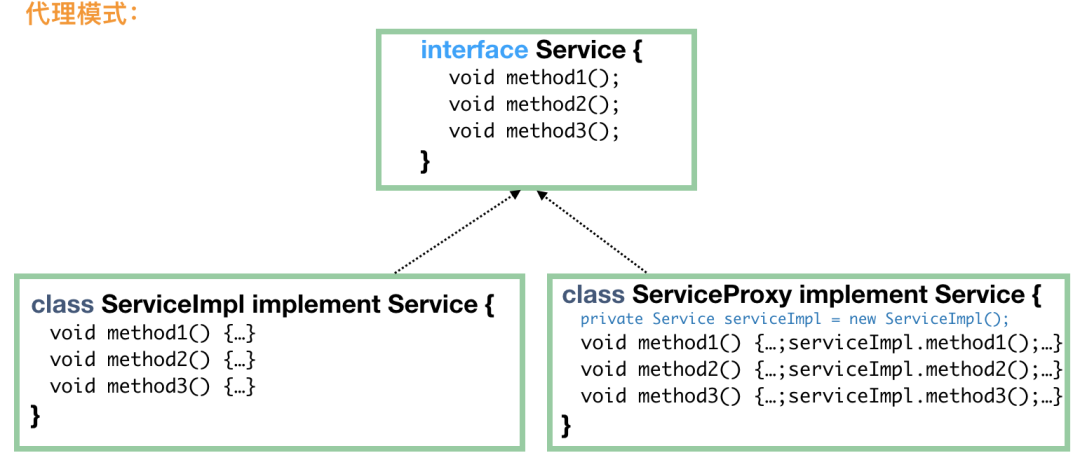
public interface FoodService {
    Food makeChicken();
    Food makeNoodle();
}

public class FoodServiceImpl implements FoodService {
    public Food makeChicken() {
          Food f = new Chicken()
        f.setChicken("1kg");
          f.setSpicy("1g");
          f.setSalt("3g");
        return f;
    }
    public Food makeNoodle() {
        Food f = new Noodle();
        f.setNoodle("500g");
        f.setSalt("5g");
        return f;
    }
}

// 代理要表現(xiàn)得“就像是”真實實現(xiàn)類,所以需要實現(xiàn) FoodService
public class FoodServiceProxy implements FoodService {

    // 內部一定要有一個真實的實現(xiàn)類,當然也可以通過構造方法注入
    private FoodService foodService = new FoodServiceImpl();

    public Food makeChicken() {
        System.out.println("我們馬上要開始制作雞肉了");

        // 如果我們定義這句為核心代碼的話,那么,核心代碼是真實實現(xiàn)類做的,
        // 代理只是在核心代碼前后做些“無足輕重”的事情
        Food food = foodService.makeChicken();

        System.out.println("雞肉制作完成啦,加點胡椒粉"); // 增強
          food.addCondiment("pepper");

        return food;
    }
    public Food makeNoodle() {
        System.out.println("準備制作拉面~");
        Food food = foodService.makeNoodle();
        System.out.println("制作完成啦")
        return food;
    }
}
// 這里用代理類來實例化
FoodService foodService = new FoodServiceProxy();
foodService.makeChicken();
public interface FileAlterationListener {
    void onStart(final FileAlterationObserver observer);
    void onDirectoryCreate(final File directory);
    void onDirectoryChange(final File directory);
    void onDirectoryDelete(final File directory);
    void onFileCreate(final File file);
    void onFileChange(final File file);
    void onFileDelete(final File file);
    void onStop(final FileAlterationObserver observer);
}
public class FileAlterationListenerAdaptor implements FileAlterationListener {

    public void onStart(final FileAlterationObserver observer) {
    }

    public void onDirectoryCreate(final File directory) {
    }

    public void onDirectoryChange(final File directory) {
    }

    public void onDirectoryDelete(final File directory) {
    }

    public void onFileCreate(final File file) {
    }

    public void onFileChange(final File file) {
    }

    public void onFileDelete(final File file) {
    }

    public void onStop(final FileAlterationObserver observer) {
    }
}
public class FileMonitor extends FileAlterationListenerAdaptor {
    public void onFileCreate(final File file) {
        // 文件創(chuàng)建
        doSomething();
    }

    public void onFileDelete(final File file) {
        // 文件刪除
        doSomething();
    }
}
public interface Duck {
    public void quack(); // 鴨的呱呱叫
    public void fly(); // 飛
}

public interface Cock {
    public void gobble(); // 雞的咕咕叫
    public void fly(); // 飛
}

public class WildCock implements Cock {
    public void gobble() {
        System.out.println("咕咕叫");
    }
    public void fly() {
        System.out.println("雞也會飛哦");
    }
}
// 毫無疑問,首先,這個適配器肯定需要 implements Duck,這樣才能當做鴨來用
public class CockAdapter implements Duck {

    Cock cock;
    // 構造方法中需要一個雞的實例,此類就是將這只雞適配成鴨來用
      public CockAdapter(Cock cock) {
        this.cock = cock;
    }

    // 實現(xiàn)鴨的呱呱叫方法
    @Override
      public void quack() {
        // 內部其實是一只雞的咕咕叫
        cock.gobble();
    }

      @Override
      public void fly() {
        cock.fly();
    }
}
public static void main(String[] args) {
    // 有一只野雞
      Cock wildCock = new WildCock();
      // 成功將野雞適配成鴨
      Duck duck = new CockAdapter(wildCock);
      ...
}
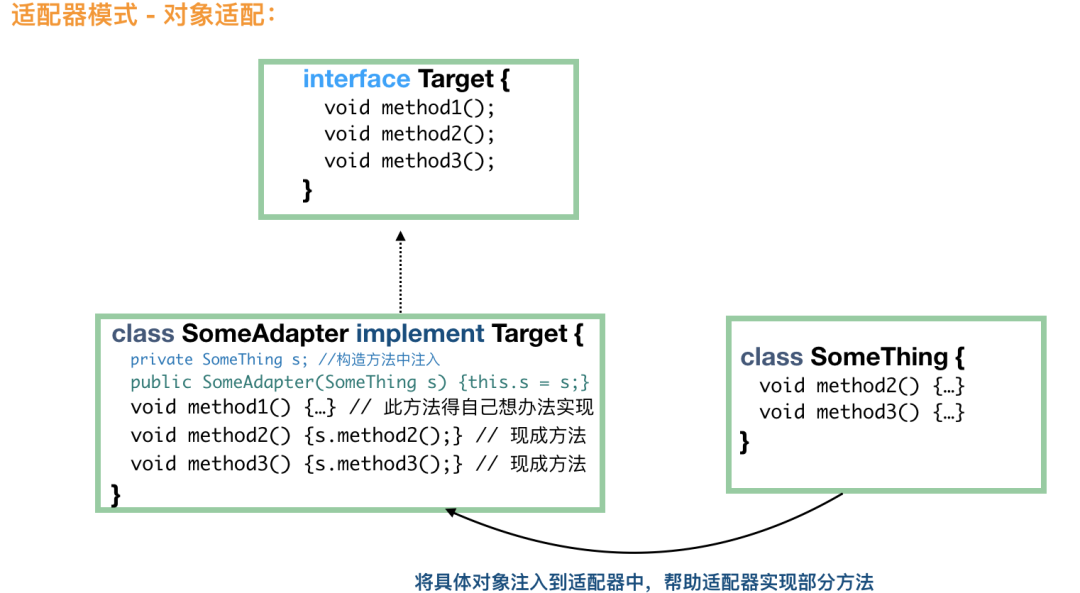
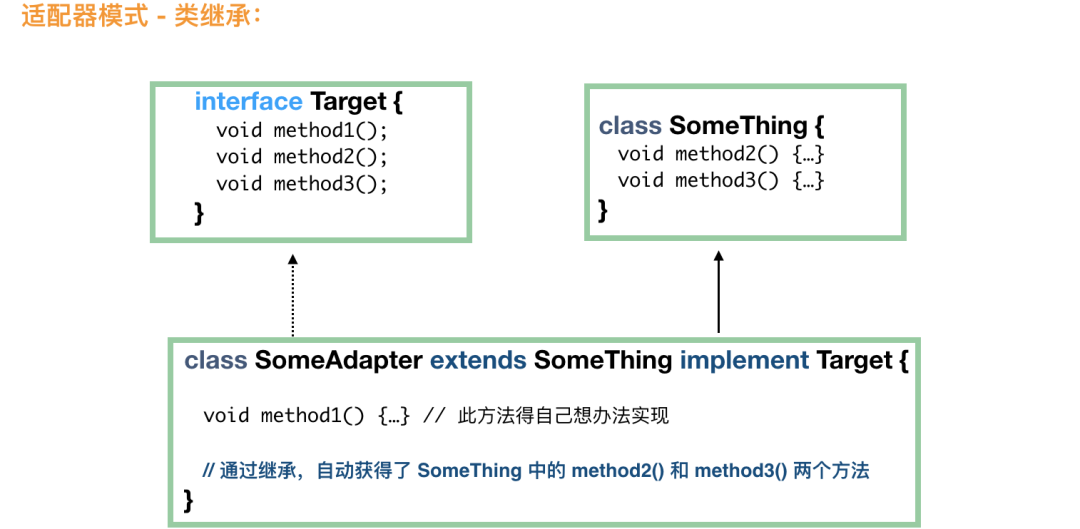
一個采用繼承,一個采用組合;
類適配屬于靜態(tài)實現(xiàn),對象適配屬于組合的動態(tài)實現(xiàn),對象適配需要多實例化一個對象;
總體來說,對象適配用得比較多。
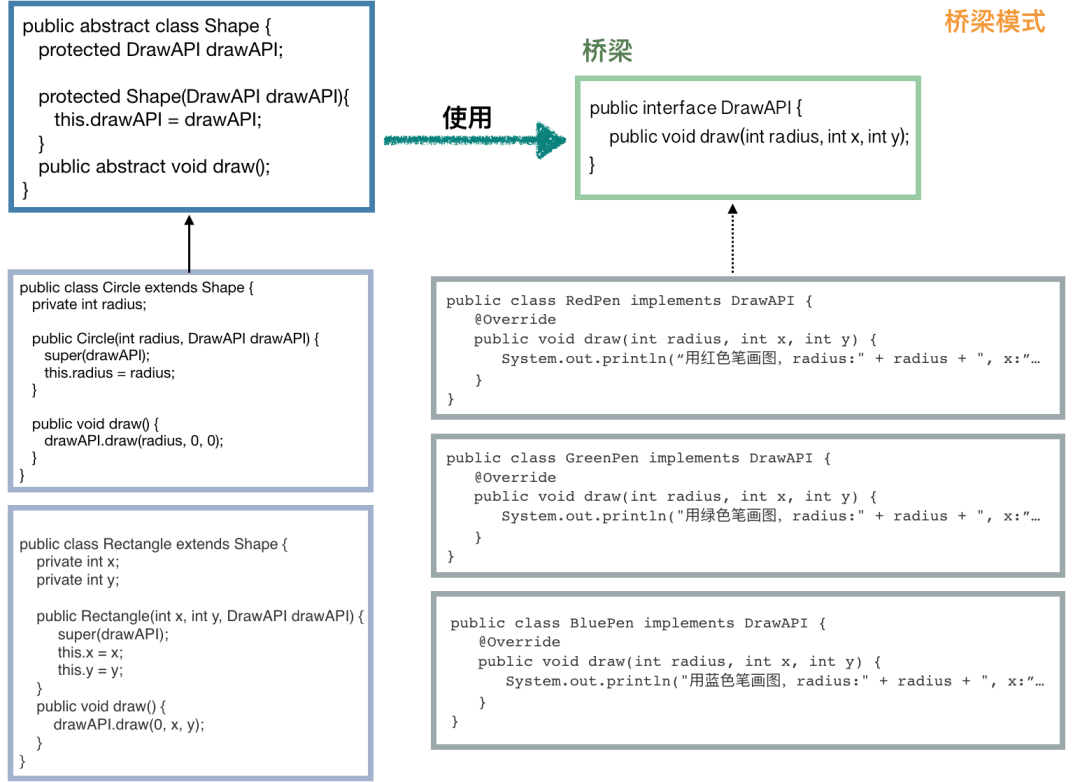
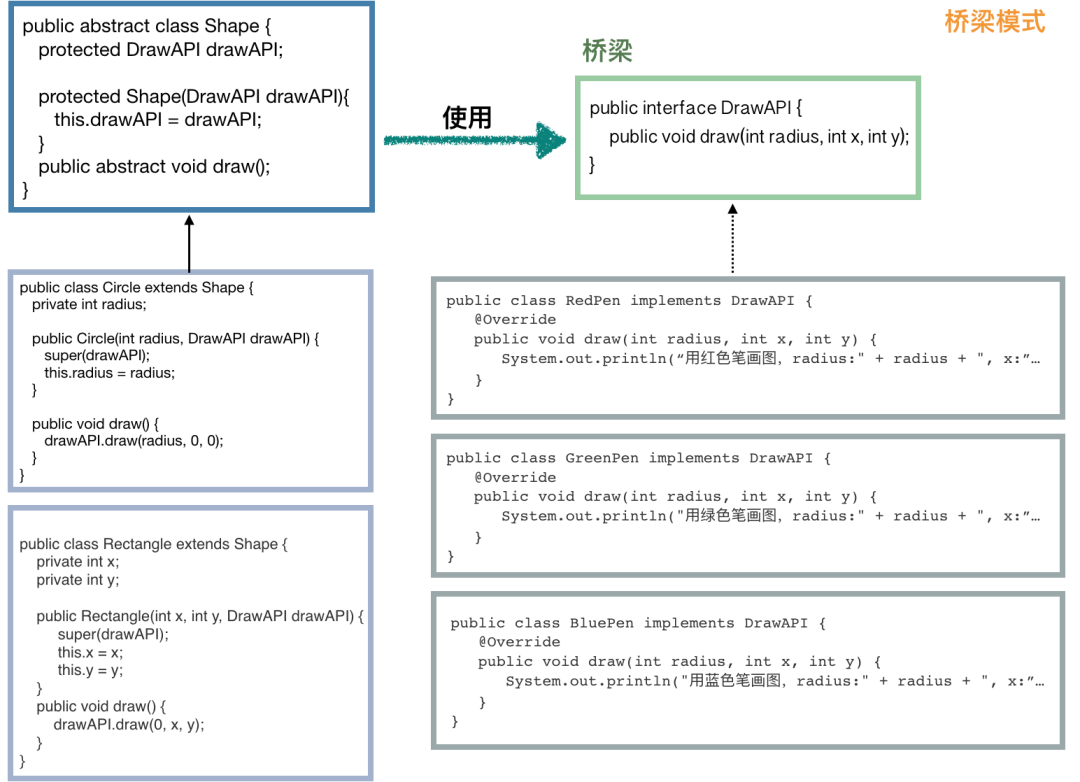
public interface DrawAPI {
   public void draw(int radius, int x, int y);
}
public class RedPen implements DrawAPI {
    @Override
    public void draw(int radius, int x, int y) {
        System.out.println("用紅色筆畫圖,radius:" + radius + ", x:" + x + ", y:" + y);
    }
}
public class GreenPen implements DrawAPI {
    @Override
    public void draw(int radius, int x, int y) {
        System.out.println("用綠色筆畫圖,radius:" + radius + ", x:" + x + ", y:" + y);
    }
}
public class BluePen implements DrawAPI {
    @Override
    public void draw(int radius, int x, int y) {
        System.out.println("用藍色筆畫圖,radius:" + radius + ", x:" + x + ", y:" + y);
    }
}
public abstract class Shape {
    protected DrawAPI drawAPI;
    protected Shape(DrawAPI drawAPI) {
        this.drawAPI = drawAPI;
    }
    public abstract void draw();
}
// 圓形
public class Circle extends Shape {
    private int radius;
    public Circle(int radius, DrawAPI drawAPI) {
        super(drawAPI);
        this.radius = radius;
    }
    public void draw() {
        drawAPI.draw(radius, 0, 0);
    }
}
// 長方形
public class Rectangle extends Shape {
    private int x;
    private int y;
    public Rectangle(int x, int y, DrawAPI drawAPI) {
        super(drawAPI);
        this.x = x;
        this.y = y;
    }
    public void draw() {
        drawAPI.draw(0, x, y);
    }
}
public static void main(String[] args) {
    Shape greenCircle = new Circle(10, new GreenPen());
    Shape redRectangle = new Rectangle(4, 8, new RedPen());
    greenCircle.draw();
    redRectangle.draw();
}
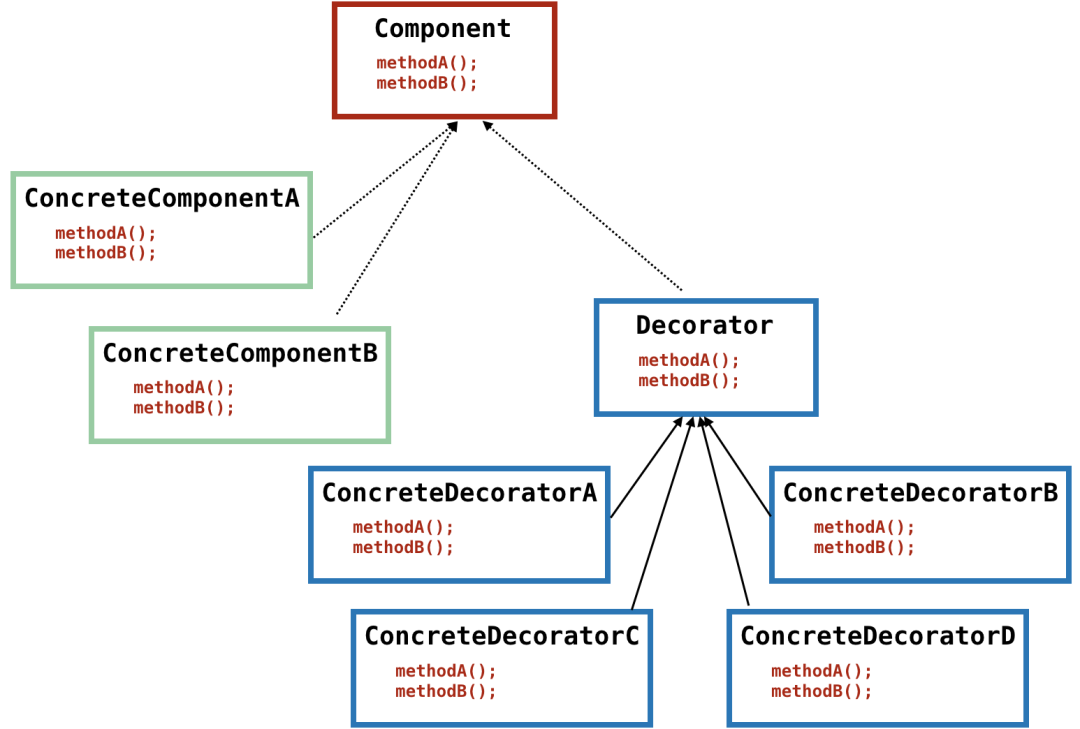
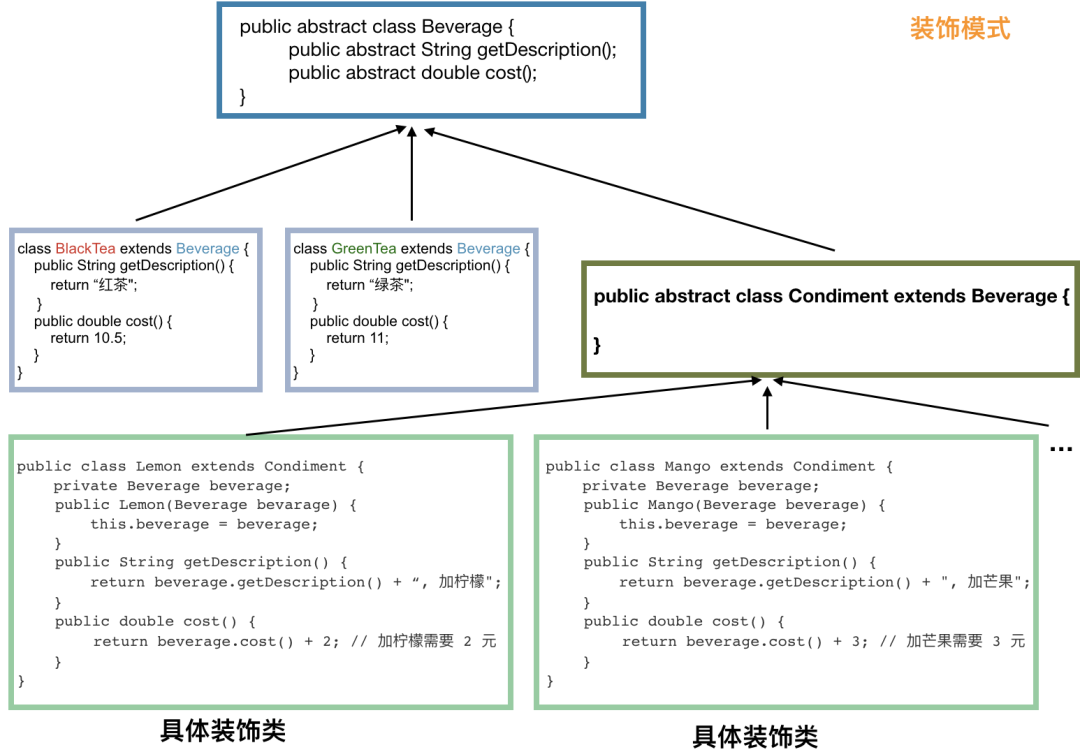
public abstract class Beverage {
      // 返回描述
      public abstract String getDescription();
      // 返回價格
      public abstract double cost();
}
public class BlackTea extends Beverage {
      public String getDescription() {
        return "紅茶";
    }
      public double cost() {
        return 10;
    }
}
public class GreenTea extends Beverage {
    public String getDescription() {
        return "綠茶";
    }
      public double cost() {
        return 11;
    }
}
...// 咖啡省略
// 調料
public abstract class Condiment extends Beverage {

}
public class Lemon extends Condiment {
    private Beverage bevarage;
    // 這里很關鍵,需要傳入具體的飲料,如需要傳入沒有被裝飾的紅茶或綠茶,
    // 當然也可以傳入已經(jīng)裝飾好的芒果綠茶,這樣可以做芒果檸檬綠茶
    public Lemon(Beverage bevarage) {
        this.bevarage = bevarage;
    }
    public String getDescription() {
        // 裝飾
        return bevarage.getDescription() + ", 加檸檬";
    }
    public double cost() {
        // 裝飾
        return beverage.cost() + 2; // 加檸檬需要 2 元
    }
}

public class Mango extends Condiment {
    private Beverage bevarage;
    public Mango(Beverage bevarage) {
        this.bevarage = bevarage;
    }
    public String getDescription() {
        return bevarage.getDescription() + ", 加芒果";
    }
    public double cost() {
        return beverage.cost() + 3; // 加芒果需要 3 元
    }
}
...// 給每一種調料都加一個類
public static void main(String[] args) {
    // 首先,我們需要一個基礎飲料,紅茶、綠茶或咖啡
    Beverage beverage = new GreenTea();
    // 開始裝飾
    beverage = new Lemon(beverage); // 先加一份檸檬
    beverage = new Mongo(beverage); // 再加一份芒果

    System.out.println(beverage.getDescription() + " 價格:¥" + beverage.cost());
    //"綠茶, 加檸檬, 加芒果 價格:¥16"
}
Beverage beverage = new Mongo(new Pearl(new Lemon(new Lemon(new BlackTea()))));
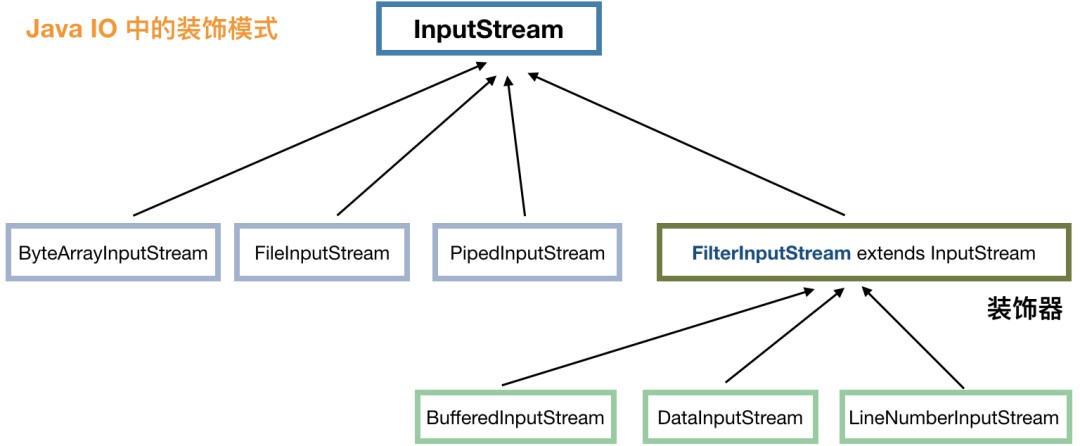
InputStream inputStream = new LineNumberInputStream(new BufferedInputStream(new FileInputStream("")));
DataInputStream is = new DataInputStream(
                              new BufferedInputStream(
                                  new FileInputStream("")));
public interface Shape {
   void draw();
}
public class Circle implements Shape {
    @Override
    public void draw() {
       System.out.println("Circle::draw()");
    }
}

public class Rectangle implements Shape {
    @Override
    public void draw() {
       System.out.println("Rectangle::draw()");
    }
}
public static void main(String[] args) {
    // 畫一個圓形
      Shape circle = new Circle();
      circle.draw();

      // 畫一個長方形
      Shape rectangle = new Rectangle();
      rectangle.draw();
}
public class ShapeMaker {
   private Shape circle;
   private Shape rectangle;
   private Shape square;

   public ShapeMaker() {
      circle = new Circle();
      rectangle = new Rectangle();
      square = new Square();
   }

  /**
   * 下面定義一堆方法,具體應該調用什么方法,由這個門面來決定
   */

   public void drawCircle(){
      circle.draw();
   }
   public void drawRectangle(){
      rectangle.draw();
   }
   public void drawSquare(){
      square.draw();
   }
}
public static void main(String[] args) {
  ShapeMaker shapeMaker = new ShapeMaker();

  // 客戶端調用現(xiàn)在更加清晰了
  shapeMaker.drawCircle();
  shapeMaker.drawRectangle();
  shapeMaker.drawSquare();
}
public class Employee {
   private String name;
   private String dept;
   private int salary;
   private List<Employee> subordinates; // 下屬

   public Employee(String name,String dept, int sal) {
      this.name = name;
      this.dept = dept;
      this.salary = sal;
      subordinates = new ArrayList<Employee>();
   }

   public void add(Employee e) {
      subordinates.add(e);
   }

   public void remove(Employee e) {
      subordinates.remove(e);
   }

   public List<Employee> getSubordinates(){
     return subordinates;
   }

   public String toString(){
      return ("Employee :[ Name : " + name + ", dept : " + dept + ", salary :" + salary+" ]");
   }
}
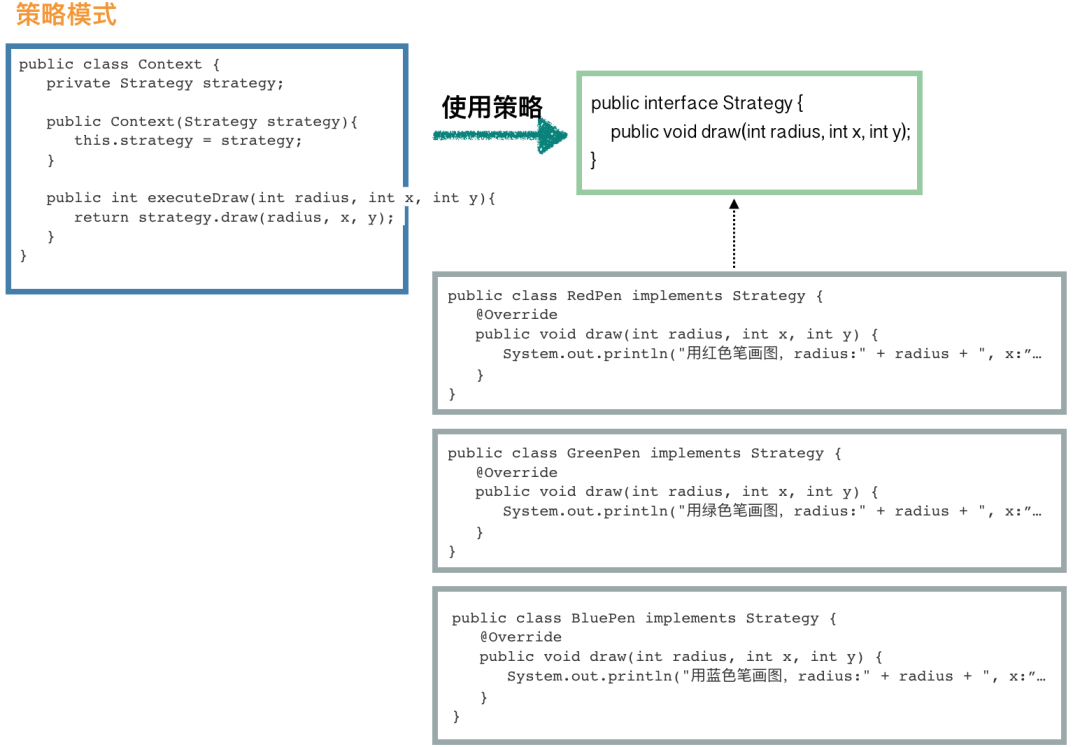
public interface Strategy {
   public void draw(int radius, int x, int y);
}
public class RedPen implements Strategy {
   @Override
   public void draw(int radius, int x, int y) {
      System.out.println("用紅色筆畫圖,radius:" + radius + ", x:" + x + ", y:" + y);
   }
}
public class GreenPen implements Strategy {
   @Override
   public void draw(int radius, int x, int y) {
      System.out.println("用綠色筆畫圖,radius:" + radius + ", x:" + x + ", y:" + y);
   }
}
public class BluePen implements Strategy {
   @Override
   public void draw(int radius, int x, int y) {
      System.out.println("用藍色筆畫圖,radius:" + radius + ", x:" + x + ", y:" + y);
   }
}
public class Context {
   private Strategy strategy;

   public Context(Strategy strategy){
      this.strategy = strategy;
   }

   public int executeDraw(int radius, int x, int y){
      return strategy.draw(radius, x, y);
   }
}
public static void main(String[] args) {
    Context context = new Context(new BluePen()); // 使用綠色筆來畫
      context.executeDraw(10, 0, 0);
}
public class Subject {
    private List<Observer> observers = new ArrayList<Observer>();
    private int state;
    public int getState() {
        return state;
    }
    public void setState(int state) {
        this.state = state;
        // 數(shù)據(jù)已變更,通知觀察者們
        notifyAllObservers();
    }
    // 注冊觀察者
    public void attach(Observer observer) {
        observers.add(observer);
    }
    // 通知觀察者們
    public void notifyAllObservers() {
        for (Observer observer : observers) {
            observer.update();
        }
    }
}
public abstract class Observer {
    protected Subject subject;
    public abstract void update();
}
public class BinaryObserver extends Observer {
    // 在構造方法中進行訂閱主題
    public BinaryObserver(Subject subject) {
        this.subject = subject;
        // 通常在構造方法中將 this 發(fā)布出去的操作一定要小心
        this.subject.attach(this);
    }
    // 該方法由主題類在數(shù)據(jù)變更的時候進行調用
    @Override
    public void update() {
        String result = Integer.toBinaryString(subject.getState());
        System.out.println("訂閱的數(shù)據(jù)發(fā)生變化,新的數(shù)據(jù)處理為二進制值為:" + result);
    }
}

public class HexaObserver extends Observer {
    public HexaObserver(Subject subject) {
        this.subject = subject;
        this.subject.attach(this);
    }
    @Override
    public void update() {
        String result = Integer.toHexString(subject.getState()).toUpperCase();
        System.out.println("訂閱的數(shù)據(jù)發(fā)生變化,新的數(shù)據(jù)處理為十六進制值為:" + result);
    }
}
public static void main(String[] args) {
    // 先定義一個主題
    Subject subject1 = new Subject();
    // 定義觀察者
    new BinaryObserver(subject1);
    new HexaObserver(subject1);

    // 模擬數(shù)據(jù)變更,這個時候,觀察者們的 update 方法將會被調用
    subject.setState(11);
}
訂閱的數(shù)據(jù)發(fā)生變化,新的數(shù)據(jù)處理為二進制值為:1011
訂閱的數(shù)據(jù)發(fā)生變化,新的數(shù)據(jù)處理為十六進制值為:B
public abstract class RuleHandler {
    // 后繼節(jié)點
    protected RuleHandler successor;

    public abstract void apply(Context context);

    public void setSuccessor(RuleHandler successor) {
        this.successor = successor;
    }

    public RuleHandler getSuccessor() {
        return successor;
    }
}
public class NewUserRuleHandler extends RuleHandler {
    public void apply(Context context) {
        if (context.isNewUser()) {
            // 如果有后繼節(jié)點的話,傳遞下去
            if (this.getSuccessor() != null) {
                this.getSuccessor().apply(context);
            }
        } else {
            throw new RuntimeException("該活動僅限新用戶參與");
        }
    }
}
public class LocationRuleHandler extends RuleHandler {
    public void apply(Context context) {
        boolean allowed = activityService.isSupportedLocation(context.getLocation);
        if (allowed) {
            if (this.getSuccessor() != null) {
                this.getSuccessor().apply(context);
            }
        } else {
            throw new RuntimeException("非常抱歉,您所在的地區(qū)無法參與本次活動");
        }
    }
}
public class LimitRuleHandler extends RuleHandler {
    public void apply(Context context) {
        int remainedTimes = activityService.queryRemainedTimes(context); // 查詢剩余獎品
        if (remainedTimes > 0) {
            if (this.getSuccessor() != null) {
                this.getSuccessor().apply(userInfo);
            }
        } else {
            throw new RuntimeException("您來得太晚了,獎品被領完了");
        }
    }
}
public static void main(String[] args) {
    RuleHandler newUserHandler = new NewUserRuleHandler();
    RuleHandler locationHandler = new LocationRuleHandler();
    RuleHandler limitHandler = new LimitRuleHandler();

    // 假設本次活動僅校驗地區(qū)和獎品數(shù)量,不校驗新老用戶
    locationHandler.setSuccessor(limitHandler);

    locationHandler.apply(context);
}
public abstract class AbstractTemplate {
    // 這就是模板方法
    public void templateMethod() {
        init();
        apply(); // 這個是重點
        end(); // 可以作為鉤子方法
    }

    protected void init() {
        System.out.println("init 抽象層已經(jīng)實現(xiàn),子類也可以選擇覆寫");
    }

    // 留給子類實現(xiàn)
    protected abstract void apply();

    protected void end() {
    }
}
public class ConcreteTemplate extends AbstractTemplate {
    public void apply() {
        System.out.println("子類實現(xiàn)抽象方法 apply");
    }

    public void end() {
        System.out.println("我們可以把 method3 當做鉤子方法來使用,需要的時候覆寫就可以了");
    }
}
public static void main(String[] args) {
    AbstractTemplate t = new ConcreteTemplate();
    // 調用模板方法
    t.templateMethod();
}
public interface State {
    public void doAction(Context context);
}
public class DeductState implements State {

    public void doAction(Context context) {
        System.out.println("商品賣出,準備減庫存");
        context.setState(this);

        //... 執(zhí)行減庫存的具體操作
    }

    public String toString() {
        return "Deduct State";
    }
}
public class RevertState implements State {

    public void doAction(Context context) {
        System.out.println("給此商品補庫存");
        context.setState(this);

        //... 執(zhí)行加庫存的具體操作
    }

    public String toString() {
        return "Revert State";
    }
}
public class Context {
    private State state;
      private String name;
      public Context(String name) {
        this.name = name;
    }

      public void setState(State state) {
        this.state = state;
    }
      public void getState() {
        return this.state;
    }
}
public static void main(String[] args) {
    // 我們需要操作的是 iPhone X
    Context context = new Context("iPhone X");

    // 看看怎么進行補庫存操作
      State revertState = new RevertState();
      revertState.doAction(context);

    // 同樣的,減庫存操作也非常簡單
      State deductState = new DeductState();
      deductState.doAction(context);

      // 如果需要我們可以獲取當前的狀態(tài)
    // context.getState().toString();
}
干貨分享
最近將個人學習筆記整理成冊,使用PDF分享。關注我,回復如下代碼,即可獲得百度盤地址,無套路領取!
?001:《Java并發(fā)與高并發(fā)解決方案》學習筆記;?002:《深入JVM內核——原理、診斷與優(yōu)化》學習筆記;?003:《Java面試寶典》?004:《Docker開源書》?005:《Kubernetes開源書》?006:《DDD速成(領域驅動設計速成)》?007:全部?008:加技術群討論
加個關注不迷路
喜歡就點個"在看"唄^_^