
爆肝!用Python制作抖音爆款視頻!

文 | 某某白米飯
來源:Python 技術(shù)「ID: pythonall」

前幾天小編在抖音上刷到一個慢慢變老的視頻,播放量居然有 30W+,當(dāng)時就在想這視頻 Python 可不可以做?經(jīng)過一番搜索,小編找到了騰訊云的人臉年齡變化 API,上面介紹說只要用戶上傳一張人臉圖片,基于人臉編輯與生成算法,就可以輸出一張人臉變老或變年輕的圖片,并支持實現(xiàn)人臉不同年齡的變化。
準(zhǔn)備工作
獲取 API 秘鑰
第一步,在注冊賬號之后,打開 API 密鑰管理頁面(https://console.cloud.tencent.com/cam/capi)獲取到 SecretId 和 SecretKey。

第二步,安裝騰訊云的 SDK
pip3 install tencentcloud-sdk-python
人臉屬性
在人臉年齡變化 API 中有一個 AgeInfo 參數(shù),它包含了 Age 和 FaceRect 兩個屬性,其中 FaceRect 屬性必須填人臉在照片中基于左上角的 X、Y 坐標(biāo)和人臉的高度與寬度。所以先要調(diào)用人臉檢測與分析 API 得到這些數(shù)據(jù)。
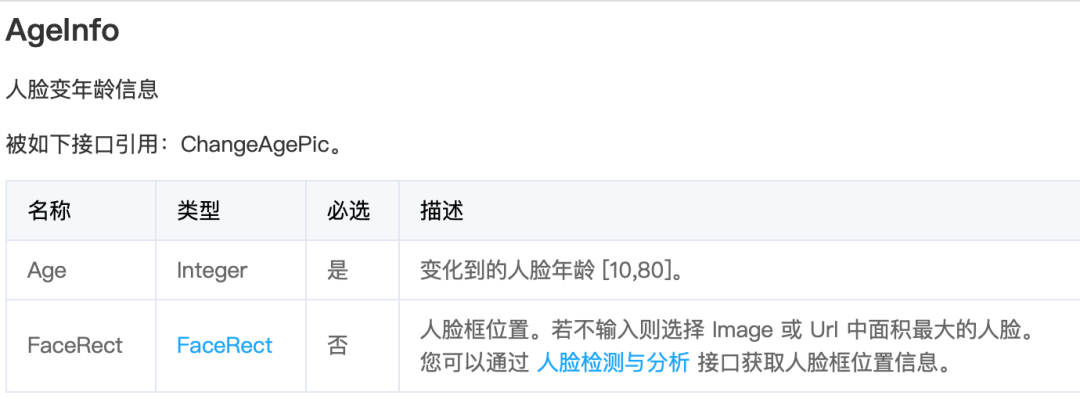
下面的示例圖是在百度圖片中截取的。

import json
import base64
from tencentcloud.common import credential
from tencentcloud.common.profile.client_profile import ClientProfile
from tencentcloud.common.profile.http_profile import HttpProfile
from tencentcloud.common.exception.tencent_cloud_sdk_exception import TencentCloudSDKException
from tencentcloud.iai.v20200303 import iai_client
from tencentcloud.iai.v20200303 import models as models03

sid = "xxx"
skey = "xxx"
try:

    filepath = '/Users/imeng/Downloads/face/face.png'
    file = open(filepath, "rb")
    base64_data = base64.b64encode(file.read())

    cred = credential.Credential(sid, skey)
    httpProfile = HttpProfile()
    httpProfile.endpoint = "iai.tencentcloudapi.com"

    clientProfile = ClientProfile()
    clientProfile.httpProfile = httpProfile
    client = iai_client.IaiClient(cred, "ap-beijing", clientProfile)

    req = models03.DetectFaceAttributesRequest()
    params = {
        "MaxFaceNum":2,
        "Action":"DetectFace",
        "Version":"2018-03-01",
        "Image": base64_data.decode()
    }
    req.from_json_string(json.dumps(params))
    resp = client.DetectFaceAttributes(req)

    faceDetailInfos = resp.FaceDetailInfos
    for faceDetailInfo in faceDetailInfos:
        faceRect = faceDetailInfo.FaceRect
        print(faceRect)
except TencentCloudSDKException as err:
    print(err)
示例結(jié)果
{"X": 62, "Y": 13, "Width": 145, "Height": 230}
{"X": 426, "Y": 113, "Width": 115, "Height": 139}
修改年齡
在上面已經(jīng)得到了各個人臉的 X、Y、Width、Height 屬性,加上變老的年齡 Age,就可以請求年齡變化 API 了。
這里需要注意的是 models 模塊,人臉檢測 models 模塊是在 tencentcloud.iai.v20200303 包下,人臉年齡變化的 models 是在 tencentcloud.ft.v20200304 下,兩個 models 模塊并不兼容。
import json
from tencentcloud.common import credential
from tencentcloud.common.profile.client_profile import ClientProfile
from tencentcloud.common.profile.http_profile import HttpProfile
from tencentcloud.common.exception.tencent_cloud_sdk_exception import TencentCloudSDKException
from tencentcloud.ft.v20200304 import ft_client, models

cred = credential.Credential(sid, skey)
httpProfile = HttpProfile()
httpProfile.endpoint = "ft.tencentcloudapi.com"
clientProfile.httpProfile = httpProfile
client = ft_client.FtClient(cred, "ap-beijing", clientProfile)

req = models.ChangeAgePicRequest()

for age in range(70, 80):
params = {
    "Image": base64_data.decode(),
    "AgeInfos": [
        {
            "Age": age,
            "FaceRect": {
                "Y": faceDetailInfos[0].FaceRect.Y,
                "X": faceDetailInfos[0].FaceRect.X,
                "Width": faceDetailInfos[0].FaceRect.Width,
                "Height": faceDetailInfos[0].FaceRect.Height
            }
        },
        {
            "Age": age,
            "FaceRect": {
                "Y": faceDetailInfos[1].FaceRect.Y,
                "X": faceDetailInfos[1].FaceRect.X,
                "Width": faceDetailInfos[1].FaceRect.Width,
                "Height": faceDetailInfos[1].FaceRect.Height
            }
        }
    ],
    "RspImgType": "base64"
}
req.from_json_string(json.dumps(params))
resp = client.ChangeAgePic(req)
image_base64 = resp.ResultImage
image_data = base64.b64decode(image_base64)
file_path = '/Users/imeng/Downloads/face/{}.png'.format(age)
with open(file_path, 'wb') as f:
    f.write(image_data)
time.sleep(1)
示例結(jié)果
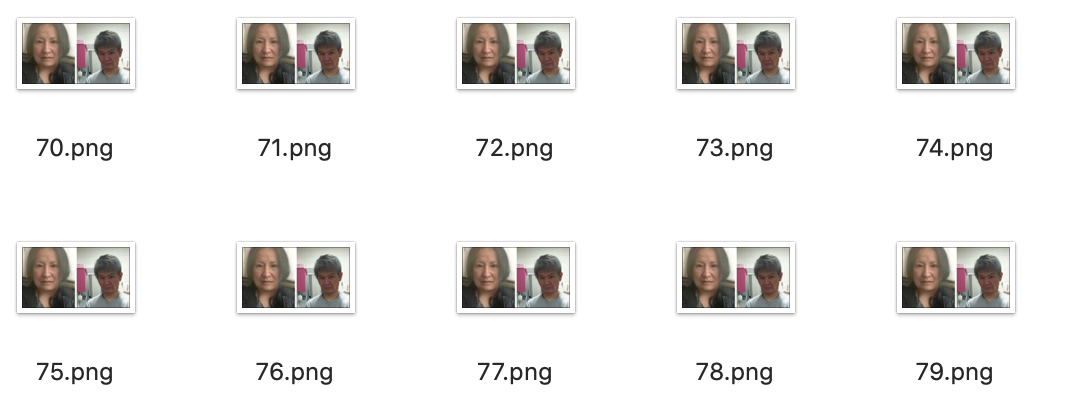
最后的視頻可以將圖片一張一張插入 PPT 幻燈片,點擊保存為視頻。
總結(jié)
用 Python 制作抖音素材,下一個 30W+ 播放量等著你。
PS:公號內(nèi)回復(fù)「Python」即可進(jìn)入Python 新手學(xué)習(xí)交流群,一起 100 天計劃!
老規(guī)矩,兄弟們還記得么,右下角的 “在看” 點一下,如果感覺文章內(nèi)容不錯的話,記得分享朋友圈讓更多的人知道!


【代碼獲取方式】