
.NET Core 下的爬蟲利器

本著研究學(xué)習(xí)的目的,記錄一下在 .NET Core 下抓取數(shù)據(jù)的實(shí)際案例。爬蟲代碼一般具有時(shí)效性,當(dāng)我們的目標(biāo)發(fā)生改版升級(jí),規(guī)則轉(zhuǎn)換后我們寫的爬蟲代碼就會(huì)失效,需要重新應(yīng)對(duì)。抓取數(shù)據(jù)的主要思路就是去分析目標(biāo)網(wǎng)站的頁面邏輯,利用xpath、正則表達(dá)式等知識(shí)去解析網(wǎng)頁拿到我們想要的數(shù)據(jù)。
本篇主要簡單介紹三個(gè)組件的使用,HtmlAgilityPack、AngleSharp、PuppeteerSharp,前兩個(gè)可以處理傳統(tǒng)的頁面,無法抓取單頁應(yīng)用,如果需要抓取單頁應(yīng)用可以使用PuppeteerSharp。
關(guān)于這三個(gè)組件庫的實(shí)際應(yīng)用可以參考一下定時(shí)任務(wù)最佳實(shí)戰(zhàn)系列文章。
新建一個(gè)控制臺(tái)項(xiàng)目,抓取幾個(gè)站點(diǎn)的數(shù)據(jù)來試試,先做準(zhǔn)備工作,添加一個(gè)IHotNews的接口。
using?System.Collections.Generic;
using?System.Threading.Tasks;

namespace?SpiderDemo
{
????public?interface?IHotNews
????{
????????Task>?GetHotNewsAsync();
????}
}
HotNews模型,包含標(biāo)題和鏈接
namespace?SpiderDemo
{
????public?class?HotNews
????{
????????public?string?Title?{?get;?set;?}

????????public?string?Url?{?get;?set;?}
????}
}
最終我們通過依賴注入的方式,將抓取到的數(shù)據(jù)展示到控制臺(tái)中。
HtmlAgilityPack
https://html-agility-pack.net/ https://github.com/zzzprojects/html-agility-pack
在項(xiàng)目中安裝HtmlAgilityPack組件
Install-Package HtmlAgilityPack
這里以博客園為抓取目標(biāo),我們抓取首頁的文章標(biāo)題和鏈接。
using?HtmlAgilityPack;
using?System.Collections.Generic;
using?System.Linq;
using?System.Threading.Tasks;

namespace?SpiderDemo
{
????public?class?HotNewsHtmlAgilityPack?:?IHotNews
????{
????????public?async?Task>?GetHotNewsAsync()
????????{
????????????var?list?=?new?List();

????????????var?web?=?new?HtmlWeb();

????????????var?htmlDocument?=?await?web.LoadFromWebAsync("https://www.cnblogs.com/");

????????????var?node?=?htmlDocument.DocumentNode.SelectNodes("http://*[@id='post_list']/article/section/div/a").ToList();

????????????foreach?(var?item?in?node)
????????????{
????????????????list.Add(new?HotNews
????????????????{
????????????????????Title?=?item.InnerText,
????????????????????Url?=?item.GetAttributeValue("href",?"")
????????????????});
????????????}

????????????return?list;
????????}
????}
}
添加HotNewsHtmlAgilityPack.cs實(shí)現(xiàn)IHotNews接口,訪問博客園網(wǎng)址,拿到HTML數(shù)據(jù)后,使用xpath語法解析HTML,這里主要是拿到a標(biāo)簽即可。
通過查看網(wǎng)頁分析可以得到這個(gè)xpath://*[@id='post_list']/article/section/div/a。
然后在Program.cs中注入IHotNews,循環(huán)遍歷看看效果。
using?Microsoft.Extensions.DependencyInjection;
using?System;
using?System.Linq;
using?System.Threading.Tasks;

namespace?SpiderDemo
{
????class?Program
????{
????????static?async?Task?Main(string[]?args)
????????{
????????????IServiceCollection?service?=?new?ServiceCollection();

????????????service.AddSingleton();

????????????var?provider?=?service.BuildServiceProvider().GetRequiredService();

????????????var?list?=?await?provider.GetHotNewsAsync();

????????????if?(list.Any())
????????????{
????????????????Console.WriteLine($"一共{list.Count}條數(shù)據(jù)");

????????????????foreach?(var?item?in?list)
????????????????{
????????????????????Console.WriteLine($"{item.Title}\t{item.Url}");
????????????????}
????????????}
????????????else
????????????{
????????????????Console.WriteLine("無數(shù)據(jù)");
????????????}
????????}
????}
}
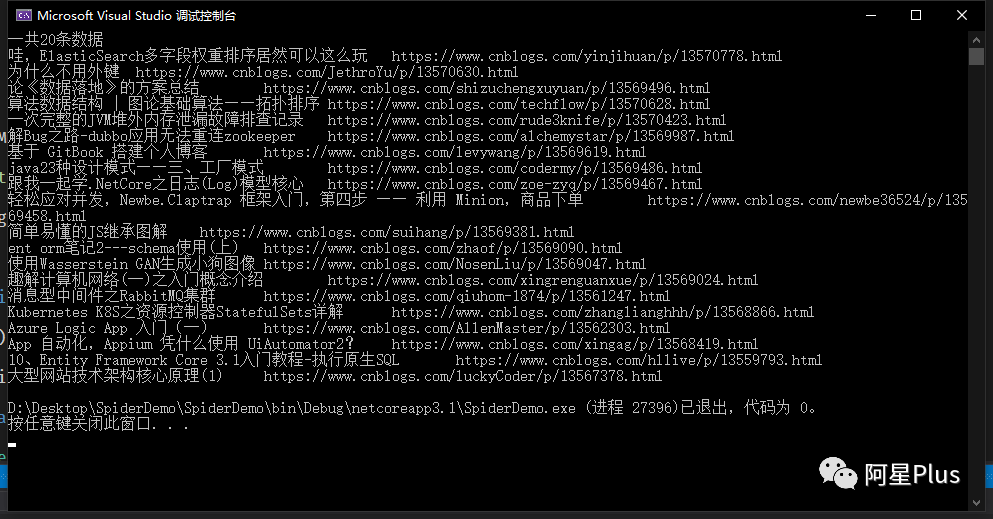
AngleSharp
https://anglesharp.github.io/ https://github.com/AngleSharp/AngleSharp
在項(xiàng)目中安裝AngleSharp組件
Install-Package AngleSharp
同樣的,新建一個(gè)HotNewsAngleSharp.cs也實(shí)現(xiàn)IHotNews接口,這次使用AngleSharp抓取。
using?AngleSharp;
using?System.Collections.Generic;
using?System.Threading.Tasks;

namespace?SpiderDemo
{
????public?class?HotNewsAngleSharp?:?IHotNews
????{
????????public?async?Task>?GetHotNewsAsync()
????????{
????????????var?list?=?new?List();

????????????var?config?=?Configuration.Default.WithDefaultLoader();
????????????var?address?=?"https://www.cnblogs.com";
????????????var?context?=?BrowsingContext.New(config);
????????????var?document?=?await?context.OpenAsync(address);

????????????var?cellSelector?=?"article.post-item";
????????????var?cells?=?document.QuerySelectorAll(cellSelector);

????????????foreach?(var?item?in?cells)
????????????{
????????????????var?a?=?item.QuerySelector("section>div>a");
????????????????list.Add(new?HotNews
????????????????{
????????????????????Title?=?a.TextContent,
????????????????????Url?=?a.GetAttribute("href")
????????????????});
????????????}

????????????return?list;
????????}
????}
}
AngleSharp解析數(shù)據(jù)和HtmlAgilityPack的方式有所不同,AngleSharp可以利用css規(guī)則去獲取數(shù)據(jù),用起來也是挺方便的。
在Program.cs中注入IHotNews,循環(huán)遍歷看看效果。
using?Microsoft.Extensions.DependencyInjection;
using?System;
using?System.Linq;
using?System.Threading.Tasks;

namespace?SpiderDemo
{
????class?Program
????{
????????static?async?Task?Main(string[]?args)
????????{
????????????IServiceCollection?service?=?new?ServiceCollection();

????????????service.AddSingleton();

????????????var?provider?=?service.BuildServiceProvider().GetRequiredService();

????????????var?list?=?await?provider.GetHotNewsAsync();

????????????if?(list.Any())
????????????{
????????????????Console.WriteLine($"一共{list.Count}條數(shù)據(jù)");

????????????????foreach?(var?item?in?list)
????????????????{
????????????????????Console.WriteLine($"{item.Title}\t{item.Url}");
????????????????}
????????????}
????????????else
????????????{
????????????????Console.WriteLine("無數(shù)據(jù)");
????????????}
????????}
????}
}
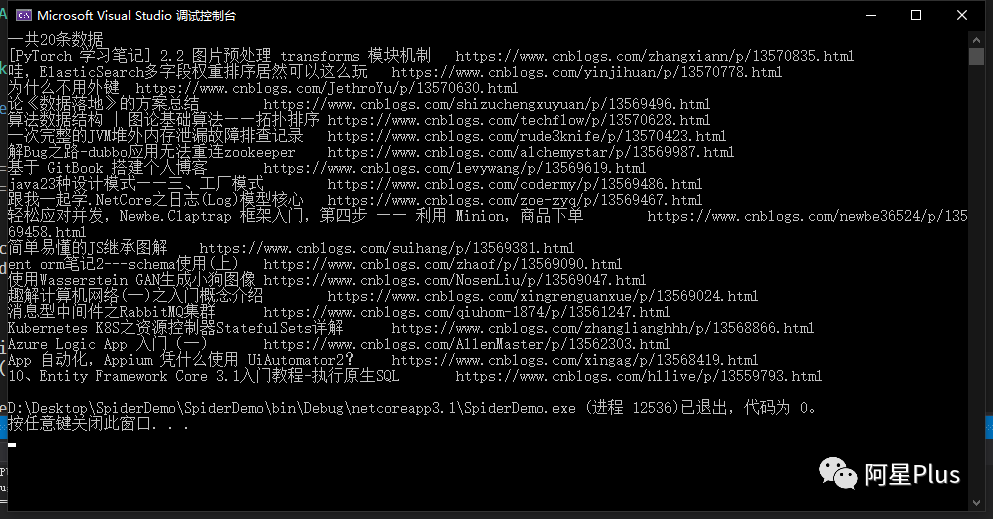
PuppeteerSharp
https://www.puppeteersharp.com/ https://github.com/hardkoded/puppeteer-sharp
PuppeteerSharp是基于Puppeteer的,Puppeteer?是一個(gè)Google 開源的NodeJS 庫,它提供了一個(gè)高級(jí)API 來通過DevTools協(xié)議控制Chromium 瀏覽器。Puppeteer 默認(rèn)以無頭(Headless) 模式運(yùn)行,但是可以通過修改配置運(yùn)行“有頭”模式。
PuppeteerSharp可以干很多事情,不光可以用來抓取單頁應(yīng)用,還可以用來生成頁面PDF或者圖片,可以做自動(dòng)化測試等。
在項(xiàng)目中安裝PuppeteerSharp組件
Install-Package PuppeteerSharp
使用PuppeteerSharp第一次會(huì)幫我們在項(xiàng)目根目錄中下載瀏覽器執(zhí)行程序,這個(gè)取決于當(dāng)前網(wǎng)速的快慢,建議手動(dòng)下載后放在指定位置即可。
using?PuppeteerSharp;
using?System.Threading.Tasks;

namespace?SpiderDemo
{
????class?Program
????{
????????static?async?Task?Main(string[]?args)
????????{
????????????//?下載瀏覽器執(zhí)行程序
????????????await?new?BrowserFetcher().DownloadAsync(BrowserFetcher.DefaultRevision);

????????????//?創(chuàng)建一個(gè)瀏覽器執(zhí)行實(shí)例
????????????using?var?browser?=?await?Puppeteer.LaunchAsync(new?LaunchOptions
????????????{
????????????????Headless?=?true,
????????????????Args?=?new?string[]?{?"--no-sandbox"?}
????????????});

????????????//?打開一個(gè)頁面
????????????using?var?page?=?await?browser.NewPageAsync();

????????????//?設(shè)置頁面大小
????????????await?page.SetViewportAsync(new?ViewPortOptions
????????????{
????????????????Width?=?1920,
????????????????Height?=?1080
????????????});
????????}
????}
}
上面這段代碼是初始化PuppeteerSharp必要的代碼,可以根據(jù)實(shí)際開發(fā)需要進(jìn)行修改,下面以"https://juejin.im"為例,演示幾個(gè)常用操作。
獲取單頁應(yīng)用HTML
...
var?url?=?"https://juejin.im";
await?page.GoToAsync(url,?WaitUntilNavigation.Networkidle0);
var?content?=?await?page.GetContentAsync();
Console.WriteLine(content);
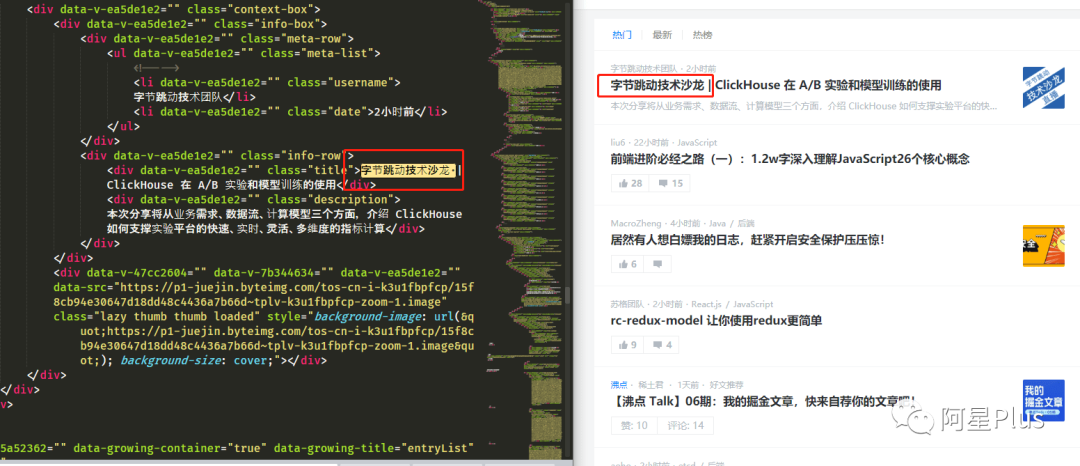
可以看到頁面上的HTML全部被獲取到了,這時(shí)候就可以利用規(guī)則解析HTML,拿到我們想要的數(shù)據(jù)了。
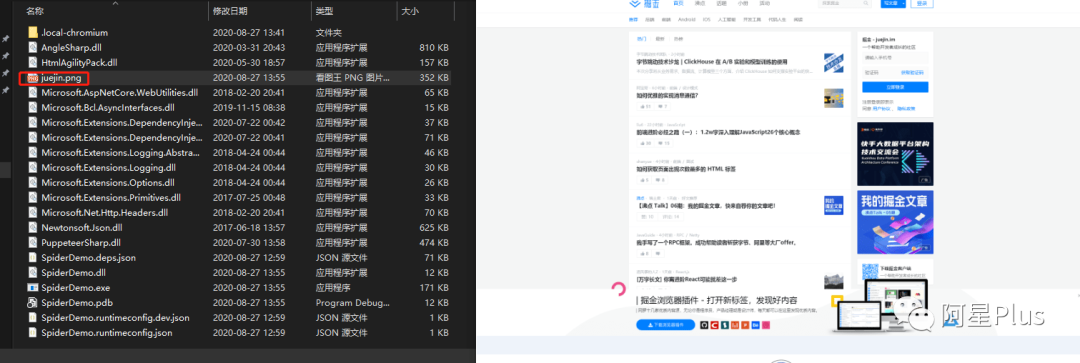
保存為圖片
...
var?url?=?"https://juejin.im/";
await?page.GoToAsync(url,?WaitUntilNavigation.Networkidle0);

await?page.ScreenshotAsync("juejin.png");
保存為PDF
var?url?=?"https://juejin.im/";
await?page.GoToAsync(url,?WaitUntilNavigation.Networkidle0);

await?page.PdfAsync("juejin.pdf");
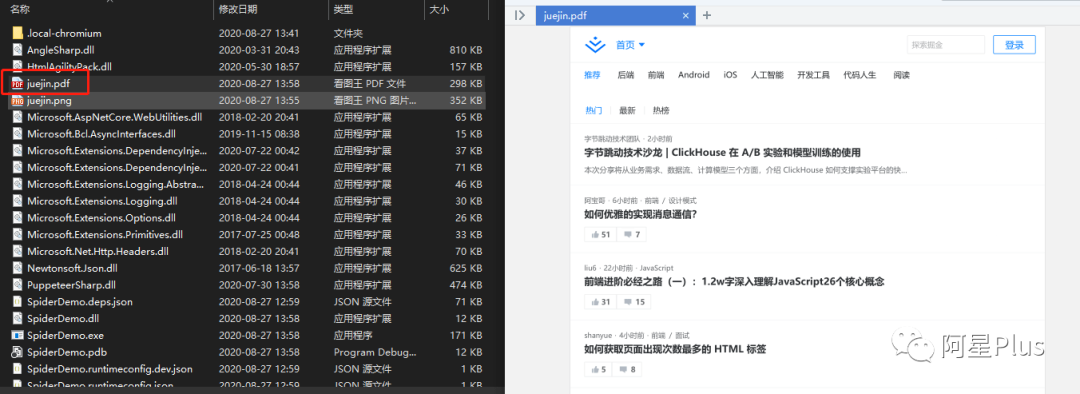
PuppeteerSharp的功能還有很多,比如頁面注入HTML、執(zhí)行JS代碼等,使用的時(shí)候可以參考官網(wǎng)示例。
【推薦】.NET Core開發(fā)實(shí)戰(zhàn)視頻課程?★★★
.NET Core實(shí)戰(zhàn)項(xiàng)目之CMS 第一章 入門篇-開篇及總體規(guī)劃
【.NET Core微服務(wù)實(shí)戰(zhàn)-統(tǒng)一身份認(rèn)證】開篇及目錄索引
Redis基本使用及百億數(shù)據(jù)量中的使用技巧分享(附視頻地址及觀看指南)
.NET Core中的一個(gè)接口多種實(shí)現(xiàn)的依賴注入與動(dòng)態(tài)選擇看這篇就夠了
10個(gè)小技巧助您寫出高性能的ASP.NET Core代碼
用abp vNext快速開發(fā)Quartz.NET定時(shí)任務(wù)管理界面
在ASP.NET Core中創(chuàng)建基于Quartz.NET托管服務(wù)輕松實(shí)現(xiàn)作業(yè)調(diào)度
現(xiàn)身說法:實(shí)際業(yè)務(wù)出發(fā)分析百億數(shù)據(jù)量下的多表查詢優(yōu)化