
聊一聊面試中經(jīng)常被問(wèn)到的Tree Shaking
天下武功,唯快不破!最新版的 antd 以及 vue 都對(duì) Tree Shaking 提供了支持。我們內(nèi)部的組件在支持這部分功能時(shí),也專門梳理了相關(guān)的特性。這是四月份寫的文章了,長(zhǎng)時(shí)間不用就會(huì)忘,復(fù)習(xí)一下!
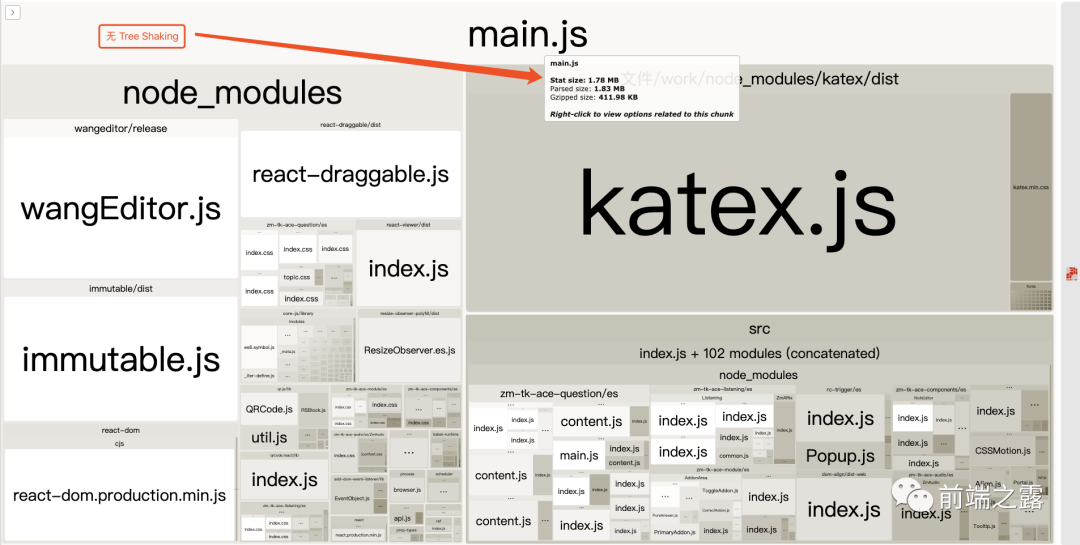
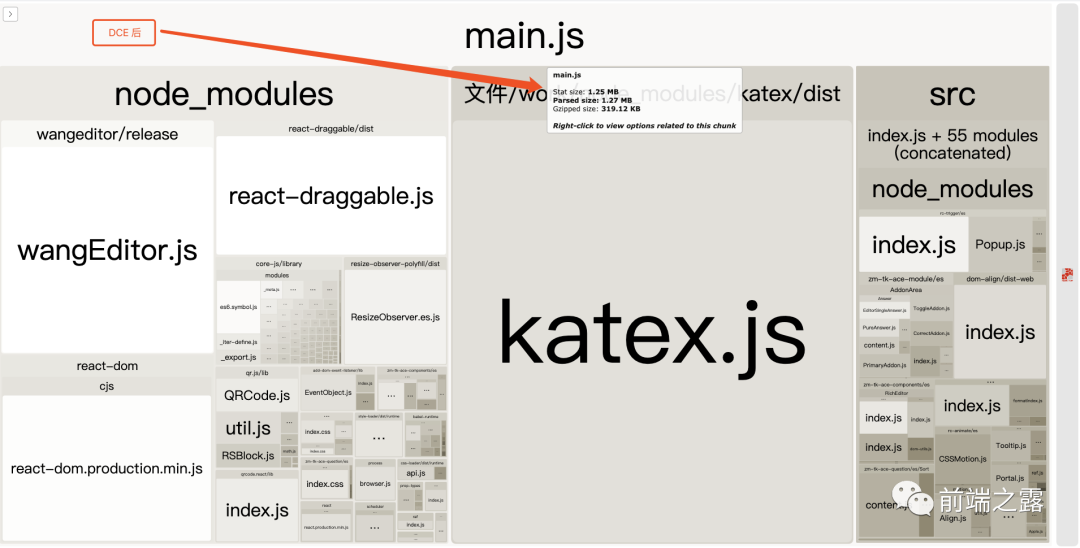
JS 文件絕大多數(shù)需要通過(guò)網(wǎng)絡(luò)進(jìn)行加載,然后執(zhí)行。DCE(dead code elimination)可以使得加載文件的大小更小,整體執(zhí)行時(shí)間更短。tree shaking?就是通常用于描述移除 JavaScript 上下文中的未引用代碼(dead-code)。它依賴于 ES2015 模塊語(yǔ)法的?靜態(tài)結(jié)構(gòu)?特性,例如?import?和?export。
原理
ESM
import 只能作為模塊頂層的語(yǔ)句出現(xiàn) import 的模塊名只能是字符串常量 import binding 是 immutable 的
這就是區(qū)別于CMJ,ESM 獨(dú)有的靜態(tài)分析特性。等等,那什么是靜態(tài)分析呢,就是不執(zhí)行代碼。CMJ 中的 require,只有執(zhí)行以后才知道引用的是什么模塊。
保證了依賴關(guān)系是確定的,和運(yùn)行時(shí)的狀態(tài)無(wú)關(guān),可以進(jìn)行可靠的靜態(tài)分析。靜態(tài)分析會(huì)在繪制依賴圖時(shí)做DCE,減少打包體積。
ESM 也支持動(dòng)態(tài)引入,類似于下面這種引入方式是不支持Tree Shacking的。
if?(false)?{
??import('./a.js').then(()?=>?{//?...})
}?else?{
??//?...
}
//?antd.js
var?emptyObject?=?{};

if?(true)?{
??Object.freeze(emptyObject);
}
module.exports?=?emptyObject;
Dead Code
Dead Code 通常是指:
代碼不會(huì)被執(zhí)行 代碼執(zhí)行的結(jié)果不會(huì)被用到 代碼只會(huì)影響死變量(只寫不讀)
//?導(dǎo)入并賦值給?JavaScript?對(duì)象,但在接下來(lái)的代碼里沒(méi)有用到
//?這就會(huì)被當(dāng)做“死”代碼,會(huì)被?tree-shaking
import?Stuff?from?'./stuff';
doSomething();


//?導(dǎo)入但沒(méi)有賦值給?JavaScript?對(duì)象,也沒(méi)有在代碼里用到
//?這會(huì)被當(dāng)做“死”代碼,會(huì)被?tree-shaking
import?'./stuff';
doSomething();

//?全部導(dǎo)入?(不支持?tree-shaking)
import?_?from?'lodash';
//?具名導(dǎo)入(支持?tree-shaking)
import?{?debounce?}?from?'lodash';
//?直接導(dǎo)入具體的模塊?(支持?tree-shaking)
import?debounce?from?'lodash/lib/debounce';
//?導(dǎo)入并賦值給?JavaScript?對(duì)象,然后在下面的代碼中被用到
//?這會(huì)被看作“活”代碼,不會(huì)做?tree-shaking
import?Stuff?from?'./stuff';
doSomething(Stuff);

//?導(dǎo)入整個(gè)庫(kù),但是沒(méi)有賦值給?JavaScript?對(duì)象,也沒(méi)有在代碼里用到
//?非常奇怪,這竟然被當(dāng)做“活”代碼,因?yàn)?Webpack 對(duì)庫(kù)的導(dǎo)入和本地代碼導(dǎo)入的處理方式不同。
import?'my-lib';
export?{?default?as?Title?}?from?'./Title';
export?{?default?as?Options?}?from?'./Options';
export?{?default?as?AddonArea?}?from?'./AddonArea';
export?{?default?as?Answer?}?from?'./AddonArea/Answer';
export?{?default?as?Analysis?}?from?'./AddonArea/Analysis';
export?{?default?as?OriginalText?}?from?'./AddonArea/OriginalText';
export?{?default?as?Labels?}?from?'./AddonArea/Labels';
這樣的文件結(jié)構(gòu)是無(wú)法進(jìn)行 tree-shaking 的, 因?yàn)闆](méi)有 import?!
自執(zhí)行的模塊 import
自執(zhí)行模塊我們通常會(huì)使用?import 'xxx'?來(lái)進(jìn)行模塊引用,而不進(jìn)行顯式的調(diào)用。因此模塊本身就有副作用。
import?'utils/refresh'
對(duì)于這種模塊可以這樣處理:
在 sideEffects 中通過(guò)數(shù)組聲明,使其在 Tree Shaking 的范圍之外 模塊改造,暴露成員支持顯式調(diào)用
unused harmony export
如果該模塊被標(biāo)識(shí)為 unused harmony export,則說(shuō)明沒(méi)有外部引用使用到該成員,webpack 認(rèn)為是可以安全去除的。
harmony export
部分被標(biāo)識(shí)為 harmony export 的模塊也會(huì)被去除。這個(gè)是跟 UglifyJS 的機(jī)制有關(guān)系。
沒(méi)有提供導(dǎo)出成員的模塊
//?./src/modules/edu-discount/seckill/index.ts

import?*?as?SeckillTypes?from?'./types';
export?{?SeckillTypes?};
對(duì)于只有暴露的成員,但是沒(méi)有被引用的成員,這種模塊會(huì)被直接刪除。
[x] exports provided [ ] exports used
配置
babel的配置文件
{
??"presets":?[
????["env",?{
??????"modules":?false??//?配置了這個(gè),babel就不會(huì)像默認(rèn)那樣轉(zhuǎn)變成 require 形式。
????}],
????"stage-2",
????"react"
??]
}
為 webpack 進(jìn)行 tree-shaking 創(chuàng)造了條件。
??不能引用類似?@babel/plugin-transform-modules-commonjs會(huì)把模塊編譯成 commonjs 的插件;
webpack 的配置文件
webpack 4 通過(guò) optimization 取代了4個(gè)常用的插件:
| 廢棄插件 | optimization 屬性 | 功能 | |
|---|---|---|---|
| UglifyjsWebpackPlugin | sideEffects | minimizer | Tree Shaking & Minimize |
| ModuleConcatenationPlugin | concatenateModules | Scope hoisting | 生產(chǎn)環(huán)境默認(rèn)開(kāi)啟 |
| CommonsChunkPlugin | splitChunks | runtimeChunk | OccurrenceOrder |
| NoEmitOnErrorsPlugin | NoEmitOnErrors | 編譯出現(xiàn)錯(cuò)誤時(shí),跳過(guò)輸出階段 | 生產(chǎn)環(huán)境默認(rèn)開(kāi)啟 |
usedExports
Webpack 將識(shí)別出它認(rèn)為沒(méi)有被使用的代碼,并在最初的打包步驟中給它做標(biāo)記。
//?Base?Webpack?Config?for?Tree?Shaking
const?config?=?{
?mode:?'production',
?optimization:?{
??usedExports:?true,
??minimizer:?[
???new?TerserPlugin({...})?//?支持刪除死代碼的壓縮器
??]
?}
};
package.json 的配置
用過(guò) redux 的童鞋應(yīng)該對(duì)純函數(shù)不陌生,自然也就應(yīng)該了解函數(shù)式編程,函數(shù)式編程中就有副作用一說(shuō)。
照顧一下不知道的同學(xué),那什么是副作用呢?
一個(gè)函數(shù)會(huì)、或者可能會(huì)對(duì)函數(shù)外部變量產(chǎn)生影響的行為。
具有副作用的文件不應(yīng)該做 tree-shaking,因?yàn)檫@將破壞整個(gè)應(yīng)用程序。比如全局樣式表及全局的 JS 配置文件。
webpack 總會(huì)害怕把你要用的代碼刪除了,所以默認(rèn)所有的文件都有副作用,不能被 Tree Shaking。
//?所有文件都有副作用,全都不可?tree-shaking
{
?"sideEffects":?true
}

//?沒(méi)有文件有副作用,全都可以 tree-shaking,即告知 webpack,它可以安全地刪除未用到的 export。
{
?"sideEffects":?false
}

//?除了數(shù)組中包含的文件外有副作用,所有其他文件都可以?tree-shaking,但會(huì)保留符合數(shù)組中條件的文件
{
?"sideEffects":?[
???"*.css",
???"*.less"
?]
}
所以,首先關(guān)閉你的 sideEffects,
直接通過(guò)?module.rules?中的 sideEffects 配置可縮小你的影響范圍。
加了 sideEffect 配置后,構(gòu)建出來(lái)的一些 IIFE 函數(shù)也會(huì)加上/PURE/注釋,便于后續(xù) treeshaking。
組件不支持DCE?

我們的組件用的是 father,可以看到其依賴的father-build 是基于 rollup 的,那就好辦了。webpack 的 Tree Shaking 還是 copy 的 rollup家的。
關(guān)鍵是在應(yīng)用組件的業(yè)務(wù)項(xiàng)目里面配置optimization.sideEffects: true
//?webpack.config.js
const?path?=?require('path')
const?webpackConfig?=?{
??module?:?{
????rules:?[
??????{
????????test:?/\.(jsx|js)$/,
????????use:?'babel-loader',
????????exclude:?path.resolve(__dirname,?'node_modules')
??????}???
????]
??},
optimization?:?{
??sideEffects:?true,
??minimizer:?[
????//?這里配置成空數(shù)組是為了使最終產(chǎn)生的?main.js?不被壓縮
??]
},
??plugins:[]
};
module.exports?=?webpackConfig;
//?package.json
{
??"name":?"treeshaking-test",
??"version":?"0.1.0",
??"description":?"",
??"main":?"src/index.js",
??"scripts":?{
????"build":?"webpack?--config?webpack.config.js"
??},
??"author":?"lu.lu??(https://github.com/lulu27753)" ,
??"license":?"MIT",
??"dependencies":?{
????"big-module":?"^0.1.0",
????"big-module-with-flag":?"^0.1.0",
????"webpack-bundle-analyzer":?"^3.7.0"
??},
??"devDependencies":?{
????"babel-preset-env":?"^1.7.0",
????"webpack":?"^4.43.0",
????"webpack-cli":?"^3.3.11"
??}
}
//?.babelrc
{
??"presets":?[
????["env",?{?"modules":?false?}]
??]
}
可以看到最終打包后的文件如下:
//?dist/main.js
"use?strict";
//?ESM?COMPAT?FLAG
__webpack_require__.r(__webpack_exports__);

//?CONCATENATED?MODULE:?./node_modules/big-module/es/a.js
var?a?=?'a';
//?CONCATENATED?MODULE:?./node_modules/big-module/es/b.js
var?b?=?'b';
//?CONCATENATED?MODULE:?./node_modules/big-module/es/c.js
var?c?=?'c';
//?CONCATENATED?MODULE:?./node_modules/big-module/es/index.js


//?CONCATENATED?MODULE:?./node_modules/big-module-with-flag/es/a.js
var?a_a?=?'a';
//?CONCATENATED?MODULE:?./node_modules/big-module-with-flag/es/b.js
var?b_b?=?'b';
//?CONCATENATED?MODULE:?./src/index.js


console.log(a,?b,?a_a,?b_b);

/***/?})
/******/?]);
可以很清楚的看到?big-module-with-flag?中的 c 模塊被DCE了。
做個(gè)小小的改動(dòng),將?.babelrc?中的?modules?改為"commonjs"
{
??"presets":?[
????["env",?{?"modules":?"commonjs"?}]
??]
}
"use?strict";
//?ESM?COMPAT?FLAG
__webpack_require__.r(__webpack_exports__);

//?EXPORTS
__webpack_require__.d(__webpack_exports__,?"a",?function()?{?return?/*?reexport?*/?a;?});
__webpack_require__.d(__webpack_exports__,?"b",?function()?{?return?/*?reexport?*/?b;?});
__webpack_require__.d(__webpack_exports__,?"c",?function()?{?return?/*?reexport?*/?c;?});

//?CONCATENATED?MODULE:?./node_modules/big-module/es/a.js
var?a?=?'a';
//?CONCATENATED?MODULE:?./node_modules/big-module/es/b.js
var?b?=?'b';
//?CONCATENATED?MODULE:?./node_modules/big-module/es/c.js
var?c?=?'c';
//?CONCATENATED?MODULE:?./node_modules/big-module/es/index.js

/***/?}),
/*?2?*/
/***/?(function(module,?__webpack_exports__,?__webpack_require__)?{

"use?strict";
//?ESM?COMPAT?FLAG
__webpack_require__.r(__webpack_exports__);

//?EXPORTS
__webpack_require__.d(__webpack_exports__,?"a",?function()?{?return?/*?reexport?*/?a;?});
__webpack_require__.d(__webpack_exports__,?"b",?function()?{?return?/*?reexport?*/?b;?});
__webpack_require__.d(__webpack_exports__,?"c",?function()?{?return?/*?reexport?*/?c;?});

//?CONCATENATED?MODULE:?./node_modules/big-module-with-flag/es/a.js
var?a?=?'a';
//?CONCATENATED?MODULE:?./node_modules/big-module-with-flag/es/b.js
var?b?=?'b';
//?CONCATENATED?MODULE:?./node_modules/big-module-with-flag/es/c.js
var?c?=?'c';
//?CONCATENATED?MODULE:?./node_modules/big-module-with-flag/es/index.js

/***/?})
/******/?]);
結(jié)果是?CDE?失敗!
將?modules?的值改回去,并升級(jí)big-module-with-flag為0.2.0。CDE?成功,可以打假一波了(?,網(wǎng)上很多文章都是基于webpack3的,過(guò)時(shí)了)
升級(jí)big-module-with-flag為0.5.0, 并更改?src/index.js
import?{?a?as?a1,?b?as?b1?}?from?"big-module";
import?{?a?as?a2,?b?as?b2,?Apple??}?from?"big-module-with-flag";

console.log(a1,?b1,?a2,?b2);

const?appleModel?=?new?Apple({model:?'IphoneX'}).getModel()

console.log(appleModel)
var?Apple?=?/*#__PURE__*/function?()?{
??function?Apple(_ref)?{
????var?model?=?_ref.model;

????_classCallCheck(this,?Apple);

????this.className?=?'Apple';
????this.model?=?model;
??}

??_createClass(Apple,?[{
????key:?"getModel",
????value:?function?getModel()?{
??????return?this.model;
????}
??}]);

??return?Apple;
}();


//?CONCATENATED?MODULE:?./src/index.js


console.log(a,?b,?es_a,?es_b);
var?appleModel?=?new?Apple({
??model:?'IphoneX'
}).getModel();
console.log(appleModel);
DCE 成功!
var?_bigModule?=?__webpack_require__(2);

var?_bigModuleWithFlag?=?__webpack_require__(1);

console.log(_bigModule.a,?_bigModule.b,?_bigModuleWithFlag.a,?_bigModuleWithFlag.b);
var?appleModel?=?new?_bigModuleWithFlag.Apple({
??model:?'IphoneX'
}).getModel();
console.log(appleModel);

/***/?}),
/*?1?*/
/***/?(function(module,?__webpack_exports__,?__webpack_require__)?{

"use?strict";
//?ESM?COMPAT?FLAG
__webpack_require__.r(__webpack_exports__);

//?EXPORTS
__webpack_require__.d(__webpack_exports__,?"a",?function()?{?return?/*?reexport?*/?es_a;?});
__webpack_require__.d(__webpack_exports__,?"b",?function()?{?return?/*?reexport?*/?es_b;?});
__webpack_require__.d(__webpack_exports__,?"c",?function()?{?return?/*?reexport?*/?es_c;?});
__webpack_require__.d(__webpack_exports__,?"Person",?function()?{?return?/*?reexport?*/?Person;?});
__webpack_require__.d(__webpack_exports__,?"Apple",?function()?{?return?/*?reexport?*/?Apple;?});

//?CONCATENATED?MODULE:?./node_modules/big-module-with-flag/es/a.js
var?a?=?'a';
/*?harmony?default?export?*/?var?es_a?=?(a);
//?CONCATENATED?MODULE:?./node_modules/big-module-with-flag/es/b.js
var?b?=?'b';
/*?harmony?default?export?*/?var?es_b?=?(b);
//?CONCATENATED?MODULE:?./node_modules/big-module-with-flag/es/c.js
var?c?=?'c';
/*?harmony?default?export?*/?var?es_c?=?(c);
//?CONCATENATED?MODULE:?./node_modules/big-module-with-flag/es/Person.js
function?_classCallCheck(instance,?Constructor)?{?if?(!(instance?instanceof?Constructor))?{?throw?new?TypeError("Cannot?call?a?class?as?a?function");?}?}

function?_defineProperties(target,?props)?{?for?(var?i?=?0;?i?false;?descriptor.configurable?=?true;?if?("value"?in?descriptor)?descriptor.writable?=?true;?Object.defineProperty(target,?descriptor.key,?descriptor);?}?}

function?_createClass(Constructor,?protoProps,?staticProps)?{?if?(protoProps)?_defineProperties(Constructor.prototype,?protoProps);?if?(staticProps)?_defineProperties(Constructor,?staticProps);?return?Constructor;?}

var?Person?=?/*#__PURE__*/function?()?{
??function?Person(_ref)?{
????var?name?=?_ref.name,
????????age?=?_ref.age,
????????sex?=?_ref.sex;

????_classCallCheck(this,?Person);

????this.className?=?'Person';
????this.name?=?name;
????this.age?=?age;
????this.sex?=?sex;
??}

??_createClass(Person,?[{
????key:?"getName",
????value:?function?getName()?{
??????return?this.name;
????}
??}]);

??return?Person;
}();


//?CONCATENATED?MODULE:?./node_modules/big-module-with-flag/es/Apple.js
function?Apple_classCallCheck(instance,?Constructor)?{?if?(!(instance?instanceof?Constructor))?{?throw?new?TypeError("Cannot?call?a?class?as?a?function");?}?}

function?Apple_defineProperties(target,?props)?{?for?(var?i?=?0;?i?false;?descriptor.configurable?=?true;?if?("value"?in?descriptor)?descriptor.writable?=?true;?Object.defineProperty(target,?descriptor.key,?descriptor);?}?}

function?Apple_createClass(Constructor,?protoProps,?staticProps)?{?if?(protoProps)?Apple_defineProperties(Constructor.prototype,?protoProps);?if?(staticProps)?Apple_defineProperties(Constructor,?staticProps);?return?Constructor;?}

var?Apple?=?/*#__PURE__*/function?()?{
??function?Apple(_ref)?{
????var?model?=?_ref.model;

????Apple_classCallCheck(this,?Apple);

????this.className?=?'Apple';
????this.model?=?model;
??}

??Apple_createClass(Apple,?[{
????key:?"getModel",
????value:?function?getModel()?{
??????return?this.model;
????}
??}]);

??return?Apple;
}();


//?CONCATENATED?MODULE:?./node_modules/big-module-with-flag/es/index.js


/***/?}),
/*?2?*/
/***/?(function(module,?__webpack_exports__,?__webpack_require__)?{

"use?strict";
//?ESM?COMPAT?FLAG
__webpack_require__.r(__webpack_exports__);

//?EXPORTS
__webpack_require__.d(__webpack_exports__,?"a",?function()?{?return?/*?reexport?*/?a;?});
__webpack_require__.d(__webpack_exports__,?"b",?function()?{?return?/*?reexport?*/?b;?});
__webpack_require__.d(__webpack_exports__,?"c",?function()?{?return?/*?reexport?*/?c;?});

//?CONCATENATED?MODULE:?./node_modules/big-module/es/a.js
var?a?=?'a';
//?CONCATENATED?MODULE:?./node_modules/big-module/es/b.js
var?b?=?'b';
//?CONCATENATED?MODULE:?./node_modules/big-module/es/c.js
var?c?=?'c';
//?CONCATENATED?MODULE:?./node_modules/big-module/es/index.js
//?.babelrc
{
??"presets":?[["env",?{?"loose":?false?}]]
}
總結(jié)
webpack 官方號(hào)稱提速 98%,其最重要的前提就是你的模塊引入方式要是ESM,而不能是因?yàn)榧嫒菪钥紤]的UMD實(shí)現(xiàn)。
如果你是一個(gè)第三方庫(kù)的維護(hù)者,請(qǐng)人性化的按業(yè)界規(guī)范提供ES版本,同時(shí)配置 sideEffects: false.
Webpack 只有在壓縮代碼的時(shí)候會(huì) tree-shaking, 通常就指是生產(chǎn)環(huán)境 代碼的 module 引入必須是 import 的引入方式,也就意味著被轉(zhuǎn)換成 ES5 的代碼是無(wú)法支持 tree-shaking 的。
滿足了文件要求后,簡(jiǎn)單來(lái)說(shuō)你需要做如下配置操作
[x] 在 package.json 文件中將 sideEffects 設(shè)為 false [x] 將css相關(guān) loader中 sideEffects 設(shè)為 true [x] 讓@babel/preset-env 不編譯 ES6 模塊語(yǔ)句 [ ] 使用TerserPlugin,js代碼壓縮插件(webpack 自帶)
參考
webpack 官方文檔:https://webpack.docschina.org/guides/tree-shaking/
官方DEMO:https://github.com/webpack/webpack/tree/master/examples/side-effects
webpack 新插件系統(tǒng)如何工作:https://medium.com/webpack/the-new-plugin-system-week-22-23-c24e3b22e95
Tree-Shaking原理:https://juejin.im/post/5a4dc842518825698e7279a9
組件沒(méi)辦法DCE?:https://zhuanlan.zhihu.com/p/32831172