
qiankun 項目實踐和優(yōu)化(React+Vue)
作者:czero1995
來源:SegmentFault 思否社區(qū)
前言
qiankun微服務(wù),將多個不同技術(shù)棧的系統(tǒng)(React,Vue,Angular,jQuery)等聚合成一個系統(tǒng),各個系統(tǒng)又能各自獨立部署運行,適用于大型團隊和大型前端項目。
實現(xiàn)功能:
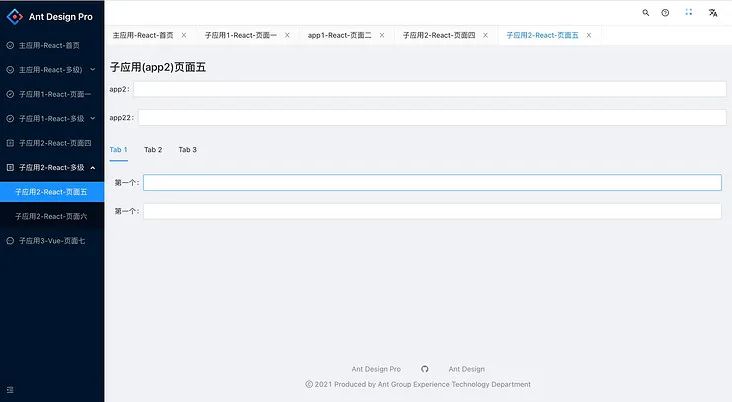
引入多技術(shù)棧(React + Vue) 后臺管理系統(tǒng)(Ant Design Pro)多標簽頁在qiankun環(huán)境緩存的實踐 依賴共享 --- 主子應(yīng)用公共的包react,react-dom,moment,antd等)的共享 資源公用 --- 共用的工具util, 組件,配置在多個項目同步
項目架構(gòu)
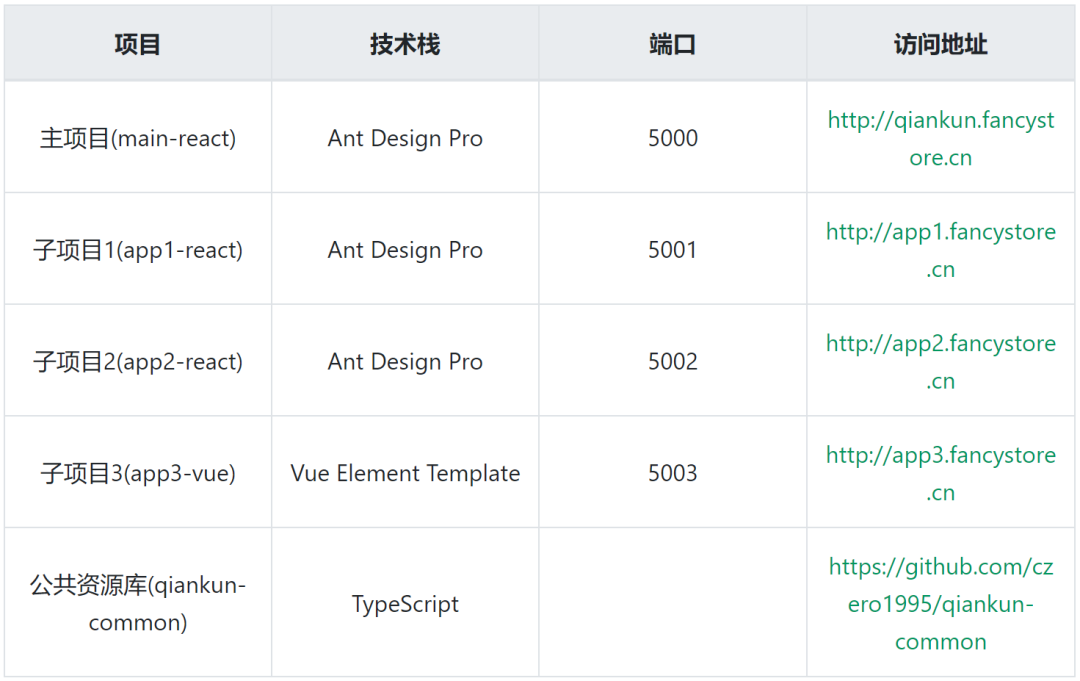
項目改造
1. 主應(yīng)用(基座)
1.1 安裝qiankun
   npm install @umi/qiankun --save
   or
   yarn add @umi/qiankun --save
1.2 注冊子應(yīng)用
  // 在config/config.ts加入
    qiankun: {
      master: {
        apps: [
           {
              name:'app1',
              entry: process.env.NODE_ENV === 'production' ? '//app1.fancystore.cn' : '//localhost:5001',
            },
            {
              name:'app2',
              entry: process.env.NODE_ENV === 'production' ? '//app2.fancystore.cn:' : '//localhost:5002',
            },
            {
              name:'app3',
              entry: process.env.NODE_ENV === 'production' ? '//app3.fancystore.cn:' : '//localhost:5003',
            },
        ],
        sandbox: true,  //是否啟用沙箱
        prefetch: true, //是否啟用prefetch特性
      }
    }
1.3 修改根節(jié)點
    // src/pages/document.ejs
    id=root-master
1.4 新建子應(yīng)用裝載布局MicroAppLayout
    // src/layouts/MicroAppLayout
    import BasicLayout from '@ant-design/pro-layout';
    import { KeepAlive, Provider } from 'react-keep-alive';
    import { MicroAppWithMemoHistory } from 'umi';
    import allRoutes from '../../config/routes';

    function MicroAppLayout(props) {
      let targetMicro = ''
      const transRoutes = (routes, pathname) => {
        routes.map(item => {
          if (item.routes) {
            return transRoutes(item.routes, pathname)
          }
          if (item.path === pathname) {
            targetMicro = item.microName
          }
        })
        return targetMicro
      }
      return <Provider>
        <KeepAlive name={props.location.pathname}>
          {
            targetMicro ? <MicroAppWithMemoHistory name={transRoutes(allRoutes[0].routes, props.location.pathname)} url={props.location.pathname} /> :
              <BasicLayout></BasicLayout>
          }
        </KeepAlive>
      </Provider>
    }

    export default MicroAppLayout;
1.5 在src目錄下新建app.ts,判斷如果是子應(yīng)用,需要用MicroAppLayout裝載
    // src/app.ts
    import LoadingComponent from '@/components/PageLoading';
    import { dynamic } from 'umi';
    const transRoutes = (routes) => {
      routes.forEach(item => {
        if(item.routes){
          return transRoutes(item.routes)
        }
        if(item.microName){
          item.component = dynamic({
            loader: (a) => import(/* webpackChunkName: 'layouts__MicroAppLayout' */ '@/layouts/MicroAppLayout'),
            loading: LoadingComponent,
          })
        }
      })
    }

    export function patchRoutes({ routes }) {
      transRoutes(routes[0].routes)
    }
    npm install @umi/qiankun --save
    or
    yarn add @umi/qiankun --save
    qiankun: {
        slave: {}
    }
id=root-slave
    const isQiankun = window.__POWERED_BY_QIANKUN__

    export const qiankun = {
        // 應(yīng)用加載之前
        async bootstrap(props) {
          console.log('app1 bootstrap', props);
        },
        // 應(yīng)用 render 之前觸發(fā)
        async mount(props) {
          console.log('app1 mount', props);
        },
        // 應(yīng)用卸載之后觸發(fā)
        async unmount(props) {
          console.log('app1 unmount', props);
        },
      };

      export async function patchRoutes({routes}) {
        if(isQiankun){
          routes[0]['component'] = require('@/layouts/BlankLayout').default
        }
      }
3. 子應(yīng)用Vue(Vue-Element-Template)
3.1 在vue.config.js下的configureWebpack中加入:
     output: {
      // 把子應(yīng)用打包成 umd 庫格式(必須)
      library: `${name}-[name]`,
      libraryTarget: 'umd',
      jsonpFunction: `webpackJsonp_${name}`,
     }
3.2 在vue.config.js下的devServer中加入:
     headers: {
          "Access-Control-Allow-Origin": "*",
          "Access-Control-Allow-Methods": "*",
          "Access-Control-Allow-Headers": "*"
     }
3.3 在main.js中暴露qiankun的生命周期:
    let install = null;
    function render(props) {
      install = new Vue({
        router,
        store,
        render: h => h(App)
      }).$mount('#app3')
    }
    if (window.__POWERED_BY_QIANKUN__) {
      __webpack_public_path__ = window.__INJECTED_PUBLIC_PATH_BY_QIANKUN__;
    } else {
      render();
    }
    export async function bootstrap(props) {
    }
    export async function mount(props) {
      render(props);
    }
    export async function unmount(props) {
      install.$destroy();
      install = null
    }
項目總結(jié)
1. 主應(yīng)用裝載子應(yīng)用有兩種形式 使用路由綁定的方式 和 使用 <MicroApp '/> 組件的方式,如果要支持Ant Design Pro多標簽頁,需要使用 <MicroApp '/> 這種形式,因為動態(tài)的顯示插入Tab,綁定死路由的話會造成qiankun加載不到對應(yīng)的頁面。
2. Ant Design Pro多標簽頁,點擊標簽頁的展示不同的應(yīng)用頁面會導致被銷毀,內(nèi)容數(shù)據(jù)被初始化和丟失,在src/layouts/MicroAppLayout下:
引入 react-keep-alive 包
主應(yīng)用須使用  MicroAppWithMemoHistory,  若使用 MicroApp 無效果。
3. qiankun環(huán)境下頁面跳轉(zhuǎn)404
在qiankun環(huán)境下,所有的路由改動都會涉會觸發(fā)qiankun的路由監(jiān)聽,需要對環(huán)境做出判斷:
export const qiankunJump = (url:string,name='頁面名稱',params = null) =>{
      window.__POWERED_BY_QIANKUN__ ? history.pushState(params,name,url): umiHistory.push(url)
}
qiankunJump('/xxx')
4. qiankun external會報 Cannot read property 'createContext' of undefind
 子項目是umi項目,只要配置了externals就會出錯,需要更改exteranls的寫法,去掉window
 externals: {
      'react': 'window.React',
      'react-dom': 'window.ReactDOM',
  } =>
  externals: {
          react: 'React',
          'react-dom': 'ReactDOM',
  }
項目優(yōu)化
1. 依賴共享
如果主子應(yīng)用使用的是相同的庫或者包(react,react-dom,moment等),可以用externals的方式來引入,減少加載重復包導致資源浪費.

 qiankun將子項目的外鏈script標簽內(nèi)容請求完后,會記錄到一個全局變量中,下次再次使用,他會先從這個全局變量中取。這樣就會實現(xiàn)內(nèi)容的復用,只要保證兩個鏈接的Url一致即可
const fetchScript = scriptUrl => scriptCache[scriptUrl] || (scriptCache[scriptUrl] = fetch(scriptUrl).then(response => response.text()));

所以只要子項目配置了webpack的externals,這些公共依賴在同一臺服務(wù)器上,就可以實現(xiàn)子項目的公共依賴的按需引入,一個項目使用了之后,另一個項目不再重復加載,可以直接復用這個文件。
2.資源共用
解決資源共用的問題,可以提高項目的維護性,不然多個系統(tǒng)共用的組件或者工具維護起來很費力。

1. 常用的就是發(fā)布成npm包,各個項目去安裝更新包。本地調(diào)試可以用npm link。但反復的更新包也是比較繁瑣。

2. 還有一種方式是用git庫引入, 在package.json的依賴中加入
"qiankun-common": "git+https://[email protected]:czero1995/qiankun-common.git"
使用
import { commonUtil } from 'qiankun-common';
util.qiankunJump('/xxx')
1. 進入main-react
    npm install
    npm run start
2. 進入app1-react
    npm install
    npm run start
3. 進入app2-react
    npm install
    npm run start
4. 進入app3-react
    npm install
    npm run dev
1. 子應(yīng)用Nginx需要配上跨域請求頭:
  add_header Access-Control-Allow-Origin *;
  add_header Access-Control-Allow-Credentials true;
  add_header Cache-Control no-cache;
2. Nginx開啟gzip壓縮:
  gzip  on;
  gzip_min_length 200;
  gzip_buffers 4 16k;
  gzip_comp_level 9;
  gzip_vary on;
  gzip_disable "MSIE [1-6]\.";
  gzip_types text/plain application/x-javascript text/css application/xml text/javascript application/x-httpd-php application/javascript application/json;

評論
圖片
表情