
前端實現(xiàn)很哇塞的端掃碼功能
今天分享一篇很有意思的文章,實現(xiàn)瀏覽器端掃碼功能,以下是正文。
背景
不久前我做了關(guān)于獲取瀏覽器攝像頭并掃碼識別的功能,本文中梳理了涉及到知識點及具體代碼實現(xiàn),整理成此篇文章內(nèi)容。
本文主要介紹,通過使用基于 vue 技術(shù)棧的前端開發(fā)技術(shù),在瀏覽器端調(diào)起攝像頭 ??,并進(jìn)行掃碼識別功能,對識別到的二維碼進(jìn)行跳轉(zhuǎn)或其他操作處理。本文內(nèi)容分為背景介紹、實現(xiàn)效果、技術(shù)簡介、代碼實現(xiàn)、總結(jié)等部分組成。
實現(xiàn)效果
本實例中主要有兩個頁面首頁和掃碼頁,具體實現(xiàn)效果如下圖所示。
首頁:點擊 SCAN QRCODE按鈕,進(jìn)入到掃碼頁。掃碼頁:首次進(jìn)入時,或彈出 獲取攝像頭訪問權(quán)限的系統(tǒng)提示框,點擊允許訪問,頁面開始加載攝像頭數(shù)據(jù)并開始進(jìn)行二維碼捕獲拾取,若捕獲到二維碼,開始進(jìn)行二維碼解析,解析成功后加載識別成功彈窗。

??在線體驗:dragonir.github.io/h5-scan-qrc…

??提示:需要在有攝像頭設(shè)備的瀏覽器中豎屏訪問。手機橫豎屏檢測小知識可前往我的另一篇文章《五十音小游戲中的前端知識》 中進(jìn)行了解。
技術(shù)簡介
WebRTC API
WebRTC (Web Real-Time Communications) 是一項實時通訊技術(shù),它允許網(wǎng)絡(luò)應(yīng)用或者站點,在不借助中間媒介的情況下,建立瀏覽器之間 點對點(Peer-to-Peer) 的連接,實現(xiàn)視頻流和(或)音頻流或者其他任意數(shù)據(jù)的傳輸。WebRTC 包含的這些標(biāo)準(zhǔn)使用戶在無需安裝任何插件或者第三方的軟件的情況下,創(chuàng)建 點對點(Peer-to-Peer) 的數(shù)據(jù)分享和電話會議成為可能。
三個主要接口:
MediaStream:能夠通過設(shè)備的攝像頭及話筒獲得視頻、音頻的同步流。RTCPeerConnection:是WebRTC用于構(gòu)建點對點之間穩(wěn)定、高效的流傳輸?shù)慕M件。RTCDataChannel:使得瀏覽器之間建立一個高吞吐量、低延時的信道,用于傳輸任意數(shù)據(jù)。
??前往MDN深入學(xué)習(xí):WebRTC_API
WebRTC adapter
雖然 WebRTC 規(guī)范已經(jīng)相對健全穩(wěn)固了,但是并不是所有的瀏覽器都實現(xiàn)了它所有的功能,有些瀏覽器需要在一些或者所有的 WebRTC API上添加前綴才能正常使用。
WebRTC 組織在 github 上提供了一個 WebRTC適配器(WebRTC adapter) 來解決在不同瀏覽器上實現(xiàn) WebRTC 的兼容性問題。這個適配器是一個 JavaScript墊片,它可以讓你根據(jù) WebRTC 規(guī)范描述的那樣去寫代碼,在所有支持 WebRTC 的瀏覽器中不用去寫前綴或者其他兼容性解決方法。
??前往MDN深入學(xué)習(xí):WebRTC adapter
核心的API navigator.mediaDevices.getUserMedia
網(wǎng)頁調(diào)用攝像頭需要調(diào)用 getUserMedia API,MediaDevices.getUserMedia() 會提示用戶給予使用媒體輸入的許可,媒體輸入會產(chǎn)生一個 MediaStream,里面包含了請求的媒體類型的軌道。此流可以包含一個視頻軌道(來自硬件或者虛擬視頻源,比如相機、視頻采集設(shè)備和屏幕共享服務(wù)等等)、一個音頻軌道(同樣來自硬件或虛擬音頻源,比如麥克風(fēng)、A/D轉(zhuǎn)換器 等等),也可能是其它軌道類型。
它返回一個 Promise 對象,成功后會 resolve 回調(diào)一個 MediaStream對象;若用戶拒絕了使用權(quán)限,或者需要的媒體源不可用,promise 會 reject 回調(diào)一個 PermissionDeniedError 或者 NotFoundError 。(返回的 promise對象 可能既不會 resolve 也不會 reject,因為用戶不是必須選擇允許或拒絕。)
通常可以使用 navigator.mediaDevices 來獲取 MediaDevices ,例如:
navigator.mediaDevices.getUserMedia(constraints)
??.then(function(stream)?{
????//?使用這個stream
??})
??.catch(function(err)?{
????//?處理error
??})
復(fù)制代碼
??前往MDN深入學(xué)習(xí):navigator.mediaDevices.getUserMedia
二維碼解析庫 JSQR
jsQR 是一個純 JavaScript 二維碼解析庫,該庫讀取原始圖像或者是攝像頭,并將定位,提取和解析其中的任何 QR碼。
如果要使用 jsQR 掃描網(wǎng)絡(luò)攝像頭流,則需要 ImageData 從視頻流中提取,然后可以將其傳遞給 jsQR。
jsQR 導(dǎo)出一個方法,該方法接受 4 個參數(shù),分別是解碼的 圖像數(shù)據(jù),寬、高 以及 可選的對象 進(jìn)一步配置掃描行為。
imageData:格式為 [r0, g0, b0, a0, r1, g1, b1, a1, ...] 的 Uint8ClampedArray( 8位無符號整型固定數(shù)組) 的 rgba 像素值。
const?code?=?jsQR(imageData,?width,?height,?options);
if?(code)?{
??console.log('找到二維碼!',?code);
}
復(fù)制代碼
??前往github深入了解:jsQR
代碼實現(xiàn)
流程
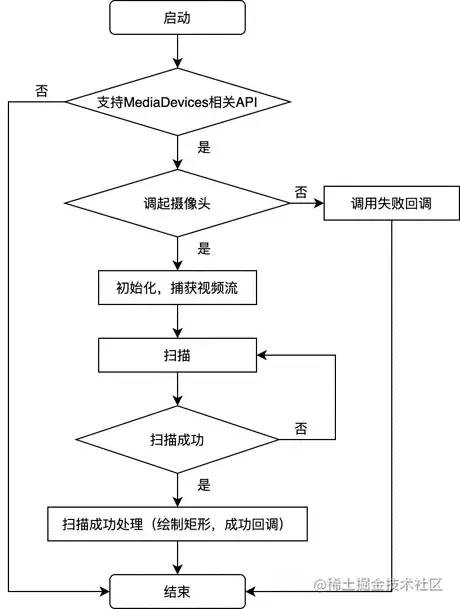
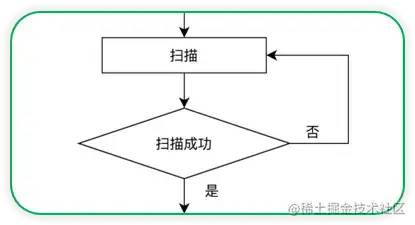
整個掃碼流程如下圖所示:頁面初始化,先檢查瀏覽器是否支持 mediaDevices 相關(guān)API,瀏覽器進(jìn)行調(diào)去攝像頭,調(diào)用失敗,就執(zhí)行失敗回調(diào);調(diào)用成功,進(jìn)行捕獲視頻流,然后進(jìn)行掃碼識別,沒有掃瞄到可識別的二維碼就繼續(xù)掃描,掃碼成功后繪制掃描成功圖案并進(jìn)行成功回調(diào)。
下文內(nèi)容對流程進(jìn)行拆分,分別實現(xiàn)對應(yīng)的功能。
掃碼組件 Scaner
頁面結(jié)構(gòu)
我們先看下頁面結(jié)構(gòu),主要由 4 部分組成:
提示框。 掃碼框。 video:展示攝像頭捕獲視頻流。canvas: 繪制視頻幀,用于二維碼識別。
<template>
??<div?class="scaner"?ref="scaner">
????
????<div?class="banner"?v-if="showBanner">
??????<i?class="close_icon"?@click="()?=>?showBanner?=?false">i>
??????<p?class="text">若當(dāng)前瀏覽器無法掃碼,請切換其他瀏覽器嘗試p>
????div>
????
????<div?class="cover">
??????<p?class="line">p>
??????<span?class="square?top?left">span>
??????<span?class="square?top?right">span>
??????<span?class="square?bottom?right">span>
??????<span?class="square?bottom?left">span>
??????<p?class="tips">將二維碼放入框內(nèi),即可自動掃描p>
????div>
????
????<video
??????v-show="showPlay"
??????class="source"
??????ref="video"
??????:width="videoWH.width"
??????:height="videoWH.height"
??????controls
????>video>
????<canvas?v-show="!showPlay"?ref="canvas"?/>
????<button?v-show="showPlay"?@click="run">開始button>
??div>
template>
復(fù)制代碼
方法:繪制
畫線。 畫框(用于掃碼成功后繪制矩形圖形)。

//?畫線
drawLine?(begin,?end)?{
??this.canvas.beginPath();
??this.canvas.moveTo(begin.x,?begin.y);
??this.canvas.lineTo(end.x,?end.y);
??this.canvas.lineWidth?=?this.lineWidth;
??this.canvas.strokeStyle?=?this.lineColor;
??this.canvas.stroke();
},
//?畫框
drawBox?(location)?{
??if?(this.drawOnfound)?{
????this.drawLine(location.topLeftCorner,?location.topRightCorner);
????this.drawLine(location.topRightCorner,?location.bottomRightCorner);
????this.drawLine(location.bottomRightCorner,?location.bottomLeftCorner);
????this.drawLine(location.bottomLeftCorner,?location.topLeftCorner);
??}
},
復(fù)制代碼
方法:初始化
檢查是否支持。 調(diào)起攝像頭。 成功失敗處理。
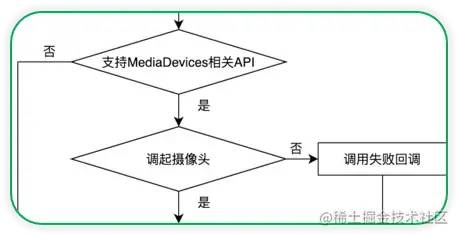
//?初始化
setup?()?{
??//?判斷了瀏覽器是否支持掛載在MediaDevices.getUserMedia()的方法
??if?(navigator.mediaDevices?&&?navigator.mediaDevices.getUserMedia)?{
????this.previousCode?=?null;
????this.parity?=?0;
????this.active?=?true;
????this.canvas?=?this.$refs.canvas.getContext("2d");
????//?獲取攝像頭模式,默認(rèn)設(shè)置是后置攝像頭
????const?facingMode?=?this.useBackCamera???{?exact:?'environment'?}?:?'user';
????//?攝像頭視頻處理
????const?handleSuccess?=?stream?=>?{
???????if?(this.$refs.video.srcObject?!==?undefined)?{
????????this.$refs.video.srcObject?=?stream;
??????}?else?if?(window.videoEl.mozSrcObject?!==?undefined)?{
????????this.$refs.video.mozSrcObject?=?stream;
??????}?else?if?(window.URL.createObjectURL)?{
????????this.$refs.video.src?=?window.URL.createObjectURL(stream);
??????}?else?if?(window.webkitURL)?{
????????this.$refs.video.src?=?window.webkitURL.createObjectURL(stream);
??????}?else?{
????????this.$refs.video.src?=?stream;
??????}
??????//?不希望用戶來拖動進(jìn)度條的話,可以直接使用playsinline屬性,webkit-playsinline屬性
??????this.$refs.video.playsInline?=?true;
??????const?playPromise?=?this.$refs.video.play();
??????playPromise.catch(()?=>?(this.showPlay?=?true));
??????//?視頻開始播放時進(jìn)行周期性掃碼識別
??????playPromise.then(this.run);
????};
????//?捕獲視頻流
????navigator.mediaDevices
??????.getUserMedia({?video:?{?facingMode?}?})
??????.then(handleSuccess)
??????.catch(()?=>?{
????????navigator.mediaDevices
??????????.getUserMedia({?video:?true?})
??????????.then(handleSuccess)
??????????.catch(error?=>?{
????????????this.$emit("error-captured",?error);
??????????});
??????});
??}
},
復(fù)制代碼
方法:周期性掃描
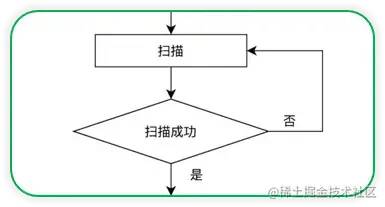
run?()?{
??if?(this.active)?{
????//?瀏覽器在下次重繪前循環(huán)調(diào)用掃碼方法
????requestAnimationFrame(this.tick);
??}
},
復(fù)制代碼
方法:成功回調(diào)

//?二維碼識別成功事件處理
found?(code)?{
??if?(this.previousCode?!==?code)?{
????this.previousCode?=?code;
??}?else?if?(this.previousCode?===?code)?{
????this.parity?+=?1;
??}
??if?(this.parity?>?2)?{
????this.active?=?this.stopOnScanned???false?:?true;
????this.parity?=?0;
????this.$emit("code-scanned",?code);
??}
},
復(fù)制代碼
方法:停止
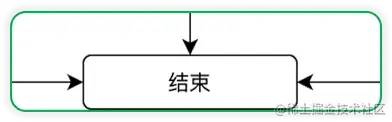
//?完全停止
fullStop?()?{
??if?(this.$refs.video?&&?this.$refs.video.srcObject)?{
????//?停止視頻流序列軌道
????this.$refs.video.srcObject.getTracks().forEach(t?=>?t.stop());
??}
}
復(fù)制代碼
方法:掃描
繪制視頻幀。 掃碼識別。
//?周期性掃碼識別
tick?()?{
??//?視頻處于準(zhǔn)備階段,并且已經(jīng)加載足夠的數(shù)據(jù)
??if?(this.$refs.video?&&?this.$refs.video.readyState?===?this.$refs.video.HAVE_ENOUGH_DATA)?{
????//?開始在畫布上繪制視頻
????this.$refs.canvas.height?=?this.videoWH.height;
????this.$refs.canvas.width?=?this.videoWH.width;
????this.canvas.drawImage(this.$refs.video,?0,?0,?this.$refs.canvas.width,?this.$refs.canvas.height);
????//?getImageData()?復(fù)制畫布上制定矩形的像素數(shù)據(jù)
????const?imageData?=?this.canvas.getImageData(0,?0,?this.$refs.canvas.width,?this.$refs.canvas.height);
????let?code?=?false;
????try?{
??????//?識別二維碼
??????code?=?jsQR(imageData.data,?imageData.width,?imageData.height);
????}?catch?(e)?{
??????console.error(e);
????}
????//?如果識別出二維碼,繪制矩形框
????if?(code)?{
??????this.drawBox(code.location);
??????//?識別成功事件處理
??????this.found(code.data);
????}
??}
??this.run();
},
復(fù)制代碼
父組件
Scaner 的父組件主要加載頁面,并展示 Scaner 掃碼結(jié)果的回調(diào)。
頁面結(jié)構(gòu)
<template>
??<div?class="scan">
????
????<div?class="nav">
??????<a?class="close"?@click="()?=>?$router.go(-1)">a>
??????<p?class="title">Scan?QRcodep>
????div>
????<div?class="scroll-container">
??????
??????<Scaner
????????v-on:code-scanned="codeScanned"
????????v-on:error-captured="errorCaptured"
????????:stop-on-scanned="true"
????????:draw-on-found="true"
????????:responsive="false"
??????/>
????div>
??div>
template>
復(fù)制代碼
父組件方法
import?Scaner?from?'../components/Scaner';

export?default?{
??name:?'Scan',
??components:?{
????Scaner
??},
??data?()?{
????return?{
??????errorMessage:?"",
??????scanned:?""
????}
??},
??methods:?{
????codeScanned(code)?{
??????this.scanned?=?code;
??????setTimeout(()?=>?{
????????alert(`掃碼解析成功:?${code}`);
??????},?200)
????},
????errorCaptured(error)?{
??????switch?(error.name)?{
????????case?"NotAllowedError":
??????????this.errorMessage?=?"Camera?permission?denied.";
??????????break;
????????case?"NotFoundError":
??????????this.errorMessage?=?"There?is?no?connected?camera.";
??????????break;
????????case?"NotSupportedError":
??????????this.errorMessage?=
????????????"Seems?like?this?page?is?served?in?non-secure?context.";
??????????break;
????????case?"NotReadableError":
??????????this.errorMessage?=
????????????"Couldn't?access?your?camera.?Is?it?already?in?use?";
??????????break;
????????case?"OverconstrainedError":
??????????this.errorMessage?=?"Constraints?don't?match?any?installed?camera.";
??????????break;
????????default:
??????????this.errorMessage?=?"UNKNOWN?ERROR:?"?+?error.message;
??????}
??????console.error(this.errorMessage);
?????alert('相機調(diào)用失敗');
????}
??},
??mounted?()?{
????var?str?=?navigator.userAgent.toLowerCase();
????var?ver?=?str.match(/cpu?iphone?os?(.*?)?like?mac?os/);
????//?經(jīng)測試?iOS?10.3.3以下系統(tǒng)無法成功調(diào)用相機攝像頭
????if?(ver?&&?ver[1].replace(/_/g,".")?'10.3.3')?{
?????alert('相機調(diào)用失敗');
????}
??}
復(fù)制代碼
完整代碼
??github: github.com/dragonir/h5…
總結(jié)
應(yīng)用擴展
我覺得以下幾個功能都是可以通過瀏覽器調(diào)用攝像頭并掃描識別來實現(xiàn)的,大家覺得還有哪些 很哇塞?? 的功能應(yīng)用可以通過瀏覽器端掃碼實現(xiàn) ???
??鏈接跳轉(zhuǎn)。??價格查詢。??登錄認(rèn)證。??文件下載。
兼容性

?即使使用了adapter,getUserMedia API在部分瀏覽器中也存在不支持的。?低版本瀏覽器(如iOS 10.3以下)、Android小眾瀏覽器(如IQOO自帶瀏覽器)不兼容。?QQ、微信內(nèi)置瀏覽器無法調(diào)用。
參考資料
[1]. Taking still photos with WebRTC [2]. Choosing cameras in JavaScript with the mediaDevices API [3]. 如何使用JavaScript訪問設(shè)備前后攝像頭