
Flink 1.11新特性之SQL Hive Streaming簡單示例
點擊上方藍色字體,選擇“設為星標”




前言
今天本來想搞篇走讀StreamingFileSink源碼的文章,但是考慮到Flink 1.11版本發(fā)布已經有段時間了,于是就放松一下,體驗新特性吧。
與1.10版本相比,1.11版本最為顯著的一個改進是Hive Integration顯著增強,也就是真正意義上實現了基于Hive的流批一體。本文用簡單的本地示例來體驗Hive Streaming的便利性。
添加相關依賴
測試集群上的Hive版本為1.1.0,Hadoop版本為2.6.0,Kafka版本為1.0.1。
<properties>
  <scala.bin.version>2.11scala.bin.version>
  <flink.version>1.11.0flink.version>
  <flink-shaded-hadoop.version>2.6.5-10.0flink-shaded-hadoop.version>
  <hive.version>1.1.0hive.version>
properties>

<dependencies>
  <dependency>
    <groupId>org.apache.flinkgroupId>
    <artifactId>flink-streaming-scala_${scala.bin.version}artifactId>
    <version>${flink.version}version>
  dependency>
  <dependency>
    <groupId>org.apache.flinkgroupId>
    <artifactId>flink-clients_${scala.bin.version}artifactId>
    <version>${flink.version}version>
  dependency>
  <dependency>
    <groupId>org.apache.flinkgroupId>
    <artifactId>flink-table-commonartifactId>
    <version>${flink.version}version>
  dependency>
  <dependency>
    <groupId>org.apache.flinkgroupId>
    <artifactId>flink-table-api-scala-bridge_${scala.bin.version}artifactId>
    <version>${flink.version}version>
  dependency>
  <dependency>
    <groupId>org.apache.flinkgroupId>
    <artifactId>flink-table-planner-blink_${scala.bin.version}artifactId>
    <version>${flink.version}version>
  dependency>
  <dependency>
    <groupId>org.apache.flinkgroupId>
    <artifactId>flink-connector-hive_${scala.bin.version}artifactId>
    <version>${flink.version}version>
  dependency>
  <dependency>
    <groupId>org.apache.flinkgroupId>
    <artifactId>flink-sql-connector-kafka_${scala.bin.version}artifactId>
    <version>${flink.version}version>
  dependency>
  <dependency>
    <groupId>org.apache.flinkgroupId>
    <artifactId>flink-jsonartifactId>
    <version>${flink.version}version>
  dependency>
  <dependency>
    <groupId>org.apache.flinkgroupId>
    <artifactId>flink-shaded-hadoop-2-uberartifactId>
    <version>${flink-shaded-hadoop.version}version>
  dependency>
  <dependency>
    <groupId>org.apache.hivegroupId>
    <artifactId>hive-execartifactId>
    <version>${hive.version}version>
  dependency>
另外,別忘了找到hdfs-site.xml和hive-site.xml,并將其加入項目。
創(chuàng)建執(zhí)行環(huán)境
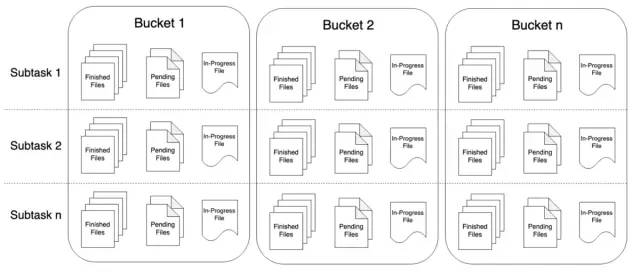
Flink 1.11的Table/SQL API中,FileSystem Connector是靠一個增強版StreamingFileSink組件實現,在源碼中名為StreamingFileWriter。我們知道,只有在checkpoint成功時,StreamingFileSink寫入的文件才會由pending狀態(tài)變成finished狀態(tài),從而能夠安全地被下游讀取。所以,我們一定要打開checkpointing,并設定合理的間隔。
val streamEnv = StreamExecutionEnvironment.getExecutionEnvironment
streamEnv.setStreamTimeCharacteristic(TimeCharacteristic.EventTime)
streamEnv.setParallelism(3)

val tableEnvSettings = EnvironmentSettings.newInstance()
    .useBlinkPlanner()
    .inStreamingMode()
    .build()
val tableEnv = StreamTableEnvironment.create(streamEnv, tableEnvSettings)
tableEnv.getConfig.getConfiguration.set(ExecutionCheckpointingOptions.CHECKPOINTING_MODE, CheckpointingMode.EXACTLY_ONCE)
tableEnv.getConfig.getConfiguration.set(ExecutionCheckpointingOptions.CHECKPOINTING_INTERVAL, Duration.ofSeconds(20))
注冊HiveCatalog
val catalogName = "my_catalog"
val catalog = new HiveCatalog(
  catalogName,              // catalog name
  "default",                // default database
  "/Users/lmagic/develop",  // Hive config (hive-site.xml) directory
  "1.1.0"                   // Hive version
)
tableEnv.registerCatalog(catalogName, catalog)
tableEnv.useCatalog(catalogName)
創(chuàng)建Kafka流表
Kafka topic中存儲的是JSON格式的埋點日志,建表時用計算列生成事件時間與水印。1.11版本SQL Kafka Connector的參數相比1.10版本有一定簡化。
tableEnv.executeSql("CREATE DATABASE IF NOT EXISTS stream_tmp")
tableEnv.executeSql("DROP TABLE IF EXISTS stream_tmp.analytics_access_log_kafka")

tableEnv.executeSql(
  """
    |CREATE TABLE stream_tmp.analytics_access_log_kafka (
    |  ts BIGINT,
    |  userId BIGINT,
    |  eventType STRING,
    |  fromType STRING,
    |  columnType STRING,
    |  siteId BIGINT,
    |  grouponId BIGINT,
    |  partnerId BIGINT,
    |  merchandiseId BIGINT,
    |  procTime AS PROCTIME(),
    |  eventTime AS TO_TIMESTAMP(FROM_UNIXTIME(ts / 1000,'yyyy-MM-dd HH:mm:ss')),
    |  WATERMARK FOR eventTime AS eventTime - INTERVAL '15' SECOND
    |) WITH (
    |  'connector' = 'kafka',
    |  'topic' = 'ods_analytics_access_log',
    |  'properties.bootstrap.servers' = 'kafka110:9092,kafka111:9092,kafka112:9092'
    |  'properties.group.id' = 'flink_hive_integration_exp_1',
    |  'scan.startup.mode' = 'latest-offset',
    |  'format' = 'json',
    |  'json.fail-on-missing-field' = 'false',
    |  'json.ignore-parse-errors' = 'true'
    |)
  """.stripMargin
)
前面已經注冊了HiveCatalog,故在Hive中可以觀察到創(chuàng)建的Kafka流表的元數據(注意該表并沒有事實上的列)。
hive> DESCRIBE FORMATTED stream_tmp.analytics_access_log_kafka;
OK
# col_name              data_type               comment


# Detailed Table Information
Database:               stream_tmp
Owner:                  null
CreateTime:             Wed Jul 15 18:25:09 CST 2020
LastAccessTime:         UNKNOWN
Protect Mode:           None
Retention:              0
Location:               hdfs://sht-bdmq-cls/user/hive/warehouse/stream_tmp.db/analytics_access_log_kafka
Table Type:             MANAGED_TABLE
Table Parameters:
    flink.connector         kafka
    flink.format            json
    flink.json.fail-on-missing-field    false
    flink.json.ignore-parse-errors  true
    flink.properties.bootstrap.servers  kafka110:9092,kafka111:9092,kafka112:9092
    flink.properties.group.id   flink_hive_integration_exp_1
    flink.scan.startup.mode latest-offset
    flink.schema.0.data-type    BIGINT
    flink.schema.0.name     ts
    flink.schema.1.data-type    BIGINT
    flink.schema.1.name     userId
    flink.schema.10.data-type   TIMESTAMP(3)
    flink.schema.10.expr    TO_TIMESTAMP(FROM_UNIXTIME(`ts` / 1000, 'yyyy-MM-dd HH:mm:ss'))
    flink.schema.10.name    eventTime
    flink.schema.2.data-type    VARCHAR(2147483647)
    flink.schema.2.name     eventType
    # 略......
    flink.schema.9.data-type    TIMESTAMP(3) NOT NULL
    flink.schema.9.expr     PROCTIME()
    flink.schema.9.name     procTime
    flink.schema.watermark.0.rowtime    eventTime
    flink.schema.watermark.0.strategy.data-type TIMESTAMP(3)
    flink.schema.watermark.0.strategy.expr  `eventTime` - INTERVAL '15' SECOND
    flink.topic             ods_analytics_access_log
    is_generic              true
    transient_lastDdlTime   1594808709

# Storage Information
SerDe Library:          org.apache.hadoop.hive.serde2.lazy.LazySimpleSerDe
InputFormat:            org.apache.hadoop.mapred.TextInputFormat
OutputFormat:           org.apache.hadoop.hive.ql.io.IgnoreKeyTextOutputFormat
Compressed:             No
Num Buckets:            -1
Bucket Columns:         []
Sort Columns:           []
Storage Desc Params:
    serialization.format    1
Time taken: 1.797 seconds, Fetched: 61 row(s)
創(chuàng)建Hive表
Flink SQL提供了兼容HiveQL風格的DDL,指定SqlDialect.HIVE即可(DML兼容還在開發(fā)中)。
為了方便觀察結果,以下的表采用了天/小時/分鐘的三級分區(qū),實際應用中可以不用這樣細的粒度(10分鐘甚至1小時的分區(qū)可能更合適)。
tableEnv.getConfig.setSqlDialect(SqlDialect.HIVE)

tableEnv.executeSql("CREATE DATABASE IF NOT EXISTS hive_tmp")
tableEnv.executeSql("DROP TABLE IF EXISTS hive_tmp.analytics_access_log_hive")

tableEnv.executeSql(
  """
    |CREATE TABLE hive_tmp.analytics_access_log_hive (
    |  ts BIGINT,
    |  user_id BIGINT,
    |  event_type STRING,
    |  from_type STRING,
    |  column_type STRING,
    |  site_id BIGINT,
    |  groupon_id BIGINT,
    |  partner_id BIGINT,
    |  merchandise_id BIGINT
    |) PARTITIONED BY (
    |  ts_date STRING,
    |  ts_hour STRING,
    |  ts_minute STRING
    |) STORED AS PARQUET
    |TBLPROPERTIES (
    |  'sink.partition-commit.trigger' = 'partition-time',
    |  'sink.partition-commit.delay' = '1 min',
    |  'sink.partition-commit.policy.kind' = 'metastore,success-file',
    |  'partition.time-extractor.timestamp-pattern' = '$ts_date $ts_hour:$ts_minute:00'
    |)
  """.stripMargin
)
Hive表的參數復用了SQL FileSystem Connector的相關參數,與分區(qū)提交(partition commit)密切相關。僅就上面出現的4個參數簡單解釋一下。
sink.partition-commit.trigger:觸發(fā)分區(qū)提交的時間特征。默認為processing-time,即處理時間,很顯然在有延遲的情況下,可能會造成數據分區(qū)錯亂。所以這里使用partition-time,即按照分區(qū)時間戳(即分區(qū)內數據對應的事件時間)來提交。partition.time-extractor.timestamp-pattern:分區(qū)時間戳的抽取格式。需要寫成yyyy-MM-dd HH:mm:ss的形式,并用Hive表中相應的分區(qū)字段做占位符替換。顯然,Hive表的分區(qū)字段值來自流表中定義好的事件時間,后面會看到。sink.partition-commit.delay:觸發(fā)分區(qū)提交的延遲。在時間特征設為partition-time的情況下,當水印時間戳大于分區(qū)創(chuàng)建時間加上此延遲時,分區(qū)才會真正提交。此值最好與分區(qū)粒度相同,例如若Hive表按1小時分區(qū),此參數可設為1 h,若按10分鐘分區(qū),可設為10 min。sink.partition-commit.policy.kind:分區(qū)提交策略,可以理解為使分區(qū)對下游可見的附加操作。metastore表示更新Hive Metastore中的表元數據,success-file則表示在分區(qū)內創(chuàng)建_SUCCESS標記文件。
當然,SQL FileSystem Connector的功能并不限于此,還有很大自定義的空間(如可以自定義分區(qū)提交策略以合并小文件等)。具體可參見官方文檔。
流式寫入Hive
注意將流表中的事件時間轉化為Hive的分區(qū)。
tableEnv.getConfig.setSqlDialect(SqlDialect.DEFAULT)
tableEnv.executeSql(
  """
    |INSERT INTO hive_tmp.analytics_access_log_hive
    |SELECT
    |  ts,userId,eventType,fromType,columnType,siteId,grouponId,partnerId,merchandiseId,
    |  DATE_FORMAT(eventTime,'yyyy-MM-dd'),
    |  DATE_FORMAT(eventTime,'HH'),
    |  DATE_FORMAT(eventTime,'mm')
    |FROM stream_tmp.analytics_access_log_kafka
    |WHERE merchandiseId > 0
  """.stripMargin
)
來觀察一下流式Sink的結果吧。
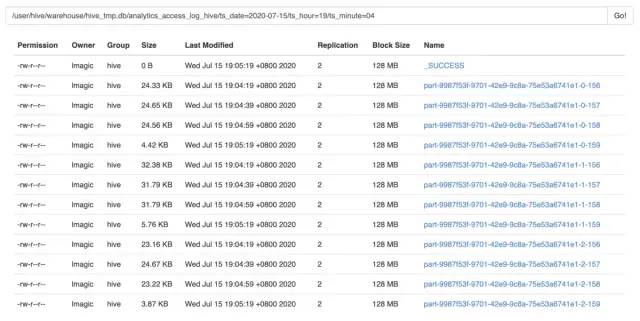
上文設定的checkpoint interval是20秒,可以看到,上圖中的數據文件恰好是以20秒的間隔寫入的。由于并行度為3,所以每次寫入會生成3個文件。分區(qū)內所有數據寫入完畢后,會同時生成_SUCCESS文件。如果是正在寫入的分區(qū),則會看到.inprogress文件。
通過Hive查詢一下,確定數據的時間無誤。
hive> SELECT from_unixtime(min(cast(ts / 1000 AS BIGINT))),from_unixtime(max(cast(ts / 1000 AS BIGINT)))
    > FROM hive_tmp.analytics_access_log_hive
    > WHERE ts_date = '2020-07-15' AND ts_hour = '23' AND ts_minute = '23';
OK
2020-07-15 23:23:00 2020-07-15 23:23:59
Time taken: 1.115 seconds, Fetched: 1 row(s)
流式讀取Hive
要將Hive表作為流式Source,需要啟用dynamic table options,并通過table hints來指定Hive數據流的參數。以下是簡單地通過Hive計算商品PV的例子。
tableEnv.getConfig.getConfiguration.setBoolean(TableConfigOptions.TABLE_DYNAMIC_TABLE_OPTIONS_ENABLED, true)

val result = tableEnv.sqlQuery(
  """
     |SELECT merchandise_id,count(1) AS pv
     |FROM hive_tmp.analytics_access_log_hive
     |/*+ OPTIONS(
     |  'streaming-source.enable' = 'true',
     |  'streaming-source.monitor-interval' = '1 min',
     |  'streaming-source.consume-start-offset' = '2020-07-15 23:30:00'
     |) */
     |WHERE event_type = 'shtOpenGoodsDetail'
     |AND ts_date >= '2020-07-15'
     |GROUP BY merchandise_id
     |ORDER BY pv DESC LIMIT 10
   """.stripMargin
)

result.toRetractStream[Row].print().setParallelism(1)
streamEnv.execute()
三個table hint參數的含義解釋如下。
streaming-source.enable:設為true,表示該Hive表可以作為Source。streaming-source.monitor-interval:感知Hive表新增數據的周期,以上設為1分鐘。對于分區(qū)表而言,則是監(jiān)控新分區(qū)的生成,以增量讀取數據。streaming-source.consume-start-offset:開始消費的時間戳,同樣需要寫成yyyy-MM-dd HH:mm:ss的形式。
更加具體的說明仍然可參見官方文檔(吐槽一句,這份文檔的Chinglish味道真的太重了=。=
最后,由于SQL語句中有ORDER BY和LIMIT邏輯,所以需要調用toRetractStream()方法轉化為回撤流,即可輸出結果。
Flink 1.11的Hive Streaming功能大大提高了Hive數倉的實時性,對ETL作業(yè)非常有利,同時還能夠滿足流式持續(xù)查詢的需求,具有一定的靈活性。


版權聲明:
文章不錯?點個【在看】吧!?