
Python-master,實(shí)用Python腳本合集!
Python這門語(yǔ)言很適合用來(lái)寫些實(shí)用的小腳本,跑個(gè)自動(dòng)化、爬蟲(chóng)、算法什么的,非常方便。
這也是很多人學(xué)習(xí)Python的樂(lè)趣所在,可能只需要花個(gè)禮拜入門語(yǔ)法,就能用第三方庫(kù)去解決實(shí)際問(wèn)題。
我在Github上就看到過(guò)不少Python代碼的項(xiàng)目,幾十行代碼就能實(shí)現(xiàn)一個(gè)場(chǎng)景功能,非常實(shí)用。
比方說(shuō)倉(cāng)庫(kù)Python-master里就有很多不錯(cuò)的實(shí)用Python腳本,舉幾個(gè)簡(jiǎn)單例子:
1、創(chuàng)建二維碼
import pyqrcode
import png
from pyqrcode import QRCode

# Text which is to be converted to QR code
print("Enter text to convert")
s = input(": ")
# Name of QR code png file
print("Enter image name to save")
n = input(": ")
# Adding extension as .pnf
d = n + ".png"
# Creating QR code
url = pyqrcode.create(s)
# Saving QR code as  a png file
url.show()
url.png(d, scale=6)
2、從圖片中截取文字
# extract text from a img and its coordinates using the pytesseract module
import cv2
import pytesseract

# You need to add tesseract binary dependency to system variable for this to work

img = cv2.imread("img.png")
# We need to convert the img into RGB format
img = cv2.cvtColor(img, cv2.COLOR_BGR2RGB)

hI, wI, k = img.shape
print(pytesseract.image_to_string(img))
boxes = pytesseract.image_to_boxes(img)
for b in boxes.splitlines():
    b = b.split(" ")
    x, y, w, h = int(b[1]), int(b[2]), int(b[3]), int(b[4])
    cv2.rectangle(img, (x, hI - y), (w, hI - h), (0, 0, 255), 0.2)

cv2.imshow("img", img)
cv2.waitKey(0)
3、判斷閏年
def is_leap(year):
    leap = False
    if year % 4 == 0:
        leap = True
        if year % 100 == 0:
            leap = False
            if year % 400 == 0:
                leap = True
    return leap

year = int(input("Enter the year here: "))
print(is_leap(year))
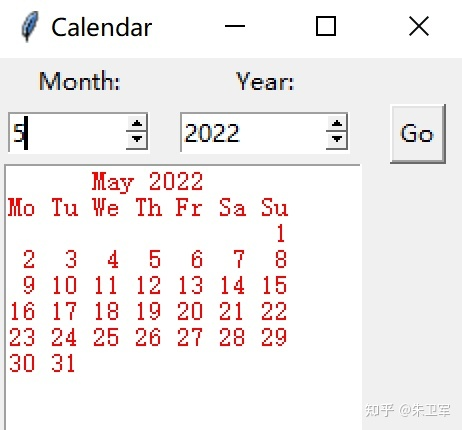
4、簡(jiǎn)易日歷
from tkinter import *
import calendar

root = Tk()
# root.geometry("400x300")
root.title("Calendar")

# Function

def text():
    month_int = int(month.get())
    year_int = int(year.get())
    cal = calendar.month(year_int, month_int)
    textfield.delete(0.0, END)
    textfield.insert(INSERT, cal)

# Creating Labels
label1 = Label(root, text="Month:")
label1.grid(row=0, column=0)

label2 = Label(root, text="Year:")
label2.grid(row=0, column=1)

# Creating spinbox
month = Spinbox(root, from_=1, to=12, width=8)
month.grid(row=1, column=0, padx=5)

year = Spinbox(root, from_=2000, to=2100, width=10)
year.grid(row=1, column=1, padx=10)

# Creating Button
button = Button(root, text="Go", command=text)
button.grid(row=1, column=2, padx=10)

# Creating Textfield
textfield = Text(root, width=25, height=10, fg="red")
textfield.grid(row=2, columnspan=2)

root.mainloop()
5、打印圖片分辨率
def jpeg_res(filename):
   """"This function prints the resolution of the jpeg image file passed into it"""

   # open image for reading in binary mode
   with open(filename,'rb') as img_file:

       # height of image (in 2 bytes) is at 164th position
       img_file.seek(163)

       # read the 2 bytes
       a = img_file.read(2)

       # calculate height
       height = (a[0] << 8) + a[1]

       # next 2 bytes is width
       a = img_file.read(2)

       # calculate width
       width = (a[0] << 8) + a[1]

   print("The resolution of the image is",width,"x",height)

jpeg_res("img1.jpg")
這個(gè)項(xiàng)目只是作者平時(shí)工作用到的一些小腳本,可能也會(huì)幫助到你。作者雖然不是程序員,但他這種用代碼解決問(wèn)題的習(xí)慣會(huì)極大的提升效率,也會(huì)迸發(fā)出更多的創(chuàng)新思維。我覺(jué)得這樣的代碼每個(gè)人都可以寫出來(lái),只要慢慢積累多練習(xí)就可以。
END
推薦閱讀
牛逼!Python常用數(shù)據(jù)類型的基本操作(長(zhǎng)文系列第①篇)
牛逼!Python的判斷、循環(huán)和各種表達(dá)式(長(zhǎng)文系列第②篇)
吳恩達(dá)deeplearining.ai的經(jīng)典總結(jié)資料
Ps:從小程序直接獲取下載
評(píng)論
圖片
表情