
分享6個實用的Python自動化腳本
每天你都可能會執(zhí)行許多重復的任務,例如閱讀 pdf、播放音樂、查看天氣、打開書簽、清理文件夾等等,使用自動化腳本,就無需手動一次又一次地完成這些任務,非常方便。而在某種程度上,Python 就是自動化的代名詞。今天分享 6 個非常有用的 Python 自動化腳本。
1、將 PDF 轉(zhuǎn)換為音頻文件
腳本可以將 pdf 轉(zhuǎn)換為音頻文件,原理也很簡單,首先用 PyPDF 提取 pdf 中的文本,然后用 Pyttsx3 將文本轉(zhuǎn)語音。關于文本轉(zhuǎn)語音,你還可以看這篇文章FastAPI:快速開發(fā)一個文本轉(zhuǎn)語音的接口。
代碼如下:
import?pyttsx3,PyPDF2
pdfreader?=?PyPDF2.PdfFileReader(open('story.pdf','rb'))
speaker?=?pyttsx3.init()
for?page_num?in?range(pdfreader.numPages):???
????text?=?pdfreader.getPage(page_num).extractText()??##?extracting?text?from?the?PDF
????cleaned_text?=?text.strip().replace('\n','?')??##?Removes?unnecessary?spaces?and?break?lines
????print(cleaned_text)????????????????##?Print?the?text?from?PDF
????#speaker.say(cleaned_text)????????##?Let?The?Speaker?Speak?The?Text
????speaker.save_to_file(cleaned_text,'story.mp3')??##?Saving?Text?In?a?audio?file?'story.mp3'
????speaker.runAndWait()
speaker.stop()
2、從列表中播放隨機音樂
這個腳本會從歌曲文件夾中隨機選擇一首歌進行播放,需要注意的是 os.startfile 僅支持 Windows 系統(tǒng)。
import?random,?os
music_dir?=?'G:\\new?english?songs'
songs?=?os.listdir(music_dir)
song?=?random.randint(0,len(songs))
print(songs[song])??##?Prints?The?Song?Name
os.startfile(os.path.join(music_dir,?songs[0]))?
3、不再有書簽了
每天睡覺前,我都會在網(wǎng)上搜索一些好內(nèi)容,第二天可以閱讀。大多數(shù)時候,我把遇到的網(wǎng)站或文章添加為書簽,但我的書簽每天都在增加,以至于現(xiàn)在我的瀏覽器周圍有100多個書簽。因此,在python的幫助下,我想出了另一種方法來解決這個問題。現(xiàn)在,我把這些網(wǎng)站的鏈接復制粘貼到文本文件中,每天早上我都會運行腳本,在我的瀏覽器中再次打開所有這些網(wǎng)站。
import?webbrowser
with?open('./websites.txt')?as?reader:
????for?link?in?reader:
????????webbrowser.open(link.strip())
代碼用到了 webbrowser,是 Python 中的一個庫,可以自動在默認瀏覽器中打開 URL。
4、智能天氣信息
國家氣象局網(wǎng)站提供獲取天氣預報的 API,直接返回 json 格式的天氣數(shù)據(jù)。所以只需要從 json 里取出對應的字段就可以了。
下面是指定城市(縣、區(qū))天氣的網(wǎng)址,直接打開網(wǎng)址,就會返回對應城市的天氣數(shù)據(jù)。比如:
http://www.weather.com.cn/data/cityinfo/101021200.html上海徐匯區(qū)對應的天氣網(wǎng)址。
具體代碼如下:
import?requests
import?json
import?logging?as?log

def?get_weather_wind(url):
????r?=?requests.get(url)
????if?r.status_code?!=?200:
????????log.error("Can't?get?weather?data!")
????info?=?json.loads(r.content.decode())

????#?get?wind?data
????data?=?info['weatherinfo']
????WD?=?data['WD']
????WS?=?data['WS']
????return?"{}({})".format(WD,?WS)


def?get_weather_city(url):
????#?open?url?and?get?return?data
????r?=?requests.get(url)
????if?r.status_code?!=?200:
????????log.error("Can't?get?weather?data!")

????#?convert?string?to?json
????info?=?json.loads(r.content.decode())

????#?get?useful?data
????data?=?info['weatherinfo']
????city?=?data['city']
????temp1?=?data['temp1']
????temp2?=?data['temp2']
????weather?=?data['weather']
????return?"{}?{}?{}~{}".format(city,?weather,?temp1,?temp2)


if?__name__?==?'__main__':
????msg?=?"""**天氣提醒**:??

{}?{}??
{}?{}??

來源:?國家氣象局
""".format(
????get_weather_city('http://www.weather.com.cn/data/cityinfo/101021200.html'),
????get_weather_wind('http://www.weather.com.cn/data/sk/101021200.html'),
????get_weather_city('http://www.weather.com.cn/data/cityinfo/101020900.html'),
????get_weather_wind('http://www.weather.com.cn/data/sk/101020900.html')
)
????print(msg)
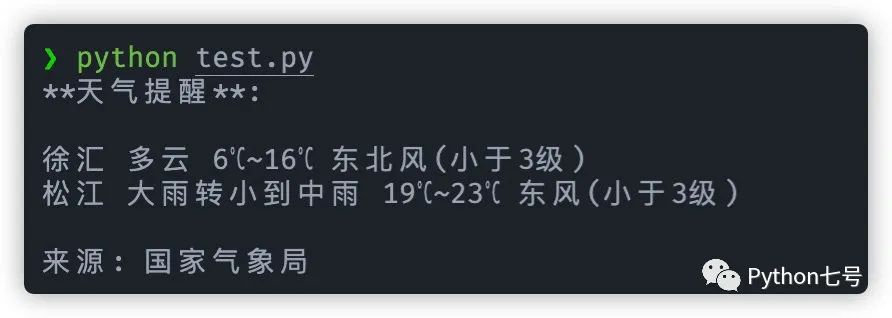
運行結(jié)果如下所示:
5、長網(wǎng)址變短網(wǎng)址
有時,那些大URL變得非常惱火,很難閱讀和共享,此腳可以將長網(wǎng)址變?yōu)槎叹W(wǎng)址。
import?contextlib
from?urllib.parse?import?urlencode
from?urllib.request?import?urlopen
import?sys

def?make_tiny(url):
?request_url?=?('http://tinyurl.com/api-create.php?'?+?
?urlencode({'url':url}))
?with?contextlib.closing(urlopen(request_url))?as?response:
??return?response.read().decode('utf-8')

def?main():
?for?tinyurl?in?map(make_tiny,?sys.argv[1:]):
??print(tinyurl)

if?__name__?==?'__main__':
?main()
這個腳本非常實用,比如說有不是內(nèi)容平臺是屏蔽公眾號文章的,那么就可以把公眾號文章的鏈接變?yōu)槎替溄樱缓蟛迦肫渲校涂梢詫崿F(xiàn)繞過:

6、清理下載文件夾
世界上最混亂的事情之一是開發(fā)人員的下載文件夾,里面存放了很多雜亂無章的文件,此腳本將根據(jù)大小限制來清理您的下載文件夾,有限清理比較舊的文件:
import?os
import?threading
import?time
?
?
def?get_file_list(file_path):
#文件按最后修改時間排序
????dir_list?=?os.listdir(file_path)
????if?not?dir_list:
????????return
????else:
????????dir_list?=?sorted(dir_list,?key=lambda?x:?os.path.getmtime(os.path.join(file_path,?x)))
????return?dir_list
?
def?get_size(file_path):
????"""[summary]
????Args:
????????file_path?([type]):?[目錄]

????Returns:
????????[type]:?返回目錄大小,MB
????"""
????totalsize=0
????for?filename?in?os.listdir(file_path):
????????totalsize=totalsize+os.path.getsize(os.path.join(file_path,?filename))
????#print(totalsize?/?1024?/?1024)
????return?totalsize?/?1024?/?1024
?
def?detect_file_size(file_path,?size_Max,?size_Del):
????"""[summary]
????Args:
????????file_path?([type]):?[文件目錄]
????????size_Max?([type]):?[文件夾最大大小]
????????size_Del?([type]):?[超過size_Max時要刪除的大小]
????"""
????print(get_size(file_path))
????if?get_size(file_path)?>?size_Max:
????????fileList?=?get_file_list(file_path)
????????for?i?in?range(len(fileList)):
????????????if?get_size(file_path)?>?(size_Max?-?size_Del):
????????????????print?("del?:%d?%s"?%?(i?+?1,?fileList[i]))
????????????????#os.remove(file_path?+?fileList[i])
????
?
def?detectFileSize():
?#檢測線程,每個5秒檢測一次
????while?True:
????????print('======detect============')
????????detect_file_size("/Users/aaron/Downloads/",?100,?30)
????????time.sleep(5)
??
if?__name__?==?"__main__":
????#創(chuàng)建檢測線程
????detect_thread?=?threading.Thread(target?=?detectFileSize)
????detect_thread.start()
最后的話
本文分享了 6 個 Python 腳本,如果覺得有幫助,還請點贊、轉(zhuǎn)發(fā)、在看,感謝你的支持。