
ActiveMQ在分布式項(xiàng)目中的實(shí)際應(yīng)用

具體需求:
后臺添加商品后,需要執(zhí)行兩個(gè)操作:
同步索引庫(商品搜索使用了Solr實(shí)現(xiàn)) 生成靜態(tài)頁面(使用freemarker)
實(shí)現(xiàn)構(gòu)思:
使用消息隊(duì)列。MQ作為消息中間件,傳遞的消息內(nèi)容為新增商品的ID。

準(zhǔn)備工作:
在需要的地方添加相應(yīng)的依賴(基礎(chǔ)依賴就不再說了)
商品服務(wù)需要發(fā)送商品添加消息,所以需要添加三個(gè)依賴,分別是整合Spring需要的兩個(gè)Jar和ActiveMQ的Jar:
<dependency>
 <groupId>org.springframework</groupId>
 <artifactId>spring-jms</artifactId>
</dependency>
<dependency>
 <groupId>org.springframework</groupId>
 <artifactId>spring-context-support</artifactId>
</dependency>
<dependency>
 <groupId>org.apache.activemq</groupId>
 <artifactId>activemq-all</artifactId>
</dependency>
索引服務(wù)需要接收消息,然后同步索引庫,所以需要添加四個(gè)依賴,分別是整合Spring需要的兩個(gè)Jar和ActiveMQ的Jar和Solr客戶端的Jar:
<dependency>
 <groupId>org.springframework</groupId>
 <artifactId>spring-jms</artifactId>
</dependency>
<dependency>
 <groupId>org.springframework</groupId>
 <artifactId>spring-context-support</artifactId>
</dependency>
<dependency>
 <groupId>org.apache.activemq</groupId>
 <artifactId>activemq-all</artifactId>
</dependency>
<dependency>
 <groupId>org.apache.solr</groupId>
 <artifactId>solr-solrj</artifactId>
</dependency>
商品詳情工程需要就收消息,然后生成靜態(tài)頁面,所以需要添加四個(gè)依賴,分別是整合Spring需要的兩個(gè)Jar和ActiveMQ的Jar和Solr客戶端的Jar:
<dependency>
 <groupId>org.springframework</groupId>
 <artifactId>spring-jms</artifactId>
</dependency>
<dependency>
 <groupId>org.springframework</groupId>
 <artifactId>spring-context-support</artifactId>
</dependency>
<dependency>
 <groupId>org.apache.activemq</groupId>
 <artifactId>activemq-all</artifactId>
</dependency>
<dependency>
        <groupId>org.freemarker</groupId>
        <artifactId>freemarker</artifactId>
</dependency>
具體實(shí)現(xiàn):
1.商品服務(wù)添加商品信息后,發(fā)布商品添加消息
spring-activemq.xml
<!-- 真正可以產(chǎn)生Connection的ConnectionFactory,由對應(yīng)的 JMS服務(wù)廠商提供 -->
<bean id="targetConnectionFactory" class="org.apache.activemq.ActiveMQConnectionFactory">
 <property name="brokerURL" value="tcp://192.168.25.131:61616" /><!-- activemq地址 -->
</bean>

<!-- Spring用于管理真正的ConnectionFactory的ConnectionFactory -->
<bean id="connectionFactory" class="org.springframework.jms.connection.SingleConnectionFactory">
 <!-- 目標(biāo)ConnectionFactory對應(yīng)真實(shí)的可以產(chǎn)生JMS Connection的ConnectionFactory -->
 <property name="targetConnectionFactory" ref="targetConnectionFactory" />
</bean>

<!-- 配置生產(chǎn)者 -->
<!-- Spring提供的JMS工具類,它可以進(jìn)行消息發(fā)送、接收等 -->
<bean id="jmsTemplate" class="org.springframework.jms.core.JmsTemplate">
 <!-- 這個(gè)connectionFactory對應(yīng)的是我們定義的Spring提供的那個(gè)ConnectionFactory對象 -->
 <property name="connectionFactory" ref="connectionFactory" />
</bean>

<!--配置主題目的地,一對多的,以為我們有多個(gè)接收方,所以這里使用topic而不是queue -->
<bean id="topicDestination" class="org.apache.activemq.command.ActiveMQTopic">
 <constructor-arg value="itemAddTopic" />
</bean>
ItemServiceImpl.java
@Autowired
private JmsTemplate jmsTemplate;
@Resource // 默認(rèn)通過id注入,找不到再通過類型注入
private Destination topicDestination;

@Override
public E3Result addItem(TbItem item, String desc, String itemParams) {
 // 生成商品ID
 final long itemId = IDUtils.genItemId();

 /**
  * 將商品信息插入數(shù)據(jù)庫中
  */

 // 發(fā)送一個(gè)商品添加消息
 jmsTemplate.send(topicDestination, new MessageCreator() {

  @Override
  public Message createMessage(Session session) throws JMSException {
   TextMessage textMessage = session.createTextMessage(itemId + "");
   return textMessage;
  }
 });
 // 返回成功
 return E3Result.ok();
}
2.索引服務(wù)配置監(jiān)聽器,接收到商品添加消息后,同步索引庫
ItemAddMessageListener.java
public class ItemAddMessageListener implements MessageListener {

 @Autowired
 private ItemMapper itemMapper;
 @Autowired
 private SolrServer solrServer;

 @Override
 public void onMessage(Message message) {
  try {
   // 從消息中取商品ID
   TextMessage textMessage = (TextMessage) message;
   String text = textMessage.getText();
   Long itemId = new Long(text);
   // 等待事務(wù)提交,不等待的話有可能下面會查不到商品信息
   Thread.sleep(1000);
   // 根據(jù)商品ID查詢商品信息
   SearchItem searchItem = itemMapper.getItemById(itemId);
   // 創(chuàng)建一個(gè)文檔對象
   SolrInputDocument document = new SolrInputDocument();
   // 向文檔對象中添加域
   document.addField("id", searchItem.getId());
   document.addField("item_title", searchItem.getTitle());
   document.addField("item_sell_point", searchItem.getSell_point());
   document.addField("item_price", searchItem.getPrice());
   document.addField("item_image", searchItem.getImage());
   document.addField("item_category_name", searchItem.getCategory_name());
   // 把文檔對象寫入索引庫
   solrServer.add(document);
   // 提交
   solrServer.commit();
  } catch (Exception e) {
   e.printStackTrace();
  }
 }
}
spring-activemq.xml
<!-- 真正可以產(chǎn)生Connection的ConnectionFactory,由對應(yīng)的 JMS服務(wù)廠商提供 -->
<bean id="targetConnectionFactory" class="org.apache.activemq.ActiveMQConnectionFactory">
 <property name="brokerURL" value="tcp://192.168.25.131:61616" /><!-- activemq地址 -->
</bean>

<!-- Spring用于管理真正的ConnectionFactory的ConnectionFactory -->
<bean id="connectionFactory" class="org.springframework.jms.connection.SingleConnectionFactory">
 <!-- 目標(biāo)ConnectionFactory對應(yīng)真實(shí)的可以產(chǎn)生JMS Connection的ConnectionFactory -->
 <property name="targetConnectionFactory" ref="targetConnectionFactory" />
</bean>

<!--配置主題目的地,一對多的 -->
<bean id="topicDestination" class="org.apache.activemq.command.ActiveMQTopic">
 <constructor-arg value="itemAddTopic" />
</bean>

<!-- 接收消息 -->
<!-- 配置消息監(jiān)聽器,監(jiān)聽商品添加消息,同步索引庫 -->
<bean id="itemAddMessageListener" class="cn.e3mall.search.message.ItemAddMessageListener"/>
<!-- 消息監(jiān)聽容器 -->
<bean class="org.springframework.jms.listener.DefaultMessageListenerContainer">
 <property name="connectionFactory" ref="connectionFactory" />
 <property name="destination" ref="topicDestination" />
 <property name="messageListener" ref="itemAddMessageListener" />
</bean>
3.商品詳情工程配置監(jiān)聽器,接收到商品添加消息后,生成商品詳情靜態(tài)頁面
首先需要配置用于生成靜態(tài)頁面的模板,具體的配置方法請參看FreeMarker教程,在這里就不詳細(xì)敘述了,我這里配置好的模板如下:
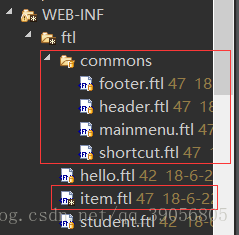
item.ftl是商品詳情頁面,其他的幾個(gè)ftl是include進(jìn)去的,都需要配置。
FreeMarker的配置:
<!-- 配置Freemaker -->
<bean id="freemarkerConfig" class="org.springframework.web.servlet.view.freemarker.FreeMarkerConfigurer">
 <property name="templateLoaderPath" value="/WEB-INF/ftl/" /><!-- 指定模板所在目錄 -->
 <property name="defaultEncoding" value="UTF-8" /><!-- 指定默認(rèn)編碼方式 -->
</bean>
監(jiān)聽器:
public class HtmlGenListener implements MessageListener {

 @Autowired
 private ItemService itemService;
 @Autowired
 private FreeMarkerConfigurer freeMarkerConfigurer;
 @Value("${HTML_GEN_PATH}")
 private String HTML_GEN_PATH; // 生成的靜態(tài)頁面保存的位置

 @Override
 public void onMessage(Message message) {
  try {
   // 從商品中取商品ID
   TextMessage textMessage = (TextMessage) message;
   String text = textMessage.getText();
   Long itemId = new Long(text);
   // 等待事務(wù)提交(防止還未插入數(shù)據(jù)庫就查詢)
   Thread.sleep(1000);
   // 根據(jù)商品id查詢商品信息,商品基本信息和商品描述信息
   TbItem tbItem= itemService.getItemById(itemId);
   Item item = new Item(tbItem);
   item.setPrice(item.getPrice() / 100); // 轉(zhuǎn)換價(jià)格
   // 取商品描述
   TbItemDesc itemDesc = itemService.getItemDesc(itemId);
   // 創(chuàng)建一個(gè)數(shù)據(jù)集,將模板所需的數(shù)據(jù)全部放進(jìn)去
   Map<String, Object> data = new HashMap<>();
   data.put("item", item);
   data.put("itemDesc", itemDesc);
   // 加載模板對象
   Configuration configuration = freeMarkerConfigurer.getConfiguration();
   Template template = configuration.getTemplate("item.ftl");
   // 創(chuàng)建一個(gè)輸出流,指定輸出的目錄以及文件名
   Writer out = new FileWriter(HTML_GEN_PATH + itemId + ".html");
   // 生成靜態(tài)頁面
   template.process(data, out);
   // 關(guān)閉流
   out.close();
  } catch (Exception e) {
   e.printStackTrace();
  }
 }
}
引用外部文件:

監(jiān)聽器配置:
<!-- 真正可以產(chǎn)生Connection的ConnectionFactory,由對應(yīng)的 JMS服務(wù)廠商提供 -->
<bean id="targetConnectionFactory" class="org.apache.activemq.ActiveMQConnectionFactory">
 <property name="brokerURL" value="tcp://192.168.25.131:61616" />
</bean>

<!-- Spring用于管理真正的ConnectionFactory的ConnectionFactory -->
<bean id="connectionFactory" class="org.springframework.jms.connection.SingleConnectionFactory">
 <!-- 目標(biāo)ConnectionFactory對應(yīng)真實(shí)的可以產(chǎn)生JMS Connection的ConnectionFactory -->
 <property name="targetConnectionFactory" ref="targetConnectionFactory" />
</bean>

<!--配置主題目的地,一對多的 -->
<bean id="topicDestination" class="org.apache.activemq.command.ActiveMQTopic">
 <constructor-arg value="itemAddTopic" />
</bean>

<!-- 接收消息 -->
<!-- 監(jiān)聽商品添加消息,同步生成靜態(tài)頁面 -->
<bean id="htmlGenListener" class="cn.e3mall.item.message.HtmlGenListener"/>
<bean class="org.springframework.jms.listener.DefaultMessageListenerContainer">
 <property name="connectionFactory" ref="connectionFactory" />
 <property name="destination" ref="topicDestination" />
 <property name="messageListener" ref="htmlGenListener" />
</bean>
至此,功能就實(shí)現(xiàn)了。
功能測試
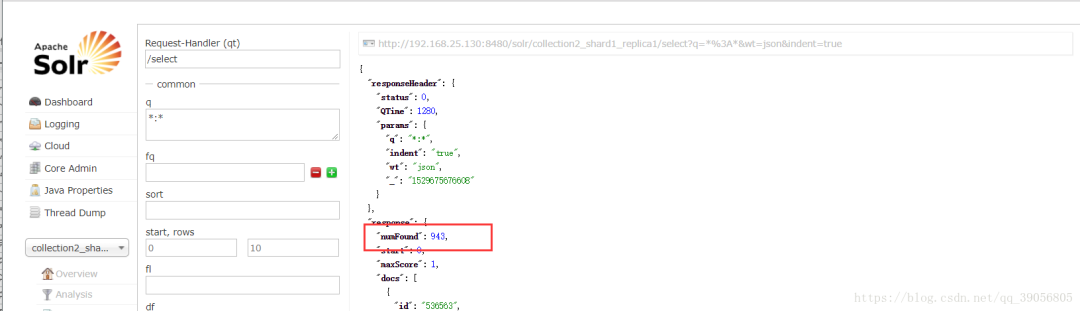
首先查看一下索引庫,可以看到目前有943條商品數(shù)據(jù)
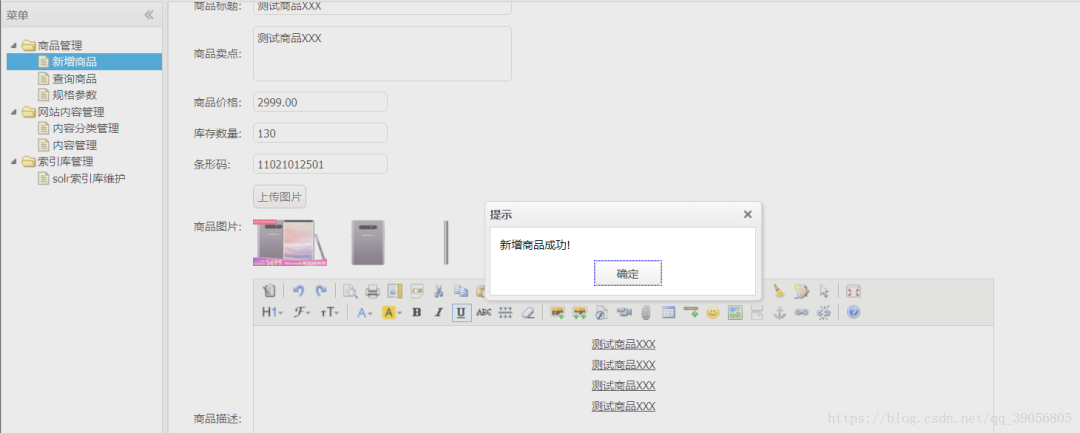
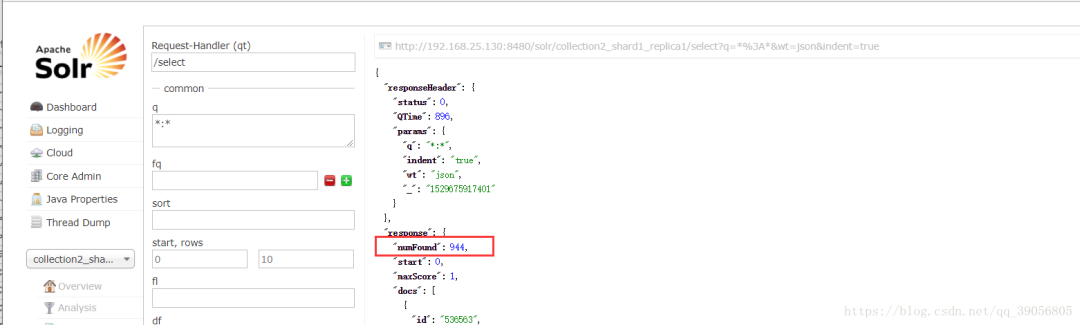
再次查看索引庫,可以看到新增加了一條數(shù)據(jù),現(xiàn)在有944條數(shù)據(jù):
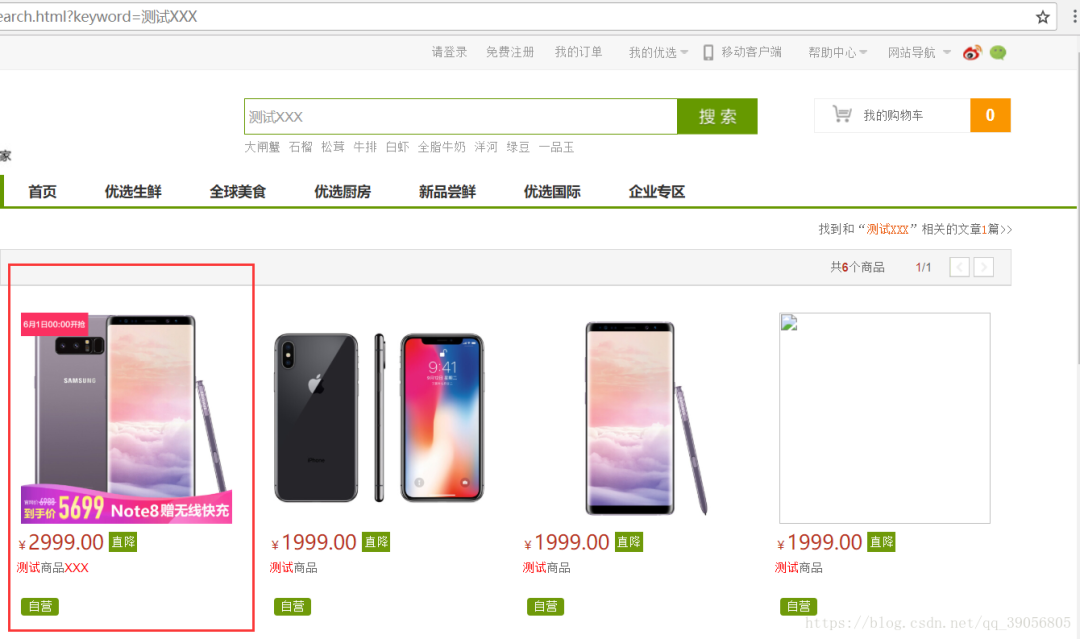
搜索新添加的商品:,可以看到,已經(jīng)能夠查到了:
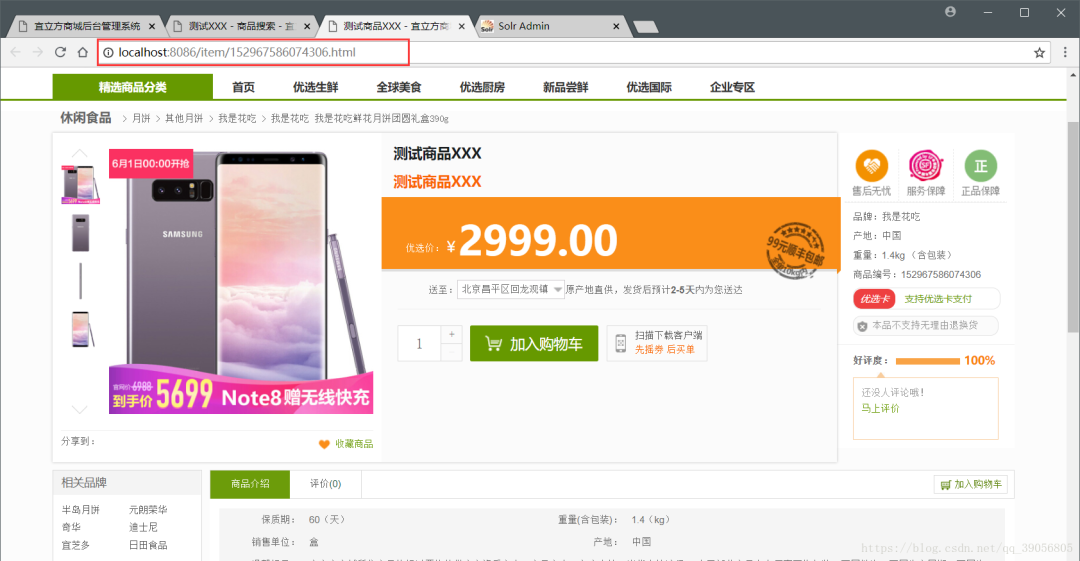
查看商品詳情,與本地生成的靜態(tài)頁面進(jìn)行對比:
本地生成靜態(tài)文件:

訪問本地靜態(tài)文件(這里使用了Nginx服務(wù)器訪問靜態(tài)文件)
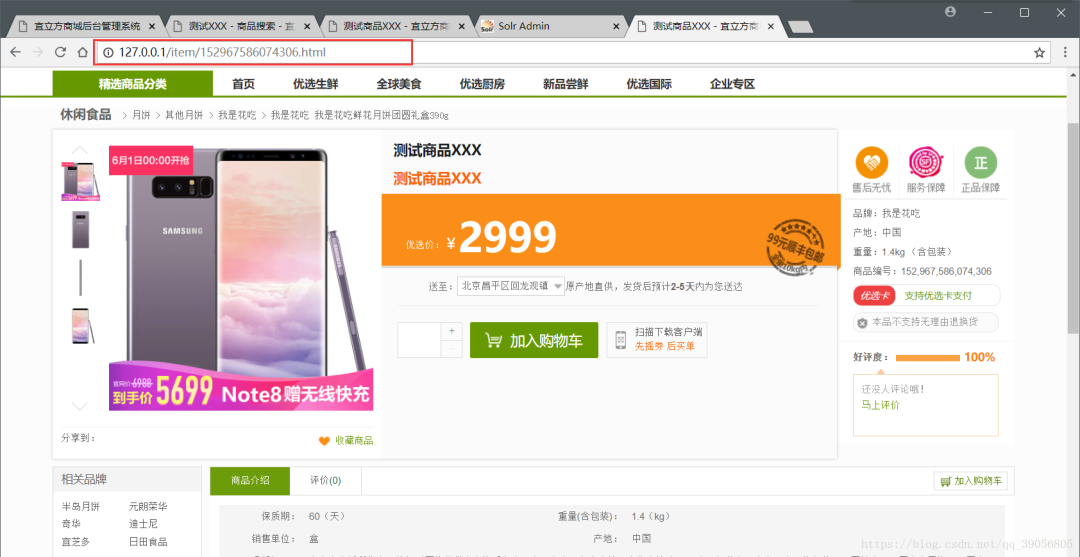
可以對比一下,兩個(gè)絕對是一模一樣的,這樣以后用戶訪問商品詳情的時(shí)候就可以返回給其一個(gè)靜態(tài)頁面,大大減小了服務(wù)器壓力,訪問速度加快,也提升了用戶體驗(yàn)。
1. 面試官扎心一問:如何使用Redis實(shí)現(xiàn)電商系統(tǒng)的庫存扣減?
最近面試BAT,整理一份面試資料《Java面試BATJ通關(guān)手冊》,覆蓋了Java核心技術(shù)、JVM、Java并發(fā)、SSM、微服務(wù)、數(shù)據(jù)庫、數(shù)據(jù)結(jié)構(gòu)等等。
獲取方式:點(diǎn)“在看”,關(guān)注公眾號并回復(fù) Java 領(lǐng)取,更多內(nèi)容陸續(xù)奉上。
文章有幫助的話,在看,轉(zhuǎn)發(fā)吧。
謝謝支持喲 (*^__^*)
