
久違了,升級一波 swagger starter!

這個swagger的starter已經(jīng)存在四年了,記得當時做這個的時候主要是由于swagger官方并沒有提供類似spring boot官方其他starter模塊一樣的封裝。當我們要用swagger的時候,還是要寫很多Java配置來啟動,所以就做了這個,盡可能的把原來要寫在Java中的配置都轉(zhuǎn)移到配置文件中來。
一個小小的封裝,也獲得了2k+的Star,使用也超過了3.1k。
之前由于springfox 3.0推出了starter(之前我也寫了篇博客介紹使用SpringFox 3生成Swagger文檔(https://blog.didispace.com/spring-boot-learning-21-2-7/)),想著既然有了這個,那就沒有花太多精力去繼續(xù)更新了。
但是,一直有收到用過springfox starter的小伙伴反應還是希望可以用純配置的方式來使用swagger,希望這個swagger可以繼續(xù)升級到最新的版本。所以,下面會繼續(xù)跟進這個starter,這里要特別感謝andi.lin(https://github.com/llin6025)的積極參與,得以讓這次的升級繼續(xù)進行。
倉庫地址:https://github.com/SpringForAll/spring-boot-starter-swagger
更新內(nèi)容
升級依賴的springfox swagger到3.0.0 文檔的開啟關(guān)閉控制改為springfox.documentation.enabled參數(shù)
如何使用
在該項目的幫助下,我們的Spring Boot可以輕松的引入swagger。只需要做下面兩個步驟:
在 pom.xml中引入依賴:
<dependency>
 <groupId>com.spring4all</groupId>
 <artifactId>swagger-spring-boot-starter</artifactId>
 <version>2.0.0.RELEASE</version>
</dependency>
注意
從 1.6.0開始,我們按Spring Boot官方建議修改了artifactId為swagger-spring-boot-starter,1.6.0之前的版本不做修改,依然為使用spring-boot-starter-swagger!從 2.0.0開始,不再需要手工添加@EnableSwagger2Doc來啟動Swagger配置
默認情況下就能產(chǎn)生所有當前Spring MVC加載的請求映射文檔。
更細致的配置內(nèi)容參考如下:
配置示例
springfox.documentation.enabled=true

swagger.title=spring-boot-starter-swagger
swagger.description=Starter for swagger 2.x
swagger.version=1.4.0.RELEASE
swagger.license=Apache License, Version 2.0
swagger.licenseUrl=https://www.apache.org/licenses/LICENSE-2.0.html
swagger.termsOfServiceUrl=https://github.com/dyc87112/spring-boot-starter-swagger
swagger.contact.name=didi
swagger.contact.url=http://blog.didispace.com
[email protected]
swagger.base-package=com.didispace
swagger.base-path=/**
swagger.exclude-path=/error, /ops/**

swagger.globalOperationParameters[0].name=name one
swagger.globalOperationParameters[0].description=some description one
swagger.globalOperationParameters[0].modelRef=string
swagger.globalOperationParameters[0].parameterType=header
swagger.globalOperationParameters[0].required=true
swagger.globalOperationParameters[1].name=name two
swagger.globalOperationParameters[1].description=some description two
swagger.globalOperationParameters[1].modelRef=string
swagger.globalOperationParameters[1].parameterType=body
swagger.globalOperationParameters[1].required=false

// 取消使用默認預定義的響應消息,并使用自定義響應消息
swagger.apply-default-response-messages=false
swagger.global-response-message.get[0].code=401
swagger.global-response-message.get[0].message=401get
swagger.global-response-message.get[1].code=500
swagger.global-response-message.get[1].message=500get
swagger.global-response-message.get[1].modelRef=ERROR
swagger.global-response-message.post[0].code=500
swagger.global-response-message.post[0].message=500post
swagger.global-response-message.post[0].modelRef=ERROR
配置說明
默認配置
springfox.documentation.enabled=是否啟用swagger,默認:true

swagger.title=標題
swagger.description=描述
swagger.version=版本
swagger.license=許可證
swagger.licenseUrl=許可證URL
swagger.termsOfServiceUrl=服務條款URL

swagger.contact.name=維護人
swagger.contact.url=維護人URL
swagger.contact.email=維護人email

swagger.base-package=swagger掃描的基礎包,默認:全掃描
swagger.base-path=需要處理的基礎URL規(guī)則,默認:/**
swagger.exclude-path=需要排除的URL規(guī)則,默認:空

swagger.host=文檔的host信息,默認:空

swagger.globalOperationParameters[0].name=參數(shù)名
swagger.globalOperationParameters[0].description=描述信息
swagger.globalOperationParameters[0].modelRef=指定參數(shù)類型
swagger.globalOperationParameters[0].parameterType=指定參數(shù)存放位置,可選header,query,path,body.form
swagger.globalOperationParameters[0].required=指定參數(shù)是否必傳,true,false
1.3.0.RELEASE新增:swagger.host屬性,同時也支持指定docket的配置
1.4.0.RELEASE新增:
swagger.enabled:用于開關(guān)swagger的配置swagger.globalOperationParameters:用于設置全局的參數(shù),比如:header部分的accessToken等。該參數(shù)支持指定docket的配置。
2.0.0.RELEASE調(diào)整:
原來的 swagger.enabled配置修改為springfox.documentation.enabled來控制
Path規(guī)則說明
swagger.base-path和swagger.exclude-path使用ANT規(guī)則配置。
我們可以使用swagger.base-path來指定所有需要生成文檔的請求路徑基礎規(guī)則,然后再利用swagger.exclude-path來剔除部分我們不需要的。
比如,通常我們可以這樣設置:
management.context-path=/ops

swagger.base-path=/**
swagger.exclude-path=/ops/**, /error
上面的設置將解析所有除了/ops/開始以及spring boot自帶/error請求路徑。
其中,exclude-path可以配合management.context-path=/ops設置的spring boot actuator的context-path來排除所有監(jiān)控端點。
分組配置
當我們一個項目的API非常多的時候,我們希望對API文檔實現(xiàn)分組。從1.2.0.RELEASE開始,將支持分組配置功能。
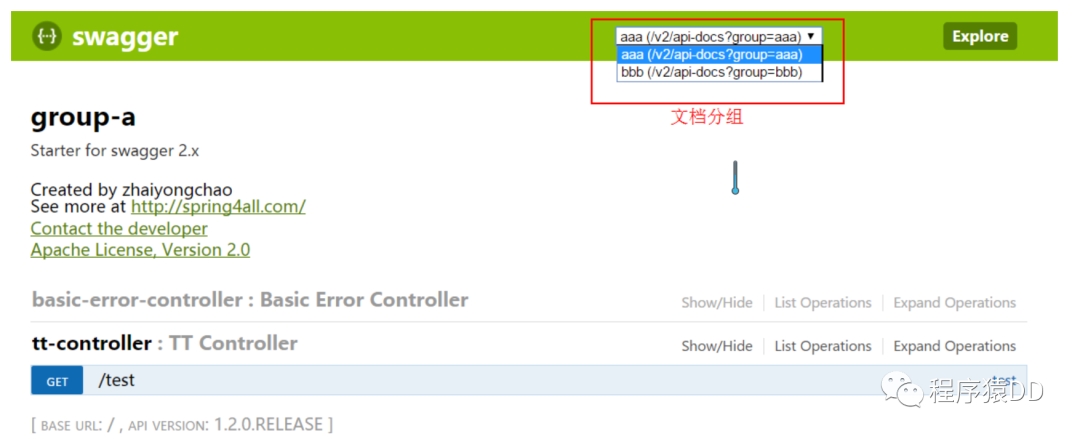
具體配置內(nèi)容如下:
swagger.docket.<name>.title=標題
swagger.docket.<name>.description=描述
swagger.docket.<name>.version=版本
swagger.docket.<name>.license=許可證
swagger.docket.<name>.licenseUrl=許可證URL
swagger.docket.<name>.termsOfServiceUrl=服務條款URL
swagger.docket.<name>.contact.name=維護人
swagger.docket.<name>.contact.url=維護人URL
swagger.docket.<name>.contact.email=維護人email
swagger.docket.<name>.base-package=swagger掃描的基礎包,默認:全掃描
swagger.docket.<name>.base-path=需要處理的基礎URL規(guī)則,默認:/**
swagger.docket.<name>.exclude-path=需要排除的URL規(guī)則,默認:空
swagger.docket.<name>.name=參數(shù)名
swagger.docket.<name>.modelRef=指定參數(shù)類型
swagger.docket.<name>.parameterType=指定參數(shù)存放位置,可選header,query,path,body.form
swagger.docket.<name>.required=true=指定參數(shù)是否必傳,true,false
swagger.docket.<name>.globalOperationParameters[0].name=參數(shù)名
swagger.docket.<name>.globalOperationParameters[0].description=描述信息
swagger.docket.<name>.globalOperationParameters[0].modelRef=指定參數(shù)存放位置,可選header,query,path,body.form
swagger.docket.<name>.globalOperationParameters[0].parameterType=指定參數(shù)是否必傳,true,false
說明:<name>為swagger文檔的分組名稱,同一個項目中可以配置多個分組,用來劃分不同的API文檔。
分組配置示例
swagger.docket.aaa.title=group-a
swagger.docket.aaa.description=Starter for swagger 2.x
swagger.docket.aaa.version=1.3.0.RELEASE
swagger.docket.aaa.termsOfServiceUrl=https://gitee.com/didispace/spring-boot-starter-swagger
swagger.docket.aaa.contact.name=zhaiyongchao
swagger.docket.aaa.contact.url=http://spring4all.com/
[email protected]
swagger.docket.aaa.excludePath=/ops/**
swagger.docket.aaa.globalOperationParameters[0].name=name three
swagger.docket.aaa.globalOperationParameters[0].description=some description three override
swagger.docket.aaa.globalOperationParameters[0].modelRef=string
swagger.docket.aaa.globalOperationParameters[0].parameterType=header

swagger.docket.bbb.title=group-bbb
swagger.docket.bbb.basePackage=com.yonghui
說明:默認配置與分組配置可以一起使用。在分組配置中沒有配置的內(nèi)容將使用默認配置替代,所以默認配置可以作為分組配置公共部分屬性的配置。swagger.docket.aaa.globalOperationParameters[0].name會覆蓋同名的全局配置。
JSR-303校驗注解支持(1.5.0 + 支持)
支持對JSR-303校驗注解的展示,如下圖所示:
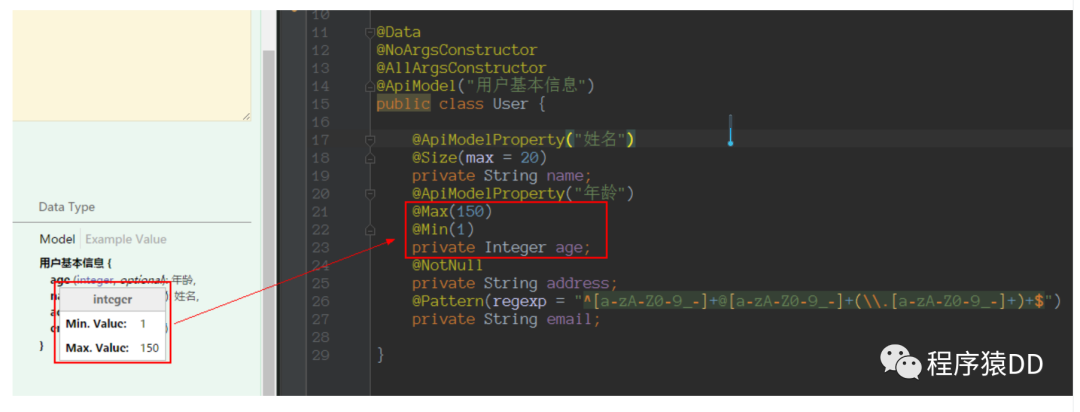
目前共支持以下幾個注解:
@NotNull@Max、@Min@Size@Pattern
支持 POST,GET,PUT,PATCH,DELETE,HEAD,OPTIONS,TRACE 全局響應消息配置,配置如下
// 取消使用默認預定義的響應消息,并使用自定義響應消息
swagger.apply-default-response-messages=false
swagger.global-response-message.get[0].code=401
swagger.global-response-message.get[0].message=401get
swagger.global-response-message.get[1].code=500
swagger.global-response-message.get[1].message=500get
swagger.global-response-message.get[1].modelRef=ERROR
swagger.global-response-message.post[0].code=500
swagger.global-response-message.post[0].message=500post
swagger.global-response-message.post[0].modelRef=ERROR
UI功能配置(1.6.0 + 支持)
調(diào)試按鈕的控制(try it out)
swagger.ui-config.submit-methods=get,delete
該參數(shù)值為提供調(diào)試按鈕的HTTP請求類型,多個用,分割。
如果不想開啟調(diào)試功能,只需要如下設置即可:
swagger.ui-config.submit-methods=
其他配置
# json編輯器
swagger.ui-config.json-editor=false

# 顯示請求頭
swagger.ui-config.show-request-headers=true

# 頁面調(diào)試請求的超時時間
swagger.ui-config.request-timeout=5000
ignoredParameterTypes配置(1.6.0 + 支持)
# 基礎配置
swagger.ignored-parameter-types[0]=com.didispace.demo.User
swagger.ignored-parameter-types[1]=com.didispace.demo.Product

# 分組配置
swagger.docket.aaa.ignored-parameter-types[0]=com.didispace.demo.User
swagger.docket.aaa.ignored-parameter-types[1]=com.didispace.demo.Product
該參數(shù)作用:Q. Infinite loop when springfox tries to determine schema for objects with nested/complex constraints? A. If you have recursively defined objects, I would try and see if providing an alternate type might work or perhaps even ignoring the offending classes e.g. order using the docket. ignoredParameterTypes(Order.class). This is usually found in Hibernate domain objects that have bidirectional dependencies on other objects.
Authorization 鑒權(quán)配置 (1.7.0 + 支持)
新增 Authorization 配置項
# 鑒權(quán)策略ID,對應 SecurityReferences ID
swagger.authorization.name=Authorization

# 鑒權(quán)策略,可選 ApiKey | BasicAuth | None,默認ApiKey
swagger.authorization.type=ApiKey

# 鑒權(quán)傳遞的Header參數(shù)
swagger.authorization.key-name=token

# 需要開啟鑒權(quán)URL的正則, 默認^.*$匹配所有URL
swagger.authorization.auth-regex=^.*$
備注:目前支持ApiKey | BasicAuth鑒權(quán)模式,None除消鑒權(quán)模式,默認ApiKey,后續(xù)添加Oauth2支持
使用須知
默認已經(jīng)在全局開啟了 global的SecurityReferences,無需配置任何參數(shù)就可以使用;全局鑒權(quán)的范圍在可以通過以上參數(shù) auth-regex進行正則表達式匹配控制;除了全局開啟外,還可以手動通過注解在RestController上進行定義鑒權(quán),使用方式如下:
// 其中的ID Authorization 即為配置項 swagger.authorization.name,詳細請關(guān)注后面的配置代碼
@ApiOperation(value = "Hello World", authorizations = {@Authorization(value = "Authorization")})
@RequestMapping(value = "/hello", method = RequestMethod.GET)
String hello();
關(guān)于如何配置實現(xiàn)鑒權(quán),請關(guān)注以下code:
/**
 * 配置基于 ApiKey 的鑒權(quán)對象
 *
 * @return
 */
private ApiKey apiKey() {
    return new ApiKey(swaggerProperties().getAuthorization().getName(),
            swaggerProperties().getAuthorization().getKeyName(),
            ApiKeyVehicle.HEADER.getValue());
}

/**
 * 配置默認的全局鑒權(quán)策略的開關(guān),以及通過正則表達式進行匹配;默認 ^.*$ 匹配所有URL
 * 其中 securityReferences 為配置啟用的鑒權(quán)策略
 *
 * @return
 */
private SecurityContext securityContext() {
    return SecurityContext.builder()
            .securityReferences(defaultAuth())
            .forPaths(PathSelectors.regex(swaggerProperties().getAuthorization().getAuthRegex()))
            .build();
}

/**
 * 配置默認的全局鑒權(quán)策略;其中返回的 SecurityReference 中,reference 即為ApiKey對象里面的name,保持一致才能開啟全局鑒權(quán)
 *
 * @return
 */
private List<SecurityReference> defaultAuth() {
    AuthorizationScope authorizationScope = new AuthorizationScope("global", "accessEverything");
    AuthorizationScope[] authorizationScopes = new AuthorizationScope[1];
    authorizationScopes[0] = authorizationScope;
    return Collections.singletonList(SecurityReference.builder()
            .reference(swaggerProperties().getAuthorization().getName())
            .scopes(authorizationScopes).build());
}
最后,如果您正在學習Spring Boot,推薦一個連載多年還在繼續(xù)更新的免費教程:《Spring Boot 2.x基礎教程》:http://blog.didispace.com/spring-boot-learning-2x/ 。
如果學習過程中如遇困難?可以加入我們Spring技術(shù)交流群(關(guān)注文末公眾號,回復“加群”),參與交流與討論,更好的學習與進步!
往期推薦
關(guān)注我回復「加群」,加入Spring技術(shù)交流群