
前端版本過低引導彈窗方案分享
大廠技術 高級前端 Node進階
點擊上方 程序員成長指北,關注公眾號
回復1,加入高級Node交流群
背景
作為 TOB 的業(yè)務方,我們偶爾會收到一些如下圖所示的反饋。

作為 PC 頁面為主的業(yè)務方,大多數(shù)用戶在一天的工作中,可能都不太會刷新或者重新打開我們的頁面,導致我們在下午或者白天發(fā)布的前端版本,往往需要到幾個小時甚至第二天,才能覆蓋到 98% 以上的用戶。
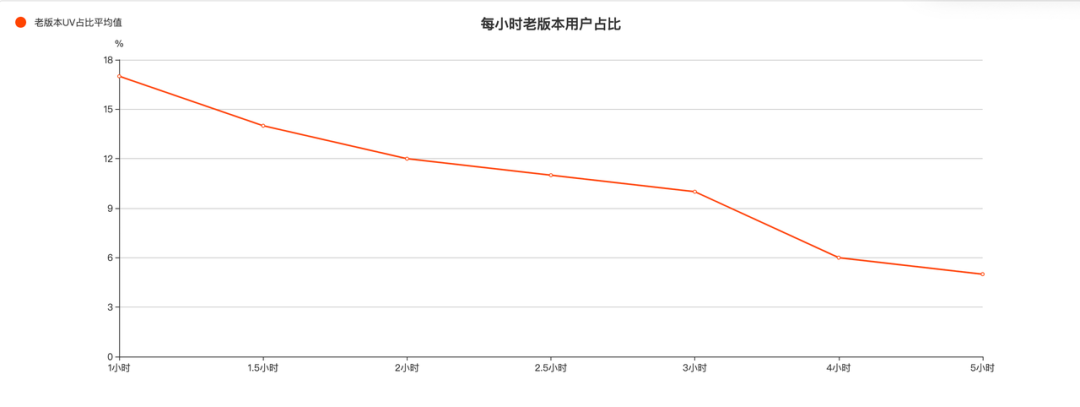
我們統(tǒng)計了 bscm 平臺 5 次下午 2-3 點左右發(fā)布的版本,在發(fā)布后每個時間段內老版本用戶的占比情況。選擇這個時間點發(fā)布的原因是這個時間點基本是平臺用戶的上班時間,是最有可能出現(xiàn)用戶已經打開了頁面同時我們在發(fā)布新代碼的場景的,比較具有代表性。按平臺用戶六七點下班來看,我們可以看到還有將近 6% 的用戶在當天是會一直訪問老版本的前端代碼的,按照 bscm 平臺 1w+的 uv 來看,約有 600 多人會可能遇到前端版本過低導致的使用問題。
方案
彈窗內容

彈窗的觸發(fā)條件
首先介紹兩個概念,本地版本號和云端版本號。本地版本號是用戶請求到的前端頁面的代碼版本號,是用戶訪問頁面時決定;云端版本號可以理解為最新前端版本號,它是每次開發(fā)者發(fā)布前端代碼時決定的。
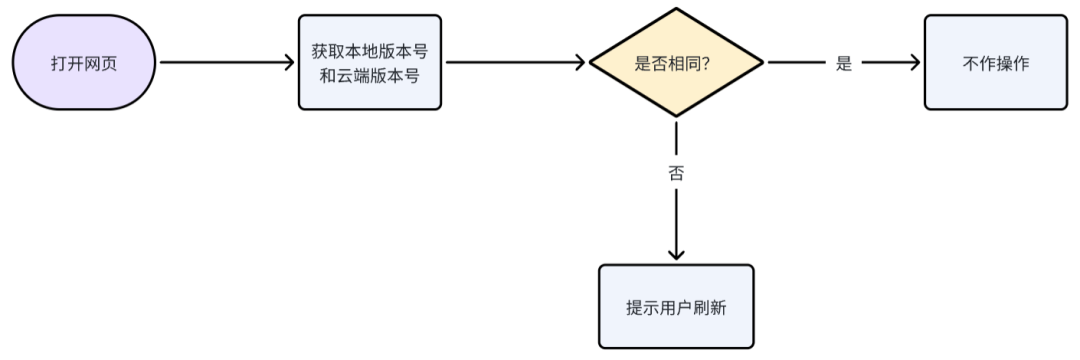
判斷觸發(fā)條件的時機
有了彈窗的觸發(fā)條件,我們還需要去決定什么時候判斷彈窗是否滿足觸發(fā)的條件,上面也提到了,出現(xiàn)這類問題的場景多見于用戶在使用過程中,開發(fā)者進行了前端代碼發(fā)布,那我們主要可以有兩個類型的時機去進行觸發(fā)條件的判斷。
-
前端代碼去感知什么時候有新版本的代碼發(fā)布了,去進行條件判斷(消息推送)
-
前端在一定的條件下主動去判斷觸發(fā)條件(輪詢,請求后端接口時,一些中頻前端事件的監(jiān)聽)
我們對這些時機在更新是否及時,判斷次數(shù)多少、實現(xiàn)成本高低等維度進行一個對比。
?? 越多表示這個維度得分越高

根據表格可以看到 websocket 消息推送和前端事件監(jiān)聽這兩種方案綜合來看是更合適一些的,但是前端事件監(jiān)聽其實它的劣勢在實際運用場景中會被弱化(一天的上線數(shù)量有限,請求次數(shù)一天不會多太多次),但是實現(xiàn)成本遠低于 websocket,所以無疑是實際落地場景中比較理想的選擇。
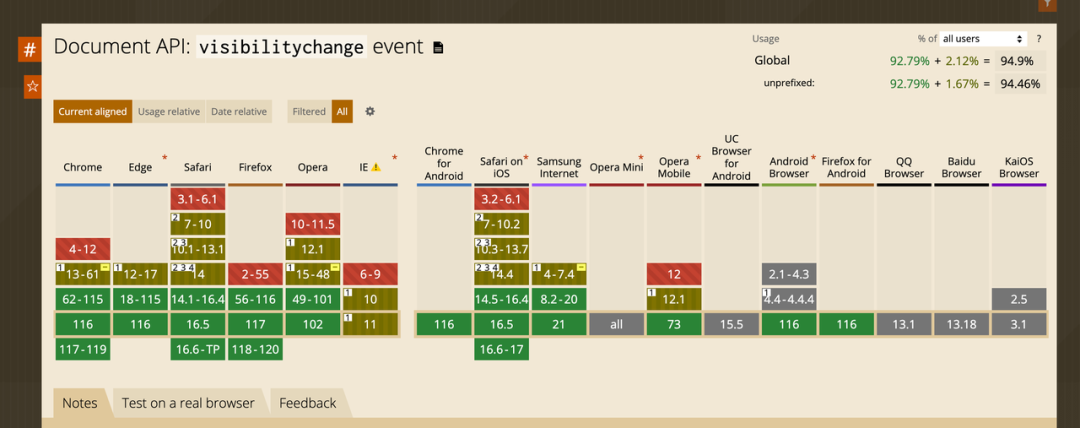
根據 can i use 的結果我們也可以發(fā)現(xiàn) visibilitychange 事件也基本符合我們目前 B 端頁面對于 PC 瀏覽器的要求。
版本號的生成
本地版本號
本地版本號是用戶訪問時決定的,那無疑頁面的 html 文件就是這個版本號存在的最佳載體,我們可以在打包時通過 plugin 給 html 文件注入一個版本號。
云端版本號
云端版本號的選擇則有很多方式了,數(shù)據庫、cdn 等等都可以滿足需求。不過考慮到實現(xiàn)成本和泳道的情況,想了一下兩個思路一個是打包的同時生成一個 version.json 文件,配一個路由去訪問;另一個是直接訪問對應的 html 代碼,解析出注入的版本號,二者各自有適合的場景。
微前端的適配
我們現(xiàn)在的大多數(shù)項目都包含了主應用和子應用,那其實不管是子應用的更新還是主應用的更新都應該有相關的提示,而且相互獨立,但同時又需要保證彈窗不同時出現(xiàn)。
想要沿用之前的方案其實只需要解決三個問題。
-
主子應用的本地版本號標識需要有區(qū)分,因為 html 文件只有一個,需要能在 html 文件中區(qū)分出哪個應用的版本是什么,這個我們只需在 plugin 中注入標識即可解決。 -
云端版本號請求時也要請求對應的云端版本號,這個目前采用的方案是主應用去請求唯一的 version.json 文件,因為主應用路由是唯一的,子應用則去請求最新的 html 資源文件,解析出云端版本號。 -
不重復彈窗我們只需要在展示彈窗前,多加一個是否已經有彈窗展示的判斷即可了。
具體實現(xiàn)
版本號的寫入和讀取

監(jiān)聽時機和頻控邏輯
正如前文提到的,本身版本發(fā)布不是一個高頻事件,但是監(jiān)聽事件的頻次有時候可能過高了,不希望頻繁的去進行觸發(fā)條件判斷。同時如果出現(xiàn)一天內多次發(fā)布的場景,也不希望這個彈窗對于用戶有過多的打擾,所以需要去添加一個頻控邏輯。
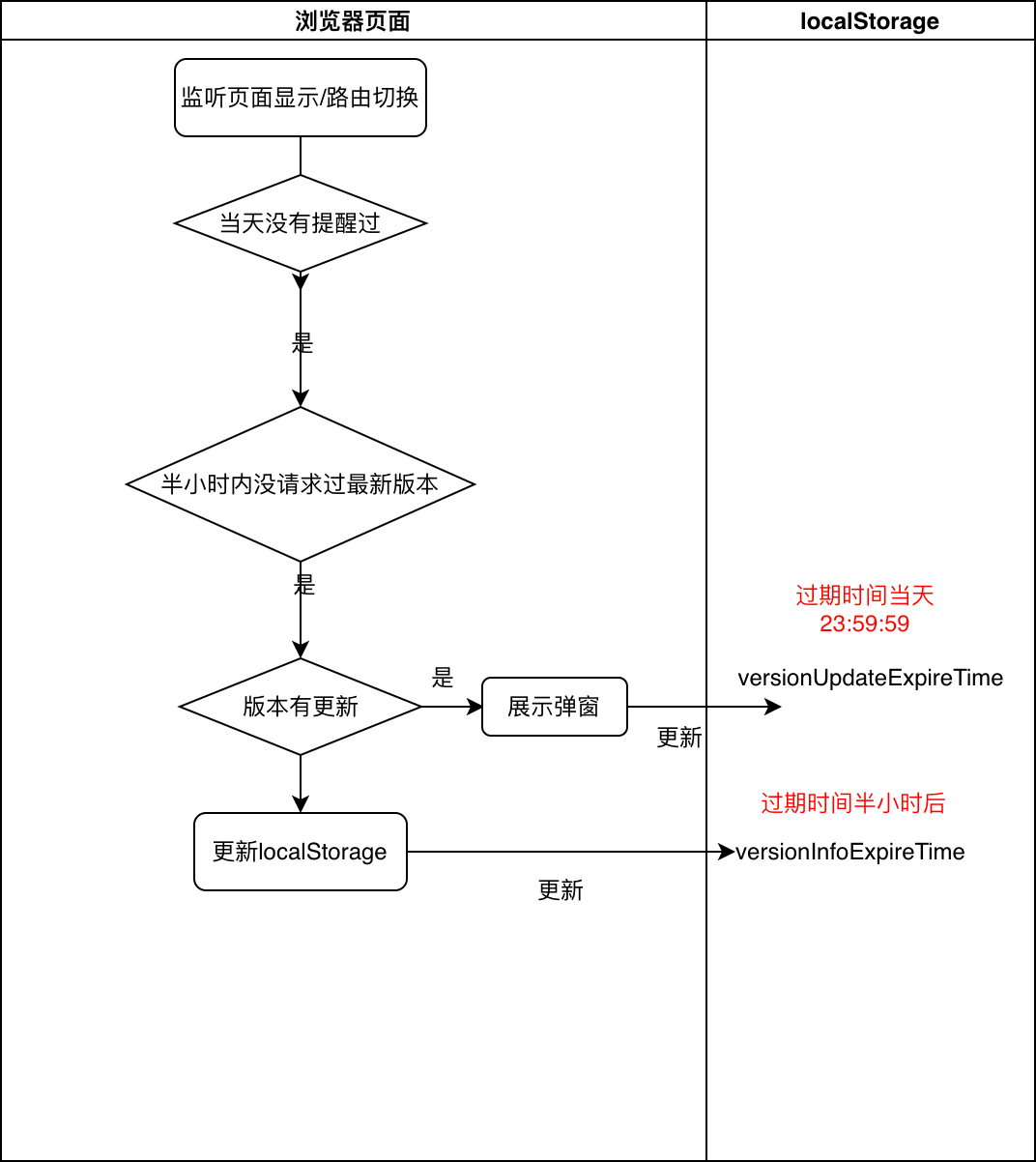
具體代碼
plugin
/* eslint-disable */
import { CoraWebpackPlugin, WebpackCompiler } from '@ies/eden-web-build';
const fs = require('fs');
const path = require('path');
const cheerio = require('cheerio');

interface IVersion {
  name?: string; // 編譯完的文件夾名稱
  subName?: string; // 子應用的名稱,主應用可以不傳
}

export class VersionPlugin implements CoraWebpackPlugin {
  readonly name = 'versionPlugin'; // 插件必須要有一個名字,這個名字不能和已有插件沖突
  private _version: number;
  private _name: string;
  private _subName: string;
  constructor(params: IVersion) {
    this._version = new Date().getTime();
    this._name = params?.name || 'build';
    this._subName = params?.subName || ''
  }
  apply(compiler: WebpackCompiler): void {
    compiler.hooks.afterCompile.tap('versionPlugin', () => {
      try {
        const filePath = path.resolve(`./${this._name}/template/version.json`);
        fs.writeFile(filePath, JSON.stringify({ version: this._version }), (err: any) => {
          if (err) {
            console.log('@@@err', err);
          }
        });
        const htmlPath = path.resolve(`./${this._name}/template/index.html`);
        const data = fs.readFileSync(htmlPath);
        const $ = cheerio.load(data);
        $('body').append(`<div id="${this._subName}versionTag" style="display: none">${this._version}</div>`);
        fs.writeFile(htmlPath, $.html(), (err: any) => {
          if (err) {
            console.log('@@@htmlerr', err);
          }
        });
      } catch (err) {
        console.log(err);
      }
    });
  }
}
彈窗組件
import React, { useEffect } from 'react';

import { Modal } from '@ecom/auxo';
import axios from 'axios';
import moment from 'moment';

export interface IProps {
  isSub?: boolean; // 是否為子應用
  subName?: string; // 子應用名稱
  resourceUrl?: string; // 子應用的資源url
}

export type IType = 'visibilitychange' | 'popstate' | 'init';

export default React.memo<IProps>(props => {
  const { isSub = false, subName = '', resourceUrl = '' } = props || {};

  const cb = (latestVersion: number | undefined, currentVersion: number | undefined, type: IType) => {
    try {
      // 版本落后,提示可以刷新頁面
      if (latestVersion && currentVersion && latestVersion > currentVersion) {
        // 提醒過了就設置一個更新提示過期時間,一天內不需要再提示了,彈窗過期時間暫時全局只需要一個!!
        localStorage.setItem(`versionUpdateExpireTime`, moment().endOf('day').format('x'));
        if (!document.getElementById('versionModalTitle')) {
          Modal.confirm({
            title: <div id="versionModalTitle">版本更新提示</div>,
            content:
              '您已經長時間未使用此頁面,在此期間平臺有過更新,如您此時在頁面中沒有填寫相關信息等操作,請點擊刷新頁面使用最新版本!',
            okText: <div data-text={`前端版本升級引導-立即更新 ${type}`}>刷新頁面</div>,
            cancelText: <div data-text={`前端版本升級引導-我知道了 ${type}`}>我知道了</div>,
            onCancel: () => {
              console.log('fe-version-watcher INFO: 未更新~');
            },
            onOk: () => {
              location.reload();
            },
          });
        }
      }
      // 不管版本是否落后,半小時內都不需要去重新請求判斷
      localStorage.setItem(`versionInfoExpireTime`, String(new Date().getTime() + 1000 * 60 * 30));
    } catch {}
  };

  const formatVersion = (text?: string) => (text ? Number(text) : undefined);

  useEffect(() => {
    try {
      const fn = function (type: IType) {
        if (document.visibilityState === 'visible') {
          /**
           * @desc 為了防止打擾,版本更新每個應用一天只提示一次 所以過期時間設為當天23:59:59,沒過期則直接return
           */
          if (Number(localStorage.getItem(`versionUpdateExpireTime`) || 0) >= new Date().getTime()) {
            return;
          }
          /**
           * @desc 不需要每次切換頁面都去判斷資源,每次從服務器獲取到的版本信息,給半個小時的緩存時間,需要區(qū)分子應用
           */
          if (Number(localStorage.getItem(`versionInfoExpireTime`) || 0) > new Date().getTime()) {
            return;
          }

          if (!isSub) {
            /**
             * @desc 主應用使用version.json文件來獲取最新的版本號
             */
            const dom = document.getElementById('versionTag');
            const currentVersion = formatVersion(dom?.innerText);
            axios.get(`/version?timestamp=${new Date().getTime()}`).then(res => {
              const latestVersion = res?.data?.version;
              cb(latestVersion, currentVersion, type);
            });
          } else {
            /**
             * @desc 子應用使用最新html中的innerText來獲取最新版本號
             */
            if (resourceUrl) {
              const dom = document.getElementById(`${subName}versionTag`);
              const currentVersion = dom?.innerText ? Number(dom?.innerText) : undefined;
              axios.get(resourceUrl).then(res => {
                /** ignore_security_alert */
                try {
                  const html = res.data;
                  const doc = new DOMParser().parseFromString(html, 'text/html');
                  const latestVersion = formatVersion(doc.getElementById(`${subName}versionTag`)?.innerText);
                  cb(latestVersion, currentVersion, type);
                } catch {}
              });
            }
          }
        }
      };
      const visibleFn = () => {
        fn('visibilitychange');
      };
      const routerFn = () => {
        fn('popstate');
      };
      if (isSub) {
        // 子應用可能會有緩存,初始化的時候先判斷一次
        fn('init');
      }
      document.addEventListener('visibilitychange', visibleFn);
      window.addEventListener('popstate', routerFn);
      return () => {
        document.removeEventListener('visibilitychange', visibleFn);
        window.removeEventListener('popstate', routerFn);
      };
    } catch {}
  }, []);

  return <div />;
});
如何接入
主應用版本
-
安裝依賴
npm i @ecom/fe-version-watcher-plugin # 安裝plugin
npm i @ecom/logistics-supply-chain-fe-version-watcher # 安裝引導彈窗
-
引入 versionPlugin,自動生成 version.json + html 文件中自動注入
import { VersionPlugin } from '@ecom/fe-version-watcher-plugin';

// 有些項目打包后template文件夾下的名字不是build而是build_cn
// 可以根據自己項目的實際情況傳入{name: build_cn}

{
    ...,
    plugins: [
        ...,
        [VersionPlugin, {}],
    ]
 }
-
引入版本引導彈窗
import { FeVersionWatcher } from '@ecom/logistics-supply-chain-fe-version-watcher';

<FeVersionWatcher />
-
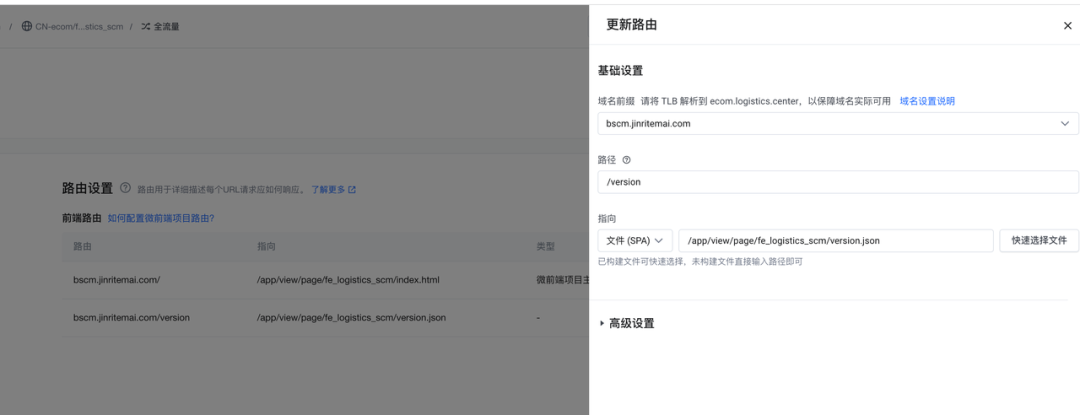
goofy 新增路由配置,/version 指向 version.json 文件 (或者其它方式可以使得/version 的路由指向該 version.json 文件)
預告
采用 version.json 的方案,引入 FersionWatcher 組件就不再需要任何參數(shù),目前主應用只支持這種模式。未來也將參考子應用,主應用支持讀取 html 中版本標識的能力,將配置路由的工作改成組件 props 傳入資源 url,開發(fā)者可以根據實際情況自行選擇。
子應用版本
-
安裝依賴
npm i @ecom/fe-version-watcher-plugin # 安裝plugin
npm i @ecom/logistics-supply-chain-fe-version-watcher # 安裝引導彈窗
-
引入 versionPlugin, html 文件中自動注入版本號,需要子應用標識參數(shù)(必填)
import { VersionPlugin } from '@ecom/fe-version-watcher-plugin';

// 有些項目打包后template文件夾下的名字不是build而是build_cn
// 可以根據自己項目的實際情況傳入{name: build_cn}

{
    ...,
    plugins: [
        ...,
        [VersionPlugin, {subName: 'general-supplier', name: 'build_cn'}],
    ]
 }
-
引入版本引導彈窗(subName 和 plugin 中保持一致,resourceUrl 為配置的子應用路由)
import { FeVersionWatcher } from '@ecom/logistics-supply-chain-fe-version-watcher';

// subName需要和plugin的參數(shù)保持一致,resourceUrl為子應用資源的路徑(子引用goofy上配置的路由)
<FeVersionWatcher isSub subName="general-supplier" resourceUrl="/webApp/general-supplier" />
resourceUrl一般就是goofy上配置的路由設置,,如果不同平臺有區(qū)分,可以動態(tài)傳入。

如何調試/效果展示
發(fā)布成功后,可以根據如下步驟測試:
-
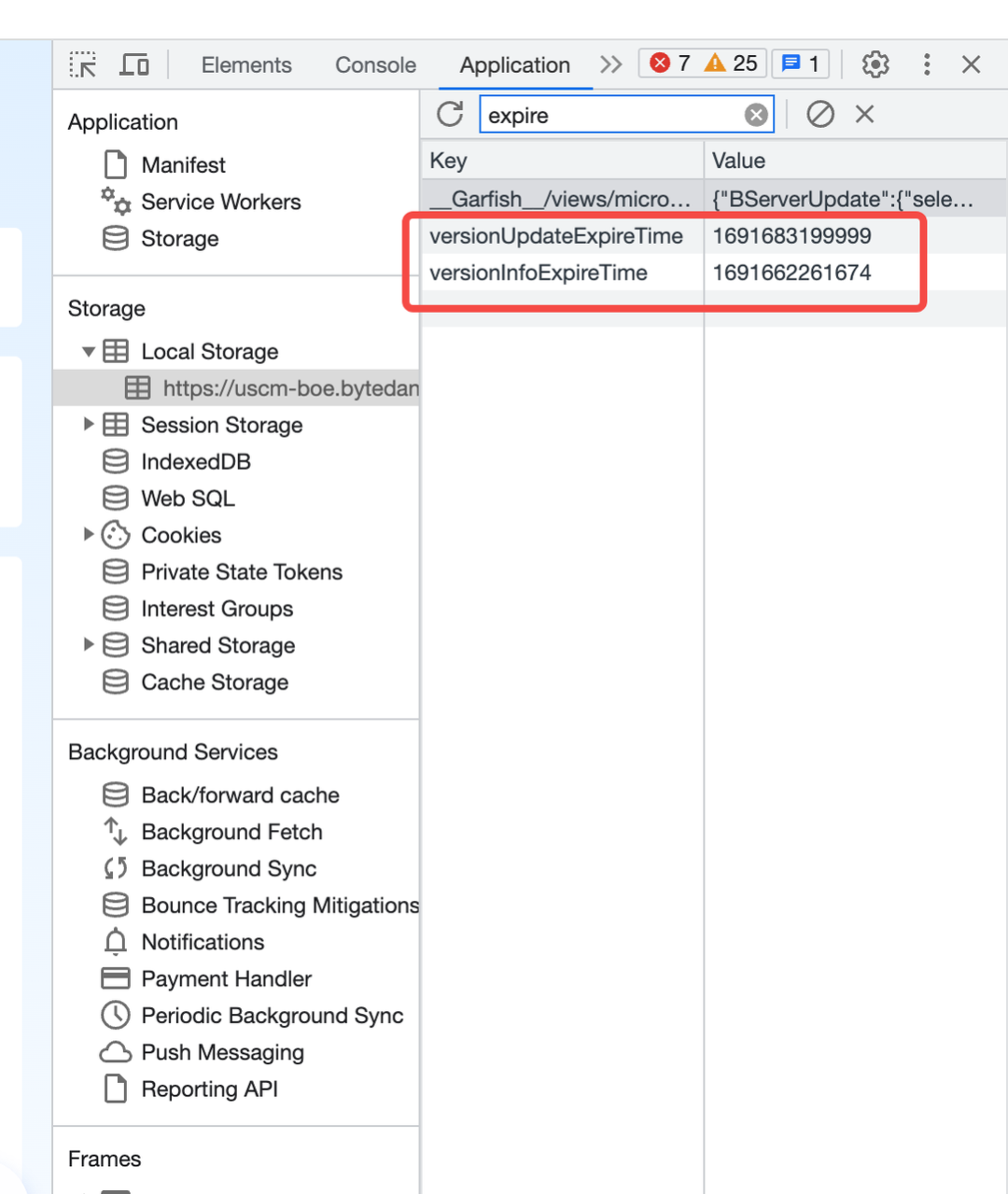
刪除 localstorage 中相關的 value
-
修改 html 中的 version,改成一個比較小的數(shù)值即可

-
切換路由,或者隱藏/打開頁面,出現(xiàn)彈窗
收益統(tǒng)計
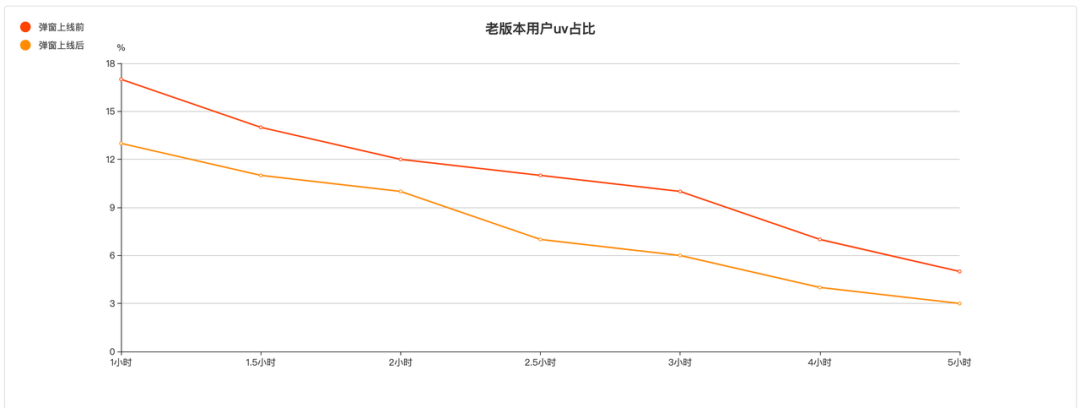
同樣我們截取了 4 次該平臺 2-3 點發(fā)布的版本情況,可以看到老版本用戶的 uv 占比有著明顯的下降。

上線至今共計提示 10 萬+用戶,幫助約 5 萬人次及時更新了前端代碼。
Node 社群
我組建了一個氛圍特別好的 Node.js 社群,里面有很多 Node.js小伙伴,如果你對Node.js學習感興趣的話(后續(xù)有計劃也可以),我們可以一起進行Node.js相關的交流、學習、共建。下方加 考拉 好友回復「Node」即可。
“分享、點贊、在看” 支持一下