
看了我的 mybatis-plus 用法,全公司同事開始悄悄模仿了
關(guān)于 mybatis-plus 是什么,不多做介紹了,看官方文檔,咱們直接代碼擼起來。
1
本文基于 springboot、maven、jdk1.8、mysql 開發(fā),所以開始前我們需要準(zhǔn)備好這套環(huán)境。我的環(huán)境使用了 nacos 作為注冊(cè)中心,不了解或需要搭建的參考:
https://juejin.cn/post/7053977860612030477
新建如下數(shù)據(jù)庫(kù):
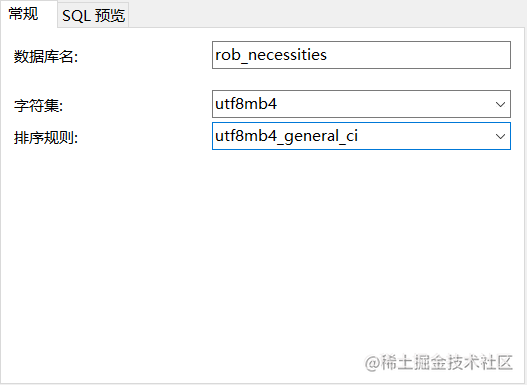
建議大家選擇 utf8mb4 這種字符集,做過微信的同學(xué)應(yīng)該會(huì)知道,微信用戶名稱的表情,是需要這種字符集才能存儲(chǔ)的。
我就默認(rèn)其他環(huán)境已經(jīng)準(zhǔn)備好了,咱們直接從 mybatis-plus 開始。
1.1 依賴準(zhǔn)備
想要什么依賴版本的去 maven 倉(cāng)庫(kù)查看:
https://mvnrepository.com/
引入 mybatis-plus 依賴:
<dependency>
    <groupId>com.baomidou</groupId>
    <artifactId>mybatis-plus-boot-starter</artifactId>
    <version>3.5.0</version>
</dependency>
引入 mysql 依賴:
<dependency>
    <groupId>mysql</groupId>
    <artifactId>mysql-connector-java</artifactId>
    <version>8.0.27</version>
</dependency>
目前,多數(shù)項(xiàng)目會(huì)有多數(shù)據(jù)源的要求,或者是主從部署的要求,所以我們還需要引入 mybatis-plus 關(guān)于多數(shù)據(jù)源的依賴:
<dependency>
    <groupId>com.baomidou</groupId>
    <artifactId>dynamic-datasource-spring-boot-starter</artifactId>
    <version>3.5.0</version>
</dependency>
1.2 配置準(zhǔn)備
springboot 啟動(dòng)類。配置@MapperScan 注解,用于掃描 Mapper 文件位置:
@EnableDiscoveryClient
@MapperScan(\"com.wjbgn.user.mapper\")
@SpringBootApplication
public class RobNecessitiesUserApplication {

    public static void main(String[] args) {
        SpringApplication.run(RobNecessitiesUserApplication.class, args);
    }
}
數(shù)據(jù)源配置,此處配置一主一從的環(huán)境,當(dāng)前我只有一臺(tái),所以此處配置一樣的:
spring:
  datasource:
    dynamic:
      primary: master #設(shè)置默認(rèn)的數(shù)據(jù)源或者數(shù)據(jù)源組,默認(rèn)值即為master
      strict: false #嚴(yán)格匹配數(shù)據(jù)源,默認(rèn)false. true未匹配到指定數(shù)據(jù)源時(shí)拋異常,false使用默認(rèn)數(shù)據(jù)源
      datasource:
        master:
          url: jdbc:mysql://127.0.0.1:3306/rob_necessities?useUnicode=true&characterEncoding=utf-8&useSSL=false&serverTimezone =Asia/Shanghai
          username: root
          password: 123456
        slave_1:
          url: jdbc:mysql://127.0.0.1:3306/rob_necessities?useUnicode=true&characterEncoding=utf-8&useSSL=false&serverTimezone =Asia/Shanghai
          username: root
password: 123456補(bǔ)充:這里面因?yàn)槟J(rèn)使用的是HikariCP數(shù)據(jù)源,目前也推薦使用這個(gè),相比于druid有更高的性能,但是不能忽略下面的配置,否則服務(wù)會(huì)不斷拋出異常,原因是數(shù)據(jù)庫(kù)的連接時(shí)常和連接池的配置沒有做好。
spring:
  datasource:
    dynamic:
      hikari:
        max-lifetime: 1800000
        connection-timeout: 5000
        idle-timeout: 3600000
        max-pool-size: 12
        min-idle: 4
        connection-test-query: /**ping*/
1.3 啟動(dòng)服務(wù)
下面直接啟動(dòng)服務(wù):
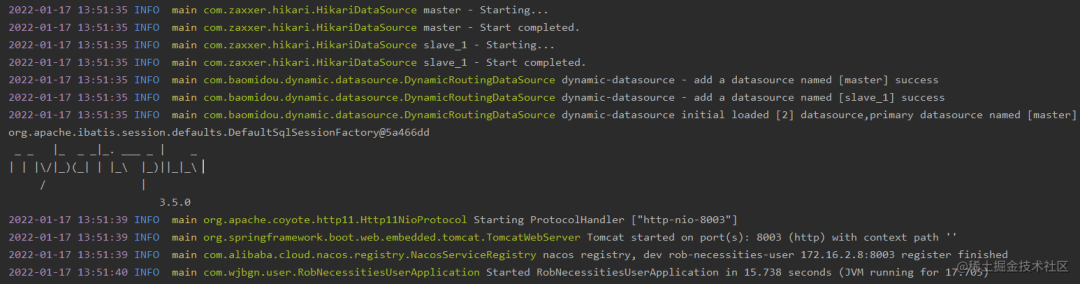
得到如上結(jié)果表示啟動(dòng)成功了。
2
前面我們成功的集成進(jìn)來了 mybatis-plus,配合 springboot 使用不要太方便。下面我們看看如何使用它來操作我們的數(shù)據(jù)庫(kù)。介紹一下常規(guī)的用法。
2.1 實(shí)體類注解
mybatis-plus 為使用者封裝了很多的注解,方便我們使用,我們首先看下實(shí)體類中有哪些注解。有如下的實(shí)體類:
@TableName(value = \"user\")
public class UserDO {

    /**
     * 主鍵
     */
    @TableId(value = \"id\", type = IdType.AUTO)
    private Long id;

    /**
     * 昵稱
     */
    @TableField(\"nickname\")
    private String nickname;

    /**
     * 真實(shí)姓名
     */
    private String realName;
}
@TableName 表名注解,用于標(biāo)識(shí)實(shí)體類對(duì)應(yīng)的表。
其說明如下,關(guān)于這些書寫,常規(guī)情況基本很少用到,不做多余解釋了:
@Documented
@Retention(RetentionPolicy.RUNTIME)
@Target({ElementType.TYPE, ElementType.ANNOTATION_TYPE})
public @interface TableName {

    /**
     * 實(shí)體對(duì)應(yīng)的表名
     */
    String value() default \"\";

    /**
     * schema
     * @since 3.1.1
     */
    String schema() default \"\";

    /**
     * 是否保持使用全局的 tablePrefix 的值
     * <p> 只生效于 既設(shè)置了全局的 tablePrefix 也設(shè)置了上面 {@link #value()} 的值 </p>
     * <li> 如果是 false , 全局的 tablePrefix 不生效 </li>
     *
     * @since 3.1.1
     */
    boolean keepGlobalPrefix() default false;

    /**
     * 實(shí)體映射結(jié)果集,
     * 只生效與 mp 自動(dòng)注入的 method
     */
    String resultMap() default \"\";

    /**
     * 是否自動(dòng)構(gòu)建 resultMap 并使用,
     * 只生效與 mp 自動(dòng)注入的 method,
     * 如果設(shè)置 resultMap 則不會(huì)進(jìn)行 resultMap 的自動(dòng)構(gòu)建并注入,
     * 只適合個(gè)別字段 設(shè)置了 typeHandler 或 jdbcType 的情況
     *
     * @since 3.1.2
     */
    boolean autoResultMap() default false;

    /**
     * 需要排除的屬性名
     *
     * @since 3.3.1
     */
    String[] excludeProperty() default {};
}
@TableId 主鍵注解
看看其源碼:
@Documented
@Retention(RetentionPolicy.RUNTIME)
@Target({ElementType.FIELD, ElementType.ANNOTATION_TYPE})
public @interface TableId {

    /**
     * 字段值(駝峰命名方式,該值可無)
     */
    String value() default \"\";

    /**
     * 主鍵ID
     * {@link IdType}
     */
    IdType type() default IdType.NONE;
}
其中 IdType 很重要:

@TableFiled 表字段標(biāo)識(shí)
下面看看其主要常用屬性:
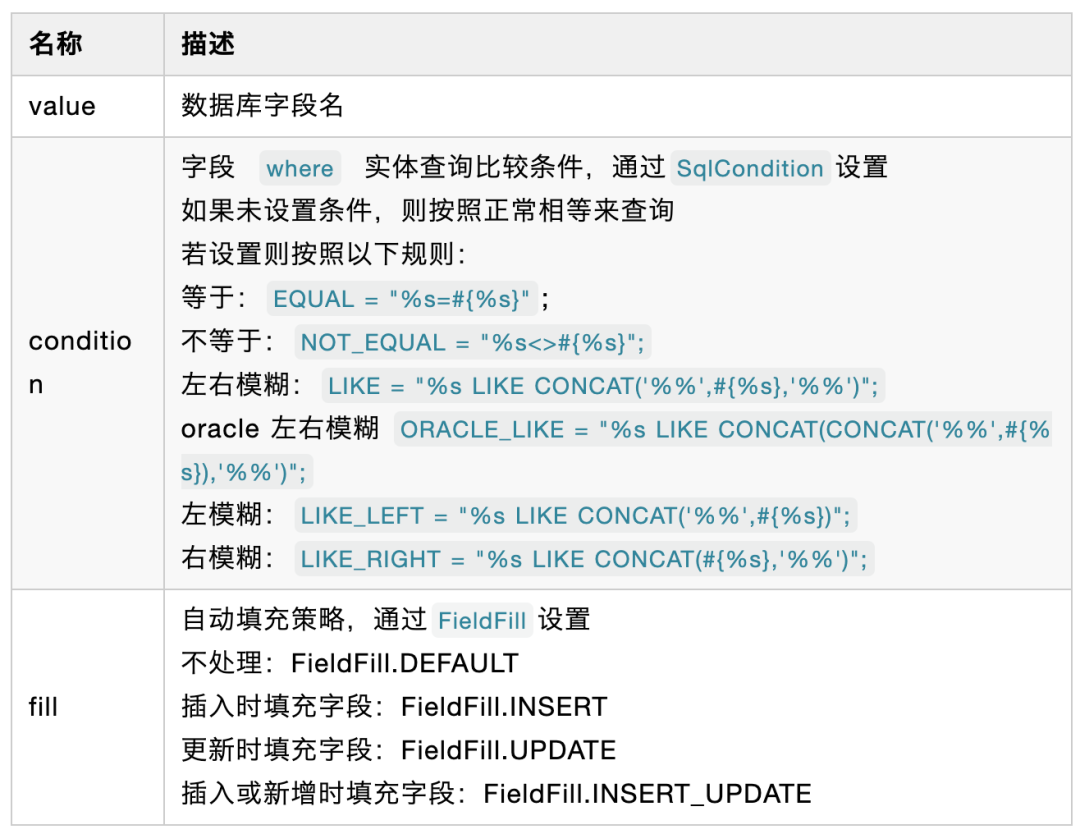
關(guān)于其他的屬性,我不太推薦使用,用得越多,越容易蒙圈。可以通過 wapper 查詢?nèi)ピO(shè)置。
2.2 CRUD
mybatis-plus 封裝好了一條接口供我們直接調(diào)用。關(guān)于內(nèi)部的具體方法,在使用時(shí)候自己體會(huì)吧,此處不列舉了。
2.2.1 Service 層 CRUD
我們使用的時(shí)候,需要在自己定義的 service 接口當(dāng)中繼承IService接口:
/**
 * @description:用戶服務(wù)接口
 * @version:3.0
 */
public interface IUserService extends IService<UserDO> {
}
同時(shí)要在我們的接口實(shí)現(xiàn) impl 當(dāng)中繼承ServiceImpl,實(shí)現(xiàn)自己的接口:
/**
 * @description:用戶接口實(shí)現(xiàn)
 * @version:3.0
 */
public class UserServiceImpl extends ServiceImpl<UserMapper, UserDO> implements IUserService {

}
2.2.2 Mapper 層 CRUD
mybatis-plus 將常用的 CRUD 接口封裝成了BaseMapper接口,我們只需要在自己的 Mapper 中繼承它就可以了:
/**
 * @description:用戶mapper
 * @version:3.0
 */
@Mapper
public interface UserMapper extends BaseMapper<UserDO> {
}
2.3 分頁
使用分頁話需要增加分頁插件的配置:
@Configuration
@MapperScan(\"com.wjbgn.*.mapper*\")
public class MybatisPlusConfig {

    @Bean
    public MybatisPlusInterceptor mybatisPlusInterceptor() {
        MybatisPlusInterceptor interceptor = new MybatisPlusInterceptor();
        interceptor.addInnerInterceptor(new PaginationInnerInterceptor(DbType.MYSQL));
        return interceptor;
    }

}
如上配置后,我們直接使用分頁方法就行。
2.4 邏輯刪除配置
很多情況下我們的系統(tǒng)都需要邏輯刪除,方便恢復(fù)查找誤刪除的數(shù)據(jù)。
通過 mybatis-plus 可以通過全局配置的方式,而不需要再去手動(dòng)處理。針對(duì)更新和查詢操作有效,新增不做限制。
通常以我的習(xí)慣邏輯刪除字段通常定義為is_delete,在實(shí)體類當(dāng)中就是isDelete。那么在配置文件中就可以有如下的配置:
mybatis-plus:
  global-config:
    db-config:
      logic-delete-field: isDelete # 全局邏輯刪除的實(shí)體字段名(since 3.3.0,配置后可以忽略不配置步驟2)
      logic-delete-value: 1 # 邏輯已刪除值(默認(rèn)為 1)
      logic-not-delete-value: 0 # 邏輯未刪除值(默認(rèn)為 0)
或者通過注解@TableLogic
@TableLogic
private Integer isDelete;
2.5 通用枚舉配置
相信后端的同學(xué)都經(jīng)歷過一個(gè)情況,比如性別這個(gè)字段,分別值和名稱對(duì)應(yīng)1男、2女,這個(gè)字段在數(shù)據(jù)庫(kù)時(shí)是數(shù)值類型,而前端展示則是展示字符串的名稱。有幾種常見實(shí)現(xiàn)方案呢?
數(shù)據(jù)庫(kù)查詢 sql 通過 case 判斷,返回名稱,以前 oracle 經(jīng)常這么做
數(shù)據(jù)庫(kù)返回的值,重新遍歷賦值進(jìn)去,這時(shí)候還需要判斷這個(gè)值到底是男是女。
前端寫死,返回 1 就是男,返回 2 就是女。
相信無論哪種方法都有其缺點(diǎn),所以我們可以使用 mybatis-plus 提供的方式。我們?cè)诜祷亟o前端時(shí):
只需要在遍歷時(shí) get 這個(gè)枚舉,直接賦值其名稱,不需要再次判斷。
直接返回給前端,讓前端去去枚舉的 name
這樣大家都不需要寫死這個(gè)值。
下面看看如何實(shí)現(xiàn)這個(gè)功能:
興義枚舉,實(shí)現(xiàn) IEnum 接口:
/**
 * @description:性別枚舉
 * @version:3.0
 */
@JsonFormat(shape = JsonFormat.Shape.OBJECT)
public enum SexEnum implements IEnum<Integer> {
    MAN(1, \"男\(zhòng)"),
    WOMAN(2, \"女\");
    private Integer code;
    private String name;

    SexEnum(Integer code, String name) {
        this.code = code;
        this.name = name;
    }

    @Override
    public Integer getValue() {
        return code;
    }

    public String getName() {
        return name;
    }

}
@JsonFormat 注解為了解決枚舉類返回前端只展示構(gòu)造器名稱的問題。
實(shí)體類性別字段
@TableName(value = \"user\")
public class UserDO {

    /**
     * 主鍵
     */
    @TableId(value = \"id\", type = IdType.AUTO)
    private Long id;

    /**
     * 昵稱
     */
    @TableField(value = \"nickname\",condition = SqlCondition.EQUAL)
    private String nickname;

    /**
     * 性別
     */
    @TableField(value = \"sex\")
    private SexEnum sex;

    /**
     * 版本
     */
    @TableField(value = \"version\",update = \"%s+1\")
    private Integer version;

    /**
     * 時(shí)間字段,自動(dòng)添加
     */
    @TableField(value = \"create_time\",fill = FieldFill.INSERT)
    private LocalDateTime createTime;
}
配置文件掃描枚舉
mybatis-plus:
  # 支持統(tǒng)配符 * 或者 ; 分割
  typeEnumsPackage: com.wjbgn.*.enums
定義配置文件
@Bean
public MybatisPlusPropertiesCustomizer mybatisPlusPropertiesCustomizer() {
    return properties -> {
        GlobalConfig globalConfig = properties.getGlobalConfig();
        globalConfig.setBanner(false);
        MybatisConfiguration configuration = new MybatisConfiguration();
        configuration.setDefaultEnumTypeHandler(MybatisEnumTypeHandler.class);
        properties.setConfiguration(configuration);
    };
}
序列化枚舉值為數(shù)據(jù)庫(kù)值
以下我是使用的 fastjson:
全局(添加在前面的配置文件中):
@Bean
 public MybatisPlusPropertiesCustomizer mybatisPlusPropertiesCustomizer() {
     // 序列化枚舉值為數(shù)據(jù)庫(kù)存儲(chǔ)值
     FastJsonConfig config = new FastJsonConfig();
     config.setSerializerFeatures(SerializerFeature.WriteEnumUsingToString);

     return properties -> {
         GlobalConfig globalConfig = properties.getGlobalConfig();
         globalConfig.setBanner(false);
         MybatisConfiguration configuration = new MybatisConfiguration();
         configuration.setDefaultEnumTypeHandler(MybatisEnumTypeHandler.class);
         properties.setConfiguration(configuration);
     };
 }
局部
@JSONField(serialzeFeatures= SerializerFeature.WriteEnumUsingToString)
 private SexEnum sex;
2.6 自動(dòng)填充
還記得前面提到的實(shí)體類當(dāng)中的注解@TableFeild嗎?當(dāng)中有個(gè)屬性叫做 fill,通過FieldFill設(shè)置屬性,這個(gè)就是做自動(dòng)填充用的。
public enum FieldFill {
    /**
     * 默認(rèn)不處理
     */
    DEFAULT,
    /**
     * 插入填充字段
     */
    INSERT,
    /**
     * 更新填充字段
     */
    UPDATE,
    /**
     * 插入和更新填充字段
     */
    INSERT_UPDATE
}
但是這個(gè)直接是不能使用的,需要通過實(shí)現(xiàn) mybatis-plus 提供的接口,增加如下配置:
/**
 * description: 啟動(dòng)自動(dòng)填充功能
 */
@Component
public class MyMetaObjectHandler implements MetaObjectHandler {

    @Override
    public void insertFill(MetaObject metaObject) {
        // 起始版本 3.3.0(推薦使用)
        this.strictInsertFill(metaObject, \"createTime\", LocalDateTime.class, LocalDateTime.now());
    }

    @Override
    public void updateFill(MetaObject metaObject) {
        // 起始版本 3.3.0(推薦)
        this.strictUpdateFill(metaObject, \"updateTime\", LocalDateTime.class, LocalDateTime.now());
    }
}
字段如下:
/**
 * 時(shí)間字段,自動(dòng)添加
 */
@TableField(value = \"create_time\",fill = FieldFill.INSERT)
private LocalDateTime createTime;
2.7 多數(shù)據(jù)源
前面提到過,配置文件當(dāng)中配置了主從的方式,其實(shí) mybatis-plus 還支持更多的方式:
多主多從
spring:
  datasource:
    dynamic:
      primary: master #設(shè)置默認(rèn)的數(shù)據(jù)源或者數(shù)據(jù)源組,默認(rèn)值即為master
      strict: false #嚴(yán)格匹配數(shù)據(jù)源,默認(rèn)false. true未匹配到指定數(shù)據(jù)源時(shí)拋異常,false使用默認(rèn)數(shù)據(jù)源
      datasource:
        master_1:
        master_2:
        slave_1:
        slave_2:
        slave_3:
多種數(shù)據(jù)庫(kù)
spring:
  datasource:
    dynamic:
      primary: mysql #設(shè)置默認(rèn)的數(shù)據(jù)源或者數(shù)據(jù)源組,默認(rèn)值即為master
      strict: false #嚴(yán)格匹配數(shù)據(jù)源,默認(rèn)false. true未匹配到指定數(shù)據(jù)源時(shí)拋異常,false使用默認(rèn)數(shù)據(jù)源
      datasource:
        mysql:
        oracle:
        postgresql:
        h2:
        sqlserver:
混合配置
spring:
  datasource:
    dynamic:
      primary: master #設(shè)置默認(rèn)的數(shù)據(jù)源或者數(shù)據(jù)源組,默認(rèn)值即為master
      strict: false #嚴(yán)格匹配數(shù)據(jù)源,默認(rèn)false. true未匹配到指定數(shù)據(jù)源時(shí)拋異常,false使用默認(rèn)數(shù)據(jù)源
      datasource:
        master_1:
        slave_1:
        slave_2:
        oracle_1:
        oracle_2:
上面的三種方式,除了混合配置,我覺得都有肯能出現(xiàn)的吧。
@DS 注解
可以注解在方法上或類上,同時(shí)存在就近原則 【方法上注解】 優(yōu)先于 【類上注解】:
@DS(\"slave_1\")
public class UserServiceImpl extends ServiceImpl<UserMapper, UserDO> implements IUserService {


    @DS(\"salve_1\")
    @Override
    public List<UserDO> getList() {
        return this.getList();
    }

    @DS(\"master\")
    @Override
    public int saveUser(UserDO userDO) {
        boolean save = this.save(userDO);
        if (save){
            return 1;
        }else{
            return 0;
        }
    }
}
3
經(jīng)過上面的配置,下面開始進(jìn)入測(cè)試驗(yàn)證階段。
建立一張表:
CREATE TABLE `user` (
  `id` int(11) NOT NULL AUTO_INCREMENT,
  `nickname` varchar(255) NOT NULL COMMENT '昵稱',
  `sex` tinyint(1) NOT NULL COMMENT '性別,1男2女',
  `create_time` datetime NOT NULL COMMENT '創(chuàng)建時(shí)間',
  `is_delete` tinyint(1) NOT NULL DEFAULT '0' COMMENT '是否刪除 1是,0否',
  PRIMARY KEY (`id`)
) ENGINE=InnoDB AUTO_INCREMENT=50 DEFAULT CHARSET=utf8mb4;
controller:
/**
 * @description: 用戶controller
 * @version:3.0
 */
@RestController
@RequestMapping(\"/user\")
public class UserController {

    @Autowired
    private IUserService userService;

    /**
     * description: 新增
     * @return: boolean
     */
    @RequestMapping(\"/save\")
    public boolean save() {
        UserDO userDO = new UserDO();
        userDO.setNickname(\"大漂亮\");
        userDO.setSex(SexEnum.MAN);

        return userService.save(userDO);
    }

    /**
     * description: 修改
     * @param nickname
     * @param id
     * @return: boolean
     */
    @RequestMapping(\"/update\")
    public boolean update(@RequestParam String nickname,@RequestParam Long id) {
        UserDO userDO = new UserDO();
        userDO.setNickname(nickname);
        userDO.setId(id);
        return userService.updateById(userDO);
    }

    /**
     * description: 刪除
     * @param id
     * @return: boolean

     */
    @RequestMapping(\"/delete\")
    public boolean delete(@RequestParam Long id) {
        UserDO userDO = new UserDO();
        userDO.setId(id);
        return userService.removeById(userDO);
    }

    /**
     * description: 列表
     * @return: java.util.List<com.wjbgn.user.entity.UserDO>
     */
    @RequestMapping(\"/list\")
    public List<UserDO> list() {
        return userService.list();
    }

    /**
     * description: 分頁列表
     * @param current
     * @param size
     * @return: com.baomidou.mybatisplus.extension.plugins.pagination.Page
     */
    @RequestMapping(\"/page\")
    public Page page(@RequestParam int current,@RequestParam int size) {
        return userService.page(new Page<>(current,size), new QueryWrapper(new UserDO()));
    }

}
記過上面的接口驗(yàn)證,功能沒有問題,集成成功。上文基本覆蓋了 mybatis-plus 常用的特性,有同學(xué)說自動(dòng)代碼生成沒說?
來源:juejin.cn/post/7054726274362638350
最近熬夜給大家準(zhǔn)備了非常全的一套Java一線大廠面試題。全面覆蓋BATJ等一線互聯(lián)網(wǎng)公司的面試題及解答,由BAT一線互聯(lián)網(wǎng)公司大牛帶你深度剖析面試題背后的原理,不僅授你以魚,更授你以漁,為你面試掃除一切障礙。
資源,怎么領(lǐng)取?
掃二維碼,加我微信,備注:面試題
一定要備注:面試題,不要急哦,工作忙完后就會(huì)通過!