
C#文件操作大全,趕快收藏
文件與文件夾操作主要用到以下幾個(gè)類:
1.File類:
???????????提供用于創(chuàng)建、復(fù)制、刪除、移動(dòng)和打開文件的靜態(tài)方法,并協(xié)助創(chuàng)建?FileStream?對象。
msdn:http://msdn.microsoft.com/zh-cn/library/system.io.file(v=VS.80).aspx
2.FileInfo類:
提供創(chuàng)建、復(fù)制、刪除、移動(dòng)和打開文件的實(shí)例方法,并且?guī)椭鷦?chuàng)建?FileStream?對象
msdn:http://msdn.microsoft.com/zh-cn/library/system.io.fileinfo(v=VS.80).aspx
3.Directory類:
公開用于創(chuàng)建、移動(dòng)和枚舉通過目錄和子目錄的靜態(tài)方法。
msdn:http://msdn.microsoft.com/zh-cn/library/system.io.directory.aspx
4.DirectoryInfo類:
公開用于創(chuàng)建、移動(dòng)和枚舉目錄和子目錄的實(shí)例方法。
msdn:http://msdn.microsoft.com/zh-cn/library/system.io.directoryinfo.aspx
(注:以下出現(xiàn)的dirPath表示文件夾路徑,filePath表示文件路徑)?
?
1.創(chuàng)建文件夾?
Directory.CreateDirectory(@"D:\TestDir");?
2.創(chuàng)建文件
創(chuàng)建文件會出現(xiàn)文件被訪問,以至于無法刪除以及編輯。建議用上using。
using (File.Create(@"D:\TestDir\TestFile.txt"));
?
3.刪除文件
刪除文件時(shí),最好先判斷該文件是否存在!
if (File.Exists(filePath))
{
     File.Delete(filePath);
}
?
4.刪除文件夾
刪除文件夾需要對異常進(jìn)行處理。可捕獲指定的異常。msdn:http://msdn.microsoft.com/zh-cn/library/62t64db3(v=VS.80).aspx
Directory.Delete(dirPath); //刪除空目錄,否則需捕獲指定異常處理
Directory.Delete(dirPath, true);//刪除該目錄以及其所有內(nèi)容
?
?
5.刪除指定目錄下所有的文件和文件夾
一般有兩種方法:1.刪除目錄后,創(chuàng)建空目錄 2.找出下層文件和文件夾路徑迭代刪除

 1         ///
 2         /// 刪除指定目錄下所有內(nèi)容:方法一--刪除目錄,再創(chuàng)建空目錄
 3         ///
 4         ///
 5         public static void DeleteDirectoryContentEx(string dirPath)
 6         {
 7             if (Directory.Exists(dirPath))
 8             {
 9                 Directory.Delete(dirPath);
10                 Directory.CreateDirectory(dirPath);
11             }
12         }
13
14         ///
15         /// 刪除指定目錄下所有內(nèi)容:方法二--找到所有文件和子文件夾刪除
16         ///
17         ///
18         public static void DeleteDirectoryContent(string dirPath)
19         {
20             if (Directory.Exists(dirPath))
21             {
22                 foreach (string content in Directory.GetFileSystemEntries(dirPath))
23                 {
24                     if (Directory.Exists(content))
25                     {
26                         Directory.Delete(content, true);
27                     }
28                     else if (File.Exists(content))
29                     {
30                         File.Delete(content);
31                     }
32                 }
33             }
34         }
6.讀取文件
讀取文件方法很多,F(xiàn)ile類已經(jīng)封裝了四種:
一、直接使用File類
1.public static string ReadAllText(string path);
2.public static string[] ReadAllLines(string path);
3.public static IEnumerable
4.public static byte[] ReadAllBytes(string path);
以上獲得內(nèi)容是一樣的,只是返回類型不同罷了,根據(jù)自己需要調(diào)用。
二、利用流讀取文件
分別有StreamReader和FileStream。詳細(xì)內(nèi)容請看代碼。
 1             //ReadAllLines
 2             Console.WriteLine("--{0}", "ReadAllLines");
 3             List<string> list = new List<string>(File.ReadAllLines(filePath));
 4             list.ForEach(str =>
 5             {
 6                 Console.WriteLine(str);
 7             });
 8
 9             //ReadAllText
10             Console.WriteLine("--{0}", "ReadAllLines");
11             string fileContent = File.ReadAllText(filePath);
12             Console.WriteLine(fileContent);
13
14             //StreamReader
15             Console.WriteLine("--{0}", "StreamReader");
16             using (StreamReader sr = new StreamReader(filePath))
17             {
18                 //方法一:從流的當(dāng)前位置到末尾讀取流
19                 fileContent = string.Empty;
20                 fileContent = sr.ReadToEnd();
21                 Console.WriteLine(fileContent);
22                 //方法二:一行行讀取直至為NULL
23                 fileContent = string.Empty;
24                 string strLine = string.Empty;
25                 while (strLine != null)
26                 {
27                     strLine = sr.ReadLine();
28                     fileContent += strLine+"\r\n";
29                 }
30                 Console.WriteLine(fileContent);
31             }
7.寫入文件
寫文件內(nèi)容與讀取文件類似,請參考讀取文件說明。
1            //WriteAllLines
 2             File.WriteAllLines(filePath,new string[]{"11111","22222","3333"});
 3             File.Delete(filePath);
 4
 5             //WriteAllText
 6             File.WriteAllText(filePath, "11111\r\n22222\r\n3333\r\n");
 7             File.Delete(filePath);
 8
 9             //StreamWriter
10             using (StreamWriter sw = new StreamWriter(filePath))
11             {
12                 sw.Write("11111\r\n22222\r\n3333\r\n");
13                 sw.Flush();
14             }
?
9.文件路徑
文件和文件夾的路徑操作都在Path類中。另外還可以用Environment類,里面包含環(huán)境和程序的信息。?
 1             string dirPath = @"D:\TestDir";
 2             string filePath = @"D:\TestDir\TestFile.txt";
 3             Console.WriteLine("<<<<<<<<<<<{0}>>>>>>>>>>", "文件路徑");
 4             //獲得當(dāng)前路徑
 5             Console.WriteLine(Environment.CurrentDirectory);
 6             //文件或文件夾所在目錄
 7             Console.WriteLine(Path.GetDirectoryName(filePath));     //D:\TestDir
 8             Console.WriteLine(Path.GetDirectoryName(dirPath));      //D:\
 9             //文件擴(kuò)展名
10             Console.WriteLine(Path.GetExtension(filePath));         //.txt
11             //文件名
12             Console.WriteLine(Path.GetFileName(filePath));          //TestFile.txt
13             Console.WriteLine(Path.GetFileName(dirPath));           //TestDir
14             Console.WriteLine(Path.GetFileNameWithoutExtension(filePath)); //TestFile
15             //絕對路徑
16             Console.WriteLine(Path.GetFullPath(filePath));          //D:\TestDir\TestFile.txt
17             Console.WriteLine(Path.GetFullPath(dirPath));           //D:\TestDir
18             //更改擴(kuò)展名
19             Console.WriteLine(Path.ChangeExtension(filePath, ".jpg"));//D:\TestDir\TestFile.jpg
20             //根目錄
21             Console.WriteLine(Path.GetPathRoot(dirPath));           //D:\
22             //生成路徑
23             Console.WriteLine(Path.Combine(new string[] { @"D:\", "BaseDir", "SubDir", "TestFile.txt" })); //D:\BaseDir\SubDir\TestFile.txt
24             //生成隨即文件夾名或文件名
25             Console.WriteLine(Path.GetRandomFileName());
26             //創(chuàng)建磁盤上唯一命名的零字節(jié)的臨時(shí)文件并返回該文件的完整路徑
27             Console.WriteLine(Path.GetTempFileName());
28             //返回當(dāng)前系統(tǒng)的臨時(shí)文件夾的路徑
29             Console.WriteLine(Path.GetTempPath());
30             //文件名中無效字符
31             Console.WriteLine(Path.GetInvalidFileNameChars());
32             //路徑中無效字符
33             Console.WriteLine(Path.GetInvalidPathChars());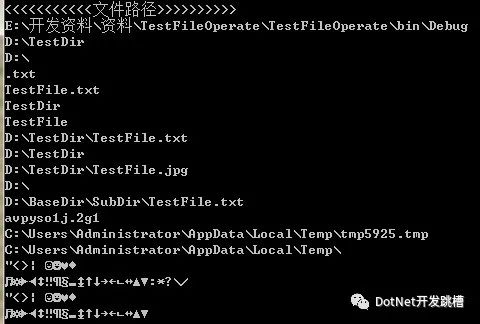
?
10.文件屬性操作
? File類與FileInfo都能實(shí)現(xiàn)。靜態(tài)方法與實(shí)例化方法的區(qū)別!
 1             //use File class
 2             Console.WriteLine(File.GetAttributes(filePath));
 3             File.SetAttributes(filePath,FileAttributes.Hidden | FileAttributes.ReadOnly);
 4             Console.WriteLine(File.GetAttributes(filePath));
 5
 6             //user FilInfo class
 7             FileInfo fi = new FileInfo(filePath);
 8             Console.WriteLine(fi.Attributes.ToString());
 9             fi.Attributes = FileAttributes.Hidden | FileAttributes.ReadOnly; //隱藏與只讀
10             Console.WriteLine(fi.Attributes.ToString());
11
12             //只讀與系統(tǒng)屬性,刪除時(shí)會提示拒絕訪問
13             fi.Attributes = FileAttributes.Archive;
14       Console.WriteLine(fi.Attributes.ToString());
?
?11.移動(dòng)文件夾中的所有文件夾與文件到另一個(gè)文件夾
如果是在同一個(gè)盤符中移動(dòng),則直接調(diào)用Directory.Move的方法即可!跨盤符則使用下面遞歸的方法!
 1         ///
 2         /// 移動(dòng)文件夾中的所有文件夾與文件到另一個(gè)文件夾
 3         ///
 4         /// 源文件夾
 5         /// 目標(biāo)文件夾
 6         public static void MoveFolder(string sourcePath,string destPath)
 7         {
 8             if (Directory.Exists(sourcePath))
 9             {
10                 if (!Directory.Exists(destPath))
11                 {
12                     //目標(biāo)目錄不存在則創(chuàng)建
13                     try
14                     {
15                         Directory.CreateDirectory(destPath);
16                     }
17                     catch (Exception ex)
18                     {
19                         throw new Exception("創(chuàng)建目標(biāo)目錄失敗:" + ex.Message);
20                     }
21                 }
22                 //獲得源文件下所有文件
23                 List<string> files = new List<string>(Directory.GetFiles(sourcePath));
24                 files.ForEach(c =>
25                 {
26                     string destFile = Path.Combine(new string[]{destPath,Path.GetFileName(c)});
27                     //覆蓋模式
28                     if (File.Exists(destFile))
29                     {
30                         File.Delete(destFile);
31                     }
32                     File.Move(c, destFile);
33                 });
34                 //獲得源文件下所有目錄文件
35                 List<string> folders = new List<string>(Directory.GetDirectories(sourcePath));
36
37                 folders.ForEach(c =>
38                 {
39                     string destDir = Path.Combine(new string[] { destPath, Path.GetFileName(c) });
40                     //Directory.Move必須要在同一個(gè)根目錄下移動(dòng)才有效,不能在不同卷中移動(dòng)。
41                     //Directory.Move(c, destDir);
42
43                     //采用遞歸的方法實(shí)現(xiàn)
44                     MoveFolder(c, destDir);
45                 });
46             }
47             else
48             {
49                 throw new DirectoryNotFoundException("源目錄不存在!");
50             }
51         }
?
12.復(fù)制文件夾中的所有文件夾與文件到另一個(gè)文件夾
如果是需要移動(dòng)指定類型的文件或者包含某些字符的目錄,只需在Directory.GetFiles中加上查詢條件即可!
 1         ///
 2         /// 復(fù)制文件夾中的所有文件夾與文件到另一個(gè)文件夾
 3         ///
 4         /// 源文件夾
 5         /// 目標(biāo)文件夾
 6         public static void CopyFolder(string sourcePath,string destPath)
 7         {
 8             if (Directory.Exists(sourcePath))
 9             {
10                 if (!Directory.Exists(destPath))
11                 {
12                     //目標(biāo)目錄不存在則創(chuàng)建
13                     try
14                     {
15                         Directory.CreateDirectory(destPath);
16                     }
17                     catch (Exception ex)
18                     {
19                         throw new Exception("創(chuàng)建目標(biāo)目錄失敗:" + ex.Message);
20                     }
21                 }
22                 //獲得源文件下所有文件
23                 List<string> files = new List<string>(Directory.GetFiles(sourcePath));
24                 files.ForEach(c =>
25                 {
26                     string destFile = Path.Combine(new string[]{destPath,Path.GetFileName(c)});
27                     File.Copy(c, destFile,true);//覆蓋模式
28                 });
29                 //獲得源文件下所有目錄文件
30                 List<string> folders = new List<string>(Directory.GetDirectories(sourcePath));
31                 folders.ForEach(c =>
32                 {
33                     string destDir = Path.Combine(new string[] { destPath, Path.GetFileName(c) });
34                     //采用遞歸的方法實(shí)現(xiàn)
35                     CopyFolder(c, destDir);
36                 });
37             }
38             else
39             {
40                 throw new DirectoryNotFoundException("源目錄不存在!");
41             }
42         }
總結(jié):
有關(guān)文件的操作的內(nèi)容非常多,不過幾乎都是從上面的這些基礎(chǔ)方法中演化出來的。比如對內(nèi)容的修改,不外乎就是加上點(diǎn)字符串操作或者流操作。還有其它一些特別的內(nèi)容,等在開發(fā)項(xiàng)目中具體遇到后再添加。
出處:https://www.cnblogs.com/wangshenhe/archive/2012/05/09/2490438.htm
版權(quán)申明:本文來源于網(wǎng)友收集或網(wǎng)友提供,僅供學(xué)習(xí)交流之用,如果有侵權(quán),請轉(zhuǎn)告版主或者留言,本公眾號立即刪除。
支持小微:
騰訊云 雙十一活動(dòng)!玩服務(wù)器的可以搞搞!
輕量服務(wù)器??1C2G5M 50GB SSD盤?50元起
鏈接:https://curl.qcloud.com/bR8ycXZa
右下角,您點(diǎn)一下在看圖片
小微工資漲1毛
商務(wù)合作QQ:185601686