Python副業(yè)私活600元,用Flask做一個查詢Excel的網(wǎng)站
前言
這次的接單的任務(wù)是用flask開發(fā)一個簡單的數(shù)據(jù)查詢展示網(wǎng)站。單子最早是在端午節(jié)假期發(fā)的,那個時候就想接下來干,奈何對Linux服務(wù)器部署一無所知,只能放棄了。8號這個單子又發(fā)出來了,再一次勾起了我想嘗試一下的欲望,后來在螞蟻的鼓勵下,本著對Linux無知者無畏的精神和忐忑的心情接了下來。
需求分析
通過對客戶需求文檔分析和與客戶溝通后,大致有以下幾個需求:
寫一個web頁面,支持兩個查詢
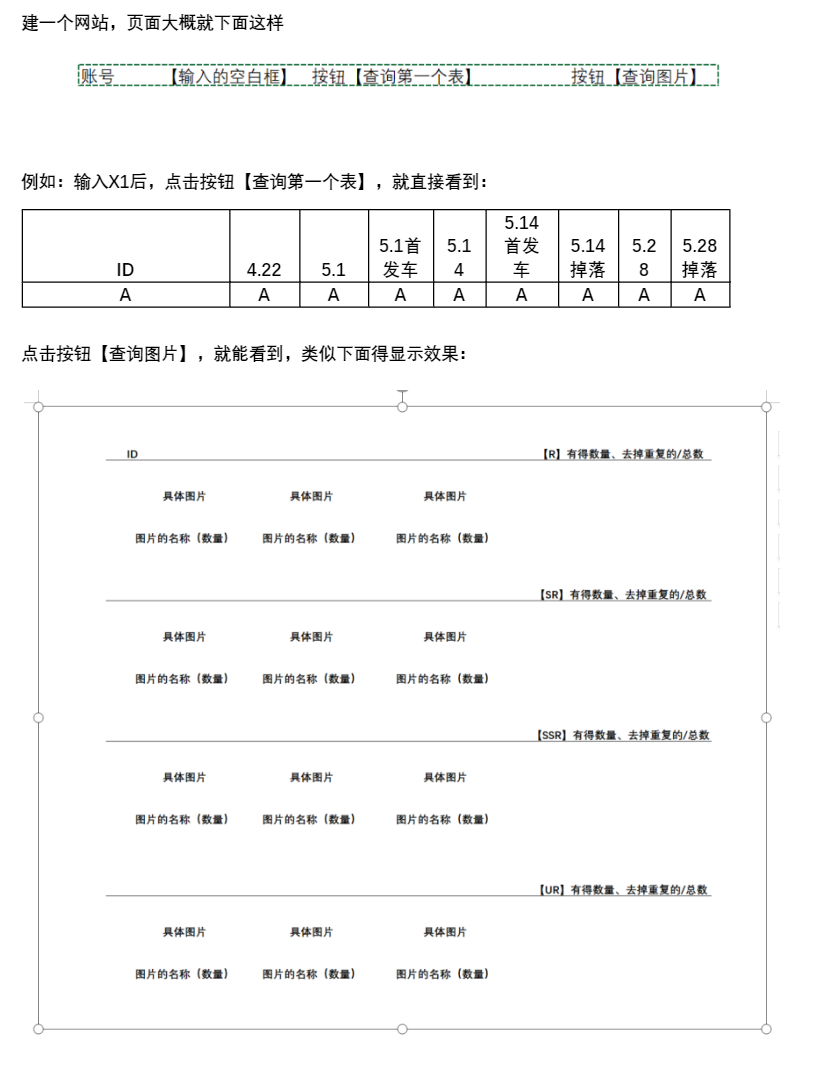
處理Excel數(shù)據(jù),并根據(jù)web查詢條件返回相應(yīng)的數(shù)據(jù) 部署到Linux服務(wù)器,映射客戶自己的域名
思路整理
先寫前端頁面,因為首頁即數(shù)據(jù)查詢頁,為了方便后續(xù)代碼編寫,選擇用模板繼承 其次后端用pandas處理Excel,整理好數(shù)據(jù)后傳到前端 百度搜索flask任務(wù)怎么在Linux服務(wù)器上部署
代碼實現(xiàn)
1.前端
1.1 寫header和footer的HTML模板
# header模板
<!DOCTYPE html>
<html lang="ch-zn">
<head>
<meta charset="UTF-8">
<meta http-equiv="X-UA-Compatible" content="IE=edge">
<meta name="viewport" content="width=device-width, initial-scale=1.0">
<title>數(shù)據(jù)查詢系統(tǒng)</title>
<link rel="stylesheet" href="../static/bootstrap/css/bootstrap.min.css">
<link rel="stylesheet" href="../static/bootstrap/js/bootstrap.min.js">
<link rel="stylesheet" href="../static/css/index.css">
</head>
<body>
<div class="box">
<div class="search-box">
<form class="table-box" action="/" method="post">
<h3>下單賬號:</h3>
<label for="exampleInputUsername"></label>
<input type="text" placeholder="請輸入賬號" name="input" id="exampleInputUsername">
<button type="submit" class="btn btn-primary">獎勵周邊查詢</button>
 
<button type="submit" class="btn btn-secondary" formaction="/pic">抽卡查詢</button>
</form>
</div>
# footer模板
</div>
</body>

</html>
為了快速搭建,使用了bootstrap5.
1.2寫index、table和pic的HTML
使用模板引入,構(gòu)造需求web頁面
# index.html
{% include 'header.html' %}
{% include 'footer.html' %}
# table.html
{% include 'header.html' %}
{% for message in get_flashed_messages() %}
    <div class=flash>{{ message }}</div>
{% endfor %}
<div class="search-table">
    <table class="table table-striped table-hover table-bordered">
        <thead>
        <tr class="table-dark">
            {% for i in labels %}
            <th scope="col">{{ i }}</th>
            {% endfor %}
        </tr>
        </thead>
        <tbody>
        <tr>
            {% for j in contents %}
            <td>{{ j[0] }}</td>
            {% endfor %}
        </tr>
        </tbody>
    </table>
</div>
{% include 'footer.html' %}
# pic.html
{% include 'header.html' %}
<div class="pic">
    <div class="r">
        <div class="title">
        <h4>ID:{{data['user_id']}}</h4>
        <p class="counts-part">【R】{{data['quantity'][0]}}、{{data['deduplication'][0]}}/{{data['total']}}</p>
    </div>
        <ul>
            {% for name in data['category']['R'][1] %}
            <li>
                <img src="{{data['category']['R'][1][name]}}" alt="">
                <p>{{name}} ({{data['category']['R'][2][name]}})</p>
            </li>
            {% endfor %}
        </ul>
    </div>
    <div class="sr">
         <p class="counts-part">【SR】{{data['quantity'][1]}}、{{data['deduplication'][1]}}/{{data['total']}}</p>
        <ul>
            {% for name in data['category']['SR'][1] %}
            <li>
                <img src="{{data['category']['SR'][1][name]}}" alt="">
                <p>{{name}} ({{data['category']['SR'][2][name]}})</p>
            </li>
            {% endfor %}
        </ul>
    </div>
     <div class="ssr">
          <p class="counts-part">【SSR】{{data['quantity'][2]}}、{{data['deduplication'][2]}}/{{data['total']}}</p>
        <ul>
            {% for name in data['category']['SSR'][1] %}
            <li>
                <img src="{{data['category']['SSR'][1][name]}}" alt="">
                <p>{{name}} ({{data['category']['SSR'][2][name]}})</p>
            </li>
            {% endfor %}
        </ul>
    </div>
     <div class="ur">
          <p class="counts-part">【UR】{{data['quantity'][3]}}、{{data['deduplication'][3]}}/{{data['total']}}</p>
        <ul>
            {% for name in data['category']['UR'][1] %}
            <li>
                <img src="{{data['category']['UR'][1][name]}}" alt="">
                <p>{{name}} ({{data['category']['UR'][2][name]}})</p>
            </li>
            {% endfor %}
        </ul>
    </div>
</div>
{% include 'footer.html' %}
1.3寫css樣式
由于bootstrap的樣式不能完全滿足需求,還需要自己再寫一點,對html的布局進行調(diào)整。
* {
    margin: 0;
    padding: 0;
    box-sizing: border-box;
}

.box {
    width: 100vw;
    height: 100vh;
    background-image: url('../image/bg.png');
    background-repeat: no-repeat;
    background-size: cover;
}

.search-box {
    height: 120px;
    margin: 0 auto 30px;
    text-align: center;
    padding-top: 50px;
    border-bottom: 2px solid #666;
}
.table{
    width: 1000px;
    margin: 0 auto;
    text-align: center;
    font-family: Microsoft YaHei;
    height:80px;
}
.table-box input {
    display: inline-block;
    width: 200px;
    font-size: 14px;
    height: 35px;
    margin-right: 20px;
}

.table-box button {
    display: inline-block;
    width: 100px;
    height:35px;
    line-height:21px;
    text-align:center;
}
.table-box h3{
    display: inline-block;
    vertical-align: middle;
    font-size: 25px;
}
.btn-primary{
    font-size:12px;
}
.pic{
    width:1360px;
    height:100vh;
    background-color: rgba(255,255,255,.3);
    margin:50px auto 0;
    text-align:center;
}

.pic ul{
    border-top: #4f5050 solid 2px;
    padding-top:10px;
    padding-left: 0;
}
.pic li{
    display: inline-block;
    background-color:#fff;
    text-decoration: none;
    list-style: none;
}
.pic li:nth-child(-n+7){
    margin-right: 20px;
}
.pic li img{
    width:140px;
}
.pic li p {
    height:30px;
    line-height:26px;
    text-align:center;
    margin-bottom:0;
    font-size: 12px;
}
.pic .title h4{
    float:left;
    margin-left: 35px;
    height:45px;
    line-height:70px;
    font-size:20px;
}
.pic .title p{
    float:right;
    margin-right: 35px;
    height:45px;
    line-height:70px;
}
.pic .title{
    height:50px;
}
.pic .counts-part{
    text-align:right;
    margin-right: 35px;
}
.flash{
    text-align:center;
    width:350px;
    height:50px;
    margin: 0 auto;
    line-height:50px;
    background-color: rgba(211, 19, 19,.5);
    border-radius: 5px;
    color: #fff;
    letter-spacing: 1px;
}
2.后端
2.1數(shù)據(jù)展示
@app.route('/', methods=['GET', 'POST'])
def get_table_data():
    df = pd.read_excel('./data/第一個表.xlsx')
    if request.method == 'POST':
        order_account = request.form.get('input')
        if len(order_account) != 0:
            df = df[df['下單賬號'] == int(order_account)]
            dict_value = df.fillna('').to_dict(orient='list')
            labels = dict_value.keys()
            contents = dict_value.values()
            return render_template('table.html', labels=labels, contents=contents)
        else:
            flash('查詢內(nèi)容不能為空,請輸入需要查詢的賬號!')
            return render_template('table.html')
    return render_template('index.html')
2.2圖片展示
@app.route('/pic', methods=['GET', 'POST'])
def get_pic_data():
    df = pd.read_excel('./data/第二個表.xlsx')
    if request.method == 'POST':
        order_account = request.form.get('input')
        if len(order_account) != 0:
            df = df[df['下單賬號'] == int(order_account)]
            user_id = df['ID'].values[0]  # 獲取用戶id
            total = len(''.join(df['擁有'].to_list()).split('、'))  # 計算總數(shù)
            gif_dict = {'category': {
                'R': [],
                'SR': [],
                'SSR': [],
                'UR': []
            }, 'user_id': user_id, 'total': total, 'quantity': [], 'deduplication': []}
            list_r, list_sr, list_ssr, list_ur = [], [], [], []
            img_r, img_sr, img_ssr, img_ur = {}, {}, {}, {}
            base_folder = r'../images'  # 圖片文件路徑
            for i in ''.join(df['擁有'].to_list()).split('、'):
                filename = i + '.gif'
                if i.startswith('【R】'):
                    list_r.append(i)
                    img_url = '{base_folder}/{filename}'.format(base_folder=base_folder, filename=filename)
                    img_r[i] = img_url
                elif i.startswith('【SR】'):
                    img_url = f'{base_folder}/{filename}'
                    img_sr[i] = img_url
                    list_sr.append(i)
                elif i.startswith('【SSR】'):
                    list_ssr.append(i)
                    img_url = f'{base_folder}/{filename}'
                    img_ssr[i] = img_url
                elif i.startswith('【UR】'):
                    list_ur.append(i)
                    img_url = f'{base_folder}/{filename}'
                    img_ur[i] = img_url
            gif_dict['category']['R'].append(list_r)
            gif_dict['category']['SR'].append(list_sr)
            gif_dict['category']['SSR'].append(list_ssr)
            gif_dict['category']['UR'].append(list_ur)
            gif_dict['category']['R'].append(img_r)
            gif_dict['category']['SR'].append(img_sr)
            gif_dict['category']['SSR'].append(img_ssr)
            gif_dict['category']['UR'].append(img_ur)
            for k in (list_r, list_sr, list_ssr, list_ur):
                gif_dict['quantity'].append(len(k))  # 有的數(shù)量
                gif_dict['deduplication'].append(len(set(k)))  # 去重數(shù)量
            for k1 in gif_dict['category'].keys():  # 計算文件名對應(yīng)的元素個數(shù)
                result = Counter(gif_dict['category'][k1][0])
                gif_dict['category'][k1].append(dict(result))  # 將結(jié)果轉(zhuǎn)成字典添加到gif字典
                gif_dict['category'][k1].append(dict(result))
                gif_dict['category'][k1].append(dict(result))
                gif_dict['category'][k1].append(dict(result))
            print(gif_dict)
            return render_template('pic.html', data=gif_dict)
        else:
            flash('查詢內(nèi)容不能為空,請輸入需要查詢的賬號!')
            return render_template('table.html')
    return render_template('index.html')
2.3后端完整代碼
from flask import Flask, render_template, request, flash, url_for, redirect
import pandas as pd
from collections import Counter

app = Flask(__name__, static_folder='/')
app.config['SECRET_KEY'] = 'asdfghj3223'


@app.route('/', methods=['GET', 'POST'])
def get_table_data():
    df = pd.read_excel('./data/第一個表.xlsx')
    if request.method == 'POST':
        order_account = request.form.get('input')
        if len(order_account) != 0:
            df = df[df['下單賬號'] == int(order_account)]
            dict_value = df.fillna('').to_dict(orient='list')
            labels = dict_value.keys()
            contents = dict_value.values()
            return render_template('table.html', labels=labels, contents=contents)
        else:
            flash('查詢內(nèi)容不能為空,請輸入需要查詢的賬號!')
            return render_template('table.html')
    return render_template('index.html')


@app.route('/pic', methods=['GET', 'POST'])
def get_pic_data():
    df = pd.read_excel('./data/第二個表.xlsx')
    if request.method == 'POST':
        order_account = request.form.get('input')
        if len(order_account) != 0:
            df = df[df['下單賬號'] == int(order_account)]
            user_id = df['ID'].values[0]  # 獲取用戶id
            total = len(''.join(df['擁有'].to_list()).split('、'))  # 計算總數(shù)
            gif_dict = {'category': {
                'R': [],
                'SR': [],
                'SSR': [],
                'UR': []
            }, 'user_id': user_id, 'total': total, 'quantity': [], 'deduplication': []}
            list_r, list_sr, list_ssr, list_ur = [], [], [], []
            img_r, img_sr, img_ssr, img_ur = {}, {}, {}, {}
            base_folder = r'../images'  # 圖片文件路徑
            for i in ''.join(df['擁有'].to_list()).split('、'):
                filename = i + '.gif'
                if i.startswith('【R】'):
                    list_r.append(i)
                    img_url = '{base_folder}/{filename}'.format(base_folder=base_folder, filename=filename)
                    img_r[i] = img_url
                elif i.startswith('【SR】'):
                    img_url = f'{base_folder}/{filename}'
                    img_sr[i] = img_url
                    list_sr.append(i)
                elif i.startswith('【SSR】'):
                    list_ssr.append(i)
                    img_url = f'{base_folder}/{filename}'
                    img_ssr[i] = img_url
                elif i.startswith('【UR】'):
                    list_ur.append(i)
                    img_url = f'{base_folder}/{filename}'
                    img_ur[i] = img_url
            gif_dict['category']['R'].append(list_r)
            gif_dict['category']['SR'].append(list_sr)
            gif_dict['category']['SSR'].append(list_ssr)
            gif_dict['category']['UR'].append(list_ur)
            gif_dict['category']['R'].append(img_r)
            gif_dict['category']['SR'].append(img_sr)
            gif_dict['category']['SSR'].append(img_ssr)
            gif_dict['category']['UR'].append(img_ur)
            for k in (list_r, list_sr, list_ssr, list_ur):
                gif_dict['quantity'].append(len(k))  # 有的數(shù)量
                gif_dict['deduplication'].append(len(set(k)))  # 去重數(shù)量
            for k1 in gif_dict['category'].keys():  # 計算文件名對應(yīng)的元素個數(shù)
                result = Counter(gif_dict['category'][k1][0])
                gif_dict['category'][k1].append(dict(result))  # 將結(jié)果轉(zhuǎn)成字典添加到gif字典
                gif_dict['category'][k1].append(dict(result))
                gif_dict['category'][k1].append(dict(result))
                gif_dict['category'][k1].append(dict(result))
            print(gif_dict)
            return render_template('pic.html', data=gif_dict)
        else:
            flash('查詢內(nèi)容不能為空,請輸入需要查詢的賬號!')
            return render_template('table.html')
    return render_template('index.html')


if __name__ == '__main__':
    app.run(debug=True)
這個項目最好的辦法是用JavaScript寫Ajax,因為在寫的時候就像是在逆向爬蟲數(shù)據(jù)解析的過程,但是Ajax還沒有學(xué)到,只能退而求其次,好在數(shù)據(jù)量不大,而且也只是客戶自己用,無傷大雅。
3.部署
通過和客戶的進一步溝通,得知客戶使用的是騰訊云的Linux服務(wù)器
 既然有了目標(biāo),就有搜索的方向,通過在百度上一翻搜尋,最終找到了,寶塔面板。即先給服務(wù)器裝上寶塔面板,裝好以后服務(wù)器類似于一個桌面操作系統(tǒng),使用起來就方便很多了。其次在應(yīng)用商店安裝python項目管理器,利用python項目管理器安裝python環(huán)境以及相應(yīng)的依賴。最后上傳項目文件,使用python項目管理器部署項目,并選擇域名映射。網(wǎng)上的教程很多,這里不再贅述,有興趣的可以自己研究下,總之,非常nice。
效果展示
首頁

獎勵周邊查詢頁
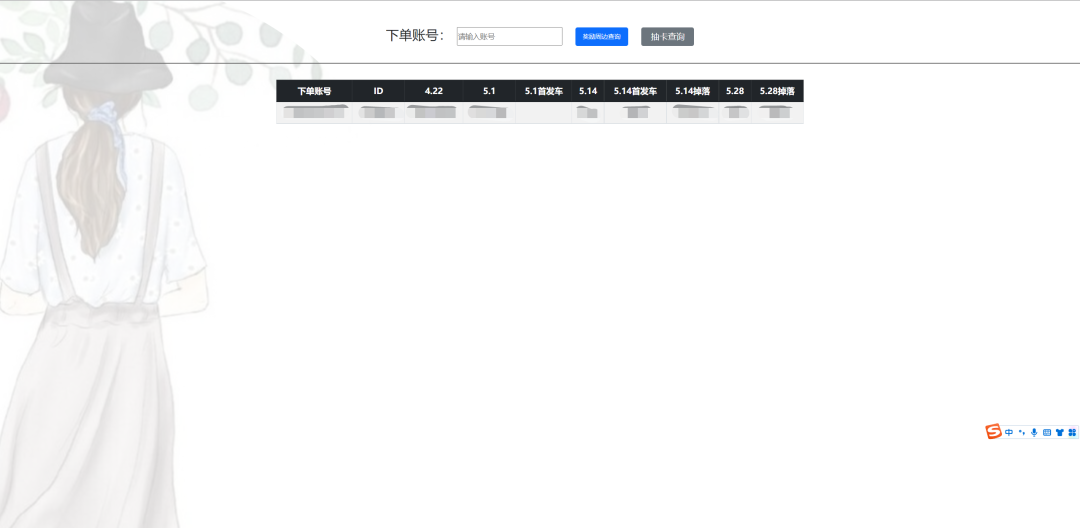
抽卡查詢頁
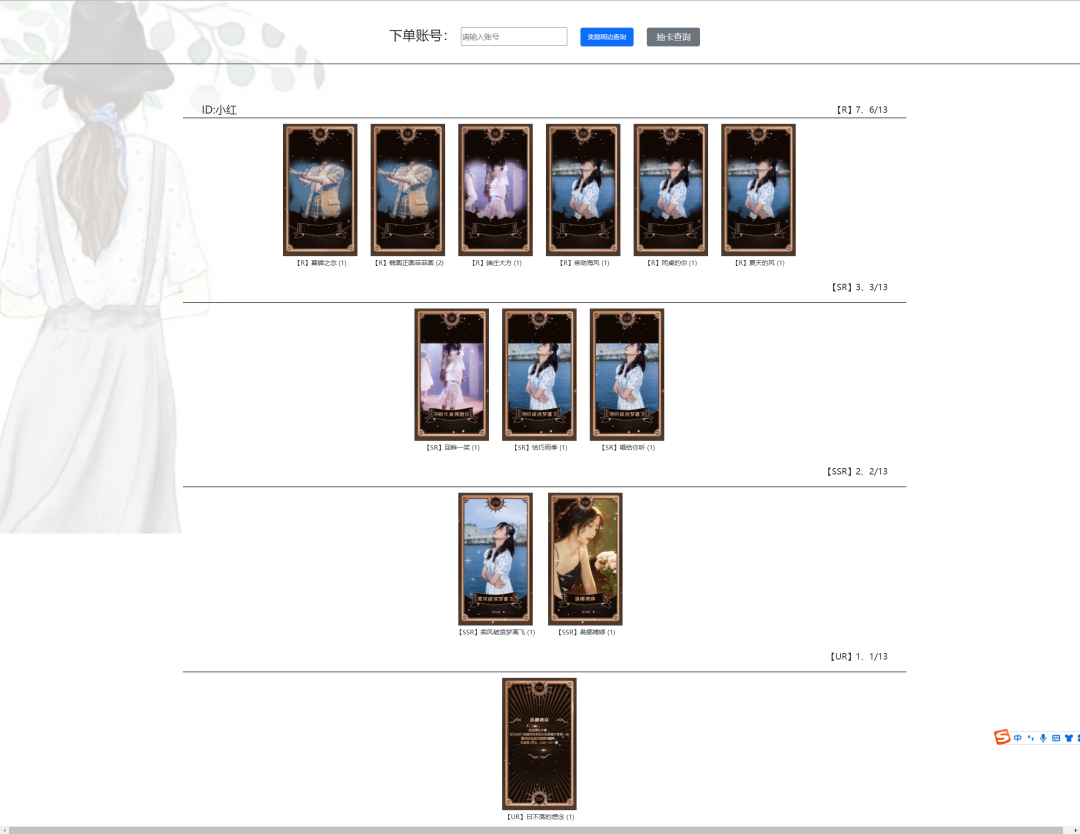
錯誤提示頁

項目結(jié)構(gòu)
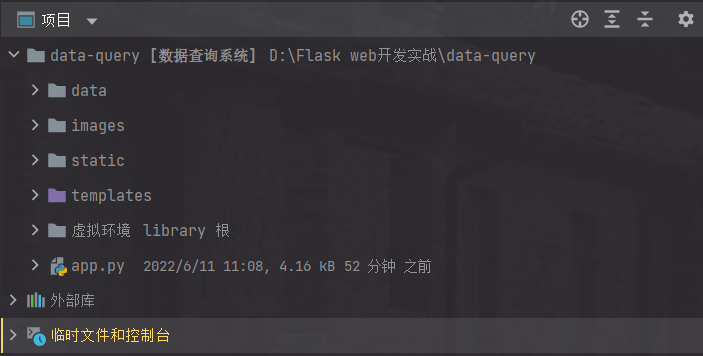
寫在最后
這里強烈推薦一下螞蟻的python課程,全都面向?qū)崙?zhàn),不注水,全干貨。就這個項目而言,bootstrap和flask課程里都有,學(xué)過的,做出來沒有任何問題。同時也感謝螞蟻學(xué)Python-VIP 4群@氵斤@大魚@偶是飯盒@freshj@哦@王偉敬@對方正在輸出中....等各位大佬在部署階段給予的建議。
每天鎖定螞蟻老師抖音直播間,給你介紹Python副業(yè)的玩法: