
使用typescript開發(fā)前端錯(cuò)誤及性能監(jiān)控SDK

前端的錯(cuò)誤監(jiān)控、性能數(shù)據(jù)往往對業(yè)務(wù)的穩(wěn)定性有很重要的影響,即使我們在開發(fā)階段十分小心,也難免上線后出現(xiàn)異常,并且線上異常我們往往后知后覺。而頁面的性能數(shù)據(jù)則關(guān)系到用戶體驗(yàn),因此這部分?jǐn)?shù)據(jù)也在我們采集范圍內(nèi)。
現(xiàn)在第三方完整解決方案國外有sentry,國內(nèi)有fundebug、frontjs,他們提供前端接入的SDK和數(shù)據(jù)服務(wù),然后有一定的免費(fèi)額度,超出就需要使用付費(fèi)方案。前端的SDK用戶監(jiān)控用戶端異常和性能,后端服務(wù)用戶可以創(chuàng)建應(yīng)用,每個(gè)應(yīng)用分配一個(gè)APPKEY,然后SDK完成自動(dòng)上報(bào)。
本文不考慮數(shù)據(jù)服務(wù),只對前端監(jiān)控進(jìn)行分析,講下web如何進(jìn)行監(jiān)控和采集這些數(shù)據(jù),并且通過TS集成這些功能做出一套前端監(jiān)控SDK。
既然需要采集數(shù)據(jù),我們要明確下可能需要哪些數(shù)據(jù),目前來看有如下一些數(shù)據(jù):
- 頁面錯(cuò)誤數(shù)據(jù)
- 頁面資源加載情況
- 頁面性能數(shù)據(jù)
- 接口數(shù)據(jù)
- 手機(jī)、瀏覽器數(shù)據(jù)
- 頁面訪問數(shù)據(jù)
- 用戶行為數(shù)據(jù)
- ...
下面分析一下這些數(shù)據(jù)如何獲取:
頁面錯(cuò)誤數(shù)據(jù)window.onerrorAOP捕獲異常能力無論是異步還是非異步錯(cuò)誤,onerror都能捕獲到運(yùn)行時(shí)錯(cuò)誤。window.onerror不能捕獲頁面資源的加載錯(cuò)誤,但資源加載錯(cuò)誤能被window.addEventListener在捕獲階段捕獲。由于addEventListener也能夠捕獲js錯(cuò)誤,因此需要過濾避免重復(fù)觸發(fā)事件鉤子window.onerror無法捕獲Promise任務(wù)中未被處理的異常,通過unhandledrejection可以捕獲
頁面資源加載異常
window.addEventListener(
??"error",
??function?(event)?{
????const?target:?any?=?event.target?||?event.srcElement;
????const?isElementTarget?=
??????target?instanceof?HTMLScriptElement?||
??????target?instanceof?HTMLLinkElement?||
??????target?instanceof?HTMLImageElement;
????if?(!isElementTarget)?return?false;

????const?url?=?target.src?||?target.href;
????onResourceError?.call(this,?url);
??},
??true
);
頁面邏輯和未catch的promise異常
?const?oldOnError?=?window.onerror;
?const?oldUnHandleRejection?=?window.onunhandledrejection;

?window.onerror?=?function?(...args)?{
???if?(oldOnError)?{
?????oldOnError(...args);
???}

???const?[msg,?url,?line,?column,?error]?=?args;
???onError?.call(this,?{
?????msg,
?????url,
?????line,
?????column,
?????error
???});
?};

?window.onunhandledrejection?=?function?(e:?PromiseRejectionEvent)?{
???if?(oldUnHandleRejection)?{
?????oldUnHandleRejection.call(window,?e);
???}

???onUnHandleRejection?&&?onUnHandleRejection(e);
?};
在Vue中,我們應(yīng)該通過Vue.config.errorHandler = function(err, vm, info) {};進(jìn)行異常捕獲,這樣可以獲取到更多的上下文信息。
對于React,React 16 提供了一個(gè)內(nèi)置函數(shù) componentDidCatch,使用它可以非常簡單的獲取到 react 下的錯(cuò)誤信息
componentDidCatch(error,?info)?{
????console.log(error,?info);
}
通常我們會關(guān)注以下性能指標(biāo):
- 白屏?xí)r間:從瀏覽器輸入地址并回車后到頁面開始有內(nèi)容的時(shí)間;
- 首屏?xí)r間:從瀏覽器輸入地址并回車后到首屏內(nèi)容渲染完畢的時(shí)間;
- 用戶可操作時(shí)間節(jié)點(diǎn):domready觸發(fā)節(jié)點(diǎn),點(diǎn)擊事件有反應(yīng);
- 總下載時(shí)間:window.onload的觸發(fā)節(jié)點(diǎn)。
白屏?xí)r間
白屏?xí)r間節(jié)點(diǎn)指的是從用戶進(jìn)入網(wǎng)站(輸入url、刷新、跳轉(zhuǎn)等方式)的時(shí)刻開始計(jì)算,一直到頁面有內(nèi)容展示出來的時(shí)間節(jié)點(diǎn)。這個(gè)過程包括dns查詢、建立tcp連接、發(fā)送首個(gè)http請求(如果使用https還要介入TLS的驗(yàn)證時(shí)間)、返回html文檔、html文檔head解析完畢。
首屏?xí)r間
首屏?xí)r間的統(tǒng)計(jì)比較復(fù)雜,因?yàn)樯婕皥D片等多種元素及異步渲染等方式。觀察加載視圖可發(fā)現(xiàn),影響首屏的主要因素的「圖片的加載」。通過統(tǒng)計(jì)首屏內(nèi)圖片的加載時(shí)間便可以獲取首屏渲染完成的時(shí)間。
- 頁面存在 iframe 的情況下也需要判斷加載時(shí)間
- gif 圖片在 IE 上可能重復(fù)觸發(fā) load 事件需排除
- 異步渲染的情況下應(yīng)在異步獲取數(shù)據(jù)插入之后再計(jì)算首屏
- css 重要背景圖片可以通過 JS 請求圖片 url 來統(tǒng)計(jì)(瀏覽器不會重復(fù)加載)
- 沒有圖片則以統(tǒng)計(jì) JS 執(zhí)行時(shí)間為首屏,即認(rèn)為文字出現(xiàn)時(shí)間
用戶可操作時(shí)間
DOM解析完畢時(shí)間,可統(tǒng)計(jì)DomReady時(shí)間,因?yàn)橥ǔ谶@個(gè)時(shí)間點(diǎn)綁定事件
對于web端獲取性能數(shù)據(jù)方法很簡單,只需要使用瀏覽器自帶的Performance接口
頁面性能數(shù)據(jù)采集
?Performance 接口可以獲取到當(dāng)前頁面中與性能相關(guān)的信息,它是 High Resolution Time API 的一部分,同時(shí)也融合了 Performance Timeline API、Navigation Timing API、 User Timing API 和 Resource Timing API。
?
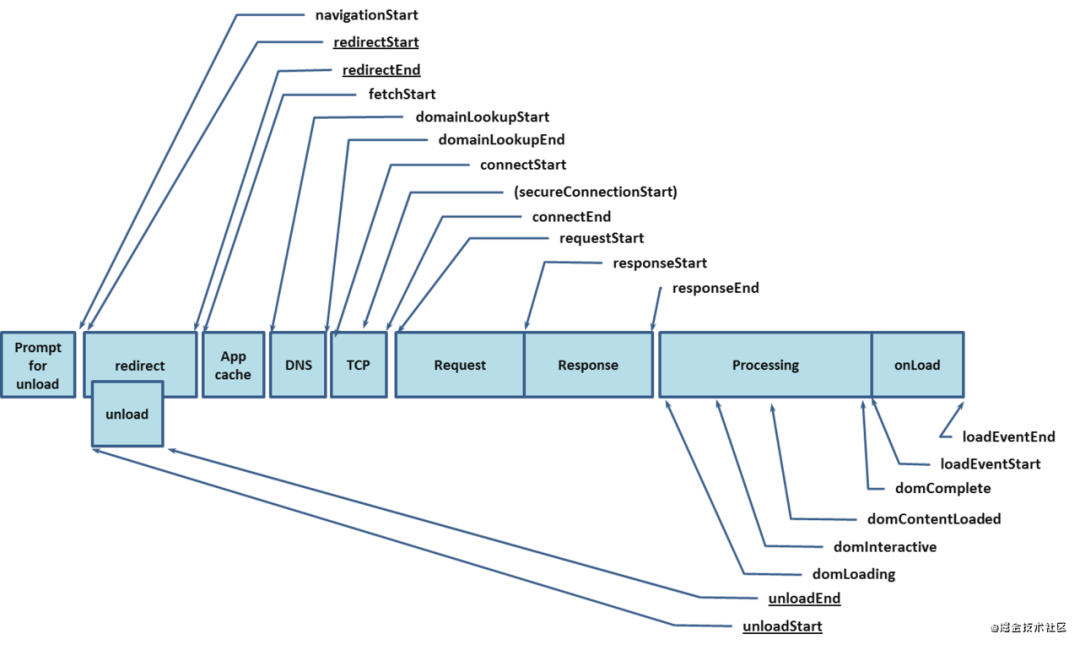 performance
從圖中可以看到很多指標(biāo)都是成對出現(xiàn),這里我們直接求差值,就可以求出對應(yīng)頁面加載過程中關(guān)鍵節(jié)點(diǎn)的耗時(shí),這里我們介紹幾個(gè)比較常用的,比如:
const?timingInfo?=?window.performance.timing;

//?DNS解析,DNS查詢耗時(shí)
timingInfo.domainLookupEnd?-?timingInfo.domainLookupStart;

//?TCP連接耗時(shí)
timingInfo.connectEnd?-?timingInfo.connectStart;

//?獲得首字節(jié)耗費(fèi)時(shí)間,也叫TTFB
timingInfo.responseStart?-?timingInfo.navigationStart;

//?*:?domReady時(shí)間(與DomContentLoad事件對應(yīng))
timingInfo.domContentLoadedEventStart?-?timingInfo.navigationStart;

//?DOM資源下載
timingInfo.responseEnd?-?timingInfo.responseStart;

//?準(zhǔn)備新頁面時(shí)間耗時(shí)
timingInfo.fetchStart?-?timingInfo.navigationStart;

//?重定向耗時(shí)
timingInfo.redirectEnd?-?timingInfo.redirectStart;

//?Appcache?耗時(shí)
timingInfo.domainLookupStart?-?timingInfo.fetchStart;

//?unload?前文檔耗時(shí)
timingInfo.unloadEventEnd?-?timingInfo.unloadEventStart;

//?request請求耗時(shí)
timingInfo.responseEnd?-?timingInfo.requestStart;

//?請求完畢至DOM加載
timingInfo.domInteractive?-?timingInfo.responseEnd;

//?解釋dom樹耗時(shí)
timingInfo.domComplete?-?timingInfo.domInteractive;

//?*:從開始至load總耗時(shí)
timingInfo.loadEventEnd?-?timingInfo.navigationStart;

//?*:?白屏?xí)r間
timingInfo.responseStart?-?timingInfo.fetchStart;

//?*:?首屏?xí)r間
timingInfo.domComplete?-?timingInfo.fetchStart;
接口數(shù)據(jù)主要包括接口耗時(shí)、接口請求異常,耗時(shí)可以通過對XmlHttpRequest 和 fetch請求的攔截過程中進(jìn)行時(shí)間統(tǒng)計(jì),異常通過xhr的readyState和status屬性判斷。
XmlHttpRequest 攔截:修改XMLHttpRequest的原型,在發(fā)送請求時(shí)開啟事件監(jiān)聽,注入SDK鉤子 XMLHttpRequest.readyState的五種就緒狀態(tài):
- 0:請求未初始化(還沒有調(diào)用 open())。
- 1:請求已經(jīng)建立,但是還沒有發(fā)送(還沒有調(diào)用 send())。
- 2:請求已發(fā)送,正在處理中(通常現(xiàn)在可以從響應(yīng)中獲取內(nèi)容頭)。
- 3:請求在處理中;通常響應(yīng)中已有部分?jǐn)?shù)據(jù)可用了,但是服務(wù)器還沒有完成響應(yīng)的生成。
- 4:響應(yīng)已完成;您可以獲取并使用服務(wù)器的響應(yīng)了。
XMLHttpRequest.prototype.open?=?function?(method:?string,?url:?string)?{
??//?...省略
??return?open.call(this,?method,?url,?true);
};
XMLHttpRequest.prototype.send?=?function?(...rest:?any[])?{
??//?...省略
??const?body?=?rest[0];

??this.addEventListener("readystatechange",?function?()?{
????if?(this.readyState?===?4)?{
??????if?(this.status?>=?200?&&?this.status?<?300)?{
????????//?...省略
??????}?else?{
????????//?...省略
??????}
????}
??});
??return?send.call(this,?body);
};
Fetch 攔截:Object.defineProperty
Object.defineProperty(window,?"fetch",?{
??configurable:?true,
??enumerable:?true,
??get()?{
????return?(url:?string,?options:?any?=?{})?=>?{
??????return?originFetch(url,?options)
????????.then((res)?=>?{
?????????//?...
????????})
????};
??}
});
通過navigatorAPI獲取在進(jìn)行解析,使用第三方包mobile-detect幫助我們獲取解析
頁面訪問數(shù)據(jù)全局?jǐn)?shù)據(jù)增加url、頁面標(biāo)題、用戶標(biāo)識,SDK可以自動(dòng)為網(wǎng)頁session分配一個(gè)隨機(jī)用戶label作為標(biāo)識,以此標(biāo)識單個(gè)用戶
用戶行為數(shù)據(jù)主要包含用戶點(diǎn)擊頁面元素、控制臺信息、用戶鼠標(biāo)移動(dòng)軌跡。
- 用戶點(diǎn)擊元素:window事件代理
- 控制臺信息:重寫console
- 用戶鼠標(biāo)移動(dòng)軌跡:第三方庫rrweb
下面是針對這些數(shù)據(jù)進(jìn)行統(tǒng)一的監(jiān)控SDK設(shè)計(jì)
SDK開發(fā)為更好的解耦模塊,我決定使用基于事件訂閱的方式,整個(gè)SDK分成幾個(gè)核心的模塊,由于使用ts開發(fā)并且代碼會保持良好的命名規(guī)范和語義化,只有在關(guān)鍵的地方才會有注釋,完整的代碼實(shí)現(xiàn)見文末Github倉庫。
- class: ?WebMonitor:核心監(jiān)控類
- class:AjaxInterceptor:攔截ajax請求
- class:ErrorObserver:監(jiān)控全局錯(cuò)誤
- class:FetchInterceptor:攔截fetch請求
- class:Reporter:上報(bào)
- class:Performance:監(jiān)控性能數(shù)據(jù)
- class:RrwebObserver:接入rrweb獲取用戶行為軌跡
- class:SpaHandler:針對SPA應(yīng)用做處理
- util: DeviceUtil:設(shè)備信息獲取輔助函數(shù)
- event: 事件中心
SDK提供的事件
對外暴露事件,_開頭為框架內(nèi)部事件
export?enum?TrackerEvents?{
??//?對外暴露事件
??performanceInfoReady?=?"performanceInfoReady",??//?頁面性能數(shù)據(jù)獲取完畢
??reqStart?=?"reqStart",??//?接口請求開始
??reqEnd?=?"reqEnd",???//?接口請求完成
??reqError?=?"reqError",??//?請求錯(cuò)誤
??jsError?=?"jsError",??//?頁面邏輯異常
??vuejsError?=?"vuejsError",??//?vue錯(cuò)誤監(jiān)控事件
??unHandleRejection?=?"unHandleRejection",??//?未處理promise異常
??resourceError?=?"resourceError",??//?資源加載錯(cuò)誤
??batchErrors?=?"batchErrors",??//?錯(cuò)誤合并上報(bào)事件,用戶合并上報(bào)請求節(jié)省請求數(shù)量
??mouseTrack?=?"mouseTrack",??//??用戶鼠標(biāo)行為追蹤
}
使用方式
import?{?WebMonitor?}?from?"femonitor-web";
const?monitor?=?Monitor.init();
/*?Listen?single?event?*/
monitor.on([event],?(emitData)?=>?{});
/*?Or?Listen?all?event?*/
monitor.on("event",?(eventName,?emitData)?=>?{})
WebMonitor、errorObserver、ajaxInterceptor、fetchInterceptor、performance
WebMonitor
集成了框架的其他類,對傳入配置和默認(rèn)配置進(jìn)行deepmerge,根據(jù)配置進(jìn)行初始化
this.initOptions(options);

this.getDeviceInfo();
this.getNetworkType();
this.getUserAgent();

this.initGlobalData();?//?設(shè)置一些全局的數(shù)據(jù),在所有事件中g(shù)lobalData中都會帶上
this.initInstances();
this.initEventListeners();
API
支持鏈?zhǔn)讲僮?/p>
- on:監(jiān)聽事件
- off:移除事件
- useVueErrorListener:使用Vue錯(cuò)誤監(jiān)控,獲取更詳細(xì)的組件數(shù)據(jù)
- changeOptions:修改配置
- configData:設(shè)置全局?jǐn)?shù)據(jù)
errorObserver
監(jiān)聽window.onerror和window.onunhandledrejection,并且對err.message進(jìn)行解析,獲取想要emit的錯(cuò)誤數(shù)據(jù)。
window.onerror?=?function?(...args)?{
??//?調(diào)用原始方法
??if?(oldOnError)?{
????oldOnError(...args);
??}

??const?[msg,?url,?line,?column,?error]?=?args;

??const?stackTrace?=?error???ErrorStackParser.parse(error)?:?[];
??const?msgText?=?typeof?msg?===?"string"???msg?:?msg.type;
??const?errorObj:?IError?=?{};

??myEmitter.customEmit(TrackerEvents.jsError,?errorObj);
};

window.onunhandledrejection?=?function?(error:?PromiseRejectionEvent)?{
??if?(oldUnHandleRejection)?{
????oldUnHandleRejection.call(window,?error);
??}

??const?errorObj:?IUnHandleRejectionError?=?{};
??myEmitter.customEmit(TrackerEvents.unHandleRejection,?errorObj);
};

window.addEventListener(
??"error",
??function?(event)?{
????const?target:?any?=?event.target?||?event.srcElement;
????const?isElementTarget?=
??????target?instanceof?HTMLScriptElement?||
??????target?instanceof?HTMLLinkElement?||
??????target?instanceof?HTMLImageElement;
????if?(!isElementTarget)?return?false;

????const?url?=?target.src?||?target.href;

????const?errorObj:?BaseError?=?{};
????myEmitter.customEmit(TrackerEvents.resourceError,?errorObj);
??},
??true
);
ajaxInterceptor
攔截ajax請求,并觸發(fā)自定義的事件。對XMLHttpRequest的open和send方法進(jìn)行重寫
XMLHttpRequest.prototype.open?=?function?(method:?string,?url:?string)?{
??const?reqStartRes:?IAjaxReqStartRes?=?{
??};

??myEmitter.customEmit(TrackerEvents.reqStart,?reqStartRes);
??return?open.call(this,?method,?url,?true);
};

XMLHttpRequest.prototype.send?=?function?(...rest:?any[])?{
??const?body?=?rest[0];
??const?requestData:?string?=?body;
??const?startTime?=?Date.now();

??this.addEventListener("readystatechange",?function?()?{
????if?(this.readyState?===?4)?{
??????if?(this.status?>=?200?&&?this.status?<?300)?{
????????const?reqEndRes:?IReqEndRes?=?{};

????????myEmitter.customEmit(TrackerEvents.reqEnd,?reqEndRes);
??????}?else?{
????????const?reqErrorObj:?IHttpReqErrorRes?=?{};
????????
????????myEmitter.customEmit(TrackerEvents.reqError,?reqErrorObj);
??????}
????}
??});
??return?send.call(this,?body);
};
fetchInterceptor
對fetch進(jìn)行攔截,并且觸發(fā)自定義的事件。
Object.defineProperty(window,?"fetch",?{
??configurable:?true,
??enumerable:?true,
??get()?{
????return?(url:?string,?options:?any?=?{})?=>?{
??????const?reqStartRes:?IFetchReqStartRes?=?{};
??????myEmitter.customEmit(TrackerEvents.reqStart,?reqStartRes);

??????return?originFetch(url,?options)
????????.then((res)?=>?{
??????????const?status?=?res.status;
??????????const?reqEndRes:?IReqEndRes?=?{};

??????????const?reqErrorRes:?IHttpReqErrorRes?=?{};

??????????if?(status?>=?200?&&?status?<?300)?{
????????????myEmitter.customEmit(TrackerEvents.reqEnd,?reqEndRes);
??????????}?else?{
????????????if?(this._url?!==?self._options.reportUrl)?{
??????????????myEmitter.customEmit(TrackerEvents.reqError,?reqErrorRes);
????????????}
??????????}

??????????return?Promise.resolve(res);
????????})
????????.catch((e:?Error)?=>?{
??????????const?reqErrorRes:?IHttpReqErrorRes?=?{};
??????????myEmitter.customEmit(TrackerEvents.reqError,?reqErrorRes);
????????});
????};
??}
});
performance
通過Performance獲取頁面性能,在性能數(shù)據(jù)完備后emit事件
const?{
??domainLookupEnd,
??domainLookupStart,
??connectEnd,
??connectStart,
??responseEnd,
??requestStart,
??domComplete,
??domInteractive,
??domContentLoadedEventEnd,
??loadEventEnd,
??navigationStart,
??responseStart,
??fetchStart
}?=?this.timingInfo;

const?dnsLkTime?=?domainLookupEnd?-?domainLookupStart;
const?tcpConTime?=?connectEnd?-?connectStart;
const?reqTime?=?responseEnd?-?requestStart;
const?domParseTime?=?domComplete?-?domInteractive;
const?domReadyTime?=?domContentLoadedEventEnd?-?fetchStart;
const?loadTime?=?loadEventEnd?-?navigationStart;
const?fpTime?=?responseStart?-?fetchStart;
const?fcpTime?=?domComplete?-?fetchStart;

const?performanceInfo:?IPerformanceInfo<number>?=?{
??dnsLkTime,
??tcpConTime,
??reqTime,
??domParseTime,
??domReadyTime,
??loadTime,
??fpTime,
??fcpTime
};

myEmitter.emit(TrackerEvents.performanceInfoReady,?performanceInfo);
完整SDK實(shí)現(xiàn)見下方Github倉庫地址,歡迎star、fork、issue,點(diǎn)擊左下方“閱讀原文”即可跳轉(zhuǎn)。
web前端監(jiān)控SDK:https://github.com/alex1504/femonitor-web
如果本文對你有幫助,歡迎點(diǎn)贊、收藏及轉(zhuǎn)發(fā),也歡迎在下方評論區(qū)一起交流,你的支持是我前進(jìn)的動(dòng)力。