
Android實現(xiàn)溫度旋轉(zhuǎn)按鈕功能
1、介紹

2、思路
初始化一些參數(shù)
繪制刻度盤
繪制刻度盤下的圓弧
繪制標題與溫度標識
繪制旋轉(zhuǎn)按鈕
繪制溫度
處理滑動事件
提供一些接口方法
3、實現(xiàn)
初始化一些參數(shù)
public class TempControlView extends View {// 控件寬private int width;// 控件高private int height;// 刻度盤半徑private int dialRadius;// 圓弧半徑private int arcRadius;// 刻度高private int scaleHeight = dp2px(10);// 刻度盤畫筆private Paint dialPaint;// 圓弧畫筆private Paint arcPaint;// 標題畫筆private Paint titlePaint;// 溫度標識畫筆private Paint tempFlagPaint;// 旋轉(zhuǎn)按鈕畫筆private Paint buttonPaint;// 溫度顯示畫筆private Paint tempPaint;// 文本提示private String title = "最高溫度設(shè)置";// 溫度private int temperature;// 最低溫度private int minTemp = 15;// 最高溫度private int maxTemp = 30;// 四格(每格4.5度,共18度)代表溫度1度private int angleRate = 4;// 按鈕圖片private Bitmap buttonImage = BitmapFactory.decodeResource(getResources(),R.mipmap.btn_rotate);// 按鈕圖片陰影private Bitmap buttonImageShadow = BitmapFactory.decodeResource(getResources(),R.mipmap.btn_rotate_shadow);// 抗鋸齒private PaintFlagsDrawFilter paintFlagsDrawFilter;// 溫度改變監(jiān)聽private OnTempChangeListener onTempChangeListener;// 以下為旋轉(zhuǎn)按鈕相關(guān)// 當前按鈕旋轉(zhuǎn)的角度private float rotateAngle;// 當前的角度private float currentAngle;...@Overrideprotected void onSizeChanged(int w, int h, int oldw, int oldh) {super.onSizeChanged(w, h, oldw, oldh);// 控件寬、高width = height = Math.min(h, w);// 刻度盤半徑dialRadius = width / 2 - dp2px(20);// 圓弧半徑arcRadius = dialRadius - dp2px(20);}...}
繪制刻度盤
以屏幕中心為畫布原點,圓弧角度為270°,繪制未選中與選中狀態(tài)的刻度盤。
旋轉(zhuǎn)方法中多減的2°是后期調(diào)整所得,不用在意。
/*** 繪制刻度盤** @param canvas 畫布*/private void drawScale(Canvas canvas) {canvas.save();canvas.translate(getWidth() / 2, getHeight() / 2);// 逆時針旋轉(zhuǎn)135-2度canvas.rotate(-133);dialPaint.setColor(Color.parseColor("#3CB7EA"));for (int i = 0; i < 60; i++) {canvas.drawLine(0, -dialRadius, 0, -dialRadius + scaleHeight, dialPaint);canvas.rotate(4.5f);}canvas.rotate(90);dialPaint.setColor(Color.parseColor("#E37364"));for (int i = 0; i < (temperature - minTemp) * angleRate; i++) {canvas.drawLine(0, -dialRadius, 0, -dialRadius + scaleHeight, dialPaint);canvas.rotate(4.5f);}canvas.restore();}

繪制刻度盤下的圓弧
/*** 繪制刻度盤下的圓弧** @param canvas 畫布*/private void drawArc(Canvas canvas) {canvas.save();canvas.translate(getWidth() / 2, getHeight() / 2);canvas.rotate(135 + 2);RectF rectF = new RectF(-arcRadius, -arcRadius, arcRadius, arcRadius);canvas.drawArc(rectF, 0, 265, false, arcPaint);canvas.restore();}

繪制標題與溫度標識
/*** 繪制標題與溫度標識** @param canvas 畫布*/private void drawText(Canvas canvas) {canvas.save();// 繪制標題float titleWidth = titlePaint.measureText(title);canvas.drawText(title, (width - titleWidth) / 2, dialRadius * 2 + dp2px(15), titlePaint);// 繪制最小溫度標識// 最小溫度如果小于10,顯示為0xString minTempFlag = minTemp < 10 ? "0" + minTemp : minTemp + "";float tempFlagWidth = titlePaint.measureText(maxTemp + "");canvas.rotate(55, width / 2, height / 2);canvas.drawText(minTempFlag, (width - tempFlagWidth) / 2, height + dp2px(5), tempFlagPaint);// 繪制最大溫度標識canvas.rotate(-105, width / 2, height / 2);canvas.drawText(maxTemp + "", (width - tempFlagWidth) / 2, height + dp2px(5), tempFlagPaint);canvas.restore();}

繪制旋轉(zhuǎn)按鈕
/*** 繪制旋轉(zhuǎn)按鈕** @param canvas 畫布*/private void drawButton(Canvas canvas) {// 按鈕寬高int buttonWidth = buttonImage.getWidth();int buttonHeight = buttonImage.getHeight();// 按鈕陰影寬高int buttonShadowWidth = buttonImageShadow.getWidth();int buttonShadowHeight = buttonImageShadow.getHeight();// 繪制按鈕陰影canvas.drawBitmap(buttonImageShadow, (width - buttonShadowWidth) / 2,(height - buttonShadowHeight) / 2, buttonPaint);Matrix matrix = new Matrix();// 設(shè)置按鈕位置matrix.setTranslate(buttonWidth / 2, buttonHeight / 2);// 設(shè)置旋轉(zhuǎn)角度matrix.preRotate(45 + rotateAngle);// 按鈕位置還原,此時按鈕位置在左上角matrix.preTranslate(-buttonWidth / 2, -buttonHeight / 2);// 將按鈕移到中心位置matrix.postTranslate((width - buttonWidth) / 2, (height - buttonHeight) / 2);//設(shè)置抗鋸齒canvas.setDrawFilter(paintFlagsDrawFilter);canvas.drawBitmap(buttonImage, matrix, buttonPaint);}

繪制溫度
/*** 繪制溫度** @param canvas 畫布*/private void drawTemp(Canvas canvas) {canvas.save();canvas.translate(getWidth() / 2, getHeight() / 2);float tempWidth = tempPaint.measureText(temperature + "");float tempHeight = (tempPaint.ascent() + tempPaint.descent()) / 2;canvas.drawText(temperature + "°", -tempWidth / 2 - dp2px(5), -tempHeight, tempPaint);canvas.restore();}
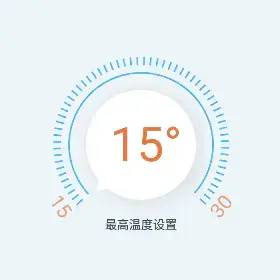
處理滑動事件
private boolean isDown;private boolean isMove;@Overridepublic boolean onTouchEvent(MotionEvent event) {switch (event.getAction()) {case MotionEvent.ACTION_DOWN:isDown = true;float downX = event.getX();float downY = event.getY();currentAngle = calcAngle(downX, downY);break;case MotionEvent.ACTION_MOVE:isMove = true;float targetX;float targetY;downX = targetX = event.getX();downY = targetY = event.getY();float angle = calcAngle(targetX, targetY);// 滑過的角度增量float angleIncreased = angle - currentAngle;// 防止越界if (angleIncreased < -270) {angleIncreased = angleIncreased + 360;} else if (angleIncreased > 270) {angleIncreased = angleIncreased - 360;}IncreaseAngle(angleIncreased);currentAngle = angle;invalidate();break;case MotionEvent.ACTION_CANCEL:case MotionEvent.ACTION_UP: {if (isDown && isMove) {// 糾正指針位置rotateAngle = (float) ((temperature - minTemp) * angleRate * 4.5);invalidate();// 回調(diào)溫度改變監(jiān)聽onTempChangeListener.change(temperature);isDown = false;isMove = false;}break;}}return true;}/*** 以按鈕圓心為坐標圓點,建立坐標系,求出(targetX, targetY)坐標與x軸的夾角** @param targetX x坐標* @param targetY y坐標* @return (targetX, targetY)坐標與x軸的夾角*/private float calcAngle(float targetX, float targetY) {float x = targetX - width / 2;float y = targetY - height / 2;double radian;if (x != 0) {float tan = Math.abs(y / x);if (x > 0) {if (y >= 0) {radian = Math.atan(tan);} else {radian = 2 * Math.PI - Math.atan(tan);}} else {if (y >= 0) {radian = Math.PI - Math.atan(tan);} else {radian = Math.PI + Math.atan(tan);}}} else {if (y > 0) {radian = Math.PI / 2;} else {radian = -Math.PI / 2;}}return (float) ((radian * 180) / Math.PI);}/*** 增加旋轉(zhuǎn)角度** @param angle 增加的角度*/private void IncreaseAngle(float angle) {rotateAngle += angle;if (rotateAngle < 0) {rotateAngle = 0;} else if (rotateAngle > 270) {rotateAngle = 270;}temperature = (int) (rotateAngle / 4.5) / angleRate + minTemp;}
提供一些接口方法
/*** 設(shè)置溫度** @param minTemp 最小溫度* @param maxTemp 最大溫度* @param temp 設(shè)置的溫度*/public void setTemp(int minTemp, int maxTemp, int temp) {this.minTemp = minTemp;this.maxTemp = maxTemp;this.temperature = temp;this.angleRate = 60 / (maxTemp - minTemp);rotateAngle = (float) ((temp - minTemp) * angleRate * 4.5);invalidate();}/*** 設(shè)置溫度改變監(jiān)聽** @param onTempChangeListener 監(jiān)聽接口*/public void setOnTempChangeListener(OnTempChangeListener onTempChangeListener) {this.onTempChangeListener = onTempChangeListener;}/*** 溫度改變監(jiān)聽接口*/public interface OnTempChangeListener {/*** 回調(diào)方法** @param temp 溫度*/void change(int temp);}
評論
圖片
表情