
Android實(shí)現(xiàn)懸浮按鈕拖動(dòng)功能
在應(yīng)用商店、京東、游戲中心,右下角都有一個(gè)懸浮的按鈕,可能是可以拖動(dòng)的,一般用于廣告或活動(dòng)。本篇來(lái)用ViewDragHelper來(lái)做懸浮按鈕的拽托,并處理fling(慣性滑動(dòng))。
效果圖:
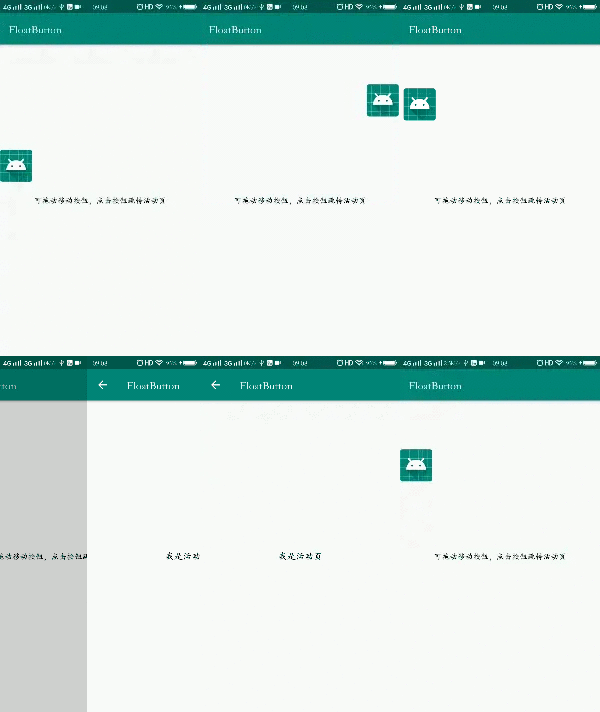
ViewDragHelper每個(gè)方法的分析,在之前的文章有分析,本篇?jiǎng)t不再贅述了。
原理分析
我們?cè)赩iewDragHelper中提供的回調(diào)中,處理懸浮按鈕的移動(dòng)邊界,不允許超出父布局。
松手回彈處理,在onViewReleased()方法中判斷,松手時(shí)的坐標(biāo)位于屏幕一半的左側(cè),還是右側(cè),決定回彈到哪一邊,使用ViewDragHelper的settleCapturedViewAt()方法進(jìn)行彈性移動(dòng)。
fling操作處理,判斷移動(dòng)的距離是否小于固定值,并且速度小于指定速度,則當(dāng)為fling操作,判斷滑動(dòng)方法是左右,還是上下,如果是左右,再慣性滑動(dòng)到哪一側(cè)。
主要復(fù)雜的地方在onViewReleased(),處理fling操作時(shí)代碼比較多,如果不處理fling,只判斷松手位置在屏幕一半的哪一邊,代碼量就只有3分之一。
完整代碼
約定id
由于我們要捕獲子View,而布局中允許有多個(gè)子View,所以我們約定可拖動(dòng)的按鈕的id為float_button。
<?xml version="1.0" encoding="utf-8"?><resources><item name="float_button" type="id"/></resources>
自定義View
重點(diǎn)都在FloatButtonLayout類(lèi)中了,實(shí)現(xiàn)過(guò)程中發(fā)現(xiàn),如果給懸浮按鈕設(shè)置了OnClick點(diǎn)擊事件,會(huì)導(dǎo)致無(wú)法拖動(dòng),估計(jì)是Down事件被懸浮按鈕攔截了導(dǎo)致。為了處理這個(gè)問(wèn)題,我在類(lèi)中也判斷了是否是點(diǎn)擊操作,提供了回調(diào)設(shè)置,通過(guò)setCallback(),設(shè)置點(diǎn)擊監(jiān)聽(tīng),代替原生onClick()點(diǎn)擊監(jiān)聽(tīng)即可。
public class FloatButtonLayout extends FrameLayout {/*** 可拽托按鈕*/private View mFloatButton;/*** 拽托幫助類(lèi)*/private ViewDragHelper mViewDragHelper;/*** 回調(diào)*/private Callback mCallback;public FloatButtonLayout(@NonNull Context context) {this(context, null);}public FloatButtonLayout(@NonNull Context context, @Nullable AttributeSet attrs) {this(context, attrs, 0);}public FloatButtonLayout(@NonNull Context context, @Nullable AttributeSet attrs, int defStyleAttr) {super(context, attrs, defStyleAttr);init(context, attrs, defStyleAttr);}private void init(Context context, AttributeSet attrs, int defStyleAttr) {mViewDragHelper = ViewDragHelper.create(this, 0.3f, new ViewDragHelper.Callback() {/*** 開(kāi)始拽托時(shí)的X坐標(biāo)*/private int mDownX;/*** 開(kāi)始拽托時(shí)的Y坐標(biāo)*/private int mDownY;/*** 開(kāi)始拽托時(shí)的時(shí)間*/private long mDownTime;@Overridepublic boolean tryCaptureView(@NonNull View child, int pointerId) {return child == mFloatButton;}@Overridepublic int clampViewPositionHorizontal(@NonNull View child, int left, int dx) {//限制左右移動(dòng)的返回,不能超過(guò)父控件int leftBound = getPaddingStart();int rightBound = getMeasuredWidth() - getPaddingEnd() - child.getWidth();if (left < leftBound) {return leftBound;}if (left > rightBound) {return rightBound;}return left;}@Overridepublic int clampViewPositionVertical(@NonNull View child, int top, int dy) {//限制上下移動(dòng)的返回,不能超過(guò)父控件int topBound = getPaddingTop();int bottomBound = getMeasuredHeight() - getPaddingBottom() - child.getHeight();if (top < topBound) {return topBound;}if (top > bottomBound) {return bottomBound;}return top;}@Overridepublic int getViewHorizontalDragRange(@NonNull View child) {return getMeasuredWidth() - getPaddingStart() - getPaddingEnd() - child.getWidth();}@Overridepublic int getViewVerticalDragRange(@NonNull View child) {return getMeasuredHeight() - getPaddingTop() - getPaddingBottom() - child.getHeight();}@Overridepublic void onViewCaptured(@NonNull View capturedChild, int activePointerId) {super.onViewCaptured(capturedChild, activePointerId);mDownX = capturedChild.getLeft();mDownY = capturedChild.getTop();mDownTime = System.currentTimeMillis();}@Overridepublic void onViewReleased(@NonNull final View releasedChild, float xvel, float yvel) {super.onViewReleased(releasedChild, xvel, yvel);//松手回彈,判斷如果松手位置,近左邊還是右邊,進(jìn)行彈性滑動(dòng)int fullWidth = getMeasuredWidth();final int halfWidth = fullWidth / 2;final int currentLeft = releasedChild.getLeft();final int currentTop = releasedChild.getTop();//滾動(dòng)到左邊final Runnable scrollToLeft = new Runnable() {@Overridepublic void run() {mViewDragHelper.settleCapturedViewAt(getPaddingStart(), currentTop);}};//滾動(dòng)到右邊final Runnable scrollToRight = new Runnable() {@Overridepublic void run() {int endX = getMeasuredWidth() - getPaddingEnd() - releasedChild.getWidth();mViewDragHelper.settleCapturedViewAt(endX, currentTop);}};Runnable checkDirection = new Runnable() {@Overridepublic void run() {if (currentLeft < halfWidth) {//在屏幕一半的左邊,回彈回左邊scrollToLeft.run();} else {//在屏幕一半的右邊,回彈回右邊scrollToRight.run();}}};//最小移動(dòng)距離int minMoveDistance = fullWidth / 3;//計(jì)算移動(dòng)距離int distanceX = currentLeft - mDownX;int distanceY = currentTop - mDownY;long upTime = System.currentTimeMillis();//間隔時(shí)間long intervalTime = upTime - mDownTime;float touched = getDistanceBetween2Points(new PointF(mDownX, mDownY), new PointF(currentLeft, currentTop));//處理點(diǎn)擊事件,移動(dòng)距離小于識(shí)別為移動(dòng)的距離,并且時(shí)間小于400if (touched < mViewDragHelper.getTouchSlop() && intervalTime < 300) {if (mCallback != null) {mCallback.onClickFloatButton();}//因?yàn)榕袛酁辄c(diǎn)擊事件后,return就會(huì)讓按鈕不進(jìn)行貼邊回彈了,這里再添加處理,讓可以貼邊回彈checkDirection.run();return;}//判斷上下滑還是左右滑if (Math.abs(distanceX) > Math.abs(distanceY)) {//左右滑,滑動(dòng)得少,并且速度很快,則為fling操作if (Math.abs(distanceX) < minMoveDistance &&Math.abs(xvel) > Math.abs(mViewDragHelper.getMinVelocity())) {//距離相減為正數(shù),則為往右滑if (distanceX > 0) {scrollToRight.run();} else {//否則為往左scrollToLeft.run();}} else {//不是fling操作,判斷松手位置在屏幕左邊還是右邊checkDirection.run();}} else {//上下滑,主要是判斷在屏幕左還是屏幕右,不需要判斷flingcheckDirection.run();}invalidate();}});}@Overridepublic boolean onInterceptTouchEvent(MotionEvent ev) {return mViewDragHelper.shouldInterceptTouchEvent(ev);}@Overridepublic boolean onTouchEvent(MotionEvent event) {mViewDragHelper.processTouchEvent(event);return true;}@Overridepublic void computeScroll() {super.computeScroll();if (mViewDragHelper != null && mViewDragHelper.continueSettling(true)) {invalidate();}}@Overrideprotected void onFinishInflate() {super.onFinishInflate();mFloatButton = findViewById(R.id.float_button);if (mFloatButton == null) {throw new NullPointerException("必須要有一個(gè)可拽托按鈕");}}/*** 獲得兩點(diǎn)之間的距離*/public static float getDistanceBetween2Points(PointF p0, PointF p1) {return (float) Math.sqrt(Math.pow(p0.y - p1.y, 2) + Math.pow(p0.x - p1.x, 2));}public interface Callback {/*** 點(diǎn)擊時(shí)回調(diào)*/void onClickFloatButton();}public void setCallback(Callback callback) {mCallback = callback;}}
具體使用
布局中添加,包裹可拖動(dòng)的懸浮按鈕
<?xml version="1.0" encoding="utf-8"?><androidx.constraintlayout.widget.ConstraintLayout xmlns:android="http://schemas.android.com/apk/res/android"xmlns:app="http://schemas.android.com/apk/res-auto"xmlns:tools="http://schemas.android.com/tools"android:layout_width="match_parent"android:layout_height="match_parent"tools:context=".MainActivity"><TextViewandroid:layout_width="wrap_content"android:layout_height="wrap_content"android:text="可拖動(dòng)移動(dòng)按鈕,點(diǎn)擊按鈕跳轉(zhuǎn)活動(dòng)頁(yè)"android:textColor="@android:color/black"app:layout_constraintBottom_toBottomOf="parent"app:layout_constraintLeft_toLeftOf="parent"app:layout_constraintRight_toRightOf="parent"app:layout_constraintTop_toTopOf="parent" /><com.zh.android.floatbutton.weiget.FloatButtonLayoutandroid:id="@+id/float_button_layout"android:layout_width="match_parent"android:layout_height="match_parent"><ImageViewandroid:id="@id/float_button"android:layout_width="58dp"android:layout_height="58dp"android:src="@mipmap/ic_launcher" /></com.zh.android.floatbutton.weiget.FloatButtonLayout></androidx.constraintlayout.widget.ConstraintLayout>
Java代碼,設(shè)置點(diǎn)擊事件
public class MainActivity extends AppCompatActivity {@Overrideprotected void onCreate(Bundle savedInstanceState) {super.onCreate(savedInstanceState);setContentView(R.layout.activity_main);FloatButtonLayout floatButton = findViewById(R.id.float_button_layout);//設(shè)置點(diǎn)擊事件,跳轉(zhuǎn)活動(dòng)頁(yè)面floatButton.setCallback(new FloatButtonLayout.Callback() {@Overridepublic void onClickFloatButton() {startActivity(new Intent(MainActivity.this, NewYearActivity.class));}});}}
源碼地址:
https://github.com/hezihaog/FloatButton
到這里就結(jié)束了.