<kbd id="afajh"><form id="afajh"></form></kbd>
<strong id="afajh"><dl id="afajh"></dl></strong>
    <del id="afajh"><form id="afajh"></form></del>
        1. <th id="afajh"><progress id="afajh"></progress></th>
          <b id="afajh"><abbr id="afajh"></abbr></b>
          <th id="afajh"><progress id="afajh"></progress></th>

          用 Python 登錄 24 個主流網(wǎng)站

          共 3505字,需瀏覽 8分鐘

           ·

          2020-08-04 12:42

          爬蟲腳本是大家經(jīng)常用到的,那就避開不了登錄?這一關(guān)。
          使用Python一般需要request庫,補充 header 中的 post 要素,有些還會有 隱藏的 hidden 參數(shù),可以通過瀏覽器 F12 或者元素審查來發(fā)現(xiàn),對于初學(xué)者來說都是一個坑。
          還有需要解決驗證碼的問題,一種方法是下載驗證碼圖片識別驗證碼再次post,或者使用云打碼平臺。當(dāng)然,有些驗證碼及其變態(tài)就不那么容易解決了,比如選字順序、滑塊、12306那種人為都會選錯的。
          本篇分享一個GitHub項目awesome-python-login-model》,主要就是利用Python解決登錄主流平臺的,包含24個主流平臺,目前在GitHub上已經(jīng)表星11.8k了。
          Github鏈接:https://github.com/Kr1s77/awesome-python-login-model

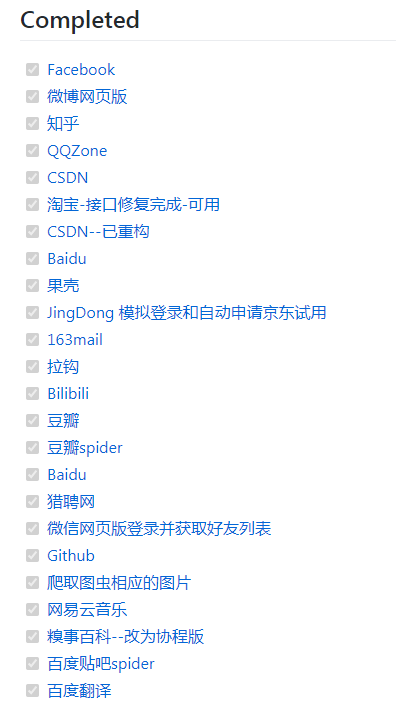
          已完成的主流網(wǎng)站

          上面是作者已經(jīng)完成的一些主流網(wǎng)站了,其中有的是通過?selenium登錄,有的是通過?抓包直接模擬登錄,有的是利用 scrapy框架。
          這個很容易理解,因為有的網(wǎng)站設(shè)計比較復(fù)雜,通過抓包很難實現(xiàn)模擬登錄,這樣用 selenium+webdriver 就會相對輕松一些。
          雖然在登錄的時候采用的是selenium,為了效率,我們可以在登錄過后得到的cookie維護(hù)起來,然后調(diào)用requests或者scrapy等進(jìn)行數(shù)據(jù)采集,這樣數(shù)據(jù)采集的速度可以得到保證。

          模擬登錄GitHub

          這里給大家展示一個模擬登錄GitHub的代碼。
          """
          github第二種登錄方式
          info:
          author:CriseLYJ
          github:https://github.com/CriseLYJ/
          update_time:2019-3-7
          """


          import?re
          import?requests
          from?lxml?import?etree


          class?Login(object):
          class?GithubLogin(object):

          ????def?__init__(self,?email,?password):

          ????????#?初始化信息
          ????????self.headers?=?{
          ????????????'User-Agent':?'Mozilla/5.0?(Macintosh;?Intel?Mac?OS?X?10_14_2)?AppleWebKit/537.36?(KHTML,?like?Gecko)?Chrome/71.0.3578.98?Safari/537.36',
          ????????????'Referer':?'https://github.com/',
          ????????????'Host':?'github.com'
          ????????}

          ????????self.session?=?requests.Session()
          ????????self.login_url?=?'https://github.com/login'
          ????????self.post_url?=?'https://github.com/session'
          ????????self.session?=?requests.Session()

          ????????self.email?=?email
          ????????self.password?=?password
          ????#?模擬登錄
          ????def?login_GitHub(self):

          ????????#?登錄入口
          ????????post_data?=?{
          ????????????'commit':?'Sign?in',
          ????????????'utf8':?'?',
          ????????????'authenticity_token':?self.get_token(),
          ????????????'login':?self.email,
          ????????????'password':?self.password
          ????????}
          ????????resp?=?self.session.post(
          ????????????self.post_url,?data=post_data,?headers=self.headers)

          ????????print('StatusCode:',?resp.status_code)
          ????????if?resp.status_code?!=?200:
          ????????????print('Login?Fail')
          ????????match?=?re.search(r'"user-login"?content="(.*?)"',?resp.text)
          ????????user_name?=?match.group(1)
          ????????print('UserName:',?user_name)

          ????????response?=?self.session.post(self.post_url,?data=post_data,?headers=self.headers)

          ????????print(response.status_code)
          ????????print(post_data)

          ????????if?response.status_code?==?200:
          ????????????print("登錄成功!")
          ????????else:
          ????????????print("登錄失敗!")
          ????#?獲取token信息
          ????#?Get?login?token
          ????def?get_token(self):

          ????????response?=?self.session.get(self.login_url,?headers=self.headers)

          ????????html?=?etree.HTML(response.content.decode())

          ????????token?=?html.xpath('//input[@name="authenticity_token"]/@value')[0]

          ????????return?token
          ????????if?response.status_code?!=?200:
          ????????????print('Get?token?fail')
          ????????????return?None
          ????????match?=?re.search(
          ????????????r'name="authenticity_token"?value="(.*?)"',?response.text)
          ????????if?not?match:
          ????????????print('Get?Token?Fail')
          ????????????return?None
          ????????return?match.group(1)

          if?__name__?==?'__main__':
          ????email?=?input('請輸入您的賬號:?')
          ????password?=?input('請輸入您的密碼:?')
          ????email?=?input('Account:')
          ????password?=?input('Password:')

          ????login?=?Login(email,?password)
          ????login?=?GithubLogin(email,?password)
          ????login.login_GitHub()

          相信這對初學(xué)爬蟲的朋友是一個很好的教程。
          但提示一下,模擬登錄的代碼隨時都有可能失效,因為前端的網(wǎng)頁HTML、CSS、JS等結(jié)構(gòu)可能會根據(jù)公司業(yè)務(wù)調(diào)整之類的發(fā)生變化。
          所以,重點是掌握了各種技巧,學(xué)會這些完全可以自己調(diào)試完成登錄,那時候你也可以成為 contributor 了!
          Github鏈接:https://github.com/Kr1s77/awesome-python-login-model


          推薦閱讀:
          用 Python 進(jìn)行系統(tǒng)聚類分析
          用 Python 對數(shù)據(jù)進(jìn)行相關(guān)性分析
          如何在 matplotlib 中加注釋和內(nèi)嵌圖
          如何用一行代碼讓 gevent 爬蟲提速 100%


          ▼點擊成為社區(qū)會員? ?喜歡就點個在看吧

          瀏覽 63
          點贊
          評論
          收藏
          分享

          手機掃一掃分享

          分享
          舉報
          評論
          圖片
          表情
          推薦
          點贊
          評論
          收藏
          分享

          手機掃一掃分享

          分享
          舉報
          <kbd id="afajh"><form id="afajh"></form></kbd>
          <strong id="afajh"><dl id="afajh"></dl></strong>
            <del id="afajh"><form id="afajh"></form></del>
                1. <th id="afajh"><progress id="afajh"></progress></th>
                  <b id="afajh"><abbr id="afajh"></abbr></b>
                  <th id="afajh"><progress id="afajh"></progress></th>
                  亚洲第一页在线观看 | 伊人色图吧 | 人人干人人看人人摸 | 一区二区三区四区视频 | 黄色一区二区三区 |