
Opencv實現(xiàn)瓶口缺陷檢測(源碼)
點擊下方卡片,關(guān)注“新機器視覺”公眾號
視覺/圖像重磅干貨,第一時間送達
摘要
本文使用opencv實現(xiàn)Halcon中的一個瓶口缺陷檢測實例(C++實現(xiàn)),Halcon中對應(yīng)的例子為inspect_bottle_mouth.hdev,用于檢測酒瓶瓶口是否出現(xiàn)破損等缺陷情形。
Halcon實例主要步驟包含五步,分別是:
使用閾值處理和形態(tài)學(xué)粗定位品口位置;
XLD輪廓擬合最近似的圓形區(qū)域作為瓶口的輪廓;
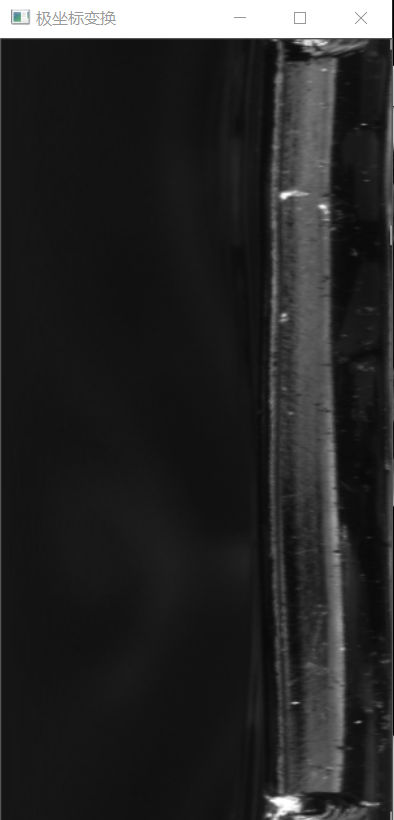
極坐標變換,轉(zhuǎn)換到水平或垂直方向進行處理;
均值濾波圖與原圖做差分,根據(jù)閾值提取;
將繪制的缺陷部分通過反極坐標變換投影到原圖上。
需要注意的是:在opencv中第一步和第二步這里直接用霍夫圓變換來替換(最重要的就是參數(shù)要設(shè)置合適)。
opencv實現(xiàn)步驟分解:
(一)讀入圖像,預(yù)處理,霍夫圓檢測
    Mat dst,src1;
    Mat src = imread("D:/opencv練習(xí)圖片/瓶口缺陷檢測.png");
    src.copyTo(src1);
    imshow("原圖", src);
    //預(yù)處理,霍夫園檢測
    Mat gray;
    cvtColor(src, gray, COLOR_RGB2GRAY);
    medianBlur(gray, gray, 3);
    vector<Vec3f>circles;
    HoughCircles(gray, circles, HOUGH_GRADIENT, 1, 100, 200, 30, 150, 500);
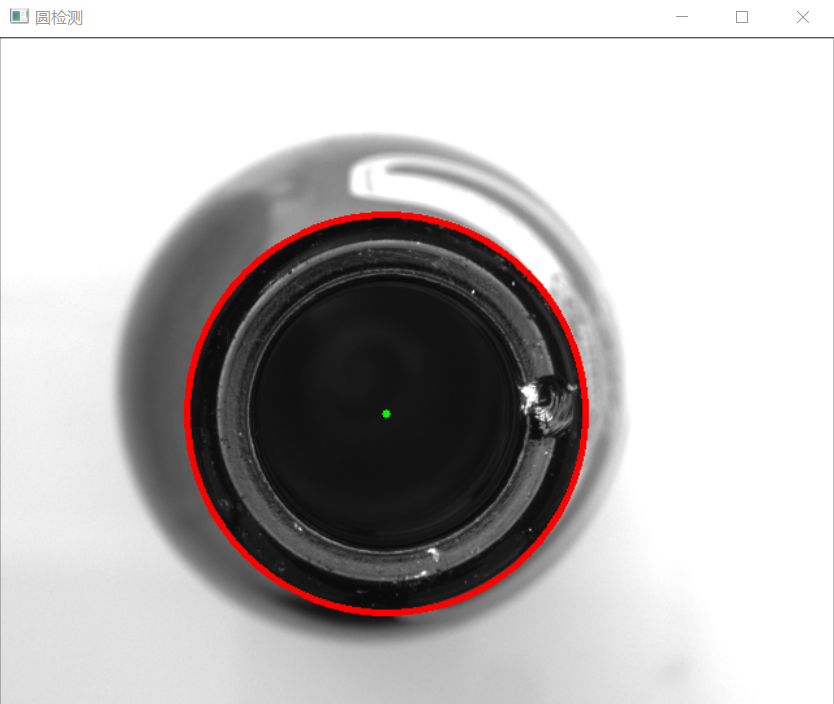
我測試了一下,16張測試圖,效果都不錯,暫時采用它。但是對于霍夫圓檢測,設(shè)置參數(shù)必須精確,才能有效果。
HoughCircles函數(shù)API
vector<Vec3f>circles;
HoughCircles(gray, circles, HOUGH_GRADIENT, 1, 100, 200, 30, 150, 500);
//第一個參數(shù)是輸出被檢測圖片
//第二個參數(shù)表示存儲數(shù)組,其中存儲被檢測的圓的圓心的坐標和圓的半徑。
//第三個參數(shù)是檢測圓的方法(霍夫梯度法)
//第四個參數(shù)可以設(shè)置為1就行--默認參數(shù)
//第五個參數(shù)是圓心與圓心之間的距離,這是一個經(jīng)驗值。這個大了,那么多個圓就是被認為一個圓。
//第六個參數(shù) 就設(shè)為默認值就OK
//第七個參數(shù)這個根據(jù)你的圖像中的圓  大小設(shè)置,如果圓越小,則設(shè)置越小
//第八個和第九個參數(shù) 是你檢測圓 最小半徑和最大半徑是多少  這個是經(jīng)驗值
(二)極坐標變換(重點就是要準確找到圓心作為極坐標變換的中心)
    int X = 0;//圓心坐標的X
    int Y = 0;//圓心坐標的Y
    int R = 0;//半徑
    Mat ROI;
    for (int i = 0; i < circles.size(); i++)
    {
         X = cvRound(circles[i][0]);
        Y = cvRound(circles[i][1]);
        Point center(X,Y);//圓心坐標
         R = cvRound(circles[i][2]);
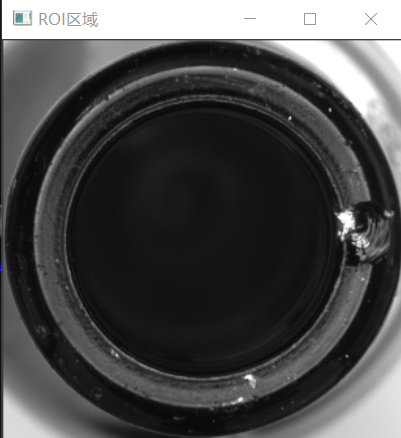
         ROI = src(Rect(X - R, Y - R, 2 * R, 2 * R));//提取ROI區(qū)域
         Point trans_center = Point(R, R);//ROI區(qū)域內(nèi)的中心坐標
        warpPolar(ROI, dst, Size(300, 600), trans_center, R, INTER_LINEAR | WARP_POLAR_LINEAR);

    }
    imshow("ROI區(qū)域", ROI);
    imshow("極坐標變換", dst);
(三)均值濾波做差分,二值化
    //均值濾波做差分
    Mat dst_blur,diff,binary,dst_gray;
    cvtColor(dst, dst_gray, COLOR_RGB2GRAY);
    blur(dst_gray, dst_blur, Size(3, 501), Point(-1, -1));
    absdiff(dst_gray, dst_blur, diff);
    imshow("差分", diff);
    threshold(diff, binary, 70, 255, THRESH_BINARY);
    medianBlur(binary, binary, 3);
    imshow("二值化", binary);
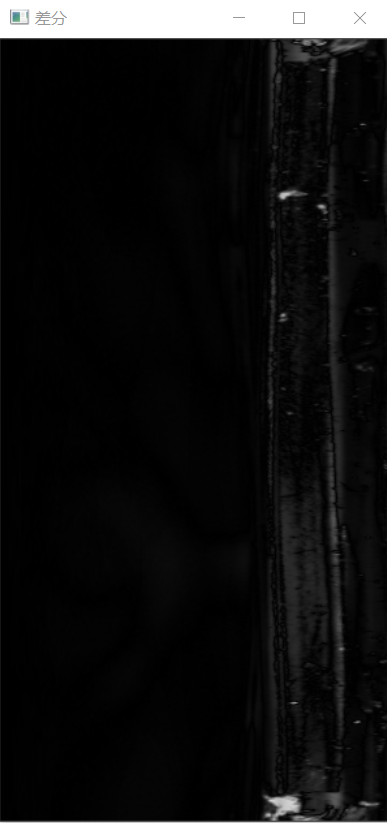
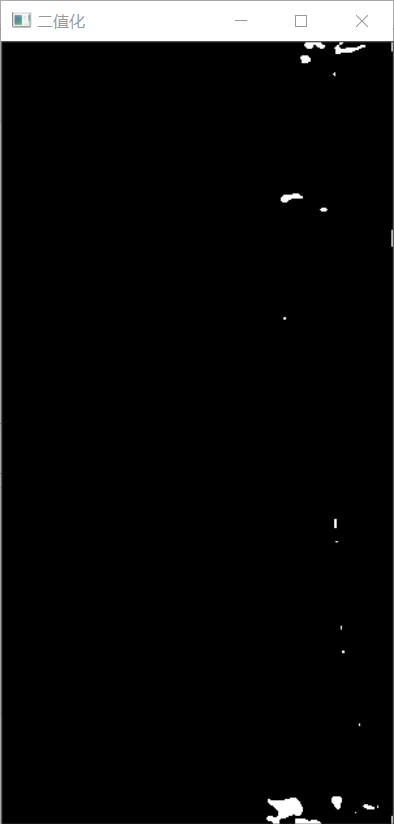
注意這里的均值濾波核大小,一般我們都是設(shè)置(3,3)或(5,5)等,這里物體垂直方向較長,參考Halcon例子中設(shè)置為(3, 501)。
可以看到,通過均值濾波差分后圖像的缺陷已經(jīng)可以很明顯的看到了。
(四)輪廓提取,篩選缺陷輪廓
    vector<vector<Point>>contours;
    findContours(binary, contours, RETR_EXTERNAL, CHAIN_APPROX_NONE, Point());
    for (int i = 0; i < contours.size(); i++)
    {
        Rect rect = boundingRect(contours[i]);
        float width = rect.width;
        if (width>10)
        {
            drawContours(dst, contours,i, Scalar(0, 0, 255), 2);
        }
    }
    imshow("缺陷", dst);
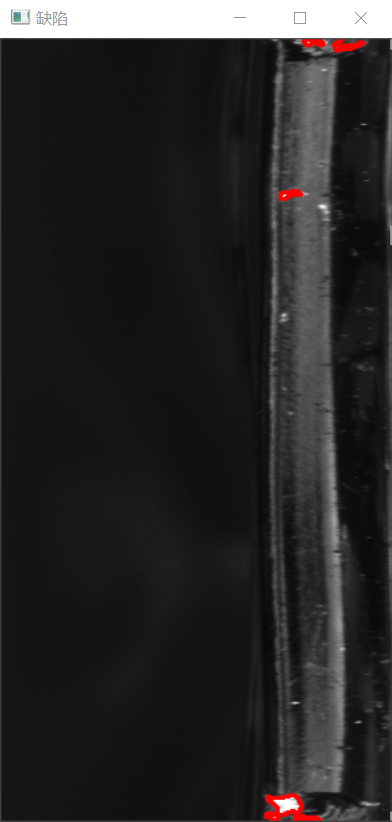
這里篩選缺陷的標準是:輪廓寬度大于10的都認為是缺陷(可以添加更精確的標準)
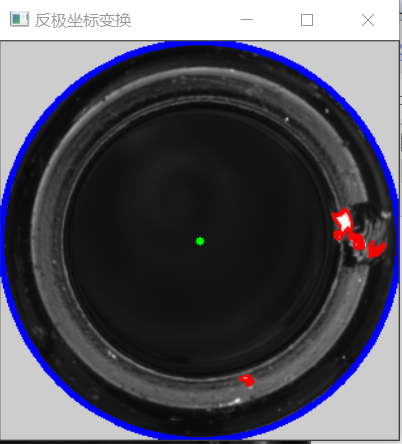
(五)反極坐標變換,結(jié)果投影到原圖
    Mat polarImg_Inv;
    warpPolar(dst, polarImg_Inv, ROI.size(), Point(R,R), R, INTER_LINEAR | WARP_POLAR_LINEAR| WARP_INVERSE_MAP);
    circle(polarImg_Inv, Point(R, R), 3, Scalar(0, 255, 0), -1, 8, 0);
    circle(polarImg_Inv, Point(R, R), R, Scalar(255, 0, 0), 3, 8, 0);
    imshow("反極坐標變換", polarImg_Inv);
來源:https://www.cnblogs.com/xyf327/p/14848402.html
—版權(quán)聲明—
僅用于學(xué)術(shù)分享,版權(quán)屬于原作者。
若有侵權(quán),請聯(lián)系微信號:yiyang-sy 刪除或修改!