
大公司系統(tǒng)太多,如何實現(xiàn)賬號互通?
背景

一個公司產(chǎn)品矩陣比較豐富的時候,用戶在不同系統(tǒng)之間來回切換,固然對產(chǎn)品用戶體驗上較差,并且增加用戶密碼管理成本。
也沒有很好地利用內(nèi)部流量進(jìn)行用戶打通,并且每個產(chǎn)品的獨(dú)立體系會導(dǎo)致產(chǎn)品安全度下降。
因此實現(xiàn)集團(tuán)產(chǎn)品的單點登錄對用戶使用體驗以及效率提升有很大的幫助。那么如何實現(xiàn)統(tǒng)一認(rèn)證呢?我們先了解一下傳統(tǒng)的身份驗證方式。
傳統(tǒng) Session 機(jī)制及身份認(rèn)證方案
| Cookie 與服務(wù)器的交互
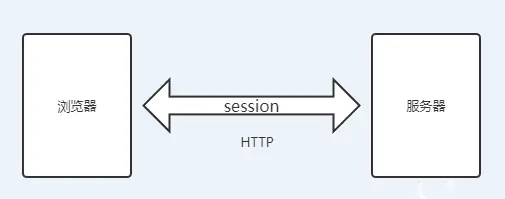
眾所周知,http 是無狀態(tài)的協(xié)議,因此客戶每次通過瀏覽器訪問 web。
頁面,請求到服務(wù)端時,服務(wù)器都會新建線程,打開新的會話,而且服務(wù)器也不會自動維護(hù)客戶的上下文信息。

因此出現(xiàn)了 session 這個概念,session 就是一種保存上下文信息的機(jī)制,他是面向用戶的,每一個 SessionID 對應(yīng)著一個用戶,并且保存在服務(wù)端中。
session 主要以 cookie 或 URL 重寫為基礎(chǔ)的來實現(xiàn)的,默認(rèn)使用 cookie 來實現(xiàn),系統(tǒng)會創(chuàng)造一個名為 JSESSIONID 的變量輸出到 cookie 中。
JSESSIONID 是存儲于瀏覽器內(nèi)存中的,并不是寫到硬盤上的,如果我們把瀏覽器的cookie 禁止,則 web 服務(wù)器會采用 URL 重寫的方式傳遞 Sessionid,我們就可以在地址欄看到 sessionid=KWJHUG6JJM65HS2K6 之類的字符串。
通常 JSESSIONID 是不能跨窗口使用的,當(dāng)你新開了一個瀏覽器窗口進(jìn)入相同頁面時,系統(tǒng)會賦予你一個新的 sessionid,這樣我們信息共享的目的就達(dá)不到了。
| 服務(wù)器端的 session 的機(jī)制
當(dāng)服務(wù)端收到客戶端的請求時候,首先判斷請求里是否包含了 JSESSIONID 的 sessionId,如果存在說明已經(jīng)創(chuàng)建過了,直接從內(nèi)存中拿出來使用,如果查詢不到,說明是無效的。
如果客戶請求不包含 sessionid,則為此客戶創(chuàng)建一個 session 并且生成一個與此 session 相關(guān)聯(lián)的 sessionid,這個 sessionid 將在本次響應(yīng)中返回給客戶端保存。
對每次 http 請求,都經(jīng)歷以下步驟處理:
服務(wù)端首先查找對應(yīng)的 cookie 的值(sessionid)。
根據(jù) sessionid,從服務(wù)器端 session 存儲中獲取對應(yīng) id 的 session 數(shù)據(jù),進(jìn)行返回。
如果找不到 sessionid,服務(wù)器端就創(chuàng)建 session,生成 sessionid 對應(yīng)的 cookie,寫入到響應(yīng)頭中。
session 是由服務(wù)端生成的,并且以散列表的形式保存在內(nèi)存中。
| 基于 session 的身份認(rèn)證流程
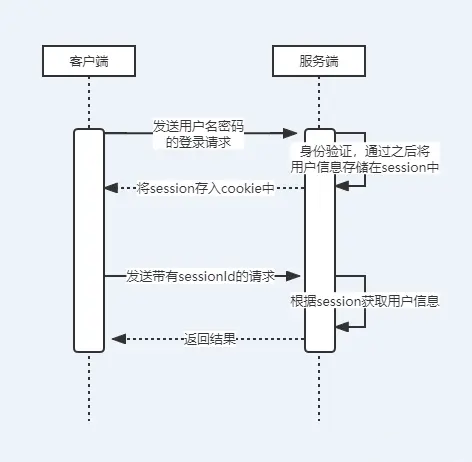
因為 http 請求是無狀態(tài)請求,所以在 Web 領(lǐng)域,大部分都是通過這種方式解決。但是這么做有什么問題呢?我們接著看。
集群環(huán)境下的 Session 困境及解決方案

通常都會把系統(tǒng)部署在多臺服務(wù)器上,通過負(fù)載均衡把請求分發(fā)到其中的一臺服務(wù)器上,這樣很可能同一個用戶的請求被分發(fā)到不同的服務(wù)器上。
因為 session 是保存在服務(wù)器上的,那么很有可能第一次請求訪問的 A 服務(wù)器,創(chuàng)建了 session,但是第二次訪問到了 B 服務(wù)器,這時就會出現(xiàn)取不到 session 的情況。
我們知道,Session 一般是用來存會話全局的用戶信息(不僅僅是登陸方面的問題),用來簡化/加速后續(xù)的業(yè)務(wù)請求。
傳統(tǒng)的 session 由服務(wù)器端生成并存儲,當(dāng)應(yīng)用進(jìn)行分布式集群部署的時候,如何保證不同服務(wù)器上 session 信息能夠共享呢?
| Session 共享方案
Session 共享一般有兩種思路:
session 復(fù)制
session 集中存儲
①session 復(fù)制

這種實現(xiàn)的問題就是實現(xiàn)成本高,維護(hù)難度大,并且會存在延遲登問題。
②session 集中存儲

集中存儲就是將獲取 session 單獨(dú)放在一個服務(wù)中進(jìn)行存儲,所有獲取 session 的統(tǒng)一來這個服務(wù)中去取。
這樣就避免了同步和維護(hù)多套 session 的問題。一般我們都是使用 redis 進(jìn)行集中式存儲 session。
多服務(wù)下的登陸困境及 SSO 方案
| SSO 的產(chǎn)生背景
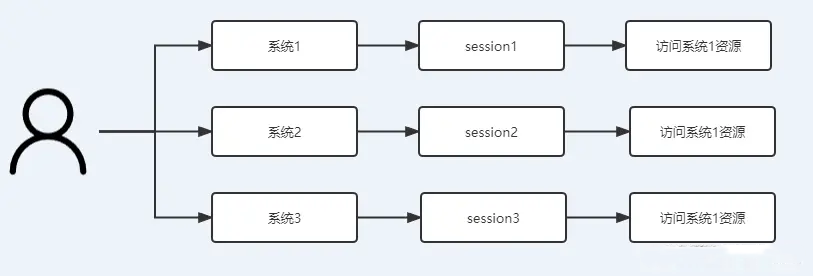
如果企業(yè)做大了之后,一般都有很多的業(yè)務(wù)支持系統(tǒng)為其提供相應(yīng)的管理和 IT 服務(wù),按照傳統(tǒng)的驗證方式訪問多系統(tǒng),每個單獨(dú)的系統(tǒng)都會有自己的安全體系和身份認(rèn)證系統(tǒng)。
進(jìn)入每個系統(tǒng)都需要進(jìn)行登錄,獲取 session,再通過 session 訪問對應(yīng)系統(tǒng)資源。
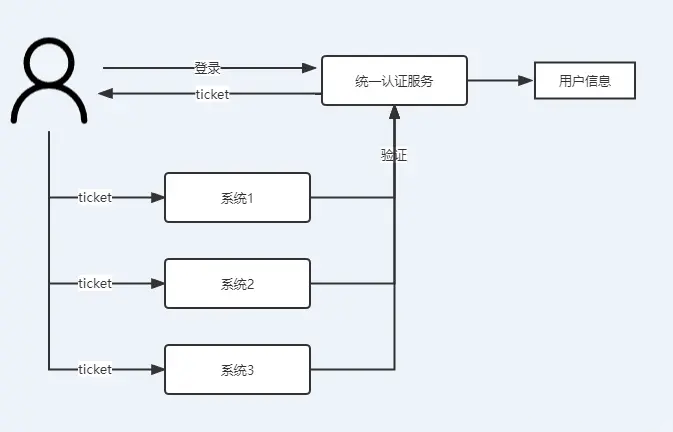
“單點登錄”就是專為解決此類問題的。其大致思想流程如下:通過一個 ticket 進(jìn)行串接各系統(tǒng)間的用戶信息。
| SSO 的底層原理 CAS
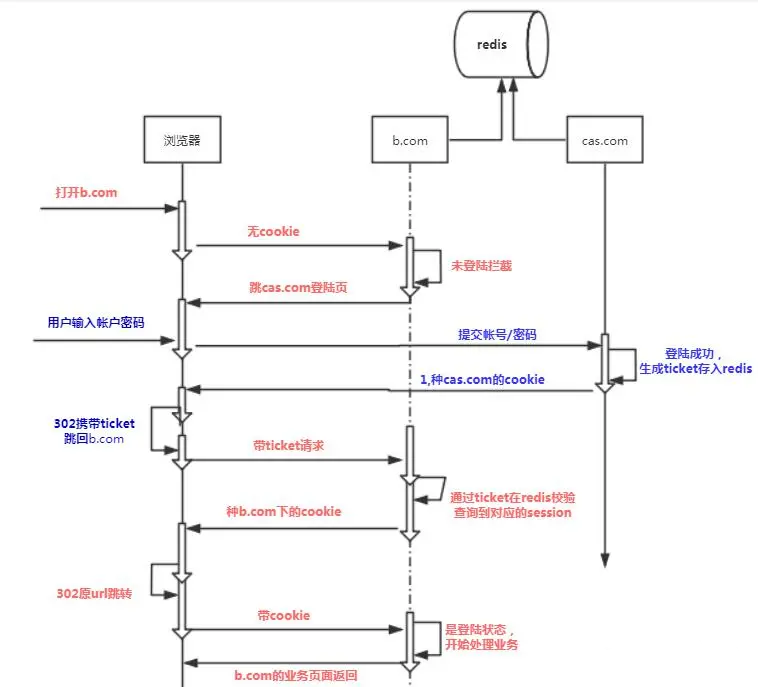
①CAS 實現(xiàn)單點登錄流程
我們知道對于完全不同域名的系統(tǒng),cookie 是無法跨域名共享的,因此 sessionId 在頁面端也無法共享,因此需要實現(xiàn)單店登錄,就需要啟用一個專門用來登錄的域名如(ouath.com)來提供所有系統(tǒng)的 sessionId。
當(dāng)業(yè)務(wù)系統(tǒng)被打開時,借助中心授權(quán)系統(tǒng)進(jìn)行登錄,整體流程如下:
當(dāng) b.com 打開時,發(fā)現(xiàn)自己未登陸,于是跳轉(zhuǎn)到 ouath.com 去登陸
ouath.com 登陸頁面被打開,用戶輸入帳戶/密碼登陸成功
ouath.com 登陸成功,種 cookie 到 ouath.com 域名下
把 sessionid 放入后臺 redis,存放<ticket,sesssionid>數(shù)據(jù)結(jié)構(gòu),然后頁面重定向到 A 系統(tǒng)
當(dāng) b.com 重新被打開,發(fā)現(xiàn)仍然是未登陸,但是有了一個 ticket 值
當(dāng) b.com 用 ticket 值,到 redis 里查到 sessionid,并做 session 同步,然后種 cookie 給自己,頁面原地重定向
當(dāng) b.com 打開自己頁面,此時有了 cookie,后臺校驗登陸狀態(tài),成功
②單點登錄流程演示
CAS 登錄服務(wù) demo 核心代碼如下:
public class UserForm implements Serializable{
private static final long serialVersionUID = 1L;

private String username;
private String password;
private String backurl;

public String getUsername() {
    return username;
}

public void setUsername(String username) {
    this.username = username;
}

public String getPassword() {
    return password;
}

public void setPassword(String password) {
    this.password = password;
}

public String getBackurl() {
    return backurl;
}

public void setBackurl(String backurl) {
    this.backurl = backurl;
}

}
@Controller
public class IndexController {
    @Autowired
    private RedisTemplate redisTemplate;

@GetMapping("/toLogin")
public String toLogin(Model model,HttpServletRequest request) {
    Object userInfo = request.getSession().getAttribute(LoginFilter.USER_INFO);
    //不為空,則是已登陸狀態(tài)
    if (null != userInfo){
        String ticket = UUID.randomUUID().toString();
        redisTemplate.opsForValue().set(ticket,userInfo,2, TimeUnit.SECONDS);
        return "redirect:"+request.getParameter("url")+"?ticket="+ticket;
    }
    UserForm user = new UserForm();
    user.setUsername("laowang");
    user.setPassword("laowang");
    user.setBackurl(request.getParameter("url"));
    model.addAttribute("user", user);

    return "login";
}

@PostMapping("/login")
public void login(@ModelAttribute UserForm user,HttpServletRequest request,HttpServletResponse response) throws IOException, ServletException {
    System.out.println("backurl:"+user.getBackurl());
    request.getSession().setAttribute(LoginFilter.USER_INFO,user);

    //登陸成功,創(chuàng)建用戶信息票據(jù)
    String ticket = UUID.randomUUID().toString();
    redisTemplate.opsForValue().set(ticket,user,20, TimeUnit.SECONDS);
    //重定向,回原url  ---a.com
    if (null == user.getBackurl() || user.getBackurl().length()==0){
        response.sendRedirect("/index");
    } else {
        response.sendRedirect(user.getBackurl()+"?ticket="+ticket);
    }
}

@GetMapping("/index")
public ModelAndView index(HttpServletRequest request) {
    ModelAndView modelAndView = new ModelAndView();
    Object user = request.getSession().getAttribute(LoginFilter.USER_INFO);
    UserForm userInfo = (UserForm) user;
    modelAndView.setViewName("index");
    modelAndView.addObject("user", userInfo);
    request.getSession().setAttribute("test","123");
    return modelAndView;
}
}
public class LoginFilter implements Filter {
    public static final String USER_INFO = "user";
    @Override
    public void init(FilterConfig filterConfig) throws ServletException {

}

@Override
public void doFilter(ServletRequest servletRequest,
                     ServletResponse servletResponse, FilterChain filterChain)
        throws IOException, ServletException {

    HttpServletRequest request = (HttpServletRequest) servletRequest;
     HttpServletResponse response = (HttpServletResponse)servletResponse;

    Object userInfo = request.getSession().getAttribute(USER_INFO);;

    //如果未登陸,則拒絕請求,轉(zhuǎn)向登陸頁面
    String requestUrl = request.getServletPath();
    if (!"/toLogin".equals(requestUrl)//不是登陸頁面
            && !requestUrl.startsWith("/login")//不是去登陸
            && null == userInfo) {//不是登陸狀態(tài)

        request.getRequestDispatcher("/toLogin").forward(request,response);
        return ;
    }

    filterChain.doFilter(request,servletResponse);
}

@Override
public void destroy() {

}
}
@Configuration
public class LoginConfig {

//配置filter生效
@Bean
public FilterRegistrationBean sessionFilterRegistration() {

    FilterRegistrationBean registration = new FilterRegistrationBean();
    registration.setFilter(new LoginFilter());
    registration.addUrlPatterns("/*");
    registration.addInitParameter("paramName", "paramValue");
    registration.setName("sessionFilter");
    registration.setOrder(1);
    return registration;
}
}
<!DOCTYPE HTML>
<html xmlns:th="http://www.thymeleaf.org">
<head>
    <title>enjoy login</title>
    <meta http-equiv="Content-Type" content="text/html; charset=UTF-8" />
</head>
<body>
<div text-align="center">
    <h1>請登陸</h1>
    <form action="#" th:action="@{/login}" th:object="${user}" method="post">
        <p>用戶名: <input type="text" th:field="*{username}" /></p>
        <p>密  碼: <input type="text" th:field="*{password}" /></p>
        <p><input type="submit" value="Submit" /> <input type="reset" value="Reset" /></p>
        <input type="text" th:field="*{backurl}" hidden="hidden" />
    </form>
</div>


</body>
</html>
web 系統(tǒng) demo 核心代碼如下:
public class SSOFilter implements Filter {
    private RedisTemplate redisTemplate;

public static final String USER_INFO = "user";

public SSOFilter(RedisTemplate redisTemplate){
    this.redisTemplate = redisTemplate;
}
@Override
public void init(FilterConfig filterConfig) throws ServletException {

}

@Override
public void doFilter(ServletRequest servletRequest,
                     ServletResponse servletResponse, FilterChain filterChain)
        throws IOException, ServletException {

    HttpServletRequest request = (HttpServletRequest) servletRequest;
    HttpServletResponse response = (HttpServletResponse)servletResponse;

    Object userInfo = request.getSession().getAttribute(USER_INFO);;

    //如果未登陸,則拒絕請求,轉(zhuǎn)向登陸頁面
    String requestUrl = request.getServletPath();
    if (!"/toLogin".equals(requestUrl)//不是登陸頁面
            && !requestUrl.startsWith("/login")//不是去登陸
            && null == userInfo) {//不是登陸狀態(tài)

        String ticket = request.getParameter("ticket");
        //有票據(jù),則使用票據(jù)去嘗試拿取用戶信息
        if (null != ticket){
            userInfo = redisTemplate.opsForValue().get(ticket);
        }
        //無法得到用戶信息,則去登陸頁面
        if (null == userInfo){
            response.sendRedirect("http://127.0.0.1:8080/toLogin?url="+request.getRequestURL().toString());
            return ;
        }

        /**
         * 將用戶信息,加載進(jìn)session中
         */
        UserForm user = (UserForm) userInfo;
        request.getSession().setAttribute(SSOFilter.USER_INFO,user);
        redisTemplate.delete(ticket);
    }

    filterChain.doFilter(request,servletResponse);
}

@Override
public void destroy() {

}
}
@Controller
public class IndexController {
    @Autowired
    private RedisTemplate redisTemplate;

@GetMapping("/index")
public ModelAndView index(HttpServletRequest request) {
    ModelAndView modelAndView = new ModelAndView();
    Object userInfo = request.getSession().getAttribute(SSOFilter.USER_INFO);
    UserForm user = (UserForm) userInfo;
    modelAndView.setViewName("index");
    modelAndView.addObject("user", user);

    request.getSession().setAttribute("test","123");
    return modelAndView;
}
}
<!DOCTYPE HTML>
<html xmlns:th="http://www.thymeleaf.org">
<head>
    <title>enjoy index</title>
    <meta http-equiv="Content-Type" content="text/html; charset=UTF-8" />
</head>
<body>
<div th:object="${user}">
    <h1>cas-website:歡迎你"></h1>
</div>
</body>
</html>
③CAS 的單點登錄和 OAuth2 的區(qū)別
OAuth2:三方授權(quán)協(xié)議,允許用戶在不提供賬號密碼的情況下,通過信任的應(yīng)用進(jìn)行授權(quán),使其客戶端可以訪問權(quán)限范圍內(nèi)的資源。
CAS:中央認(rèn)證服務(wù)(Central Authentication Service),一個基于 Kerberos 票據(jù)方式實現(xiàn) SSO 單點登錄的框架,為 Web 應(yīng)用系統(tǒng)提供一種可靠的單點登錄解決方法(屬于 Web SSO )。
CAS 的單點登錄時保障客戶端的用戶資源的安全 ;OAuth2 則是保障服務(wù)端的用戶資源的安全 。
CAS 客戶端要獲取的最終信息是,這個用戶到底有沒有權(quán)限訪問我(CAS 客戶端)的資源;OAuth2 獲取的最終信息是,我(oauth2 服務(wù)提供方)的用戶的資源到底能不能讓你(oauth2 的客戶端)訪問。
因此,需要統(tǒng)一的賬號密碼進(jìn)行身份認(rèn)證,用 CAS;需要授權(quán)第三方服務(wù)使用我方資源,使用 OAuth2。