
值得推薦!分享8個(gè)超好用的 Python 自動(dòng)化腳本!
↓推薦關(guān)注↓
每天你都可能會(huì)執(zhí)行許多重復(fù)的任務(wù),例如閱讀新聞、發(fā)郵件、查看天氣、清理文件夾等等,使用自動(dòng)化腳本,就無需手動(dòng)一次又一次地完成這些任務(wù),非常方便。而在某種程度上,Python 就是自動(dòng)化的代名詞。
今天分享 8 個(gè)非常有用的 Python 自動(dòng)化腳本。喜歡記得收藏、關(guān)注、點(diǎn)贊。
1、自動(dòng)化閱讀網(wǎng)頁新聞
這個(gè)腳本能夠?qū)崿F(xiàn)從網(wǎng)頁中抓取文本,然后自動(dòng)化語音朗讀,當(dāng)你想聽新聞的時(shí)候,這是個(gè)不錯(cuò)的選擇。
代碼分為兩大部分,第一通過爬蟲抓取網(wǎng)頁文本呢,第二通過閱讀工具來朗讀文本。
需要的第三方庫:
Beautiful Soup - 經(jīng)典的HTML/XML文本解析器,用來提取爬下來的網(wǎng)頁信息
requests - 好用到逆天的HTTP工具,用來向網(wǎng)頁發(fā)送請(qǐng)求獲取數(shù)據(jù)
Pyttsx3 - 將文本轉(zhuǎn)換為語音,并控制速率、頻率和語音
import pyttsx3
import requests
from bs4 import BeautifulSoup
engine = pyttsx3.init('sapi5')
voices = engine.getProperty('voices')
newVoiceRate = 130                       ## Reduce The Speech Rate
engine.setProperty('rate',newVoiceRate)
engine.setProperty('voice', voices[1].id)
def speak(audio):
  engine.say(audio)
  engine.runAndWait()
text = str(input("Paste article\n"))
res = requests.get(text)
soup = BeautifulSoup(res.text,'html.parser')

articles = []
for i in range(len(soup.select('.p'))):
    article = soup.select('.p')[i].getText().strip()
    articles.append(article)
text = " ".join(articles)
speak(text)
# engine.save_to_file(text, 'test.mp3') ## If you want to save the speech as a audio file
engine.runAndWait()
2、自動(dòng)化數(shù)據(jù)探索
數(shù)據(jù)探索是數(shù)據(jù)科學(xué)項(xiàng)目的第一步,你需要了解數(shù)據(jù)的基本信息才能進(jìn)一步分析更深的價(jià)值。
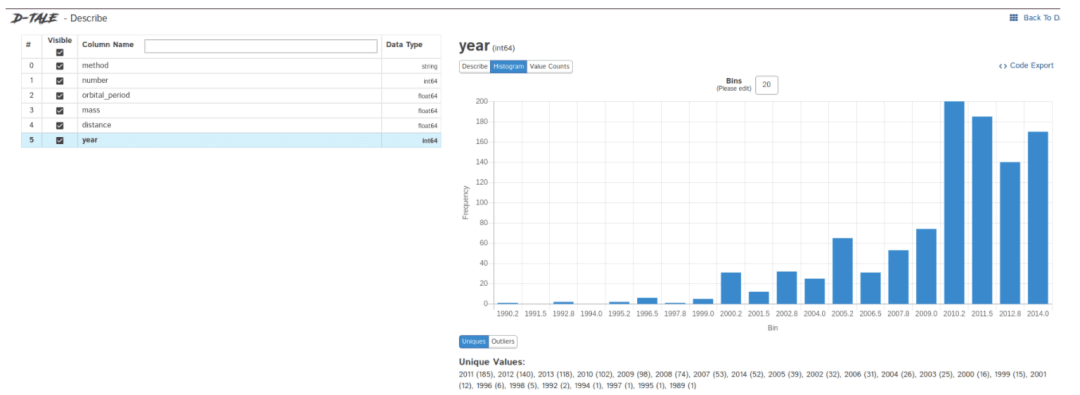
一般我們會(huì)用pandas、matplotlib等工具來探索數(shù)據(jù),但需要自己編寫大量代碼,如果想提高效率,Dtale是個(gè)不錯(cuò)的選擇。
Dtale特點(diǎn)是用一行代碼生成自動(dòng)化分析報(bào)告,它結(jié)合了Flask后端和React前端,為我們提供了一種查看和分析Pandas數(shù)據(jù)結(jié)構(gòu)的簡便方法。
我們可以在Jupyter上實(shí)用Dtale。
需要的第三方庫:
Dtale - 自動(dòng)生成分析報(bào)告
### Importing Seaborn Library For Some Datasets
import seaborn as sns

### Printing Inbuilt Datasets of Seaborn Library
print(sns.get_dataset_names())


### Loading Titanic Dataset
df=sns.load_dataset('titanic')

### Importing The Library
import dtale

#### Generating Quick Summary
dtale.show(df)
3、自動(dòng)發(fā)送多封郵件
這個(gè)腳本可以幫助我們批量定時(shí)發(fā)送郵件,郵件內(nèi)容、附件也可以自定義調(diào)整,非常的實(shí)用。
相比較郵件客戶端,Python腳本的優(yōu)點(diǎn)在于可以智能、批量、高定制化地部署郵件服務(wù)。
需要的第三方庫:
Email - 用于管理電子郵件消息
Smtlib - 向SMTP服務(wù)器發(fā)送電子郵件,它定義了一個(gè) SMTP 客戶端會(huì)話對(duì)象,該對(duì)象可將郵件發(fā)送到互聯(lián)網(wǎng)上任何帶有 SMTP 或 ESMTP 監(jiān)聽程序的計(jì)算機(jī)
Pandas - 用于數(shù)據(jù)分析清洗的工具
import smtplib
from email.message import EmailMessage
import pandas as pd

def send_email(remail, rsubject, rcontent):
    email = EmailMessage()                          ## Creating a object for EmailMessage
    email['from'] = 'The Pythoneer Here'            ## Person who is sending
    email['to'] = remail                            ## Whom we are sending
    email['subject'] = rsubject                     ## Subject of email
    email.set_content(rcontent)                     ## content of email
    with smtplib.SMTP(host='smtp.gmail.com',port=587)as smtp:
        smtp.ehlo()                                 ## server object
        smtp.starttls()                             ## used to send data between server and client
        smtp.login("[email protected]","delta@371") ## login id and password of gmail
        smtp.send_message(email)                    ## Sending email
        print("email send to ",remail)              ## Printing success message

if __name__ == '__main__':
    df = pd.read_excel('list.xlsx')
    length = len(df)+1

    for index, item in df.iterrows():
        email = item[0]
        subject = item[1]
        content = item[2]

        send_email(email,subject,content)
4、將 PDF 轉(zhuǎn)換為音頻文件
腳本可以將 pdf 轉(zhuǎn)換為音頻文件,原理也很簡單,首先用 PyPDF 提取 pdf 中的文本,然后用 Pyttsx3 將文本轉(zhuǎn)語音。
import pyttsx3,PyPDF2
pdfreader = PyPDF2.PdfFileReader(open('story.pdf','rb'))
speaker = pyttsx3.init()
for page_num in range(pdfreader.numPages):
    text = pdfreader.getPage(page_num).extractText()  ## extracting text from the PDF
    cleaned_text = text.strip().replace('\n',' ')  ## Removes unnecessary spaces and break lines
    print(cleaned_text)                ## Print the text from PDF
    #speaker.say(cleaned_text)        ## Let The Speaker Speak The Text
    speaker.save_to_file(cleaned_text,'story.mp3')  ## Saving Text In a audio file 'story.mp3'
    speaker.runAndWait()
speaker.stop()
5、從列表中播放隨機(jī)音樂
這個(gè)腳本會(huì)從歌曲文件夾中隨機(jī)選擇一首歌進(jìn)行播放,需要注意的是 os.startfile 僅支持 Windows 系統(tǒng)。
import random, os
music_dir = 'G:\\new english songs'
songs = os.listdir(music_dir)
song = random.randint(0,len(songs))
print(songs[song])  ## Prints The Song Name
os.startfile(os.path.join(music_dir, songs[0]))
6、智能天氣信息
國家氣象局網(wǎng)站提供獲取天氣預(yù)報(bào)的 API,直接返回 json 格式的天氣數(shù)據(jù)。所以只需要從 json 里取出對(duì)應(yīng)的字段就可以了。
下面是指定城市(縣、區(qū))天氣的網(wǎng)址,直接打開網(wǎng)址,就會(huì)返回對(duì)應(yīng)城市的天氣數(shù)據(jù)。比如:
http://www.weather.com.cn/data/cityinfo/101021200.html 上海徐匯區(qū)對(duì)應(yīng)的天氣網(wǎng)址。
具體代碼如下:
mport requests
import json
import logging as log

def get_weather_wind(url):
    r = requests.get(url)
    if r.status_code != 200:
        log.error("Can't get weather data!")
    info = json.loads(r.content.decode())

    # get wind data
    data = info['weatherinfo']
    WD = data['WD']
    WS = data['WS']
    return "{}({})".format(WD, WS)


def get_weather_city(url):
    # open url and get return data
    r = requests.get(url)
    if r.status_code != 200:
        log.error("Can't get weather data!")

    # convert string to json
    info = json.loads(r.content.decode())

    # get useful data
    data = info['weatherinfo']
    city = data['city']
    temp1 = data['temp1']
    temp2 = data['temp2']
    weather = data['weather']
    return "{} {} {}~{}".format(city, weather, temp1, temp2)


if __name__ == '__main__':
    msg = """**天氣提醒**:

{} {}
{} {}

來源: 國家氣象局
""".format(
    get_weather_city('http://www.weather.com.cn/data/cityinfo/101021200.html'),
    get_weather_wind('http://www.weather.com.cn/data/sk/101021200.html'),
    get_weather_city('http://www.weather.com.cn/data/cityinfo/101020900.html'),
    get_weather_wind('http://www.weather.com.cn/data/sk/101020900.html')
)
    print(msg)
運(yùn)行結(jié)果如下所示: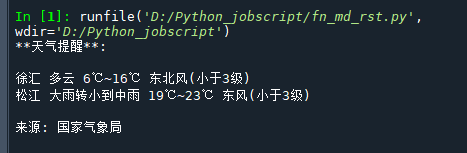
7、長網(wǎng)址變短網(wǎng)址
有時(shí),那些大URL變得非常惱火,很難閱讀和共享,此腳可以將長網(wǎng)址變?yōu)槎叹W(wǎng)址。
import contextlib
from urllib.parse import urlencode
from urllib.request import urlopen
import sys

def make_tiny(url):
 request_url = ('http://tinyurl.com/api-create.php?' +
 urlencode({'url':url}))
 with contextlib.closing(urlopen(request_url)) as response:
  return response.read().decode('utf-8')

def main():
 for tinyurl in map(make_tiny, sys.argv[1:]):
  print(tinyurl)

if __name__ == '__main__':
 main()
這個(gè)腳本非常實(shí)用,比如說有內(nèi)容平臺(tái)是屏蔽公眾號(hào)文章的,那么就可以把公眾號(hào)文章的鏈接變?yōu)槎替溄樱缓蟛迦肫渲校涂梢詫?shí)現(xiàn)繞過
8、清理下載文件夾
世界上最混亂的事情之一是開發(fā)人員的下載文件夾,里面存放了很多雜亂無章的文件,此腳本將根據(jù)大小限制來清理您的下載文件夾,有限清理比較舊的文件:
import os
import threading
import time


def get_file_list(file_path):
#文件按最后修改時(shí)間排序
    dir_list = os.listdir(file_path)
    if not dir_list:
        return
    else:
        dir_list = sorted(dir_list, key=lambda x: os.path.getmtime(os.path.join(file_path, x)))
    return dir_list

def get_size(file_path):
    """[summary]
    Args:
        file_path ([type]): [目錄]

    Returns:
        [type]: 返回目錄大小,MB
    """
    totalsize=0
    for filename in os.listdir(file_path):
        totalsize=totalsize+os.path.getsize(os.path.join(file_path, filename))
    #print(totalsize / 1024 / 1024)
    return totalsize / 1024 / 1024

def detect_file_size(file_path, size_Max, size_Del):
    """[summary]
    Args:
        file_path ([type]): [文件目錄]
        size_Max ([type]): [文件夾最大大小]
        size_Del ([type]): [超過size_Max時(shí)要?jiǎng)h除的大小]
    """
    print(get_size(file_path))
    if get_size(file_path) > size_Max:
        fileList = get_file_list(file_path)
        for i in range(len(fileList)):
            if get_size(file_path) > (size_Max - size_Del):
                print ("del :%d %s" % (i + 1, fileList[i]))
                #os.remove(file_path + fileList[i])
長按或掃描下方二維碼,后臺(tái)回復(fù):加群,即可申請(qǐng)入群。一定要備注:來源+研究方向+學(xué)校/公司,否則不拉入群中,見諒!
(長按三秒,進(jìn)入后臺(tái))
推薦閱讀
