
基于度量學(xué)習(xí)的行人重識別(二)
前面我們已經(jīng)說到了三元組損失以及MobileNet模型的搭建,我們再來看一下實現(xiàn)的具體流程,如下圖:
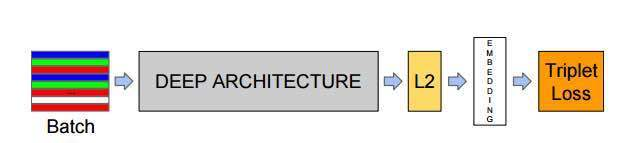
batch :是指輸入的人臉圖像樣本,這里的樣本是已經(jīng)經(jīng)過人臉檢測找到人臉并裁剪到固定尺寸(例如160x160)的圖片樣本。
Deep architecture:指的是采用一種深入學(xué)習(xí)架構(gòu)例如imagenet歷年冠軍網(wǎng)絡(luò)中的VGG,GoogleNet等,本文中我們將使用MoblieNetv2 作為主要的特征提取網(wǎng)絡(luò)。
L2 :是指特征歸一化(使其特征的||f(x)||2=1,這里是2次方的意思。這樣所有圖像的特征都會被映射到一個超球面上)
Embeddings: 就是前面經(jīng)過深度學(xué)習(xí)網(wǎng)絡(luò),L2歸一化后生成的特征向量(這個特征向量就代表了輸入的一張樣本圖片)
Triplet Loss:就是有三張圖片輸入的Loss(之前的都是Double Loss或者 是 SingleLoss)。直接學(xué)習(xí)特征間的可分性:相同身份之間的特征距離要盡可能的小,而不同身份之間的特征距離要盡可能的大
一|數(shù)據(jù)集處理。
SUMMER OF 2021
在數(shù)據(jù)集方面,我們同樣使用了DukeMTMC-reID數(shù)據(jù)集,這是在杜克大學(xué)內(nèi)采集的,圖像來自8個不同的攝像頭。該數(shù)據(jù)集提供訓(xùn)練集和測試集。訓(xùn)練集包含16522張圖像,測試集包含1761張圖像。訓(xùn)練集幾乎共有702人,平均每個人有23.5張訓(xùn)練數(shù)據(jù)。是目前最大的行人重識別數(shù)據(jù)集,并且提供了行人屬性,如性別,長短袖,是否有背包等標(biāo)注。
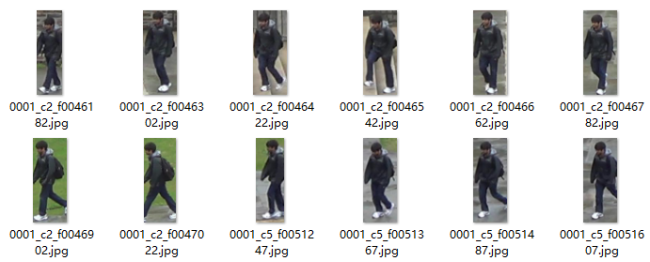
接下來,我們進行數(shù)據(jù)處理,首先,我們先觀察數(shù)據(jù)的命名格式,發(fā)現(xiàn)數(shù)據(jù)的命名是00xx_**_**.jpg。后面的不用管,我們的目的是提取對應(yīng)行人的索引。所以可以對_前的數(shù)值進行提取,新建一個data2txt.py寫入如下代碼:
import osimport cv2data_path=r'E:\DataSets\DukeMTMC-reID\DukeMTMC-reID\bounding_box_train'image_paths=[os.path.join(data_path,p)for p in os.listdir(data_path)]nameid=[]for image_path in image_paths:name=image_path.split('\\')[-1].split('_')[0]if name+'\n' not in nameid:nameid.append(name+'\n')with open('train.txt', 'w', encoding='utf8') as f:f.writelines(nameid)
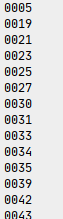
同樣地,修改一下數(shù)據(jù)地路徑以及最終的保存名稱,運行程序我們可以生成train.txt以及test.txt文件,里面存放的是如下所示的標(biāo)簽:
二|數(shù)據(jù)處理。
SUMMER OF 2021
接下來,我們要編寫一個讀取數(shù)據(jù)集的類,用來訓(xùn)練時邊訓(xùn)練邊讀取,這里我們不再使用生成器的模式來寫,而是使用tf.keras.utils.Sequence來新建一個數(shù)據(jù)加載類。新建一個load_data.py文件,首先導(dǎo)入依賴庫以及后面需要用到的一些函數(shù),同學(xué)們也可以創(chuàng)建一個utils.py文件來存放這些函數(shù):
import numpy as npimport tensorflow.keras as kimport globimport osfrom tqdm import tqdmimport jsonimport mathimport randomfrom PIL import Imageimport cv2from keras.utils import np_utils# 生成 a 到def rand(a=0, b=1):return np.random.rand()*(b-a) + a# 讀取txt 文件def read_lines(path=r'datasets\train.txt'):with open(path,'r',encoding='utf8') as f:data= f.readlines()return data
接著,新建一個類叫Person_Dataset,并初始化數(shù)據(jù),這里我們必須完成 __len__ 以及 __getitem__ 這兩個函數(shù),前者是用來判斷總共需要多少次讀取才能把數(shù)據(jù)完全拿到,公式為:讀取次數(shù) = 總圖片數(shù)/batch_size ,而后者是用來獲取每一個批次的可供訓(xùn)練的數(shù)據(jù):
class Person_Dataset(k.utils.Sequence):def __init__(self,image_path,batch_size,train=True,input_size=(215,90,3)):self.image_path = image_pathself.num_len = len(os.listdir(image_path))self.batch_size = batch_sizeself.train = trainself.json_data = self.load_data_path()self.json_key = list(self.json_data.keys())self.image_height,self.image_width,self.channel = input_sizedef __len__(self):return math.ceil(self.num_len / float(self.batch_size))def __getitem__(self, item):pass
接著,我們再寫入load_data_path函數(shù),用來讀取訓(xùn)練,或者測試時的json數(shù)據(jù),并返回,為了方便,第一次讀取時直接把數(shù)據(jù)寫入到j(luò)son中,后續(xù)直接讀取json可以省點時間:
def load_data_path(self):if self.train:if not os.path.isfile('datasets/train.json'):label_data_dist={}label_names = read_lines()for labelname in tqdm(label_names):labelname = labelname.strip('\n')label_to_imagepaths= glob.glob(self.image_path+'\%s*'%labelname)label_data_dist[labelname]=label_to_imagepaths# print(label_to_imagepaths)json_ = json.dumps(label_data_dist)with open('datasets/train.json', 'w', encoding='utf8') as f:f.writelines(json_)return json_else:with open('datasets/train.json', 'r', encoding='utf8') as f:json_ = json.loads(f.read())return json_else:if not os.path.isfile('datasets/test.json'):label_data_dist={}label_names = read_lines(path=r'datasets\test.txt')for labelname in tqdm(label_names):labelname = labelname.strip('\n')label_to_imagepaths= glob.glob(self.image_path+'\%s*'%labelname)label_data_dist[labelname]=label_to_imagepaths# print(label_to_imagepaths)json_ = json.dumps(label_data_dist)with open('datasets/test.json', 'w', encoding='utf8') as f:f.writelines(json_)return json_else:with open('datasets/test.json', 'r', encoding='utf8') as f:json_ = json.loads(f.read())return json_
然后,為了使模型更具魯棒性,所以我們再編寫一個數(shù)據(jù)增強的函數(shù),用來對行人數(shù)據(jù)進行隨機裁剪、隨機翻轉(zhuǎn)、隨機縮放等。
# 隨機增強數(shù)據(jù)def get_random_data(self, image, input_shape, jitter=.1, hue=.1, sat=1.3, val=1.3, flip_signal=True):''':param image: PIL Image:param input_shape: 輸入尺寸:param jitter: 裁剪:param hue: h:param sat: s:param val: v:param flip_signal: 翻轉(zhuǎn):return:'''image = image.convert("RGB")h, w = input_shaperand_jit1 = rand(1 - jitter, 1 + jitter)rand_jit2 = rand(1 - jitter, 1 + jitter)new_ar = w / h * rand_jit1 / rand_jit2# 隨機裁剪圖片scale = rand(0.9, 1.1)if new_ar < 1:nh = int(scale * h)nw = int(nh * new_ar)else:nw = int(scale * w)nh = int(nw / new_ar)image = image.resize((nw, nh), Image.BICUBIC)# 隨機翻轉(zhuǎn)圖片flip = rand() < .5if flip and flip_signal:image = image.transpose(Image.FLIP_LEFT_RIGHT)dx = int(rand(0, w - nw))dy = int(rand(0, h - nh))new_image = Image.new('RGB', (w, h), (128, 128, 128))new_image.paste(image, (dx, dy))image = new_image# 旋轉(zhuǎn)圖片rotate = rand() < .5if rotate:angle = np.random.randint(-10, 10)a, b = w / 2, h / 2M = cv2.getRotationMatrix2D((a, b), angle, 1)image = cv2.warpAffine(np.array(image), M, (w, h), borderValue=[128, 128, 128])return image
最后就是完成__getitem__函數(shù)中的內(nèi)容啦,我們先使用numpy新創(chuàng)建兩個全0的數(shù)組,維度分別為(batch_size,3,h,w,c)以及(batch_size,3),用來存放圖片數(shù)據(jù)以及標(biāo)簽數(shù)據(jù)。
def __getitem__(self, item):images = np.zeros((self.batch_size, 3, self.image_height, self.image_width, self.channel))labels = np.zeros((self.batch_size, 3))
然后使用循環(huán)讀取一個批次的數(shù)據(jù)并返回,具體流程如下:
在讀取的json中隨機取得第一個人,并判斷這個人擁有的圖片數(shù)是否大于2,否則重取
在取得的第一個人的圖片中隨機獲取2張圖片分別進行圖像處理以及標(biāo)簽處理
在取得的json中隨機取得第二個人,并判斷此人與第一個人是否是同一個人,是則重取
在取得的第二個人的圖片中隨機獲取1張圖片并進行圖像處理以及標(biāo)簽處理
組合數(shù)據(jù)與標(biāo)簽
返回
# 循環(huán)獲取一個批次的數(shù)據(jù)for i in range(self.batch_size):# 隨機在json中獲取一個人c = np.random.choice(self.json_key, 1)select_path = self.json_data[c[0]]# 當(dāng)獲取人的圖片數(shù)量小于2 則重新獲取while len(select_path) < 2:c = np.random.choice(self.json_key, 1)select_path = self.json_data[c[0]]# 在隨機獲取的人 的圖片中 隨機取得兩張image_index = np.random.choice(select_path, 2)# 第一張圖片image1 = Image.open(image_index[0])# 數(shù)據(jù)增強image1 = self.get_random_data(image1, [self.image_height, self.image_width])image1 = np.asarray(image1).astype(np.float64) / 255.# 獲取當(dāng)前人的標(biāo)簽label = self.json_key.index(c[0])images[i, 0, :, :, :] = image1labels[i, 0] = label# 第二張圖片image2 = Image.open(image_index[1])image2 = self.get_random_data(image2, [self.image_height, self.image_width])image2 = np.asarray(image2).astype(np.float64) / 255.images[i, 1, :, :, :] = image2labels[i, 1] = label# 隨機獲取第二個人的圖片路徑diff_c = np.random.choice(self.json_key, 1)# 如果和第一個人 是同一人則重新取while diff_c[0] == c[0]:diff_c = np.random.choice(self.json_key, 1)# 隨機取得不同人的一張圖片diff_select_path = self.json_data[diff_c[0]]diff_c_image_path = np.random.choice(diff_select_path, 1)# 圖片讀取diff_image = Image.open(diff_c_image_path[0])diff_image = self.get_random_data(diff_image, [self.image_height, self.image_width])diff_image = np.asarray(diff_image).astype(np.float64) / 255.diff_label = self.json_key.index(diff_c[0])images[i, 2, :, :, :] = diff_imagelabels[i, 2] = diff_label# 組合3張圖片images1 = np.array(images)[:, 0, :, :, :]images2 = np.array(images)[:, 1, :, :, :]images3 = np.array(images)[:, 2, :, :, :]images = np.concatenate([images1, images2, images3], 0)# 組合3個標(biāo)簽labels1 = np.array(labels)[:, 0]labels2 = np.array(labels)[:, 1]labels3 = np.array(labels)[:, 2]labels = np.concatenate([labels1, labels2, labels3], 0)# 獨熱編碼labels = np_utils.to_categorical(np.array(labels), num_classes=len(self.json_key))return images, {'Embedding': np.zeros_like(labels), 'Softmax': labels}
三|數(shù)據(jù)驗證。
SUMMER OF 2021
這樣一個數(shù)據(jù)讀取的類就完成了,我們可以使用如下的方式進行驗證,看看返回的數(shù)據(jù)是否是我們所需的。
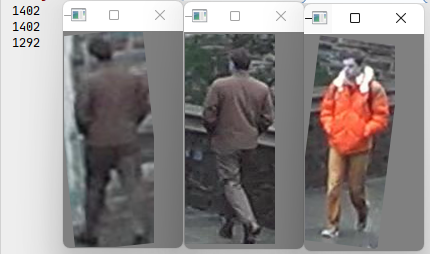
image_dir = r'E:\DataSets\DukeMTMC-reID\DukeMTMC-reID\bounding_box_train'batch_size=1# 實例化數(shù)據(jù)dataset=Face_Dataset(image_dir,batch_size)# 獲得第一個batch_size 的數(shù)據(jù)image,dict = dataset.__getitem__(1)embb=dict['Embedding']label = dict['Softmax']# 風(fēng)別取得3張圖片的索引for i in range(3):image_ = np.array(image[i]*255.,dtype='uint8')cv2.imshow('s%s'%i,image_)print(label[i].argmax())cv2.waitKey(0)
程序運行結(jié)果如下,我們可以看到第一第二張圖片很明顯就是同一個人,所以他們的索引是一致的,第三張圖片是不同人,所以索引是不一樣的。
以上就是本期推文的全部內(nèi)容了,由于數(shù)據(jù)處理方面還是比較復(fù)雜的,模型訓(xùn)練以及測試將會在下個推文給出,喜歡的可以點個關(guān)注噢!