
你真的了解Web Component嗎?
為什么使用框架?
對框架的理解
作為現(xiàn)代前端開發(fā)者,擁抱框架是生存的不二法則,有些人一入場便投身框架的海洋,有些人則有幸見證過變革,從原生,到j(luò)q,到各種框架大行其道的今天。而當(dāng)前,國內(nèi)占領(lǐng)市場份額最多的要數(shù)vue、react和angular,他們都有著各自的特點(diǎn),這也是它們一路走來的立足之本。
那么作為使用者的我們,在使用框架高效處理業(yè)務(wù)的同時,對框架本身也是需要一定程度的理解,以此來輔助我們更好的學(xué)習(xí)、了解和應(yīng)用框架。下面有一個表格,內(nèi)容提煉自尤雨溪本人對三大框架的對比看法,也許可以一定程度提升我們對框架的認(rèn)知。

大的職責(zé)范圍讓開發(fā)者習(xí)慣把問題拋給框架, 小的職責(zé)范圍讓開發(fā)者習(xí)慣把問題拋給社區(qū)。
框架的優(yōu)勢
基于上述框架間的差異化,我們可以看出框架各自不同的設(shè)計(jì)、發(fā)展和其衍生出的生態(tài)其實(shí)都是源自于最初各自對于職責(zé)范圍界定的不同而來。但盡管差異不小,它們依然存在著共性,而共性,正是源于框架本身存在的意義和目標(biāo)。
回頭審視,你會發(fā)現(xiàn)所有的框架其實(shí)都有共同的特點(diǎn)和目標(biāo),就是基于原生,然后更高的效率,更棒的性能,更好的差異抹平。
但我們需要正確理解這句話,這并不意味著框架的指標(biāo)就優(yōu)于原生,而是說,因?yàn)橛辛丝蚣埽覀儾挥迷偈謱懖灰蕾嚇I(yè)務(wù)場景的數(shù)據(jù)-視圖的綁定,不用再手動抹平平臺或?yàn)g覽器之間的差異,不用再陷入操作dom的同時還要兼顧性能苦惱。可以說框架提高了開發(fā)者開發(fā)和實(shí)現(xiàn)功能的各項(xiàng)下限,讓快速開發(fā)和基礎(chǔ)性能之間更好的平衡。我們以react和vue為例,這兩大框架所帶來的優(yōu)勢包括但不限于:
數(shù)據(jù)綁定(單/雙向) 組件化開發(fā)(各種鉤子/生命周期/作用域隔離) 虛擬dom(diff算法)以及路由等。 ......
但這些優(yōu)勢不是憑空而來,就像vue的雙向綁定,從使用object.defineProperty轉(zhuǎn)為使用proxy,這種類似的實(shí)現(xiàn)或者說轉(zhuǎn)變,核心之處都需要js語法以及瀏覽器的原生支持。因?yàn)閣eb應(yīng)用最終都是要運(yùn)行在宿主--瀏覽器上的,所以制定規(guī)范的各大瀏覽器廠商以及提供原生api支持的瀏覽器環(huán)境才是王道,而框架不是。我們之所以需要引入各類的框架、工具庫去實(shí)現(xiàn)各種優(yōu)秀的設(shè)計(jì)與思想,比如組件化,本質(zhì)上是因?yàn)樵粗苯犹峁?yīng)的方式或是api,所以才需要框架去構(gòu)建棋盤之上的又一層規(guī)則體系,來實(shí)現(xiàn)開發(fā)者的訴求。
而框架這種在瀏覽器原生規(guī)則之上又一層較高程度的封裝,在帶來便利高效的同時,不可避免的帶來兩個缺陷:
性能的下降,這也是為什么上面說有時原生的直接操作指標(biāo)要優(yōu)于框架。下面是一些關(guān)于處理dom的react vs js的對比:
(圖1:桌面chrome; 圖2:平板chrome; 圖3:移動端chrome;)
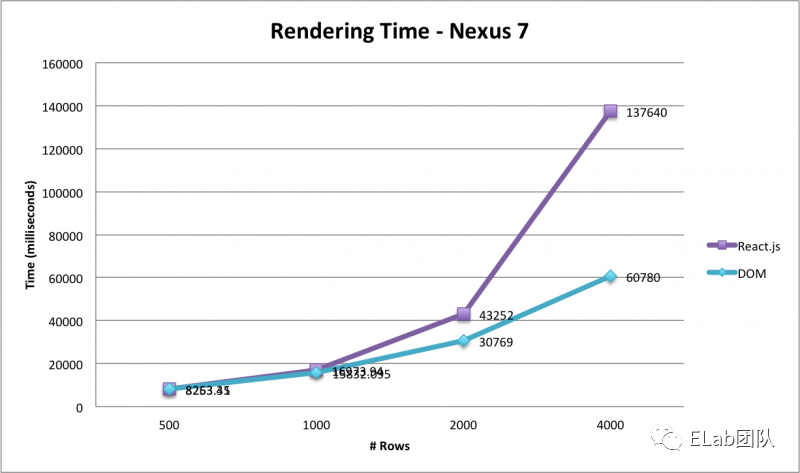
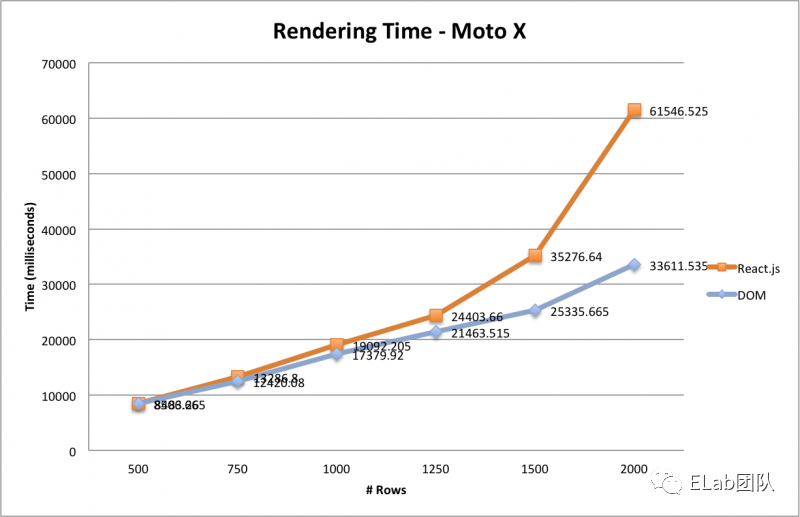 (下圖:桌面chrome下react vs js 內(nèi)存比較)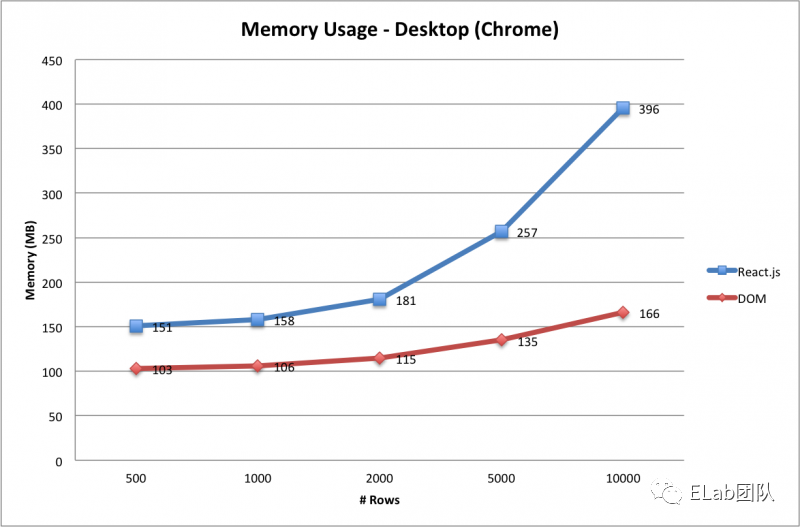
框架環(huán)境的隔離,例如vue的組件庫沒辦法很好的銜接在react的項(xiàng)目中(也許你會說vuera或微前端,但事實(shí)上ROI和性能并不好,開發(fā)和維護(hù)的成本較高)。
那么如果原生可以提供某些api,是不是就可以一定程度上替代框架的某些功能,在擁有便利高效的同時,跨平臺、跨框架的使用,還能較大限度的保持原生的性能?
這就是接下來要聊到的是web component和其所能帶來的可能甚至是變革。
認(rèn)識web component
web component

 狹義的來說,web component是瀏覽器環(huán)境提供的一些新的原生支持的api和模版。廣義的說,它是一套可以支持原生實(shí)現(xiàn)組件化的技術(shù)。從MDN的描述中可以看到,web component的誕生,是為了解決代碼復(fù)用、組件自定義、復(fù)用管理等問題。
回看上文中,我們對框架優(yōu)勢的分析羅列,可以發(fā)現(xiàn)解決這些開發(fā)痛點(diǎn)的方案早已存在,也就是與之對應(yīng)的框架優(yōu)勢中的組件化。那么根據(jù)上面的分析,既然原生支持了,是不是意味著可以顛覆框架?這種想法是有些沖動的,單純依靠原生的api去顛覆框架是不現(xiàn)實(shí)的,能顛覆框架的也必須是框架,因?yàn)槊恳粋€框架都意味著對應(yīng)的生態(tài)(路由管理、狀態(tài)管理、dom性能優(yōu)化管理等)。如果有一天,當(dāng)前框架中的大部分優(yōu)秀的設(shè)計(jì)與思想被原生環(huán)境所吸收并支持,那么在此基礎(chǔ)上衍生的框架,才能真正具備替代當(dāng)前三大框架的能力,成為前端唯一一類框架。
而現(xiàn)在,我們雖然還是無法舍棄框架擁抱原生,但是我們可以將其中的一部分進(jìn)行替代,使之擁有框架提供的優(yōu)勢,又能避免因框架而導(dǎo)致的缺陷。
原生組件化能否替代框架組件化?
我們先來看看組件化的特點(diǎn):
高內(nèi)聚,低耦合 標(biāo)記鮮明易維護(hù) 塊狀接口易擴(kuò)展
再看看依據(jù)組件化的規(guī)范,框架組件化提供給我們最直觀的體驗(yàn):
高效復(fù)用 作用域及樣式隔離 自定義開發(fā) 鉤子函數(shù)(生命周期) ......
最后我們來看看web component給我們提供了什么:
Custom elements:自定義元素,通過使用對應(yīng)的api,用戶可以在不依賴框架的情況下,開發(fā)原生層面的自定義元素,最關(guān)鍵的是,它將包含獨(dú)立的生命周期,以及提供了自定義屬性的監(jiān)聽。這就意味著它也同樣具備了較高的可操作性。 Shadow DOM:影子dom(最大的特點(diǎn)是不暴露給全局),你可以通過對應(yīng)的api,將shadow dom附加給你的自定義元素,并控制其相關(guān)功能。利用shadow dom的特性,起到隔離的作用,使特性保密,不用再擔(dān)心所編寫的腳本及樣式與文檔其他部分沖突。 HTML模版:通過 <template/>、<slot/>去實(shí)現(xiàn)內(nèi)容分發(fā)。或者你可以回憶一下vue的插槽(slot)和react的props.children。但事實(shí)上,真的是vue最先創(chuàng)立的slot嗎?看下面~
 從上述這些原生api所提供給我們的種種特性,說明web component同樣可以滿足我們對組件的自定義及復(fù)用、與文檔其他部分隔離、生命周期的鉤子函數(shù),甚至是內(nèi)容分發(fā)等這些訴求。
那么至少從理論的角度上說,web component是完全有能力替代框架組件化的,這意味著開發(fā)者可以在不使用的框架的前提下進(jìn)行組件化開發(fā),而且開發(fā)出的組件可以無縫嵌入使用了框架的項(xiàng)目中。有趣的是在最新發(fā)布的vue3.2中,也初步引入了對于web component的使用:
兼容性
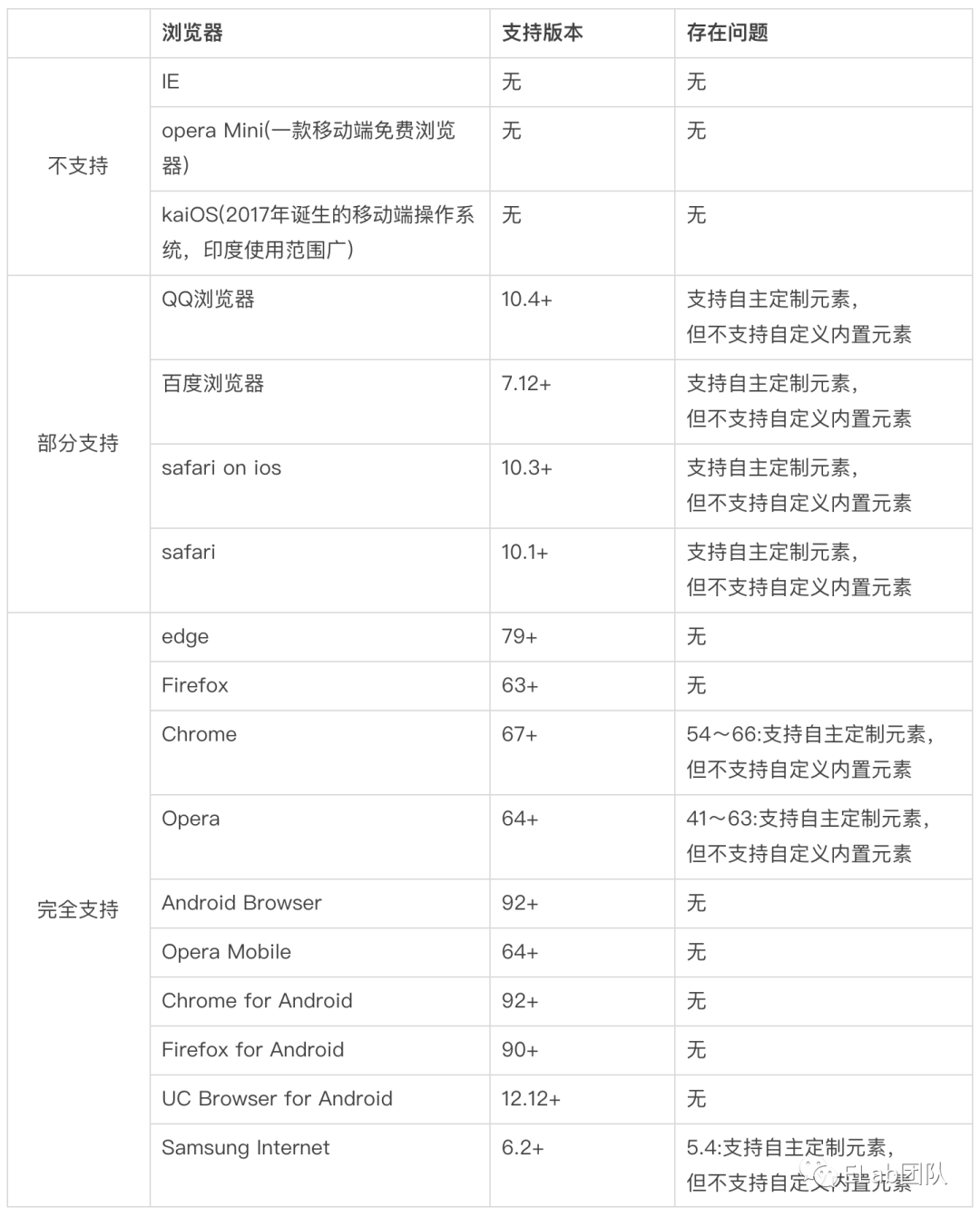
作為開發(fā)者,面對新的強(qiáng)大的api,在充滿熱情的同時,更需要關(guān)注其可用性和普及范圍。我們可以通過can i use去查看它的兼容性:https://caniuse.com/?search=web%20component。從中我們可以看到:
1. Custom elements兼容性
2. Shadow DOM兼容性
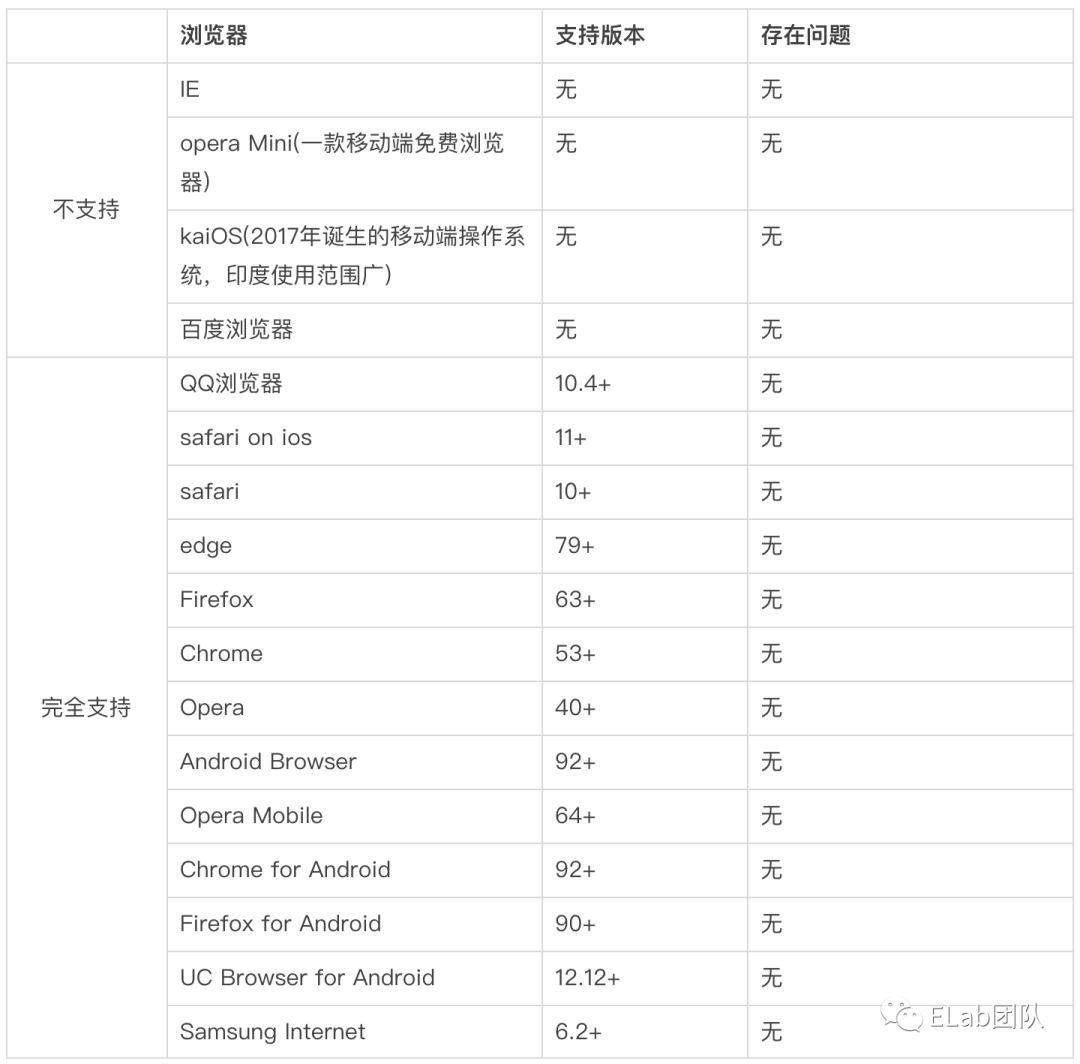
3. HTML templates兼容性
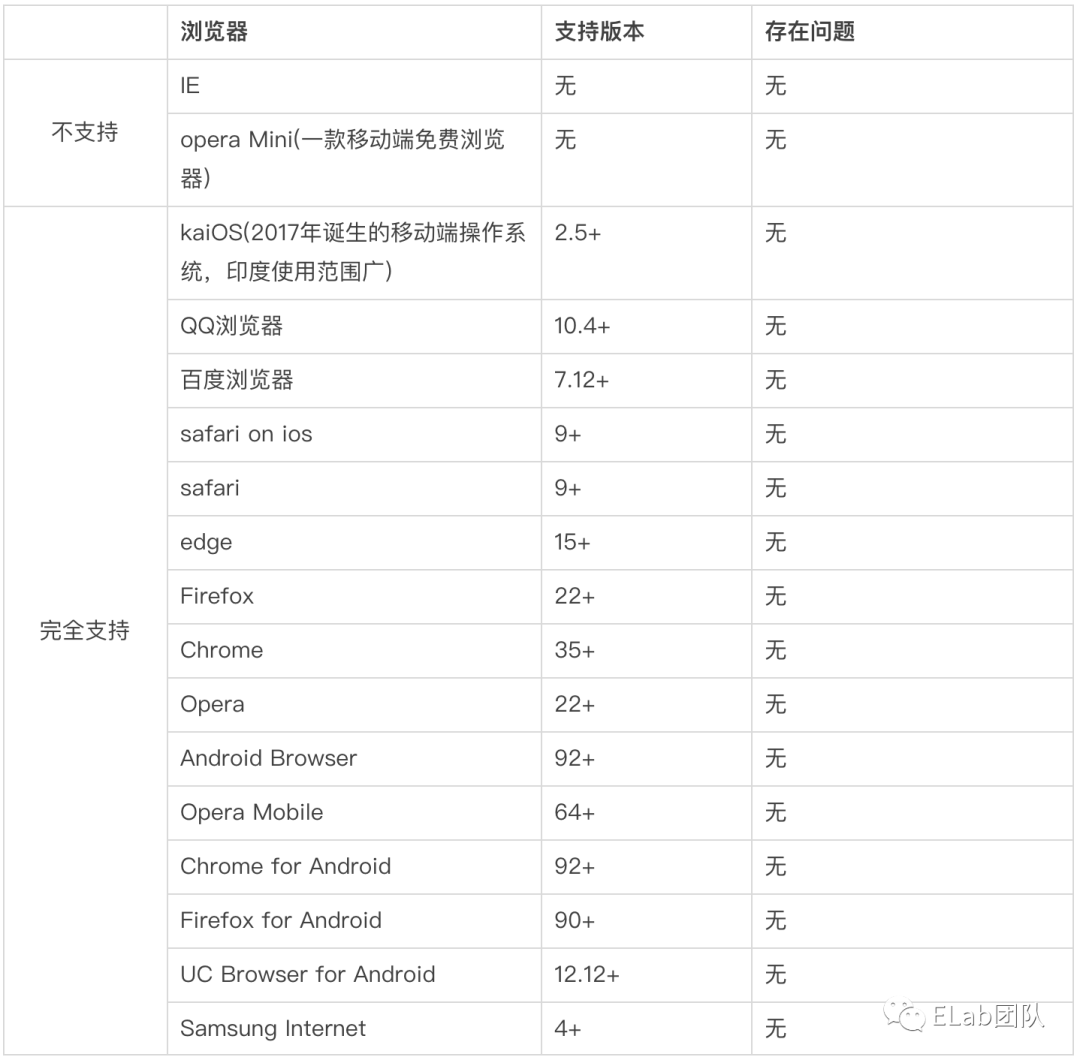
自主定制元素和自定義內(nèi)置元素
在Custom elements兼容性的描述中,我們看到兩個概念,如下:
自主定制元素:獨(dú)立元素;它們不繼承自內(nèi)置的 HTML 元素。 自定義內(nèi)置元素:這些元素繼承并擴(kuò)展了內(nèi)置的 HTML 元素。
那么這里怎么去理解自主定制元素和自定義內(nèi)置元素?我們可以從具體的code實(shí)現(xiàn)上進(jìn)行觀察:
自主定制元素
js:
...
customElements.define('custom-elements', class);
...
html:
<body>
...
<custom-elements></custom-elements>
...
</body>
自定義內(nèi)置元素
js:
...
customElements.define('custom-elements', class, { extends: 'p' });
...
html:
<body>
...
<p is="custom-elements"></p>
...
</body>
可以看到從聲明上是沒有太大區(qū)別的,都是通過 customElements.define 去定義聲明,并且需要一個 class 去構(gòu)建內(nèi)部的生命周期與屬性監(jiān)聽。區(qū)別之處在于自定義內(nèi)置元素需要在后面的配置項(xiàng)中設(shè)置要繼承的內(nèi)置HTML 元素(指原生的元素)。
而最大的區(qū)別是在于使用上,自主定制元素其實(shí)就是一個完整的自定義組件,可以讓我們在不依賴任何框架的前提下實(shí)現(xiàn)組件化。而自定義內(nèi)置組件,可以理解為是對所繼承的原生元素的改造(如上述code呈現(xiàn),聲明定義自定義組件時,指定繼承的原生元素,后續(xù)使用該原生元素時,通過is屬性引用聲明的自定義組件,就可以改造該原生元素,使其擁有生命周期、自定義組件和作用域隔離的功能)。
web component api的使用
自定義組件的聲明和使用
所依賴的主要接口是CustomElementRegistry,該接口提供了,用作支持自定義組件的使用和聲明:
window.customElements.define。
該方法用來聲明自定義組件,接受3個參數(shù),無返回值:
name:將要全局注冊的自定義組件名字(必須是中劃線的形式)。 constructor:一個類,如果聲明的是自主定制元素,則必須繼承自HTMLElement;如果聲明的是自定義內(nèi)置元素,則必須繼承它將要擴(kuò)展的原生元素所屬的類(如要擴(kuò)展div,那就必須繼承HTMLDivElement)。并且類的構(gòu)造函數(shù)中,必須執(zhí)行super。 options:一個可選的配置對象,只有在聲明自定義內(nèi)置元素時使用,且當(dāng)前只有一個配置項(xiàng)extends,值為將要擴(kuò)展的原生元素的標(biāo)簽名。
聲明示例:
//自主定制元素
class CustomEle extends HTMLElement {
  constructor() {
    super();
    ...
  }
}
customElements.define('custom-ele', CustomEle);

//自定義內(nèi)置元素,如果要擴(kuò)展div的話
class CustomEleBuiltIn extends HTMLDivElement {
  constructor() {
    super();
    ...
  }
}
customElements.define('custom-ele-build-in', CustomEleBuiltIn, { extends: 'div' });
使用的方式也是多樣的。可以通過document.createElement的方式使用,也可以直接書寫在html中。使用示例:
//自主定制元素
const customEle = document.createElement('custom-ele');
customEle.setAttribute('img', 'https://gimg2.baidu.com/image_search/src=http%3A%2F%2Fcdn.duitang.com%2Fuploads%2Fitem%2F201409%2F06%2F20140906020558_h4VfY.png');
customEle.setAttribute('text', '我是一段懸停說明');
document.querySelector('#app').appendChild(customEle);
customElements.define('custom-ele', CustomEle);
//或
customElements.define('custom-ele', CustomEle);
const customEle = new CustomEle();
customEle.setAttribute('img', 'https://gimg2.baidu.com/image_search/src=http%3A%2F%2Fcdn.duitang.com%2Fuploads%2Fitem%2F201409%2F06%2F20140906020558_h4VfY.png');
customEle.setAttribute('text', '我是一段懸停說明');
document.querySelector('#app').appendChild(customEle);
//或
<custom-ele img="https://gimg2.baidu.com/image_search/src=http%3A%2F%2Fcdn.duitang.com%2Fuploads%2Fitem%2F201409%2F06%2F20140906020558_h4VfY.png" text="我是一段懸停說明">

//自定義內(nèi)置元素,如果要擴(kuò)展div的話
customElements.define('custom-ele-build-in', CustomEleBuiltIn, { extends: 'div' });
const div = document.createElement('div', { is: 'custom-ele-build-in' });
div.setAttribute('img', 'https://gimg2.baidu.com/image_search/src=http%3A%2F%2Fcdn.duitang.com%2Fuploads%2Fitem%2F201409%2F06%2F20140906020558_h4VfY.png');
div.setAttribute('text', '我是一段懸停說明');
document.querySelector('#app').appNode.appendChild(div);
//或
<div is="custom-ele-build-in" img="https://gimg2.baidu.com/image_search/src=http%3A%2F%2Fcdn.duitang.com%2Fuploads%2Fitem%2F201409%2F06%2F20140906020558_h4VfY.png" text="我是一段懸停說明" />
這里的幾 種使用方式其實(shí)還是有差異的,在初始化的時候,直接引用的方式可以在構(gòu)造階段就拿到掛載的各個屬性;但是采用create的方式時,構(gòu)造階段無法第一時間獲取屬性,當(dāng)然,利用生命周期的鉤子函數(shù),也是解決該問題的。
window.customElements.get。
該方法用來獲取自定義組件的構(gòu)造函數(shù),接受一個參數(shù),即聲明過的自定義組件的name,返回構(gòu)造函數(shù)。
const getCustomConstructorBefore = customElements.get('custom-ele');
console.log('getCustomConstructor-before', getCustomConstructorBefore);//undefined
customElements.define('custom-ele', CustomEle);
const getCustomConstructorAfter = customElements.get('custom-ele');
console.log('getCustomConstructor-after', getCustomConstructorAfter);//CustomEle
window.customElements.upgrade。
該方法是用來更新掛載主文檔之前的包含shadow dom的自定義組件的,接受一個參數(shù),即包含了shadow dom的自定義組件節(jié)點(diǎn),無返回值。(自定義組件在被append到主文檔的時候,會觸發(fā)自動更新)。
//先創(chuàng)建了自定義元素
const customEle = document.createElement('custom-ele');
customEle.setAttribute('img', 'https://gimg2.baidu.com/image_search/src=http%3A%2F%2Fcdn.duitang.com%2Fuploads%2Fitem%2F201409%2F06%2F20140906020558_h4VfY.png');
customEle.setAttribute('text', '我是一段懸停說明');
//后聲明自定義元素
customElements.define('custom-ele', CustomEle);
//結(jié)果為false,null
console.log(customEle instanceof CustomEle, customEle.shadowRoot);
//進(jìn)行更新節(jié)點(diǎn)
customElements.upgrade(customEle);//或document.querySelector('#app').appendChild(customEle);
//true,#document-fragment
console.log(customEle instanceof CustomEle, customEle.shadowRoot);

window.customElements.whenDefined。
該方法是用來檢測并提供自定義組件被定義聲明完畢的時機(jī)得,接受一個參數(shù),即自定義元素的name,返回值是一個promise(只檢測自定義組件是否被defined,不檢測是否被掛載于主文檔)。若提供的name無效,則觸發(fā)promise的catch。
//創(chuàng)建了自定義元素dom
const customEle = document.createElement('custom-ele');
customEle.setAttribute('img', 'https://gimg2.baidu.com/image_search/src=http%3A%2F%2Fcdn.duitang.com%2Fuploads%2Fitem%2F201409%2F06%2F20140906020558_h4VfY.png');
customEle.setAttribute('text', '我是一段懸停說明');
//用來判斷關(guān)閉定時器得標(biāo)識
let isStop = false;
//獲取自定義組件定義完畢的時機(jī)
customElements.whenDefined('custom-ele').then(() => {
  console.log('定義完畢');
  isStop = true;
});
//一個用于觀察得計(jì)時器
const timer = setInterval(() => {
  if (isStop) {
    clearInterval(timer);
    return;
  }
  console.log(Math.floor(Date.now() / 1000));
}, 1000);
//延遲3秒進(jìn)行自定義組件的定義及聲明
setTimeout(() => {
  customElements.define('custom-ele', CustomEle);
}, 3000)

自定義組件的生命周期
constructor
自定義組件的第一個生命周期,用來初始化自定義組件本身。觸發(fā)的時機(jī)在自定義組件被document.createElement的時候(前提是組件已經(jīng)被customElements.define過,如果組件是先create,后defined,那么constructor的執(zhí)行時機(jī)在append到主文檔里時)。
class CustomEle extends HTMLElement {
  constructor() {
    super();
    console.log('constructor被執(zhí)行');
    ......
  }
}

customElements.define('custom-ele', CustomEle);
const customEle = document.createElement('custom-ele');

connectedCallback
在組件被成功添加到主文檔時觸發(fā)的生命周期,在constructor之后。
class CustomEle extends HTMLElement {
  constructor() {
    super();
    console.log('constructor被執(zhí)行');
    ......
  }
  connectedCallback () {
    console.log('connectedCallback被執(zhí)行');
  }
}

customElements.define('custom-ele', CustomEle);
const customEle = document.createElement('custom-ele');
document.querySelector('#app').appendChild(customEle);

attributeChangedCallback
自定義組件最關(guān)鍵的一個生命周期。觸發(fā)時機(jī)在組件屬性被增加、刪除或修改的時候。如果你是在組件被append之前設(shè)置了屬性,那么就會在connectedCallback之前觸發(fā);反之,則在connectedCallback之后觸發(fā)。需要配合靜態(tài)方法observedAttributes來使用,只有注冊在observedAttributes中的屬性才會被監(jiān)聽。
class CustomEle extends HTMLElement {
  constructor() {
    super();
    console.log('constructor被執(zhí)行');
    ......
  }
  connectedCallback () {
    console.log('connectedCallback被執(zhí)行');
  }
  static get observedAttributes () { return [ 'img', 'text' ]; }
  attributeChangedCallback (name, oldValue, newValue) {
    console.log('attributeChangedCallback', name)
    if (name === 'img') {
      this.shadowRoot.querySelector('img').src = this.getAttribute('img');
    }
    if (name === 'text') {
      this.shadowRoot.querySelector('.info').textContent = this.getAttribute('text');
    }
  }
}

customElements.define('custom-ele', CustomEle);
customEle.setAttribute('img', 'https://gimg2.baidu.com/image_search/src=http%3A%2F%2Fcdn.duitang.com%2Fuploads%2Fitem%2F201409%2F06%2F20140906020558_h4VfY.png');
customEle.setAttribute('text', '我是一段懸停說明');
const customEle = document.createElement('custom-ele');
document.querySelector('#app').appendChild(customEle);

adoptedCallback
當(dāng)元素被移動到新的文檔時,被調(diào)用。即元素是另一個文檔的元素,而adoptedCallback是新文檔下的自定義組件的回調(diào)。
//聲明自定義組件的類
class CustomEle extends HTMLElement {
  constructor() {
    super();
    ......
  }
  adoptedCallback () {
    console.log('adoptedCallback被執(zhí)行');
  }
}
//創(chuàng)造場景,增加iframe,即舊文檔
appNode.innerHTML = '<iframe></iframe>';
const p = document.createElement('p');
p.innerHTML = 'iframe';
appNode.querySelector('iframe').contentWindow.document.body.appendChild(p);

//新文檔中創(chuàng)建自定義組件
const customEle = document.createElement('custom-ele');
customEle.setAttribute('img', 'https://gimg2.baidu.com/image_search/src=http%3A%2F%2Fcdn.duitang.com%2Fuploads%2Fitem%2F201409%2F06%2F20140906020558_h4VfY.png');
customEle.setAttribute('text', '我是一段懸停說明');
customElements.define('custom-ele', CustomEle);
appNode.appendChild(customEle);

//將元素從舊文檔遷移到新文檔
setTimeout(() => {
  console.log('開始對元素進(jìn)行adoptNode操作')
  const node = appNode.querySelector('iframe').contentWindow.document.body.firstElementChild;
  appNode.appendChild(document.adoptNode(node))
}, 2000);
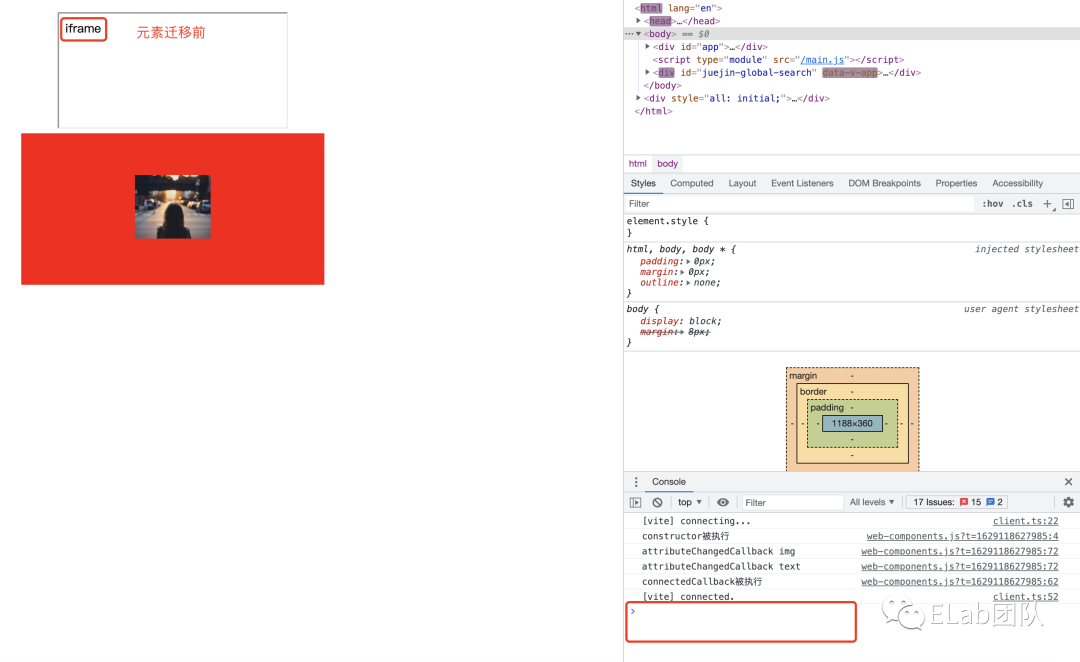
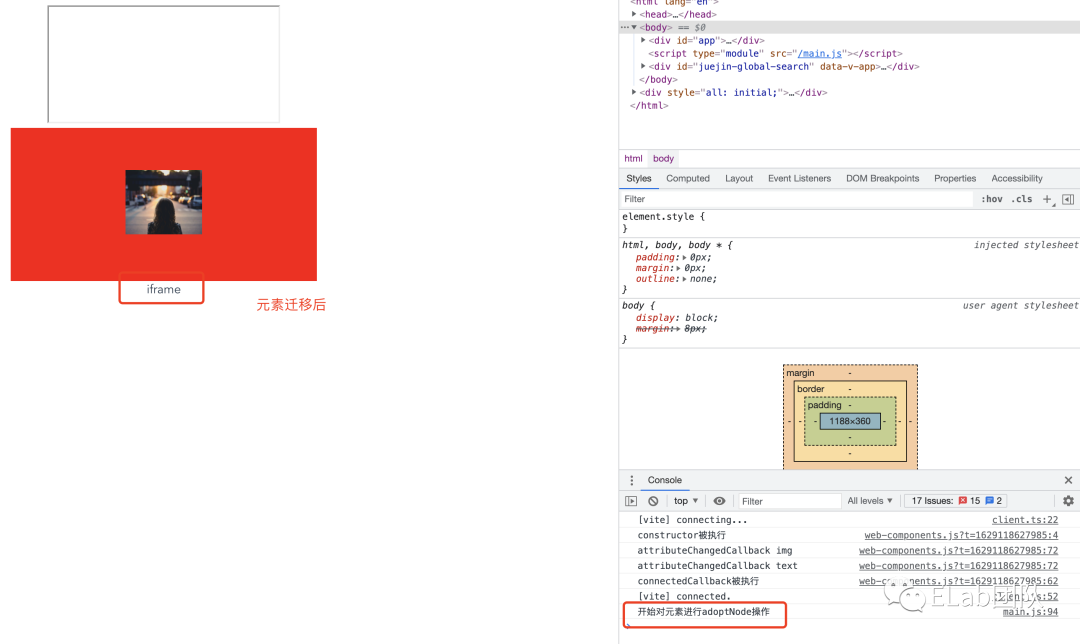 該回調(diào)函數(shù)并不常用,了解即可。
disconnectedCallback
自定義組件的最后一個生命周期,觸發(fā)的時機(jī)在組件被成功從主文檔移除時。
class CustomEle extends HTMLElement {
  constructor() {
    super();
    ......
  }
  disconnectedCallback () {
    console.log('disconnectedCallback被執(zhí)行');
  }
}

customElements.define('custom-ele', CustomEle);
const customEle = document.createElement('custom-ele');
document.querySelector('#app').appendChild(customEle);
setTimeout(() => {
  appNode.removeChild(customEle);
}, 2000)
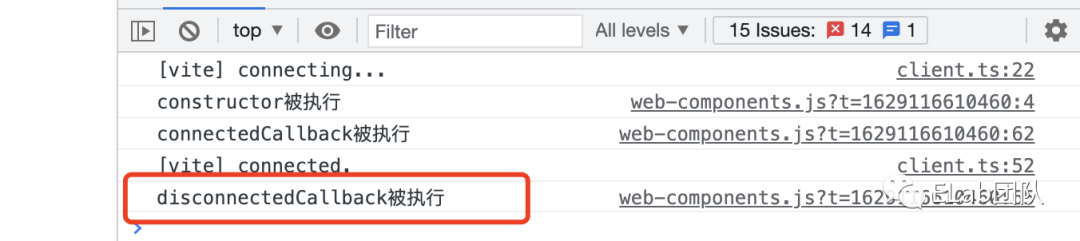 注意:瀏覽器關(guān)閉或tabs關(guān)閉,不會觸發(fā)disconnectedCallback。
Shadow DOM的使用
其作用是將標(biāo)記結(jié)構(gòu)、樣式和行為隱藏起來,并與頁面上的其他代碼相隔離。Shadow DOM 都不是一個新事物,在過去的很長一段時間里,瀏覽器用它來封裝一些元素的內(nèi)部結(jié)構(gòu),回憶一下video標(biāo)簽內(nèi)部被隱藏起來的控制按鈕們。
為元素附加Shadow DOM:ele.attachShadow
attachShadow接受一個對象參數(shù),只需關(guān)注一個配置屬性mode,如果設(shè)置為open,表示可以從外部獲取Shadow DOM內(nèi)部的元素;如果設(shè)置為closed,則表示隱藏Shadow DOM內(nèi)部,例如<video>。
class CustomEle extends HTMLElement {
  constructor() {
    super();
    const shadow = this.attachShadow({ mode: 'open' });
    ......
  }
}
customElements.define('custom-ele', CustomEle);
const customEle = document.createElement('custom-ele');
document.querySelector('#app').appendChild(customEle);
console.log(customEle.shadowRoot)

 若mode設(shè)置為closed:

操作元素的Shadow DOM并添加樣式
當(dāng)為一個元素附加了Shadow DOM后,就可以使用同操作正常dom一樣的方法去操作了。示例如下:
class CustomEle extends HTMLElement {
  constructor() {
    super();
    const shadow = this.attachShadow({ mode: 'open' });

    const wrapper = document.createElement('span');
    wrapper.setAttribute('class', 'wrapper');

    const icon = document.createElement('span');
    icon.setAttribute('class', 'icon');

    const info = document.createElement('span');
    info.setAttribute('class', 'info');

    const text = this.getAttribute('text');
    info.textContent = text;

    const img = document.createElement('img');
    img.src = this.getAttribute('img');
    icon.appendChild(img);

    const style = document.createElement('style');
    // console.log('CustomEle', style.isConnected);
    style.textContent = `
      .wrapper {
        position: relative;
      }
      .info {
        font-size: 0.8rem;
        width: 200px;
        display: inline-block;
        border: 1px solid black;
        padding: 10px;
        background: white;
        border-radius: 10px;
        opacity: 0;
        transition: 0.6s all;
        position: absolute;
        bottom: 20px;
        left: 10px;
        z-index: 3;
      }
      img {
        width: 1.2rem;
      }
      .icon:hover + .info, .icon:focus + .info {
        opacity: 1;
      }
    `;
    shadow.appendChild(style);
    // console.log('CustomEle', style.isConnected);

    shadow.appendChild(wrapper);
    wrapper.appendChild(icon);
    wrapper.appendChild(info);
  }
}
const customEle = document.createElement('custom-ele');
customEle.setAttribute('img', 'https://gimg2.baidu.com/image_search/src=http%3A%2F%2Fcdn.duitang.com%2Fuploads%2Fitem%2F201409%2F06%2F20140906020558_h4VfY.png');
customEle.setAttribute('text', '我是一段懸停說明');
customElements.define('custom-ele', CustomEle);
document.querySelector('#app').appendChild(customEle);
 如果想添加樣式表,則可以把上述代碼中的代碼:
const style = document.createElement('style');
    // console.log('CustomEle', style.isConnected);
    style.textContent = `
      .wrapper {
        position: relative;
      }
      .info {
        font-size: 0.8rem;
        width: 200px;
        display: inline-block;
        border: 1px solid black;
        padding: 10px;
        background: white;
        border-radius: 10px;
        opacity: 0;
        transition: 0.6s all;
        position: absolute;
        bottom: 20px;
        left: 10px;
        z-index: 3;
      }
      img {
        width: 1.2rem;
      }
      .icon:hover + .info, .icon:focus + .info {
        opacity: 1;
      }
    `;
    shadow.appendChild(style);
替換為:
const linkElem = document.createElement('link');
linkElem.setAttribute('rel', 'stylesheet');
linkElem.setAttribute('href', 'style.css');//樣式的地址

shadow.appendChild(linkElem);
需要注意的是:由于link元素不會打斷 shadow root 的繪制, 因此在加載樣式表時可能會出現(xiàn)未添加樣式內(nèi)容(FOUC),導(dǎo)致閃爍。
模版
template
使用包裹的內(nèi)容不會在頁面上顯示,但是卻可以被js引用到。這就意味著有些內(nèi)容我們不用重復(fù)構(gòu)建多遍,使用<template></template>構(gòu)建一遍,然后多次引用處理就好了。
class CustomEle extends HTMLElement {
  constructor() {
    super();
    console.log('constructor被執(zhí)行');
    const shadow = this.attachShadow({ mode: 'open' });

    let template = document.getElementById('my-paragraph');
    if (template) {
      let templateContent = template.content;
      shadow.appendChild(templateContent.cloneNode(true));
    }
    ......
  }
}
appNode.innerHTML = '<template id="my-paragraph"><style>p {color: white;background-color: #666;padding: 5px;}</style><p>My paragraph</p></template>';
const customEle = document.createElement('custom-ele');
customEle.setAttribute('img', 'https://gimg2.baidu.com/image_search/src=http%3A%2F%2Fcdn.duitang.com%2Fuploads%2Fitem%2F201409%2F06%2F20140906020558_h4VfY.png');
customEle.setAttribute('text', '我是一段懸停說明');
customElements.define('custom-ele', CustomEle);
appNode.appendChild(customEle);
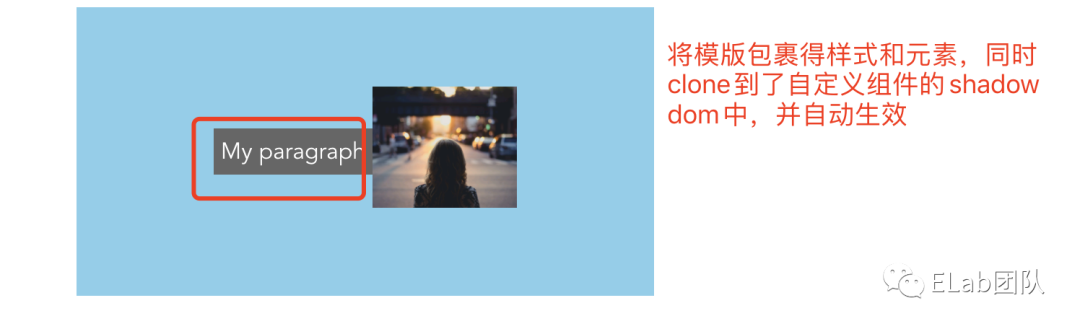
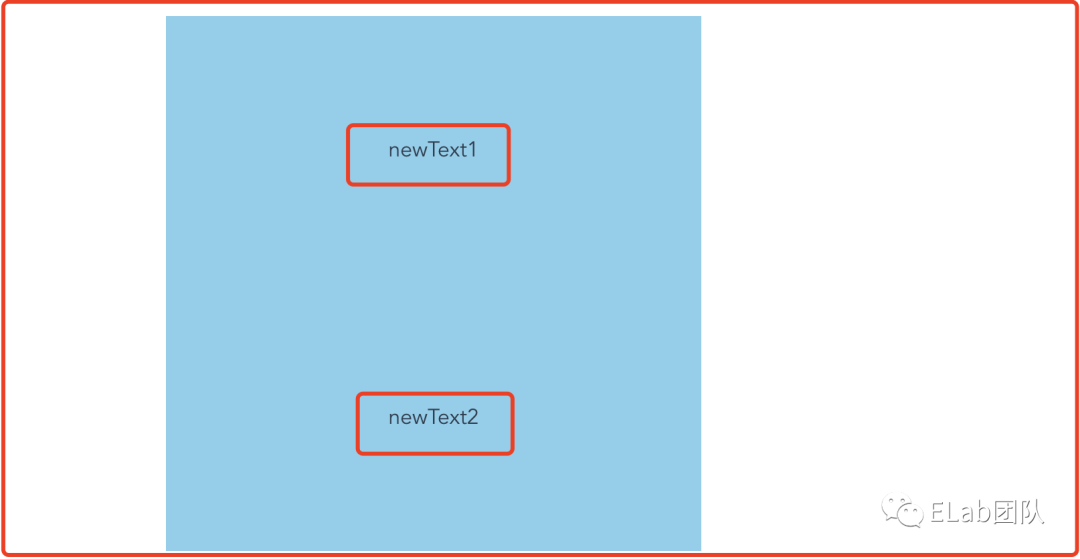
slot 在template的基礎(chǔ)上,更加靈活的內(nèi)容分發(fā),可以配合template使用(在template中定義占位符,然后將template的內(nèi)容clone到shadow DOM中)。也可以直接在shadow DOM中添加占位符。
然后在自定義組件的innerhtml中使用即可。
class CustomEle extends HTMLElement {
  constructor() {
    super();
    console.log('constructor被執(zhí)行');
    const shadow = this.attachShadow({ mode: 'open' });

    let template = document.getElementById('my-paragraph');
    if (template) {
      let templateContent = template.content;
      shadow.appendChild(templateContent.cloneNode(true));
    }
    const slot2 = document.createElement('slot');
    slot2.setAttribute('name', 'newText2');
    shadow.appendChild(slot2);
    ......
  }
}
appNode.innerHTML = '<template id="my-paragraph"><style>p {color: white;background-color: #666;padding: 5px;}</style><slot name="newText1"></slot></template><custom-ele><p slot="newText1">newText1</p></custom-ele>';
const customEle = document.createElement('custom-ele');
customEle.innerHTML = '<p slot="newText2">newText2</p>';
customElements.define('custom-ele', CustomEle);
appNode.appendChild(customEle);
slotchange:用于監(jiān)聽shadow DOM中的slot插入或移除的事件。
class CustomEle extends HTMLElement {
  constructor() {
    super();
    let template = document.getElementById('my-paragraph');
    if (template) {
      let templateContent = template.content;
      shadow.appendChild(templateContent.cloneNode(true));
    }
    const slots = shadow.querySelectorAll('slot');
    slots.forEach(slot => {
      slot.addEventListener('slotchange', function (e) {
        console.log('slotchange', slot.name, e);
      });
    });
    ......
  }
}

appNode.innerHTML = '<template id="my-paragraph">' +
  '<style>p {color: white;background-color: #666;padding: 5px;}</style>' +
  '<slot name="newText1"></slot>' +
  '<slot name="spanText"></slot>' +
  '</template>' +
  '<h3>' +
  '<custom-ele class="newText1Box">' +
  '<p slot="newText1">newText1</p>' +
  '<span slot="spanText">spanText</span>' +
  '</custom-ele>' +
  '</h3>';
setTimeout(() => {
  document.querySelector('.newText1Box').removeChild(document.querySelector('.newText1Box p'));
  //或
  document.querySelector('.newText1Box p').removeAttribute('slot');
}, 2000)
在添加slot時(直接插入包含slot屬性的元素或給已插入的元素增加slot屬性)或刪除slot時(直接remove包含slot屬性的元素或給已插入的元素removeAttribute slot屬性),都會觸發(fā)slotchange事件。
相關(guān)的其他api
element.attachShadow(opt):用來給指定元素掛載shadow DOM。
opt的配置項(xiàng):
mode:如果為open,表示可以在外部通過element.shadowRoot獲取shadow DOM節(jié)點(diǎn)。并且方法會返回shadow DOM對象。如果為closed,表示不允許外部訪問shadow DOM節(jié)點(diǎn),并且方法返回null。 delegatesFocus:表示是否減輕自定義元素的聚焦性能問題。當(dāng)shadow DOM中不可聚焦的部分被點(diǎn)擊時, 讓第一個可聚焦的部分成為焦點(diǎn), 并且shadow host將提供所有可用的 :focus 樣式. css偽類: :defined:表示所有內(nèi)置元素及已經(jīng)通過customElements.define注冊的元素。 :host:只能在shadow DOM的樣式表內(nèi)書寫。表示當(dāng)前所在的自定義組件的所有實(shí)例及shadow DOM下所有的元素。 :host([選擇器]):只能在shadow DOM的樣式表內(nèi)書寫。是:host的增強(qiáng),表示:host()所在的自定義組件的所有實(shí)例中選擇器符合括號中名稱的實(shí)例及其包含的shadow DOM下屬所有元素。 :host-context([選擇器]):只能在shadow DOM的樣式表內(nèi)書寫。是:host的增強(qiáng),表示:host()-context所在的自定義組件的所有實(shí)例的父元素中選擇器符合括號中名稱的實(shí)例及其包含的shadow DOM下屬所有元素。 :slotted([選擇器]):只能在shadow DOM的樣式表內(nèi)書寫。表示: slotted()所在的自定義組件的所有實(shí)例中選擇器符合括號中名稱的slot元素,若選擇器為*,則表示命中所有slot。 節(jié)點(diǎn)相關(guān)拓展 getRootNode:使用方式為ele. getRootNode(opt),opt中包含一個屬性composed,為true時,檢索到的根元素為document;為false時,如果ele是屬于shadow DOM,那么檢索到shadow DOM,否則檢索到document。 isConnected:是元素的一個只讀屬性接口。返回元素是否與dom樹連接的boolean值。即是否被append到主文檔中。 event擴(kuò)展 composed屬性:用來指示該事件是否可以從 Shadow DOM 傳遞到一般的 DOM(測試后發(fā)現(xiàn)不論是普通DOM還是shadow DOM均為true)。 path屬性:返回事件的路徑。如果shadow root是使用mode為closed創(chuàng)建的,則不包括shadow樹中的節(jié)點(diǎn)(測試后發(fā)現(xiàn)盡管shadowdom設(shè)置了mode為closed,依然能獲取完整的path)。 關(guān)于slot ele.assignedSlot:用來獲取ele元素上代表插入slot的元素。但如果ele.attachShadow中的mode是closed為closed時,返回null。 ele.slot:用來獲取元素上slot的name值。 ......
相關(guān)的庫及網(wǎng)站
webcomponents.org — site featuring web components examples, tutorials, and other information. Hybrids — Open source web components library, which favors plain objects and pure functions over class and this syntax. It provides a simple and functional API for creating custom elements. Polymer — Google's web components framework — a set of polyfills, enhancements, and examples. Currently the easiest way to use web components cross-browser. Snuggsi.es — Easy Web Components in ~1kB Including polyfill — All you need is a browser and basic understanding of HTML, CSS, and JavaScript classes to be productive. Slim.js — Open source web components library — a high-performant library for rapid and easy component authoring; extensible and pluggable and cross-framework compatible. Smart.js — Web Components library with simple API for creating cross-browser custom elements. Stencil — Toolchain for building reusable, scalable design systems in web components.
參考
https://developer.mozilla.org/zh-CN/docs/Web/Web_Components
https://medium.com/jspoint/the-anatomy-of-web-components-d6afedb81b37
https://www.ruanyifeng.com/blog/2019/08/web_components.html
https://html.spec.whatwg.org/multipage/custom-elements.html#custom-elements
https://developers.google.cn/web/fundamentals/web-components
https://objectpartners.com/2015/11/19/comparing-react-js-performance-vs-native-dom/
https://bugs.webkit.org/show_bug.cgi?id=182671