
用Python輕松開發(fā)數(shù)據(jù)庫取數(shù)下載工具
?本文示例代碼已上傳至我的
?Github倉庫https://github.com/CNFeffery/DataScienceStudyNotes
1 簡介
這是我的系列教程「Python+Dash快速web應(yīng)用開發(fā)」的第十四期,在前兩期中,我們針對dash_table的自定義樣式、前后端分頁、單元格內(nèi)容編輯等特點展開了介紹。
而在dash_table中還有很多高級特性,可以極大程度上豐富DataTable()所渲染網(wǎng)頁表格的交互能力,今天的文章作為「交互表格篇」的下篇,我們就來一起學(xué)習(xí)其中比較實用的一些特性。

2 dash_table的更多實用功能
2.1 更多表格交互特性
上一期文章最后我們學(xué)習(xí)了通過設(shè)置參數(shù)editable=True,使得渲染出的表格可以通過鼠標(biāo)雙擊進(jìn)行編輯,而dash_table除此之外,還有更多實用的交互能力:
2.1.1 按列排序
「普通單列排序」
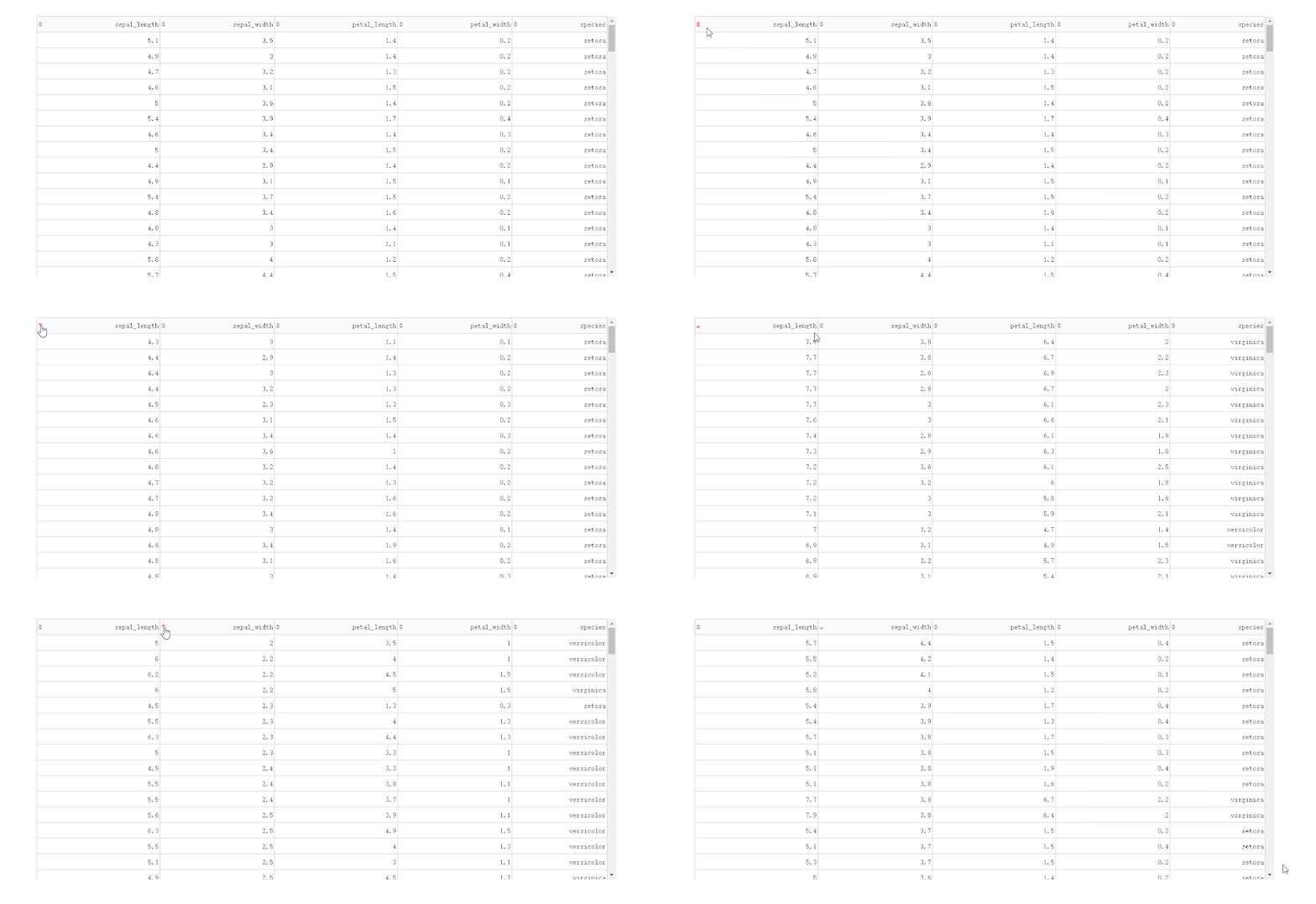
在DataTable()中,我們只需要設(shè)置參數(shù)sort_action='native',即可開啟列排序功能,此時每一列列名單元格內(nèi)都會出現(xiàn)部件供我們點擊切換排序方式:
?app1.py
?
import dash
import dash_table
import dash_bootstrap_components as dbc

import seaborn as sns

df = sns.load_dataset('iris')

app = dash.Dash(__name__)

app.layout = dbc.Container(
    [
        dash_table.DataTable(
            data=df.to_dict('records'),
            columns=[
                {'name': column, 'id': column}
                for column in df.columns
            ],
            style_table={
                'height': '500px',
                'overflow-y': 'auto'
            },
            sort_action='native'
        )
    ],
    style={
        'margin-top': '50px'
    }
)

if __name__ == '__main__':
    app.run_server(debug=True)
「基于后端排序的多列排序」
在DataTable()中設(shè)置sort_action='native'時,對應(yīng)的是「按列排序」的前端模式,也即是數(shù)據(jù)一次性灌注到瀏覽器的前提下進(jìn)行排序,這種方式不僅不適合大型數(shù)據(jù)集,而且只支持「單列排序」。
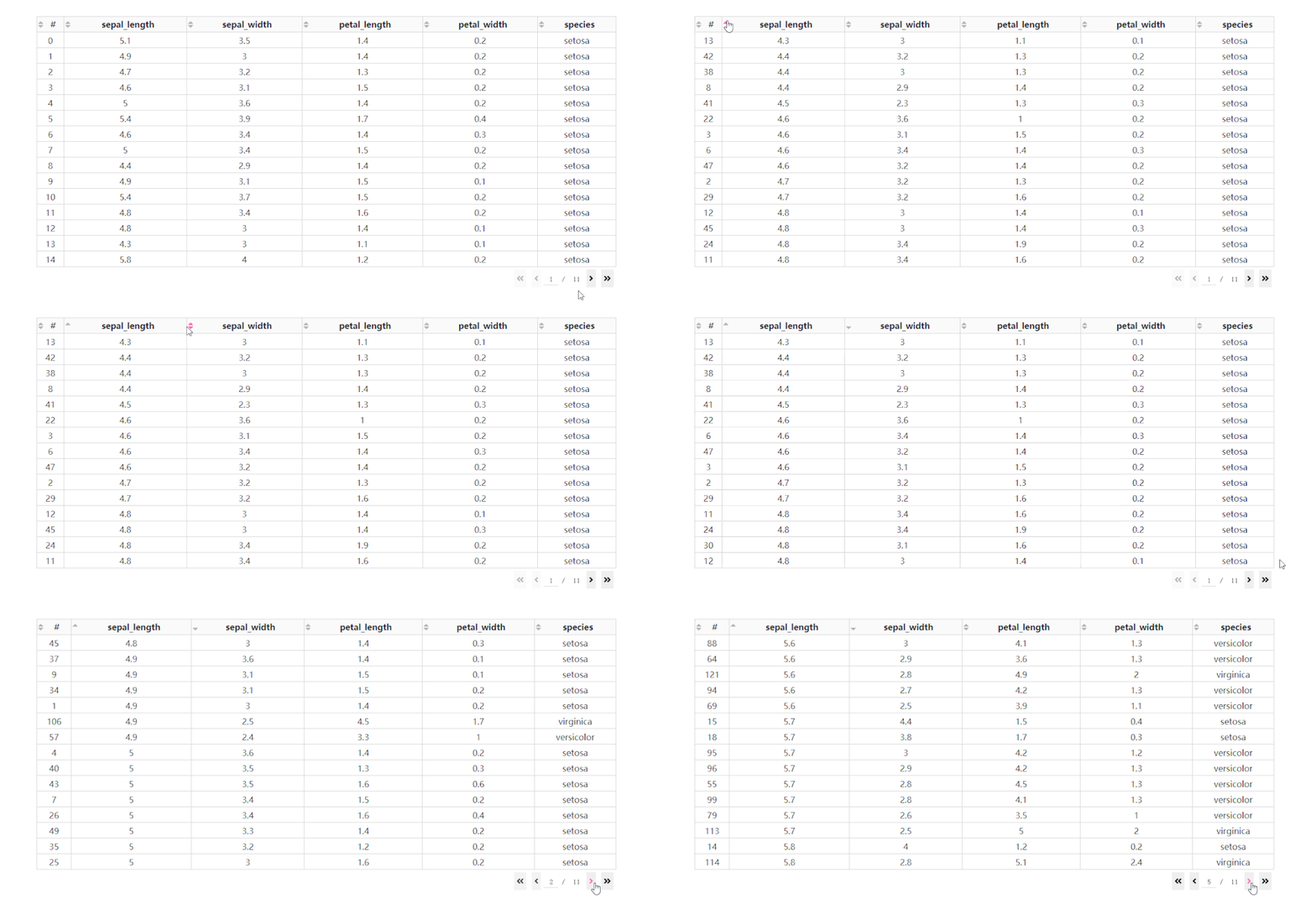
而當(dāng)數(shù)據(jù)渲染方式為后端模式時,我們通過設(shè)置參數(shù)sort_action='custom'以及sort_mode='multi',配合在回調(diào)中獲取屬性sort_by中記錄的參與排序的列名及升序降序方式,就可以實現(xiàn)多列排序。
我們在上一期的app2.py的基礎(chǔ)上修改得到下面的例子:
?app2.py
?
import dash
import dash_bootstrap_components as dbc
import dash_table
from dash.dependencies import Input, Output

import seaborn as sns

df = sns.load_dataset('iris')
df.insert(0, '#', df.index)

app = dash.Dash(__name__)

app.layout = dbc.Container(
    [
        dbc.Spinner(
            dash_table.DataTable(
                id='dash-table',
                columns=[
                    {'name': column, 'id': column}
                    for column in df.columns
                ],
                page_size=15,  # 設(shè)置單頁顯示15行記錄行數(shù)
                page_action='custom',
                page_current=0,
                style_header={
                    'font-family': 'Times New Romer',
                    'font-weight': 'bold',
                    'text-align': 'center'
                },
                style_data={
                    'font-family': 'Times New Romer',
                    'text-align': 'center'
                },
                sort_action='custom',
                sort_mode='multi'
            )
        )
    ],
    style={
        'margin-top': '50px'
    }
)


@app.callback(
    [Output('dash-table', 'data'),
     Output('dash-table', 'page_count')],
    [Input('dash-table', 'page_current'),
     Input('dash-table', 'page_size'),
     Input('dash-table', 'sort_by')]
)
def refresh_page_data(page_current, page_size, sort_by):

    if sort_by:
        return (
            df
            .sort_values(
                [col['column_id'] for col in sort_by],
                ascending=[
                    col['direction'] == 'asc'
                    for col in sort_by
                ]
            )
            .iloc[page_current * page_size:(page_current + 1) * page_size]
            .to_dict('records'),
            1 + df.shape[0] // page_size
        )

    return (
        df.iloc[page_current * page_size:(page_current + 1) * page_size].to_dict('records'),
        1 + df.shape[0] // page_size
    )


if __name__ == '__main__':
    app.run_server(debug=True)
2.1.2 按列條件篩選
除了基于指定字段進(jìn)行排序之外,dash_table還支持列的條件篩選,設(shè)置filter_action="native",就可以開啟基礎(chǔ)的按列條件篩選功能,此時每一列表頭下都會多出供用戶輸入篩選條件的單元格:
?app3.py
?
import dash
import dash_table
import dash_bootstrap_components as dbc

import seaborn as sns

df = sns.load_dataset('iris')

app = dash.Dash(__name__)

app.layout = dbc.Container(
    [
        dash_table.DataTable(
            data=df.to_dict('records'),
            columns=[
                {'name': column, 'id': column}
                for column in df.columns
            ],
            # 自定義條件篩選單元格樣式
            style_filter={
                'font-family': 'Times New Romer',
                'background-color': '#e3f2fd'
            },
            style_table={
                'height': '500px',
                'overflow-y': 'auto'
            },
            style_header={
                'font-family': 'Times New Romer',
                'font-weight': 'bold',
                'text-align': 'center'
            },
            style_data={
                'font-family': 'Times New Romer',
                'text-align': 'center'
            },
            filter_action="native"
        )
    ],
    style={
        'margin-top': '50px'
    }
)

if __name__ == '__main__':
    app.run_server(debug=True)
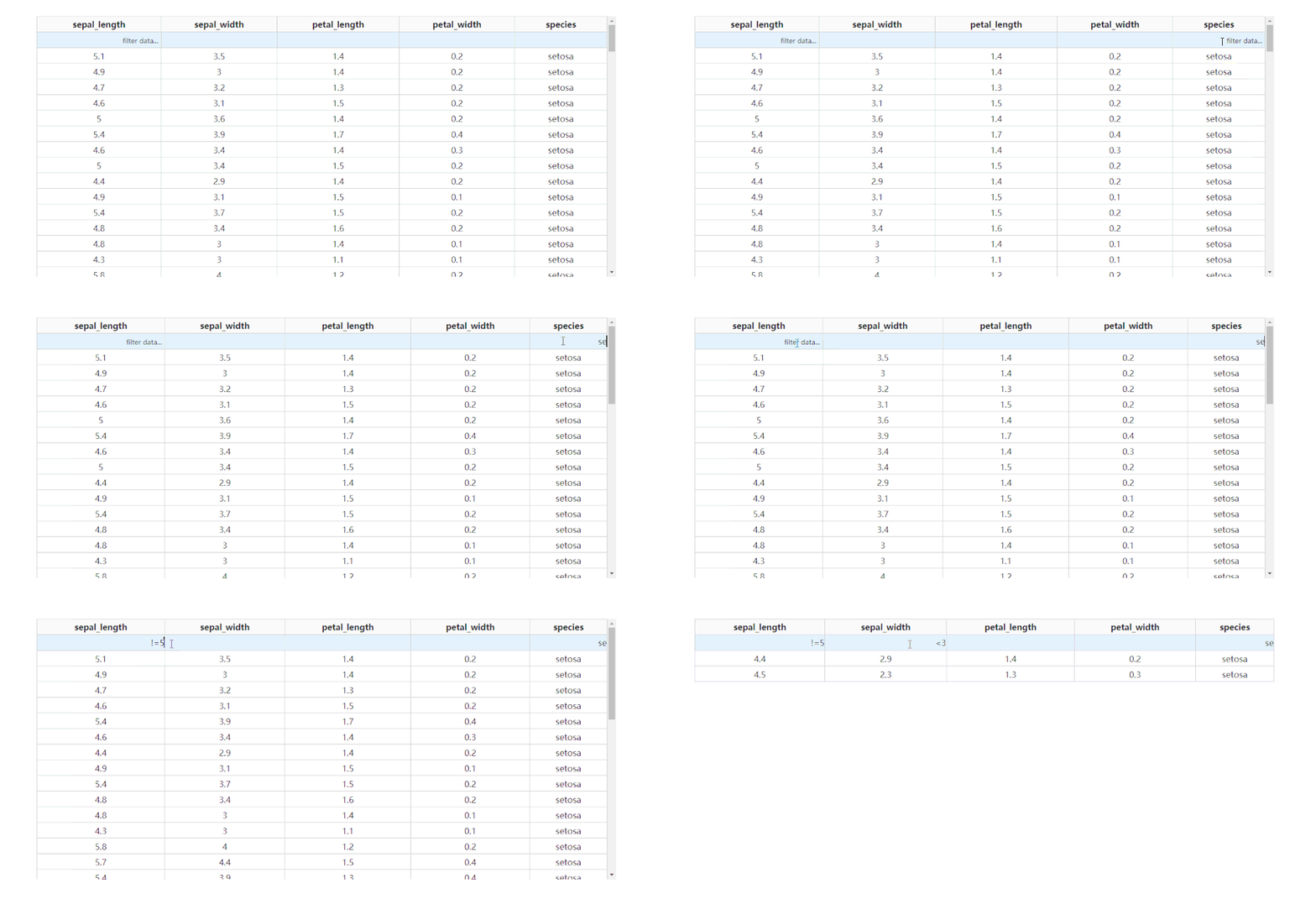
而dash_table中自帶的條件篩選語法很豐富,有條件的朋友可以前往https://dash.plotly.com/datatable/filtering了解更多。
而dash_table同樣可以實現(xiàn)后端篩選,和前面的后端排序類似,主要利用filter_query屬性的回調(diào)變化在后臺基于pandas等框架進(jìn)行數(shù)據(jù)篩選,比較簡單,這里就不再贅述。
2.2 自帶的數(shù)據(jù)表格下載功能
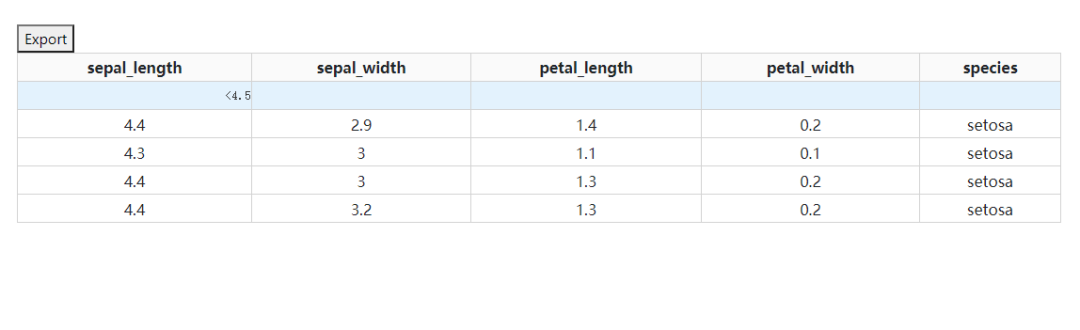
dash_table還自帶了將當(dāng)前所渲染的表格內(nèi)容直接下載為csv或xlsx格式文件的簡易功能,通過參數(shù)export_format設(shè)置導(dǎo)出的文件格式,但自帶的下載按鈕樣式比較丑,如果你對此有比較高的要求,還是建議結(jié)合之前的「上傳下載篇」自己設(shè)計相關(guān)功能:
2.3 凍結(jié)首行
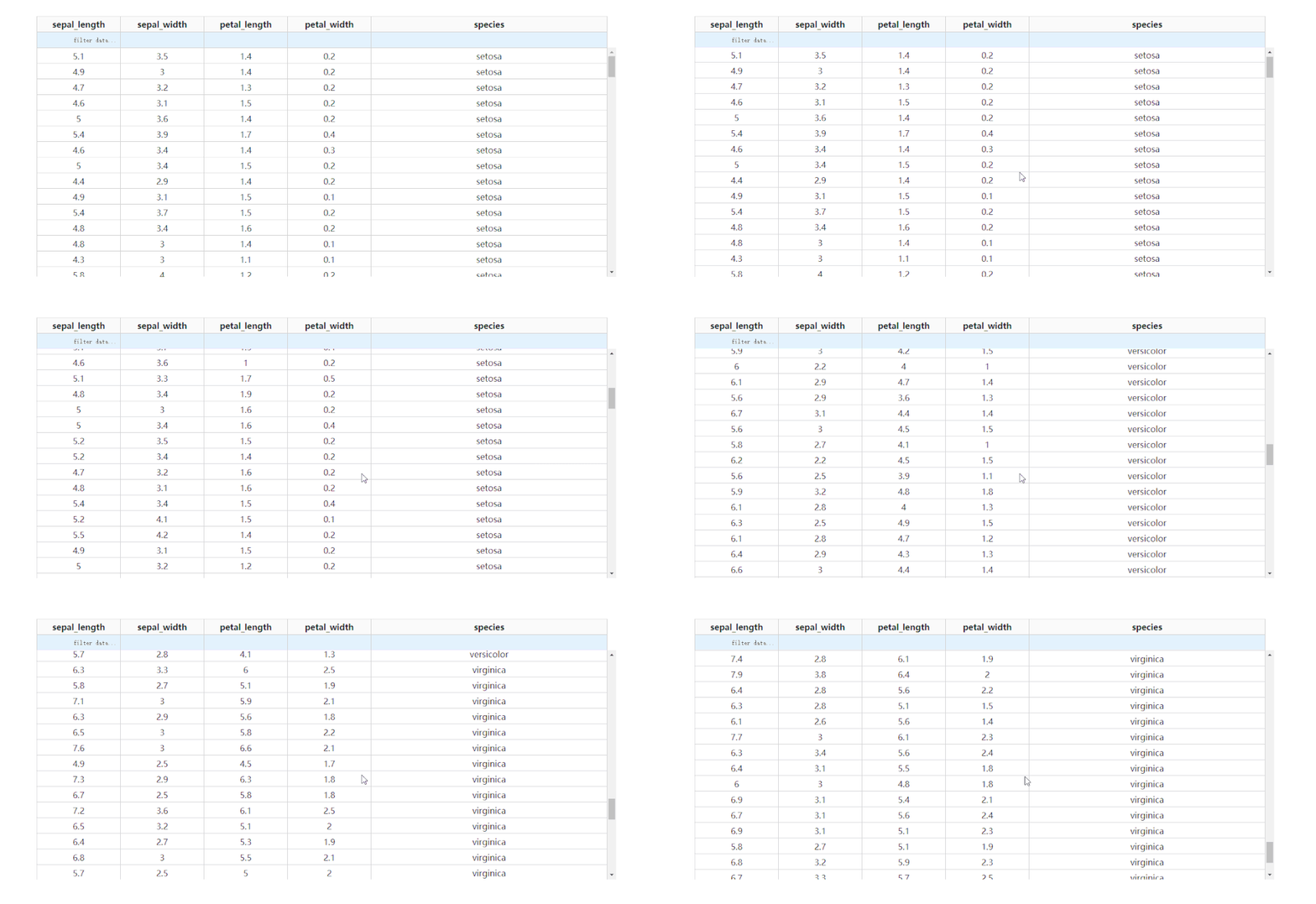
通過設(shè)置參數(shù)fixed_rows={'headers': True},我們可以實現(xiàn)下滑查看表格的過程中,始終保持表頭被凍結(jié):
3 開發(fā)一個在線取數(shù)工具
在學(xué)習(xí)完今天的內(nèi)容之后,我們來結(jié)合之前「上傳下載篇」中提到的下載功能,來制作一個簡單的對指定數(shù)據(jù)庫中的數(shù)據(jù)表進(jìn)行快速條件篩選并下載的工具,其中DataTable的derived_virtual_data屬性記錄了經(jīng)過排序、條件篩選等操作后當(dāng)前顯示的表格數(shù)據(jù):

?app4.py
?
import dash
import dash_bootstrap_components as dbc
import dash_core_components as dcc
import dash_html_components as html
import dash_table
from dash.dependencies import Input, Output

from flask import send_from_directory

import os
import uuid
from sqlalchemy import create_engine
import pandas as pd

try:
    os.mkdir("downloads")
except FileExistsError:
    pass

engine = create_engine('mysql+pymysql://root:mysql@localhost/DASH')

app = dash.Dash(__name__)


@app.server.route('/download/<file>')
def download(file):
    return send_from_directory('downloads', file)


app.layout = dbc.Container(
    [
        dbc.Row(
            [
                dbc.Col(dbc.Button('更新數(shù)據(jù)表', id='refresh-tables', style={'width': '100%'}), width=2),
                dbc.Col(dcc.Dropdown(id='table-select', style={'width': '100%'}), width=2)
            ]
        ),
        html.Hr(),
        dash_table.DataTable(
            id='dash-table',
            editable=True,
            page_size=15,
            style_header={
                'font-family': 'Times New Romer',
                'font-weight': 'bold',
                'text-align': 'center'
            },
            style_data={
                'font-family': 'Times New Romer',
                'text-align': 'center'
            },
            style_data_conditional=[
                {
                    # 對選中狀態(tài)下的單元格進(jìn)行自定義樣式
                    "if": {"state": "selected"},
                    "background-color": "#b3e5fc",
                    "border": "none"
                },
            ],
            filter_action="native"
        ),
        html.Br(),
        html.A(id='download-url', target="_blank")
    ],
    style={
        'margin-top': '50px'
    }
)


@app.callback(
    Output('table-select', 'options'),
    Input('refresh-tables', 'n_clicks')
)
def refresh_tables(n_clicks):
    if n_clicks:
        return [
            {
                'label': table,
                'value': table
            }
            for table in pd.read_sql_query('SHOW TABLES', con=engine)['Tables_in_dash']
        ]

    return dash.no_update


@app.callback(
    [Output('dash-table', 'data'),
     Output('dash-table', 'columns')],
    Input('table-select', 'value')
)
def render_dash_table(value):
    if value:
        df = pd.read_sql_table(value, con=engine)

        return df.to_dict('records'), [
            {'name': column, 'id': column}
            for column in df.columns
        ]

    else:
        return [], []


@app.callback(
    [Output("download-url", "href"),
     Output("download-url", "children")],
    [Input("dash-table", "derived_virtual_data"),
     Input("dash-table", "filter_query")],
    prevent_initial_call=True
)
def download_table(derived_virtual_data, filter_query):
    if derived_virtual_data:
        print(derived_virtual_data)

        filename = f"output_{uuid.uuid1()}.xlsx"

        pd.DataFrame(derived_virtual_data).to_excel("downloads/" + filename, index=False)

        return "/download/" + filename, "下載當(dāng)前狀態(tài)表格"

    return "", ""


if __name__ == '__main__':
    app.run_server(debug=True)
以上就是本文的全部內(nèi)容,歡迎在評論區(qū)發(fā)表你的意見與觀點。
推薦閱讀