
小程序canvas寫一個(gè)簡單的圖片應(yīng)用
很早就想寫一個(gè)移動端圖片小應(yīng)用了,最近剛好休業(yè)在家,于是抽出時(shí)間實(shí)現(xiàn)下自己的小想法。
應(yīng)用展示
截圖
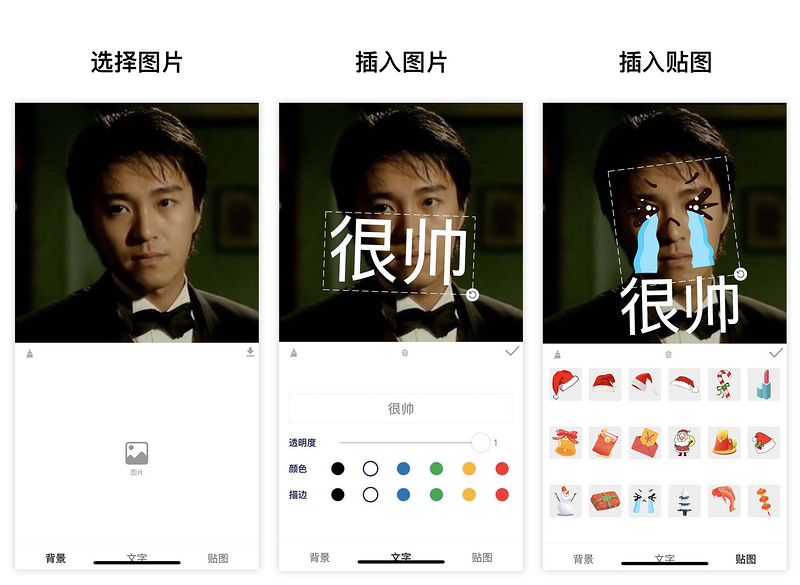
在線預(yù)覽

需求
既然是小應(yīng)用,那就希望最終成品是有?適用的場景?且是?有價(jià)值?的
需求來源
在以前工作生活中,經(jīng)常會無意中獲得同事的?美照,這時(shí)我們想要把這張照片做成表情包,一般給圖片添加幾個(gè)說明文字,一個(gè)有意思的溝通工具(表情包)就完成了。
需求分析
基于以上需求的拆解
可以將要應(yīng)用功能實(shí)現(xiàn)整理一下
用戶需要上傳一張圖片 可以添加文字 文字可以作?樣式調(diào)整?和?旋轉(zhuǎn)縮放 另外我們希望還可以插入一些貼圖 貼圖可以做?旋轉(zhuǎn)縮放 用戶導(dǎo)出圖片到相冊
實(shí)現(xiàn)
使用框架:mpx 使用技術(shù):小程序canvas
狀態(tài)管理
import?{?createStore?}?from?'@mpxjs/core'

const?store?=?createStore({
??state:?{
????cavas:?null,?????????//?cnavas實(shí)例
????ctx:?null,???????????//?canvas上下文實(shí)例
????elements:?[],????????//?canvas元素
????activeIndex:?null,???//?當(dāng)前編輯中的元素索引
????mode:?'background', ?//?當(dāng)前編輯模式:background, text, sticker
????fontStyle:?{?????????//?文字默認(rèn)樣式
??????opacity:?1,
??????fillStyle:?'#000000',
??????strokeStyle:?'#000000'
????}
??},
??mutations:?{
????setCanvas?(state,?data)?{
??????state.canvas?=?data
????},
????setCtx?(state,?data)?{
??????state.ctx?=?data
????},
????setElements?(state,?data)?{
??????state.elements?=?data
????},
????setMode?(state,?data)?{
??????state.mode?=?data
????},
????setActiveIndex?(state,?data)?{
??????state.activeIndex?=?data
????},
????setFontStyle?(state,?{?key,?data?})?{
??????state.fontStyle[key]?=?data
????},
????//?添加文字
????addText?(state)?{
??????const?size?=?50
??????const?string?=?'請輸入文字'
??????const?text?=?{
????????type:?'text',
????????data:?string,
????????scale:?1,
????????size,
????????left:?100,
????????top:?100,
????????rotate:?0,
????????opacity:?state.fontStyle.opacity,
????????fillStyle:?state.fontStyle.fillStyle,
????????strokeStyle:?state.fontStyle.strokeStyle
??????}
??????state.elements.push(text)
??????state.activeIndex?=?state.elements.length?-?1
????},
????//?添加貼圖
????addSticker?(state,?data)?{
??????state.elements.push(data)
??????state.activeIndex?=?state.elements.length?-?1
????},
????//?刪除當(dāng)前選中
????deleteActiveELement?(state)?{
??????state.elements.splice(state.activeIndex,?1)
??????state.activeIndex?=?null
????},
????//?清空畫布
????clear?(state)?{
??????state.elements?=?[]
??????state.activeIndex?=?null
????}
??}
})

export?default?store
畫布初始化
//?初始化畫布
async?initCanvas()?{
??const?query?=?this.createSelectorQuery()
??query
????.select('#canvas')
????.fields({?node:?true,?size:?true?})
????.exec(async?res?=>?{
??????const?canvas?=?res[0].node
??????const?ctx?=?canvas.getContext('2d')
??????store.commit('setCanvas',?canvas)
??????store.commit('setCtx',?ctx)

??????await?this.loadImage('/images/icon-rotate.png').then(res?=>?{
????????this.image.rotate?=?res
??????})

??????canvas.width?=?res[0].width?*?this.dpr
??????canvas.height?=?res[0].height?*?this.dpr
??????ctx.scale(this.dpr,?this.dpr)
??????this.drawGrid()
????})
}
繪制圖片
/**
?*?繪制圖片
?*?@param?{?Object?}?ele?canvas元素
?*/
drawImage(ele)?{
??this.ctx.save()
??const?width?=?ele.width
??const?height?=?ele.height
??const?centerX?=?ele.left?+?ele.width?/?2
??const?centerY?=?ele.top?+?ele.height?/?2
??this.ctx.translate(centerX,?centerY)
??this.ctx.rotate(ele.rotate)
??this.ctx.drawImage(ele.data,?ele.left?-?centerX,?ele.top?-?centerY,?width,?height)
??this.ctx.restore()
}
繪制文字
/**
?*?繪制文字
?*?@param?{?Object?}?ele?canvas元素
?*/
drawText(ele)?{
??this.ctx.save()
??const?width?=?ele.size?*?ele.data.length
??const?height?=?ele.size
??const?centerX?=?ele.left?+?width?/?2
??const?centerY?=?ele.top?+?height?/?2
??this.ctx.translate(centerX,?centerY)
??this.ctx.rotate(ele.rotate)
??this.ctx.font?=?`${ele.size}px?bold?sans-serif`
??this.ctx.globalAlpha?=?ele.opacity
??this.ctx.fillStyle?=?ele.fillStyle
??this.ctx.strokeStyle?=?ele.strokeStyle
??//?this.ctx.lineWidth?=?2
??this.ctx.textBaseline?=?'top'
??console.log('draw-text',?ele)
??this.ctx.fillText(ele.data,?ele.left?-?centerX,?ele.top?-?centerY)
??this.ctx.strokeText(ele.data,?ele.left?-?centerX,?ele.top?-?centerY)
??this.ctx.restore()
}
繪制控制元件
initController(ele)?{
??const?cs?=?this.convert2ControllerSize(ele)
??this.ctx.save()
??this.ctx.strokeStyle?=?'#eee'
??this.ctx.translate(cs.centerX,?cs.centerY)
??this.ctx.rotate(cs.rotate)
??//?繪制虛線邊框
??this.ctx.setLineDash([10,?5],?5)
??this.ctx.strokeRect(cs.left?-?cs.centerX,?cs.top?-?cs.centerY,?cs.width,?cs.height)
??//?繪制控制點(diǎn)-旋轉(zhuǎn)
??this.ctx.drawImage(this.image.rotate,?cs.left?+?cs.width?-?10?-?cs.centerX,?cs.top?+?cs.height?-?10?-?cs.centerY,?20,?20)
??this.ctx.restore()
}
畫布渲染函數(shù)
//?畫布渲染函數(shù)
renderCanvas()?{
??this.ctx.clearRect(0,?0,?this.ctx.canvas.width,?this.ctx.canvas.height)
??this.drawGrid()
??console.log('draw-background',?this.background)
??if?(this.background)?this.drawImage(this.background)
??for?(let?i?=?0;?i?????const?ele?=?this.elements[i]
????//?渲染背景
????if?(ele.type?===?'background')?{
??????this.drawImage(ele)
????}
????if?(ele.type?===?'sticker')?{
??????this.drawImage(ele)
????}
????//?渲染文字
????if?(ele.type?===?'text')?{
??????this.drawText(ele)
????}
????//?選中元素添加控制元件
????if?(this.activeIndex?===?i)?{
??????this.initController(ele)
????}
??}
}
事件監(jiān)聽
移動
//?移動事件綁定函數(shù)
handleMove(e)?{
??console.log('mouse-move',?e)
??if?(e.touches.length?>?1)?return
??const?x?=?e.touches[0].x
??const?y?=?e.touches[0].y
??const?dx?=?this.startTouches[0].x?-?x
??const?dy?=?this.startTouches[0].y?-?y
??const?elements?=?this.elements.slice()
??elements[this.activeIndex?||?0].left?=?this.startSelected.left?-?dx
??elements[this.activeIndex?||?0].top?=?this.startSelected.top?-?dy
??store.commit('setElements',?elements)
}
旋轉(zhuǎn)
//?旋轉(zhuǎn)綁定函數(shù)
handleRotate(e)?{
??console.log('handleRotate')
??const?start?=?this.startTouches[0]
??const?end?=?e.touches[0]
??const?center?=?{
????x:?this.startSelected.centerX,
????y:?this.startSelected.centerY
??}
??const?startLength?=?Math.sqrt((center.x?-?start.x)?**?2?+?(center.y?-?start.y)?**?2)
??const?endLength?=?Math.sqrt((center.x?-?end.x)?**?2?+?(center.y?-?end.y)?**?2)
??const?radian?=?this.convert2Radian(start,?end,?center)
??const?scale?=?endLength?/?startLength
??const?elements?=?this.elements.slice()
??const?selected?=?elements[this.activeIndex]
??//?旋轉(zhuǎn)
??selected.rotate?=?this.startSelected.rotate?-?radian
??//?縮放
??if?(selected.type?===?'text')?{
????selected.left?=?this.startSelected.centerX?-?this.startSelected.size?*?this.startSelected.data.length?*?scale?/?2
????selected.top?=?this.startSelected.centerY?-?this.startSelected.size?*?scale?/?2
????selected.size?=?this.startSelected.size?*?scale
??}
??if?(selected.type?===?'sticker')?{
????selected.left?=?this.startSelected.centerX?-?this.startSelected.width?*?scale?/?2
????selected.top?=?this.startSelected.centerY?-?this.startSelected.height?*?scale?/?2
????selected.width?=?this.startSelected.width?*?scale
????selected.height?=?this.startSelected.height?*?scale
??}
??store.commit('setElements',?elements)
}
縮放
//?縮放事件綁定函數(shù)
handleScale(e)?{
??if?(e.touches.length?!==?2?||?this.mode?!==?'background')?return
??const?startLength?=?Math.sqrt(
????(this.startTouches[0].x?-?this.startTouches[1].x)?**?2?+
??????(this.startTouches[0].y?-?this.startTouches[1].y)?**?2
??)
??const?endLength?=?Math.sqrt(
????(e.touches[0].x?-?e.touches[1].x)?**?2?+?(e.touches[0].y?-?e.touches[1].y)?**?2
??)
??const?scale?=?endLength?/?startLength
??const?elements?=?this.elements.slice()
??const?selected?=?elements[this.activeIndex?||?0]
??selected.left?=?this.startSelected.centerX?-?this.startSelected.width?*?scale?/?2
??selected.top?=?this.startSelected.centerY?-?this.startSelected.height?*?scale?/?2
??selected.width?=?this.startSelected.width?*?scale
??selected.height?=?this.startSelected.height?*?scale
??//?elements[this.activeIndex?||?0].scale?=?this.startSelected.scale?*?scale
??store.commit('setElements',?elements)
}
導(dǎo)出圖片
export()?{
??if?(!store.state.elements.length)?{
????wx.showToast({
??????title:?'加點(diǎn)東西再導(dǎo)出吧',
??????icon:?'none'
????})
????return
??}
??wx.showModal({
????title:?'提示',
????content:?'圖片將保存到手機(jī)相冊',
????success(res)?{
??????if?(res.confirm)?{
????????console.log('export-canvas',?store.state.ctx)
????????const?canvas?=?store.state.canvas
????????wx.canvasToTempFilePath({
??????????x:?0,
??????????y:?0,
??????????width:?canvas.width,
??????????height:?canvas.height,
??????????canvas,
??????????complete(res)?{
????????????if?(res.errMsg?===?'canvasToTempFilePath:ok')?{
??????????????wx.saveImageToPhotosAlbum({
????????????????filePath:?res.tempFilePath,
????????????????success(res)?{
??????????????????wx.showToast({
????????????????????title:?'圖片保存成功',
????????????????????icon:?'none'
??????????????????})
????????????????}
??????????????})
????????????}
??????????}
????????})
??????}
????}
??})
}
項(xiàng)目持續(xù)更新優(yōu)化,感興趣的朋友可以關(guān)注一下,一起交流學(xué)習(xí) github倉庫?https://github.com/luosijie/face-maker

評論
圖片
表情