
【TensorFlow】筆記:基礎(chǔ)知識(shí)-張量操作(二)
TensorFlow 使用?張量?(Tensor)作為數(shù)據(jù)的基本單位。張量的重要屬性是其形狀、類型和值。可以通過(guò)張量的?shape?、?dtype?屬性和?numpy()?方法獲得。
01
形狀簡(jiǎn)介
張量有形狀。下面是幾個(gè)相關(guān)術(shù)語(yǔ):
形狀:張量的每個(gè)維度的長(zhǎng)度(元素?cái)?shù)量)。
秩:張量的維度數(shù)量。標(biāo)量的秩為 0,向量的秩為 1,矩陣的秩為 2。
軸或維度:張量的一個(gè)特殊維度。
大小:張量的總項(xiàng)數(shù),即乘積形狀向量
tensor?=?tf.zeros([3,?2,?4,?5])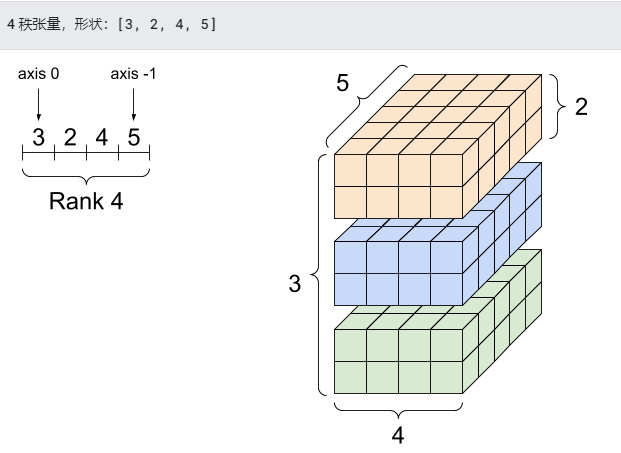
print("Type of every element:", tensor.dtype)print("Number of dimensions:", tensor.ndim)print("Shape of tensor:",tensor.shape)print("Elements along axis 0 of tensor:", tensor.shape[0])print("Elements along the last axis of tensor:", tensor.shape[-1])print("Total number of elements (3*2*4*5): ", tf.size(tensor).numpy())# outputType of every element:Number of dimensions: 4Shape of tensor: (3, 2, 4, 5)Elements along axis 0 of tensor: 3Elements along the last axis of tensor: 5Total number of elements (3*2*4*5): 120
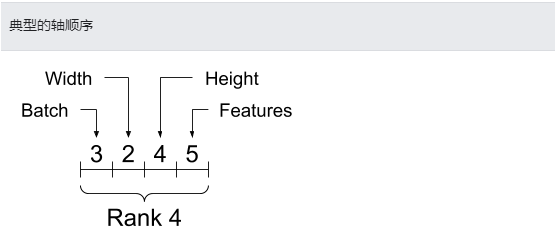
雖然通常用索引來(lái)指代軸,但是您始終要記住每個(gè)軸的含義。軸一般按照從全局到局部的順序進(jìn)行排序:首先是批次軸,隨后是空間維度,最后是每個(gè)位置的特征。這樣,在內(nèi)存中,特征向量就會(huì)位于連續(xù)的區(qū)域。
02
索引
單軸索引
TensorFlow 遵循標(biāo)準(zhǔn) Python 索引規(guī)則(類似于在 Python 中為列表或字符串編制索引)以及 NumPy 索引的基本規(guī)則。
索引從?
0?開(kāi)始編制負(fù)索引表示按倒序編制索引
冒號(hào)?
:?用于切片?start:stop:step
tensor1 = tf.constant([0, 1, 1, 2, 3, 5, 8, 13, 21, 34])print(tensor1.numpy())#?output[ 0 1 1 2 3 5 8 13 21 34
使用標(biāo)量編制索引會(huì)移除維度:
print("First:", tensor1[0].numpy())print("Second:", tensor1[1].numpy())print("Last:", tensor1[-1].numpy())# outputFirst: 0Second: 1Last: 34
使用?:?切片編制索引會(huì)保留維度:
print("Everything:", tensor1[:].numpy())print("Before 4:", tensor1[:4].numpy())print("From 4 to the end:", tensor1[4:].numpy())print("From 2, before 7:", tensor1[2:7].numpy())print("Every other item:", tensor1[::2].numpy())print("Reversed:", tensor1[::-1].numpy())# outputEverything: [ 0 1 1 2 3 5 8 13 21 34]Before 4: [0 1 1 2]From 4 to the end: [ 3 5 8 13 21 34]From 2, before 7: [1 2 3 5 8]Every other item: [ 0 1 3 8 21]Reversed: [34 21 13 8 5 3 2 1 1 0]
多軸索引:
更高秩的張量通過(guò)傳遞多個(gè)索引來(lái)編制索引。
對(duì)于高秩張量的每個(gè)單獨(dú)的軸,遵循與單軸情形完全相同的索引規(guī)則。
tensor2 = tf.constant([[1, 2],[3, 4],[5, 6]], dtype=tf.float16)print(tensor2.numpy())# output[[1. 2.][3. 4.][5. 6.]]
為每個(gè)索引傳遞一個(gè)整數(shù),結(jié)果是一個(gè)標(biāo)量。
print(tensor2[1, 1].numpy())# output4.0
還可以使用整數(shù)與切片的任意組合編制索引:
# Get row and column tensorsprint("Second row:", tensor2[1, :].numpy())print("Second column:", tensor2[:, 1].numpy())print("Last row:", tensor2[-1, :].numpy())print("First item in last column:", tensor2[0, -1].numpy())print("Skip the first row:")print(tensor2[1:, :].numpy(), "\n")# outputSecond row: [3. 4.]Second column: [2. 4. 6.]Last row: [5. 6.]First item in last column: 2.0Skip the first row:[[3. 4.]?[5.?6.]]?
下面是一個(gè) 3 軸張量的示例:
tensor3 = tf.constant([[],[]],[],[]],[],[]],])print(tensor3)tf.Tensor([][]][][]][][]]], shape=(3, 2, 5), dtype=int32)
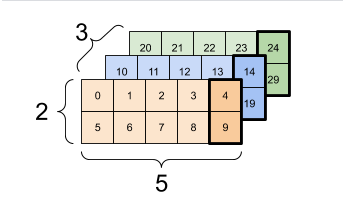
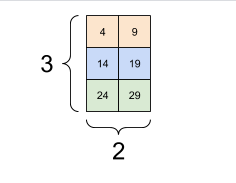
選擇批次中每個(gè)示例的所有位置的最后一個(gè)特征:
print(tensor3[:, :, 4]# outputtf.Tensor([[ 4 9][14 19][24 29]], shape=(3, 2), dtype=int32)
參考文獻(xiàn):文檔主要參考TensorFlow官網(wǎng)
點(diǎn)擊上方“藍(lán)字”關(guān)注本公眾號(hào)
點(diǎn)擊上方“藍(lán)字”關(guān)注本公眾號(hào)
?END
掃碼關(guān)注
微信號(hào)|sdxx_rmbj