
【TensorFlow】筆記:基本操作-張量操作(一)
TensorFlow 使用?張量?(Tensor)作為數(shù)據(jù)的基本單位。TensorFlow 的張量在概念上等同于多維數(shù)組,我們可以使用它來(lái)描述數(shù)學(xué)中的標(biāo)量(0 維數(shù)組)、向量(1 維數(shù)組)、矩陣(2 維數(shù)組)等各種量。
基礎(chǔ)知識(shí)
首先,我們導(dǎo)入tensorflow,
import tensorflow as tf我們來(lái)創(chuàng)建一些基本張量,
tensor1 = tf.constant(4)print(tensor1)# outputtf.Tensor(4, shape=(), dtype=int32)
這是一個(gè)“標(biāo)量”(或稱“0 秩”張量)。標(biāo)量包含單個(gè)值,但沒(méi)有“軸”。
tensor2 = tf.constant([2.0, 3.0, 4.0])print(tensor2)# outputtf.Tensor([2. 3. 4.], shape=(3,), dtype=float32)
這是一個(gè)“向量”(或稱“1 秩”張量)就像一個(gè)值的列表。向量有 1 個(gè)軸。
tensor3 = tf.constant([[1, 2],[3, 4],[5, 6]], dtype=tf.float16)print(tensor3)# outputtf.Tensor([[1. 2.][3. 4.][5. 6.]], shape=(3, 2), dtype=float16)
這是一個(gè)“矩陣”(或稱“2 秩”張量)有 2 個(gè)軸。
總結(jié)
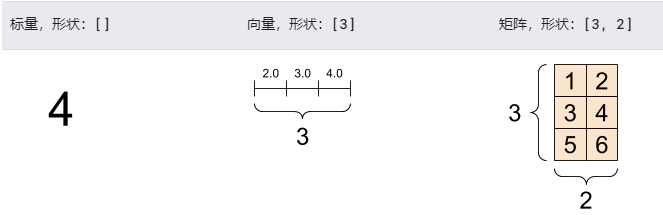
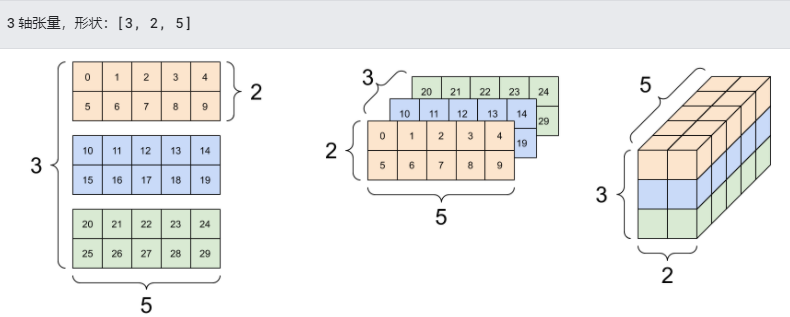
張量的軸可能更多,下面是一個(gè)包含 3 個(gè)軸的張量:
tensor4 = tf.constant([[[0, 1, 2, 3, 4],[5, 6, 7, 8, 9]],[[10, 11, 12, 13, 14],[15, 16, 17, 18, 19]],[[20, 21, 22, 23, 24],[25, 26, 27, 28, 29]],])print(tensor4)# outputtf.Tensor([[[ 0 1 2 3 4][ 5 6 7 8 9]][[10 11 12 13 14][15 16 17 18 19]][[20 21 22 23 24][25 26 27 28 29]]], shape=(3, 2, 5), dtype=int32)
張量通常包含浮點(diǎn)型和整型數(shù)據(jù),但是還有許多其他數(shù)據(jù)類型,包括:
復(fù)雜的數(shù)值
字符串
tf.Tensor 基類要求張量是“矩形”——也就是說(shuō),每個(gè)軸上的每一個(gè)元素大小相同。但是,張量有可以處理不同形狀的特殊類型。
我們可以對(duì)張量執(zhí)行基本數(shù)學(xué)運(yùn)算,包括加法、逐元素乘法和矩陣乘法運(yùn)算。
a = tf.constant([[1, 2],[3, 4]])b = tf.constant([[1, 1],[1, 1]])print(tf.add(a,?b),?"\n")?# 對(duì)應(yīng)元素相加print(tf.multiply(a,?b),?"\n")?#?對(duì)應(yīng)元素相乘print(tf.matmul(a,?b),?"\n")?#?做矩陣乘法# outputtf.Tensor([[2 3][4 5]], shape=(2, 2), dtype=int32)tf.Tensor([[1 2][3 4]], shape=(2, 2), dtype=int32)tf.Tensor([[3 3][7 7]], shape=(2, 2), dtype=int32)
print(a + b, "\n") # element-wise additionprint(a * b, "\n") # element-wise multiplicationprint(a @ b, "\n") # matrix multiplication# outputtf.Tensor([[2 3][4 5]], shape=(2, 2), dtype=int32)tf.Tensor([[1 2][3 4]], shape=(2, 2), dtype=int32)tf.Tensor([[3 3][7 7]], shape=(2, 2), dtype=int32)
各種運(yùn)算 (op) 都可以使用張量。
a?=?tf.constant([[4.0,?5.0],?[10.0,?1.0]])# 找最大值print(tf.reduce_max(a))# 找最大值的索引print(tf.argmax(a))# outputtf.Tensor(10.0, shape=(), dtype=float32)tf.Tensor([1 0], shape=(2,), dtype=int64)

點(diǎn)擊上方“藍(lán)字”關(guān)注本公眾號(hào)
點(diǎn)擊上方“藍(lán)字”關(guān)注本公眾號(hào)
評(píng)論
圖片
表情