
Spring Boot + GraphQL 才是 API 的未來(lái)!
快速開始
創(chuàng)建spring boot工程
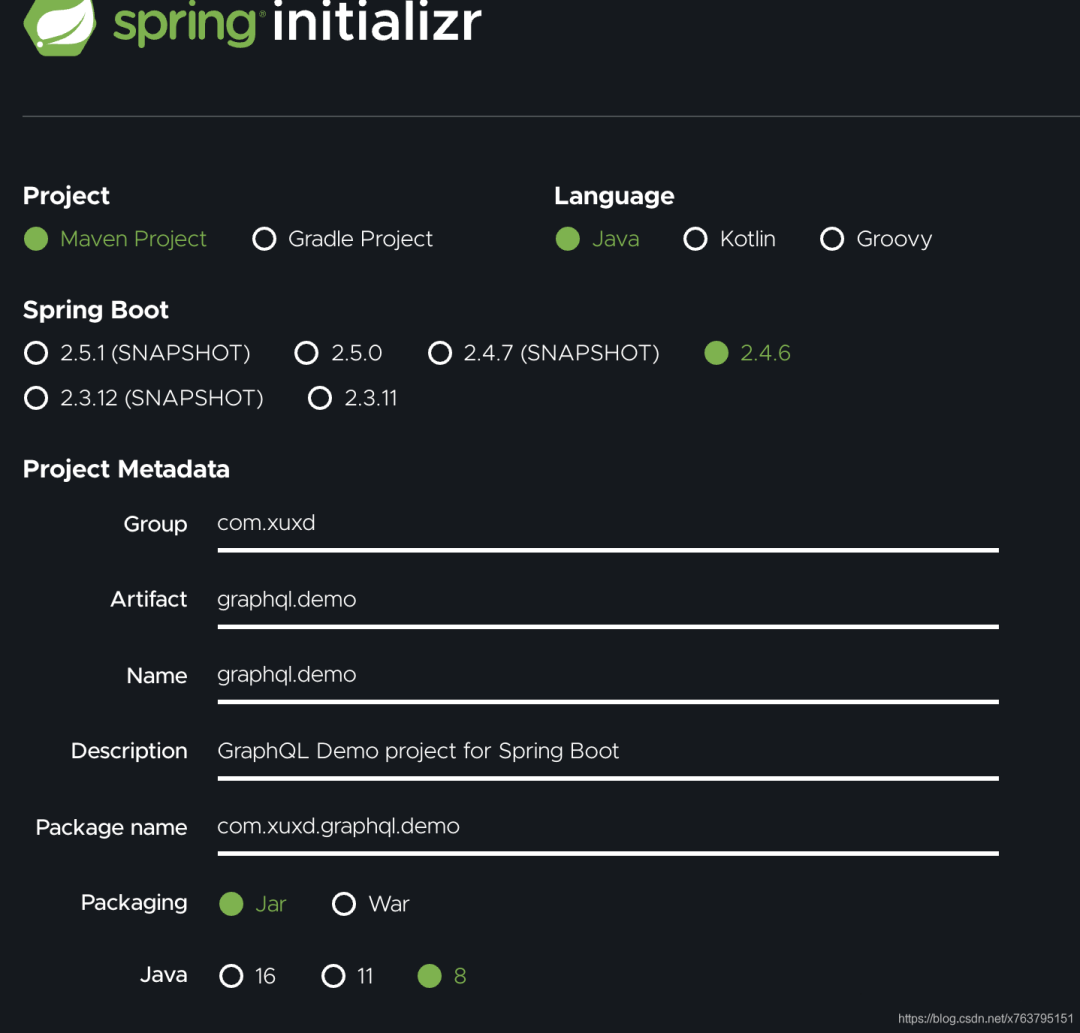

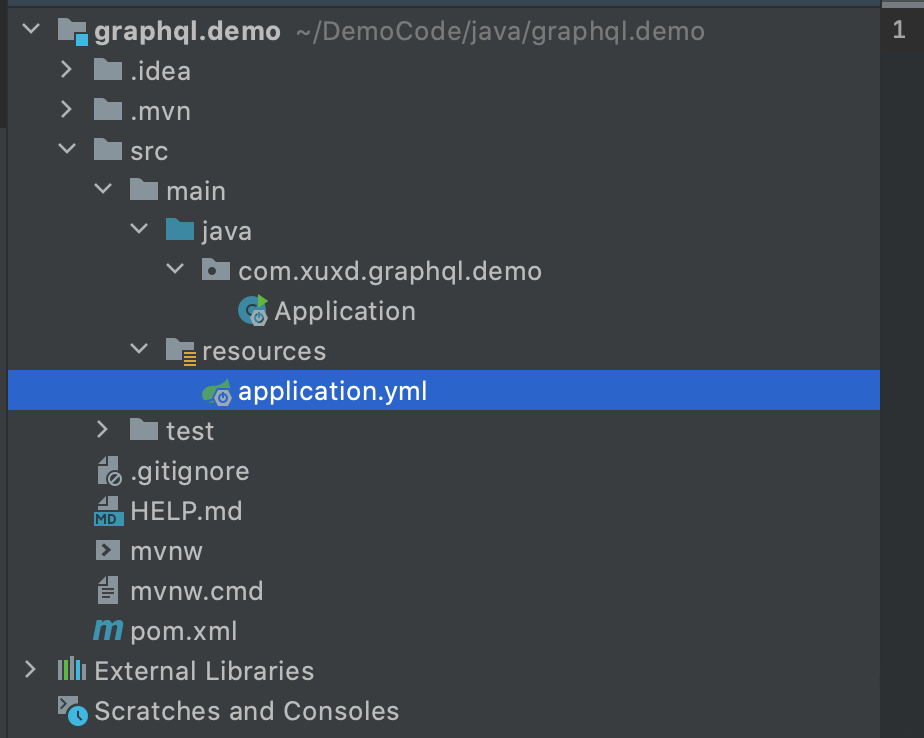
引入相關(guān)依賴
<?xml version="1.0" encoding="UTF-8"?>
<project xmlns="http://maven.apache.org/POM/4.0.0" xmlns:xsi="http://www.w3.org/2001/XMLSchema-instance"
 xsi:schemaLocation="http://maven.apache.org/POM/4.0.0 https://maven.apache.org/xsd/maven-4.0.0.xsd">
 <modelVersion>4.0.0</modelVersion>
 <parent>
  <groupId>org.springframework.boot</groupId>
  <artifactId>spring-boot-starter-parent</artifactId>
  <version>2.4.6</version>
  <relativePath/> <!-- lookup parent from repository -->
 </parent>
 <groupId>com.xuxd</groupId>
 <artifactId>graphql.demo</artifactId>
 <version>0.0.1-SNAPSHOT</version>
 <name>graphql.demo</name>
 <description>GraphQL Demo project for Spring Boot</description>
 <properties>
  <java.version>1.8</java.version>
  <maven.compiler.source>1.8</maven.compiler.source>
  <maven.compiler.target>1.8</maven.compiler.target>
  <project.build.sourceEncoding>UTF-8</project.build.sourceEncoding>
  <project.reporting.outputEncoding>UTF-8</project.reporting.outputEncoding>
  <lombok.version>1.18.20</lombok.version>
  <graphql-java-tools.version>11.0.1</graphql-java-tools.version>
  <gson.version>2.8.7</gson.version>
 </properties>
 <dependencies>
  <dependency>
   <groupId>org.springframework.boot</groupId>
   <artifactId>spring-boot-starter</artifactId>
  </dependency>

  <dependency>
   <groupId>org.springframework.boot</groupId>
   <artifactId>spring-boot-starter-web</artifactId>
  </dependency>

  <dependency>
   <groupId>org.springframework.boot</groupId>
   <artifactId>spring-boot-starter-test</artifactId>
   <scope>test</scope>
  </dependency>

  <dependency>
   <groupId>org.projectlombok</groupId>
   <artifactId>lombok</artifactId>
   <version>${lombok.version}</version>
   <scope>provided</scope>
  </dependency>

  <dependency>
   <groupId>com.graphql-java-kickstart</groupId>
   <artifactId>graphql-java-tools</artifactId>
   <version>${graphql-java-tools.version}</version>
  </dependency>

  <dependency>
   <groupId>com.google.code.gson</groupId>
   <artifactId>gson</artifactId>
   <version>${gson.version}</version>
  </dependency>
 </dependencies>

 <build>
  <plugins>
   <plugin>
    <groupId>org.springframework.boot</groupId>
    <artifactId>spring-boot-maven-plugin</artifactId>
   </plugin>
  </plugins>
 </build>

</project>
初始化GraphQL實(shí)例
@Component
public class GraphQLProvider {

    private GraphQL graphQL;

    @Autowired
    private IItemService itemService;

    @Bean
    public GraphQL graphQL() {
        return graphQL;
    }

    @PostConstruct
    public void init() throws IOException {
        GraphQLSchema graphQLSchema = SchemaParser.newParser()
            .file("graphql/base.graphqls")
            .resolvers(new Query(), new Mutation())
            .file("graphql/item.graphqls")
            .resolvers(new ItemResolver(itemService))
//            .file("book.graphqls")
//            .resolvers(new BookResolver())  //其它定義照上面的示例,繼續(xù)增加
            .build().makeExecutableSchema();

        this.graphQL = graphQL.newGraphQL(graphQLSchema).build();
    }

}
*.graphqls或者對(duì)應(yīng)的Resolver如ItemResolver,可以參看淺嘗GraphQL相關(guān)描述,這里只是作了微調(diào)整,相關(guān)代碼如下:schema {
# 查詢
query: Query
# 更新
mutation: Mutation
}
type Query {
version: String
}
type Mutation {
version: String
}
# 定義一個(gè)查詢類型
extend type Query {
    queryItemList: ItemList  # 定義查詢項(xiàng)目列表
    queryById(id: ID): Item
}

extend type Mutation {
    updateName(param: Param): Item
}

# 定義項(xiàng)目字段
type Item {
    id: ID!
    code: String!
    name: String!
}

type ItemList {
    itemList: [Item!]!  #獲取項(xiàng)目列表
    total: Int!      # 獲取項(xiàng)目總數(shù)
}

input Param {
    id: ID!
    name: String!
}
public class ItemResolver implements GraphQLQueryResolver, GraphQLMutationResolver {

    private IItemService itemService;

    public ItemResolver(IItemService itemService) {
        this.itemService = itemService;
    }

    // 對(duì)應(yīng)item.graphqls里的queryItemList
    public ItemList queryItemList() {
        return itemService.queryItemList();
    }

    public Item queryById(Long id) {
        return itemService.queryById(id);
    }

    public Item updateName(Param param) {
        return itemService.updateName(param);
    }
}
提供API
@RestController
@RequestMapping("/graphql")
@Log
public class GraphqlController {

    @Autowired
    private GraphQL graphQL;

    @PostMapping
    public Object execute(@RequestBody GraphqlRequest request) {
        ExecutionInput executionInput = ExecutionInput.newExecutionInput()
            .query(request.getQuery())
            .variables(request.getVariables())
            .build();
        Map<String, Object> result = new HashMap<>();

        ExecutionResult executionResult = graphQL.execute(executionInput);
        List<GraphQLError> errors = executionResult.getErrors();

        if (errors != null && !errors.isEmpty()) {
            result.put("errors", errors);
            return result;
        }
        return executionResult.getData();
    }
}
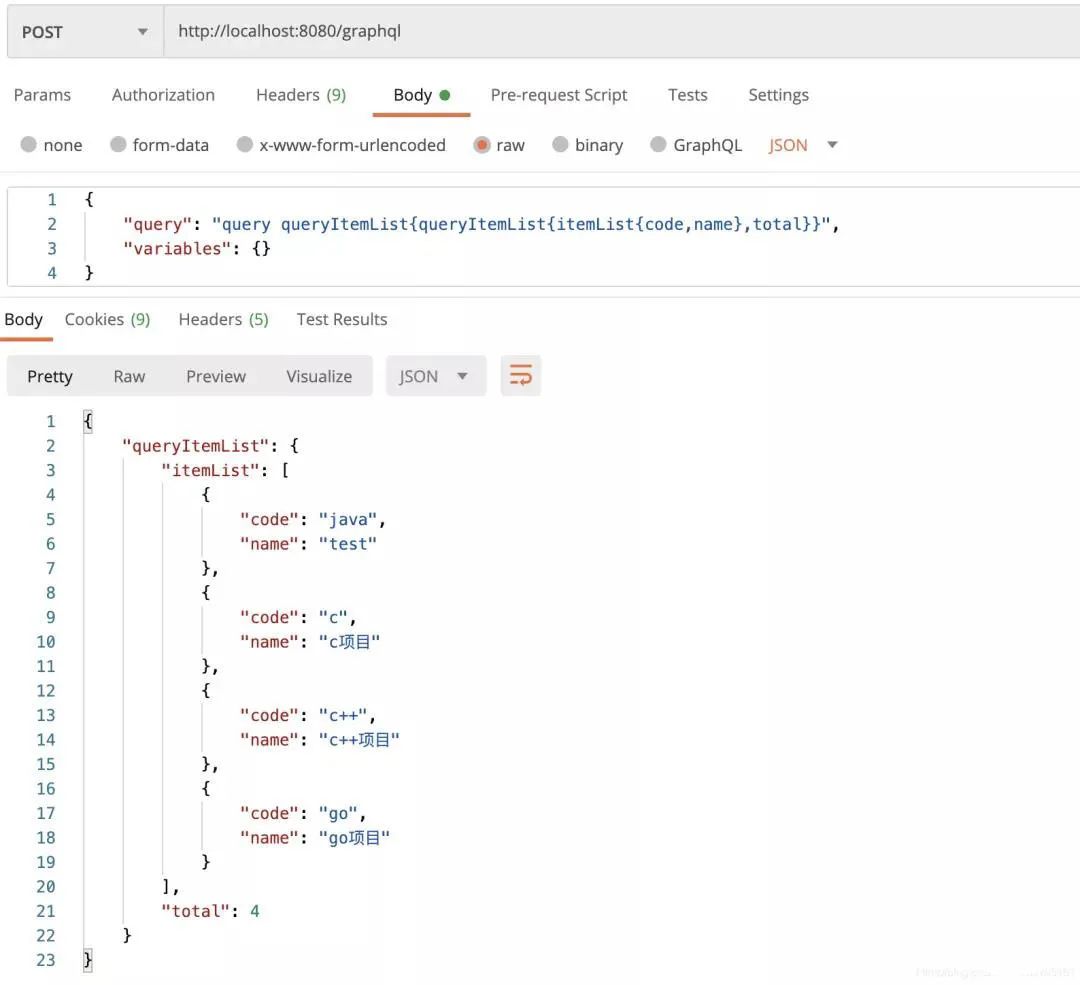
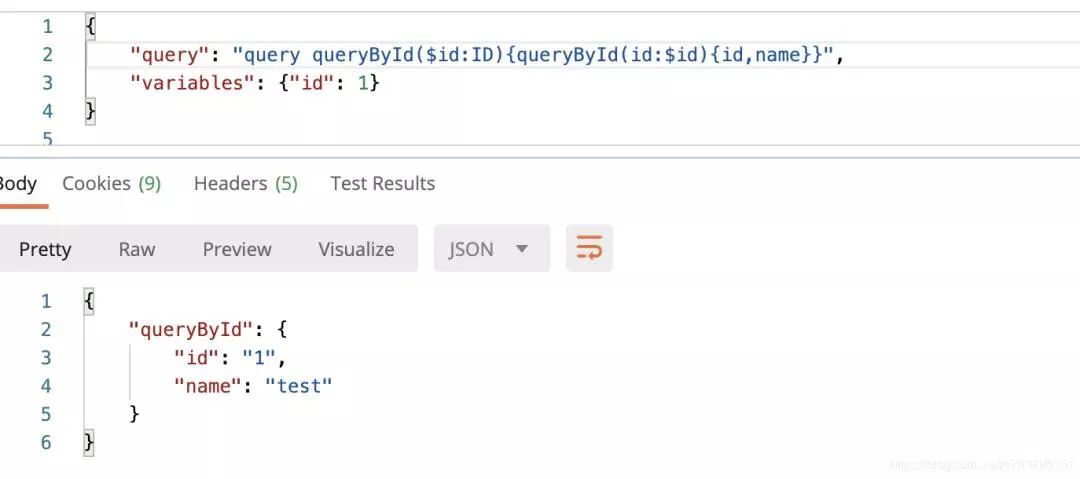
測(cè)試
ItemList queryItemList();

Item queryById(Long id);

Item updateName(Param param);
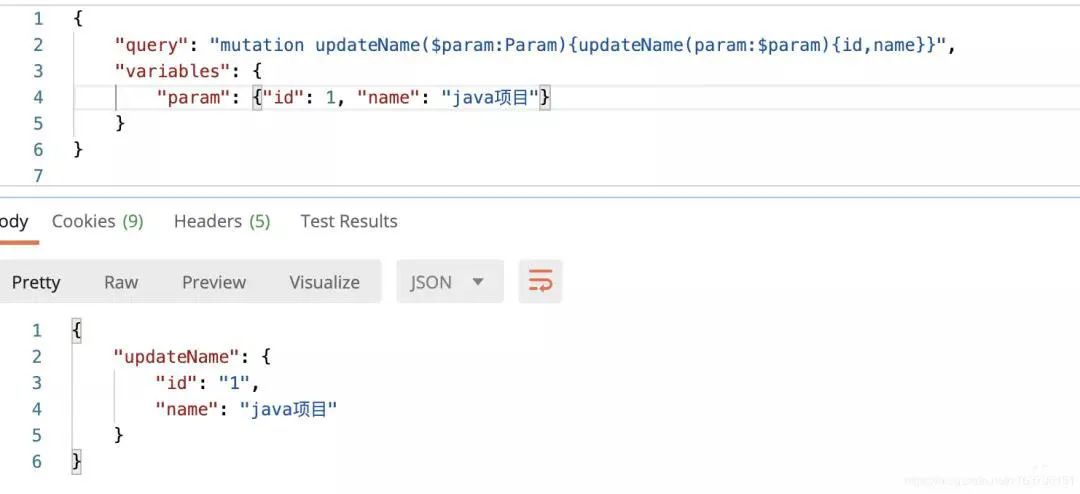
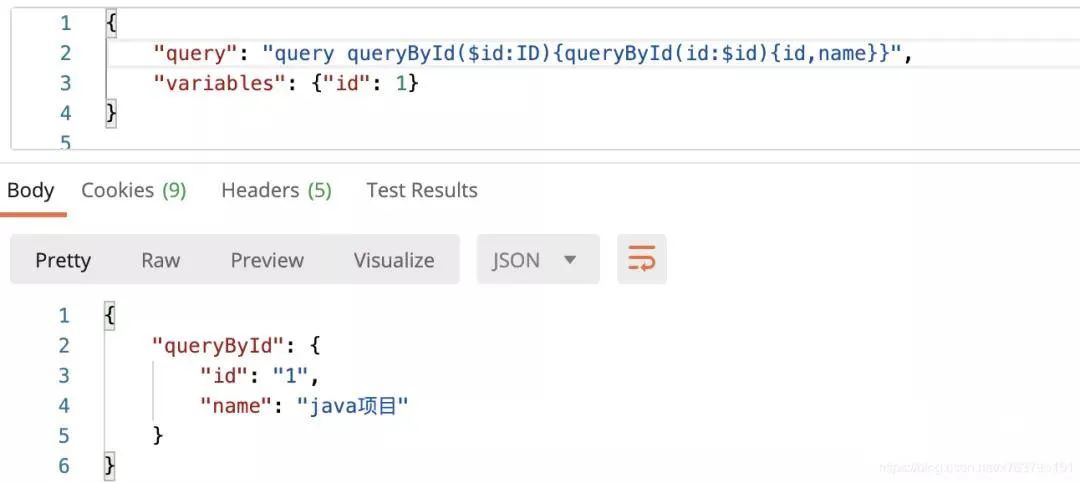
結(jié)束語(yǔ)
這樣整個(gè)項(xiàng)目的GraphQL相關(guān)的基本配置已經(jīng)完成,可以進(jìn)行業(yè)務(wù)開發(fā)了。
2、心態(tài)崩了!稅前2萬(wàn)4,到手1萬(wàn)4,年終獎(jiǎng)扣稅方式1月1日起施行~
3、雷軍做程序員時(shí)寫的博客,很強(qiáng)大!
評(píng)論
圖片
表情