
Spring Boot + GraphQL 才是 API 的未來!
來源:www.toutiao.com/i6929867921…
前言
在淺嘗GraphQL一文描述了GraphQL及基本使用,本文提供一個基本示例,描述如何基于spring boot的web項目快速應(yīng)用。
graphql-java的官方文檔:Getting started with GraphQL Java and Spring Boot,提供了相關(guān)依賴用以快速配置,但是個人真心不建議使用這個庫及相關(guān)配置方式來搭建腳手架,在實際開發(fā)中,業(yè)務(wù)比較復(fù)雜的時候,會導(dǎo)致需要配置的業(yè)務(wù)代碼比較多也比較繁瑣,相對下面這種方式,代碼復(fù)雜性比較高。
本文提供一種更靈活快捷的方式,在spring boot項目中快速應(yīng)用開發(fā)。使用的依賴也和上面官方提供的都不一樣,請注意區(qū)分。
快速開始
創(chuàng)建spring boot工程
通過Spring Initializr快速搭建,我選的jdk版本及spring boot版本,如下所示,其它版本未做兼容性測試。
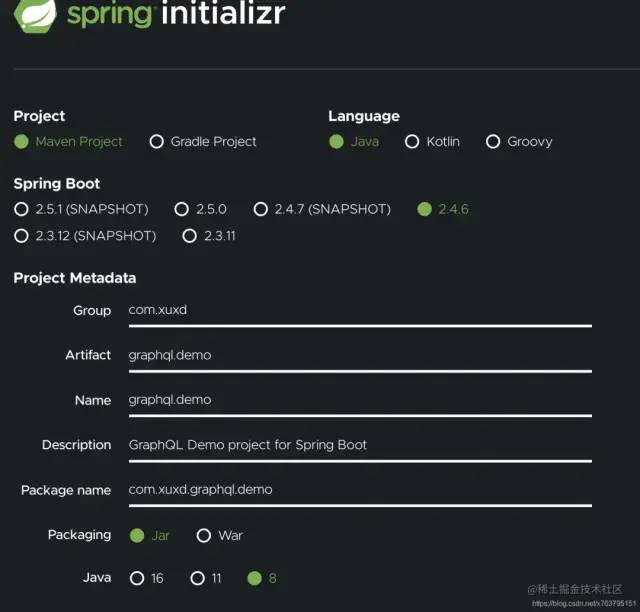
點擊下方的Generate按鈕:

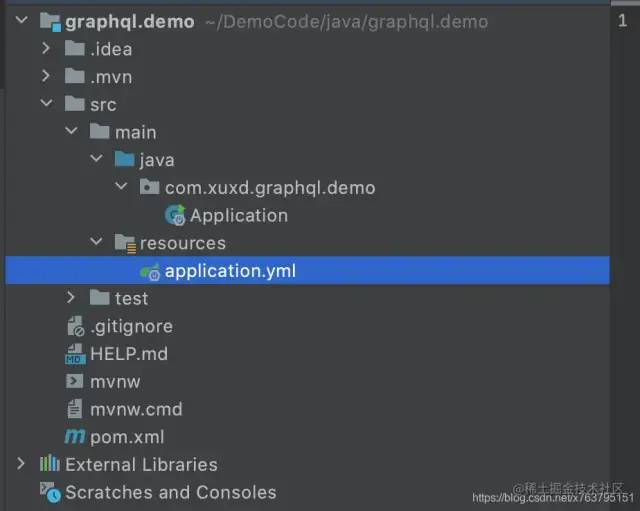
打開工程結(jié)構(gòu)如下,我將application.properties刪除了替換成applicaiton.yml,因為我個人比較喜歡yaml的配置方式:
引入相關(guān)依賴
pom.xml配置如下:
 xsi:schemaLocation="http://maven.apache.org/POM/4.0.0 https://maven.apache.org/xsd/maven-4.0.0.xsd">
 4.0.0

  org.springframework.boot
  spring-boot-starter-parent
  2.4.6


 com.xuxd
 graphql.demo
 0.0.1-SNAPSHOT
 graphql.demo
 GraphQL Demo project for Spring Boot

  1.8
  1.8
  1.8
  UTF-8
  UTF-8
  1.18.20
  11.0.1
  2.8.7


   org.springframework.boot
   spring-boot-starter


   org.springframework.boot
   spring-boot-starter-web


   org.springframework.boot
   spring-boot-starter-test
   test


   org.projectlombok
   lombok
   ${lombok.version}
   provided


   com.graphql-java-kickstart
   graphql-java-tools
   ${graphql-java-tools.version}


   com.google.code.gson
   gson
   ${gson.version}


    org.springframework.boot
    spring-boot-maven-plugin


復(fù)制代碼
初始化GraphQL實例
我們將創(chuàng)建一個GraphQL實例并將其注冊到spring容器中,代碼如下:
創(chuàng)建一個GraphQLProvider類:
@Component
public class GraphQLProvider {

    private GraphQL graphQL;

    @Autowired
    private IItemService itemService;

    @Bean
    public GraphQL graphQL() {
        return graphQL;
    }

    @PostConstruct
    public void init() throws IOException {
        GraphQLSchema graphQLSchema = SchemaParser.newParser()
            .file("graphql/base.graphqls")
            .resolvers(new Query(), new Mutation())
            .file("graphql/item.graphqls")
            .resolvers(new ItemResolver(itemService))
//            .file("book.graphqls")
//            .resolvers(new BookResolver())  //其它定義照上面的示例,繼續(xù)增加
            .build().makeExecutableSchema();

        this.graphQL = graphQL.newGraphQL(graphQLSchema).build();
    }

}
復(fù)制代碼關(guān)于*.graphqls或者對應(yīng)的Resolver如ItemResolver,可以參看淺嘗GraphQL相關(guān)描述,這里只是作了微調(diào)整,相關(guān)代碼如下:
base.grqphqls
schema {
    # 查詢
    query: Query
    # 更新
    mutation: Mutation
}

type Query {
    version: String
}

type Mutation {
    version: String
}
復(fù)制代碼
item.graphqls
# 定義一個查詢類型
extend type Query {
    queryItemList: ItemList  # 定義查詢項目列表
    queryById(id: ID): Item
}

extend type Mutation {
    updateName(param: Param): Item
}

# 定義項目字段
type Item {
    id: ID!
    code: String!
    name: String!
}

type ItemList {
    itemList: [Item!]!  #獲取項目列表
    total: Int!      # 獲取項目總數(shù)
}

input Param {
    id: ID!
    name: String!
}
復(fù)制代碼
ItemResolver
public class ItemResolver implements GraphQLQueryResolver, GraphQLMutationResolver {

    private IItemService itemService;

    public ItemResolver(IItemService itemService) {
        this.itemService = itemService;
    }

    // 對應(yīng)item.graphqls里的queryItemList
    public ItemList queryItemList() {
        return itemService.queryItemList();
    }

    public Item queryById(Long id) {
        return itemService.queryById(id);
    }

    public Item updateName(Param param) {
        return itemService.updateName(param);
    }
}
復(fù)制代碼
相關(guān)業(yè)務(wù)代碼比較多,就不一一貼了。
提供API
我們需要暴露一個接口來接收請求,并作相關(guān)處理,也只需提供一個接口即可。因此我們創(chuàng)建一個Controller:GraphqlController.
@RestController
@RequestMapping("/graphql")
@Log
public class GraphqlController {

    @Autowired
    private GraphQL graphQL;

    @PostMapping
    public Object execute(@RequestBody GraphqlRequest request) {
        ExecutionInput executionInput = ExecutionInput.newExecutionInput()
            .query(request.getQuery())
            .variables(request.getVariables())
            .build();
        Map result = new HashMap<>();

        ExecutionResult executionResult = graphQL.execute(executionInput);
        List errors = executionResult.getErrors();

        if (errors != null && !errors.isEmpty()) {
            result.put("errors", errors);
            return result;
        }
        return executionResult.getData();
    }
}
復(fù)制代碼
到這一步,其實基本功能都已配置完成,可以啟動項目進(jìn)行相關(guān)測試了。
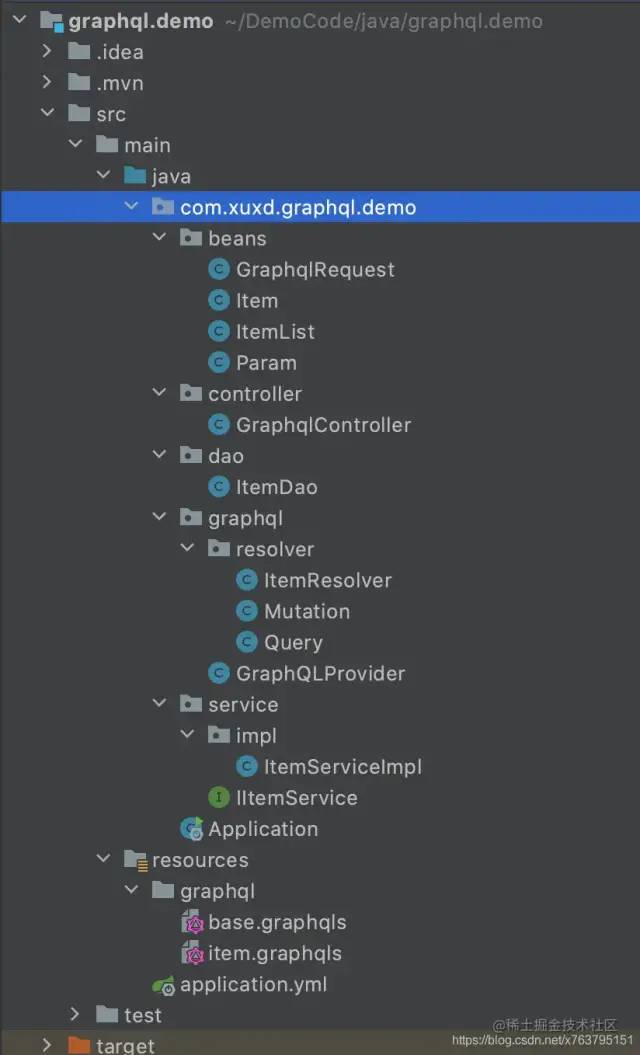
整個項目的代碼結(jié)構(gòu)如下,我盡量用了一個比較常規(guī)的web項目結(jié)構(gòu)(controller,service,dao等):
測試
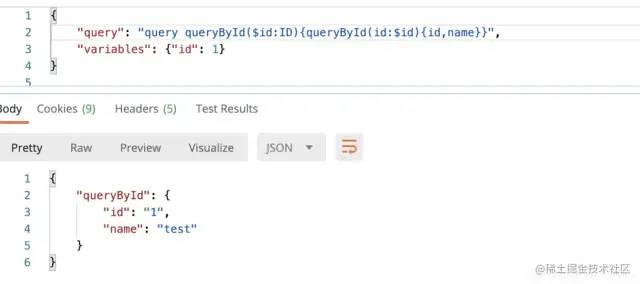
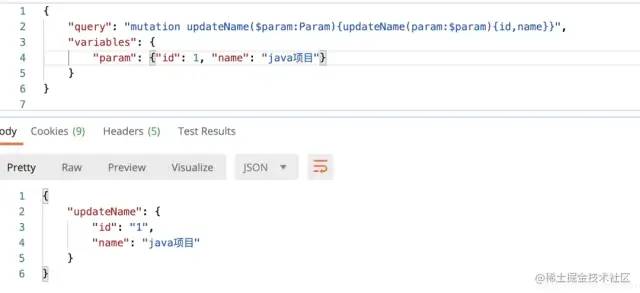
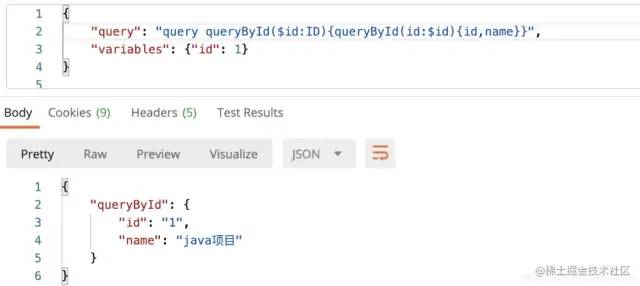
示例中總共提供了3個接口,兩個查詢一個更新,分別進(jìn)行測試:
ItemList queryItemList();

Item queryById(Long id);

Item updateName(Param param);
復(fù)制代碼
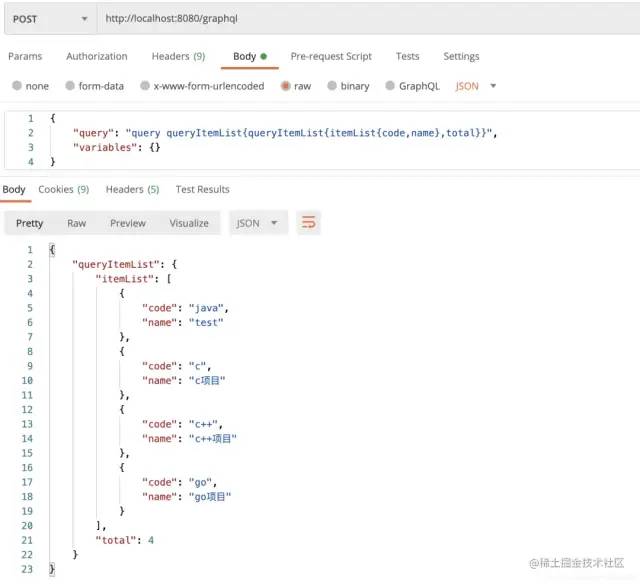
查詢所有項目列表(只獲取每個項目的編碼和名稱,以及列表總數(shù)):
根據(jù)ID查詢,獲取項目的id和名稱
更新指定ID的項目名稱
我們項目Id為1編碼為test的項目修改為“java項目”
再查詢一下,可以看到結(jié)果更新了:
結(jié)束語
這樣整個項目的GraphQL相關(guān)的基本配置已經(jīng)完成,可以進(jìn)行業(yè)務(wù)開發(fā)了。