
教你一行代碼自動(dòng)繪制藝術(shù)畫 (Discoart)

DiscoArt 是一個(gè)很牛逼的開源模塊,它能根據(jù)你給定的關(guān)鍵詞自動(dòng)繪畫。
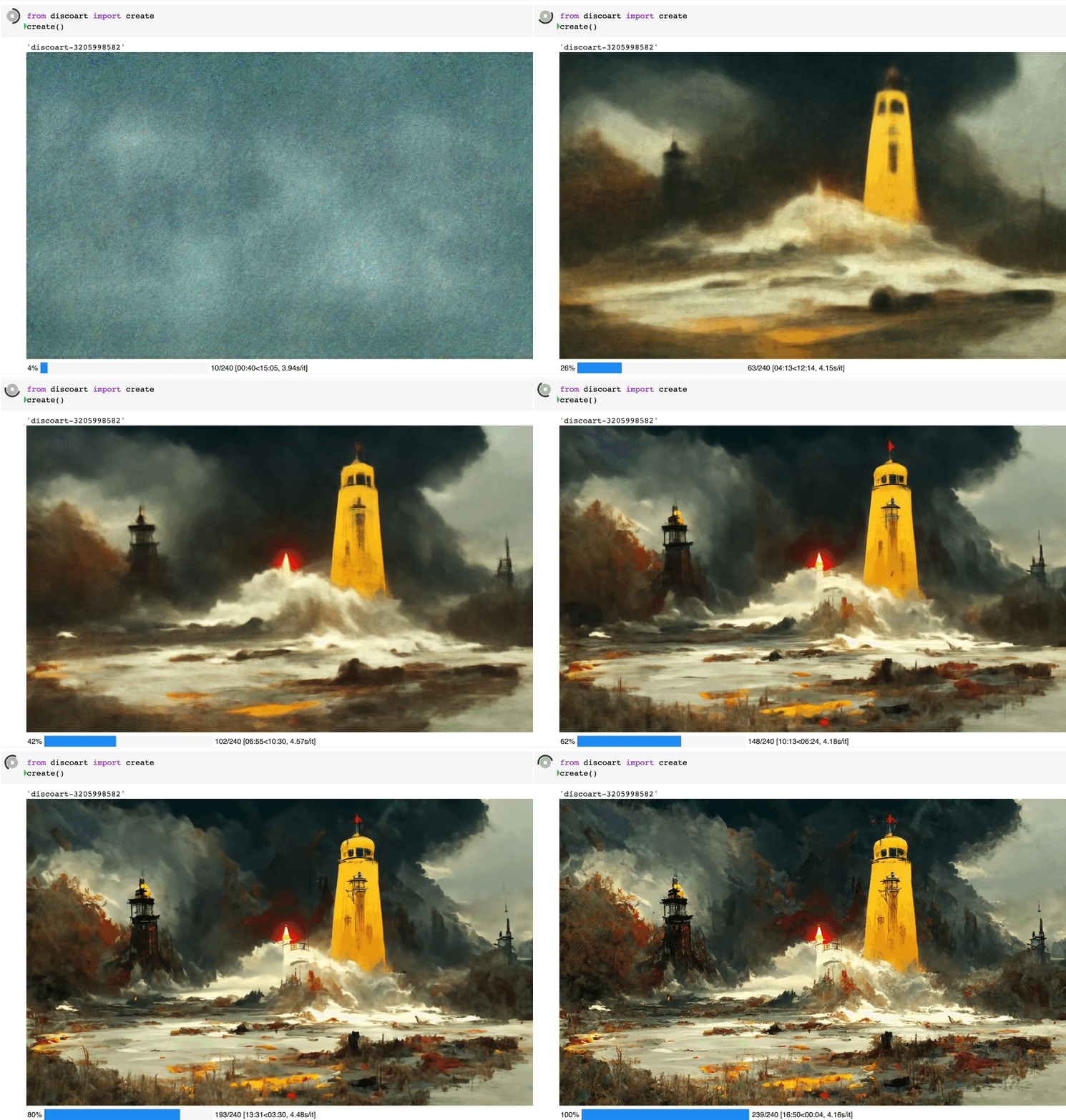
繪制過程是完全可見的,你可以在 jupyter 頁面上看見這個(gè)繪制的過程:
1.準(zhǔn)備
開始之前,你要確保Python和pip已經(jīng)成功安裝在電腦上,如果沒有,可以訪問這篇文章:超詳細(xì)Python安裝指南 進(jìn)行安裝。
(可選1) 如果你用Python的目的是數(shù)據(jù)分析,可以直接安裝Anaconda:Python數(shù)據(jù)分析與挖掘好幫手—Anaconda,它內(nèi)置了Python和pip.
(可選2) 此外,推薦大家用VSCode編輯器,它有許多的優(yōu)點(diǎn):Python 編程的最好搭檔—VSCode 詳細(xì)指南。
請選擇以下任一種方式輸入命令安裝依賴:
1. Windows 環(huán)境 打開 Cmd (開始-運(yùn)行-CMD)。
2. MacOS 環(huán)境 打開 Terminal (command+空格輸入Terminal)。
3. 如果你用的是 VSCode編輯器 或 Pycharm,可以直接使用界面下方的Terminal.
pip install discoart為了運(yùn)行 Discoart, 你需要Python 3.7+ 和支持 CUDA 的 PyTorch.
2.開始使用 Discoart
你可以在Jupyter中運(yùn)行Discoart,這樣能方便地實(shí)時(shí)展示繪制過程:
from discoart import create

da = create()
這樣將使用默認(rèn)的 文本描述 和參數(shù)創(chuàng)建圖像:
創(chuàng)建出來的就是這個(gè)圖:
Create 支持的所有參數(shù)如下:
你可以這么使用參數(shù):
from discoart import create

da = create(
    text_prompts='A painting of sea cliffs in a tumultuous storm, Trending on ArtStation.',
    init_image='https://d2vyhzeko0lke5.cloudfront.net/2f4f6dfa5a05e078469ebe57e77b72f0.png',
    skip_steps=100,
)
如果你不是用jupyter運(yùn)行的,你也可以看到中間結(jié)果,因?yàn)樽罱K結(jié)果和中間結(jié)果都會被創(chuàng)建在當(dāng)前工作目錄下,即
./{name-docarray}/{i}-done.png
./{name-docarray}/{i}-step-{j}.png
./{name-docarray}/{i}-progress.png
./{name-docarray}/{i}-progress.gif
./{name-docarray}/da.protobuf.lz4name-docarray是運(yùn)行時(shí)定義的名稱,如果沒有定義,則會隨機(jī)生成。i-*第幾個(gè)Batch。*-done-*是當(dāng)前Batch完成后的最終圖像。*-step-*是某一步的中間圖像,實(shí)時(shí)更新。*-progress.png是到目前為止所有中間結(jié)果的png圖像,實(shí)時(shí)更新。*-progress.gif是到目前為止所有中間結(jié)果的動(dòng)畫 gif,實(shí)時(shí)更新。da.protobuf.lz4是到目前為止所有中間結(jié)果的壓縮 protobuf,實(shí)時(shí)更新。
3.顯示/保存/加載配置
如果你想知道你當(dāng)前繪圖的配置,有三種方法:
from discoart import show_config

show_config(da) # show the config of the first run
show_config(da[3]) # show the config of the fourth run
show_config(
    'discoart-06030a0198843332edc554ffebfbf288'
) # show the config of the run with a known DocArray ID
要保存 Document/DocumentArray 的配置:
from discoart import save_config

save_config(da, 'my.yml') # save the config of the first run
save_config(da[3], 'my.yml') # save the config of the fourth run
從配置中導(dǎo)入:
from discoart import create, load_config

config = load_config('my.yml')
create(**config)
此外,你還能直接把配置導(dǎo)出為圖像的形式
from discoart.config import save_config_svg

save_config_svg(da)
我們的文章到此就結(jié)束啦,如果你喜歡今天的Python 實(shí)戰(zhàn)教程,請持續(xù)關(guān)注Python實(shí)用寶典。
有任何問題,可以在公眾號后臺回復(fù):加群,回答相應(yīng)紅字驗(yàn)證信息,進(jìn)入互助群詢問。
原創(chuàng)不易,希望你能在下面點(diǎn)個(gè)贊和在看支持我繼續(xù)創(chuàng)作,謝謝!
點(diǎn)擊下方閱讀原文可獲得更好的閱讀體驗(yàn)
Python實(shí)用寶典 (pythondict.com)
不只是一個(gè)寶典
歡迎關(guān)注公眾號:Python實(shí)用寶典