
通過(guò)Java技術(shù)手段,某程序員發(fā)現(xiàn)自己被綠了!
相關(guān)閱讀:
300本計(jì)算機(jī)編程的經(jīng)典書(shū)籍下載
AI全套:Python3+TensorFlow打造人臉識(shí)別智能小程序
最新人工智能資料-Google工程師親授 Tensorflow-入門(mén)到進(jìn)階
黑馬頭條項(xiàng)目 - Java Springboot2.0(視頻、資料、代碼和講義)14天完整版
作者:肥仔哥哥1930 來(lái)源:https://blog.csdn.net/zwrlj527/article/details/119823407
從博文上看是exifread模塊,找我大java的對(duì)應(yīng)的jar,發(fā)現(xiàn)metadata-extractor,而且官方還在持續(xù)更新,最近的jar是今年的。
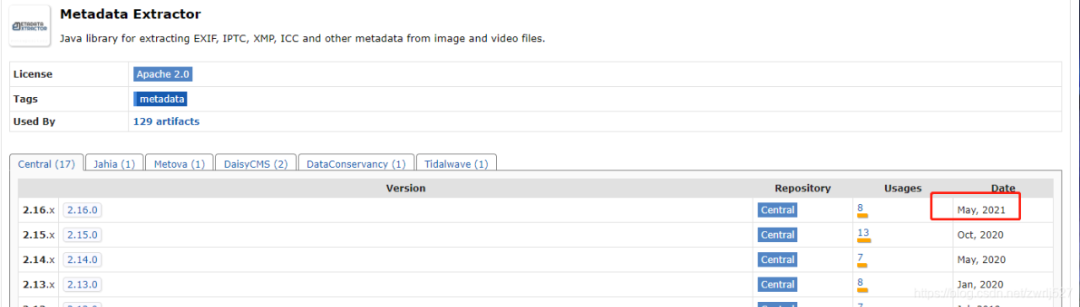
這個(gè)元數(shù)據(jù)提取jar非常強(qiáng)大,還支持視頻信息的提取,看看官方介紹:
看到?jīng)],第一個(gè)示例,就寫(xiě)的支持我大JAVA,讓我猶如雞血沖頂,在支持同事聯(lián)調(diào)事件工單的同時(shí),大肝這塊。搜索公眾號(hào)互聯(lián)網(wǎng)架構(gòu)師后臺(tái)回復(fù)“2T”,獲取一份驚喜禮包。
com.drewnoakes metadata-extractor 2.16.0
1、室外空曠地點(diǎn)打開(kāi)GPS
2、百度地圖、北斗伴驗(yàn)證已連接到GPS定位
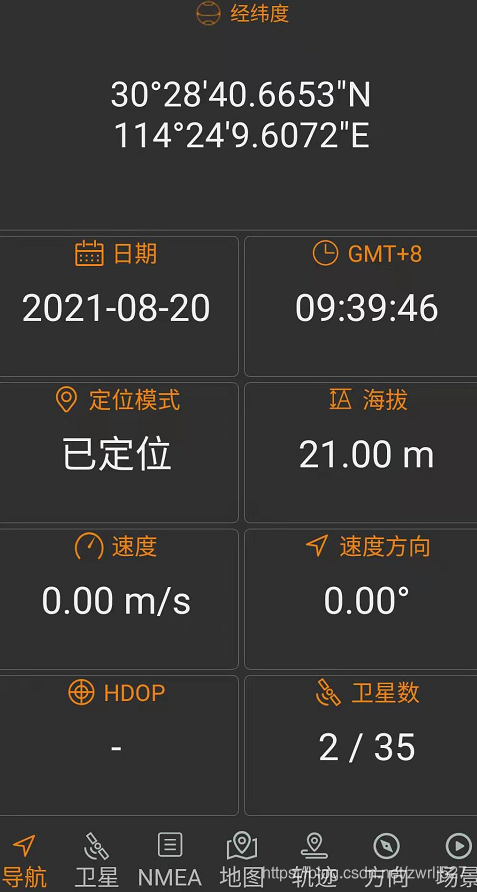
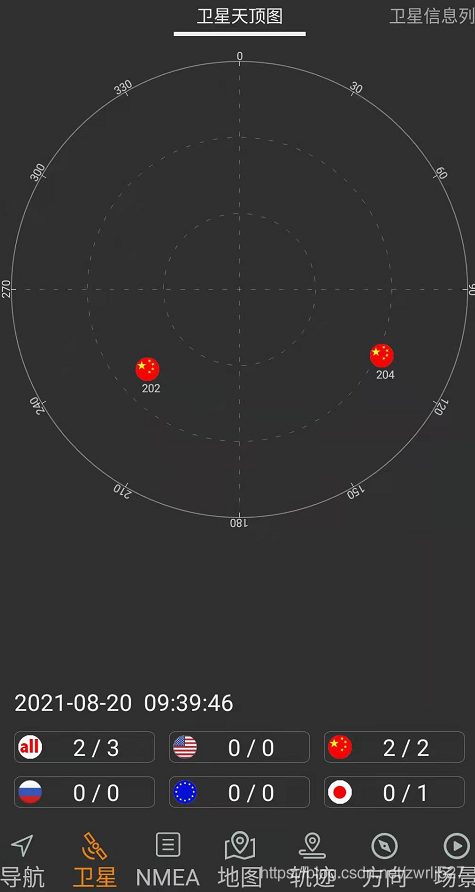
3、設(shè)置手機(jī)帶的照相機(jī)開(kāi)啟位置信息

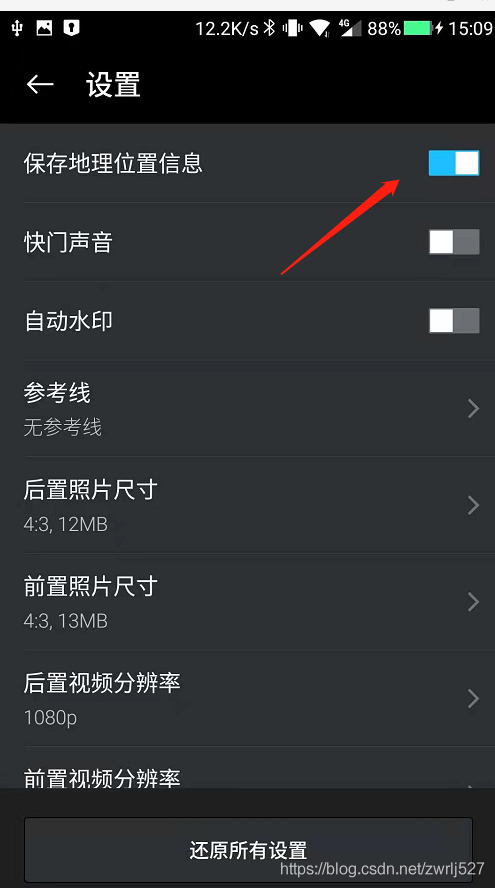
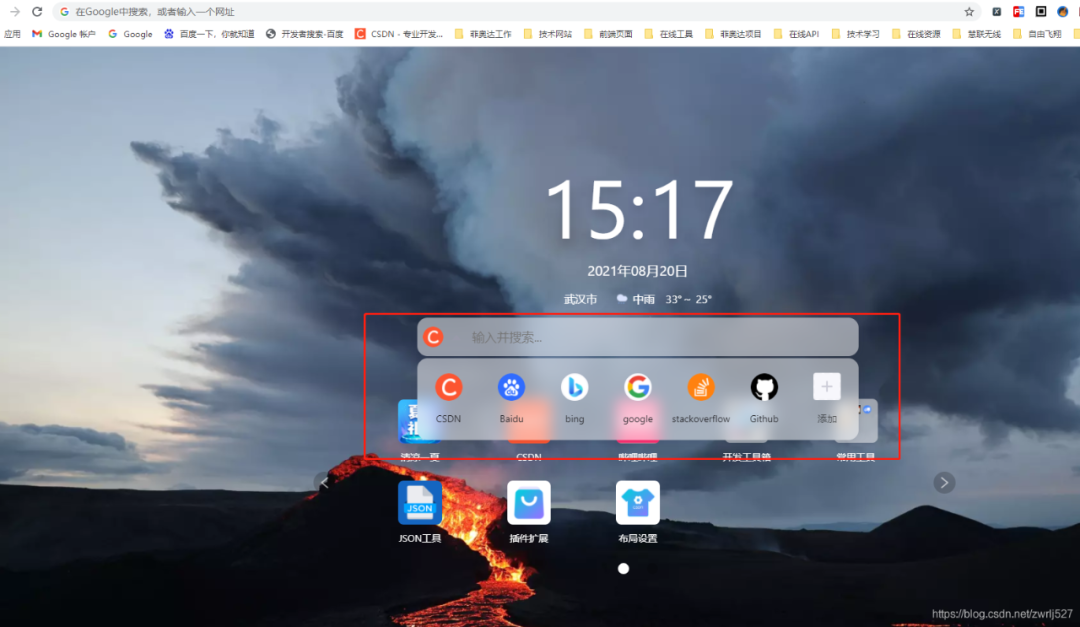
這里一定要確定拍的照片的詳情時(shí)有經(jīng)緯度信息的,如果沒(méi)有,你針對(duì)你的手機(jī)在CSDN里搜索下怎么設(shè)置。這里順便提下,CSDN的瀏覽器插件真香。簡(jiǎn)直就是我們技術(shù)人事的福音,再以不用擔(dān)心某某度的廣告之類(lèi)導(dǎo)致找東西費(fèi)勁了,而且它很包容,還時(shí)可以選擇自己喜歡的搜索引擎的。搜索公眾號(hào)互聯(lián)網(wǎng)架構(gòu)師后臺(tái)回復(fù)“2T”,獲取一份驚喜禮包。
這里先演示這個(gè)元數(shù)據(jù)提取jar能提取到的信息,順便把取到的經(jīng)緯度通過(guò)百度轉(zhuǎn)地址。搜索公眾號(hào)互聯(lián)網(wǎng)架構(gòu)師后臺(tái)回復(fù)“2T”,獲取一份驚喜禮包。
因?yàn)槭莇emo,沒(méi)有業(yè)務(wù),我這里就直接在測(cè)試類(lèi)里干了。沒(méi)有什么業(yè)務(wù),不涉及什么機(jī)密,可以上全碼。
package com.easylinkin.bm.extractor;import com.alibaba.fastjson.JSONObject;import com.drew.imaging.ImageMetadataReader;import com.drew.imaging.ImageProcessingException;import com.drew.metadata.Directory;import com.drew.metadata.Metadata;import com.drew.metadata.Tag;import com.easylinkin.bm.util.HttpUtils;import lombok.extern.slf4j.Slf4j;import java.io.File;import java.io.IOException;/*** @author zhengwen**/@Slf4jpublic class ImgTestCode {public static void main(String[] args) throws Exception {File file = new File("C:\\Users\\zhengwen\\Desktop\\test\\IMG_20210820_093958.jpg");readImageInfo(file);}/*** 提取照片里面的信息** @param file 照片文件* @throws ImageProcessingException* @throws Exception*/private static void readImageInfo(File file) throws ImageProcessingException, Exception {Metadata metadata = ImageMetadataReader.readMetadata(file);System.out.println("---打印全部詳情---");for (Directory directory : metadata.getDirectories()) {for (Tag tag : directory.getTags()) {System.out.format("[%s] - %s = %s\n",directory.getName(), tag.getTagName(), tag.getDescription());}if (directory.hasErrors()) {for (String error : directory.getErrors()) {System.err.format("ERROR: %s", error);}}}System.out.println("--打印常用信息---");Double lat = null;Double lng = null;for (Directory directory : metadata.getDirectories()) {for (Tag tag : directory.getTags()) {String tagName = tag.getTagName(); //標(biāo)簽名String desc = tag.getDescription(); //標(biāo)簽信息if (tagName.equals("Image Height")) {System.err.println("圖片高度: " + desc);} else if (tagName.equals("Image Width")) {System.err.println("圖片寬度: " + desc);} else if (tagName.equals("Date/Time Original")) {System.err.println("拍攝時(shí)間: " + desc);} else if (tagName.equals("GPS Latitude")) {System.err.println("緯度 : " + desc);System.err.println("緯度(度分秒格式) : " + pointToLatlong(desc));lat = latLng2Decimal(desc);} else if (tagName.equals("GPS Longitude")) {System.err.println("經(jīng)度: " + desc);System.err.println("經(jīng)度(度分秒格式): " + pointToLatlong(desc));lng = latLng2Decimal(desc);}}}System.err.println("--經(jīng)緯度轉(zhuǎn)地址--");//經(jīng)緯度轉(zhuǎn)地主使用百度apiconvertGpsToLoaction(lat, lng);}/*** 經(jīng)緯度格式 轉(zhuǎn)換為 度分秒格式 ,如果需要的話可以調(diào)用該方法進(jìn)行轉(zhuǎn)換** @param point 坐標(biāo)點(diǎn)* @return*/public static String pointToLatlong(String point) {Double du = Double.parseDouble(point.substring(0, point.indexOf("°")).trim());Double fen = Double.parseDouble(point.substring(point.indexOf("°") + 1, point.indexOf("'")).trim());Double miao = Double.parseDouble(point.substring(point.indexOf("'") + 1, point.indexOf("\"")).trim());Double duStr = du + fen / 60 + miao / 60 / 60;return duStr.toString();}/**** 經(jīng)緯度坐標(biāo)格式轉(zhuǎn)換(* °轉(zhuǎn)十進(jìn)制格式)* @param gps*/public static double latLng2Decimal(String gps) {String a = gps.split("°")[0].replace(" ", "");String b = gps.split("°")[1].split("'")[0].replace(" ", "");String c = gps.split("°")[1].split("'")[1].replace(" ", "").replace("\"", "");double gps_dou = Double.parseDouble(a) + Double.parseDouble(b) / 60 + Double.parseDouble(c) / 60 / 60;return gps_dou;}/*** api_key:注冊(cè)的百度api的key* coords:經(jīng)緯度坐標(biāo)* http://api.map.baidu.com/reverse_geocoding/v3/?ak="+api_key+"&output=json&coordtype=wgs84ll&location="+coords** 經(jīng)緯度轉(zhuǎn)地址信息** @param gps_latitude 維度* @param gps_longitude 精度*/private static void convertGpsToLoaction(double gps_latitude, double gps_longitude) throws IOException {String apiKey = "YNxcSCAphFvuPD4LwcgWXwC3SEZZc7Ra";String res = "";String url = "http://api.map.baidu.com/reverse_geocoding/v3/?ak=" + apiKey + "&output=json&coordtype=wgs84ll&location=" + (gps_latitude + "," + gps_longitude);System.err.println("【url】" + url);res = HttpUtils.httpGet(url);JSONObject object = JSONObject.parseObject(res);if (object.containsKey("result")) {JSONObject result = object.getJSONObject("result");if (result.containsKey("addressComponent")) {JSONObject address = object.getJSONObject("result").getJSONObject("addressComponent");System.err.println("拍攝地點(diǎn):" + address.get("country") + " " + address.get("province") + " " + address.get("city") + " " + address.get("district") + " "+ address.get("street") + " " + result.get("formatted_address") + " " + result.get("business"));}}}}
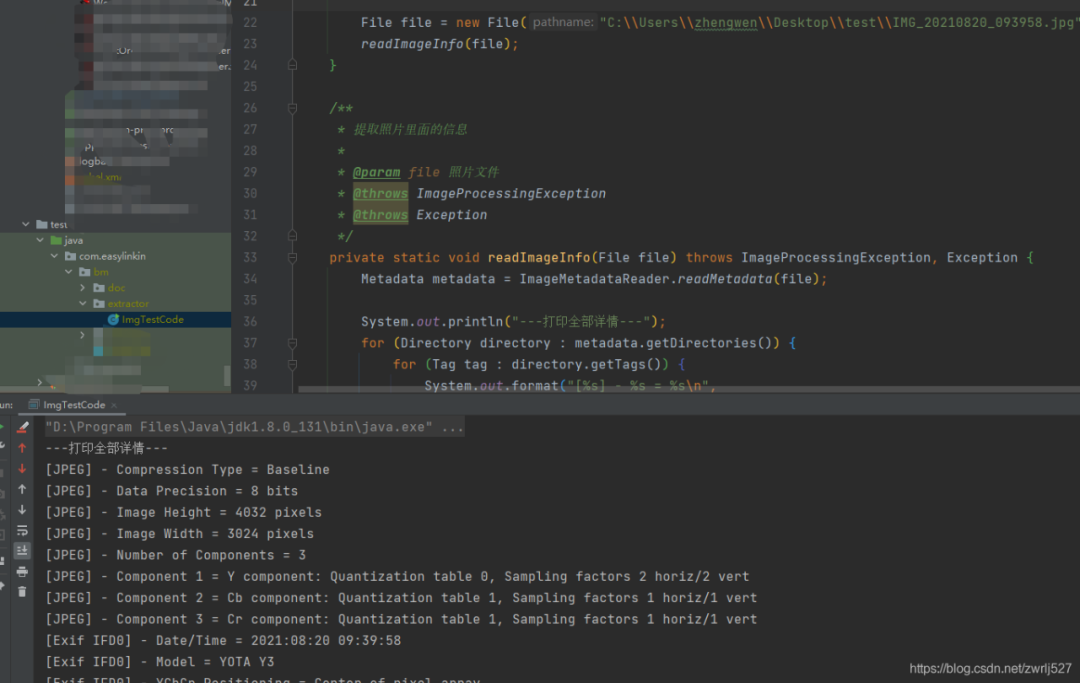
com.easylinkin.bm.extractor.ImgTestCode---打印全部詳情---[JPEG] - Compression Type = Baseline[JPEG] - Data Precision = 8 bits[JPEG] - Image Height = 4032 pixels[JPEG] - Image Width = 3024 pixels[JPEG] - Number of Components = 3[JPEG] - Component 1 = Y component: Quantization table 0, Sampling factors 2 horiz/2 vert[JPEG] - Component 2 = Cb component: Quantization table 1, Sampling factors 1 horiz/1 vert[JPEG] - Component 3 = Cr component: Quantization table 1, Sampling factors 1 horiz/1 vert[Exif IFD0] - Date/Time = 2021:08:20 09:39:58[Exif IFD0] - Model = YOTA Y3[Exif IFD0] - YCbCr Positioning = Center of pixel array[Exif IFD0] - Resolution Unit = Inch[Exif IFD0] - Y Resolution = 72 dots per inch[Exif IFD0] - X Resolution = 72 dots per inch[Exif IFD0] - Make = YOTA[GPS] - GPS Date Stamp = 2021:08:20[GPS] - GPS Altitude Ref = Below sea level[GPS] - GPS Longitude Ref = E[GPS] - GPS Longitude = 114° 24' 9.61"[GPS] - GPS Processing Method = ASCII[GPS] - GPS Latitude Ref = N[GPS] - GPS Time-Stamp = 01:39:46.000 UTC[GPS] - GPS Altitude = 21 metres[GPS] - GPS Latitude = 30° 28' 40.67"[Exif SubIFD] - Color Space = sRGB[Exif SubIFD] - F-Number = f/1.9[Exif SubIFD] - Date/Time Digitized = 2021:08:20 09:39:58[Exif SubIFD] - Focal Length = 3.9 mm[Exif SubIFD] - Aperture Value = f/1.9[Exif SubIFD] - Exposure Mode = Auto exposure[Exif SubIFD] - Sub-Sec Time Digitized = 819350[Exif SubIFD] - Exif Image Height = 4032 pixels[Exif SubIFD] - Focal Length 35 = 23 mm[Exif SubIFD] - Scene Capture Type = Standard[Exif SubIFD] - Sub-Sec Time Original = 819350[Exif SubIFD] - Exposure Program = Unknown (0)[Exif SubIFD] - White Balance Mode = Auto white balance[Exif SubIFD] - Exif Image Width = 3024 pixels[Exif SubIFD] - Sub-Sec Time = 819350[Exif SubIFD] - Shutter Speed Value = 1/1022 sec[Exif SubIFD] - Metering Mode = Center weighted average[Exif SubIFD] - Date/Time Original = 2021:08:20 09:39:58[Exif SubIFD] - Components Configuration = YCbCr[Exif SubIFD] - Exif Version = 2.20[Exif SubIFD] - Flash = Flash did not fire[Exif SubIFD] - Brightness Value = 0.0[Exif SubIFD] - ISO Speed Ratings = 103[Exif SubIFD] - Sensing Method = One-chip color area sensor[Exif SubIFD] - FlashPix Version = 1.00[Exif SubIFD] - Exposure Time = 1/1023 sec[Interoperability] - Interoperability Index = Recommended Exif Interoperability Rules (ExifR98)[Interoperability] - Interoperability Version = 1.00[Exif Thumbnail] - Y Resolution = 72 dots per inch[Exif Thumbnail] - Thumbnail Length = 21538 bytes[Exif Thumbnail] - Thumbnail Offset = 959 bytes[Exif Thumbnail] - Compression = JPEG (old-style)[Exif Thumbnail] - Resolution Unit = Inch[Exif Thumbnail] - X Resolution = 72 dots per inch[Huffman] - Number of Tables = 4 Huffman tables[File Type] - Detected File Type Name = JPEG[File Type] - Detected File Type Long Name = Joint Photographic Experts Group[File Type] - Detected MIME Type = image/jpeg[File Type] - Expected File Name Extension = jpg[File] - File Name = IMG_20210820_093958.jpg[File] - File Size = 5215044 bytes[File] - File Modified Date = 星期五 八月 20 09:39:59 +08:00 2021--打印常用信息---初始化HttpClientTest~~~開(kāi)始圖片高度: 4032 pixels圖片寬度: 3024 pixels經(jīng)度: 114° 24' 9.61"經(jīng)度(度分秒格式): 114.40266944444446緯度 : 30° 28' 40.67"緯度(度分秒格式) : 30.477963888888887拍攝時(shí)間: 2021:08:20 09:39:58--經(jīng)緯度轉(zhuǎn)地址--【url】http://api.map.baidu.com/reverse_geocoding/v3/?ak=YNxcSCAphFvuPD4LwcgWXwC3SEZZc7Ra&output=json&coordtype=wgs84ll&location=30.477963888888887,114.40266944444446初始化HttpClientTest~~~結(jié)束拍攝地點(diǎn):中國(guó) 湖北省 武漢市 洪山區(qū) 軟件園路 湖北省武漢市洪山區(qū)軟件園路9 關(guān)山,光谷天地
上面的提取到的內(nèi)容我就不解釋了,應(yīng)該看得懂,不懂的,可以翻譯英文,或者查API看打印的是啥。
其他文件我就不演示了,有興趣的可以自己試試。
我的百度地圖的AK就先放這里,方便大家驗(yàn)證,免得說(shuō)我騙人,反正我也是免費(fèi)用的。
最后再說(shuō)一句,圖片發(fā)送要么壓縮到壓縮包再發(fā)送,要么用數(shù)據(jù)線從手機(jī)里拷出來(lái)。我這里先用微信發(fā)的,基本上信息都被抹除了(在電腦上查看圖片詳情,其實(shí)也可以看到經(jīng)緯度信息的)。
還有,我還有個(gè)蘋(píng)果手機(jī),其實(shí)也是可以拍有地理位置信息的照片的,要打開(kāi)隱私里的定位,授權(quán)照相機(jī)。
這個(gè)怎么說(shuō)呢,還是很不錯(cuò)的。用到我們的工作中的話,我們覺(jué)得可以替代我們之前做的一個(gè)打點(diǎn)巡檢的,到達(dá)巡檢位置拍張照片再配合機(jī)器碼,不怕你讓別人代拍照片了。還有考勤的公出單、外勤等等。
全棧架構(gòu)社區(qū)交流群
?「全棧架構(gòu)社區(qū)」建立了讀者架構(gòu)師交流群,大家可以添加小編微信進(jìn)行加群。歡迎有想法、樂(lè)于分享的朋友們一起交流學(xué)習(xí)。
看完本文有收獲?請(qǐng)轉(zhuǎn)發(fā)分享給更多人
往期資源:
2019最新Python視頻:從入門(mén)到Swiper項(xiàng)目實(shí)戰(zhàn)
2019年Android應(yīng)用程序開(kāi)發(fā)
2019重磅高級(jí)資源:Java并發(fā)編程原理和實(shí)戰(zhàn)
最新黑馬大數(shù)據(jù)資源:深入解析docker容器化技術(shù)
最新Java后端實(shí)戰(zhàn)視頻:SSM框架在線商城系統(tǒng)
2019最新黑客技術(shù)之Windows網(wǎng)絡(luò)安全精講