
牛了!通過 Java 技術(shù)手段,獲取女朋友定位地址...
點(diǎn)擊關(guān)注公眾號,Java干貨及時(shí)送達(dá)??
來源:blog.csdn.net/zwrlj527/article/details/119823407
今早,看到CSDN里推薦的Python獲取女朋友發(fā)來加班拍照定位地址是酒店的段子,本來準(zhǔn)備驗(yàn)證下,順便練練手的,最后,安裝執(zhí)行pip install json報(bào)沒有指定版本號。
一怒之下搞我大JAVA,驗(yàn)證可行與場景體遐想。廢話不多說,先上硬貨。
依賴導(dǎo)入
從博文上看是exifread模塊,找我大java的對應(yīng)的jar,發(fā)現(xiàn)metadata-extractor,而且官方還在持續(xù)更新,最近的jar是今年的。
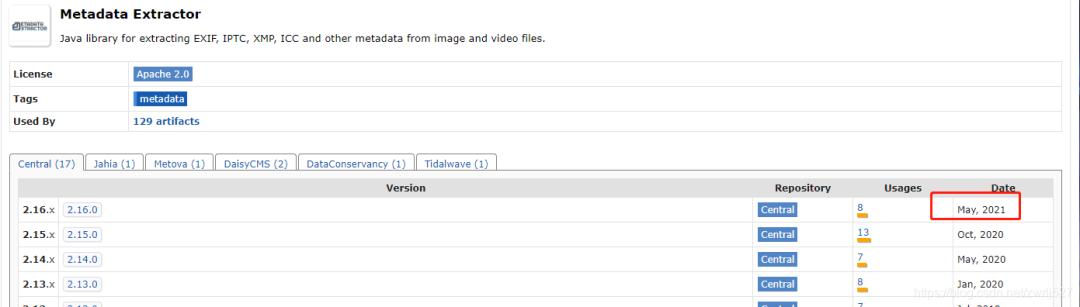
這個(gè)元數(shù)據(jù)提取jar非常強(qiáng)大,還支持視頻信息的提取,看看官方介紹:
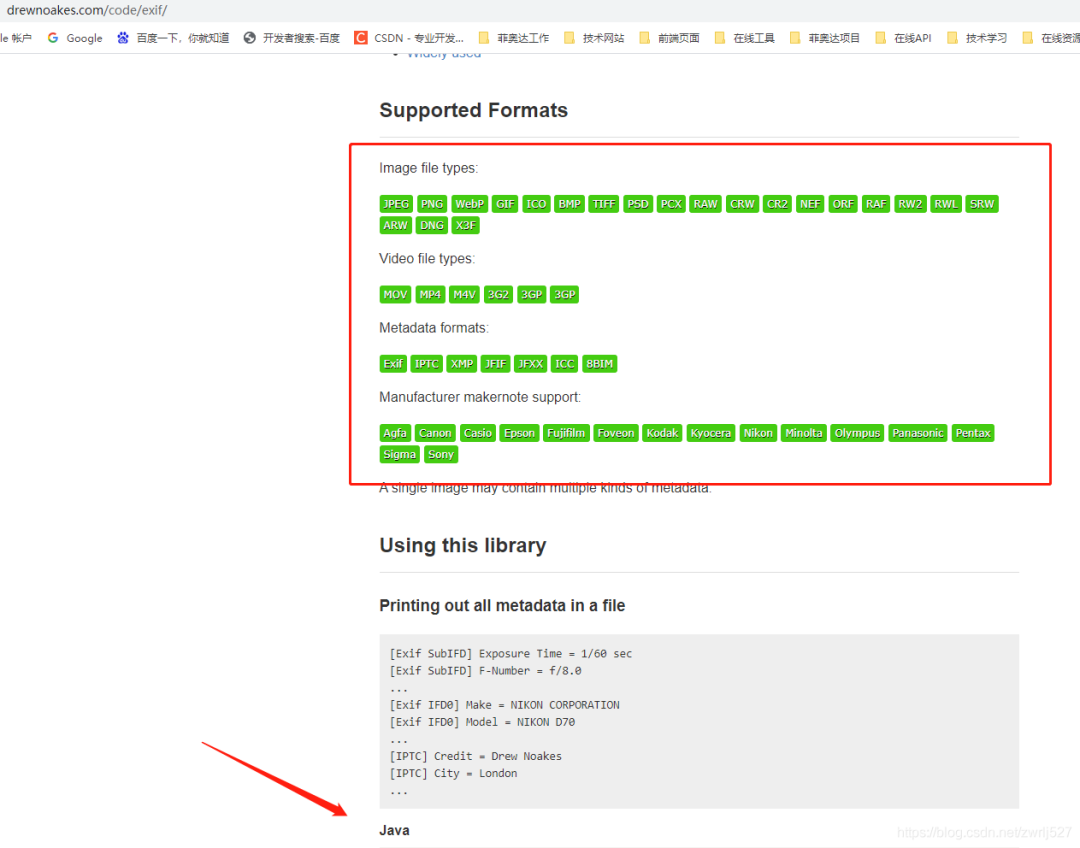
看到?jīng)],第一個(gè)示例,就寫的支持我大JAVA,讓我猶如雞血沖頂,在支持同事聯(lián)調(diào)事件工單的同時(shí),大肝這塊。
????com.drewnoakes
????metadata-extractor
????2.16.0
準(zhǔn)備工作
1、室外空曠地點(diǎn)打開GPS
2、百度地圖、北斗伴驗(yàn)證已連接到GPS定位
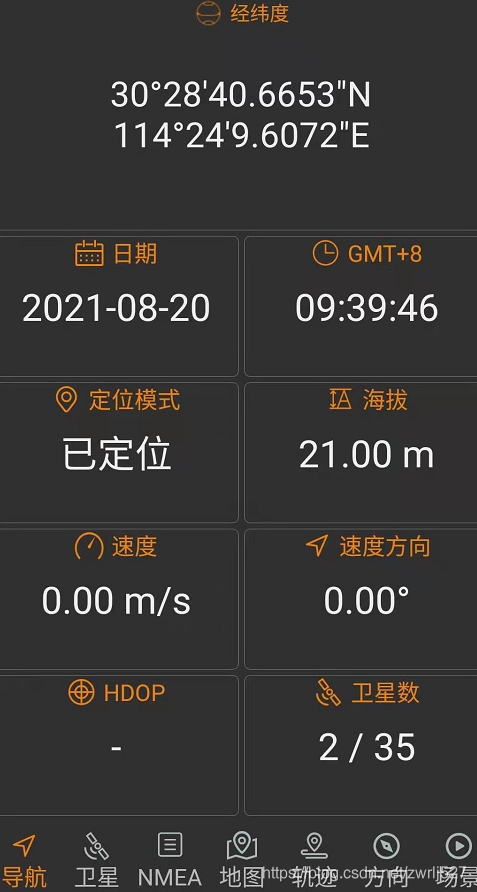
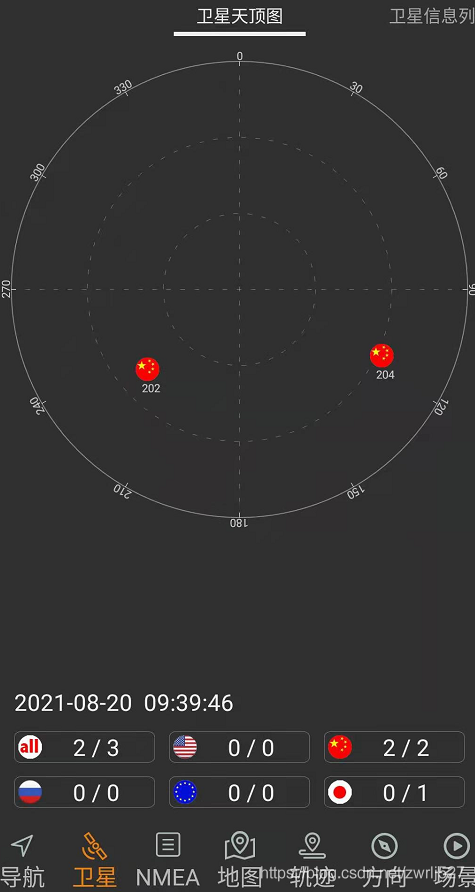
3、設(shè)置手機(jī)帶的照相機(jī)開啟位置信息
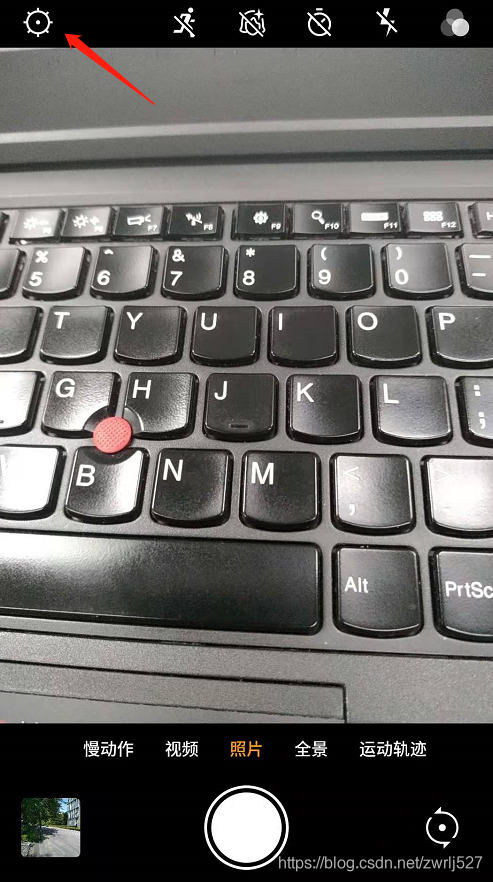
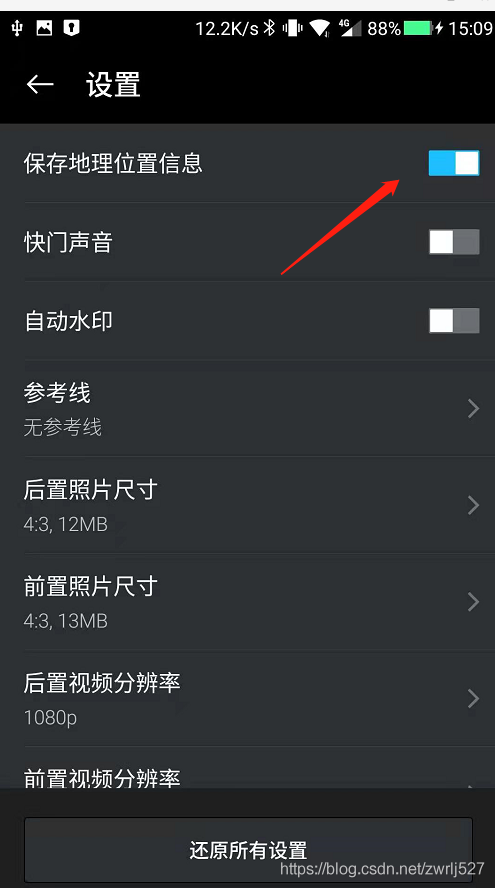
4、拍照一張順便查看照片詳情
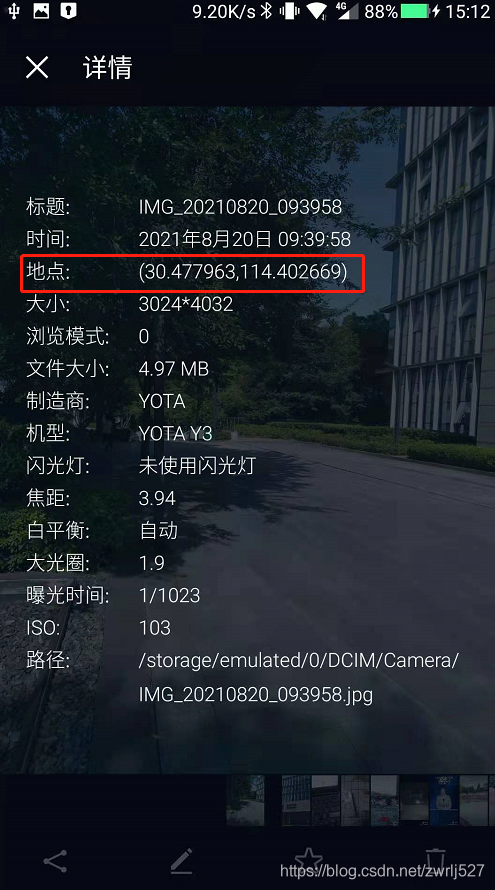
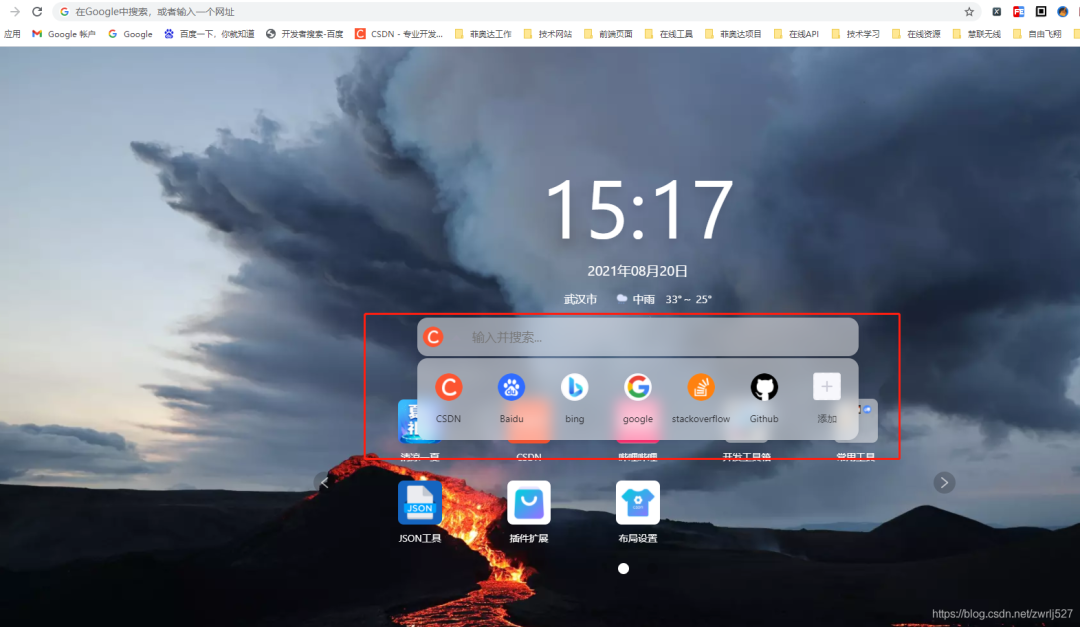
這里一定要確定拍的照片的詳情時(shí)有經(jīng)緯度信息的,如果沒有,你針對你的手機(jī)在CSDN里搜索下怎么設(shè)置。這里順便提下,CSDN的瀏覽器插件真香。簡直就是我們技術(shù)人事的福音,再以不用擔(dān)心某某度的廣告之類導(dǎo)致找東西費(fèi)勁了,而且它很包容,還時(shí)可以選擇自己喜歡的搜索引擎的。
示例demo
這里先演示這個(gè)元數(shù)據(jù)提取jar能提取到的信息,順便把取到的經(jīng)緯度通過百度轉(zhuǎn)地址。
因?yàn)槭莇emo,沒有業(yè)務(wù),我這里就直接在測試類里干了。沒有什么業(yè)務(wù),不涉及什么機(jī)密,可以上全碼。
package?com.easylinkin.bm.extractor;
import?com.alibaba.fastjson.JSONObject;
import?com.drew.imaging.ImageMetadataReader;
import?com.drew.imaging.ImageProcessingException;
import?com.drew.metadata.Directory;
import?com.drew.metadata.Metadata;
import?com.drew.metadata.Tag;
import?com.easylinkin.bm.util.HttpUtils;
import?lombok.extern.slf4j.Slf4j;
import?java.io.File;
import?java.io.IOException;
/**
?*?@author?zhengwen
?**/
@Slf4j
public?class?ImgTestCode?{
????public?static?void?main(String[]?args)?throws?Exception?{
????????File?file?=?new?File("C:\\Users\\zhengwen\\Desktop\\test\\IMG_20210820_093958.jpg");
????????readImageInfo(file);
????}
????/**
?????*?提取照片里面的信息
?????*
?????*?@param?file?照片文件
?????*?@throws?ImageProcessingException
?????*?@throws?Exception
?????*/
????private?static?void?readImageInfo(File?file)?throws?ImageProcessingException,?Exception?{
????????Metadata?metadata?=?ImageMetadataReader.readMetadata(file);
????????System.out.println("---打印全部詳情---");
????????for?(Directory?directory?:?metadata.getDirectories())?{
????????????for?(Tag?tag?:?directory.getTags())?{
????????????????System.out.format("[%s]?-?%s?=?%s\n",
????????????????????????directory.getName(),?tag.getTagName(),?tag.getDescription());
????????????}
????????????if?(directory.hasErrors())?{
????????????????for?(String?error?:?directory.getErrors())?{
????????????????????System.err.format("ERROR:?%s",?error);
????????????????}
????????????}
????????}
????????System.out.println("--打印常用信息---");
????????
????????Double?lat?=?null;
????????Double?lng?=?null;
????????for?(Directory?directory?:?metadata.getDirectories())?{
????????????for?(Tag?tag?:?directory.getTags())?{
????????????????String?tagName?=?tag.getTagName();??//標(biāo)簽名
????????????????String?desc?=?tag.getDescription();?//標(biāo)簽信息
????????????????if?(tagName.equals("Image?Height"))?{
????????????????????System.err.println("圖片高度:?"?+?desc);
????????????????}?else?if?(tagName.equals("Image?Width"))?{
????????????????????System.err.println("圖片寬度:?"?+?desc);
????????????????}?else?if?(tagName.equals("Date/Time?Original"))?{
????????????????????System.err.println("拍攝時(shí)間:?"?+?desc);
????????????????}?else?if?(tagName.equals("GPS?Latitude"))?{
????????????????????System.err.println("緯度?:?"?+?desc);
????????????????????System.err.println("緯度(度分秒格式)?:?"?+?pointToLatlong(desc));
????????????????????lat?=?latLng2Decimal(desc);
????????????????}?else?if?(tagName.equals("GPS?Longitude"))?{
????????????????????System.err.println("經(jīng)度:?"?+?desc);
????????????????????System.err.println("經(jīng)度(度分秒格式):?"?+?pointToLatlong(desc));
????????????????????lng?=?latLng2Decimal(desc);
????????????????}
????????????}
????????}
????????System.err.println("--經(jīng)緯度轉(zhuǎn)地址--");
????????//經(jīng)緯度轉(zhuǎn)地主使用百度api
????????convertGpsToLoaction(lat,?lng);
????}
????/**
?????*?經(jīng)緯度格式??轉(zhuǎn)換為??度分秒格式?,如果需要的話可以調(diào)用該方法進(jìn)行轉(zhuǎn)換
?????*
?????*?@param?point?坐標(biāo)點(diǎn)
?????*?@return
?????*/
????public?static?String?pointToLatlong(String?point)?{
????????Double?du?=?Double.parseDouble(point.substring(0,?point.indexOf("°")).trim());
????????Double?fen?=?Double.parseDouble(point.substring(point.indexOf("°")?+?1,?point.indexOf("'")).trim());
????????Double?miao?=?Double.parseDouble(point.substring(point.indexOf("'")?+?1,?point.indexOf("\"")).trim());
????????Double?duStr?=?du?+?fen?/?60?+?miao?/?60?/?60;
????????return?duStr.toString();
????}
????/***
?????*?經(jīng)緯度坐標(biāo)格式轉(zhuǎn)換(*?°轉(zhuǎn)十進(jìn)制格式)
?????*?@param?gps
?????*/
????public?static?double?latLng2Decimal(String?gps)?{
????????String?a?=?gps.split("°")[0].replace("?",?"");
????????String?b?=?gps.split("°")[1].split("'")[0].replace("?",?"");
????????String?c?=?gps.split("°")[1].split("'")[1].replace("?",?"").replace("\"",?"");
????????double?gps_dou?=?Double.parseDouble(a)?+?Double.parseDouble(b)?/?60?+?Double.parseDouble(c)?/?60?/?60;
????????return?gps_dou;
????}
????/**
?????* api_key:注冊的百度api的key
?????* coords:經(jīng)緯度坐標(biāo)
?????*?http://api.map.baidu.com/reverse_geocoding/v3/?ak="+api_key+"&output=json&coordtype=wgs84ll&location="+coords
?????*?
?????*?經(jīng)緯度轉(zhuǎn)地址信息
?????*
?????*?@param?gps_latitude??維度
?????*?@param?gps_longitude?精度
?????*/
????private?static?void?convertGpsToLoaction(double?gps_latitude,?double?gps_longitude)?throws?IOException?{
????????String?apiKey?=?"
YNxcSCAphFvuPD4LwcgWXwC3SEZZc7Ra";
????????String?res?=?"";
????????String?url?=?"http://api.map.baidu.com/reverse_geocoding/v3/?ak="?+?apiKey?+?"&output=json&coordtype=wgs84ll&location="?+?(gps_latitude?+?","?+?gps_longitude);
????????System.err.println("【url】"?+?url);
????????res?=?HttpUtils.httpGet(url);
????????JSONObject?object?=?JSONObject.parseObject(res);
????????if?(object.containsKey("result"))?{
????????????JSONObject?result?=?object.getJSONObject("result");
????????????if?(result.containsKey("addressComponent"))?{
????????????????JSONObject?address?=?object.getJSONObject("result").getJSONObject("addressComponent");
????????????????System.err.println("拍攝地點(diǎn):"?+?address.get("country")?+?"?"?+?address.get("province")?+?"?"?+?address.get("city")?+?"?"?+?address.get("district")?+?"?"
????????????????????????+?address.get("street")?+?"?"?+?result.get("formatted_address")?+?"?"?+?result.get("business"));
????????????}
????????}
????}
}
控制臺打印:
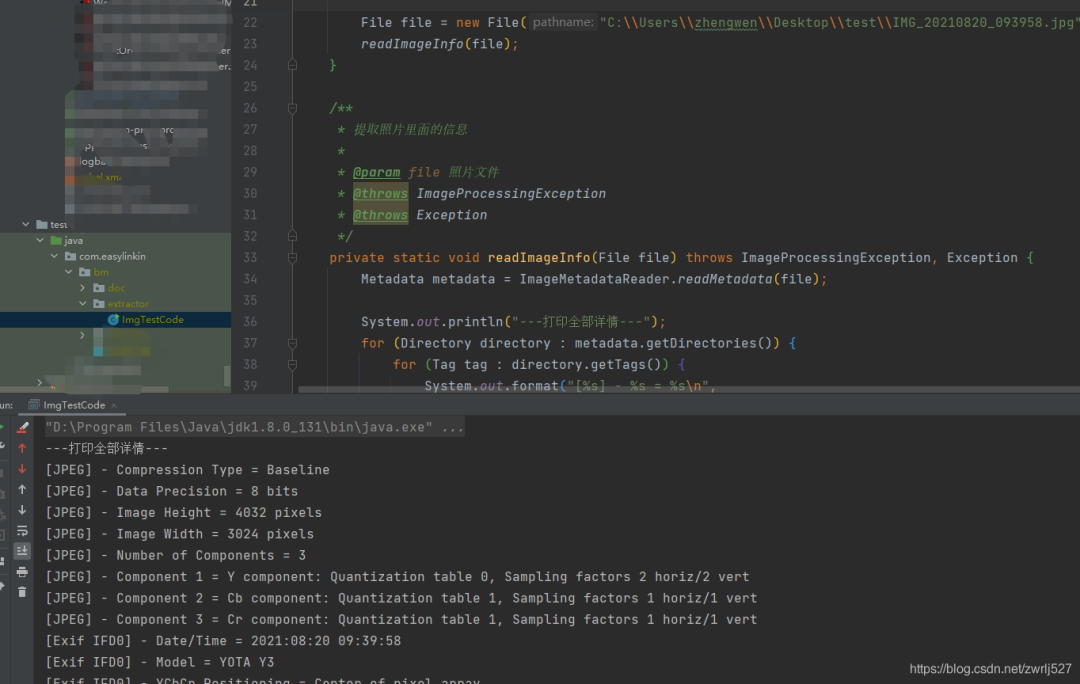
下面貼出詳細(xì)內(nèi)容:
com.easylinkin.bm.extractor.ImgTestCode
---打印全部詳情---
[JPEG]?-?Compression?Type?=?Baseline
[JPEG]?-?Data?Precision?=?8?bits
[JPEG]?-?Image?Height?=?4032?pixels
[JPEG]?-?Image?Width?=?3024?pixels
[JPEG]?-?Number?of?Components?=?3
[JPEG]?-?Component?1?=?Y?component:?Quantization?table?0,?Sampling?factors?2?horiz/2?vert
[JPEG]?-?Component?2?=?Cb?component:?Quantization?table?1,?Sampling?factors?1?horiz/1?vert
[JPEG]?-?Component?3?=?Cr?component:?Quantization?table?1,?Sampling?factors?1?horiz/1?vert
[Exif?IFD0]?-?Date/Time?=?2021:08:20?09:39:58
[Exif?IFD0]?-?Model?=?YOTA?Y3
[Exif?IFD0]?-?YCbCr?Positioning?=?Center?of?pixel?array
[Exif?IFD0]?-?Resolution?Unit?=?Inch
[Exif?IFD0]?-?Y?Resolution?=?72?dots?per?inch
[Exif?IFD0]?-?X?Resolution?=?72?dots?per?inch
[Exif?IFD0]?-?Make?=?YOTA
[GPS]?-?GPS?Date?Stamp?=?2021:08:20
[GPS]?-?GPS?Altitude?Ref?=?Below?sea?level
[GPS]?-?GPS?Longitude?Ref?=?E
[GPS]?-?GPS?Longitude?=?114°?24'?9.61"
[GPS]?-?GPS?Processing?Method?=?ASCII
[GPS]?-?GPS?Latitude?Ref?=?N
[GPS]?-?GPS?Time-Stamp?=?01:39:46.000?UTC
[GPS]?-?GPS?Altitude?=?21?metres
[GPS]?-?GPS?Latitude?=?30°?28'?40.67"
[Exif?SubIFD]?-?Color?Space?=?sRGB
[Exif?SubIFD]?-?F-Number?=?f/1.9
[Exif?SubIFD]?-?Date/Time?Digitized?=?2021:08:20?09:39:58
[Exif?SubIFD]?-?Focal?Length?=?3.9?mm
[Exif?SubIFD]?-?Aperture?Value?=?f/1.9
[Exif?SubIFD]?-?Exposure?Mode?=?Auto?exposure
[Exif?SubIFD]?-?Sub-Sec?Time?Digitized?=?819350
[Exif?SubIFD]?-?Exif?Image?Height?=?4032?pixels
[Exif?SubIFD]?-?Focal?Length?35?=?23?mm
[Exif?SubIFD]?-?Scene?Capture?Type?=?Standard
[Exif?SubIFD]?-?Sub-Sec?Time?Original?=?819350
[Exif?SubIFD]?-?Exposure?Program?=?Unknown?(0)
[Exif?SubIFD]?-?White?Balance?Mode?=?Auto?white?balance
[Exif?SubIFD]?-?Exif?Image?Width?=?3024?pixels
[Exif?SubIFD]?-?Sub-Sec?Time?=?819350
[Exif?SubIFD]?-?Shutter?Speed?Value?=?1/1022?sec
[Exif?SubIFD]?-?Metering?Mode?=?Center?weighted?average
[Exif?SubIFD]?-?Date/Time?Original?=?2021:08:20?09:39:58
[Exif?SubIFD]?-?Components?Configuration?=?YCbCr
[Exif?SubIFD]?-?Exif?Version?=?2.20
[Exif?SubIFD]?-?Flash?=?Flash?did?not?fire
[Exif?SubIFD]?-?Brightness?Value?=?0.0
[Exif?SubIFD]?-?ISO?Speed?Ratings?=?103
[Exif?SubIFD]?-?Sensing?Method?=?One-chip?color?area?sensor
[Exif?SubIFD]?-?FlashPix?Version?=?1.00
[Exif?SubIFD]?-?Exposure?Time?=?1/1023?sec
[Interoperability]?-?Interoperability?Index?=?Recommended?Exif?Interoperability?Rules?(ExifR98)
[Interoperability]?-?Interoperability?Version?=?1.00
[Exif?Thumbnail]?-?Y?Resolution?=?72?dots?per?inch
[Exif?Thumbnail]?-?Thumbnail?Length?=?21538?bytes
[Exif?Thumbnail]?-?Thumbnail?Offset?=?959?bytes
[Exif?Thumbnail]?-?Compression?=?JPEG?(old-style)
[Exif?Thumbnail]?-?Resolution?Unit?=?Inch
[Exif?Thumbnail]?-?X?Resolution?=?72?dots?per?inch
[Huffman]?-?Number?of?Tables?=?4?Huffman?tables
[File?Type]?-?Detected?File?Type?Name?=?JPEG
[File?Type]?-?Detected?File?Type?Long?Name?=?Joint?Photographic?Experts?Group
[File?Type]?-?Detected?MIME?Type?=?image/jpeg
[File?Type]?-?Expected?File?Name?Extension?=?jpg
[File]?-?File?Name?=?IMG_20210820_093958.jpg
[File]?-?File?Size?=?5215044?bytes
[File]?-?File?Modified?Date?=?星期五?八月?20?09:39:59?+08:00?2021
--打印常用信息---
初始化HttpClientTest~~~開始
圖片高度:?4032?pixels
圖片寬度:?3024?pixels
經(jīng)度:?114°?24'?9.61"
經(jīng)度(度分秒格式):?114.40266944444446
緯度?:?30°?28'?40.67"
緯度(度分秒格式)?:?30.477963888888887
拍攝時(shí)間:?2021:08:20?09:39:58
--經(jīng)緯度轉(zhuǎn)地址--
【url】http://api.map.baidu.com/reverse_geocoding/v3/?ak=YNxcSCAphFvuPD4LwcgWXwC3SEZZc7Ra&output=json&coordtype=wgs84ll&location=30.477963888888887,114.40266944444446
初始化HttpClientTest~~~結(jié)束
拍攝地點(diǎn):中國?湖北省?武漢市?洪山區(qū)?軟件園路?湖北省武漢市洪山區(qū)軟件園路9 關(guān)山,光谷天地
上面的提取到的內(nèi)容我就不解釋了,應(yīng)該看得懂,不懂的,可以翻譯英文,或者查API看打印的是啥。其他文件我就不演示了,有興趣的可以自己試試。我的百度地圖的AK就先放這里,方便大家驗(yàn)證,免得說我騙人,反正我也是免費(fèi)用的。最后再說一句,圖片發(fā)送要么壓縮到壓縮包再發(fā)送,要么用數(shù)據(jù)線從手機(jī)里拷出來。我這里先用微信發(fā)的,基本上信息都被抹除了(在電腦上查看圖片詳情,其實(shí)也可以看到經(jīng)緯度信息的)。還有,我還有個(gè)蘋果手機(jī),其實(shí)也是可以拍有地理位置信息的照片的,要打開隱私里的定位,授權(quán)照相機(jī)。
總結(jié)與衍生想法
這個(gè)怎么說呢,還是很不錯(cuò)的。用到我們的工作中的話,我們覺得可以替代我們之前做的一個(gè)打點(diǎn)巡檢的,到達(dá)巡檢位置拍張照片再配合機(jī)器碼,不怕你讓別人代拍照片了。還有考勤的公出單、外勤等等。
另外還想到這出門在外愛拍照的娃們,你們的照片放到云存儲上,然后如果有無良服務(wù)商,基本可以把你的軌跡通過你上傳的照片時(shí)間繪制出來。。。
好了,這個(gè)就分享到這里。這里其實(shí)還給我一個(gè)最大的感受就是,如果我不知道A就不會想到B。要是我早知道圖片可以攜帶的信息,或者知道照相機(jī)軟件可以獲取的信息,可能可以針對這些早點(diǎn)做點(diǎn)什么。。。。。。
新人問一般都用哪些 Linux 命令,我把這個(gè)扔了過去
最近面試BAT,整理一份面試資料《Java面試BATJ通關(guān)手冊》,覆蓋了Java核心技術(shù)、JVM、Java并發(fā)、SSM、微服務(wù)、數(shù)據(jù)庫、數(shù)據(jù)結(jié)構(gòu)等等。
獲取方式:點(diǎn)“在看”,關(guān)注公眾號并回復(fù)?Java?領(lǐng)取,更多內(nèi)容陸續(xù)奉上。
文章有幫助的話,在看,轉(zhuǎn)發(fā)吧。
謝謝支持喲 (*^
