
Android仿淘寶歷史搜索功能
簡介
前一段時間項目里面要做一個仿淘寶歷史搜索的功能,現(xiàn)將這個demo整理
需求
首先我們來看看淘寶歷史搜索規(guī)則

總結(jié)
整個搜索過程詞條維持在10條,短詞條可以在三行全部顯示完,多出的行數(shù)隱藏,長詞條默認只顯示兩行,多出的部分隱藏,點擊更多箭頭展示全部詞條,長按出現(xiàn)刪除某個詞條彈框,點擊清理按鈕可以清除所有歷史記錄
代碼實現(xiàn)
實現(xiàn)之前參考一下鴻洋大神的流式布局,GitHub地址:
(https://github.com/hongyangAndroid/FlowLayout),
也可考慮用Google的原生布局FlexBoxLayout實現(xiàn)。
1、繪制UI
自定義流式布局
is_limit true表示限制隱藏,false表示不限制行數(shù)
limit_line_count 表示最大展示行,這里設置展示3行
max_select 這里表示最大選擇數(shù)量為1,沒有什么意義
<com.zhy.view.flowlayout.TagFlowLayoutandroid:id="@+id/fl_search_records"android:layout_width="match_parent"android:layout_height="wrap_content"android:paddingTop="@dimen/space_normal"app:is_limit="true"app:limit_line_count="3"app:max_select="1"></com.zhy.view.flowlayout.TagFlowLayout>
2、創(chuàng)建數(shù)據(jù)庫
利用Android原生數(shù)據(jù)庫Sqlite,實現(xiàn)搜索數(shù)據(jù)根據(jù)用戶插入、更新、查詢、刪除和刪除表中所有的數(shù)據(jù)功能
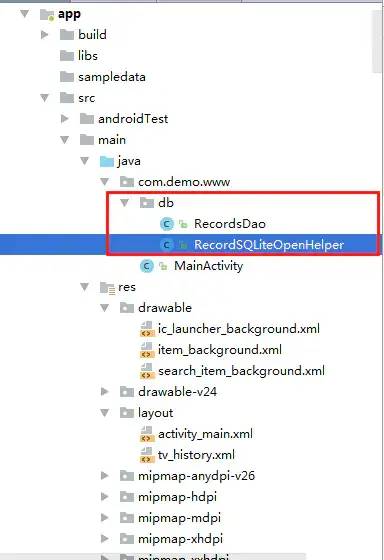
3、修改TagFlowLayout布局
onMeasure
在FlowLayout類中,onMeasure計算子view的寬度超過當前行寬時,添加超出行數(shù)的檢測,不計算超出之后的子view測量
private int limitLineCount; //默認顯示3行 斷詞條顯示3行,長詞條顯示2行private boolean isLimit; //是否有行限制private boolean isOverFlow; //是否溢出3行...for (int i = 0; i < cCount; i++) {View child = getChildAt(i);if (child.getVisibility() == View.GONE) {if (i == cCount - 1) {if (isLimit) {if (lineCount == limitLineCount) {setOverFlow(true);break;} else {setOverFlow(false);}}width = Math.max(lineWidth, width);height += lineHeight;lineCount++;}continue;}measureChild(child, widthMeasureSpec, heightMeasureSpec);MarginLayoutParams lp = (MarginLayoutParams) child.getLayoutParams();int childWidth = child.getMeasuredWidth() + lp.leftMargin+ lp.rightMargin;int childHeight = child.getMeasuredHeight() + lp.topMargin+ lp.bottomMargin;if (lineWidth + childWidth > sizeWidth - getPaddingLeft() - getPaddingRight()) {if (isLimit) {if (lineCount == limitLineCount) {setOverFlow(true);break;} else {setOverFlow(false);}}width = Math.max(width, lineWidth);lineWidth = childWidth;height += lineHeight;lineHeight = childHeight;lineCount++;} else {lineWidth += childWidth;lineHeight = Math.max(lineHeight, childHeight);}if (i == cCount - 1) {if (isLimit) {if (lineCount == limitLineCount) {setOverFlow(true);break;} else {setOverFlow(false);}}width = Math.max(lineWidth, width);height += lineHeight;lineCount++;}}
if (isLimit) {if (lineCount == limitLineCount) {setOverFlow(true);break;} else {setOverFlow(false);}}
onLayout
在FlowLayout類中,onLayout布局子View的位置顯示時,當超出規(guī)定行數(shù)時,不讓超出的view占據(jù)位置顯示
for (int i = 0; i < cCount; i++) {View child = getChildAt(i);if (child.getVisibility() == View.GONE) continue;MarginLayoutParams lp = (MarginLayoutParams) child.getLayoutParams();int childWidth = child.getMeasuredWidth();int childHeight = child.getMeasuredHeight();if (childWidth + lineWidth + lp.leftMargin + lp.rightMargin > width - getPaddingLeft() - getPaddingRight()) {if (isLimit) {if (lineCount == limitLineCount) {break;}}mLineHeight.add(lineHeight);mAllViews.add(lineViews);mLineWidth.add(lineWidth);lineWidth = 0;lineHeight = childHeight + lp.topMargin + lp.bottomMargin;lineViews = new ArrayList<View>();lineCount++;}lineWidth += childWidth + lp.leftMargin + lp.rightMargin;lineHeight = Math.max(lineHeight, childHeight + lp.topMargin+ lp.bottomMargin);lineViews.add(child);}
if (isLimit) {if (lineCount == limitLineCount) {break;}}
4、更多箭頭展示
TagFlowLayout每次繪制完,都對其進行是否超過行數(shù)的檢測,如果超過規(guī)定的行數(shù),則顯示更多箭頭,否則隱藏箭頭
//view加載完成時回調(diào)tagFlowLayout.getViewTreeObserver().addOnGlobalLayoutListener(new ViewTreeObserver.OnGlobalLayoutListener() {@Overridepublic void onGlobalLayout() {boolean isOverFlow = tagFlowLayout.isOverFlow();boolean isLimit = tagFlowLayout.isLimit();if (isLimit && isOverFlow) {moreArrow.setVisibility(View.VISIBLE);} else {moreArrow.setVisibility(View.GONE);}}});
實現(xiàn)效果

評論
圖片
表情