
機(jī)器學(xué)習(xí)特征數(shù)據(jù)預(yù)處理
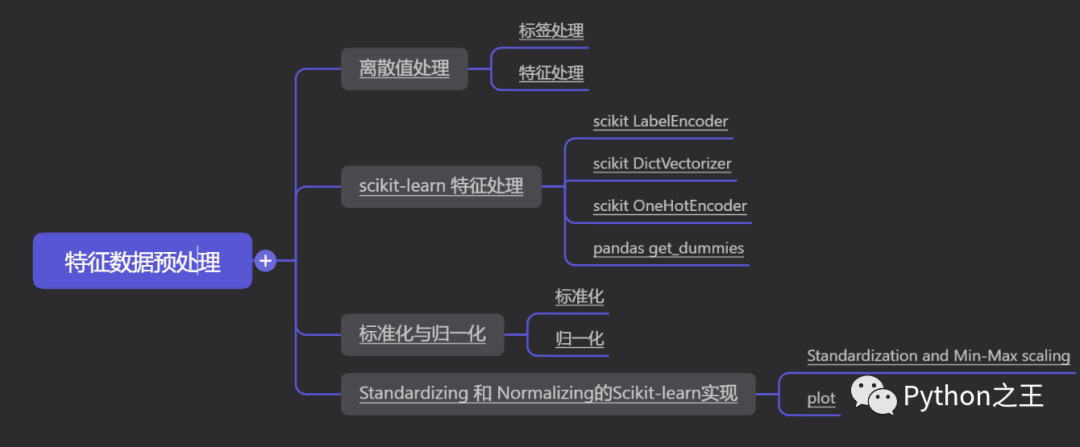
標(biāo)簽處理
特征處理
scikit-learn 特征處理
scikit LabelEncoder
scikit DictVectorizer
scikit OneHotEncoder
pandas get_dummies
標(biāo)準(zhǔn)化
歸一化
Standardization and Min-Max scaling
plot
離散值處理
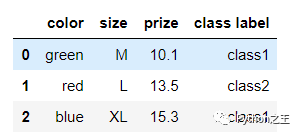
關(guān)于特征值離散化的相關(guān)內(nèi)容下面直接進(jìn)行舉例,主要是標(biāo)簽處理、特征處理和OneHot。
import pandas as pd
df = pd.DataFrame([
            ['green', 'M', 10.1, 'class1'],
            ['red', 'L', 13.5, 'class2'],
            ['blue', 'XL', 15.3, 'class1']])

df.columns = ['color', 'size', 'prize', 'class label']
df
標(biāo)簽處理
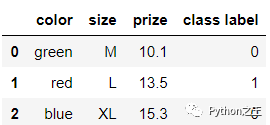
通常我們會把字符型的標(biāo)簽轉(zhuǎn)換成數(shù)值型的
class_mapping = {label:idx for idx,label in enumerate(set(df['class label']))}

df['class label'] = df['class label'].map(class_mapping)
df
特征處理
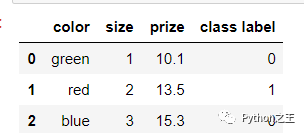
對于特征來說,我們一般可以做一個映射的字典
size_mapping = {
           'XL': 3,
           'L': 2,
           'M': 1}

df['size'] = df['size'].map(size_mapping)
df
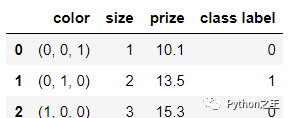
我們還可以做這樣的轉(zhuǎn)換進(jìn)行編碼
color_mapping = {
           'green': (0,0,1),
           'red': (0,1,0),
           'blue': (1,0,0)}

df['color'] = df['color'].map(color_mapping)
df
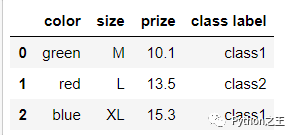
對于數(shù)據(jù),我們同樣可以給它反變換回去
inv_color_mapping = {v: k for k, v in color_mapping.items()}
inv_size_mapping = {v: k for k, v in size_mapping.items()}
inv_class_mapping = {v: k for k, v in class_mapping.items()}

df['color'] = df['color'].map(inv_color_mapping)
df['size'] = df['size'].map(inv_size_mapping)
df['class label'] = df['class label'].map(inv_class_mapping)
df
scikit-learn 特征處理
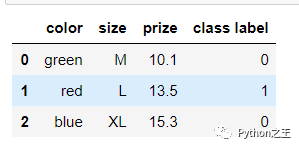
scikit LabelEncoder
from sklearn.preprocessing import LabelEncoder

class_le = LabelEncoder()
df['class label'] = class_le.fit_transform(df['class label'])
df
反變換回去可以用這個函數(shù) inverse_transform :
class_le.inverse_transform(df['class label'])
scikit DictVectorizer
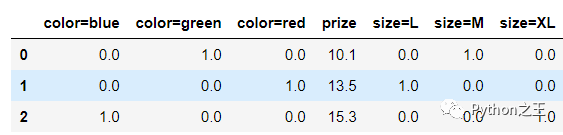
使用 DictVectorizer將得到特征的字典
df.transpose().to_dict().values()
feature = df.iloc[:, :-1]
feature
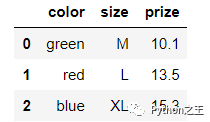
對所有的數(shù)據(jù)都做了映射
from sklearn.feature_extraction import DictVectorizer
dvec = DictVectorizer(sparse=False)

X = dvec.fit_transform(feature.transpose().to_dict().values())
X

可以調(diào)用 get_feature_names 來返回新的列的名字,其中0和1就代表是不是這個屬性.
pd.DataFrame(X, columns=dvec.get_feature_names())
scikit OneHotEncoder
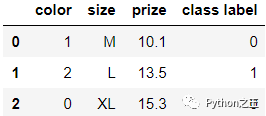
OneHotEncoder 必須使用整數(shù)作為輸入,所以得先預(yù)處理一下
color_le = LabelEncoder()
df['color'] = color_le.fit_transform(df['color'])

df
from sklearn.preprocessing import OneHotEncoder
ohe = OneHotEncoder(sparse=False)

X = ohe.fit_transform(df[['color']].values)
X
pandas get_dummies
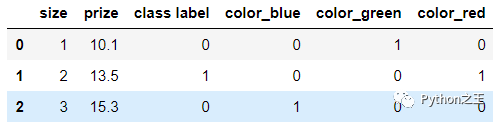
Pandas庫中同樣有類似的操作,使用get_dummies也可以得到相應(yīng)的特征
import pandas as pd
df = pd.DataFrame([
            ['green', 'M', 10.1, 'class1'],
            ['red', 'L', 13.5, 'class2'],
            ['blue', 'XL', 15.3, 'class1']])

df.columns = ['color', 'size', 'prize', 'class label']

size_mapping = {
           'XL': 3,
           'L': 2,
           'M': 1}
df['size'] = df['size'].map(size_mapping)

class_mapping = {label:idx for idx,label in enumerate(set(df['class label']))}
df['class label'] = df['class label'].map(class_mapping)


df
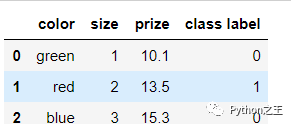
對整個DF使用get_dummies 將會得到新的列:
pd.get_dummies(df)
標(biāo)準(zhǔn)化與歸一化
標(biāo)準(zhǔn)化
同樣我們都需要對原始數(shù)據(jù)進(jìn)行處理,少不了的就是 standardization (或者叫做 Z-score normalization)
要求 均值 和標(biāo)準(zhǔn)差
轉(zhuǎn)換公式如下:
這個意義是十分重大的,想象一下,我們經(jīng)常通過梯度下降來進(jìn)行優(yōu)化求解,公式一般如下,如果特征之間的數(shù)值差異太大,那么更新的結(jié)果肯定也會產(chǎn)生較大的差異,這是我們所不希望的。在最開始的時候,我們認(rèn)為特征之間的重要程度的是一樣,并不想偏袒哪個特征,所以這部預(yù)處理工作必做!
參數(shù)更新:
歸一化
另一種方法叫做 Min-Max scaling (或者叫做 "normalization"也就是我們常說的0-1歸一化).
處理后的所有特征的值都會被壓縮到 0到1區(qū)間上.這樣做還可以抑制離群值對結(jié)果的影響. 歸一化公式如下:
Standardizing 和 Normalizing的Scikit-learn實現(xiàn)
葡萄酒數(shù)據(jù)集由3個不同的類組成,每一行對應(yīng)一個特定的葡萄酒樣本。類標(biāo)簽(1、2、3)列在第一列中,列2-14對應(yīng)13個不同的屬性(特征):
-
Alcohol -
Malic acid
from sklearn.datasets import load_wine
wine = load_wine()
df= pd.concat([pd.DataFrame(wine.target),pd.DataFrame(wine["data"][:,:2],)],axis=1)
df.columns = ['Class label', 'Alcohol', 'Malic acid']
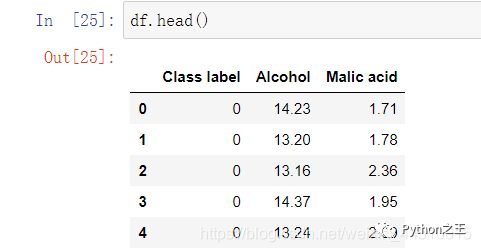
在數(shù)據(jù)中,Alcohol和Malic acid 衡量的標(biāo)準(zhǔn)應(yīng)該是不同的,特征之間數(shù)值差異較大
Standardization and Min-Max scaling
from sklearn import preprocessing

std_scale = preprocessing.StandardScaler().fit(df[['Alcohol', 'Malic acid']])
df_std = std_scale.transform(df[['Alcohol', 'Malic acid']])

minmax_scale = preprocessing.MinMaxScaler().fit(df[['Alcohol', 'Malic acid']])
df_minmax = minmax_scale.transform(df[['Alcohol', 'Malic acid']])

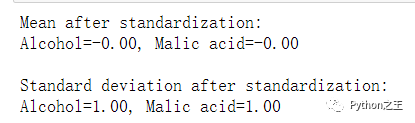
print('Mean after standardization:\nAlcohol={:.2f}, Malic acid={:.2f}'
      .format(df_std[:,0].mean(), df_std[:,1].mean()))
print('\nStandard deviation after standardization:\nAlcohol={:.2f}, Malic acid={:.2f}'
      .format(df_std[:,0].std(), df_std[:,1].std()))
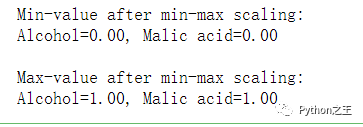
print('Min-value after min-max scaling:\nAlcohol={:.2f}, Malic acid={:.2f}'
      .format(df_minmax[:,0].min(), df_minmax[:,1].min()))
print('\nMax-value after min-max scaling:\nAlcohol={:.2f}, Malic acid={:.2f}'
      .format(df_minmax[:,0].max(), df_minmax[:,1].max()))
plot
from matplotlib import pyplot as plt

def plot():
    plt.figure(figsize=(8,6))

    plt.scatter(df['Alcohol'], df['Malic acid'],
            color='green', label='input scale', alpha=0.5)

    plt.scatter(df_std[:,0], df_std[:,1], color='red',
            label='Standardized [$N  (\mu=0, \; \sigma=1)$]', alpha=0.3)

    plt.scatter(df_minmax[:,0], df_minmax[:,1],
            color='blue', label='min-max scaled [min=0, max=1]', alpha=0.3)

    plt.title('Alcohol and Malic Acid content of the wine dataset')
    plt.xlabel('Alcohol')
    plt.ylabel('Malic Acid')
    plt.legend(loc='upper left')
    plt.grid()

    plt.tight_layout()

plot()
plt.show()
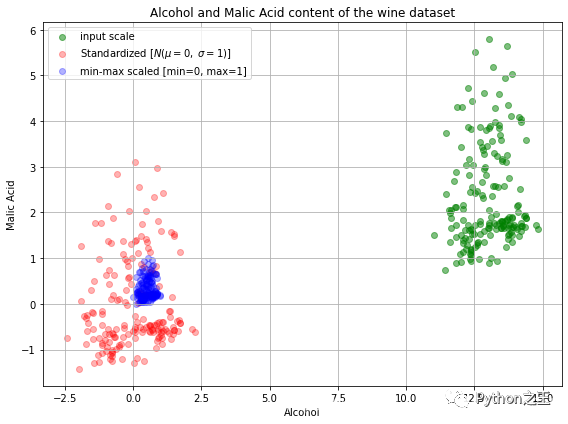 我們將原始的和變換后都放到了同一個圖上,觀察下結(jié)果吧!接下來我們再看看數(shù)據(jù)是否被打亂了呢?
fig, ax = plt.subplots(3, figsize=(6,14))

for a,d,l in zip(range(len(ax)),
               (df[['Alcohol', 'Malic acid']].values, df_std, df_minmax),
               ('Input scale',
                'Standardized [$N  (\mu=0, \; \sigma=1)$]',
                'min-max scaled [min=0, max=1]')
                ):
    for i,c in zip(range(1,4), ('red', 'blue', 'green')):
        ax[a].scatter(d[df['Class label'].values == i, 0],
                  d[df['Class label'].values == i, 1],
                  alpha=0.5,
                  color=c,
                  label='Class %s' %i
                  )
    ax[a].set_title(l)
    ax[a].set_xlabel('Alcohol')
    ax[a].set_ylabel('Malic Acid')
    ax[a].legend(loc='upper left')
    ax[a].grid()

plt.tight_layout()

plt.show()
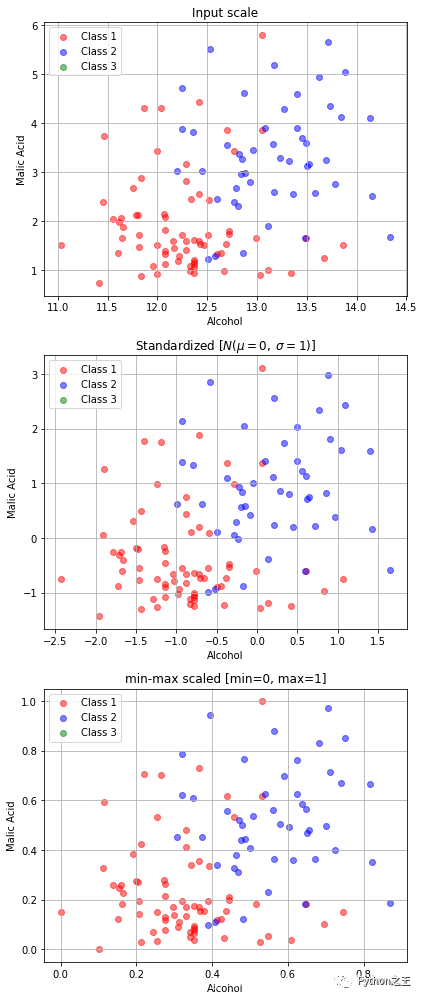 在機(jī)器學(xué)習(xí)中,如果我們對訓(xùn)練集做了上述處理,那么同樣的對測試集也必須要經(jīng)過相同的處理
std_scale = preprocessing.StandardScaler().fit(X_train)
X_train = std_scale.transform(X_train)
X_test = std_scale.transform(X_test)


Python“寶藏級”公眾號【Python之王】專注于Python領(lǐng)域,會爬蟲,數(shù)分,C++,tensorflow和Pytorch等等。
近 2年共原創(chuàng) 100+ 篇技術(shù)文章。創(chuàng)作的精品文章系列有:
日常收集整理了一批不錯的 Python 學(xué)習(xí)資料,有需要的小伙可以自行免費(fèi)領(lǐng)取。
獲取方式如下:公眾號回復(fù)資料。領(lǐng)取Python等系列筆記,項目,書籍,直接套上模板就可以用了。資料包含算法、python、算法小抄、力扣刷題手冊和 C++ 等學(xué)習(xí)資料!