
做一次面向對象的體操:將JSON字符串轉換為嵌套對象的一種方法

背景與問題
在 《一個略復雜的數(shù)據(jù)映射聚合例子及代碼重構》 一文中,將一個JSON字符串轉成了所需要的訂單信息Map。盡管做了代碼重構和配置化,過程式的代碼仍然顯得晦澀難懂,并且客戶端使用Map也非常難受。
能不能把這個JSON串轉成相應的對象,更易于使用呢?為了方便講解,這里重復寫下JSON串。
{
    "item:s_id:18006666": "1024",
    "item:s_id:18008888": "1024",
    "item:g_id:18006666": "6666",
    "item:g_id:18008888": "8888",
    "item:num:18008888": "8",
    "item:num:18006666": "6",
    "item:item_core_id:18006666": "9876666",
    "item:item_core_id:18008888": "9878888",
    "item:order_no:18006666": "E20171013174712025",
    "item:order_no:18008888": "E20171013174712025",
    "item:id:18008888": "18008888",
    "item:id:18006666": "18006666",

    "item_core:num:9878888": "8",
    "item_core:num:9876666": "6",
    "item_core:id:9876666": "9876666",
    "item_core:id:9878888": "9878888",

    "item_price:item_id:1000": "9876666",
    "item_price:item_id:2000": "9878888",
    "item_price:price:1000": "100",
    "item_price:price:2000": "200",
    "item_price:id:2000": "2000",
    "item_price:id:1000": "1000",

    "item_price_change_log:id:1111": "1111",
    "item_price_change_log:id:2222": "2222",
    "item_price_change_log:item_id:1111": "9876666",
    "item_price_change_log:item_id:2222": "9878888",
    "item_price_change_log:detail:1111": "haha1111",
    "item_price_change_log:detail:2222": "haha2222",
    "item_price_change_log:id:3333": "3333",
    "item_price_change_log:id:4444": "4444",
    "item_price_change_log:item_id:3333": "9876666",
    "item_price_change_log:item_id:4444": "9878888",
    "item_price_change_log:detail:3333": "haha3333",
    "item_price_change_log:detail:4444": "haha4444"
}
思路與實現(xiàn)
要解決這個問題,需要有一個清晰的思路。
- 首先,需要知道應該轉成怎樣的目標對象。
- 其次,需要找到一種方法,建立從JSON串到目標對象的橋梁。
推斷目標對象
仔細觀察可知,每個 key 都是 tablename:field:id 組成,其中 table:id 相同的可以構成一個對象的數(shù)據(jù);此外,不同的tablename 對應不同的對象,而這些對象之間可以通過相同的 itemId 關聯(lián)。
根據(jù)對JSON字符串的仔細分析(尤其是字段的關聯(lián)性),可以知道:目標對象應該類似如下嵌套對象:
@Getter
@Setter
public class ItemCore {
  private String id;
  private String num;

  private Item item;

  private ItemPrice itemPrice;

  private List<ItemPriceChangeLog> itemPriceChangeLogs;

}


@Getter
@Setter
public class Item {
  private String sId;
  private String gId;
  private String num;
  private String orderNo;
  private String id;
  private String itemCoreId;

}

@Getter
@Setter
public class ItemPrice {
  private String itemId;
  private String price;
  private String id;
}

@Getter
@Setter
public class ItemPriceChangeLog {
  private String id;
  private String itemId;
  private String detail;
}
注意到,對象里的屬性是駝峰式,JSON串里的字段是下劃線,遵循各自領域內的命名慣例。這里需要用到一個函數(shù),將Map的key從下劃線轉成駝峰。這個方法在 《Java實現(xiàn)遞歸將嵌套Map里的字段名由駝峰轉為下劃線》 給出。
明確了目標對象,就成功了 30%。接下來,需要找到一種方法,從指定字符串轉換到這個對象。
算法設計
由于 JSON 并不是與對象結構對應的嵌套結構。需要先轉成容易處理的Map對象。這里的一種思路是,
STEP1: 將 table:id 相同的字段及值分組聚合,得到 Map[tablename:id, mapForKey[field, value]];
STEP2: 將每個 mapForKey[field, value] 轉成 tablename 對應的單個對象 Item, ItemCore, ItemPrice, ItemPriceChangeLog;
STEP3: 然后根據(jù) itemId 來關聯(lián)這些對象,組成最終對象。
代碼實現(xiàn)
package zzz.study.algorithm.object;

import com.alibaba.fastjson.JSON;

import java.util.ArrayList;
import java.util.HashMap;
import java.util.HashSet;
import java.util.List;
import java.util.Map;
import java.util.Set;
import java.util.stream.Collectors;

import zzz.study.datastructure.map.TransferUtil;
import static zzz.study.utils.BeanUtil.map2Bean;

public class MapToObject {

  private static final String json = "{\n"
             + " \"item:s_id:18006666\": \"1024\",\n"
             + " \"item:s_id:18008888\": \"1024\",\n"
             + " \"item:g_id:18006666\": \"6666\",\n"
             + " \"item:g_id:18008888\": \"8888\",\n"
             + " \"item:num:18008888\": \"8\",\n"
             + " \"item:num:18006666\": \"6\",\n"
             + " \"item:item_core_id:18006666\": \"9876666\",\n"
             + " \"item:item_core_id:18008888\": \"9878888\",\n"
             + " \"item:order_no:18006666\": \"E20171013174712025\",\n"
             + " \"item:order_no:18008888\": \"E20171013174712025\",\n"
             + " \"item:id:18008888\": \"18008888\",\n"
             + " \"item:id:18006666\": \"18006666\",\n"
             + " \n"
             + " \"item_core:num:9878888\": \"8\",\n"
             + " \"item_core:num:9876666\": \"6\",\n"
             + " \"item_core:id:9876666\": \"9876666\",\n"
             + " \"item_core:id:9878888\": \"9878888\",\n"
             + "\n"
             + " \"item_price:item_id:1000\": \"9876666\",\n"
             + " \"item_price:item_id:2000\": \"9878888\",\n"
             + " \"item_price:price:1000\": \"100\",\n"
             + " \"item_price:price:2000\": \"200\",\n"
             + " \"item_price:id:2000\": \"2000\",\n"
             + " \"item_price:id:1000\": \"1000\",\n"
             + "\n"
             + " \"item_price_change_log:id:1111\": \"1111\",\n"
             + " \"item_price_change_log:id:2222\": \"2222\",\n"
             + " \"item_price_change_log:item_id:1111\": \"9876666\",\n"
             + " \"item_price_change_log:item_id:2222\": \"9878888\",\n"
             + " \"item_price_change_log:detail:1111\": \"haha1111\",\n"
             + " \"item_price_change_log:detail:2222\": \"haha2222\",\n"
             + " \"item_price_change_log:id:3333\": \"3333\",\n"
             + " \"item_price_change_log:id:4444\": \"4444\",\n"
             + " \"item_price_change_log:item_id:3333\": \"9876666\",\n"
             + " \"item_price_change_log:item_id:4444\": \"9878888\",\n"
             + " \"item_price_change_log:detail:3333\": \"haha3333\",\n"
             + " \"item_price_change_log:detail:4444\": \"haha4444\"\n"
             + "}";


  public static void main(String[] args) {
    Order order = transferOrder(json);
    System.out.println(JSON.toJSONString(order));
  }

  public static Order transferOrder(String json) {
    return relate(underline2camelForMap(group(json)));
  }

  /**
   * 轉換成 Map[tablename:id => Map["field": value]]
   */
  public static Map<String, Map<String,Object>> group(String json) {
    Map<String, Object> map = JSON.parseObject(json);
    Map<String, Map<String,Object>> groupedMaps = new HashMap();
    map.forEach(
        (keyInJson, value) -> {
          TableField tableField = TableField.buildFrom(keyInJson);
          String key = tableField.getTablename() + ":" + tableField.getId();
          Map<String,Object> mapForKey = groupedMaps.getOrDefault(key, new HashMap<>());
          mapForKey.put(tableField.getField(), value);
          groupedMaps.put(key, mapForKey);
        }
    );
    return groupedMaps;
  }

  public static Map<String, Map<String,Object>> underline2camelForMap(Map<String, Map<String,Object>> underlined) {
    Map<String, Map<String,Object>> groupedMapsCamel = new HashMap<>();
    Set<String> ignoreSets = new HashSet();
    underlined.forEach(
        (key, mapForKey) -> {
          Map<String,Object> keytoCamel = TransferUtil.generalMapProcess(mapForKey, TransferUtil::underlineToCamel, ignoreSets);
          groupedMapsCamel.put(key, keytoCamel);
        }
    );
    return groupedMapsCamel;
  }

  /**
   * 將分組后的子map先轉成相應單個對象,再按照某個key值進行關聯(lián)
   */
  public static Order relate(Map<String, Map<String,Object>> groupedMaps) {
    List<Item> items = new ArrayList<>();
    List<ItemCore> itemCores = new ArrayList<>();
    List<ItemPrice> itemPrices = new ArrayList<>();
    List<ItemPriceChangeLog> itemPriceChangeLogs = new ArrayList<>();
    groupedMaps.forEach(
        (key, mapForKey) -> {
          if (key.startsWith("item:")) {
            items.add(map2Bean(mapForKey, Item.class));
          }
          else if (key.startsWith("item_core:")) {
            itemCores.add(map2Bean(mapForKey, ItemCore.class));
          }
          else if (key.startsWith("item_price:")) {
            itemPrices.add(map2Bean(mapForKey, ItemPrice.class));
          }
          else if (key.startsWith("item_price_change_log:")) {
            itemPriceChangeLogs.add(map2Bean(mapForKey, ItemPriceChangeLog.class));
          }
        }
    );

    Map<String ,List<Item>> itemMap = items.stream().collect(Collectors.groupingBy(
        Item::getItemCoreId
    ));
    Map<String ,List<ItemPrice>> itemPriceMap = itemPrices.stream().collect(Collectors.groupingBy(
        ItemPrice::getItemId
    ));
    Map<String ,List<ItemPriceChangeLog>> itemPriceChangeLogMap = itemPriceChangeLogs.stream().collect(Collectors.groupingBy(
        ItemPriceChangeLog::getItemId
    ));
    itemCores.forEach(
        itemCore -> {
          String itemId = itemCore.getId();
          itemCore.setItem(itemMap.get(itemId).get(0));
          itemCore.setItemPrice(itemPriceMap.get(itemId).get(0));
          itemCore.setItemPriceChangeLogs(itemPriceChangeLogMap.get(itemId));
        }
    );
    Order order = new Order();
    order.setItemCores(itemCores);
    return order;
  }

}
@Data
public class TableField {
String tablename;
String field;
String id;
public TableField(String tablename, String field, String id) {
this.tablename = tablename;
this.field = field;
this.id = id;
}
public static TableField buildFrom(String combined) {
String[] parts = combined.split(":");
if (parts != null && parts.length == 3) {
return new TableField(parts[0], parts[1], parts[2]);
}
throw new IllegalArgumentException(combined);
}
}package zzz.study.utils;
import org.apache.commons.beanutils.BeanUtils;
import java.util.Map;
public class BeanUtil {
public static <T> T map2Bean(Map map, Class<T> c) {
try {
T t = c.newInstance();
BeanUtils.populate(t, map);
return t;
} catch (Exception ex) {
throw new RuntimeException(ex.getCause());
}
}
}代碼重構
group的實現(xiàn)已經不涉及具體業(yè)務。這里重點說下 relate 實現(xiàn)的優(yōu)化。在實現(xiàn)中看到了 if-elseif-elseif-else 條件分支語句。是否可以做成配置化呢?
做配置化的關鍵在于:將關聯(lián)項表達成配置。看看 relate 的前半段,實際上就是一個套路:匹配某個前綴 - 轉換為相應的Bean - 加入相應的對象列表。后半段,需要根據(jù)關鍵字段(itemCoreId)來構建對象列表的 Map 方便做關聯(lián)。因此,可以提取相應的配置項:(prefix, beanClass, BeanMap, BeanKeyFunc)。這個配置項抽象成 BizObjects , 整體配置構成 objMapping 對象。在這個基礎上,可以將代碼重構如下:
public static Order relate2(Map<String, Map<String,Object>> groupedMaps) {
    ObjectMapping objectMapping = new ObjectMapping();
    objectMapping = objectMapping.FillFrom(groupedMaps);
    List<ItemCore> finalItemCoreList = objectMapping.buildFinalList();
    Order order = new Order();
    order.setItemCores(finalItemCoreList);
    return order;
  }
ObjectMapping.java
package zzz.study.algorithm.object;

import java.util.ArrayList;
import java.util.HashMap;
import java.util.List;
import java.util.Map;

import static zzz.study.utils.BeanUtil.map2Bean;

public class ObjectMapping {

  Map<String, BizObjects> objMapping;

  public ObjectMapping() {
    objMapping = new HashMap<>();
    objMapping.put("item", new BizObjects<Item,String>(Item.class, new HashMap<>(), Item::getItemCoreId));
    objMapping.put("item_core", new BizObjects<ItemCore,String>(ItemCore.class, new HashMap<>(), ItemCore::getId));
    objMapping.put("item_price", new BizObjects<ItemPrice,String>(ItemPrice.class, new HashMap<>(), ItemPrice::getItemId));
    objMapping.put("item_price_change_log", new BizObjects<ItemPriceChangeLog,String>(ItemPriceChangeLog.class, new HashMap<>(), ItemPriceChangeLog::getItemId));
  }

  public ObjectMapping FillFrom(Map<String, Map<String,Object>> groupedMaps) {
    groupedMaps.forEach(
        (key, mapForKey) -> {
          String prefixOfKey = key.split(":")[0];
          BizObjects bizObjects = objMapping.get(prefixOfKey);
          bizObjects.add(map2Bean(mapForKey, bizObjects.getObjectClass()));
        }
    );
    return this;
  }

  public List<ItemCore> buildFinalList() {
    Map<String, List<ItemCore>> itemCores = objMapping.get("item_core").getObjects();

    List<ItemCore> finalItemCoreList = new ArrayList<>();
    itemCores.forEach(
        (itemCoreId, itemCoreList) -> {
          ItemCore itemCore = itemCoreList.get(0);
          itemCore.setItem((Item) objMapping.get("item").getSingle(itemCoreId));
          itemCore.setItemPrice((ItemPrice) objMapping.get("item_price").getSingle(itemCoreId));
          itemCore.setItemPriceChangeLogs(objMapping.get("item_price_change_log").get(itemCoreId));
          finalItemCoreList.add(itemCore);
        }
    );
    return finalItemCoreList;
  }

}
BizObjects.java
package zzz.study.algorithm.object;

import java.util.ArrayList;
import java.util.Collections;
import java.util.HashMap;
import java.util.List;
import java.util.Map;
import java.util.function.Function;

public class BizObjects<T, K> {

  private Class<T> cls;
  private Map<K, List<T>> map;
  private Function<T, K> keyFunc;

  public BizObjects(Class<T> cls, Map<K,List<T>> map, Function<T,K> keyFunc) {
    this.cls = cls;
    this.map = (map != null ? map : new HashMap<>());
    this.keyFunc = keyFunc;
  }

  public void add(T t) {
    K key = keyFunc.apply(t);
    List<T> objs = map.getOrDefault(key, new ArrayList<>());
    objs.add(t);
    map.put(key, objs);
  }

  public Class<T> getObjectClass() {
    return cls;
  }

  public List<T> get(K key) {
    return map.get(key);
  }

  public T getSingle(K key) {
    return (map != null && map.containsKey(key) && map.get(key).size() > 0) ? map.get(key).get(0) : null;
  }

  public Map<K, List<T>> getObjects() {
    return Collections.unmodifiableMap(map);
  }

}
新的實現(xiàn)的主要特點在于:
- 去掉了條件語句;
- 將轉換為嵌套對象的重要配置與邏輯都集中到 objMapping ;
- 更加對象化的思維。
美中不足的是,大量使用了泛型來提高通用性,同時也犧牲了運行時安全的好處(需要強制類型轉換)。后半段關聯(lián)對象,還是不夠配置化,暫時沒想到更好的方法。
為什么 BizObjects 里要用 Map 而不用 List 來表示多個對象呢 ?因為后面需要根據(jù) itemCoreId
來關聯(lián)相應對象。如果用 List , 后續(xù)還要一個單獨的 buildObjMap 操作。這里添加的時候就構建 Map ,將行為集中于
BizObjects 內部管理, 為后續(xù)配置化地關聯(lián)對象留下一個空間。
一個小坑
運行結果會發(fā)現(xiàn),轉換后的 item 對象的屬性 sId, gId 的值為 null 。納尼 ?這是怎么回事呢?
單步調試,運行后,會發(fā)現(xiàn)在 BeanUtilsBean.java 932 行有這樣一行代碼(用的是 commons-beanutils 的 1.9.3 版本):
PropertyDescriptor descriptor = null;
            try {
                descriptor =
                    getPropertyUtils().getPropertyDescriptor(target, name);
                if (descriptor == null) {
                    return; // Skip this property setter
                }
            } catch (final NoSuchMethodException e) {
                return; // Skip this property setter
            }
當 name = "gId" 時,會獲取不到 descriptor 直接返回。為什么獲取不到呢,因為 Item propertyDescriptors 緩存里的 key是 GId ,而不是 gId !
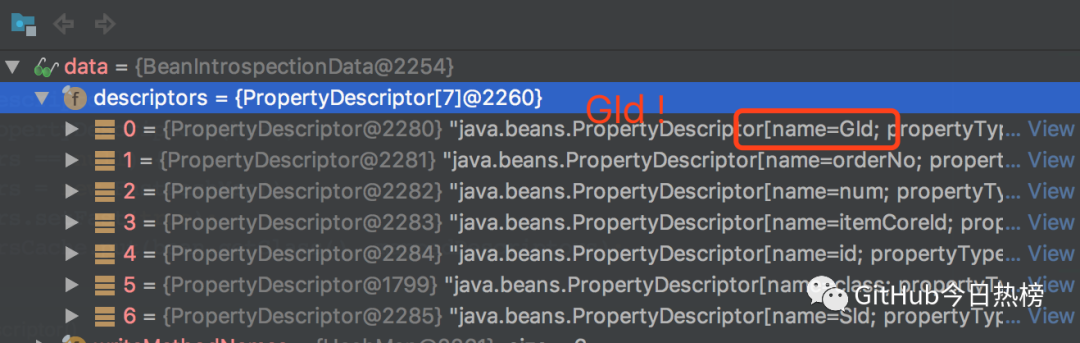
為什么 itemPropertyDescriptors 里的 key 是 GId 呢?進一步跟蹤到 propertyDescriptors 的生成,在 Introspector.getTargetPropertyInfo 方法中,是根據(jù)屬性的 getter/setter 方法來生成 propertyDescriptor 的 name 的。最終定位的代碼是 Introspector.decapitalize 方法:
public static String decapitalize(String name) {
        if (name == null || name.length() == 0) {
            return name;
        }
        if (name.length() > 1 && Character.isUpperCase(name.charAt(1)) &&
                        Character.isUpperCase(name.charAt(0))){
            return name;
        }
        char chars[] = name.toCharArray();
        chars[0] = Character.toLowerCase(chars[0]);
        return new String(chars);
    }
這里 name 是 getter/setter 方法的第四位開始的字符串。比如 gId 的 setter 方法為 setGId ,那么 name = GId 。根據(jù)這個方法得到的 name = GId ,也就是走到中間那個 if 分支了。之所以這樣,方法的解釋是這樣的:
This normally means converting the first
     * character from upper case to lower case, but in the (unusual) special
     * case when there is more than one character and both the first and
     * second characters are upper case, we leave it alone.
     *
     * Thus "FooBah" becomes "fooBah" and "X" becomes "x", but "URL" stays
* as "URL".真相大白!當使用 BeanUtils.populate 將 map 轉為對象時,對象的屬性命名要尤其注意:第二個字母不能是大寫!
收工!
小結
本文展示了一種方法, 將具有內在關聯(lián)性的JSON字符串轉成對應的嵌套對象。當處理復雜業(yè)務關聯(lián)的數(shù)據(jù)時,相比過程式的思維,轉換為對象的視角會更容易處理和使用。
關注GitHub今日熱榜,專注挖掘好用的開發(fā)工具,致力于分享優(yōu)質高效的工具、資源、插件等,助力開發(fā)者成長!
點個在看 你最好看